Power up your Kiosk Studio with Real-Time Data Capture, Client Scripts & More!

Power up your Kiosk Studio with Real-Time Data Capture, Client Scripts & More!

Hello Everyone,

We’re thrilled to announce a powerful set of enhancements to Kiosk Studio in Zoho CRM. These new updates give you more flexibility, faster record handling, and real-time data capture, making your Kiosk flows smarter and more efficient than ever.

What's New? 

  1. Launch Kiosks Anywhere with Client Script Support (Phase 1) 
  2. Capture data live during Kiosk execution
  3. GetRecords Screen Enhancements :
    1. Fetch all records from a module 
    2. View more records with pagination
    3. Find records faster with the new Search & Filters
    4. Select more records at a time with increased selection limits
    5. GetRecords first screen loads Instantly with no refresh needed 
  4. Kiosk Studio now available in the Standard Edition 
 
Let's dive into the details below:

Launch Kiosks anywhere with Client Script Support 

The first phase of Client Script support for Kiosk is here.

Now users can open a Kiosk directly through scripts anywhere within Zoho CRM.

As part of this update, there’s an important change to note. We’ve introduced a Unified API Name which is a unique identifier that stays consistent across all versions of the Kiosk. While creating Kiosks, users must now also add this API name so it will be easier to manage and track Kiosks while ensuring smooth integration with scripts.

To use client scripts :
First create the command to open kiosks from anywhere in the CRM by navigating to Settings < Developer hub < Client Script < Command. Next you can open the command from the Command Palette or use keyboard shortcuts to from any module in your CRM account to open Kiosks.


This is just the beginning! Phase 1 lays the foundation for deeper client script integrations coming soon.

Some of the upcoming client script support enhancements include :
  1. Allow users to add clients scripts for a screen from both a screen in Kiosk or from a command in Client Script.
  2. Add multiple client scripts for a Kiosk screen,
  3. Invoke responses from a Kiosk for a call back function from Client Script.
Notes
Note :
  1. Learn more about Client Scripts from our developer guides.
  2. Learn how to create commands in Client Scripts.

Capture data live during Kiosk Execution with new create record actions  

1 - Predefined Configuration (Existing Action)

The current create record action will be retained and renamed as 'Predefined Configuration'.

Records will be created automatically during the execution of a Kiosk. They require you to add pre-defined values either as static values or data from previous screens. This is ideal for predefined updates or recurring tasks where information is known in advance.

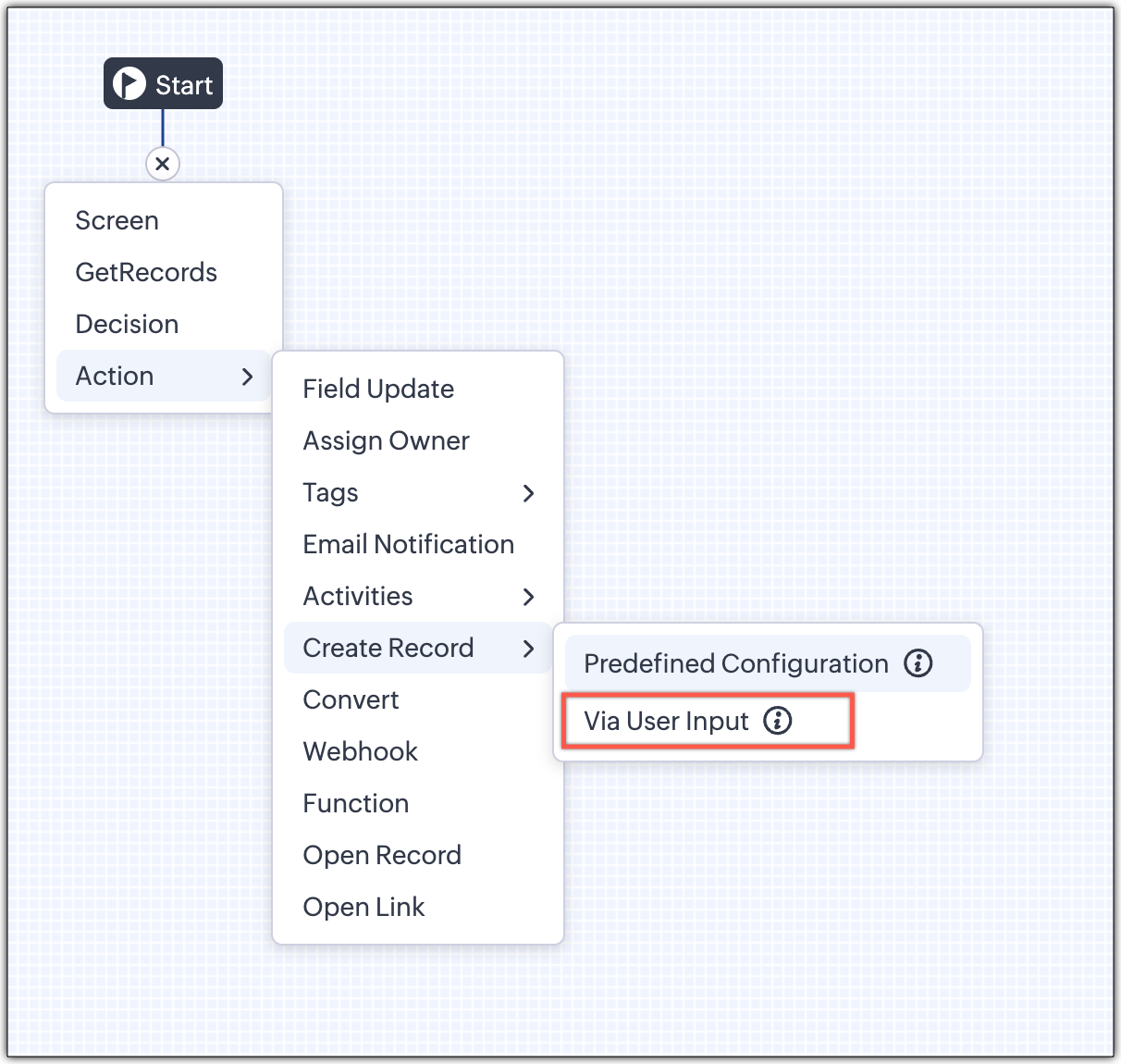
2 - Via User Input (New Action)

The key advantage of this update is that it simplifies how admins configure record creation in Kiosk Studio. Earlier, admins had to manually create a separate screen replicating all the fields of a module and then map them in the Create Record action. Moreover, if there were changes made to the fields in the module, the admin would have to edit the Kiosk and add/map the new field. All this was time-consuming and complex to setup.

Now, admins can choose to allow records to be created during the Kiosk's execution and eliminate the need to replicate, map and merge fields to save time and effort through the use of Quick Create pop-up.

Through this enhancement, real-time record creation is possible during live Kiosk execution. Users can input values in the Quick create layout that would pop-up during execution to create new records in a module. Perfect for real-world scenarios, the exact information needed to create a record only becomes available during the live execution of the Kiosk.   
Real-time scenarios

Let's say you run a Kiosk for your sales team. During a call, a customer requests a product demo and shares their availability Or, your support team receives a call and has to log the customer’s issue details or updated contact info.

With this enhancement, the sales rep or support executive can create records instantly while the Kiosk is running, to input the information they get during their call to provide a smooth customer experience.

How does it work?

  1. While setting up the Kiosk, select Create Record > Via User Input.
  2. Enter Action Name, then choose the Module and Layout.
  3. During execution, the Quick Create layout for the selected module appears.
  4. There is an option to pre-fill frequently used field values during configuration.
  5. Now, users can enter details directly while the Kiosk is being executed.
  6. Note: If a user lacks Create permission for a module, this step is skipped, and related values will show as null.

Take a look at the GIF below to understand how this action can be setup and executed.
 

GetRecords just got smarter with these new enhancements

Fetch All Records from a module to your GetRecords Screen

You can now choose to fetch all records from a module to be displayed in your GetRecords Screen.

Previously, you could select a single record or multiple records based on the limit set for record preferences. Now, we've given you a choice to be able to select Some Records or All records. This is useful in scenarios when users need to view or act on a complete set of records in a module rather than on a limited number of them.

New pagination making easier to navigate records

We’ve added pagination to the GetRecords screen, making it easier to navigate and locate specific records quickly, even when dealing with large data sets.

Search or filter records in GetRecord screen s

Quickly find records in GetRecords screens with this new addition to Kiosk.

Increased selection limit to select more records

We have increased the GetRecord selection limit from 10 to 100.

GetRecords First-Screen Loads Instantly - No Refresh Needed

Currently, only Kiosks opened through user actions (like Blueprint or Custom Buttons) loaded records directly, while others showed a 'Refresh to load' button. 


Now, every Kiosk auto-loads the first-screen of GetRecords without the need to manually refresh. When a Kiosk opens with GetRecords on the first screen, records now load instantly, regardless of whether it’s on the Home Page, Canvas, Record Detail View, Blueprint, or a Custom Button.

Kiosk Studio Added to the Standard Edition

We have extended the ability to create Kiosks to all paid editions in Zoho CRM including the Standard Edition. We aim to allow more users to create and manage Kiosks for their business processes. Take a look at the table below to know Kiosk creation limits for each Zoho CRM edition.


Standard
Professional
Enterprise
Ultimate / CRMPlus / ZohoOne
Number of Kiosks
2
7
25
50


Info
Release Plan :

- These enhancements is available for all users in all data centers


Start exploring these new features today and experience a faster, smarter, and easier way to capture data with Kiosk Studio.

Stay tuned for even more exciting enhancements coming your way!


Regards,
Serena Woolridge

    Access your files securely from anywhere

        All-in-one knowledge management and training platform for your employees and customers.


                              Zoho Developer Community


                                                    • Desk Community Learning Series


                                                    • Digest


                                                    • Functions


                                                    • Meetups


                                                    • Kbase


                                                    • Resources


                                                    • Glossary


                                                    • Desk Marketplace


                                                    • MVP Corner


                                                    • Word of the Day


                                                    • Ask the Experts


                                                              Manage your brands on social media


                                                                    Zoho TeamInbox Resources


                                                                        Zoho CRM Plus Resources

                                                                          Zoho Books Resources


                                                                            Zoho Subscriptions Resources

                                                                              Zoho Projects Resources


                                                                                Zoho Sprints Resources


                                                                                  Qntrl Resources


                                                                                    Zoho Creator Resources


                                                                                        Zoho CRM Resources

                                                                                        • CRM Community Learning Series

                                                                                          CRM Community Learning Series


                                                                                        • Kaizen

                                                                                          Kaizen

                                                                                        • Functions

                                                                                          Functions

                                                                                        • Meetups

                                                                                          Meetups

                                                                                        • Kbase

                                                                                          Kbase

                                                                                        • Resources

                                                                                          Resources

                                                                                        • Digest

                                                                                          Digest

                                                                                        • CRM Marketplace

                                                                                          CRM Marketplace

                                                                                        • MVP Corner

                                                                                          MVP Corner


                                                                                            Design. Discuss. Deliver.

                                                                                            Create visually engaging stories with Zoho Show.

                                                                                            Get Started Now


                                                                                              Zoho Show Resources

                                                                                                Zoho Writer

                                                                                                Get Started. Write Away!

                                                                                                Writer is a powerful online word processor, designed for collaborative work.

                                                                                                  Zoho CRM コンテンツ


                                                                                                    Nederlandse Hulpbronnen


                                                                                                        ご検討中の方


                                                                                                                • Recent Topics

                                                                                                                • Upload field on tasks module

                                                                                                                  Hello, Why I cannot add an upload field to a Task? Or maybe when creating the task make attachements visible, so you can add an attachement while creating the task? Looking forward to your response!
                                                                                                                • Seeking a WhatsApp Business App (not API) Zoho CRM integration

                                                                                                                  We have a business need to integrated WhatsApp Business App (not API) into Zoho CRM to centrally manage communications between our Sales team and Leads & Contact. Is there a reputable integration available for this scenario of ours? Core features we would
                                                                                                                • WhatsApp phone number migration

                                                                                                                  Hi @Gowri V and @Pheranda Nongpiur, Thanks for implementing the promised enhancements to the integration between Zoho CRM and WhatsApp. The previous discussion has been locked, so I'm opening this new one. I am copying below a specific
                                                                                                                • Does Zoho Creator support multilingual translation for user-entered data?

                                                                                                                  I understand that Zoho Creator provides localization support for UI elements such as field labels and static text. I would like to know: Does Zoho Creator support automatic translation of user-entered data (for example, form inputs or stored records)
                                                                                                                • How to let club members update their own profile data

                                                                                                                  Our club has about 200 members. We keep names, addresses, phones, emails, payment records, etc. for each, recently migrated to Creator. Once a year I send email to each member to confirm or correct their info on file with us, as well as ask for payment
                                                                                                                • Document retention in Zoho Sign

                                                                                                                  Document management doesn’t end at signing. It extends to how long you retain agreements—and how securely you dispose of them. With the document retention option in Zoho Sign, you can define structured, policy-driven timelines for managing completed documents.
                                                                                                                • Sales Allowed Beyond Available Stock and Payment Recorded Without Restriction

                                                                                                                  Hi, While testing in Zoho Inventory, I noticed that a sales order can be created with a quantity exceeding the available stock in the selected warehouse. In my case: Available stock: 5 units Ordered quantity: 6 units Despite this: I was able to convert
                                                                                                                • Deleting, Adding and Changing a Zoho Books Entry

                                                                                                                  Zoho Books Community & Support, If a bulk upload of entries were added to an account, what is the process to: - Delete an entry - Change the amount of an entry - Is there a means to manually add an entry other than upload?
                                                                                                                • Zoho CRM - Feature Request - Analytics Components Group By Week Alternative Formats

                                                                                                                  On the Zoho CRM Analytics Components, please consider adding an option to allow group by week format to be changed to other formats such as Week Commencing or Week Ending dates, rather than the current Week Number. This would provide improved usability
                                                                                                                • The Social Playbook March edition: Myth vs Facts

                                                                                                                  We’ve all heard a lot of myths growing up. Some sound convincing, some feel believable, and over time they start to feel like facts. But the truth is, a myth is still a myth until it’s backed by real facts. Marketing is no different. Over time, many ideas
                                                                                                                • Updating Analytical Fields Data

                                                                                                                  Dear Zoho team, I'm having an issue with the recently added fields in both Analytical Desk and Analytical. How can I generate the data in Analytical when new fields are added? https://analytics.zoho.com/workspace/2436819000000007005/edit/24368190000
                                                                                                                • Marketing Tip #26: Optimize product images for SEO

                                                                                                                  Product images can do more than make your store look good. They can also help customers discover your products through search. Since search engines can’t "see" images, they rely on text signals to understand what an image is about. Two small actions make
                                                                                                                • What's New in Zoho Analytics - February 2026

                                                                                                                  Hello Users! We're back with another round of updates for Zoho Analytics. This month's release focuses on giving you greater flexibility in how you visualize, manage, and act on your data - with new features like custom visualizations, remote MCP server,
                                                                                                                • Clone a Module??

                                                                                                                  I am giong to repurpose the Vendors module but would like to have a separate but very similar module for another group of contacts called Buyers. I have already repurposed Contacts to Sellers. Is it possible to clone (make a duplicate) module of Vendors
                                                                                                                • [Webinar] Solving business challenges: Secure, real-time, and external collaboration

                                                                                                                  Hi Zoho Writer users, We are excited to announce Zoho Writer's webinar for March 2026: Solving business challenges: Secure, real-time, and external collaboration. Zoho Writer supports real-time collaboration by allowing teams to work together in documents.
                                                                                                                • Realtime Translations of Video via OnAir

                                                                                                                  It would be an amazing feature to have a drop down selector in the On Air video area for attendees to select a language to convert the original language to.
                                                                                                                • can change deal colors in bigin?

                                                                                                                  can be super useful if we can change colors deals process any way to do it?
                                                                                                                • You have reached the maximum limit of bank accounts that can be connected to Zoho Books through token.

                                                                                                                  I can no longer connect to my bank account to download transactions into Zoho Books. I egt the error message: "You have reached the maximum limit of bank accounts that can be connected to Zoho Books through token. To connect more accounts, write to us
                                                                                                                • Assign emails to lead

                                                                                                                  I have some contacts who refers leads but there is no away to manually assign emails to lead.   
                                                                                                                • Separate Items & Services

                                                                                                                  Hi, please separate items and services into different categories. Thank you
                                                                                                                • Can I import MSG files into Microsoft 365 without Outlook?

                                                                                                                  Yes, absolutely. You do not need Outlook installed to import MSG files into Microsoft 365. Aryson MSG file Converter is a dedicated tool that eliminates the Outlook dependency entirely, making the migration process simple and efficient for all users.
                                                                                                                • Print Sales Orders, Purchase Orders or Invoices from API

                                                                                                                  Hello, Is it possible to use the print option that is available in Sales Orders Purchase Orders and Invoices with the API?. I don't see any information in the docs about this. Thanks
                                                                                                                • Connectivity issues with Google Calendar and third-party integrations

                                                                                                                  Description: We are currently experiencing a critical failure with Zoho CRM third-party connections. This issue is heavily affecting our primary workflow. Symptoms: Sync Failure: Existing Zoho CRM to Google Calendar connections have been failing for approximately
                                                                                                                • How are you syncing CRM, Inventory & orders in Zoho without issues?

                                                                                                                  Hi everyone, While working with Zoho One, I noticed syncing CRM, Inventory, and orders can get tricky as operations grow. Issues I’ve seen: Inventory mismatches Delayed order updates Too much manual intervention For those using Zoho at scale — How are
                                                                                                                • Auto-sync field of lookup value

                                                                                                                  This feature has been requested many times in the discussion Field of Lookup Announcement and this post aims to track it separately. At the moment the value of a 'field of lookup' is a snapshot but once the parent lookup field is updated the values diverge.
                                                                                                                • Specifying time increments on a Date/Time field

                                                                                                                  Hi all, Im using a Date/Time field in my CRM module. At the moment the increments are 30 minutes. How can I change these to be 15 minutes? Thanks
                                                                                                                • Push Forms to CRM

                                                                                                                  Hello, I created a Form but forgot to integrate to CRM before many of the Forms were filled out. Is it possible to push those entries to CRM or should I just export a CSV then upload to CRM?
                                                                                                                • Better use of contacts

                                                                                                                  Zoho inventory has the ability to add multiple contacts to customers. However Zoho inventory doesn't currently provide a way to link a contact to objects like sales orders. This means that while you can tell what company has placed a sales order you can't
                                                                                                                • Layout Adjustment.

                                                                                                                  Hello Latha, Hope you are doing well. I wanted to check with you about adjusting the layout columns in the Service Report from the backend, as currently there is no capability for us to customize the layout from our end. Below is the output that I am
                                                                                                                • Looking for Guidance on Building a Zoho Website

                                                                                                                  I'm exploring the possibility of building a custom website with specific features using Zoho as an alternative platform. My goal is to create something similar to https://gtasandresapk.com , with the same kind of functionality and user experience. I'd
                                                                                                                • Invoice emails repeatedly "Bounced back" from perfectly good email address of clients.

                                                                                                                  Hi For a couple of months now I am getting tens of invoice email invoices "bounced back" from perfectly sound email addresses when they are sent via Zoho Books. (see attached or an example) (the common theme seems to be that the emails are going to either
                                                                                                                • Newby Questions - Vendors, Customers, and Income vs. Other Income Clarifications

                                                                                                                  Q1. For Deposits, there does not seem to be an option for "Income". "Other Income" is an option however. What is the process to add the option to assign a deposit to type "Income"? Q2. In many cases Vendors and Customer are the same. Vendors may purchase
                                                                                                                • yodlee bank fees

                                                                                                                  My bank feeds have been pretty much error-free until this recent Yodlee update.  I have configured it as per the information however nothing comes through. It says that bank feeds have been refreshed as of 30th June, 2022. It is the end of the financial
                                                                                                                • Create Item group from a composite Item

                                                                                                                  I have applied my mind for hours but cannot figure this out. Can you have a composite item in an item group?. E.g. We bundle different color and size SKU's together as composite items. Also Using composite items as Bill of Materials. We want to create
                                                                                                                • Amazon.in FBA multiple warehouse integration with Zoho Inventory

                                                                                                                  My organisation subscribed to Zoho One looking at the opportunity to integrate Amazon.in with Inventory. But during the configuration, we understood the integration has severe limitations when it involves multiple warehouses in the same Organisation.
                                                                                                                • Feature Request - Make Available "Alias Name" Field In Item List View

                                                                                                                  Hi Zoho Inventory Team, I have noticed that the "Alias Name" field does not appear on the list of selectable columns in the Customise Columns feature in the Items module. This would be very useful to see for businesses who are using the Alias Name field
                                                                                                                • Feature Request - Option To Hide Default System Fields on Items

                                                                                                                  Hi Zoho Inventory Team, As far as I know it is not possible to hid some of the defult system fields on Items, such as UPC, MPN, EAN, ISBN. A good use case is that in many cases ISBN is not relevant and it would be an improved user experience if we could
                                                                                                                • OpenAPI Specs are just plain wrong

                                                                                                                  The provided yml files for generating the OpenAPI specs are absolutely riddled with errors and inconsistencies. From missing fields on the objects, to just incorrectly named resource objects. I'm having to go through and manually changing the spec to
                                                                                                                • Zoho Inventory - Composite Items - Assembly - Single Line Item Quantity of One

                                                                                                                  Hi Zoho Inventory Team, Please consider relaxing the system rules which prevent an assembly items from consisting of a single line item and outputting a quantity of 1. A client I'm currently working with sells cosmetics and offers testers of their products
                                                                                                                • Categorize Items with Item Headers

                                                                                                                  Hello customers, Did you ever want to classify items based on specific categories to help your customers understand your invoice better? With the new Item Header feature, you can easily categorize items in your invoices and estimates and give them a common title.  Item Headers are available in the Invoices, the Recurring Invoices and the Estimates module. It can be carried forward from estimates to invoices at the time of converting the estimates.  To add an item header: Go to the Estimates, Invoices
                                                                                                                • Next Page