Présentation des pipelines connectés, pour une transition fluide des données entre les pipelines

Présentation des pipelines connectés, pour une transition fluide des données entre les pipelines

Bonjour à tous !


Nous avons récemment présenté les Pipelines d'Équipes - la dernière mise à jour majeure de Bigin pour transformer et unifier les opérations clients pour les petites entreprises. L'un des retours que nous avons reçus de nos premiers utilisateurs est que lorsqu'un enregistrement atteint un certain stade dans un Team Pipeline, ils souhaitent qu'un nouvel enregistrement soit créé dans un autre Team Pipeline avec les informations reportées du pipeline précédent. Pour répondre à cette demande, nous introduisons les Pipelines connectés, une nouvelle fonctionnalité qui automatise le transfert transparent des enregistrements d'un pipeline à l'autre.


Comment les pipelines connectés peuvent-ils aider votre entreprise ?


Prenons l'exemple d'une entreprise de décoration d'intérieur - Zylker Interiors - qui propose des espaces de travail intérieurs pour les bureaux. Elle a mis en place 3 Team Pipelines différents à Bigin.


Pipeline de ventes

Pipeline de production

Pipeline d'installation

L'équipe de vente de Zylker utilise ce pipeline pour entrer en contact avec des prospects à la recherche d'intérieurs de bureaux et les convertir en clients.

Une fois qu'un nouveau client a rejoint l'entreprise, l'unité de production de Zylker utilise ce pipeline pour gérer les ordres de production du client.

Après l'achèvement d'un ordre de production, l'expédition vers le site du client et le processus d'installation qui s'ensuit sont gérés dans ce pipeline.


Dans le cas de Zylker, chaque fois que l'équipe de vente conclut une affaire dans le pipeline de vente, il serait idéal qu'une nouvelle commande soit instantanément créée dans le pipeline de production. De même, une fois la commande terminée dans le pipeline de production, l'idéal serait de créer automatiquement une demande d'installation correspondante dans le pipeline d'installation.


Les pipelines connectés peuvent vous aider à automatiser l'ensemble de ce processus, éliminant ainsi le travail manuel et les erreurs liées à l'intervention humaine.


Comment cela fonctionne-t-il ?


Pour réaliser des pipelines connectés, nous introduisons une nouvelle action dans les flux de travail : "Créer des enregistrements connectés".


1. Avec cette mise à jour, vous pouvez configurer un Workflow qui se déclenche chaque fois que l'étape d'une Offre est modifiée. Vous pouvez spécifier l'étape exacte dans la section Conditions.


2. Dans la section Actions, vous pouvez cliquer sur l'action "Créer des enregistrements connectés" et choisir le prochain pipeline d'équipe dans votre processus d'entreprise. Dans le cas de Zylker, il s'agira du pipeline de production après la conclusion d'une affaire dans le pipeline de vente.


3. Dans l'écran Créer un enregistrement connecté qui s'affiche, vous pouvez mapper les champs entre les deux pipelines afin que les informations de l'enregistrement de l'affaire soient correctement reportées dans l'enregistrement de la commande lorsqu'elle atteint le pipeline de production.


Désormais, chaque fois que l'équipe de vente conclut une affaire dans le pipeline de vente, une nouvelle commande est automatiquement créée dans le pipeline de production. Cela permet d'éviter les efforts manuels et de gagner du temps, car l'étape suivante du parcours du client démarre instantanément dès que l'équipe a terminé l'étape précédente.


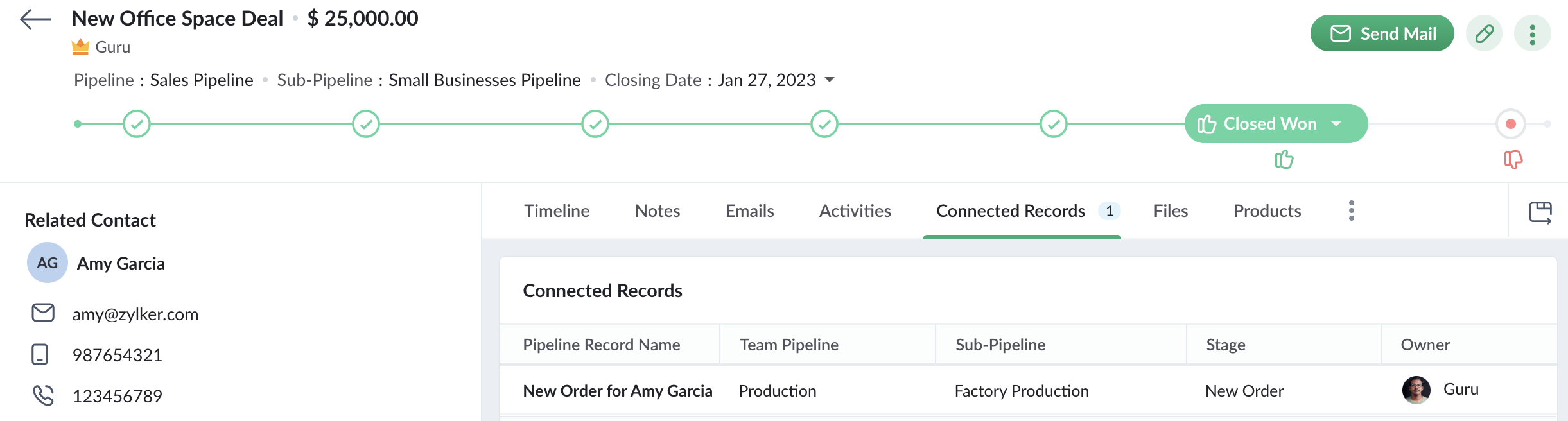
De plus, lorsqu'un commercial ouvre un enregistrement d'affaire qui a déclenché le workflow pour créer une nouvelle commande, il peut également voir l'enregistrement de la commande dans l'onglet Enregistrements connectés. Le commercial peut ainsi suivre l'état de la commande. Ainsi, Connected Pipelines permet à vos équipes de rester unies grâce à la boucle d'information connectée à travers Team Pipelines.


Disponibilité


Si vous utilisez déjà la version Team Pipelines de Bigin, alors Connected Pipelines sera déjà disponible pour vous. Vous pouvez vous en assurer en vérifiant si vous voyez l'action "Créer des enregistrements connectés" lorsque vous créez un flux de travail.

Nous avons publié un guide d'aide détaillé pour vous aider à démarrer avec Connected Pipelines.

Essayez cette nouvelle amélioration et faites-nous part de vos réactions dans les commentaires ci-dessous.


Pour ceux qui n'ont pas encore essayé Team Pipelines, nous vous suggérons de remplir ce formulaire et nous activerons Team Pipelines pour votre compte. Nous vous conseillons de passer à Team Pipelines le plus tôt possible car nous nous préparons à le déployer pour tous les utilisateurs de Bigin.


Sur quoi d'autre travaillons-nous ?


Nous avons écouté activement vos demandes de fonctionnalités et nous travaillons sur un grand nombre d'améliorations, notamment l'intégration de Whatsapp, l'affichage du calendrier pour les activités, les pages de réservation en ligne, les formulaires Web pour Team Pipelines et bien d'autres encore.


Restez à l'écoute pour de nouvelles mises à jour !

    Access your files securely from anywhere


                            Zoho Developer Community


                                                  • Desk Community Learning Series


                                                  • Digest


                                                  • Functions


                                                  • Meetups


                                                  • Kbase


                                                  • Resources


                                                  • Glossary


                                                  • Desk Marketplace


                                                  • MVP Corner


                                                  • Word of the Day


                                                  • Ask the Experts


                                                            Manage your brands on social media


                                                                  Zoho TeamInbox Resources


                                                                      Zoho CRM Plus Resources

                                                                        Zoho Books Resources


                                                                          Zoho Subscriptions Resources

                                                                            Zoho Projects Resources


                                                                              Zoho Sprints Resources


                                                                                Qntrl Resources


                                                                                  Zoho Creator Resources


                                                                                      Zoho CRM Resources

                                                                                      • CRM Community Learning Series

                                                                                        CRM Community Learning Series


                                                                                      • Kaizen

                                                                                        Kaizen

                                                                                      • Functions

                                                                                        Functions

                                                                                      • Meetups

                                                                                        Meetups

                                                                                      • Kbase

                                                                                        Kbase

                                                                                      • Resources

                                                                                        Resources

                                                                                      • Digest

                                                                                        Digest

                                                                                      • CRM Marketplace

                                                                                        CRM Marketplace

                                                                                      • MVP Corner

                                                                                        MVP Corner


                                                                                          Design. Discuss. Deliver.

                                                                                          Create visually engaging stories with Zoho Show.

                                                                                          Get Started Now


                                                                                            Zoho Show Resources

                                                                                              Zoho Writer

                                                                                              Get Started. Write Away!

                                                                                              Writer is a powerful online word processor, designed for collaborative work.

                                                                                                Zoho CRM コンテンツ


                                                                                                  Nederlandse Hulpbronnen


                                                                                                      ご検討中の方


                                                                                                              • Recent Topics

                                                                                                              • Using IMAP configuration for shared email inboxes

                                                                                                                Our customer service team utilizes shared email boxes to allow multiple people to view and handle incoming customer requests. For example, the customer sends an email to info@xxxx.com and multiple people can view it and handle the request. How can I configure
                                                                                                              • Zoho CRM for Everyone's NextGen UI Gets an Upgrade

                                                                                                                Hello Everyone We've made improvements to Zoho CRM for Everyone's Nextgen UI. These changes are the result of valuable feedback from you where we’ve focused on improving usability, providing wider screen space, and making navigation smoother so everything
                                                                                                              • Auto-sync field of lookup value

                                                                                                                This feature has been requested many times in the discussion Field of Lookup Announcement and this post aims to track it separately. At the moment the value of a 'field of lookup' is a snapshot but once the parent lookup field is updated the values diverge.
                                                                                                              • Zoho Recruit Subscription

                                                                                                                Hello Zoho Recruit Team, Good day! I would like to inquire about your recruitment subscription plans and would also like to verify the current subscription our company is enrolled in under Zoho Recruit. Thank you, and I look forward to your response.
                                                                                                              • Keyboard shortcut M key

                                                                                                                I'm trying to customize my keyboard shortcuts and assign the "m" key. But it says the key is already assigned. I've looked through all my shortcuts and can't see any assigned "m". When I select an email and press the M key, nothing happens. What is the
                                                                                                              • Is it possible to create a meeting in Zoho Crm which automatically creates a Google Meet link?

                                                                                                                We are using Google's own "Zoho CRM for Google" integration and also Zoho's "Google Apps Sync" tools, but none of them provide us with the ability to create a meeting in Zoho CRM that then adds a Google Meet link into the meeting. Is this something that
                                                                                                              • Ensure Consistent Service Delivery with Comprehensive Job Sheets

                                                                                                                We are elated to announce that one of the most requested features is now live: Job Sheets. They are customizable, reusable forms that serve as a checklist for the services that technicians need to carry out and as a tool for data collection. While on
                                                                                                              • Automatic Portal invite

                                                                                                                We have numerous customers we move through a blueprint in deals, when they get to a certain point we need to give them portal access, how can this be done through deluge or a workflow? Latest Update (December 2025): The option to automate portal invitations
                                                                                                              • Marketer's Space: Why mobile optimization deserves a place in your email strategy

                                                                                                                Hello Marketers, Welcome back to Marketer's Space! Today, we'll talk about the importance of creating mobile-friendly email designs. While mobile phones were once used only to make phone calls, today they're used for almost everything, including texting,
                                                                                                              • Enhancements in Canvas

                                                                                                                Dear All, Greetings! Canvas lets you design the record details page to suit your brand or business preferences. We are glad to introduce the following enhancements to uplift your design experience. Reusable Components Style Presets Let's go! Reusable
                                                                                                              • Introducing Dark Mode / Light Mode : A New Look For Your CRM

                                                                                                                Hello Users, We are excited to announce a highly anticipated feature - the launch of Day, Night and Auto Mode implementation in Zoho CRM's NextGen user interface! This feature is designed to provide a visually appealing and comfortable experience for
                                                                                                              • ABN with Legal Entity Name

                                                                                                                Hi, How can I execute this? The ABN number is entered in Accounts Module and ideally, it should display or suggest the correct Legal Entity Name based on the ABN lookup. ex. Account Name: JPG Resources ABN Number: 65 067 761 871 Legal Entity Name: (auto
                                                                                                              • Presenting ABM for Zoho CRM: Expand and retain your customers with precision

                                                                                                                Picture this scenario: You're a growing SaaS company ready to launch a powerful business suite, and are looking to gain traction and momentum. But as a business with a tight budget, you know acquiring new customers is slow, expensive, and often delivers
                                                                                                              • Text snippet

                                                                                                                There is a nice feature in Zoho Desk called Text Snippet. It allows you to insert a bit of text anywhere in a reply that you are typing. That would be nice to have that option in Zoho CRM as well when we compose an email. Moderation Update: We agree that
                                                                                                              • Zoho Cliq not working on airplanes

                                                                                                                Hi, My team and I have been having this constant issue of cliq not working when connected to an airplane's wifi. Is there a reason for this? We have tried on different Airlines and it doesn't work on any of them. We need assistance here since we are constantly
                                                                                                              • Prepopulating Fields

                                                                                                                Hello, I have a form (Assets) with 2 lookup fields: Client (from Clients) Site (from Client Sites) I modified the code (highlighted in red below), so the Site dropdown shows the list of sites related to the Client. must have Client_Site ( type = picklist
                                                                                                              • What is the difference between Zoho Campaigns and marketing hub?

                                                                                                                Zoho Campaigns is a permission-based email marketing tool for sending marketing emails and mass emails. Marketing Automation is a multichannel marketing automation tool that caters to organizations looking for tools to engage their users across multiple
                                                                                                              • Unify Overlapping Functionalities Across Zoho Products

                                                                                                                Hi Zoho One Team, We would like to raise a concern about the current overlap of core functionalities across various Zoho applications. While Zoho offers a rich suite of tools, many applications include similar or identical features—such as shift management,
                                                                                                              • Detailed Account Reports - Add Running Balance

                                                                                                                When one clicks into an account from a report (say P/L or Balance Sheet), the default reports have the Debit, Credit, and then the Amount. The Amount column (last one) is duplicate information. It would be far better and fit more peoples' use cases if
                                                                                                              • Can we add custom fields to portal community profiles?

                                                                                                                How do we add custom fields to our profile pages in our portal community? If we have the ability to add custom fields, will we be able to access those fields via API? We want to use our Desk community in our help portal as our primary community and would
                                                                                                              • Start Workflow from Deluge Script

                                                                                                                I have developed a customized process from our CRM that leverages a deluge script to create a statement of work document. Once the document has been created via the merge and store function, I would like the ability to start a workdrive review & approve
                                                                                                              • Issue: Ticket Export Does Not Include Ticket Threads

                                                                                                                Dear Zoho Desk Support Team, I hope you’re doing well. I wanted to bring to your attention that the current ticket export feature in Zoho Desk does not seem to include the ticket threads or conversation history. When exporting tickets, only the summary
                                                                                                              • Pushover Notification Module

                                                                                                                Hello, it would be good if there would be a "Pushover" (https://pushover.net/) module besides the standard SMS module. Pushover is now very well known, especially in IT, and is becoming more and more popular. The biggest advantage are the customizable
                                                                                                              • Forward - no Ticket Number

                                                                                                                Hello, when I send an email to Zoho Desk via Reply or Reply All, the ticket number is in the subject line. But if I use forward then not. Is there an option to change this? We often forward e-mails and a reply to this will of course create a new ticket
                                                                                                              • Checkout: Adding Images

                                                                                                                Hello everyone, I’m trying to add a small GoGreen logo in the shipping section of the checkout to promote our sustainable shipping. While I can insert text without any issues, it seems that adding images is not supported in this area. Is there currently
                                                                                                              • Sortie de Zoho TABLE ??

                                                                                                                Bonjour, Depuis bientôt 2 ans l'application zoho table est sortie en dehors de l'UE ? Depuis un an elle est annoncée en Europe Mais en vrai, c'est pour quand exactement ??
                                                                                                              • [solved] #original_sender trick not working for us

                                                                                                                Hello community ! We really like DESK.. it's working like a charm for us but I have a request. Some users are sending emails personnaly to me (instead of using the support adress).. and I saw there was a possibilty to use : #original_sender {mail@mail.com}
                                                                                                              • SalesIQ Chat Notifications

                                                                                                                I am the admin of our salesIQ implementation. About two weeks ago, I started hearing/seeing notification for ALL chats messages from monitored agents/chat participants. I don't need to see these, we have a manager who deals with this. I can't stop the
                                                                                                              • Correlated subqueries not supported in Zoho Analytics. This creates huge limitations

                                                                                                                Running into a major limitation in Zoho Analytics: correlated subqueries simply don’t work, even in completely standard SQL patterns inside a JOIN. Example: LEFT JOIN "Bills" b ON d."Id" = b."Deal ID" AND EXISTS ( SELECT 1 FROM "Bill
                                                                                                              • Unknown table or alias 'A1'

                                                                                                                I would like to create a subquery but i am getting the following error: Unknown table or alias 'A1' used in select query. This is the sql statement:  SELECT A1.active_paying_customers, A1.active_trial_customers, A1.new_paying_signup, date(A1.date_active_customers), 
                                                                                                              • HubSpot CRM to Zoho Creator Integration

                                                                                                                I'm trying to create an integration between HubSpot CRM and Zoho Creator with HubSpot being the push source (if a contact is created or updated in HubSpot, it pushes the information to Zoho Creator). I have two questions: 1- Is it best to use Zoho Flow
                                                                                                              • Batch Emails in CRM Plus without using a template?

                                                                                                                Hi guys. Is it possible to send the same email to multiple people at the same time within CRM Plus without using an email template? At the moment we create a custom view in Contacts to display the people that we need. We then click the boxes on the left, and click 'Send Mail', but always need to select a template. Sometimes its better to write a quick one off message, without needing to set up a template first. Thanks.
                                                                                                              • bank charge

                                                                                                                a charge to my account was made that I did not authorize, of $16.46, for something that looks like "computer maintenance or something to that matter". please refund.
                                                                                                              • [Free Webinar] Product Updates: Quick Catch-Up Session - Part II - Creator Tech Connect

                                                                                                                Hello Everyone! We welcome you all to the upcoming free webinar on the Creator Tech Connect Series. The Creator Tech Connect series is a free monthly webinar featuring deep-dive technical sessions designed for developers, administrators, and app builders.
                                                                                                              • Introducing Liquid Glass UI on the Zoho Mail iOS app

                                                                                                                Hello everyone! We're excited to announce that the Zoho Mail app is now fully optimised for iOS 26's Liquid Glass design on both iPhone and iPad! The updated interface features transparent layers, smooth animations, and refined visual elements that enhance
                                                                                                              • Jobs at multiple locations

                                                                                                                Hi A lot of times we have same job open at multiple locations. So I would like an option where we can create a job and choose multiple locations. Currently we have to create individual jobs for each location. If we can create one job and mention multiple
                                                                                                              • Zoho Creator customer portal users

                                                                                                                Hi, I'm in a Zoho One subscription with our company. I'm running a project now that involves creating a Zoho Creater application and using the Zoho Creator Customer Portal.  At most we need 25 customer portal users. In our Zoho One plan we only get 3
                                                                                                              • Plan change from Zoho One to Zoho Workplace

                                                                                                                Hello Zoho, Following the recent pricing update for Zoho One, we are interested in transitioning to Zoho Workplace products. Please inform us about the necessary steps for this process so we can proceed promptly. Kind regards,
                                                                                                              • Is it possible to sync data every 5–10 minutes in Zoho Analytics (CRM or Excel imports)?

                                                                                                                Hello Team, I want to know if Zoho Analytics supports near real-time syncing of data from different sources. My requirements: I am importing data from Zoho CRM → Zoho Analytics I also have some datasets maintained in Excel/CSV I want both data sources
                                                                                                              • Partner with HDFC And Sbi Bank.

                                                                                                                Hdfc and sbi both are very popular bank if zoho books become partner with this banks then many of the zoho books users will benefit premium features of partnered banks.
                                                                                                              • Next Page