Tip#65: How can external users create Cards in Qntrl?
Tip#65: How can external users create Cards in Qntrl?


Sometimes, a business process involves users outside the organization. We may outsource and collect information that is needed for our business. In such cases, external users come in to picture. When these external users collect the required data, they will have to upload the same into Qntrl for further business needs. These users are actually not a part of the Organization and so, we'll not be able to add them as users inside the Organization.
 
With the below listed options, external users can upload their collected data to Qntrl without being a part of Qntrl organization. 

1. Public Forms

You can create Public Forms using which external users can enter the information they have collected and upload it to Qntrl. With the Form Link of a Public Form, external users can create cards in Qntrl. All the card details can be filled in the form and submitted to Qntrl.
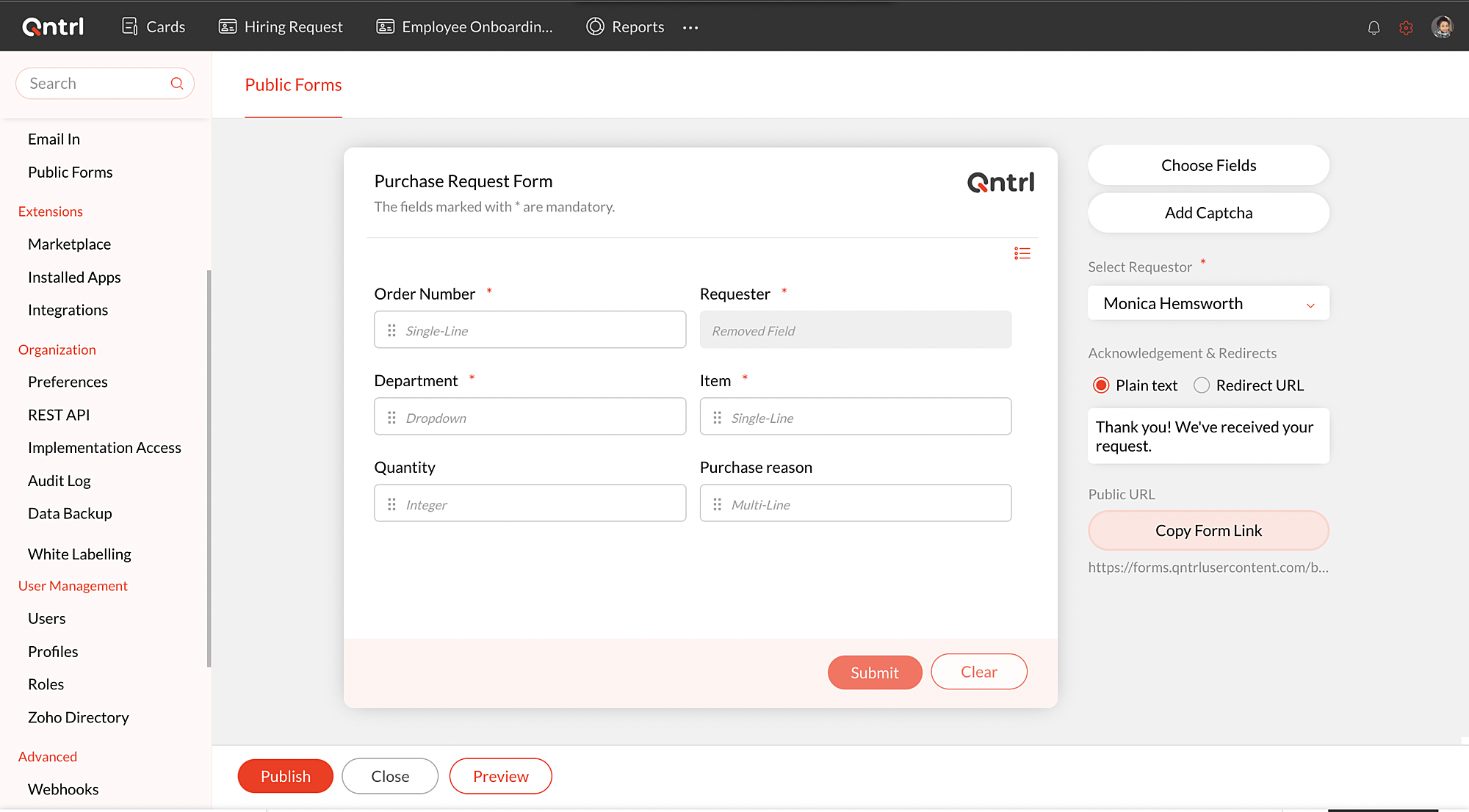


Know how to create Public Forms from this help document .

2. Email In

An external user can create cards in Qntrl just by emailing the card details to Qntrl. Each orchestration will have a unique Email In ID to which the external user can drop an email with the card details which in turn will create a card in Qntrl. Also, the reply emails will be added as comments on the cards.
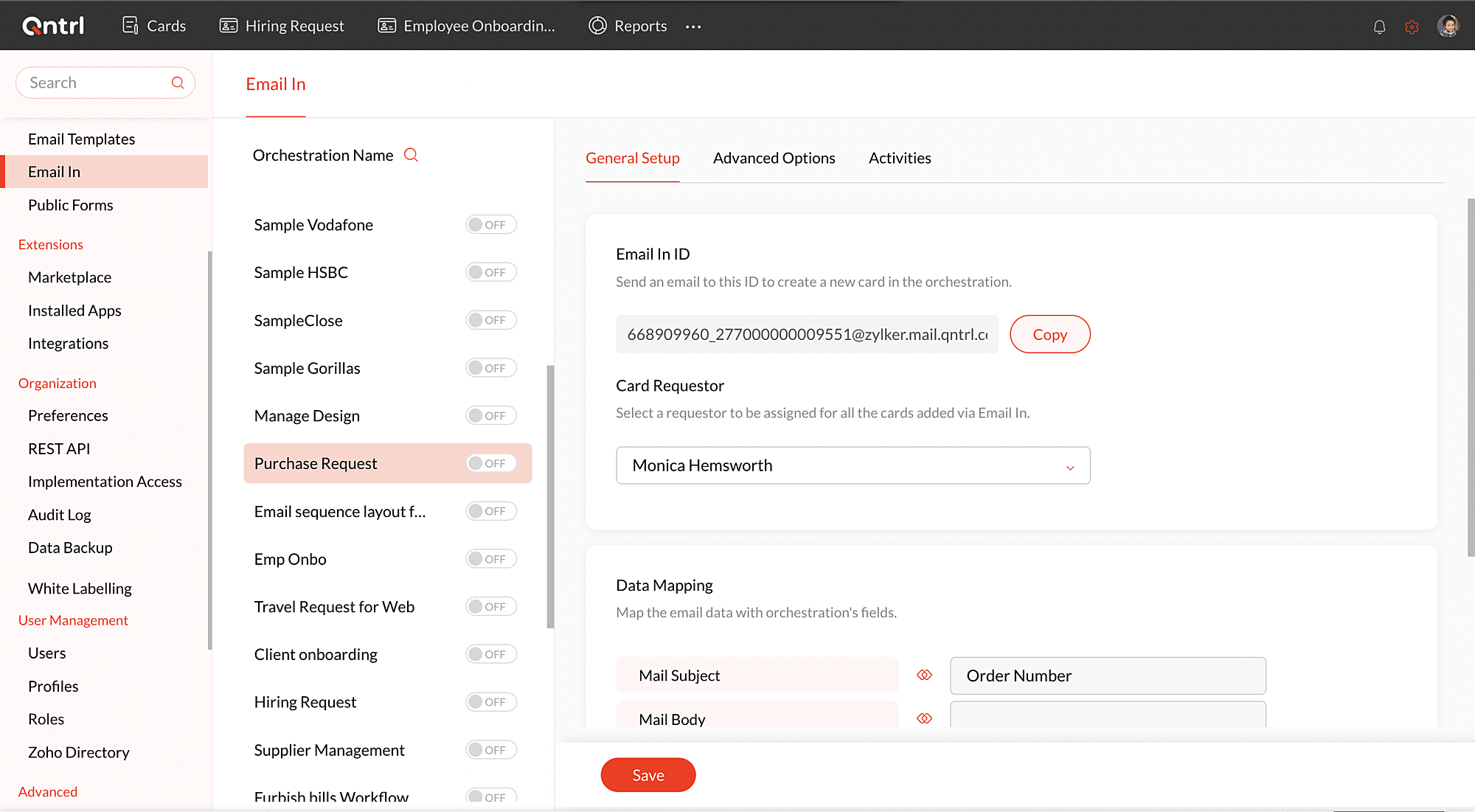


Learn more about Email in from this help document .
 
Here's a real time scenario where the above features will be most helpful. Consider Zylker, an online grocery start up firm, which delivers multiple daily essentials everyday. Since it is a start-up, part-time sales executives are appointed to generate leads. The details of the people who show interest in the product have to be uploaded by the part-time sales executive in Qntrl. With the help of Public Forms/ Email In features, the part-time sales executives can add their prospective leads data without having to be a part of the organization.
 
We hope this article is helpful in briefing the different ways to create cards in Qntrl. If you have any suggestions or queries, do email us at support@qntrl.com .


                                           Help resources: Qntrl KB | Tutorials | Short Help Videos | How-to videos  


    Access your files securely from anywhere


                            Zoho Developer Community


                                                  • Desk Community Learning Series


                                                  • Digest


                                                  • Functions


                                                  • Meetups


                                                  • Kbase


                                                  • Resources


                                                  • Glossary


                                                  • Desk Marketplace


                                                  • MVP Corner


                                                  • Word of the Day


                                                  • Ask the Experts


                                                            • Sticky Posts

                                                            • Tip #21: Increase user engagement using dynamic email content and attachments in Orchestly

                                                              Businesses often send out bulk emails like weekly newsletters, monthly event updates, promotional emails, surveys, beta access emails, product reviews, seasonal greetings, and so on. Even as the gist of these emails remain constant for all recipients, personalizations capture the audience’s attention and help brands connect with them.   Orchestly’s email templates allows you to draft and send dynamic emails with personalized content and attachments to internal and external users. Email templates
                                                            • Qntrl's 2023 year in review

                                                              This year has been all about analyzing our customer feedback and building a resilient and solution-driven product from it. As a result of this work, we're happy to announce that a whole new version of Qntrl is getting ready for release soon. This new
                                                            • Tip #61: 5 different ways to create Cards in Qntrl

                                                              Qntrl supports an array of features that covers everything required for business orchestration, from process automation to business advancement. Cards, being the elemental feature of Qntrl, record all the details of a particular task from the beginning
                                                            • Tip #17: Stay informed of significant business impact using Orchestly

                                                              With remote working becoming the new norm, leaders across sectors need to stay updated of their business performance in the market to aid business decisions. Instead of awaiting virtual meetings from sales and finance heads to put forth the business status, organization leaders can themselves dig into the system to keep an eye on their revenue generating customers or set up notifications to monitor major updates.   Orchestly recognizes such requirements and provides adaptable solutions for all business
                                                            • Onboard faster with Orchestly's Tutorials

                                                              We are actively rolling out new learning materials to assist our customers onboard at ease and automate their processes effortlessly. On that front, we recently launched Tutorials for Orchestly.   Tutorial is a step-by-step guide to help users familiarize the concepts of Orchestly and automate simple processes right from scratch. We’ve documented 3 such business processes viz. Order Manufacturing, Product Implementation, and Change Management.   We're looking forward to document more customer-centric


                                                            Manage your brands on social media


                                                                  Zoho TeamInbox Resources


                                                                      Zoho CRM Plus Resources

                                                                        Zoho Books Resources


                                                                          Zoho Subscriptions Resources

                                                                            Zoho Projects Resources


                                                                              Zoho Sprints Resources


                                                                                Qntrl Resources


                                                                                  Zoho Creator Resources


                                                                                      Zoho CRM Resources

                                                                                      • CRM Community Learning Series

                                                                                        CRM Community Learning Series


                                                                                      • Kaizen

                                                                                        Kaizen

                                                                                      • Functions

                                                                                        Functions

                                                                                      • Meetups

                                                                                        Meetups

                                                                                      • Kbase

                                                                                        Kbase

                                                                                      • Resources

                                                                                        Resources

                                                                                      • Digest

                                                                                        Digest

                                                                                      • CRM Marketplace

                                                                                        CRM Marketplace

                                                                                      • MVP Corner

                                                                                        MVP Corner


                                                                                          Design. Discuss. Deliver.

                                                                                          Create visually engaging stories with Zoho Show.

                                                                                          Get Started Now


                                                                                            Zoho Show Resources

                                                                                              Zoho Writer

                                                                                              Get Started. Write Away!

                                                                                              Writer is a powerful online word processor, designed for collaborative work.

                                                                                                Zoho CRM コンテンツ


                                                                                                  Nederlandse Hulpbronnen


                                                                                                      ご検討中の方


                                                                                                              • Recent Topics

                                                                                                              • Customize Calendar view in Teamspaces Settings

                                                                                                                Right now every customization that happens inside of the calendar view inside of CRM is only visible for the specific user. We want to be able to set up calendar views as an admin for specific roles. I would suggest to do that inside of the settings of
                                                                                                              • CRM->INVENTORY, sync products as composite items

                                                                                                                We have a product team working in the CRM, as it’s more convenient than using Books or Inventory—especially with features like Blueprints being available. Once a product reaches a certain stage, it needs to become visible in Inventory. To achieve this,
                                                                                                              • Add an option to disable ZIA suggestions

                                                                                                                Currently, ZIA in Zoho Inventory automatically provides suggestions, such as sending order confirmation emails. However, there is no way to disable this feature. In our case, orders are automatically created by customers, and we’ve built a custom workflow
                                                                                                              • What's new in Zoho Sheet: Simplify data entry and collaboration

                                                                                                                Hello, Zoho Sheet community! Last year, our team was focused on research and development so we could deliver updates that enhance your spreadsheet experience. This year, we’re excited to deliver those enhancements—but we'll be rolling them out incrementally
                                                                                                              • Zoho Desk API - Send Reply to CUSTOMERPORTAL

                                                                                                                Hello! I'll try to send a reply to Customer Portal, But the response is 500 (INTERNAL_SERVER_ERROR in service response). {"Error":"{\"errorCode\":\"INTERNAL_SERVER_ERROR\",\"message\":\"An internal server error occurred while performing this operation.\"}"}
                                                                                                              • validation rules doesn't work in Blueprint when it is validated using function?

                                                                                                                I have tried to create a validation rule in the deal module. it works if I try to create a deal manually or if I try to update the empty field inside a deal. but when I try to update the field via the blueprint mandatory field, it seems the validation
                                                                                                              • Zoho Creator Developer Console | Improved Distribution and Lifecycle Management for apps

                                                                                                                Hello everyone, We're excited to introduce new enhancements now in the Zoho Creator Developer Console. These updates strengthen private app distribution through licensing controls and extend environment support across all installed apps, helping teams
                                                                                                              • CRM gets location smart with the all new Map View: visualize records, locate records within any radius, and more

                                                                                                                Hello all, We've introduced a new way to work with location data in Zoho CRM: the Map View. Instead of scrolling through endless lists, your records now appear as pins on a map. Built on top of the all-new address field and powered by Mappls (MapMyIndia),
                                                                                                              • WhatsApp IM in Zoho Desk always routes to Admin instead of assigned agent

                                                                                                                Hello Zoho Experts, I connected WhatsApp IM to my Zoho Desk account. I only assigned my Customer Service (CS) agent to the WhatsApp channel, and I did NOT include Admin in this channel. However, every new WhatsApp conversation automatically gets assigned
                                                                                                              • Zoho CRM for Everyone's NextGen UI Gets an Upgrade

                                                                                                                Hello Everyone We've made improvements to Zoho CRM for Everyone's Nextgen UI. These changes are the result of valuable feedback from you where we’ve focused on improving usability, providing wider screen space, and making navigation smoother so everything
                                                                                                              • [Webinar] Solving business challenges- Handling the challenge of transitioning to Zoho Writer from legacy tools

                                                                                                                Moving to Zoho Writer is a great way to consolidate your business tools and become more agile. With multiple accessibility modes, no-code automation, and extensive integration with business apps and content platforms, Zoho Writer helps solve your organization's
                                                                                                              • hide resolution from help centre

                                                                                                                to my surprise, i just found out that the resolution text is public in the helpcenter, even if 'notify customer' is off. is there a workaround to that? how do others deal with this? How zoho support does this and I don't think its used by Zoho in the first place. the resolution is meant to be private, not public
                                                                                                              • Feature Request - Gift Cards or Gift Voucher Capability in Zoho Commerce

                                                                                                                Hi Zoho Commerce team, I'm comming accross more and more retail businesses who sell gift cards. As there is currently no way to manage this in Zoho Commerce, it is a blocker to addoption. This is particularly popular in Europe and North America. I recently
                                                                                                              • Highlight a candidate who is "off limits"

                                                                                                                Hello: Is there a way to highlight a candidate who is "off limits"?  I would like to have the ability to make certain candidate and / or Client records highlighted in RED or something like that.   This would be used for example when we may have placed a candidate somewhere and we want everyone in our company to quickly and easily see that they are off limits.  The same would apply when we want to put a client or former client off limits so no one recruits out of there. How can this be done? Cheers,
                                                                                                              • Closing off tasks automatically based on project status

                                                                                                                Is there a way to close off all open tasks when a project is set as Cancelled?
                                                                                                              • CRM x WorkDrive: File storage for new CRM signups is now powered by WorkDrive

                                                                                                                Availability Editions: All DCs: All Release plan: Released for new signups in all DCs. It will be enabled for existing users in a phased manner in the upcoming months. Help documentation: Documents in Zoho CRM Manage folders in Documents tab Manage files
                                                                                                              • [Free webinar] Understanding connections and datasources in Zoho Creator - Creator Tech Connect

                                                                                                                Hello everyone, We’re excited to invite you to another edition of the Creator Tech Connect webinar. About Creator Tech Connect The Creator Tech Connect series is a free monthly webinar featuring in-depth technical sessions designed for developers, administrators,
                                                                                                              • Bridge the Gap Between your Service and Finance Teams

                                                                                                                In field service, the most expensive distance isn’t the drive to a customer’s home—it’s the gap between a finished job and a paid invoice. Zoho FSM leverages the power of Zoho Invoice to handle and manage billing operations. It enables you to: Instantly
                                                                                                              • Direct URL to "View Record"

                                                                                                                I would like to create a button (Deluge Script) to jump to the "view record" without passing by the record menu, but I can not aford to find the right url. I don't want the "view record" as a single page. I want the "view record" in the application like the picture below: Thanks in advance for your help
                                                                                                              • Live Chat for user

                                                                                                                Hi everyone, I’m new to Zoho Creator and wanted to ask if it’s possible to add a live chat option for all logged-in portal users so they can chat internally. I’m trying to create a customer portal similar to a service desk, but for vehicle breakdowns,
                                                                                                              • SalesIQ Chat Owner to CRM Lead Owner Mapping

                                                                                                                There is no proper mapping between the SalesIQ chat owner and the CRM lead owner. When a chat is assigned to an agent, the lead created in CRM is often assigned to a different user, forcing admins to manually change ownership every time. This creates
                                                                                                              • Does zoho inventory need Enterprise or Premium subsrciption to make Widgets.

                                                                                                                We have Zoho One Enterprise and yet we can't create widgets on inventory.
                                                                                                              • Product line search in quotes

                                                                                                                Is there a way to change the search setting when you add a product line to a quote. We have created a field in products called 'Part Number' and I would like when I'm adding a product line to the quote that I can search on that field. At the moment it only searches on product description. In products I can search on the 'Part Number' field Any help welcome.
                                                                                                              • Invoice status on write-off is "Paid" - how do I change this to "Written off"

                                                                                                                HI guys, I want to write off a couple of outstanding invoices, but when I do this, the status of the invoices shows as "Paid". Clearly this is not the case and I need to be able to see that they are written off in the customer's history. Is there a way
                                                                                                              • 🚀 WorkDrive 6.0 (Phase 1): Empowering Teams with Content Intelligence, Automation, Accessibility, and Control

                                                                                                                Hello, everyone! WorkDrive continues to evolve from a robust file management solution into an intelligent, secure, and connected content collaboration platform for modern businesses. Our goal remains unchanged: to simplify teamwork, strengthen data security,
                                                                                                              • Storage Limits

                                                                                                                Hello, What is the storage limitations for each user on professional edition?  Thanks, Mekki
                                                                                                              • Optimum CRM setup for new B2B business

                                                                                                                Can some advise the most common way to setup Zoho CRM to handle sales for a B2B company? Specifically in how to handle inbound/outbound emails. I have spent hours researching online and can't seem to find an accepted approach, or even a tutorial. I have
                                                                                                              • Dheeraj Sudan and Meenu Hinduja-How do I customize Zoho apps to suit my needs?

                                                                                                                Hi Everyone, I'm Meenu Hinduja and my husband Dheeraj Sudan, run a business. I’m looking to tweak a few things to fit my needs, and I’d love to hear what customizations others have done. Any tips or examples would be super helpful! Regards Dheeraj Sudan
                                                                                                              • Important Update: Google Ads & YouTube Ads API Migration

                                                                                                                To maintain platform performance and align with Google's newest requirements, we are updating the Google Ads and YouTube Ads integrations by migrating from API v19 to the newer v22, before the official deprecation of v19 on February 11, 2026. Reference:
                                                                                                              • Zoho Recruit Community Meetup - London 🇬🇧

                                                                                                                Hello Recruiters! We’re excited to announce that the Zoho Recruit team is coming to the UK for an in-person Zoho User Group (ZUG) Meetup in London! This is your chance to connect with fellow Zoho users, learn from experts, and walk away with actionable
                                                                                                              • Power Pivot and Data Modeling functionality in Zoho Sheet

                                                                                                                When will MS Excel functionalities like Power Pivot and Data Modeling functionalities be available in Zoho Sheet?
                                                                                                              • Sender Email Configuration Error.

                                                                                                                Hello Team, Hope you are all doing well. We are in the process of creating the Zoho FSM environment in the UAE. When we try to add the sender email address “techsupportuae@stryker.com”, we receive the error message: “Error occurred while sending mail
                                                                                                              • Canvas View bug

                                                                                                                I would like to report a bug. When clone a canvas view from an existing canvas view, if the original canvas view have canvas button with client script. Then the new create canvas view will have canvas button, it is make sense. But when I try to delete
                                                                                                              • Global Search placement in the new UI

                                                                                                                Having a hard time with the global search placement in the UI redesign. Surely I can't be the only one. Previously global search placement was perfect. A bar at the top/center of the page. Exactly where you would expect it to be. Since the new UI has
                                                                                                              • What's New - January 2026 | Zoho Backstage

                                                                                                                Welcome to 2026! If you thought last year was big, buckle up. We’re stepping into this year with a singular focus: unimaginable growth, elite scalability, and performance benchmarks that leave the old ways of event management in the rearview mirror. As
                                                                                                              • Cliq on your mobile phone

                                                                                                                Some of the employees in my company get their cliq on their mobile phones but it will not let them answer the call. The employee has to go to their laptop to access it. 
                                                                                                              • Scheduled sending of a poll and its results

                                                                                                                Is there a way to schedule sending a poll to all my users and have the results sent separately to the team?
                                                                                                              • Bulk Delete Messages in Cliq

                                                                                                                Isn't it possible to bulk delete messages in Cliq? I have them delivered to me as notifications from another service but most of them need to be deleted as not of value. I get dozens of them per day, and deleting them is already difficult is the "Delete"
                                                                                                              • stock movement report by each transaction for each item

                                                                                                                Dear Sir we are using zoho inventory for foodstuff and we lack the transaction report which clearly shows movement of an item from Opening balance of the month to Goods received in, Supplier return out, Invoice out, Sales return In, Transfer out and Transfer
                                                                                                              • Select the task view on the board in the Zoho Connect iPhone app

                                                                                                                Hello. How do I select the task view on the board in the Zoho Connect iPhone app? The Android app has this functionality.
                                                                                                              • Next Page