Zoho Creator Developer Console | Improved Distribution and Lifecycle Management for apps

Zoho Creator Developer Console | Improved Distribution and Lifecycle Management for apps

Hello everyone,

We're excited to introduce new enhancements now in the Zoho Creator Developer Console. These updates strengthen private app distribution through licensing controls and extend environment support across all installed apps, helping teams test changes safely before going live.

What is private sharing?
Private sharing of apps gives you the flexibility to distribute your apps directly to specific clients using their Zoho email address. This is especially useful for developers and Partners who want to deliver tailored solutions to select customers.

Why this matters
Many of our Partners would like to distribute applications directly to clients and manage payments offline. Until now, Zoho Creator had no in-product mechanism to enforce app validity based on your payment or agreement status with clients. This meant that even if a client stopped renewing their license, the application remained fully functional in their account.
This new enhancement solves that issue by allowing Partners to define a clear validity period. Once expired, the app automatically becomes disabled, and the Partner gains the ability to block access fully. This protects your IP and ensures fair usage of your apps.

Additionally, there was previously no way to share apps for evaluation purposes. With this update, the Trial License feature enables developers to offer a time-bound preview before subscription.

While Developer Console already supported private sharing, we recognized that the existing flow was limited and didn't fully address the diverse requirements of our Partners. That’s why we've rolled out this new update to make the flow more robust and professional.

Here's how the new flow works:
  1. Evaluation: You can now offer your client a Trial License for your app. Once the client is added and the app is shared with a trial license, they'll receive an installation email. After they install the app using the provided link, it becomes available in their Creator account for the trial period.

  2. Post-evaluation: If an agreement isn't reached, the application will be disabled after the evaluation period ends. This means the app will switch to read-only mode, where the client would have access to existing data but won't be able to add new entries. At any point after the trial period expired, the developer will have the option to delete the disabled application (along with its data) from the client's account.

  3. Subscription: Following the evaluation, if the client decides to proceed with a purchase, you can offer them a Subscription License after completing the transaction through your preferred channels. Based on your agreement, the subscription can be granted for as little as one month or set to lifetime validity.

    Once the subscription period ends, the application is automatically disabled and moved to read-only mode, allowing clients to view existing data but not perform any actions. If required, developers can further restrict the application, completely blocking client access. If the client and developer agree to extend the subscription, the app can be unblocked and access restored. 

    These safeguards ensure clients can't continue using your app beyond your agreed terms with the client, giving you complete control, since payments are handled outside Zoho Creator. 
 
To share applications with your clients:
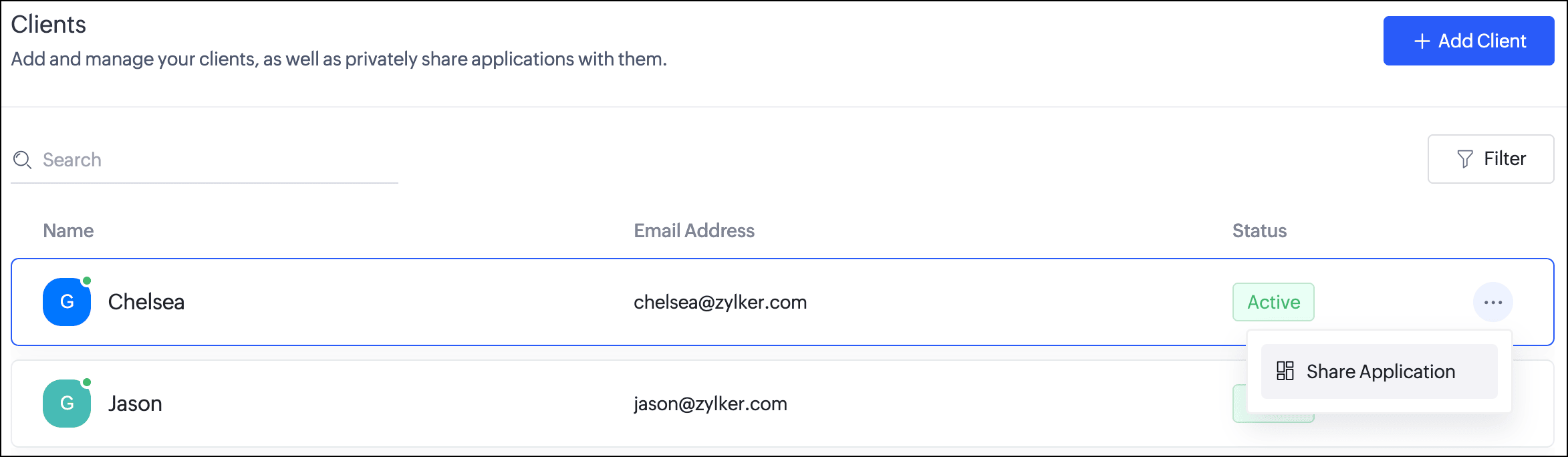
  1. Navigate to the Clients section. Click the horizontal ellipsis icon next to a client and select Share Application.
  2. In the popup, you can choose the Application and the version to be shared with the client.
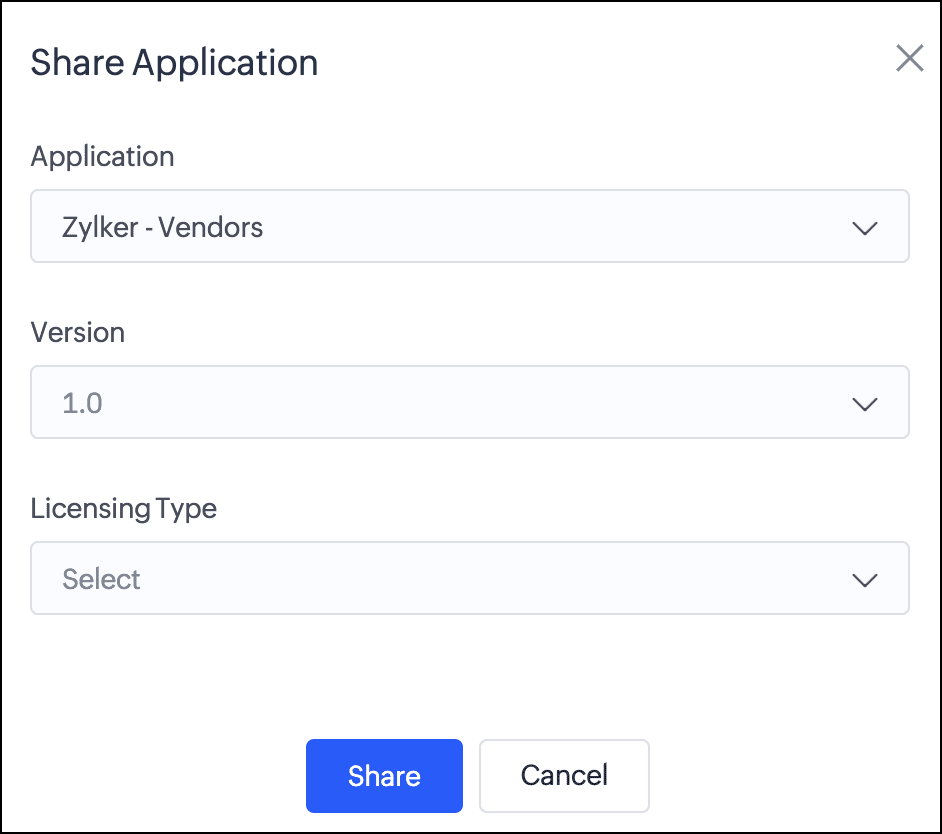
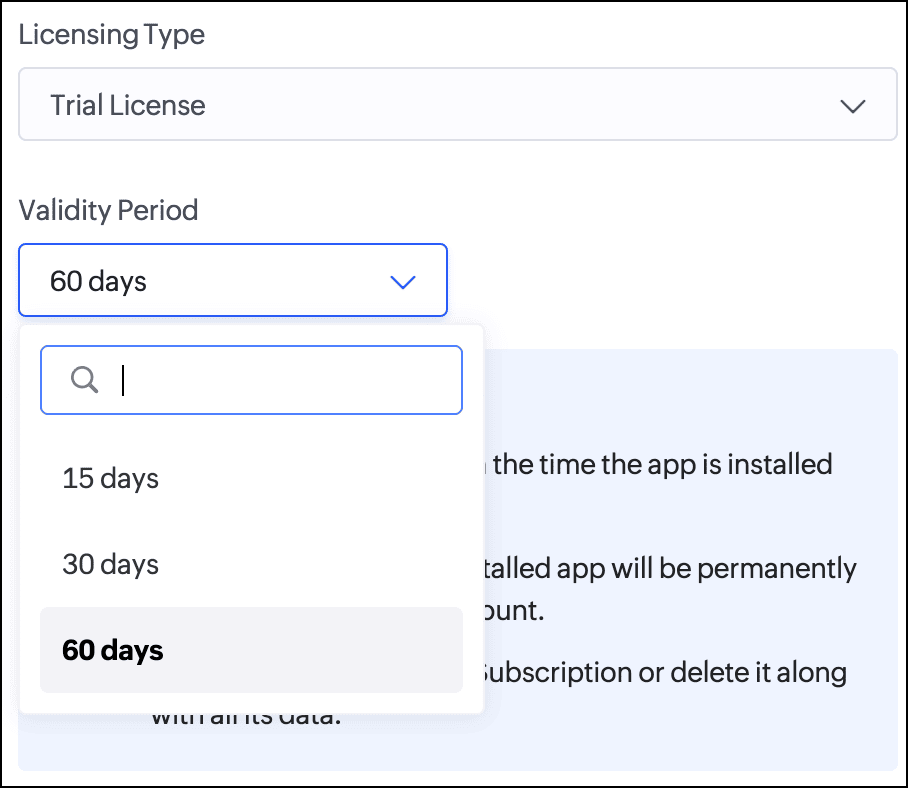
  3. Next, you can choose from two license types:
    Trial License: Provide your client with a trial period to evaluate the app. You can set the duration to 15, 30, or 60 days.
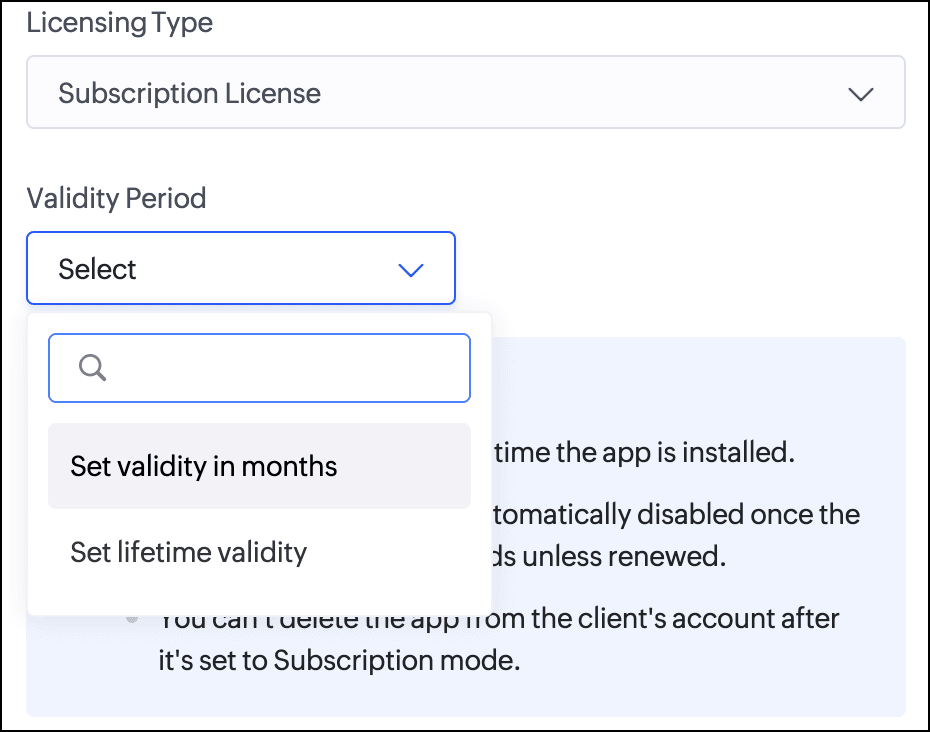
    Subscription License: Once you've finalized the subscription terms with your client, you can issue a subscription license. You have the option to set a fixed validity period in months (from 1 to 36) or grant lifetime access to the app.

Consequently, with the introduction of this new flow, we've implemented automated email reminders to keep clients informed about their subscription status and expiry timelines. Developers will be proactively notified about client subscription activity and upcoming license expirations. This ensures both parties stay in sync throughout the subscription lifecycle.

Documentation
To help you better understand these changes, we've provided comprehensive resources to assist you with the private sharing of applications. They can be accessed at the Understanding private distribution of apps help page.

Environment support for installed apps  
Along with the above enhancements, we're also introducing environment support for apps you've distributed. Your clients will now be able to add installed apps to environments and thoroughly test them in the staging environment before publishing them to production. This ensures the changes to apps are validated before they become accessible to end users.

This enhancement removes the earlier limitation that prevented distributed apps from being added to environments. Please note that while your clients can add distributed apps to environments, they will not have access to development. This continues our policy of protecting intellectual property and ensuring that developers remain in control of their apps.

For more information, visit the Installing and managing distributed apps help doc.

Timeline
These enhancements have already been rolled out and are now accessible to users in all DCs.

We believe this new enhancement to the private sharing feature will provide you with greater control and flexibility when distributing your Zoho Creator applications. We hope you love it!

We'll be back soon with more exciting updates, so stay tuned.

Regards,
The Zoho Creator Team

    Access your files securely from anywhere

        All-in-one knowledge management and training platform for your employees and customers.


                              Zoho Developer Community


                                                    • Desk Community Learning Series


                                                    • Digest


                                                    • Functions


                                                    • Meetups


                                                    • Kbase


                                                    • Resources


                                                    • Glossary


                                                    • Desk Marketplace


                                                    • MVP Corner


                                                    • Word of the Day


                                                    • Ask the Experts


                                                              • Sticky Posts

                                                              • Introducing Zoho Creator's 2025 Release Projection 2

                                                                Hello Creators! I'm Prakash, from the Creator product management team, and today I'm delighted to unveil our next set of features as part of Release Projection 2 for 2025. With thoughtful analysis and planning, we've curated powerful new capabilities
                                                              • Zoho Creator - 2023 Release Projection 1

                                                                Hello everyone! A very Happy New Year to you and your family. Hope you're all good and having a great time using Zoho Creator to make your lives easier and your businesses prosper. 2022 was an action-packed year for us at Creator, and we hope to continue
                                                              • Zoho Creator User Group meetups in a city near you! - Oct - Nov, 2023

                                                                Greetings from the Zoho Creator team! We're hosting a series of Zoho Creator meetups in various cities across the globe, and we'd love to meet you there! Our meetups are a great opportunity to network with industry peers, exchange ideas and best practices,
                                                              • Zoho Creator - 2023 Release Projection 2

                                                                Hello everyone! Time truly flies when you're having an incredible journey, and today we mark the completion of an eventful and action-packed six months. It feels like just yesterday when we embarked on this adventure together with the launch of our new
                                                              • Upcoming Updates - August 2022

                                                                Hi all, Greetings from the Zoho Creator team! Today we've got news for you on some exciting updates. And rest assured— there’s more to come! In this post, we'll be going over the upcoming features and improvements for this month as mentioned below. A


                                                              Manage your brands on social media


                                                                    Zoho TeamInbox Resources


                                                                        Zoho CRM Plus Resources

                                                                          Zoho Books Resources


                                                                            Zoho Subscriptions Resources

                                                                              Zoho Projects Resources


                                                                                Zoho Sprints Resources


                                                                                  Qntrl Resources


                                                                                    Zoho Creator Resources


                                                                                        Zoho CRM Resources

                                                                                        • CRM Community Learning Series

                                                                                          CRM Community Learning Series


                                                                                        • Kaizen

                                                                                          Kaizen

                                                                                        • Functions

                                                                                          Functions

                                                                                        • Meetups

                                                                                          Meetups

                                                                                        • Kbase

                                                                                          Kbase

                                                                                        • Resources

                                                                                          Resources

                                                                                        • Digest

                                                                                          Digest

                                                                                        • CRM Marketplace

                                                                                          CRM Marketplace

                                                                                        • MVP Corner

                                                                                          MVP Corner


                                                                                            Design. Discuss. Deliver.

                                                                                            Create visually engaging stories with Zoho Show.

                                                                                            Get Started Now


                                                                                              Zoho Show Resources

                                                                                                Zoho Writer

                                                                                                Get Started. Write Away!

                                                                                                Writer is a powerful online word processor, designed for collaborative work.

                                                                                                  Zoho CRM コンテンツ


                                                                                                    Nederlandse Hulpbronnen


                                                                                                        ご検討中の方


                                                                                                                • Recent Topics

                                                                                                                • Syncing zoho books into zoho crm

                                                                                                                  I was wondering how I can use zoho books in crm as I have been using them separately and would like to sync the two. Is this possible and if so, how? Thanks
                                                                                                                • Introducing a smarter, faster, and more flexible charting experience

                                                                                                                  Hello Zoho Sheet users, We're delighted to share the latest news about a major update to charts in Zoho Sheet! The new version supports dynamic data ranges, granular styling options, faster loading, and other interesting enhancements that allow you to
                                                                                                                • REFUND REQUEST FOR PLAN SUBSCRIPTION CANCELLED

                                                                                                                  I have cancelled my Zoho Books subscription and would like to request a full refund for the subscription. Kindly process the refund at your earliest convenience.
                                                                                                                • Connecting Airwallex in Zoho Books

                                                                                                                  I have a question. I’m trying to connect our Airwallex account to Zoho Books, but the integration does not seem to work. Could you please guide me on how to properly connect Airwallex? I need to see the expenses also, since it only shows the profits now
                                                                                                                • purchasing a pagkage

                                                                                                                  goodmorning i want to pay for my monthly package but your app is sayinng i have insufficient funds yet i loaded money on my account yesterday though in our currency of ugx
                                                                                                                • Edit Receipt, how?

                                                                                                                  Do you notice the big blank space in Receipt? I want to remove that. I know there is a template but that blank space, I can't seem to remove it. Please help. Thank you!
                                                                                                                • Can I export a TXF (TurboTax exchange format) file out of Zoho Books?

                                                                                                                  Hello, I'm trying to do my US Small Business Taxes using Intuit's Turbo Tax. Can I export my expenses from Zoho Books to a TXF format file, so that it can then be imported into Turbo Tax? Thanks, Rajnesh
                                                                                                                • Tax inclusive and exclusive for Sales invoices

                                                                                                                  Hello, where can I set my tax to be inclusive or exclusive for invoices in Zoho Books? There used to be a button for me to do that right above the products table. Can someone help me please? Thank you!
                                                                                                                • Unable to produce monthly P&L reports for previous years

                                                                                                                  My company just migrated to Books this year. We have 5+ years financial data and need to generate a monthly P&L for 2019 and a monthly P&L YTD for 2020. The latter is easy, but I'm VERY surprised to learn that default reports in Zoho Books cannot create
                                                                                                                • ZOHO Reports are taking longer time to get refresh

                                                                                                                  Hi Team, Since last few days, I'm facing issues in getting updated reports. For eg: right after making an expense entry or even posting a journal, it is taking longer then expected for the updated reports. Refer below: "You are viewing the report that
                                                                                                                • Dont want to list inactive items.

                                                                                                                  If an item is made inactive, there is no point in showing it in the item list. Please provide an option to hide all inactive items in 'Preferences'. 
                                                                                                                • audio and video comments in tasks in zoho projects

                                                                                                                  Hi, is it planned to have the ability to post audio and video comments? the whatsapp wechat format of communicating is a reality... tools like zoho project would facilitate a lot teamwork by facilitating the way in which we can give feedback in audio and video rather than only text. thx!
                                                                                                                • Questions Regarding Helpdesk & SalesIQ Customization and Email Setup

                                                                                                                  Hello, I hope you’re doing well. I have a few questions regarding Helpdesk and SalesIQ: Can the emails sent to customers via helpdesk tickets be fully customized — including signature, subject line, and other elements? Also, is it possible to send these
                                                                                                                • Looking for Zoho + Twilio Automation Specialist (Duda Website Integration)

                                                                                                                  Hi everyone, I’m looking for an experienced Zoho specialist to help build a mostly automated CRM and booking system for my service business. I already have a live website built on Duda.co and need help integrating my existing forms into Zoho CRM (no rebuild
                                                                                                                • Ask the Experts 27: Onboarding and managing support reps

                                                                                                                  Hello everyone, We are back with our Ask the Experts (ATE) series for 2026. This year, we bring experts to help you address customer support challenges using Zoho Desk. For our first ATE, we are getting into the human side of customer support. "Every
                                                                                                                • Salesforceに添付ファイルを格納したい

                                                                                                                  お世話になっております。 Salesforceに添付ファイルを格納したく、カスタムオブジェクトに連携し、 「ファイルのアップロード」項目を設けました。 実際、エラーもなく送信出来たのですが、実際生成されたカスタムオブジェクトのレコードを見ると、どこにも添付ファイルがありません。仕様として、この添付ファイルはSalesforceのどこに格納されるのでしょうか? 今回作りたいフォームは、複数の書類を添付するため、Zohoformのファイルアップロード項目「本人確認書類」「源泉徴収票」などの項目を、Salesforce側にも設けた「本人確認書類」「源泉徴収票」という各項目にURLリンクとして紐づけたいと思っておりました。
                                                                                                                • Zoho CRM For Everyone UI Rollout Begins for All Users

                                                                                                                  Hello Partners, We have started rolling out the new Zoho CRM For Everyone UI as the default experience for all users. This update is being released in three phases based on organization size and account type. We want to keep you informed of the rollout
                                                                                                                • Migrating all workflows to another Zoho account

                                                                                                                  We are going to transfer into another company, and we are going to get new emails and new Zoho accounts. Is there a way to migrate (or save in some sort of external file) all presets and settings that we have on this account? That includes primarily workflows,
                                                                                                                • How to retreive the "To be received" value of an Item displayed in Zoho inventory.

                                                                                                                  Hi everyone, We have our own Deluge code to generate a PO according to taget quantity and box quantity, pretty usefull and powerful! However, we want to reduce our quantity to order according to "To be received" variable. Seems like this might not even
                                                                                                                • Introducing Explainer Videos for Zoho Desk: Solve everyday challenges with simple configurations

                                                                                                                  Dear everyone, We have created a set of short explainer videos that show how common support scenarios can be handled using simple configurations within the product. The solutions often lie in the plain sight, but go unnoticed. Through these videos we
                                                                                                                • Notifications Feeds unread count?

                                                                                                                  How do I reset the unread count on feeds notifications?  I've opened every notification in the list.  And the count never goes to zero.
                                                                                                                • Simple reliable solution to convert MSG files for AOL Mail?

                                                                                                                  A simple and reliable way to convert MSG files for AOL Mail is by using a professional tool MacGater Mac MSG Converter. This software allows users to quickly convert MSG files into formats compatible with AOL, such as MBOX or direct email migration. It
                                                                                                                • Zoho One Support is non existent...

                                                                                                                  I've tried through Email, Chat, this community and finally through Phone. There is no way to receive an answer. Email = over a week and no answer Chat = not available Community = no answer at all Telephone = after clicking myself through the callcenter
                                                                                                                • Disable Zoho Contacts

                                                                                                                  We don't want to use this app... How can we disable it?
                                                                                                                • Custom module - change from autonumber to name

                                                                                                                  I fear I know the answer to this already, but thought I'd ask the question. I created a custom module and instead of having a name as being the primary field, I changed it to an auto-number. I didn't realise that all searches would only show this reference.
                                                                                                                • Edit a previous reconciliation

                                                                                                                  I realized that during my March bank reconciliation, I chose the wrong check to reconcile (they were for the same amount on the same date, I just chose the wrong check to reconcile). So now, the incorrect check is showing as un-reconciled. Is there any way I can edit a previous reconciliation (this is 7 months ago) so I can adjust the check that was reconciled? The amounts are exactly the same and it won't change my ending balance.
                                                                                                                • How to add "All Open AND Overdue" back to the Home Page Task Component?

                                                                                                                  Hi everyone, I’m looking for a way to restore the Tasks component dropdown list on the Zoho CRM Home Page. Since the recent update to the Task area in my Home Page Classic View, the dropdown options (e.g., My Next 7 Days + Overdue) are too restrictive
                                                                                                                • Dynamic Questions in Zoho Forms

                                                                                                                  Is it possible to add dynamic questions (like displaying a user’s name) in Zoho Forms? I know this is possible in surveys, but can we implement similar functionality in Zoho Forms?
                                                                                                                • Introducing Zoho MCP for Bigin

                                                                                                                  Hello Biginners! We're excited to introduce Zoho MCP for Bigin, a completely new way of interacting with Bigin data using AI. With Zoho MCP, you can securely connect your Bigin account with popular AI tools like Claude, Cursor, Windsurf, and VS Code,
                                                                                                                • associating products with accounts

                                                                                                                  I have all my accounts and products in zoho now.  I need to generate a sales order for an account.  The product lookup feature on the sales order shows no products...how can I get them to appear. 
                                                                                                                • Three Zoho Billing Limitations Blocking Standard Subscription Operations

                                                                                                                  After working through Zoho Billing support for over a year on these three issues without resolution, we wanted to flag them to the broader community. We are curious whether other businesses are running into the same walls. 1. Cannot Prepone (Move Earlier)
                                                                                                                • SAP Business One(B1) integration is now live in Zoho Flow

                                                                                                                  We’re excited to share that SAP Business One (B1) is now available in Zoho Flow! This means you can now build workflows that connect SAP B1 with other apps and automate routine processes without relying on custom code. Note: SAP Business One integration
                                                                                                                • Built-in Date Functions in Zoho Analytics Query Tables

                                                                                                                  I have a doubt about whether Zoho Analytics Query Tables provide built-in functions for start date, end date, and the current month
                                                                                                                • [Action Required] : Update Shopify Access Scope to fetch complete order history

                                                                                                                  Hello Shopify Users! Shopify has updated the access scope for apps under developer portal. With this change, the read_orders scope now provides access only to the last 60 days of order history. To access older historical orders, Shopify requires a separate
                                                                                                                • Enhancements for Currencies in Zoho CRM: Automatic exchange rate updates, options to update record exchange rates, and more

                                                                                                                  The multi-currency feature helps you track currencies region-wise. This can apply to Sales, CTC, or any other currency-related data. You can record amounts in a customer’s local currency, while the CRM automatically converts them to your home currency
                                                                                                                • Advance Payment Record Removed When Deleting Applied Credit from Bill

                                                                                                                  Hello, So while working with vendor advance payments, I noticed that removing the applied credit from a bill also removes the corresponding entry from the Payments Made section. What I did : Recorded an advance payment to a vendor through Payments Made.
                                                                                                                • How to Connect Zoho Books with e-Way Bill Portal (Step-by-Step Guide)

                                                                                                                  Integrating Zoho Books with the e-Way Bill portal helps automate your logistics and compliance process. Follow the steps below to set it up easily: 🚀 How to Connect Zoho Books with e-Way Bill Portal (Step-by-Step Guide) Integrating Zoho Books with the
                                                                                                                • Is there a way to update all the start and end dates of tasks of a project after a calendar change?

                                                                                                                  Hi! Here's my situation. I've built a complete project planning. All its tasks have start dates and due dates. After completing the planning, I've realized that the project calendar was not the right one. So I changed the project calendar. I now have
                                                                                                                • Lookup fields can't be used for anything important

                                                                                                                  Hi It seems the lookup fields are mostly.... informative, you can at most link stuff between modules... You can't use lookup fields in blueprints, you can't use them in layout rules or anything... It that correct?
                                                                                                                • Sales Allowed Beyond Available Stock and Payment Recorded Without Restriction

                                                                                                                  Hi, While testing in Zoho Inventory, I noticed that a sales order can be created with a quantity exceeding the available stock in the selected warehouse. In my case: Available stock: 5 units Ordered quantity: 6 units Despite this: I was able to convert
                                                                                                                • Next Page