Zoho Campaigns' ecommerce solutions for Shopify - Online Help | Zoho Campaigns

Ecommerce solutions for Shopify

If your store is on the Shopify basic plan, your contacts and their order related information can not be synced to your Zoho Campaigns account.

The Zoho Campaigns and Shopify integration is mainly designed to bridge the gap between your marketing efforts and ecommerce activities. This integration lets you:
  1. Import your products into Zoho Campaigns for promotions.
  2. Import your customers and their details.
  3. Import the details of orders placed in your store.
  4. Gain detailed insights on your total and average store revenue.
If you've already integrated with Shopify, you can access Zoho Campaigns' ecommerce solution for your Shopify store by disconnecting and re-integrating your Shopify account.
If you re-integrate your Shopify account, existing syncs that you have with Shopify will be disabled.

To connect your Shopify store:
  1. From the navigation toolbar select Ecommerce.
  2. Take a quick look at what happens if you connect your store with Zoho Campaigns.
  3. Integrate with Shopify if you haven't done it yet.
  4. Upon integrating, your online store and the data in it (customers, products, store domain, currency used) will be connected and synced with Campaigns.
Note : You can integrate only one of your Shopify store into Zoho Campaigns. 
Now, let's see the different subtabs in Zoho Campaigns with the integration. 

Shopify - Summary

In this section, you can see:
  1. Total number of orders placed in your store.
  2. Total revenue generated in your store.
  3. Average revenue of your store.
  4. Note: Total revenue calculated will be inclusive of all the taxes and the shipping charges.

Zoho Campaigns - Summary

In this section, you can see:
  1. Total number of promotional emails sent from Campaigns.
  2. Total number of automated emails created here.
  3. Total number of orders placed via the promotions sent from Campaigns.
  4. Average revenue generated.
  5. Total revenue generated via Campaigns.

Store products

In this sub tab, you can see your store's products, the product codes, price and the time when they were added or modified.

Customers

Your store's customers will be listed in the Customers subtab with all their details. Select individual customers to learn more details about them, such as the purchase they made, revenue they've generated, their most recent purchase, and more. In Campaigns, your customers will be divided into two categories.

Marketing allowed

These are the customers who have opted in for and are eligible to receive emails from you. These customers, at some point of time, might have entered their email addresses on your website and opted in to receive emails from your store.

Marketing not allowed

These are the customers who might have either not subscribed to your newsletters or might have unsubscribed or opted out to receive emails from your store. Customers who enter their email addresses in any of your forms but did not check the box to receive emails from your store will be considered as Marketing not allowed.


Create promotion

To create a product promotional email campaign:
  1. From the navigation toolbar choose Ecommerce.
  2. Click Create in the top-right corner of the page and click Promotional Email or click Create Promotion in the Promotion subtab.
  3. Enter the basic info of the campaign and click Next.
  4. Select the products that you want to promote in the campaign.
  5. Select the mailing lists to which you want to send the campaign.
Alternatively, you can create a promotional campaign for your online store just like how you create a advanced campaign.
  1. From the navigation toolbar, choose Email Campaigns.
  2. Click Create Campaign in the top-right corner.
  3. Scroll down to the Ecommerce section and click Create New dropdown.

  4. Select either Regular campaign or A/B test based on your choice.
  5. Select the store for which would you like to create a promotional campaign.
  6. Integrate with Shopify if you haven't done so yet.
  7. Enter the basic info of the campaign and click Next.
  8. Select a template for your campaign.
  9. Use the Product component in the template editor to add your store products in the content.
  10. Choose the mailing lists to which you want to send the campaign.
  11. Send your campaign.

Automated emails

One of the most crucial parts of your sales funnels is customer workflows and re-engagement using automated follow-up emails. Interpreting the process that customers undergo when they explore, analyze, and purchase from you is essential to know the next step that you need to take to keep the engagement pushing along the way. There are two types of automated emails that you can create for your customers.
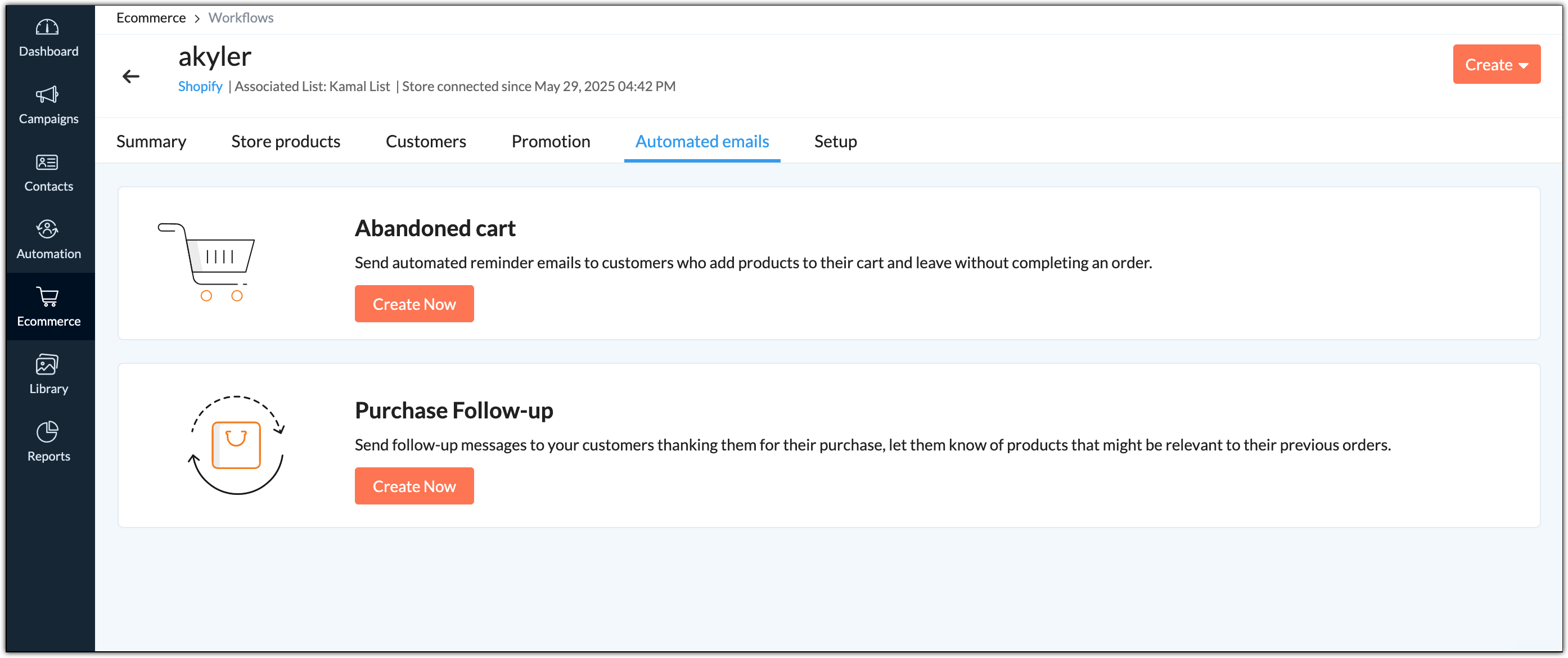
  1. Abandoned cart: Send automated reminder emails to customers who add products to their cart and leave without completing an order using Abandoned cart template.
  2. Purchase follow-up: Send follow-up messages to your customers thanking them on their purchase, let them know of products that might be relevant to their previous orders using Purchase follow-up. This template will be triggered only on completion of a purchase.

Segmentation

Segment your customers based on the items they have or have not purchased, average and the total amount they have spent on purchases, total orders, and the most recent order they have placed. Segment your customers based on a certain criteria for personalized and relevant marketing communications with them. To create a segment for your ecommerce customers:
  1. From the navigation toolbar, choose Contacts and select Manage lists.
  2. Select the mailing list that you have connected with your store to manage your customers.
  3. Choose Segments subtab at the top and click Segment from the dropdown.
  4. Click the top-right Add icon and select Segment from the dropdown.
  5. Alternatively, from the navigation toolbar, choose Contacts and select Segments.
  6. Click Create button on the top-right corner and select Segment or Bulk Segment.
  7. In segment creation page, do the following:
    1. Name - Give a name to your segment.
    2. Criteria - In this case, select a relevant ecommerce criteria.
  8. Click Save.
Note:
  1. You can choose to set more than one criteria while creating segments.
  2. Segments created before November 17, 2021 will be listed under the respective mailing lists until September 30, 2022. You cannot edit these segments, however you can clone them.
  3. Segments created after November 17, 2021 are organization-level segments and they will be listed under Contacts -> Segments.


        Create. Review. Publish.

        Write, edit, collaborate on, and publish documents to different content management platforms.

        Get Started Now


          Access your files securely from anywhere

            Zoho CRM Training Programs

            Learn how to use the best tools for sales force automation and better customer engagement from Zoho's implementation specialists.

            Zoho CRM Training
              Redefine the way you work
              with Zoho Workplace

                Zoho DataPrep Personalized Demo

                If you'd like a personalized walk-through of our data preparation tool, please request a demo and we'll be happy to show you how to get the best out of Zoho DataPrep.

                Zoho CRM Training

                  Create, share, and deliver

                  beautiful slides from anywhere.

                  Get Started Now


                    Zoho Sign now offers specialized one-on-one training for both administrators and developers.

                    BOOK A SESSION


                                Quick LinksWorkflow AutomationData Collection
                                Web FormsEnterpriseOnline Data Collection Tool
                                Embeddable FormsBankingBegin Data Collection
                                Interactive FormsWorkplaceData Collection App
                                CRM FormsCustomer ServiceAccessible Forms
                                Digital FormsMarketingForms for Small Business
                                HTML FormsEducationForms for Enterprise
                                Contact FormsE-commerceForms for any business
                                Lead Generation FormsHealthcareForms for Startups
                                Wordpress FormsCustomer onboardingForms for Small Business
                                No Code FormsConstructionRSVP tool for holidays
                                Free FormsTravelFeatures for Order Forms
                                Prefill FormsNon-Profit

                                Intake FormsLegal
                                Mobile App
                                Form DesignerHR
                                Mobile Forms
                                Card FormsFoodOffline Forms
                                Assign FormsPhotographyMobile Forms Features
                                Translate FormsReal EstateKiosk in Mobile Forms
                                Electronic Forms
                                Drag & drop form builder

                                Notification Emails for FormsAlternativesSecurity & Compliance
                                Holiday FormsGoogle Forms alternative GDPR
                                Form to PDFJotform alternativeHIPAA Forms
                                Email FormsFormstack alternativeEncrypted Forms

                                Wufoo alternativeSecure Forms

                                TypeformWCAG


                                    All-in-one knowledge management and training platform for your employees and customers.

                                              Create. Review. Publish.

                                              Write, edit, collaborate on, and publish documents to different content management platforms.

                                              Get Started Now


                                                                You are currently viewing the help pages of Qntrl’s earlier version. Click here to view our latest version—Qntrl 3.0's help articles.


                                                                    Manage your brands on social media


                                                                      • Desk Community Learning Series


                                                                      • Digest


                                                                      • Functions


                                                                      • Meetups


                                                                      • Kbase


                                                                      • Resources


                                                                      • Glossary


                                                                      • Desk Marketplace


                                                                      • MVP Corner


                                                                      • Word of the Day


                                                                      • Ask the Experts


                                                                        Zoho Sheet Resources


                                                                            Zoho Forms Resources


                                                                              Secure your business
                                                                              communication with Zoho Mail


                                                                              Mail on the move with
                                                                              Zoho Mail mobile application

                                                                                Stay on top of your schedule
                                                                                at all times


                                                                                Carry your calendar with you
                                                                                Anytime, anywhere


                                                                                      Zoho Sign Resources

                                                                                        Sign, Paperless!

                                                                                        Sign and send business documents on the go!

                                                                                        Get Started Now


                                                                                                Zoho TeamInbox Resources


                                                                                                          Zoho DataPrep Demo

                                                                                                          Get a personalized demo or POC

                                                                                                          REGISTER NOW


                                                                                                            Design. Discuss. Deliver.

                                                                                                            Create visually engaging stories with Zoho Show.

                                                                                                            Get Started Now


                                                                                                                                • Related Articles

                                                                                                                                • Ecommerce Solutions FAQ

                                                                                                                                  Integrating with Shopify 1. How do I connect Zoho Campaigns to the user’s Shopify store? If the customer is subscribed to the Basic plan in Shopify, they will not be able to integrate Shopify into Zoho Campaigns. It only works when the customer ...
                                                                                                                                • Purchase Follow-ups

                                                                                                                                  Post-purchase period is an important point in a customer's journey. Sending purchase follow-up emails helps you generate stronger customer loyalty, more repeat purchases, and above all it helps your customers to stay connected to your brand. ...
                                                                                                                                • Shopify Campaigns

                                                                                                                                  Disclaimer: This is the help page for users who have already associated their Shopify store and want to import contacts and send email campaigns. If you’re looking for ecommerce solutions for Shopify, click here. Zoho Campaigns integrates with ...
                                                                                                                                • Import contacts from Shopify

                                                                                                                                  Disclaimer: This is the help page for users who have already associated their Shopify store and want to import contacts and send email campaigns. If you’re looking the help page for ecommerce solutions for Shopify, click here. Zoho Campaigns enable ...
                                                                                                                                • Ecommerce - Troubleshooting Guide

                                                                                                                                  Connecting a store with Zoho Campaigns Only one store can be integrated with an organization. If you have more than one store, you need separate organizations to integrate each store. Only users with administrator role can connect Zoho Campaigns with ...
                                                                                                                                  Wherever you are is as good as
                                                                                                                                  your workplace

                                                                                                                                    Resources

                                                                                                                                    Videos

                                                                                                                                    Watch comprehensive videos on features and other important topics that will help you master Zoho CRM.


                                                                                                                                    eBooks

                                                                                                                                    Download free eBooks and access a range of topics to get deeper insight on successfully using Zoho CRM.


                                                                                                                                    Webinars

                                                                                                                                    Sign up for our webinars and learn the Zoho CRM basics, from customization to sales force automation and more.


                                                                                                                                    CRM Tips

                                                                                                                                    Make the most of Zoho CRM with these useful tips.


                                                                                                                                      Zoho Show Resources