Create a consent email - Online Help | Zoho Campaigns

Creating a consent email

  1. This feature will not be available for accounts created after September 22, 2021. You can send consent emails using consent merge tags.
  2. This feature will be available for accounts created before the above mentioned date, but won't be able to create or edit the consent emails. However, scheduled mails will be sent as configured. 
Creating a consent email for your contacts allows you to get their permission before sending out newsletters about your business or product. Getting a contact's consent is a two step process.
There are three types of consent email that you can send:
  1. Instant consent email: Select this type of email if you want to send a consent email to your contacts as soon as they join the mailing lists in your organization.
    Once you set up an instant consent email, it will automatically be sent to contacts as soon as they join. You need not have to wait for an interval for sending the email.
  2. Recurring consent email: Select this type if you want to send your consent emails at fixed intervals. You can set a time at which the email will be sent out. This is recurring because an email will be sent regularly at intervals unless you stop/pause it.
  3. Standard consent email: Standard consent email is more like a one-time email. Create this email, send it to mailing lists of your choice, and get consent from the contacts in those mailing lists. This email is not recurring so you'll have to create a new email each time when you select this type.
  1. Select Contacts from the Navigation toolbar, then click Manage Topics.
  2. Click Create Consent Email on the top-right corner of the page.
  3. Select any one from the three types of consent email.
  4. Enter a name for the email.
  5. Choose a purpose.

  6. Choose how would you like to get consent
    1. Zoho Campaigns - If you select this and if you use the default consent email template that we provide, the options for Consent and Deny will be added automatically. If you select any other template, you have to add the consent and deny merge tags manually.
    2. Zoho CRM Form - Select this if you want to send the Zoho CRM form to obtain consent from the contacts that you have synced from Zoho CRM.
      Required merge tags will be added by default in the templates that we provide. For templates other than that, you'll have to add the Zoho CRM merge tags. Form that you have created in Zoho CRM will be used here. Note that you can use this form only when you have enabled Compliance Settings in Zoho CRM. The consent that you obtain from your contacts will be updated only in Zoho CRM.
  7. Choose recipients: Select if you want to send the consent email to all your mailing lists or specific mailing lists.
  8. Click Create.
  9. Create your consent email just as you create an email campaign.
  10. Ensure that your email content has the merge tags for Consent and Deny.
While creating a Recurring Consent Email, you need to set the time at which the email will be sent to your contacts.


Use case:

What will happen if I opt to get consent via Zoho Campaigns?

If you've chosen Zoho Campaigns to receive consent, there are two options to add content.

Case 1: You can choose a consent based email templates that has inbuilt Call to action (CTA) for Consent and Deny.

Case 2: You can create the email content using any predesigned template or other content options such as HTML editor. In these cases, you have to manually add Consent and Deny in your content by adding the merge tags $[LI:EMAILCONSENT]$ and $[LI:DENY_EMAIL_CONSENT]$ in your email content.

  1. To add merge tag, navigate through Email Template's Editor and select Merge Tags and click Consent Merge Tags.

  2. Add the merge tags for consent and deny.
What will happen if I opt to get consent via Zoho CRM Form?
If you've chosen Zoho CRM forms to receive consent, there are two options to add content.

Case 1: You can choose a consent based email templates that has inbuilt Call to action (CTA) for Consent.

Case 2: You can create the email content using any predesigned template or other content options such as HTML editor. In these cases, you have to manually add Consent in your content by adding the merge tags $[LI:EMAILCONSENT]$ in your email content. Once a contact clicks the Consent button, he'll be taken to a CRM form where he can give his consent.
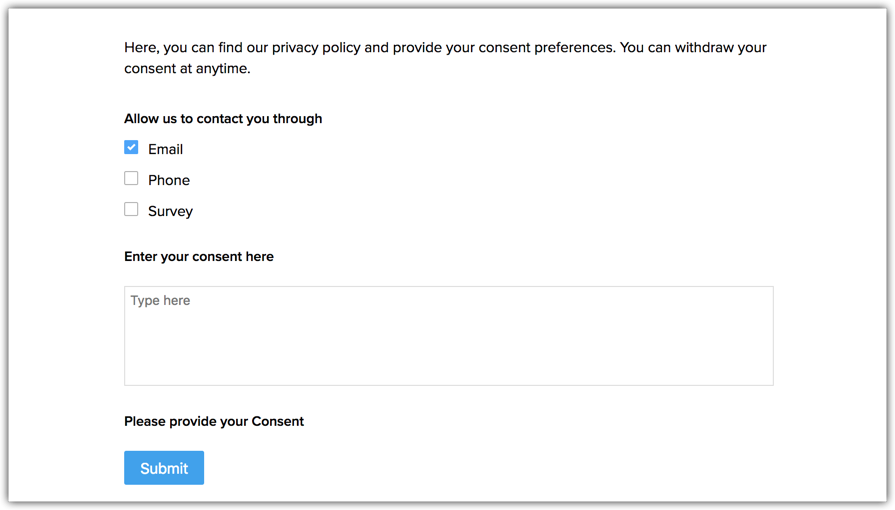
Multiple Purposes in GDPR compliant email marketing

When you have multiple purposes in GDPR compliant email marketing, you will have to select the purposes to which you want to send the consent email. After selecting a purpose, you should choose the contacts to whom you want send the consent email. You can either choose to send the email to all the contacts under that purpose or to contacts in specific mailing lists.
  1. Add basic details for your consent email and click Next.
  2. Select a consent email template to add content.
  3. Click Save and Proceed.
  4. Click Start Now to start the consent series immediately or click Schedule for Later to send it at a specified time.

Creating a reminder email

Schedule reminder consent emails to be sent to recipients who have not replied to your original email. A maximum of two reminder emails can be sent to contacts who have not granted consent to receive your emails.
  1. From the Navigation toolbar, select Contacts.
  2. Select Manage Topics and click Emails.
  3. Mouse over the email for which you want to create reminder emails and click on the View Reports icon on its right corner.
  4. Click View Details on the top-right corner of the page and click Create Message under First Reminder email.
  5. Create the reminder email following the steps mentioned under Creating content for the consent email above.
  6. Set a date for the reminder email to be sent.
  7. Follow steps 1-5 to create the second reminder email.
Note: Reminder emails should only be sent two days after the previous consent email.

Consent Dashboard provides a detail view on the consent status of your contacts and summarizes the various details in different views.

Your purpose of sending email
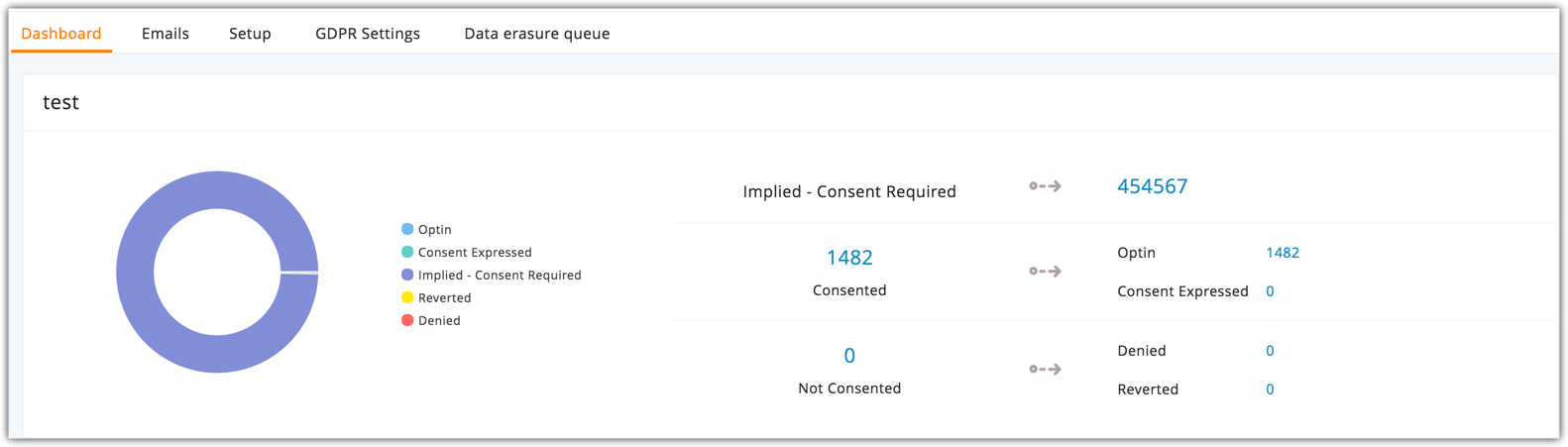
The first section of the dashboard shows the purpose that you have mentioned, for sending emails to your contacts. It displays the data processing basis that you have mentioned for that purpose and the statistics of the contacts who have expressed their consent and who have denied consent.
In this section, you can see the consent status of all your contacts.
In this section, you can see the details and status of the consent email and reminder emails that you have sent.


        Create. Review. Publish.

        Write, edit, collaborate on, and publish documents to different content management platforms.

        Get Started Now


          Access your files securely from anywhere

            Zoho CRM Training Programs

            Learn how to use the best tools for sales force automation and better customer engagement from Zoho's implementation specialists.

            Zoho CRM Training
              Redefine the way you work
              with Zoho Workplace

                Zoho DataPrep Personalized Demo

                If you'd like a personalized walk-through of our data preparation tool, please request a demo and we'll be happy to show you how to get the best out of Zoho DataPrep.

                Zoho CRM Training

                  Create, share, and deliver

                  beautiful slides from anywhere.

                  Get Started Now


                    Zoho Sign now offers specialized one-on-one training for both administrators and developers.

                    BOOK A SESSION


                                Quick LinksWorkflow AutomationData Collection
                                Web FormsEnterpriseOnline Data Collection Tool
                                Embeddable FormsBankingBegin Data Collection
                                Interactive FormsWorkplaceData Collection App
                                CRM FormsCustomer ServiceAccessible Forms
                                Digital FormsMarketingForms for Small Business
                                HTML FormsEducationForms for Enterprise
                                Contact FormsE-commerceForms for any business
                                Lead Generation FormsHealthcareForms for Startups
                                Wordpress FormsCustomer onboardingForms for Small Business
                                No Code FormsConstructionRSVP tool for holidays
                                Free FormsTravelFeatures for Order Forms
                                Prefill FormsNon-Profit

                                Intake FormsLegal
                                Mobile App
                                Form DesignerHR
                                Mobile Forms
                                Card FormsFoodOffline Forms
                                Assign FormsPhotographyMobile Forms Features
                                Translate FormsReal EstateKiosk in Mobile Forms
                                Electronic Forms
                                Drag & drop form builder

                                Notification Emails for FormsAlternativesSecurity & Compliance
                                Holiday FormsGoogle Forms alternative GDPR
                                Form to PDFJotform alternativeHIPAA Forms
                                Email FormsFormstack alternativeEncrypted Forms

                                Wufoo alternativeSecure Forms

                                TypeformWCAG


                                      All-in-one knowledge management and training platform for your employees and customers.

                                                Create. Review. Publish.

                                                Write, edit, collaborate on, and publish documents to different content management platforms.

                                                Get Started Now


                                                                  You are currently viewing the help pages of Qntrl’s earlier version. Click here to view our latest version—Qntrl 3.0's help articles.


                                                                      Manage your brands on social media


                                                                        • Desk Community Learning Series


                                                                        • Digest


                                                                        • Functions


                                                                        • Meetups


                                                                        • Kbase


                                                                        • Resources


                                                                        • Glossary


                                                                        • Desk Marketplace


                                                                        • MVP Corner


                                                                        • Word of the Day


                                                                        • Ask the Experts


                                                                          Zoho Sheet Resources


                                                                              Zoho Forms Resources


                                                                                Secure your business
                                                                                communication with Zoho Mail


                                                                                Mail on the move with
                                                                                Zoho Mail mobile application

                                                                                  Stay on top of your schedule
                                                                                  at all times


                                                                                  Carry your calendar with you
                                                                                  Anytime, anywhere


                                                                                        Zoho Sign Resources

                                                                                          Sign, Paperless!

                                                                                          Sign and send business documents on the go!

                                                                                          Get Started Now


                                                                                                  Zoho TeamInbox Resources


                                                                                                            Zoho DataPrep Demo

                                                                                                            Get a personalized demo or POC

                                                                                                            REGISTER NOW


                                                                                                              Design. Discuss. Deliver.

                                                                                                              Create visually engaging stories with Zoho Show.

                                                                                                              Get Started Now


                                                                                                                                  • Related Articles

                                                                                                                                  • GDPR - Troubleshooting guide

                                                                                                                                    General Data Protection Regulation regulates the collection and processing of personal information of EU residents. This provides EU residents with complete authority over their data.   According to GDPR, EU residents have the right to know that ...
                                                                                                                                  • Other consent activities

                                                                                                                                    These features will not be available for accounts created after September 22, 2021 This tab will be visible for accounts created before the above mentioned date, but won't be able to create or edit the consent emails. However, you can delete and push ...
                                                                                                                                  • Managing Email Open Tracking in Zoho Campaigns 3.0

                                                                                                                                    What is email open tracking Email open tracking embeds a tiny, invisible image (1×1 pixel) into your email. When a recipient opens the message, that image loads from Zoho's servers. This tells you the email was opened, at what time, and from what ...
                                                                                                                                  • Managing Email Tracking and Email Frequency

                                                                                                                                    This feature is available for Zoho Campaigns accounts migrated to the new version of Topic management. Contacts use signup forms to signup with your website/brand and subscribe to the email campaigns. Some contacts may have unwittingly subscribed to ...
                                                                                                                                  • Topics

                                                                                                                                    We have recently updated Topics in Zoho Campaigns. Please click here for the updated help document . Using Zoho Campaigns, you can categorize your mailing lists under different topics so that you send your contacts the right emails. Let them choose ...
                                                                                                                                    Wherever you are is as good as
                                                                                                                                    your workplace

                                                                                                                                      Resources

                                                                                                                                      Videos

                                                                                                                                      Watch comprehensive videos on features and other important topics that will help you master Zoho CRM.


                                                                                                                                      eBooks

                                                                                                                                      Download free eBooks and access a range of topics to get deeper insight on successfully using Zoho CRM.


                                                                                                                                      Webinars

                                                                                                                                      Sign up for our webinars and learn the Zoho CRM basics, from customization to sales force automation and more.


                                                                                                                                      CRM Tips

                                                                                                                                      Make the most of Zoho CRM with these useful tips.


                                                                                                                                        Zoho Show Resources

