No duplicate values
Understand preventing duplicate values in form fields

-
Applicable to the following fields: single line, email, number, percent, decimal, currency, date, date-time, and users
- Learn how to enable the No duplicate values field property
Enabling the
No duplicate values
property for a
field
forces your users to enter a unique input - an input that no existing record has in that field. Until your users enter a unique input, they will be unable to submit your form.
This validation is triggered only when your users enter an input in that field and submit the form. If your users do not enter an input, i.e., leave the field blank, form submission will not be failed. (Only when your users enter a value can the presence of duplicate values be searched)
For example, when you enable this property for an email field on your form, the below given is what happens when a user enters a duplicate email address (one that's already present in an existing record) and submits your form from a web browser:
-
The Invalid entries found message appears in a pop-up window.
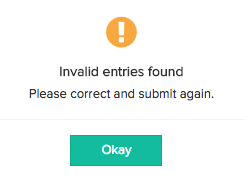
-
Clicking Okay closes this pop-up and displays a message below that email field.
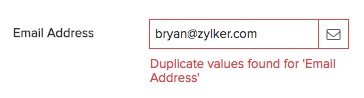
When a user enters a duplicate email address and submits your form from a phone or tablet:
- The Invalid entries found message appears in a pop-up window.
- Clicking Done closes this pop-up and displays a message below that email field.