Understanding databridge
In a nutshell
Databridge in Zoho Creator lets your applications securely access data from services and databases hosted within your private network. It works by establishing an outbound connection from your network to Zoho Creator and relay information through a secure tunnel ensuring a controlled data access without exposing your internal data sources to the internet.
Availability
- Roles and permissions -
- Developers can use configured databridges to create connections and integrate applications with locally hosted services.
- Supported operating systems are: Windows, macOS, and Linux. Learn more about the system requirements
1. Overview
Organizations often store critical data in on-premise or privately hosted systems, including legacy databases and services protected by firewalls. These systems cannot be directly accessed from Zoho Creator cloud due to security and compliance requirements.
Without a secure bridge, applications must rely on manual data exports or duplicate records to bridge this gap, leading to delays, inconsistencies, and increased operational overhead.
Without a secure bridge, applications must rely on manual data exports or duplicate records to bridge this gap, leading to delays, inconsistencies, and increased operational overhead.
Databridge in Zoho Creator, powered by Qntrl, solves this by creating a secure communication channel between your Creator applications and your internal network, so your apps can perform data operations such as fetching, submitting, or updating records against systems that are not exposed to the internet.
For example, a Creator app can fetch customer records from an on-premises Oracle database without making the database publicly accessible.

Note: Configuring Qntrl integration under System Integrations is a prerequisite for setting up databridge.
1.1 How databridge works
Databridge enables communication between Zoho Creator and your internal network using an outbound connection model. A typical data operation flow through databridge is as follows:
- Creator application initiates a request: A form, report, workflow, or custom function in your Creator application triggers a data operation against a privately hosted service.
- Request is routed to databridge: The request is securely relayed from Zoho Creator to the databridge installed on your server.
- Databridge connects to the internal source: Databridge, running on your network, accesses the configured privately hosted service or database.
- Data operation is performed: Databridge fetches, submits, or updates the requested records on the hosted service.
- Response is returned to Creator: The result is sent back to your Creator application over the same secure channel.
Since the connection is initiated from within your network, your firewall does not need to allow inbound access. Your internal services and databases remain private while still being accessible to your applications when needed.
Where Databridge is used
Data operations are typically performed through databridge in scenarios such as:
- Loading records into forms or reports
- Pushing data from form entries into the privately hosted service
- Fetching or pushing data during workflows and approvals
- Reading and writing information through custom functions or integrations
- Accessing external data sources configured in your application
2. Use cases
The following scenarios illustrate how Databridge can be used to connect Zoho Creator applications with privately hosted services across different business contexts.
(i) Accessing an on-premises finance database
A financial organization uses Zoho Creator to manage audit workflows and compliance reporting. Its transaction records are stored in an on-premises Oracle database, protected by internal firewalls.
When an auditor opens the Creator report, the application sends a query through databridge to the Oracle database. Databridge relays the request over a secure outbound tunnel, retrieves the relevant records, and returns them to the Creator report all without exposing the database to the internet.
Auditors access up-to-date transaction data directly within Creator, and the organization continues to meet its compliance requirements without changes to its existing infrastructure.
ii) Pushing data back to an internal system
A manufacturing company runs its shop floor operations on a Manufacturing Execution System (MES), a privately hosted system that tracks production orders, machine performance, and shift schedules on an on-premises SQL Server database. The MES offers no built-in dashboard or mobile access, leaving supervisors dependent on manual log entries and periodic exports, resulting in reporting delays and repetitive data entry across shifts.
The company uses Zoho Creator to build a modern operations layer over the MES without replacing it. A Creator page pulls live production data including machine utilization, order completion rates, and quality metrics from the MES through a Databridge connection configured with the SQL Server connector. Floor supervisors use a Creator form on mobile to log downtime events and update production order statuses, with each submission writing the record back to the MES database through the same connection. A Creator report gives plant managers a consolidated view of shift performance, accessible from any device.
The MES continues to function as the system of record with no changes to its architecture. Supervisors update records from the shop floor on mobile, managers track operations through a live dashboard, and the manual reporting cycle is eliminated, all while the MES database remains on the internal network, accessed securely through Databridge.
3. Navigation guide to configure databridge
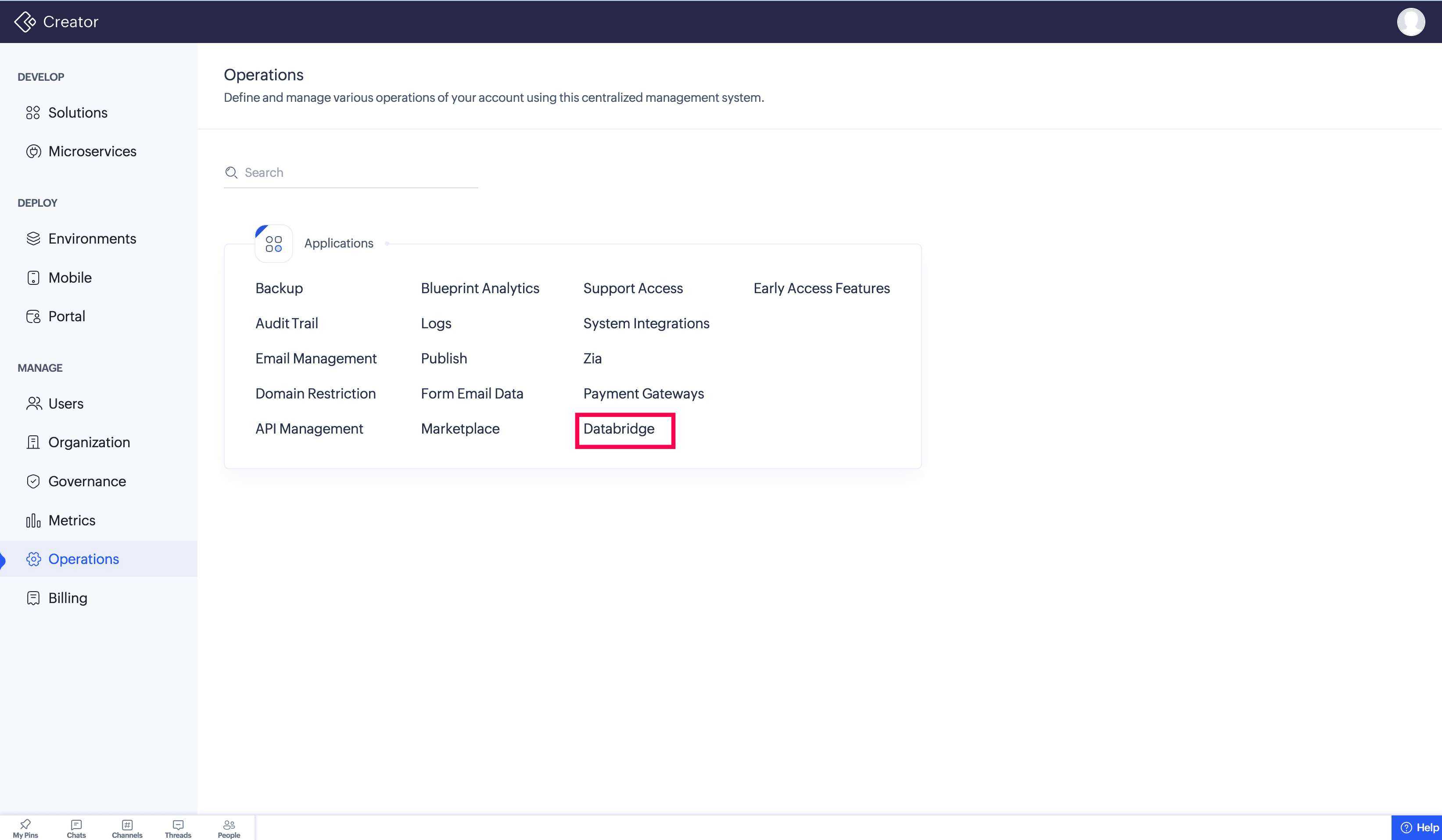
To configure databridge, navigate to Operations > Databridge. The Databridge section lists all configured databridges and allows you to download and manage them.
4. Benefits of using databridge
- Private data access without exposure
Databridge establishes secure communication between Zoho Creator and your internal systems without making them reachable from the internet.
- On-demand data access
Retrieve data from your internal systems whenever your application needs it, without storing or duplicating it in the cloud.
- Cross-platform support
You can install Databridge on a server running Windows, macOS, or Linux.
- No inbound firewall configuration required
Databridge uses outbound connections, so you do not need to open inbound firewall ports for Creator to reach your data.
- Controlled access
You decide which databases and services each Databridge can access, keeping internal access scoped and auditable.
- Extend your existing IT infrastructureModernize without rebuilding. Connect Zoho Creator to legacy databases and services already running in your environment, and extend their value into modern Creator applications.
- Data residency and privacy
Sensitive data can stay where it belongs. Use Databridge to operate on internal data without permanently migrating it to a cloud platform.
5. Glossary
- Databridge - A lightweight component that enables secure communication between Zoho Creator and your internal systems.
- Internal network - Your organization's private systems, such as on-premises databases, servers, or services protected by firewalls.
- Outbound connection - A connection initiated from inside your network to Zoho Creator, eliminating the need for inbound access.