Zia Usage Data Mapping of Events
This guide helps you with the mapping of events of your usage data under Zia. Before getting into greater detail, let's quickly revise the important terms.
What is mapping of events?
Event mapping is a technique for the system to learn usage data, using which the user can activate Predictions, such as churn prediction. Through mapping of events, the system will learn and understand how to interpret usage data for accurate Zia processing. It enables seamless import of usage data from various sources into Zoho CRM, providing accurate insights on customer engagement, retention, and personalized service delivery.
What is Usage Data?
All businesses need transactional data as a base to study user purchase behavior on metrics like customer details, date and time, payment methods, discounts, and inventory movements.
Unlike transactional data, which only includes information about customer purchases and subscription details, usage data tracks how these customers interact with or use them, through an app or a website, concentrating on metrics like frequency, duration, and patterns of usage, helping businesses understand user behavior and preferences.
Tools like Google Analytics track customer actions, such as logins, interests, purchases, and location, to provide us with this data. It is used for behavior analysis, engagement metrics, churn prediction, and more.
Why Usage Data Mapping?
Customers frequently find it challenging to effectively utilize their usage data in CRM systems due to the data being difficult for AI models to interpret. In the absence of a suitable mapping mechanism, the usage data is not fully utilized, resulting in missed chances for customer engagement, retention, and personalized service provision. Some of the advantages of using the event mapping technique include:
- Zoho CRM is open to all usage data sources like CSV files (or) URL-based sources (or) APIs. Hence, your dependency on restricted product analytics tools can be eased.
- Through mapping, there is future scope for personal recommendations and other predictive functionalities.
- Once the mappings are done, it automatically processes incoming data, allowing users to import, edit, and update usage data within the CRM at their preferred intervals.
- You can skip providing authorization details every time you add usage data for churn prediction.
- By choosing this flow, users can unlock many functionalities with the imported data such as sending promotional emails through Workflow Rules to re-engage customers who have been inactive for a certain period.
Use Cases
- A CRM administrator can import usage data into Zoho CRM and map key attributes so that Zia can generate accurate churn scores and customer engagement signals.
- A data analyst shall decode and map usage data to predefined system terms for Zia to produce meaningful predictions and recommendations.
- A customer success manager may use the mapped usage data to monitor customer activity and take proactive measures to reduce churn risks.
What needs to be done?
Event mapping involves certain data attributes like Event Name, Event Timestamp, Event Initiator, and others. It also includes the following prerequisite steps:
- Import usage data through file download, REST API, and Zoho DataPrep.
- Store the imported usage data in any custom module within Zoho CRM.
- Mapping of events: Map the key usage data attributes to the module fields to obtain Zia-driven insights based on the mapped data.
Zoho CRM can access usage data sourced via CSV files, APIs, URLs, or any supported file from any tool to be stored in a custom module. With the new Usage Data under Zia, given a static set of events, you can map each of them to the fields of the custom module. As the module is automatically updated with incoming data whenever your customers engage, your churn prediction continues to happen.
How to map events
You can turn on Churn Prediction before or after the mapping of events. If Churn Prediction is already enabled, add the modules with usage data under Churn Condition.
To include Usage Data as a source for Churn Prediction, follow the below steps.
- Navigate to Setup → Zia → Usage Data → New Mapping
- Create a new mapping by choosing the module and layout. Click Next.
- Map the usage module fields to their appropriate field types, which helps Zia generate better insights.
 During mapping of events, Configuration Buddy lets you understand the event association, giving you a brief description about every field type.Here are the data types that are supported by the respective field types. Refer to the description and examples to get a better understanding of how and why these field types are used in Zia's Usage Data Mapping.
Field Type Data types Description Examples *Event Name Single lineMulti-linePicklistLookupThe name of the user's action captured
- Share
- Click
*Who Initiated the Event Lookup The entity that initiated the event on your website or app helps identify the user
- gregdaniel@yahoo.com
- user_6479393007748
*Event Timestamp DateDate/TimeThe exact date and time of the event occurrence provides temporal context and allowing time-based analysis
- 2024-08-28 13:20:11
- 2024-12-22 07:43:38
Event Type Single lineMulti-linePicklistLookupMulti-selectThe type of event that took place helps categorize and analyze different types of user actions.
- Purchase
- Sign-up
- Interaction
Event Duration Single lineNumberFormulaThe duration of time the event lasted, to understand user engagement levels and behavior patterns. The field can store mins or secs or hrs for all records.
- 24 minutes
- 30 seconds
- 2 hours
Event Location Single lineMulti-linePicklistLookupMulti-selectURLThe geographical location or region from where the event originated, providing insights into geographic trends and user demographics.
- San Francisco, California
- Latitude: 40.7128, Longitude: -74.0060
- United States
User Attributes Single lineMulti-linePicklistLookupMulti-selectAttributes or characteristics of the user initiating the event that aid in personalization and segmentation analysis. - User ID
- Account type
- Subscription level
Event Context Single lineMultilinePicklistLookupMulti-selectUnderstanding the specific item, product, service, or entity on which the event was initiated, allowing for targeted analysis and correlations.
- Product: Accounting Software
- Feature: Email Campaign Builder
- Service: Cloud Hosting Service
Device InformationSingle lineMulti-linePicklistLookupMulti-selectURLSpecifies the type of device and/or mobile device model - Android 10, Samsung Galaxy Tab S6
- macOS 11.2, MacBook Air (M1, 2020)
- After mapping, click Save. Your mapping of events is now complete.
Your data is ready for Zia to churn prediction reports easily and effectively using Usage Data Mapping. You can revisit and edit the stored data in the custom modules whenever required.
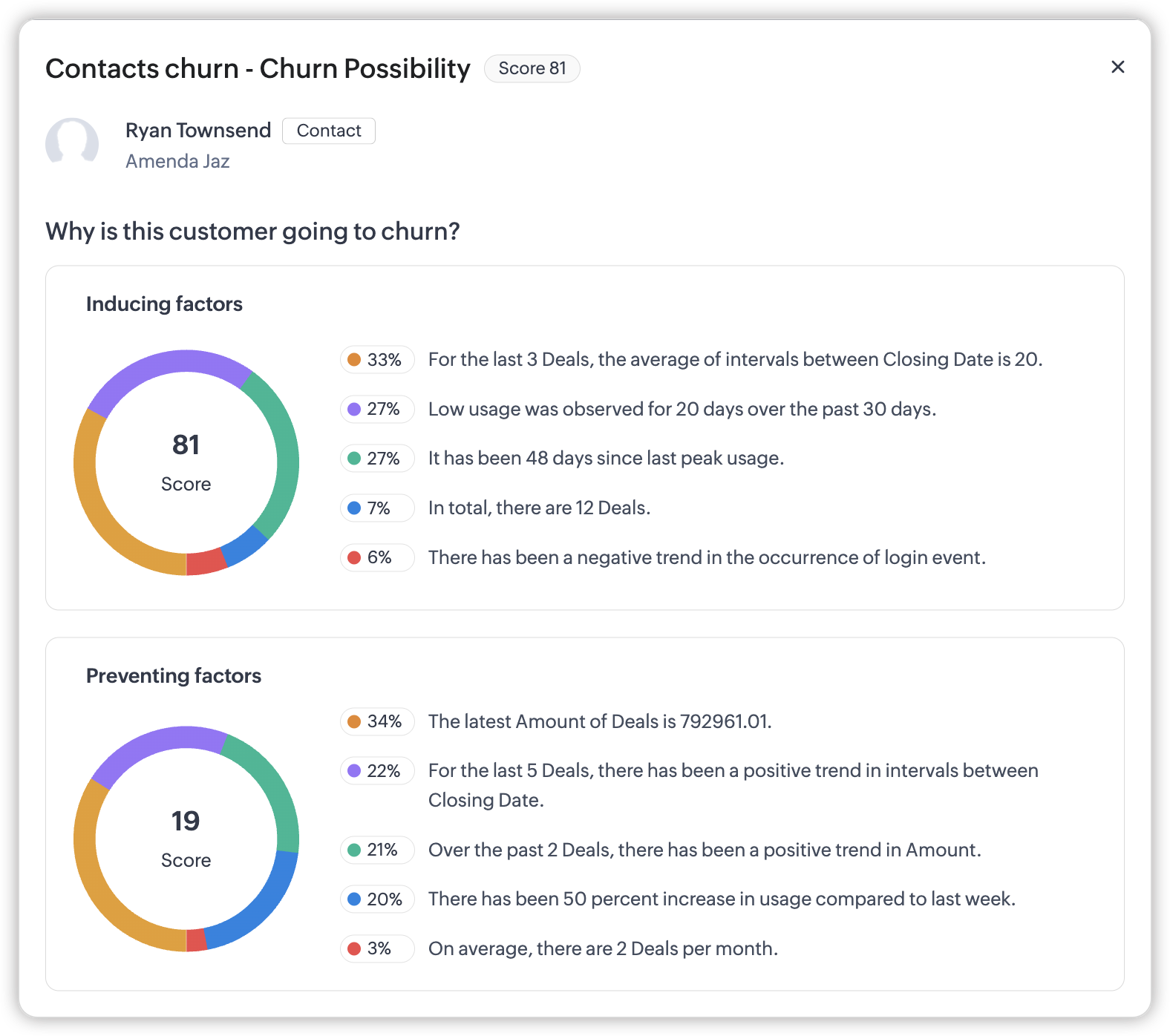
You will be notified when your churn prediction is complete. You can visit the module to receive more detailed and insightful explanations for why a specific customer is likely to churn.
Profile Permission
- In the profile page, under Zia, include Usage Data mapping along with the toggle.
- This page will be shown for admin profiles by mandate.
- This feature is restricted for team profile users.
Note: The Event Timestamp field type will also support the data type Time in the future.