Custom domain mapping for rebranding your CRM

Custom domain mapping for rebranding your CRM

Custom Domain Mapping — Overview

When a business markets itself under a particular brand name but runs its operations on multiple third-party solutions from various vendors, this disconnect poses a challenge, often from a marketing, and credibility standpoint. While these multiple third party systems may be efficient, the fact that they do not align with the organization's primary domain and appear to be different entities altogether may affect the brand's reputation and cause complications for marketing.

From the internal operations perspective, the organization may find that their users do not feel close to the brand, which it turn may affect product adoption rates. From customers' perspective, the redirection to a different brand's portal may discourage customers from continuing their relationships with their brand, because of credibility concerns.

For example, assume that Zylker Travels markets its services on its website www.zylkertravels.com but uses a different vendor, say our Zoho CRM for optimization of sales and customer portal. So, while Zylker's website, blogs and newsletters are all hosted on ZylkerTravels.com, their customers and travel agents get redirected to "Zoho", a visibly different third party portal when they attempt to log into follow up on their travel requests.

Therefore, as a solution to this disconnect in brand names, software vendors usually enable custom domain mapping in their applications to enable users to use their own domain name for the services purchased from them. Once an organization rebrands its third-party vendors' solutions as their own, they get the best of both worlds — that is the efficiency of the vendors' system, packaged and served under their very own brand name.

This custom domain mapping solution is available on Zoho CRM.  With the custom domain mapping facility in Zoho CRM, you are effectively able to
  1. rebrand your CRM system in alignment with the domain name of your business
  2. increase credibility for your brand among customers, and promote CRM adoption among your users by using your own domain name instead of Zoho's brand name.
  3. minimize credibility-related challenges by avoiding mention of third party vendors' names in your essential business applications.

Examples of custom domain mapping


How it works

Custom domain mapping in Zoho CRM is available for the following environments.
  1. The live production setup (CRM)
  2. The test bed setup (Sandbox)
  3. Customer portal
Let's now look at how to configure your custom domain mapping for your account. This is a 3-step process.
  1. Choose Account
  2. Add Domain
  3. Link and Verify.
First, go to Setup > General > Company Settings > Domain Mapping. Click Map Domain.

Step 1: Choose the desired environment

You can choose to map custom domains for all these environments or only selected ones.


Step 2: Add Domain

This is a key step in this configuration process.
In this step, you need to perform two actions simultaneously— one in the CRM and the other in the DNS Management page in your domain provider's website. These two actions are required to connect the services together and create a link.
  1. Action 1: Map your domain with Zoho CRM in your DNS registry.
  2. Action 2: Provide the domain URL in a structure: subdomain.domain.com.
Note that these two actions are required and need to be performed one after the other in order to complete adding the domain.

    Action 1: Map your domain with Zoho CRM in your DNS registry.
    Here, you need to map your domain with Zoho CRM in your vendor's domain management page. For example, if you are rebranding your CRM for your sales department and wish to have "Sales" as your subdomain, you need to provide a few details as mentioned in this step. Go to your domain provider's website (domain providers vary for each user) and do the following:
    1. Create CNAME type
    2. Provide the name of the subdomain.
    3. Provide Target or "Point to value" as crm.cs.zohohost.com 
    4. Click Save.
    Action 2: Provide the domain URL in a structure: subdomain.domain.com.
    In order to add your domain in Zoho CRM, you need to provide the domain URL in the structure: <subdomain.domain.com>.
    For example, in the case of crm.zoho.com, "crm" is a sub-domain or a classification of the parent domain called "Zoho". Now, in place of crm.zoho.com, you can choose to have a URL of your own. Say, sales.zylker.com—a desired URL for your CRM application.

    Notes
    Note:
    The changes after adding/updating the entries (adding CName record or updating existing record) in the DNS management page usually takes a few minutes for the domain to get propagated across the servers (Based on DNS providers). Until then, an error that the domain name as invalid will be displayed, because from the application's end, we don't have the hold to validate that the domain is getting propagated. Kindly factor in this wait time as required.
    After adding the domain in your CRM organization, it is time to verify to ensure security in the connection. To verify and complete the configuration, you need to perform two actions:
     
    — Action 1: In the DNS Management page, link the TXT name and value from CRM
    — Action 2: In CRM, Verify the mapping.  


    Action 1: In the DNS Management page, link the TXT name and value from CRM

    Go to your domain provider's website (domain providers vary for each user) and do the following:
    1. Create TXT type.
    2. Copy the TXT Name, which is an alphanumeric code, from CRM and enter it here.
    3. Provide TXT value as crm.cs.zohohost.com

    Action 2: In CRM, Verify the mapping.
    Once you have pasted the TXT Name and value, go back to the Domain Mapping settings in CRM and click Verify.

    This will ensure domain ownership and upon adding, the connection will be established after security verification and generation of SSL certificate from Zoho. This certificate will be provided within three business days from the day of verification.


    Once your SSL certification is generated and the domain security is verified, your custom domain will be active and you can access the same from Setup > General > Company Settings > Domain Mapping.

    Manage domain mapping

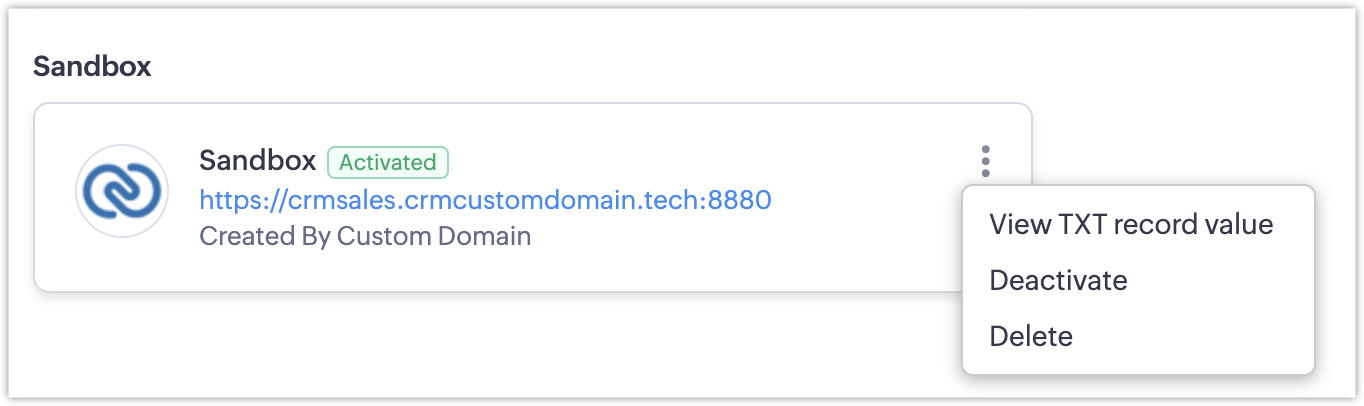
    In addition to mapping a new domain, you can deactivate or delete a verified domain from the domain mapping page itself.
    To deactivate or delete a domain,
    1. Hover on the desired domain you mapped for an environment and click on the ellipsis icon (...).
    2. Select Deactivate or Delete the domain, as desired.

      You can also view your TXT name and value from the ellipses.

    Points to note

    1. Edition availability: 
      1. Standalone Enterprise and Ultimate editions: Custom domain mapping is available.
      2. CRMPlus and Zoho One editions: Custom domain mapping is available only for portal users.
        Note: Custom domain mapping is not available for CRM in Production or Sandbox environments for both Zoho One and CRM Plus accounts.
    2. Limits: You can configure up to three domains for each environment (CRM, Sandbox and Portals). Only one domain per environment can be active at a time.
    3. Domain Access:   The Super Admin and Admins will have access to both the default domain as well as custom domain. Please note that this access privilege is applicable only for live production setup (CRM) and not applicable for the Sandbox and portal setup. In cases of issues or deactivation of the custom domain, admins will be able to access the default domain in order to further make changes to the custom domain mapping. When the custom domain gets deactivated, users of the org account will automatically gain access to the default domain. When custom domain is activated, users of the org will not be able to access the default domain, but only the custom domain. 
    4. Who can configure Domains: Domain mapping configuration will be available only for admins and super admin and this too only in CRM (Live production) environment. 
    5. A domain that is mapped to the production environment (CRM) can also be mapped with the portal setup, but not Sandbox. Let's say we have a domain "sales.zylker.in" mapped to Production (Zoho CRM) environment. We can map the same domain to the portal setup but not Sandbox. This is because production environment is essentially different from the test bed setup. This is the reason we have a difference in the default domain as well. While both production and portal setup can reflect <crm.zoho.com>, the testbed is called <crmsandbox.zoho.com>. The same differentiation needs to be established in custom domains as well, and hence a domain mapped to production and portal cannot be mapped to Sandbox as well. 
    6. Issues or deactivation of configured domains : When the custom domain gets deactivated, users of the org account will automatically gain access to the default domain. This will not affect the daily routine.

    Troubleshooting issues in domain mapping

    Warning
    1. You cannot activate more than one domain in the same environment.
    At a given moment, even if you have three domains mapped to an environment, you can have only one of them active.

    Warning
    2. Given domain name seems to be invalid
    If the domain you chose does not follow the recommended URL structure or if that sub-domain/ domain is not pointed to the targeted host or active, you might get this error during the mapping stage. Kindly ensure, you have added the sub-domain in the DNS registry before entering here. Click here to learn how to map domains.

    Also, the changes after adding/updating the entries (adding CName record or updating existing record) in the DNS management page usually takes a few minutes for the domain to get propagated across the servers (Based on DNS providers). Until then, an error that the domain name as invalid will be displayed, because from the application's end, we don't have the hold to validate that the domain is getting propagated. Kindly factor in this wait time as required.

    Warning
    3. Domain already mapped to another Zoho CRM account:
    A CRM URL is a unique string. A sub-domain can be mapped with only with one CRM organization. You will get this error if you are attempting to use the same sub-domain for a different CRM organization.


    Warning
    4. Security verification failed:
    If the TXT record is not added, then the domain will not be activated after the scheduler execution, and as a result the domain will be marked as security verification failed. You need to delete and re-map the domain.


    You can view TXT record value by clicking the Ellipsis icon against the respective environment. 


          Create. Review. Publish.

          Write, edit, collaborate on, and publish documents to different content management platforms.

          Get Started Now


            Access your files securely from anywhere

              Zoho CRM Training Programs

              Learn how to use the best tools for sales force automation and better customer engagement from Zoho's implementation specialists.

              Zoho CRM Training
                Redefine the way you work
                with Zoho Workplace

                  Zoho DataPrep Personalized Demo

                  If you'd like a personalized walk-through of our data preparation tool, please request a demo and we'll be happy to show you how to get the best out of Zoho DataPrep.

                  Zoho CRM Training

                    Create, share, and deliver

                    beautiful slides from anywhere.

                    Get Started Now


                      Zoho Sign now offers specialized one-on-one training for both administrators and developers.

                      BOOK A SESSION


                                  Quick LinksWorkflow AutomationData Collection
                                  Web FormsEnterpriseOnline Data Collection Tool
                                  Embeddable FormsBankingBegin Data Collection
                                  Interactive FormsWorkplaceData Collection App
                                  CRM FormsCustomer ServiceAccessible Forms
                                  Digital FormsMarketingForms for Small Business
                                  HTML FormsEducationForms for Enterprise
                                  Contact FormsE-commerceForms for any business
                                  Lead Generation FormsHealthcareForms for Startups
                                  Wordpress FormsCustomer onboardingForms for Small Business
                                  No Code FormsConstructionRSVP tool for holidays
                                  Free FormsTravelFeatures for Order Forms
                                  Prefill FormsNon-Profit

                                  Intake FormsLegal
                                  Mobile App
                                  Form DesignerHR
                                  Mobile Forms
                                  Card FormsFoodOffline Forms
                                  Assign FormsPhotographyMobile Forms Features
                                  Translate FormsReal EstateKiosk in Mobile Forms
                                  Electronic Forms
                                  Drag & drop form builder

                                  Notification Emails for FormsAlternativesSecurity & Compliance
                                  Holiday FormsGoogle Forms alternative GDPR
                                  Form to PDFJotform alternativeHIPAA Forms
                                  Email FormsFormstack alternativeEncrypted Forms

                                  Wufoo alternativeSecure Forms

                                  TypeformWCAG


                                      All-in-one knowledge management and training platform for your employees and customers.

                                                Create. Review. Publish.

                                                Write, edit, collaborate on, and publish documents to different content management platforms.

                                                Get Started Now


                                                                  You are currently viewing the help pages of Qntrl’s earlier version. Click here to view our latest version—Qntrl 3.0's help articles.


                                                                      Manage your brands on social media


                                                                        • Desk Community Learning Series


                                                                        • Digest


                                                                        • Functions


                                                                        • Meetups


                                                                        • Kbase


                                                                        • Resources


                                                                        • Glossary


                                                                        • Desk Marketplace


                                                                        • MVP Corner


                                                                        • Word of the Day


                                                                        • Ask the Experts


                                                                          Zoho Sheet Resources


                                                                              Zoho Forms Resources


                                                                                Secure your business
                                                                                communication with Zoho Mail


                                                                                Mail on the move with
                                                                                Zoho Mail mobile application

                                                                                  Stay on top of your schedule
                                                                                  at all times


                                                                                  Carry your calendar with you
                                                                                  Anytime, anywhere


                                                                                        Zoho Sign Resources

                                                                                          Sign, Paperless!

                                                                                          Sign and send business documents on the go!

                                                                                          Get Started Now


                                                                                                  Zoho TeamInbox Resources


                                                                                                            Zoho DataPrep Demo

                                                                                                            Get a personalized demo or POC

                                                                                                            REGISTER NOW


                                                                                                              Design. Discuss. Deliver.

                                                                                                              Create visually engaging stories with Zoho Show.

                                                                                                              Get Started Now


                                                                                                                                  • Related Articles

                                                                                                                                  • Using Custom Buttons

                                                                                                                                    Customization is the most powerful way to build a flexible CRM system. In Zoho CRM, you can customize modules, fields, pages, links, and a lot of other elements. In addition to these elements, Zoho CRM now allows you to create new button actions with ...
                                                                                                                                  • Types of Custom Fields

                                                                                                                                    In Zoho CRM, you can add different types of custom fields as per your requirements. These fields will be available to all the users added to your organization's CRM account. Customize Zoho Defined Fields : You can edit, delete and hide some of Zoho ...
                                                                                                                                  • Migrating Data Between Zoho CRM Accounts

                                                                                                                                    Retrieve Data files from Zoho CRM If you are planning to use a backup of data from Zoho CRM to import, the file structure does not change. If you exported data from another CRM, use the following folder structure: The Data folder should contain all ...
                                                                                                                                  • Zoho CRM's Core Data Model and How You Extend It Safely

                                                                                                                                    Zoho CRM ships with a complete set of standard modules covering every stage of the sales cycle, and gives your team structured, governed ways to extend that model as your business grows. Here is how the core data model is built, what it covers, and ...
                                                                                                                                  • Working with Custom Fields

                                                                                                                                    In Zoho CRM, you can add new fields as per your requirements. These fields will be available to all the users added to your organization's CRM account. Customize Zoho Defined Fields: You can edit, delete and hide some of Zoho defined fields, but note ...
                                                                                                                                    Wherever you are is as good as
                                                                                                                                    your workplace

                                                                                                                                      Resources

                                                                                                                                      Videos

                                                                                                                                      Watch comprehensive videos on features and other important topics that will help you master Zoho CRM.


                                                                                                                                      eBooks

                                                                                                                                      Download free eBooks and access a range of topics to get deeper insight on successfully using Zoho CRM.


                                                                                                                                      Webinars

                                                                                                                                      Sign up for our webinars and learn the Zoho CRM basics, from customization to sales force automation and more.


                                                                                                                                      CRM Tips

                                                                                                                                      Make the most of Zoho CRM with these useful tips.


                                                                                                                                        Zoho Show Resources