Headquarters Dashboard - Online Help | Zoho Desk

Headquarters Dashboard: Real-Time Customer Support Management


There are eight components in the headquarters dashboard that help managers make informed decisions and operate more efficiently by optimizing agent allocation during increased traffic.

The components in the HQ dashboard are:
  1. Incoming and Outgoing Bandwidth
  2. Live Traffic
  3. Unassigned
  4. Online Agents
  5. Offline Agents
  6. Most threaded tickets
  7. Customer Happiness
  8. Negative Ratings

Availability

Incoming and outgoing bandwidth

The bandwidth chart displays the number of incoming and outgoing responses in the form of a line graph for quick and easy analysis.

For example, if a retail company offers a limited-time discount and wants to track customer engagement during that period, the team can filter the component by duration and identify the number of incoming queries and the response sent to them by the agents. 

This allows the company to assess the immediate impact of the promotion, identify any spikes in customer queries, and quickly allocate agents to handle the queries, ensuring timely responses and optimal customer service.

By default, the responses sent and received in the last 24 hours are displayed.
The data can be filtered for Today, Last 7 days, Last 30 days, Current Week, Current Month, and Custom to view the frequency of incoming and outgoing responses.

You can also filter based on the responses received in different channels such as email, chat, and phone.

Live incoming and outgoing traffic

The live traffic gives a quick glimpse of the current incoming and outgoing responses. It shows the traffic in the last one hour. 

For example, a feature is released as early access to the customers on request, and the product management team has made a detailed announcement post on the same. Once the customers understand what the feature offers, there may be a spike in the number of incoming queries when they want to try it out. The team can monitor the volume of tickets in real-time and analyze the time taken to resolve the tickets. 

By filtering this data, the team will be able to understand the time the queries came in. the manager or team lead will be able to assess if the incoming ticket spike is immediately after the announcement, at a specific time of day, or across specific days of the week.


This way, they will be able to allocate more agents from the team to handle the tickets efficiently. The responses sent by the agents are calculated as the outgoing response, and it will help the managers identify if there is any in the response, and if SLA is adhered. 

Unassigned tickets

If the incoming ticket count is high, the backlog count will increase, and there will be an increase in the number of unassigned tickets. 
To prevent delays and ensure timely resolution, the support managers can filter the tickets that are overdue and assign them on priority. 

Regular monitoring can help them optimize ticket assignment and create workflows to resolve L1 issues by sending automatic responses. 
This component displays the total number of unassigned tickets that are: 
  1. On hold - If a customer raises a request for service approval, but their contract is nearing expiration, the finance team will not process the request. The ticket will be put on hold, and it will not be assigned to any agent.
  2. Open - Unassigned tickets that are open.
  3. Due in one hour - Unassigned tickets that are due in an hour. 
  4. Overdue - Unassigned tickets that were not closed within the SLA and are already overdue.

The managers can find ways to expedite resolution by assigning these tickets to agents on priority.

Agent status: Online and offline

The component gives a glimpse into the agent's status in different channels. Managers can filter and find out in which channel - email, chat, or phone- the agents are online or offline. The component also displays their overdue tickets, tickets due in one hour, and pending tickets in each channel. 


A ticket that is due in an hour or overdue can be immediately assigned to an agent who is online or available in a particular channel. Tickets can be reassigned or transferred to agents who are active in other channels like chat or phone for a quick resolution. 

In both the components, the agents with the most overdue tickets are listed at the top, allowing the manager to quickly identify the agents who have the highest number of overdue tickets. Further scrutiny can help analyze the reason and take preventive measures. Agents can also be offered insights on how to adhere to SLA. 

Most threaded tickets

When the support team sends multiple follow-ups or resolutions or the customer sends multiple messages to a ticket, the number of conversations (threads) in a ticket will increase. This could occur for several reasons, including the complexity of the issue, an extended resolution time, or the need for more ongoing communication with the customer.
The most threaded tickets component highlights the top 25 tickets with the highest levels of discussion and engagement over the past 30 days.
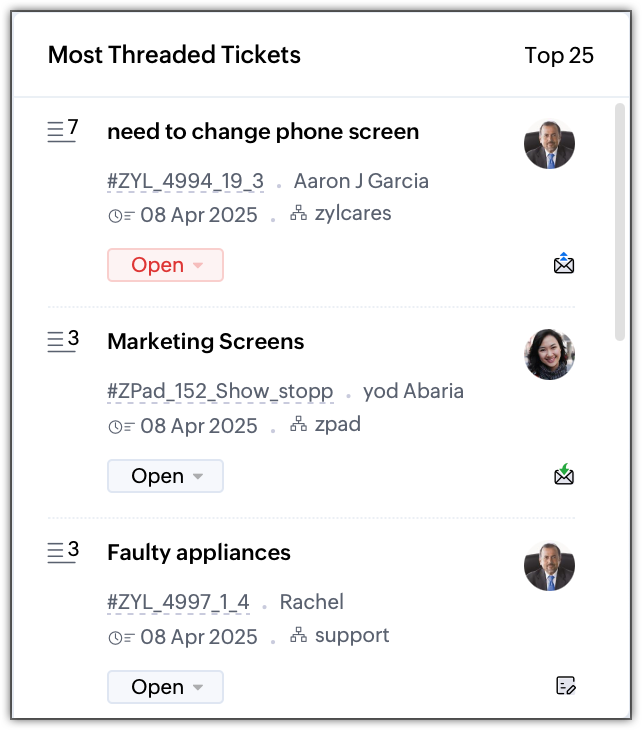


This component helps the manager identify the underlying reason for multiple conversations. By pinpointing these issues, the manager can also train agents on how to handle similar interactions more effectively in the future.

Another way to reduce back-and-forth communication in a ticket is by scheduling a call to provide a direct resolution.

Customer happiness 

The customer happiness component displays the overall customer satisfaction score from the past 25 days.

 
A positive rating provides valuable insight into what the team is doing well and highlights areas where customer expectations are being met or exceeded. 

When a customer contacts support for a query, the support agent provides a resolution. Once the resolution is provided, a survey is sent to the customer to rate the overall experience. A lower rating indicates that the customer is not satisfied with the experience. It could be due to the time taken to provide resolution, the effectiveness of the fix suggested, or the agent's knowledge of the query. 

A higher rating indicates that the customer is happy with the efficiency and clarity of the support provided.

By analyzing these positive feedback patterns, the team can replicate successful strategies and continue delivering exceptional service. 

This will help them maintain a high customer satisfaction score and improve overall service quality.

Negative ratings

The negative ratings component displays the negative ratings provided by the customers in the last 25 days. 


When a customer provides a lower rating, it is important to analyze the area of improvement. For example, the lead or managers should assess why the score is low and provide feedback/guidance to the team on how to improve customer satisfaction. 
It could be in better communication, response time, adhering to SLA, and issue resolution quality. 

If the customer provided a negative rating for a feature or requirement, they can also reach out to the customer to understand their requirement and address the issues accordingly.

By tracking and responding to low ratings promptly, teams can improve customer satisfaction.

        Create. Review. Publish.

        Write, edit, collaborate on, and publish documents to different content management platforms.

        Get Started Now


          Access your files securely from anywhere

            Zoho CRM Training Programs

            Learn how to use the best tools for sales force automation and better customer engagement from Zoho's implementation specialists.

            Zoho CRM Training
              Redefine the way you work
              with Zoho Workplace

                Zoho DataPrep Personalized Demo

                If you'd like a personalized walk-through of our data preparation tool, please request a demo and we'll be happy to show you how to get the best out of Zoho DataPrep.

                Zoho CRM Training

                  Create, share, and deliver

                  beautiful slides from anywhere.

                  Get Started Now


                    Zoho Sign now offers specialized one-on-one training for both administrators and developers.

                    BOOK A SESSION


                                Quick LinksWorkflow AutomationData Collection
                                Web FormsEnterpriseOnline Data Collection Tool
                                Embeddable FormsBankingBegin Data Collection
                                Interactive FormsWorkplaceData Collection App
                                CRM FormsCustomer ServiceAccessible Forms
                                Digital FormsMarketingForms for Small Business
                                HTML FormsEducationForms for Enterprise
                                Contact FormsE-commerceForms for any business
                                Lead Generation FormsHealthcareForms for Startups
                                Wordpress FormsCustomer onboardingForms for Small Business
                                No Code FormsConstructionRSVP tool for holidays
                                Free FormsTravelFeatures for Order Forms
                                Prefill FormsNon-Profit

                                Intake FormsLegal
                                Mobile App
                                Form DesignerHR
                                Mobile Forms
                                Card FormsFoodOffline Forms
                                Assign FormsPhotographyMobile Forms Features
                                Translate FormsReal EstateKiosk in Mobile Forms
                                Electronic Forms
                                Drag & drop form builder

                                Notification Emails for FormsAlternativesSecurity & Compliance
                                Holiday FormsGoogle Forms alternative GDPR
                                Form to PDFJotform alternativeHIPAA Forms
                                Email FormsFormstack alternativeEncrypted Forms

                                Wufoo alternativeSecure Forms

                                TypeformWCAG

                                  Zoho FSM Video Tutorials


                                        All-in-one knowledge management and training platform for your employees and customers.

                                                  Create. Review. Publish.

                                                  Write, edit, collaborate on, and publish documents to different content management platforms.

                                                  Get Started Now


                                                                    You are currently viewing the help pages of Qntrl’s earlier version. Click here to view our latest version—Qntrl 3.0's help articles.


                                                                        Manage your brands on social media


                                                                          • Desk Community Learning Series


                                                                          • Digest


                                                                          • Functions


                                                                          • Meetups


                                                                          • Kbase


                                                                          • Resources


                                                                          • Glossary


                                                                          • Desk Marketplace


                                                                          • MVP Corner


                                                                          • Word of the Day


                                                                          • Ask the Experts


                                                                            Zoho Sheet Resources


                                                                                Zoho Forms Resources


                                                                                  Secure your business
                                                                                  communication with Zoho Mail


                                                                                  Mail on the move with
                                                                                  Zoho Mail mobile application

                                                                                    Stay on top of your schedule
                                                                                    at all times


                                                                                    Carry your calendar with you
                                                                                    Anytime, anywhere


                                                                                          Zoho Sign Resources

                                                                                            Sign, Paperless!

                                                                                            Sign and send business documents on the go!

                                                                                            Get Started Now


                                                                                                    Zoho TeamInbox Resources


                                                                                                              Zoho DataPrep Demo

                                                                                                              Get a personalized demo or POC

                                                                                                              REGISTER NOW


                                                                                                                Design. Discuss. Deliver.

                                                                                                                Create visually engaging stories with Zoho Show.

                                                                                                                Get Started Now


                                                                                                                                    • Related Articles

                                                                                                                                    • FAQs: Workforce Management in Customer Support

                                                                                                                                      What is workforce management (WFM) and why has it become critical for growing support teams? Workforce management is a comprehensive set of processes and methods that help businesses optimize employee resources, boost productivity, and ensure ...
                                                                                                                                    • Blueprint Dashboard

                                                                                                                                      Performing tasks, both in and out of business settings, is easier when there's a plan in place. Even though tasks may have unique needs or multiple methods for execution, having a defined process can help reduce errors and ensure consistency. For ...
                                                                                                                                    • Zia Dashboard: Analyze Business Performance and Improve Decision Making

                                                                                                                                      Businesses track a range of data to monitor their overall performance, make informed decisions, and improve their operations. While the type of data and its usefulness varies from business to business and their goals, some of the most common data ...
                                                                                                                                    • Tracking tickets using the Tickets Dashboard in Help Center

                                                                                                                                      Customers can access individual ticket records from the Help Center to view ticket details, status, resolution progress, and communication history. However, the ticket list provides only basic details and the customers must open each ticket ...
                                                                                                                                    • Making the Radar App Follow Your Device's Timezone

                                                                                                                                      Response times make or break a customer's experience. No matter how effective the solution is, delayed delivery reduces its impact. One factor that stands in the way of prompt support is time difference—a challenge common for geographically ...
                                                                                                                                      Wherever you are is as good as
                                                                                                                                      your workplace

                                                                                                                                        Resources

                                                                                                                                        Videos

                                                                                                                                        Watch comprehensive videos on features and other important topics that will help you master Zoho CRM.


                                                                                                                                        eBooks

                                                                                                                                        Download free eBooks and access a range of topics to get deeper insight on successfully using Zoho CRM.


                                                                                                                                        Webinars

                                                                                                                                        Sign up for our webinars and learn the Zoho CRM basics, from customization to sales force automation and more.


                                                                                                                                        CRM Tips

                                                                                                                                        Make the most of Zoho CRM with these useful tips.


                                                                                                                                          Zoho Show Resources