Plans and pricing
Browse Zoho Flow's pricing page for everything you need to know about Flow pricing and plans.
Flow limits
As per our updated subscription plans, you can have unlimited live flows on both standard and professional plans. However the starter free plan is limited to five live flows.
Tasks
What is a task?
A task is a single successful execution of an action. Successful executions of all steps of a flow except trigger, decision, and set variable will be counted as tasks. For instance, if you have a flow with one trigger and two actions every time it executes, it is considered as two executed tasks. The next time the flow executes, the total task count will be four.

As per our updated subscription plans, you can choose the task count required for your business—anywhere from 5000 to 5 million tasks per month.
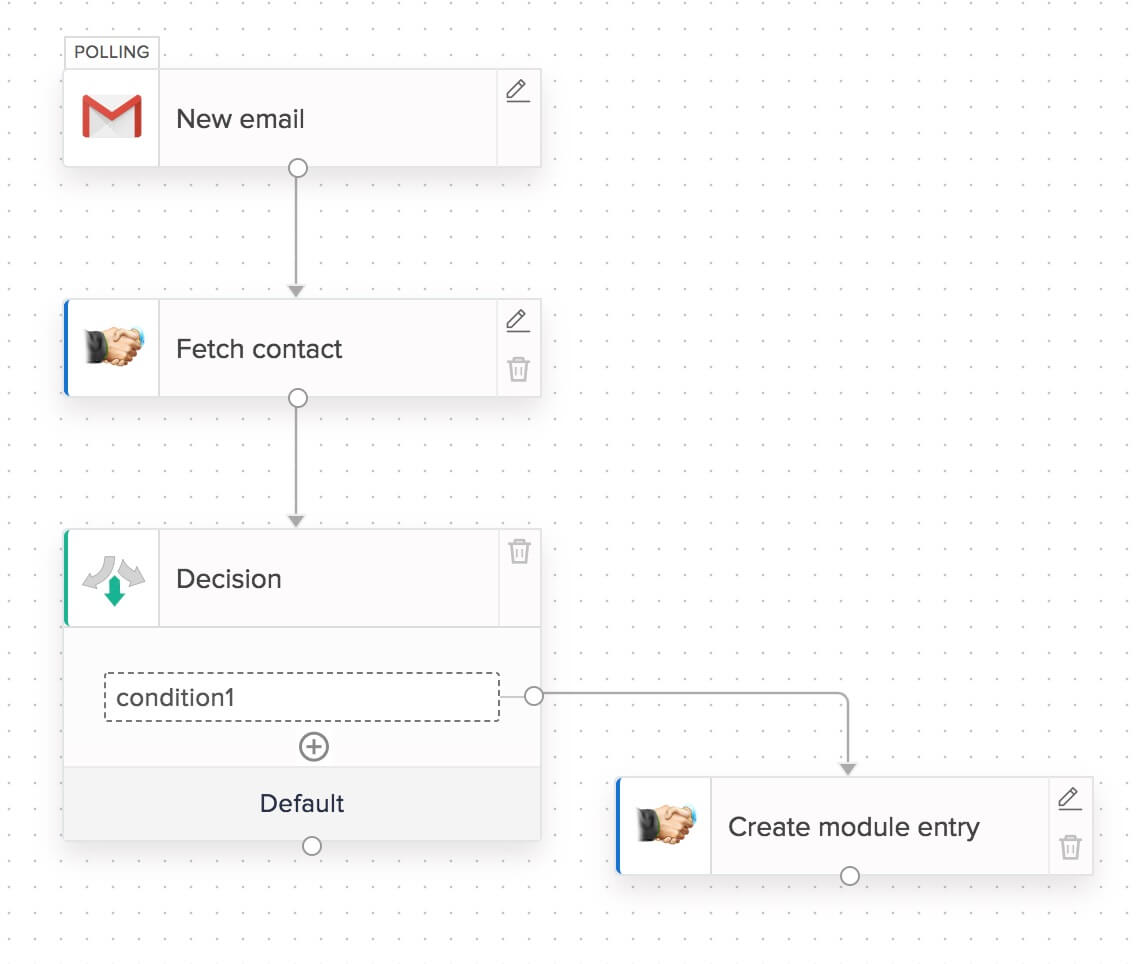
Let's take a look at how task consumption is calculated with an example flow:

When a new form entry is received, this flow fetches the contact in your CRM to check if the contact exists. If the contact doesn't exist, the flow creates a new contact. Otherwise, it does nothing and the workflow stops there.
Case 1: Contact doesn't exist in your CRM
- Entry submitted trigger: Not counted as a task
- Fetch contact action: Counted as one task
- Decision: Not counted as a task
- Create contact action: Counted as one task
This flow consumes two tasks per execution if it takes this branch. For 100 successful executions, this flow branch uses 200 tasks.
Note: In certain fetch actions, you can choose to create the record if it doesn't exist. If the flow only fetches (record is already available), it will be counted as one task. In cases where the flow creates the record (record is not available during fetch), it will be counted as two tasks.
Case 2: Contact exists in your CRM
In this case, the flow takes the default branch after a decision and stops. This flow consumes one task per execution in this branch. For 100 successful executions, this flow branch uses 100 tasks.
An action in your flow will be counted as a task only after it has been executed successfully. Actions that have failed will not be counted as tasks during that particular execution.
- Entry submitted trigger: Not counted as a task
- Fetch contact action: Counted as one task
- Decision: Not counted as a task
How are tasks consumed during a rerun?
In the case of reruns—whether auto or manual—failed attempts will not be considered tasks. However, if an attempt is successful, the failed action and all actions following that action will be executed, and tasks will be consumed accordingly.
How are tasks consumed for custom functions?
Custom functions are also actions, and a single successful execution of a custom function will consume one task.
Does a fetch action consume tasks if it doesn't return any results?
If the fetch action was executed successfully and didn't return anything because a record wasn't found, a task will be consumed. However, if the action failed due to some internal errors or third-party application errors, tasks won't be consumed.
Every month, your organization will be credited with a number of tasks depending on your plan. Note that if you are on the yearly plan, your tasks will still be credited monthly, rather than all at once. Your task count will also reset monthly, which means that tasks left over from one month cannot be carried over to the next month.
For example, if you're on Flow's yearly Standard plan with the 10000 tasks per month option, you have 120000 tasks per year. This means every month, your organization will be credited with 10000 tasks. Let's say you subscribed to Zoho Flow on 15th July and were credited with 10000 tasks. On 15th August, your task count will be reset to 10000. Any tasks left over from the period of 15th July - 14th August will not be carried over.
How do I check the tasks consumed in my Flow organization?
You can check the task usage for your Flow organization for the current month by clicking the profile icon in the top-right corner of your Zoho Flow organization.

Is it possible to estimate the tasks that my organization will consume a month based on the flows that I use?
Although you can count the number of actions in each flow, and get the total count, your task usage will depend on how many times each flow is triggered. If there isn't much variation in the number of times your flows trigger during a day, you can calculate the tasks consumed in a day and extrapolate it to arrive an approximate count for a month.
What happens if I use up the available task count for a month?
If your flows have used up all the available tasks for a particular month, they will not stop working immediately, but may be switched off at any time. The additional tasks used up in this manner will be deducted from the following month.
If your flows regularly use up almost all the available tasks, we recommend that you
upgrade to a plan that provides you sufficient task count suiting your organization's requirements. You can also purchase add-ons for extra tasks as well as flows.
If you're finding that the tasks allocated in your current Standard or Professional plan are insufficient for your automation requirements, you have the option to upgrade your plan or adjust your task limit within the same plan. Our updated pricing plans offer this flexibility, allowing you to tailor your subscription to better suit your needs.
To make changes to your plan or task limits:
- Log in to your Zoho Flow account.
- Navigate to the profile icon in the top-right corner.
- Click the Subscription link next to Plan Details.

Please note that addons are no longer supported. Instead, task upgrades are available for both Standard and Professional plans.
Subscription
If you are using Zoho Flow as part of Zoho One, you will be provided with 3000 tasks per month per organization, and 1000 additional tasks for each employee per month. The polling frequency of triggers will be five minutes. You can browse Zoho One's plan details for more information.
Upgrade - Online subscription
To change your task limit, you can drop an email to
support@zohoone.com with the required task count. We'll reply with all the details you need, including pricing. The change will be activated once you confirm.
Upgrade - Offline subscription
FAQ
Can I upgrade or downgrade my plan anytime?
Yes. Zoho Flow is a pay-as-you-go service, so you can switch plans at any time. Log in to Zoho Flow, click on your profile icon in the top-right corner of your Zoho Flow organization, then click the Upgrade or Subscription link adjacent to Plan Details to switch to a new plan or to change your plan's task limit.
Does upgrading a plan change my billing cycle?
No, your billing cycle remains the same. However, the amount paid during the billing cycle will change based on the subscription. The change will be prorate based. For example if your plan was $50 and upgraded to a plan worth $65, you'll pay only $15 more for that month and your subsequent billing will be $65.
Can I change my plan multiple times in the same month? Does tasks from the previous plan get added to the new plan?
Yes, you can change your subscription multiple times a month. The new tasks count will be available after subtracting the ones consumed. Let's say you have consumed 8000 tasks and have upgraded to 20000 tasks plan. So, for the current billing cycle, you have have 12000 tasks to use.
For any questions related to pricing and subscription, drop us an email at support@zohoflow.com.