Zoho Projects Integration | Zoho Forms - User Guide

Zoho Projects Integration

If you are looking to automate the creation of tasks in your Zoho Projects account and save the time spent on the manual task creation, you can use the Zoho Forms - Zoho Projects integration. With this integration, a new task will be automatically created in your project with each form entry. Tasks can be assigned with due dates, task owners, priority, and more.

Integration Setup  

To integrate your form with Zoho Projects,

  1. Navigate to the Integrations tab and click Zoho Projects under Task Management & Finance from the left menu.

  2. Click Integrate.

  3. Select the Portal Name and the Project Name.

  4. Select the Task List under which you want to add the Tasks in Zoho Projects.
    NotesNote: If you do not select a Task List, all the new tasks created with this integration will be added under Tasks > General in Zoho Projects.

  5. Map the Zoho Projects fields with the corresponding Zoho Forms fields.You can map certain Zoho Projects fields to manual inputs by selecting the Add Input Manually option.

  6. To map more fields, click + Add Fields.

  7. To push the form attachments to Zoho Projects, select Yes under Attachments and choose the required File Upload and Image Upload fields in your form. The files and images uploaded to the chosen fields will be pushed to the Documents section of a task in Zoho Projects.

    You can also choose to push the Default Template, Custom Template(s), PDFs sent in form submission workflows, and PDFs sent in approval process as attachments to Zoho Projects.

    • If you choose PDFs in form submission workflows, the PDF template sent to the respondent after submitting the form (for example, the PDF downloaded from the Thank You page, or any PDF sent via email notification) will be pushed to Zoho Projects as an attachment. 

    • If you choose PDFs in approval process, the PDF template sent to the respondent along with the Final Approval Email will be pushed to Zoho Projects as an attachment.

  8. Click Integrate to save your settings.
    Integration setup

Notes

Note: When a respondent's input does not match the Zoho Projects' input parameters, task creation will fail even on successful form submission. This can be checked under All Entries > Zoho Projects Status.

Supported Field Types

The following Zoho Forms fields can be mapped to the respective fields in Zoho Projects. 

S. No Zoho Projects Field Supported Zoho Forms Fields
1 Single Line Single Line, Multi Line, Name, Address, Phone, Email, Date, Time, Date-Time, Website, Unique ID, Radio, Multiple Choice, Checkbox, Number, Decimal, Currency, Slider, Rating, Formula, Dropdown, Image Choices, Terms and Conditions
2 Multi Line Single Line, Multi Line, Name, Address, Phone, Email, Date, Time, Date-Time, Website, Unique ID, Radio, Multiple Choice, Checkbox, Number, Decimal, Currency, Slider, Rating, Formula, Dropdown, Image Choices, Terms and Conditions
3 Email Email
4 Phone Phone
5 Pick List Dropdown, Radio
6 User Pick List -None-
(Manual input required)
7 Date Date
8 Date & Time -None-
9 Decimal Decimal, Number, Formula, Currency
10 Formula -None-
11 Number Number
12 URL Website
13 Task Name Single Line, Multi Line, Name, Address, Phone, Email, Date, Time, Date-Time, Website, Unique ID, Radio, Multiple Choice, Checkbox, Number, Decimal, Currency, Slider, Rating, Formula, Dropdown, Image Choices, Terms and Conditions
14 Task Owners -None-
(Manual input required. Only the users associated with a project can be selected.)
15 Duration Number, Rating, Slider
16 Start Date Date
17 End Date Date
18 Priority Dropdown, Radio
19 Percentage Decimal, Number, Formula, Currency
20 Checkbox Decision Box
21 Currency Decimal, Number, Formula, Currency
22 Recurrence -None-
23 Reminder -None-
24 Description Single Line, Multi Line, Name, Address, Phone, Email, Date, Time, Date-Time, Website, Unique ID, Radio, Multiple Choice, Checkbox, Number, Decimal, Currency, Slider, Rating, Formula, Dropdown, Image Choices, Terms and Conditions
25
Multi Select
 Multiple Choice, Checkbox

Supported Assign Value Types

When you integrate Zoho Forms with Zoho Projects, you can use the assign values option in your Zoho Forms fields to send data to Zoho Projects. The table below shows Zoho Forms field types and their assigned values can be mapped to specific Zoho Projects fields.

S. NoZoho Projects FieldSupported Assign Value Types from Zoho Forms Fields
1Single LineDropdown, Radio, Image Choices, Multiple Choice, and Checkbox: all assign values types are supported.
2Multi LineDropdown, Radio, Image Choices, Multiple Choice, and Checkbox: all assign values types are supported.
3EmailDropdown and Radio: assigning email values is supported.
4DecimalDropdown and Radio: assigning number values is supported.
5NumberDropdown and Radio: assigning number values is supported.
Note: Mapping to a Zoho Projects Number field requires whole numbers; ensure the Zoho Forms field is configured with 0 decimal places in the builder.
6Task NameDropdown, Radio, Image Choices, Multiple Choice, and Checkbox: all assign values types are supported.
7DurationDropdown and Radio: assigning number values is supported.
Note: Mapping to a Zoho Projects Duration field requires whole numbers; ensure the Zoho Forms field is configured with 0 decimal places in the builder.
8PercentageDropdown and Radio: assigning number values is supported.
9CurrencyDropdown and Radio: assigning number values is supported.
10DescriptionDropdown, Radio, Image Choices, Multiple Choice, and Checkbox: all assign values types are supported.
11Multi SelectMultiple Choice and Checkbox: all assign values types are supported.

Add Input Manually while mapping fields

While mapping Zoho Projects fields with the corresponding Zoho Forms fields, you can choose to add inputs manually for the following Zoho Projects fields.

Task Name
You can either map Task Name to the corresponding Zoho Forms field or enter a Task name of your choice by selecting Add Input Manually optionYou can merge form responses with your input by clicking the   icon in the pop-up.

Task Name

Task Owners
Click Select users from the list. A list of all the users associated with your project will be displayed. You can select multiple users as Task Owners. Additionally, you can choose the Added User option to assign the respondent as the task owner during form submission dynamically.

Select users from the list

User Picklist
Select a user from the list. You can also choose the Added User option to assign the respondent as the user dynamically.

User picklist

NoteThe Added User option, for dynamically assigning task owners/user picklist, is intended solely for private forms. In the case of public forms, the respective column in projects will remain unassigned.

Notes

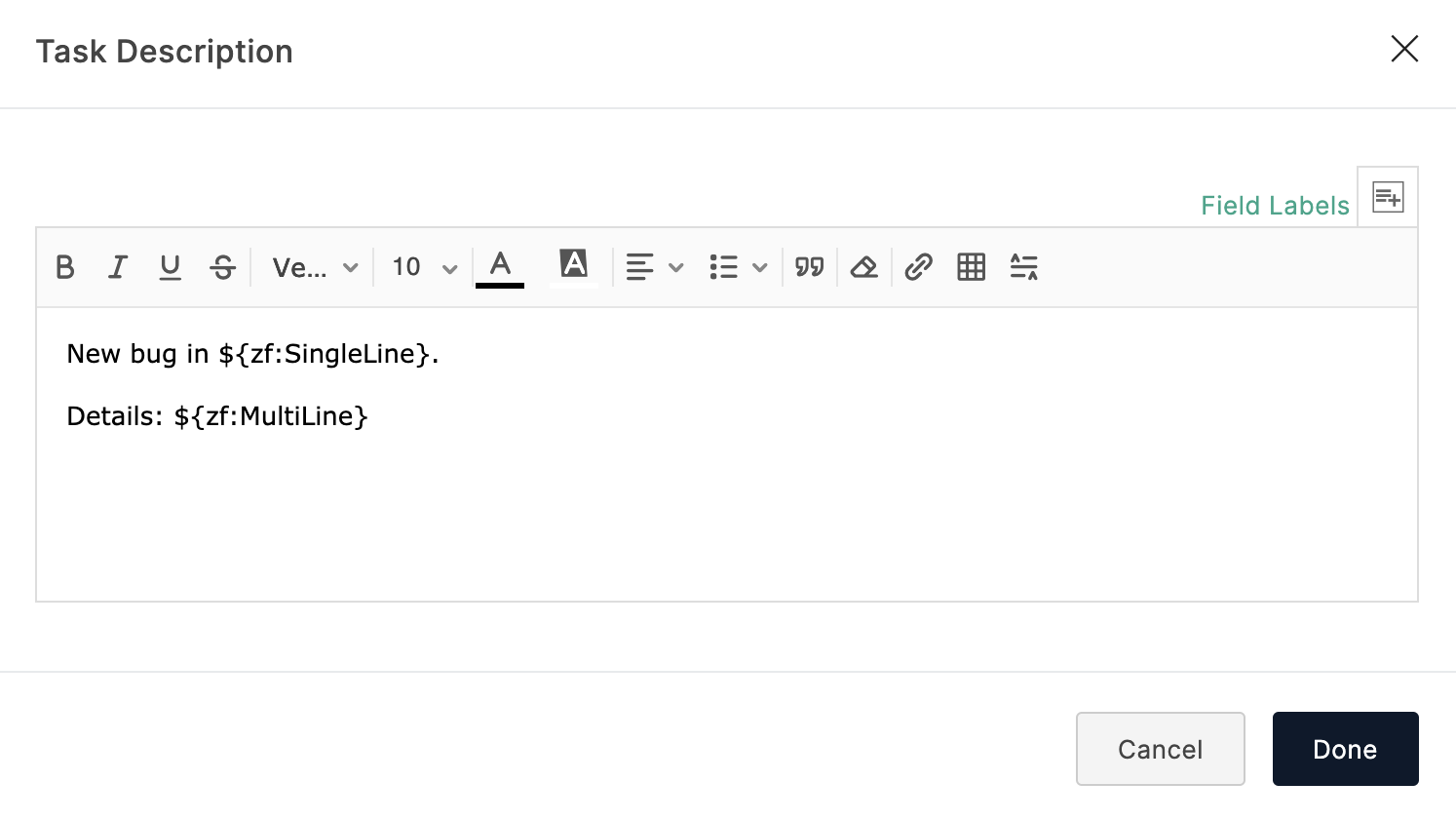
Task Description
Click Add Description and enter the description in the pop-up. You can merge form responses with the description by clicking the  icon.

Task Description

Duration
You can either map Duration with a corresponding form field or enter an input of your choice by selecting Add Input Manually option. You can choose the duration to be either in hours or days. If you choose hours, you can provide an input in the HH: MM format as well.
Example: 12:30, where 12 denotes the number of hours and 30 denotes the number of minutes.

Duration

Date-based field
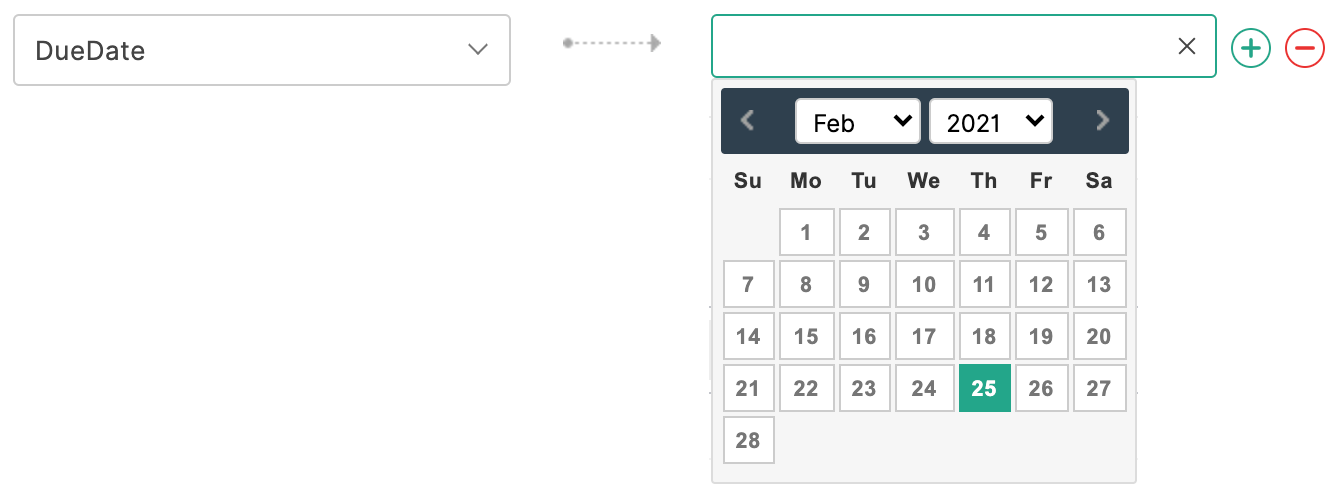
You can either map a Date-based field to a corresponding form field or pick a date from the calendar by selecting Add Input Manually option.

Date-based field


Set Alert on Integration Failure

Once your integration settings are saved, you can choose to receive an email alert if the integration fails.
To do so,

  1. Click Set Alert in the top-right corner.

  2. Configure the email alert template and click Save.

    Set Alert on Integration Failure

  3. To stop receiving email alerts on integration failure, click Remove Alert.

Notes

Note:

  • The option to set an email alert on integration failure is available only in our paid plans.

  • You can send email alerts to a maximum of 5 users within your organization.

  • An email alert will be triggered only on the first occurrence of integration failure every 24 hours.


        Create. Review. Publish.

        Write, edit, collaborate on, and publish documents to different content management platforms.

        Get Started Now


          Access your files securely from anywhere

            Zoho CRM Training Programs

            Learn how to use the best tools for sales force automation and better customer engagement from Zoho's implementation specialists.

            Zoho CRM Training
              Redefine the way you work
              with Zoho Workplace

                Zoho DataPrep Personalized Demo

                If you'd like a personalized walk-through of our data preparation tool, please request a demo and we'll be happy to show you how to get the best out of Zoho DataPrep.

                Zoho CRM Training

                  Create, share, and deliver

                  beautiful slides from anywhere.

                  Get Started Now


                    Zoho Sign now offers specialized one-on-one training for both administrators and developers.

                    BOOK A SESSION


                                Quick LinksWorkflow AutomationData Collection
                                Web FormsEnterpriseOnline Data Collection Tool
                                Embeddable FormsBankingBegin Data Collection
                                Interactive FormsWorkplaceData Collection App
                                CRM FormsCustomer ServiceAccessible Forms
                                Digital FormsMarketingForms for Small Business
                                HTML FormsEducationForms for Enterprise
                                Contact FormsE-commerceForms for any business
                                Lead Generation FormsHealthcareForms for Startups
                                Wordpress FormsCustomer onboardingForms for Small Business
                                No Code FormsConstructionRSVP tool for holidays
                                Free FormsTravelFeatures for Order Forms
                                Prefill FormsNon-Profit

                                Intake FormsLegal
                                Mobile App
                                Form DesignerHR
                                Mobile Forms
                                Card FormsFoodOffline Forms
                                Assign FormsPhotographyMobile Forms Features
                                Translate FormsReal EstateKiosk in Mobile Forms
                                Electronic Forms
                                Drag & drop form builder

                                Notification Emails for FormsAlternativesSecurity & Compliance
                                Holiday FormsGoogle Forms alternative GDPR
                                Form to PDFJotform alternativeHIPAA Forms
                                Email FormsFormstack alternativeEncrypted Forms

                                Wufoo alternativeSecure Forms

                                TypeformWCAG


                                    All-in-one knowledge management and training platform for your employees and customers.

                                              Create. Review. Publish.

                                              Write, edit, collaborate on, and publish documents to different content management platforms.

                                              Get Started Now


                                                                You are currently viewing the help pages of Qntrl’s earlier version. Click here to view our latest version—Qntrl 3.0's help articles.


                                                                    Manage your brands on social media


                                                                      • Desk Community Learning Series


                                                                      • Digest


                                                                      • Functions


                                                                      • Meetups


                                                                      • Kbase


                                                                      • Resources


                                                                      • Glossary


                                                                      • Desk Marketplace


                                                                      • MVP Corner


                                                                      • Word of the Day


                                                                      • Ask the Experts


                                                                        Zoho Sheet Resources


                                                                            Zoho Forms Resources


                                                                              Secure your business
                                                                              communication with Zoho Mail


                                                                              Mail on the move with
                                                                              Zoho Mail mobile application

                                                                                Stay on top of your schedule
                                                                                at all times


                                                                                Carry your calendar with you
                                                                                Anytime, anywhere


                                                                                      Zoho Sign Resources

                                                                                        Sign, Paperless!

                                                                                        Sign and send business documents on the go!

                                                                                        Get Started Now


                                                                                                Zoho TeamInbox Resources


                                                                                                          Zoho DataPrep Demo

                                                                                                          Get a personalized demo or POC

                                                                                                          REGISTER NOW


                                                                                                            Design. Discuss. Deliver.

                                                                                                            Create visually engaging stories with Zoho Show.

                                                                                                            Get Started Now


                                                                                                                                • Related Articles

                                                                                                                                • Zoho Campaigns Integration

                                                                                                                                  Overview If you are looking to automate adding contacts to the mailing lists in your Zoho Campaigns account instead of adding them manually, use the Zoho Forms - Zoho Campaigns integration. With this integration, you can directly add form respondents ...
                                                                                                                                • Zoho Recruit Integration

                                                                                                                                  Table of Contents Integration Setup Supported Field Types Trigger Actions in Zoho Recruit Set Alert on Integration Failure If you are using Zoho Recruit as the recruitment portal for your organization and looking to automate the collection and ...
                                                                                                                                • Zoho Desk Integration

                                                                                                                                  Table of Contents Overview Integration Setup Supported Field Types Add Input Manually while mapping fields Set Alert on Integration Failure Overview When you receive multiple customer queries and support requests in your organization, creating ...
                                                                                                                                • Salesforce Integration

                                                                                                                                  Table of Contents Overview Integration Setup Supported Field Types Add Input Manually while mapping fields Trigger Actions while pushing form entries Set Alert on Integration Failure Overview With the Zoho Forms and Salesforce integration, you can ...
                                                                                                                                • Zoho SalesIQ Integration

                                                                                                                                  Overview If you are looking to ease the process of tracking your website visitors and engage better with them, use the Zoho Forms-Zoho SalesIQ integration. When a visitor fills out the form embedded on your website, the data collected through the ...
                                                                                                                                  Wherever you are is as good as
                                                                                                                                  your workplace

                                                                                                                                    Resources

                                                                                                                                    Videos

                                                                                                                                    Watch comprehensive videos on features and other important topics that will help you master Zoho CRM.


                                                                                                                                    eBooks

                                                                                                                                    Download free eBooks and access a range of topics to get deeper insight on successfully using Zoho CRM.


                                                                                                                                    Webinars

                                                                                                                                    Sign up for our webinars and learn the Zoho CRM basics, from customization to sales force automation and more.


                                                                                                                                    CRM Tips

                                                                                                                                    Make the most of Zoho CRM with these useful tips.


                                                                                                                                      Zoho Show Resources