How to create a personalized website experience in Zoho PageSense | Help Guide?

Create your first personalization experiences in PageSense

You can use Personalization to create customized versions of your website based on the interests, characteristics, and behavior of your audience. This technique requires you to choose your target audience segment first and then make the desired content changes for each segment based on their requirements. Follow the steps below to create a personalized website experience for your preferred audience groups in Zoho PageSense.

Setup a new experience

1. Click Personalization on the left pane, then click the New Personalization button.


2.
 
Enter a name and description for your personalization experiment then click Create.


Target the pages to personalize

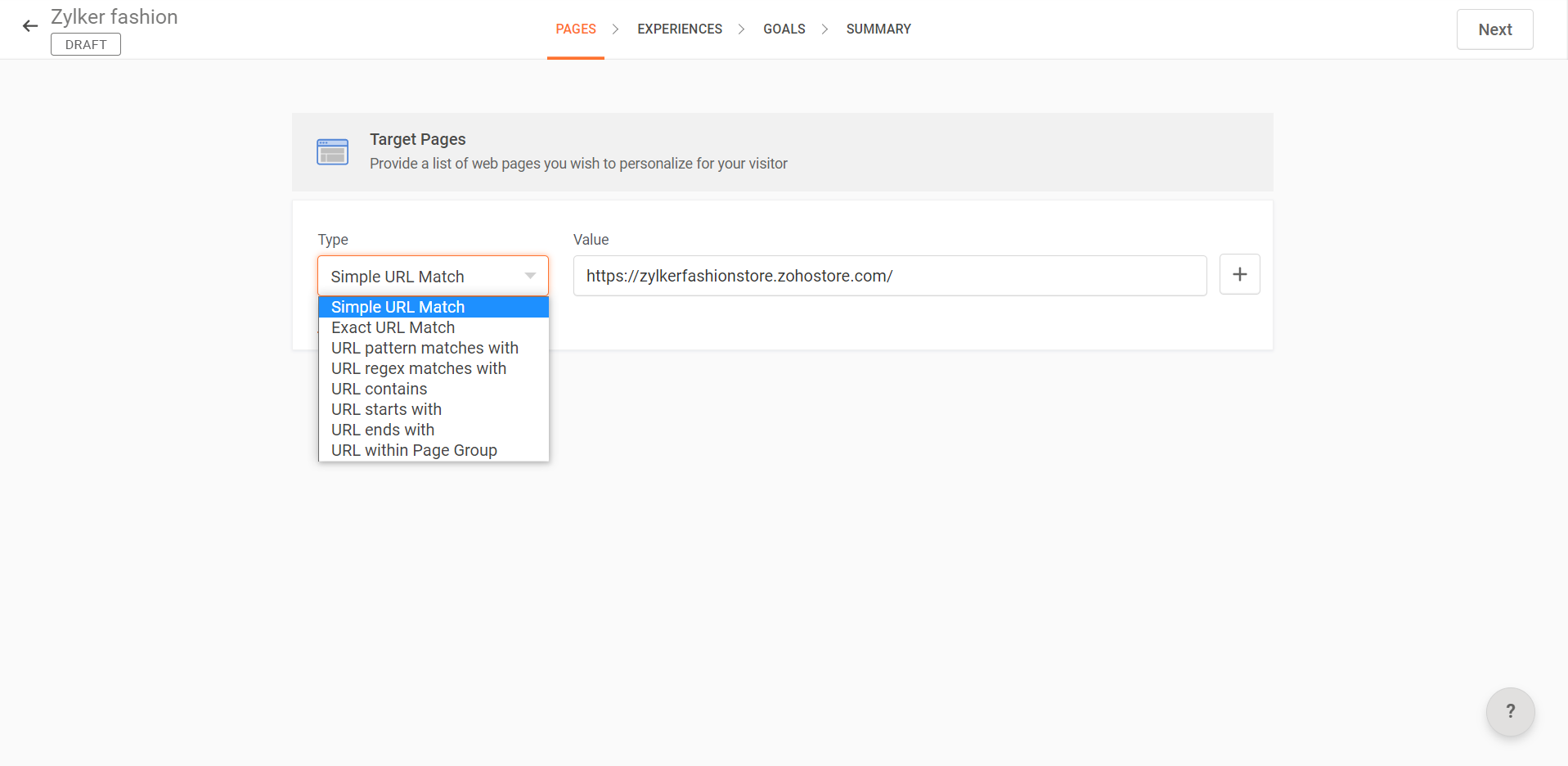
Enter the URL of the web page you want to personalize for visitors in the Pages section.
Note: You can also run your personalization test on a group of web pages using the Type dropdown. This option also allows you to use different URL match types and include or exclude web pages from being tracked in a single personalization experiment. Learn how to use the different match URL types to create advanced page targeted experiences in PageSense.


Create a new experience

1. Go to the Experience page, enter a name and description for the new experience, then click Create.


2. Select the specific group of visitors you want to target this experience for.PageSense offers two categories of audience segments:
  • Preset Segments: Predefined audience segments that you can readily choose from. 

  • Custom Segments: Customized sets of audience segments created by you.

    Note that by default, All Visitors will be chosen as your target audience segment and you can select multiple audience segments for each experience as required. Learn about the different ways of audience targeting in Zoho PageSense.
    For example, you want to create an experience for new visitors who access your site for the first time. You can select New Visitors under Preset Segments as shown below.

3. Click Next in the top-right corner.

4. You will now see your target web page loaded in the PageSense visual editor. From here, you can make your desired content and design changes to the experience.
The PageSense visual editor offers a range of options to customize the user experience by adding styles, adding or reordering images, adjusting element positions, and hiding content. The editor also provides options to edit or add custom CSS and Javascript code and you can switch between the Edit and Interact modes from the top bar to navigate between different pages on your website.
For example, say you want to personalize the title on your website's homepage for new visitors.

5. Click the Redirect URL option in the top-left corner of the visual editor to redirect visitors to the personalized version of your web page. You can create multiple experiences for each personalization experiment.


6. Once you are done making changes to the experience, click Save and then Done.
You will be redirected to the Setup Experiences page.


7. Click Create New Experience to create another experience for your personalization experiment.
For example, you want to create another experience for returning visitors on your homepage with a different title.


8. Repeat Steps 1 to 6 above for the new target audience segments, and click Save and then Done.


9. Finally, click Next when you're done creating all the required experiences for your personalization.


Set up goals for your experience

1. Click the Add New Goal button in the GOALS page to add a new goal to your personalization.
Note that it is mandatory to set up at least one goal for your personalization to track visitors' actions and conversions on your web page.


2. You can either choose from the existing goals or create one of the following goal types:

  • Element Clicks: Tracks conversions when a visitor clicks on a specific element on your web page. Learn more about creating an element click goal.

  • Link Clicks: Tracks conversions when a visitor clicks on a particular link on your web page. Learn more about creating a link click goal.

  • Time Spent on Page: Tracks conversions based on the average time spent by visitors on your web page. Learn more about creating a time spent goal.

  • Custom Event:
    Tracks conversions when a visitor achieves a specific event or set of events on your web page. Learn more about creating a custom event goal.
    For example, say you want to track the number of clicks on the Shop Now button on the homepage. In this case, you can setup an element click goal for this CTA


3. Click Save and then Next in the top-right corner to save the goals and go to the SUMMARY page.


Launch your personalization

The SUMMARY page gives you an overview of your experiment's configuration such as the targeted web pages, number of experiences created, goals added, and targeted audience segments for each experience. 

1. Click Launch in the top-right corner to start your experiment.


2. Once your experiment is launched, a new REPORTS tab will appear next to the SUMMARY tab. Learn how to understand the personalization reports in PageSense.
If you want to make changes to your experiment, click the Pause button, make the required edits, and then click Relaunch to run the experiment again.

Ensure that the Zoho PageSense code snippet is installed on all the URLs of your personalization experiment. 


        Create. Review. Publish.

        Write, edit, collaborate on, and publish documents to different content management platforms.

        Get Started Now


          Access your files securely from anywhere

            Zoho CRM Training Programs

            Learn how to use the best tools for sales force automation and better customer engagement from Zoho's implementation specialists.

            Zoho CRM Training
              Redefine the way you work
              with Zoho Workplace

                Zoho DataPrep Personalized Demo

                If you'd like a personalized walk-through of our data preparation tool, please request a demo and we'll be happy to show you how to get the best out of Zoho DataPrep.

                Zoho CRM Training

                  Create, share, and deliver

                  beautiful slides from anywhere.

                  Get Started Now


                    Zoho Sign now offers specialized one-on-one training for both administrators and developers.

                    BOOK A SESSION


                                Quick LinksWorkflow AutomationData Collection
                                Web FormsEnterpriseOnline Data Collection Tool
                                Embeddable FormsBankingBegin Data Collection
                                Interactive FormsWorkplaceData Collection App
                                CRM FormsCustomer ServiceAccessible Forms
                                Digital FormsMarketingForms for Small Business
                                HTML FormsEducationForms for Enterprise
                                Contact FormsE-commerceForms for any business
                                Lead Generation FormsHealthcareForms for Startups
                                Wordpress FormsCustomer onboardingForms for Small Business
                                No Code FormsConstructionRSVP tool for holidays
                                Free FormsTravelFeatures for Order Forms
                                Prefill FormsNon-Profit

                                Intake FormsLegal
                                Mobile App
                                Form DesignerHR
                                Mobile Forms
                                Card FormsFoodOffline Forms
                                Assign FormsPhotographyMobile Forms Features
                                Translate FormsReal EstateKiosk in Mobile Forms
                                Electronic Forms
                                Drag & drop form builder

                                Notification Emails for FormsAlternativesSecurity & Compliance
                                Holiday FormsGoogle Forms alternative GDPR
                                Form to PDFJotform alternativeHIPAA Forms
                                Email FormsFormstack alternativeEncrypted Forms

                                Wufoo alternativeSecure Forms

                                TypeformWCAG


                                    All-in-one knowledge management and training platform for your employees and customers.

                                              Create. Review. Publish.

                                              Write, edit, collaborate on, and publish documents to different content management platforms.

                                              Get Started Now


                                                                You are currently viewing the help pages of Qntrl’s earlier version. Click here to view our latest version—Qntrl 3.0's help articles.


                                                                    Manage your brands on social media


                                                                      • Desk Community Learning Series


                                                                      • Digest


                                                                      • Functions


                                                                      • Meetups


                                                                      • Kbase


                                                                      • Resources


                                                                      • Glossary


                                                                      • Desk Marketplace


                                                                      • MVP Corner


                                                                      • Word of the Day


                                                                      • Ask the Experts


                                                                        Zoho Sheet Resources


                                                                            Zoho Forms Resources


                                                                              Secure your business
                                                                              communication with Zoho Mail


                                                                              Mail on the move with
                                                                              Zoho Mail mobile application

                                                                                Stay on top of your schedule
                                                                                at all times


                                                                                Carry your calendar with you
                                                                                Anytime, anywhere


                                                                                      Zoho Sign Resources

                                                                                        Sign, Paperless!

                                                                                        Sign and send business documents on the go!

                                                                                        Get Started Now


                                                                                                Zoho TeamInbox Resources


                                                                                                          Zoho DataPrep Demo

                                                                                                          Get a personalized demo or POC

                                                                                                          REGISTER NOW


                                                                                                            Design. Discuss. Deliver.

                                                                                                            Create visually engaging stories with Zoho Show.

                                                                                                            Get Started Now


                                                                                                                                • Related Articles

                                                                                                                                • Understand your personalization reports

                                                                                                                                  <br> The aim of personalization reports in Zoho PageSense is to provide insights into how your experiences perform among the targeted audience segments. For each experience, the report gives you a high-level overview of your visitor performance ...
                                                                                                                                • Using custom dimensions in audience segments

                                                                                                                                  Custom dimensions are an advanced set of audience segmentation option available in PageSense that allows you to target your experiments and filter your reports based on a niche set of audience criteria like who they are, what their interests and ...
                                                                                                                                • The difference between website personalization and A/B testing

                                                                                                                                  Personalization and A/B testing serve different purposes and when combined together, they can tremendously increase your conversion rate. Check out the comparison table below to understand the differences between the two: Personalization A/B testing ...
                                                                                                                                • Website Settings

                                                                                                                                  The Website section in Zoho PageSense allows you to configure settings related to how PageSense connects with and interacts with your website. This includes installing the tracking snippet, enabling browser notifications, and managing how visitors ...
                                                                                                                                • Create your first pop-up in Zoho PageSense

                                                                                                                                  Choose from predesigned pop-ups in Zoho PageSense to engage customers on your website and use their feedback to improve your business instantly. No coding or design experience needed. All of the pop-up forms can be easily customized and distributed ...
                                                                                                                                  Wherever you are is as good as
                                                                                                                                  your workplace

                                                                                                                                    Resources

                                                                                                                                    Videos

                                                                                                                                    Watch comprehensive videos on features and other important topics that will help you master Zoho CRM.


                                                                                                                                    eBooks

                                                                                                                                    Download free eBooks and access a range of topics to get deeper insight on successfully using Zoho CRM.


                                                                                                                                    Webinars

                                                                                                                                    Sign up for our webinars and learn the Zoho CRM basics, from customization to sales force automation and more.


                                                                                                                                    CRM Tips

                                                                                                                                    Make the most of Zoho CRM with these useful tips.


                                                                                                                                      Zoho Show Resources