Team Space Tab in Zoho People

Team Space Tab in Zoho People

What is the Team Space tab?

The Team Space is crafted to enhance workplace collaboration, fostering closer connections among team members. Collaborate effectively and maintain connectivity with your team amidst various tasks. For managers overseeing reportees, the Team Space provides a quick glance at your team's geographical distribution, work availability, and other key details, facilitating quick access to team information even with a dispersed workforce. Moreover, the Team tab serves as a centralized hub for accessing team files, monitoring team learning activities, conducting surveys, managing projects, and more.

Features of the Team Space tab:

  1. A quick overview of your team's location diversity, availability counts, and total strength. 
  2. See employees who are celebrating their work anniversary, birthdays, and new hires. You can quickly visit these employees profiles or send a wish from right here. 
  3. See courses related to your team.
  4. The Department Wall is handy for sharing announcements across your department. Share ideas and ask questions, and your employees can also choose to comment or give it a "like.".


Groups

Create a custom employee group or crew by bringing together individuals with common interests or responsibilities. For instance, create groups like Event Organizers or Photography or Code Specialists to facilitate collaboration and knowledge-sharing within specialized areas. By switching to the Groups in Team Space, you can post announcements directly to the selected group and only members from those groups will be able to see the announcement. 


You can create new groups here by clicking on Add New Group button from the group selection drop-down list.

Surveys

The Surveys tab displays surveys that are specific to each department. Employees can view and participate in surveys created for their department from this section. They can also find completed departmental surveys in this tab.


Reportees

The Reportees tab allows you to easily access and view both your direct and indirect reports. This includes employees who report directly to you as well as those who report to your direct reports, providing a comprehensive overview of your reporting hierarchy. Switch from Grid View, List View, or Kanban View to arrange by seniority, department, or designation. You can also use the filter icon to slim down the list to match the filter criteria. Remember you can click on any of the listed employees to view their profile directly, which can be useful for adding tasks, viewing their records, and more.


You can also see the employees who report to your reportees using the reportees icon or initiate a call directly from here (Cliq Integration is required)


Department

See employees associated with various departments and locations in the Department tab. This is particularly useful in taking a quick glance at your department's availability for the current day (office-in/absent/away). The sub-department and its employees can be viewed here too. Use the drop-downs available to switch to a different department or location.


Projects

The Projects tab lets you manage projects. You can quickly view the list of projects that is associated with your teammates, department, and divisions. New projects can be added, and you can view the project dashboard when clicking on a particular project.


Team List

The Team List tab offers customizable views of your team. You can create your custom views by clicking on Create View. Options to list by direct reportees and all reportees are also available (This includes employees who report directly to you as well as those who report to your direct reports). 


By clicking on Edit, you can select the exact columns that are to be displayed. Use the ellipses icon to view more options, such as export and import. Furthermore, you can also use the Filter option to view a filtered list of employees or view the list in full screen using the Full Screen View button. If you are an administrator, you can click on a specific employee record to directly edit it.


Peers

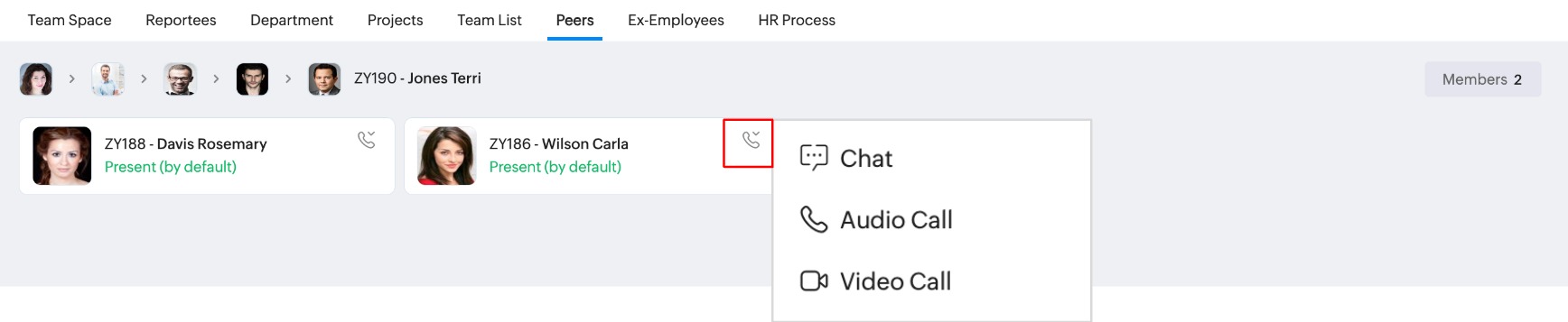
The Peers tab lists your coworkers within your team who hold the same role or position, as well as those at similar levels within the team’s hierarchy. 


Ex-Employees

Your reportees who have left the organization are listed here. You can view their exit dates and the total number of years they worked with the company.


HR Process 

Initiate HR processes such as department or designation change (the feature must be enabled and the corresponding flows must be configured). Click here to learn more about HR Process.


        Create. Review. Publish.

        Write, edit, collaborate on, and publish documents to different content management platforms.

        Get Started Now


          Access your files securely from anywhere

            Zoho CRM Training Programs

            Learn how to use the best tools for sales force automation and better customer engagement from Zoho's implementation specialists.

            Zoho CRM Training
              Redefine the way you work
              with Zoho Workplace

                Zoho DataPrep Personalized Demo

                If you'd like a personalized walk-through of our data preparation tool, please request a demo and we'll be happy to show you how to get the best out of Zoho DataPrep.

                Zoho CRM Training

                  Create, share, and deliver

                  beautiful slides from anywhere.

                  Get Started Now


                    Zoho Sign now offers specialized one-on-one training for both administrators and developers.

                    BOOK A SESSION


                                Quick LinksWorkflow AutomationData Collection
                                Web FormsEnterpriseOnline Data Collection Tool
                                Embeddable FormsBankingBegin Data Collection
                                Interactive FormsWorkplaceData Collection App
                                CRM FormsCustomer ServiceAccessible Forms
                                Digital FormsMarketingForms for Small Business
                                HTML FormsEducationForms for Enterprise
                                Contact FormsE-commerceForms for any business
                                Lead Generation FormsHealthcareForms for Startups
                                Wordpress FormsCustomer onboardingForms for Small Business
                                No Code FormsConstructionRSVP tool for holidays
                                Free FormsTravelFeatures for Order Forms
                                Prefill FormsNon-Profit

                                Intake FormsLegal
                                Mobile App
                                Form DesignerHR
                                Mobile Forms
                                Card FormsFoodOffline Forms
                                Assign FormsPhotographyMobile Forms Features
                                Translate FormsReal EstateKiosk in Mobile Forms
                                Electronic Forms
                                Drag & drop form builder

                                Notification Emails for FormsAlternativesSecurity & Compliance
                                Holiday FormsGoogle Forms alternative GDPR
                                Form to PDFJotform alternativeHIPAA Forms
                                Email FormsFormstack alternativeEncrypted Forms

                                Wufoo alternativeSecure Forms

                                TypeformWCAG

                                    All-in-one knowledge management and training platform for your employees and customers.

                                              Create. Review. Publish.

                                              Write, edit, collaborate on, and publish documents to different content management platforms.

                                              Get Started Now


                                                                You are currently viewing the help pages of Qntrl’s earlier version. Click here to view our latest version—Qntrl 3.0's help articles.


                                                                    Manage your brands on social media


                                                                      • Desk Community Learning Series


                                                                      • Digest


                                                                      • Functions


                                                                      • Meetups


                                                                      • Kbase


                                                                      • Resources


                                                                      • Glossary


                                                                      • Desk Marketplace


                                                                      • MVP Corner


                                                                      • Word of the Day


                                                                      • Ask the Experts


                                                                        Zoho Sheet Resources


                                                                            Zoho Forms Resources


                                                                              Secure your business
                                                                              communication with Zoho Mail


                                                                              Mail on the move with
                                                                              Zoho Mail mobile application

                                                                                Stay on top of your schedule
                                                                                at all times


                                                                                Carry your calendar with you
                                                                                Anytime, anywhere


                                                                                      Zoho Sign Resources

                                                                                        Sign, Paperless!

                                                                                        Sign and send business documents on the go!

                                                                                        Get Started Now


                                                                                                Zoho TeamInbox Resources


                                                                                                          Zoho DataPrep Demo

                                                                                                          Get a personalized demo or POC

                                                                                                          REGISTER NOW


                                                                                                            Design. Discuss. Deliver.

                                                                                                            Create visually engaging stories with Zoho Show.

                                                                                                            Get Started Now


                                                                                                                                • Related Articles

                                                                                                                                • Zoho People 5.0 - What has changed?

                                                                                                                                  Changes in Home tab and Self Service Zoho People 4.0 Zoho People 5.0 Landing page is Home > Dashboard Self Service page: New Landing page is Home > My Space > Overview (Replacement for Self service in Zoho People 4.0 with additional features). ...
                                                                                                                                • Organization Space Tab in Zoho People

                                                                                                                                  What is the Organization tab? The organization tab centralizes organization-wide announcements and ensures easy access to important policies, providing employees with easy access to essential information and regulatory guidelines. It lets employees ...
                                                                                                                                • My Space Tab in Zoho People

                                                                                                                                  What is My Space tab? My space is an exclusive space that revolves around the employee, the user who is currently accessing Zoho People. This space has access to reminders, approvals, and all of the important data that the employee would need to act ...
                                                                                                                                • Operations in Zoho People 5.0

                                                                                                                                  What can you do in Operations in Zoho People? Manage your employees and organization, and perform day-to-day HR processes in operations. For example, while setting up policies is performed in settings, viewing relevant data, modifying, or updating ...
                                                                                                                                • Reports in Zoho People

                                                                                                                                  What is reports space in Zoho People? Who is it for? Reports is a consolidated space for all reports from the various services in Zoho People. Reports are useful for providing actionable insights and giving a bird's-eye view of what is going on in ...
                                                                                                                                  Wherever you are is as good as
                                                                                                                                  your workplace

                                                                                                                                    Resources

                                                                                                                                    Videos

                                                                                                                                    Watch comprehensive videos on features and other important topics that will help you master Zoho CRM.


                                                                                                                                    eBooks

                                                                                                                                    Download free eBooks and access a range of topics to get deeper insight on successfully using Zoho CRM.


                                                                                                                                    Webinars

                                                                                                                                    Sign up for our webinars and learn the Zoho CRM basics, from customization to sales force automation and more.


                                                                                                                                    CRM Tips

                                                                                                                                    Make the most of Zoho CRM with these useful tips.


                                                                                                                                      Zoho Show Resources