Recycle Bin
What is Recycle Bin feature in Zoho People?
The Zoho People Recycle Bin feature retains deleted records for 30 days, allowing users to restore them if needed. This reduces the risk of losing important records due to accidental deletion.

Recycle Bin is intended for Administrators and HR Personnel.
How to restore deleted records in Zoho People?
To restore a deleted record:
- Navigate to Operations > Data Administration > Recycle Bin.
- Select a form using the drop-down provided.
- Use the checkboxes to select the records you would like to restore.
- Click Restore
- Confirm by clicking Restore again in the pop-up window.
Important Points to Note | Data Retention Period Configuration
- All custom form records can be restored.
- Employee records deleted from the Employee Form (System) can be restored from the Recycle Bin. Learn more.
- Records deleted in other core system forms, such as leave, attendance, performance forms cannot be restored.
- The deleted records will appear in the recycle bin only after a short period (about 30 seconds).
- Records deleted from certain old system forms can be restored (Travel Request, Travel Expense, Exit Details, Address Proof, Bonafide Letter, Experience Letter forms).
- Similar data can also be restored from the Activity Log page in Data Administration.
- If you wish to configure the data retention period feature for the deleted records before permanent removal, you can configure it in Settings > Manage Accounts > Organization Setup > Organization Policy > Recycle bin preference. Select the desired number of months for data retention.

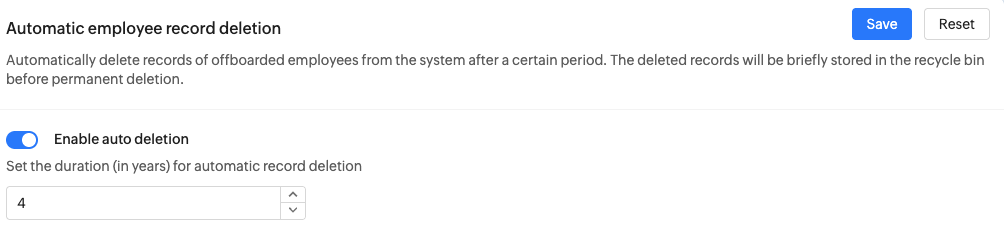
Note: For accounts exclusively associated with the Japan data center, data retention can be configured in years (e.g., 7 years), and automatic employee data deletion can also be enabled via Settings > Manage Accounts > Organization Setup > Organization Policy > Automatic employee record deletion