Continuous Review - User Service
A continuous review is a performance evaluation method enabled by your organization to regularly assess employees' performance and track their progress within their roles and assigned work. Unlike traditional annual or semi-annual reviews, continuous reviews are more dynamic and frequent, enabling timely feedback, course correction, and recognition of achievements.
In Zoho People, the continuous review user service is an interface where employees and their appraiser provide ratings on evaluation parameters (KRA, goals, competencies, and Review Questions) applicable to employees within the review cycle.
- Self-Review: If enabled, employees can rate their own performance on the applicable evaluation parameters.
- Manager Review: Manager review is the mandatory step in continuous review, where the reviewer rates their reportees performance on the employee's applicable evaluation parameters.

During the annual appraisal cycle, the employee's continuous review average score for the appraisal period is displayed on the appraisal review page which can be used as reference to provide the final appraisal rating.
Continuous review - Self Review
A self-review in a continuous review is a process where employees evaluate their own performance, progress, and accomplishments in each review cycle. Based on the evaluation parameters selected by your organization, employees will provide ratings on KRA, goals, competencies, and review questions that are applicable to them within the review cycle.
The following information is displayed in the Self-Review
- Ongoing and past continuous review cycle rating information and average score.
- Overall rating: An average continuous review score of the current year.
Submit Self review
Once the self-review period begins, employees will be notified to complete the self-review of the continuous review cycle within the specified duration.
To complete a self review:
- From the home page, navigate to Performance > Continuous Review > Self
The relevant evaluation parameters, such as KRAs, goals, competencies, and review questions, applicable within the review period, will be listed for evaluation. - Provide a rating for each evaluation parameter and add comments if required. Select 'N/A' if you wish to exclude an evaluation parameter from the self-review. You can view the total self-average rating at the top right of the page.
 Click rating info at the top right of the page to view the rating type set by your organization and maximum rating values.
 - Once you have provided rating for all the evaluation parameter, click Submit.
Continuous Review - Manager Review
The Manager Review is a critical component of the continuous review process, where reviewers evaluate the employees based on evaluation parameters applicable for them within the review period. This review takes place after the self-review period and serves as an opportunity for reviewers to provide feedback on employees performance.
Submit Manager Review
Once the Manager-review period begins, the applicable reviewers will be notified to complete the Manager-review of the continuous review cycle within the specified duration.
To complete a Manager review:
- From the home page, navigate to Performance > Continuous Review > Reviewer
The list of reportees for whom the continuous review applicable are listed. - Click the Review button to provide your rating on employees performance on the continuous review cycle.The relevant evaluation parameters, such as KRAs, goals, competencies, and review questions, applicable to the employee within the review period, will be listed for evaluation.The Yearly View lists the overall average rating of employees from the continuous reviews held in the current year.
- Provide your rating on each evaluation parameters and comment if required, you can view the self-rating values provided by employees for reference.
- Click Submit to submit the manager feedback
You can edit the rating for the employees until the end of the review period. Repeat providing the rating for all the employees for whom you are the reviewer.
Publish ratings
Once the self and reviewer ratings are submitted, the continuous review ratings can be published. After publishing, the ratings received from the reviewer will be visible to the employees.
- Click Publish to make the ratings available to employees. The review cannot be modified after the review end date.
Note: Ratings can be published by either the Reviewer or the Administrator
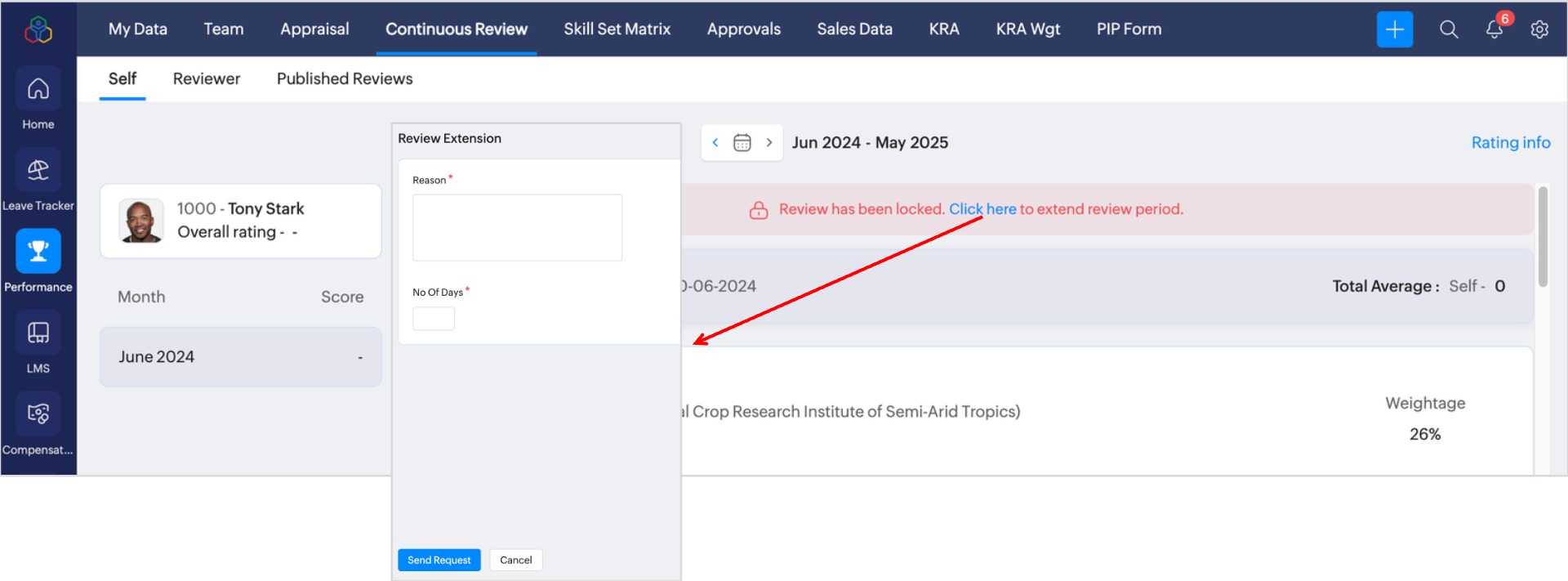
Extend Review Period
If Self-Review or Manager Review period is completed, and if the employee and the reviewer missed to submit the review for the continuous review cycle, they can request for review period extension, which can be approved or rejected by the approver.
Learn more: