Blocklist candidates in Zoho Recruit

Blocklist candidates in Zoho Recruit

Blocklist Candidate allows recruiters to permanently restrict a candidate from applying to current/future job openings. When a candidate is blocked, any job applications submitted using that email will be automatically prevented. Once the candidate is blocked, they will no longer be able to participate in the recruitment process using the blocked email. This will enable you to focus on relevant candidates that will help you to clear out unwanted/spammed candidates.


Availability
  

Available For

Modules

Candidates, Applications

Plans

Free, Standard, Professional, Enterprise

Editions

Both Staffing Agency & Corporate HR

Common Scenarios for Blocking Candidates

  1. In general recruiters are tend to block the candidates in the following scenarios like,
  2. Duplicate, repeated, or fraudulent profiles and applications
  3. Use of fake email IDs or phone numbers
  4. Unprofessional or Abusive Behavior
  5. False experience, forged documents or qualification details
  6. Failed background verification
  7. Poor Performance or Termination for cause
  8. Breach of Confidentiality or Trust
  9. Dishonest or Inaccurate References
  10. Breaching Terms of Employment

How to block a candidate

Notes
Note: Only the Record Owner, the user it was Created By or users with the Administrator profile can block a candidate. 
  1. Navigate to the Candidates /Applications module
  2. Open the required candidate/application record
  3. Click the More options (⋯) and click Block Candidate

  4. Read the instructions carefully and provide the comments

InfoInfo:
These comments are saved as Notes in the candidate record and can be viewed by hovering over the “Candidate Blocked” message on the candidate details page.   
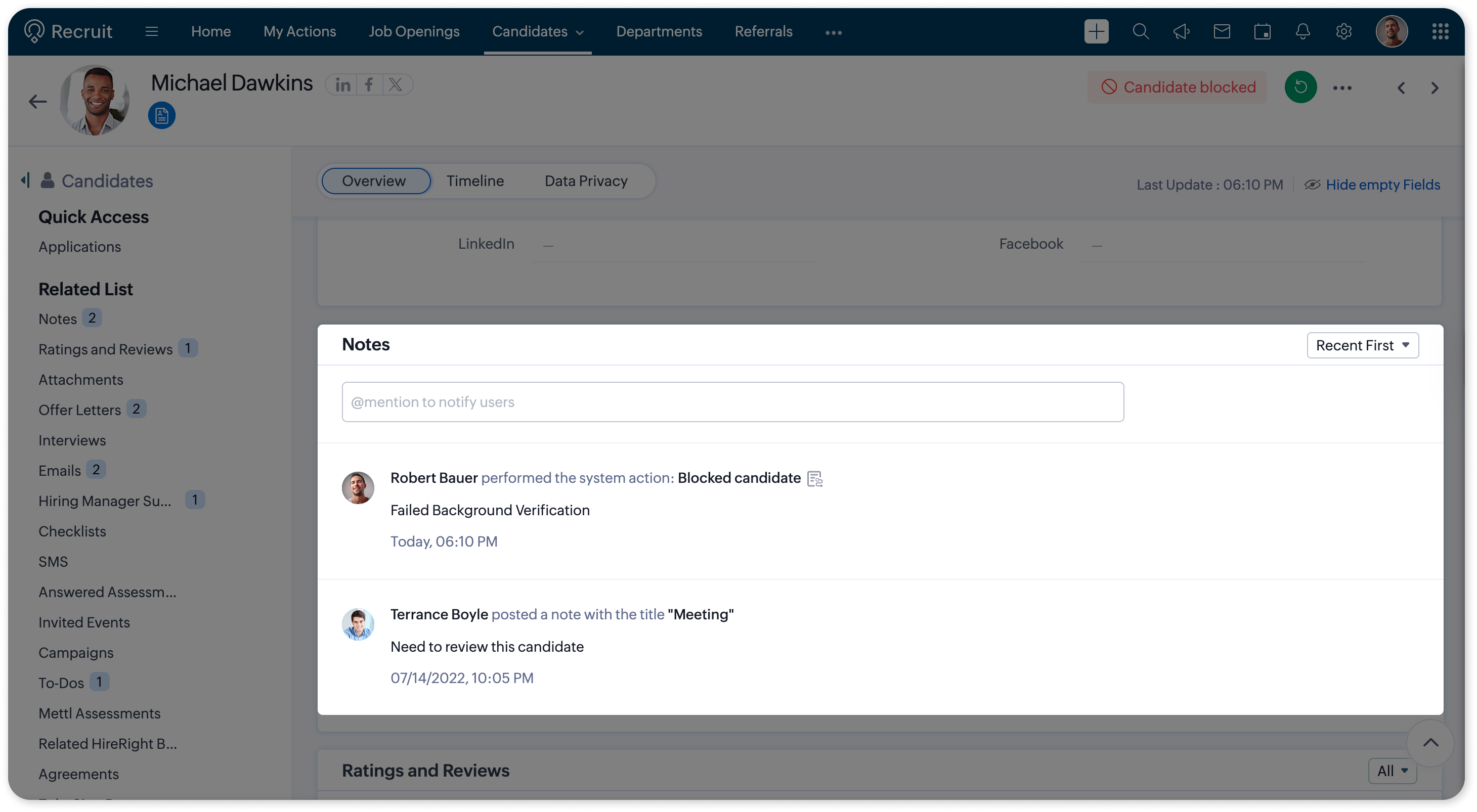
What happens when a candidate is blocked

  1. The candidates entire record will be blocked and the candidate will not be able to make any further applications with the provided email ID.
  2. All applications submitted by the candidate except those in Hired or Rejected status will be automatically moved to Archived

  3. All related interviews for the candidate will be cancelled, which may also trigger any automation configured for interview cancellations.
  4. Any unaccepted offers associated with the candidate will be automatically withdrawn
  5. All pending submissions for the candidate will be archived
  6. The candidate cannot apply for new jobs using the same email address
  7. The Candidate and Custom Portal will be deactivated

Restricted actions

 The following will be restricted from the following:

 Candidate Actions 

Candidates cannot perform the following actions once the record is blocked:
  1. Accept the candidate portal invitation and registration
  2. Portal login
  3. Apply for jobs through the career site portal
  4. Complete screening tests via the bot

Client Contact Actions

Client Contact can access candidate records as permitted, but cannot submit feedback on the candidate.

Impact on Blocked Records

  1. Blueprints/Workflows: Blueprint/Workflow actions cannot proceed for blocked candidate records.
  2. Custom Functions: Custom functions execute as configured, but record actions remain restricted due to blocked status.

Unblocking a candidate

If you decide to unblock a candidate:
  1. Go to the Candidates/Applications module.
  2. Open the blocked candidate/application record.
  3. Click the green Unblock/Revert icon at the top-right corner of the record.

  4. Click on Unblock

What happens when a candidate is unblocked

  1. The candidate’s email address is unblocked, allowing them to apply for new jobs using the same email ID.
  2. Applications that were previously archived are restored to their previous status.
  3. All submissions for the candidate that are archived remain archived.
  4. Interviews that were cancelled and offers that were withdrawn are not reinstated after unblocking.
  5. The Candidate Portal and Custom Portal remain disabled and must be manually re-enabled. 
  6. Enable/Disable both portals by clicking the respective Enable links in the candidate record. Refer here for detailed instructions.
Notes
Notes 
  1. An “Is Blocked” filter is available in both the Candidates and Applications modules, allowing recruiters to easily filter and identify blocked candidates and their related records.

  2. A default custom view named “Blocked Candidates” is available in the Candidates module to list all blocked candidates.  

Automated Blocking/Unblocking  

Recruiters can automate the Blocking/Unblocking using Gallery Custom Functions through Blueprints, Workflows, or Approval Processes. This enables recruiters to automatically block/unblock candidates when specific conditions are met, ensuring consistent policy enforcement.

Auto-block scenarios  

Candidates can be automatically blocked when:
  1. Background verification fails
  2. Applications are submitted using blocked email domains
  3. Mandatory details for offer processing are not provided, or fake documents are identified.
Notes
Notes:
Automated blocking follows the same behavior and impact as manual blocking

      Create. Review. Publish.

      Write, edit, collaborate on, and publish documents to different content management platforms.

      Get Started Now


        Access your files securely from anywhere

          Zoho CRM Training Programs

          Learn how to use the best tools for sales force automation and better customer engagement from Zoho's implementation specialists.

          Zoho CRM Training
            Redefine the way you work
            with Zoho Workplace

              Zoho DataPrep Personalized Demo

              If you'd like a personalized walk-through of our data preparation tool, please request a demo and we'll be happy to show you how to get the best out of Zoho DataPrep.

              Zoho CRM Training

                Create, share, and deliver

                beautiful slides from anywhere.

                Get Started Now


                  Zoho Sign now offers specialized one-on-one training for both administrators and developers.

                  BOOK A SESSION


                              Quick LinksWorkflow AutomationData Collection
                              Web FormsEnterpriseOnline Data Collection Tool
                              Embeddable FormsBankingBegin Data Collection
                              Interactive FormsWorkplaceData Collection App
                              CRM FormsCustomer ServiceAccessible Forms
                              Digital FormsMarketingForms for Small Business
                              HTML FormsEducationForms for Enterprise
                              Contact FormsE-commerceForms for any business
                              Lead Generation FormsHealthcareForms for Startups
                              Wordpress FormsCustomer onboardingForms for Small Business
                              No Code FormsConstructionRSVP tool for holidays
                              Free FormsTravelFeatures for Order Forms
                              Prefill FormsNon-Profit

                              Intake FormsLegal
                              Mobile App
                              Form DesignerHR
                              Mobile Forms
                              Card FormsFoodOffline Forms
                              Assign FormsPhotographyMobile Forms Features
                              Translate FormsReal EstateKiosk in Mobile Forms
                              Electronic Forms
                              Drag & drop form builder

                              Notification Emails for FormsAlternativesSecurity & Compliance
                              Holiday FormsGoogle Forms alternative GDPR
                              Form to PDFJotform alternativeHIPAA Forms
                              Email FormsFormstack alternativeEncrypted Forms

                              Wufoo alternativeSecure Forms

                              TypeformWCAG


                                          Create. Review. Publish.

                                          Write, edit, collaborate on, and publish documents to different content management platforms.

                                          Get Started Now


                                                            You are currently viewing the help pages of Qntrl’s earlier version. Click here to view our latest version—Qntrl 3.0's help articles.


                                                                Manage your brands on social media


                                                                  • Desk Community Learning Series


                                                                  • Digest


                                                                  • Functions


                                                                  • Meetups


                                                                  • Kbase


                                                                  • Resources


                                                                  • Glossary


                                                                  • Desk Marketplace


                                                                  • MVP Corner


                                                                  • Word of the Day


                                                                  • Ask the Experts


                                                                    Zoho Sheet Resources


                                                                        Zoho Forms Resources


                                                                          Secure your business
                                                                          communication with Zoho Mail


                                                                          Mail on the move with
                                                                          Zoho Mail mobile application

                                                                            Stay on top of your schedule
                                                                            at all times


                                                                            Carry your calendar with you
                                                                            Anytime, anywhere


                                                                                  Zoho Sign Resources

                                                                                    Sign, Paperless!

                                                                                    Sign and send business documents on the go!

                                                                                    Get Started Now


                                                                                            Zoho TeamInbox Resources


                                                                                                      Zoho DataPrep Demo

                                                                                                      Get a personalized demo or POC

                                                                                                      REGISTER NOW


                                                                                                        Design. Discuss. Deliver.

                                                                                                        Create visually engaging stories with Zoho Show.

                                                                                                        Get Started Now


                                                                                                                            • Related Articles

                                                                                                                            • Working with Candidates

                                                                                                                              Introduction Candidates play a very important role in an organization's Recruitment process. Sourcing candidates and managing them are the initial stages in the recruitment process. Candidates can be obtained through job boards, career website pages, ...
                                                                                                                            • Candidate stages in Zoho Recruit

                                                                                                                              The Candidate Stage is an easy way for you to see where people are in your hiring process. To view a particular candidate's stage, go to Candidates > Select a record. Clicking on the record will take you to the candidate detail page, where you can ...
                                                                                                                            • Import Candidates from documents

                                                                                                                              Zoho Recruit's import options help you and your hiring teams upload candidate details with ease. Whether you're an individual recruiter looking to add your candidate's profiles or part of an organisation handling large-scale hiring, we provide ...
                                                                                                                            • Creating Candidate Records

                                                                                                                              Methods There are multiple ways for creating candidate records in Zoho Recruit, namely; Entering data in the candidate details form: You can manually fill in the Candidate details gathered from various external sources, e.g. trade shows, exhibitions, ...
                                                                                                                            • Enabling Applications Module

                                                                                                                              The Applications module is a feature for tracking and managing job applications efficiently. To ensure a smooth transition, we’ve set up a new test environment to demonstrate how your interface will change once you enable the Applications module. ...
                                                                                                                              Wherever you are is as good as
                                                                                                                              your workplace

                                                                                                                                Resources

                                                                                                                                Videos

                                                                                                                                Watch comprehensive videos on features and other important topics that will help you master Zoho CRM.


                                                                                                                                eBooks

                                                                                                                                Download free eBooks and access a range of topics to get deeper insight on successfully using Zoho CRM.


                                                                                                                                Webinars

                                                                                                                                Sign up for our webinars and learn the Zoho CRM basics, from customization to sales force automation and more.


                                                                                                                                CRM Tips

                                                                                                                                Make the most of Zoho CRM with these useful tips.


                                                                                                                                  Zoho Show Resources