How to archive/unarchive a channel?
If a channel isn't in use right now, it can be archived and then unarchived when needed.
There are two ways to archive a channel:
- Click on three dots in the top-right of the channel and select Channel Info.
- Click the Channel image.
Either way, you will be prompted to a dialog window. Click the actions option(3 dots) and select Archive.
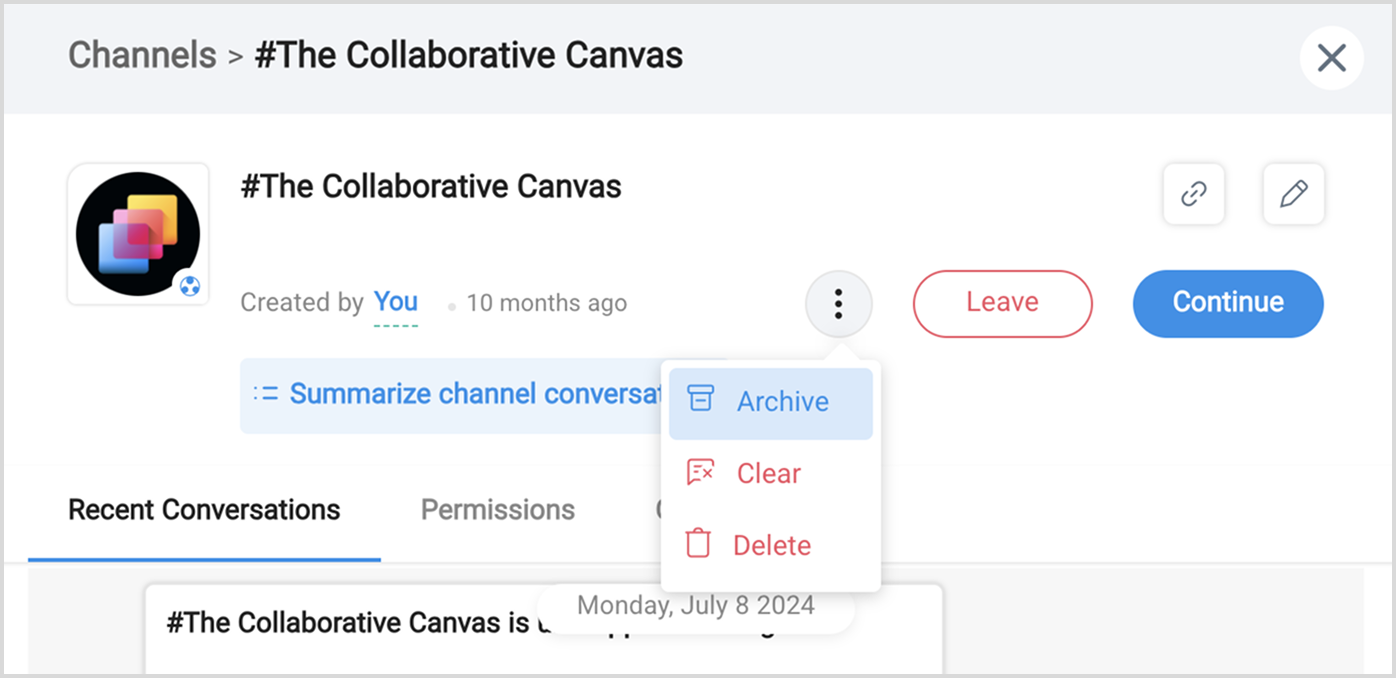
- A confirmation pop-up will be displayed. Click Yes, Archive this channel to confirm.

Note:
- The actions option(three dots) will only appear to users who have authorized permission.
- Once a channel is archived, it will disappear from the channel list. No actions can be performed here on.
- Archive channels do not delete conversation. You will be able to view them on unarchive.
To unarchive a channel:
- Click on actions next to the channel level name and select Join Channel.
Search for the channel name and select the channel from the list.
- Select Unarchive from the dialog window that is displayed.
In the confirmation popup that appears. Select Yes,Unarchive this channel.
Note:
You can unarchive a channel only on granted permission.
The Channel gets displayed in the channel list after unarchiving.
Permissions can be configured for each channel to allow or restrict users from performing certain actions. It is determined by the user roles; learn more about them here - Permissions in Cliq channels.