Determine the gateway rules for simultaneous journeys: To continue or to reenter
The accuracy in your customer’s journey lies in the Signal you configure. The more specific a Signal is, the more accurate the journeys will be. However, irrespective of creating event-specific Signals, there may be situations where a signal from the start of the journey will repeat mid way in a different context, leading to creation of a simultaneous journey instance.
 Fact: Journey Builder takes your records across stages as how your customers move in your business. However, for every customer that enters a journey configuration, there would be one or more journey record instances created based on their interactions. This record instance will grow through the interaction making it a CRM representative of their path. Abandoned interactions will lead to incomplete instances, duplicate interactions will lead to duplicate instances. The idea is one customer can take multiple tracks and these instances are representations of their interactions and movements. Learn more
For example, through the length of the pipeline, the prospect and the business will exchange multiple emails as threads with the same or similar subject. This “Receiving an email response with this subject” Signal qualifies journey progression at the time of lead evaluation and also while active negotiations. In such cases, a single email response can activate two signals: One in the initial stage and one in the mid stages.
Journey Builder is a machine built to capture events and route the records in the direction the events take. When there are situations that will activate Signals (Receiving an email in this case) to receive a new journey and continue an existing ones, Journey Builder will move the existing instance from the current stage and create a simultaneous journey and allow it to enter the journey for the same customer, just because this same signal is configured to start a journey.

The existing journey is persisted, it will take the right course when the next signal activates. What is the problem with this?
Well, this is not a “problem” inherently. The instance that came all this way will proceed when the neighboring signal is initiated. But, the simultaneous instance that also entered the journey will sit on the stage upon its arrival, consequentially executing the actions meant for that stage. For the prospect that is already in the negotiation stage, scheduling a discovery call is not relevant. These unintended simultaneous journeys will lead to moving the records to incorrect stages of the process, providing undesired and irrelevant customer experiences and creating confusion.
For someone in the pipeline, this confusion can be clarified as miscommunication. However, a mixed messaging from a brand during the exploration stage will evade the prospect from your business, totally.
Therefore, it is important to instruct the system if the simultaneous journey is intended or unintended. Intended ones can be retained to take a parallel course, while unintended instance creation itself can be avoided.
Before we find out how to curtail or regulate, let’s delve into scenarios to understand where a simultaneous journey will benefit and where it will create confusion.
Scenario 1: One journey for multiple properties; multiple enquiries creating simultaneous intentional paths
Ben enters your system by submitting a webform to enquire about a real estate property. The record entered a journey in CommandCenter and he is in the middle of the pipeline. While this is already an ongoing journey, Ben submits a webform again to enquire about one other property. This latest submission by Ben creates a simultaneous journey instance for him by the same configuration. Here, Ben’s former interaction is midway and his new submission created another one. Both the interactions are intentional and this kind of simultaneous journey can be allowed to enter.
Scenario 2: CX optimization at CPQ stage: One true journey
Imagine your business wants to optimize the CX at quotation phase, where your focus would be about orchestrating right actions for each quotes created. The Signal that starts the journey is sending of the quote. When a quote is shared with your prospect, the journey will begin and imagine if your prospect wanted a revised quote after a couple of stages into the journey, then you’d send another quote to the customer. This creates an unintentional simultaneous journey. The intention is not to start a new journey, but a new journey is created regardless, as per Journey Builder’s behavior.
**
These scenarios will explain how a simultaneous journey can be of use or not and it is not up to us to curtail the unintentional ones completely. So, we give the option to configure the re-entry rule at the hands of your admins/ strategists.
Re-entry rules
Re-entry rules are configuration that will instruct Journey Builder if new customer journey interactions can be allowed to enter a journey as a new instance or not, irrespective of whether the customer in context is already participating the same journey.
By determining the re-entry rules, you can choose how to handle the Signal for a record that is already a part of the journey.
Determine re-entry rules
Re-entry rules are applicable only for the first transition from the Start node of the journey. This is because, when one record is already half way, a repeating signal will only move it to the next stage. However, if the same Signal is in the start node, it creates and receives a journey instance into the configuration. Therefore, the determination will be applied only to the first ongoing transitions of the journey.

Note: If there are multiple first stages, all those transitions can carry re-entry rules determination.
Choices you have to make:
- The first thing you need to do is to determine the reentry behavior from the options: Ignore the signal, Start a new journey. If you choose to:
- Ignore the signal, then the existing journey instance alone will persist and continue. This will create a unique path for the customer and you can give a consistent and contextual customer experiences through each stage of their journey.
- A journey record is said to be duplicate only if their identifiers match between two transitions. It confirms that it is the same customer entering the journey. So, it is important that a minimum of one identifying value to match, so that the system can ignore the signal. However, you can form a stringent threshold by increasing the duplicate threshold value.
- Start a new journey, then whenever the repeating Signal is triggered, a new journey instance will be created taking the course afresh, while the existing instance in the current stage will also be moved to the next stage because its progression is also qualified.
- Choose the Signal Source. An action is often executed by the stages of the journey can invoke a Signal. For example: Acknowledgement Email can be sent as an action. If the event “Sending of an email” is created as a signal, then you can choose to ignore that Signal to process the records as well.
Note: This applies to the first Signal configuration.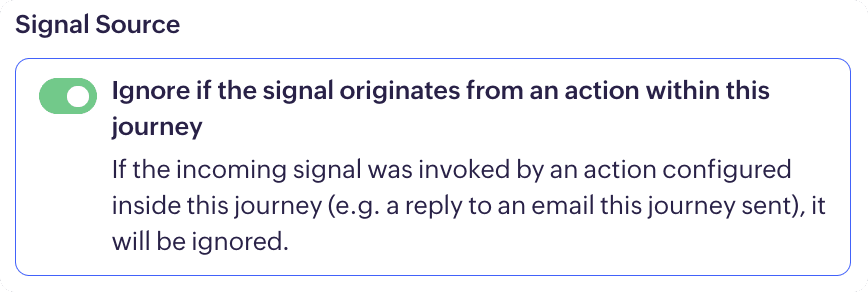
Tip:
A Signal is contextual only to those records sitting on the respective stages. Even if a signal is repeated elsewhere in the middle of the journey, the records from the respective former stages (already part of the journey) will only be moved to the next stage. However, if the very signal is used to receive new records (at the start stage), new instances will crop-up. Therefore, it is recommended to use the stage-specific signal conditions and record filters to avoid misfiring. Determining re-entry rules will add an extra layer of care to restrict creation of duplicate/ unintended journeys altogether. Think of re-entry rules as a gate-keeper and signal conditions and record filters as access-management system for customer journeys in your business.
Points to remember
By default, the re-entry rules will be configured to ignore the new signal. If a customer is already participating in a journey, a new instance will not be created. If you'd like to capture journeys at the interaction level, then kindly moderate the re-entry behavior so that all interactions are captured as distinct journeys.
Determining re-entry rule applies only to that particular journey configuration. It will not apply for the record that is also participating in another journey configuration. Imagine if you have a configuration for each property, then Ben's repeated interaction will create journeys in various configuration and re-entry rules must be determined for each journey configurations if you'd like to restrict re-entry.