Achieve multi-level record prioritization with multiple Kanban views per module

Achieve multi-level record prioritization with multiple Kanban views per module

Dear all,

We're happy to announce the introduction of a new capability within Zoho CRM: creating multiple Kanban views within a single module (depending on your edition).

As you may already know, the Kanban view in Zoho CRM is a card-based view that displays data in an organized manner for better comprehension. Until now, CRM only supported a single Kanban view per module. As a result, every time you needed a Kanban view of your records with a different Categorize By field within the same module, you had to edit the existing view accordingly—which could prove to be quite tedious.

Now, this new feature enables you to use multiple fields in order to prioritize your records.

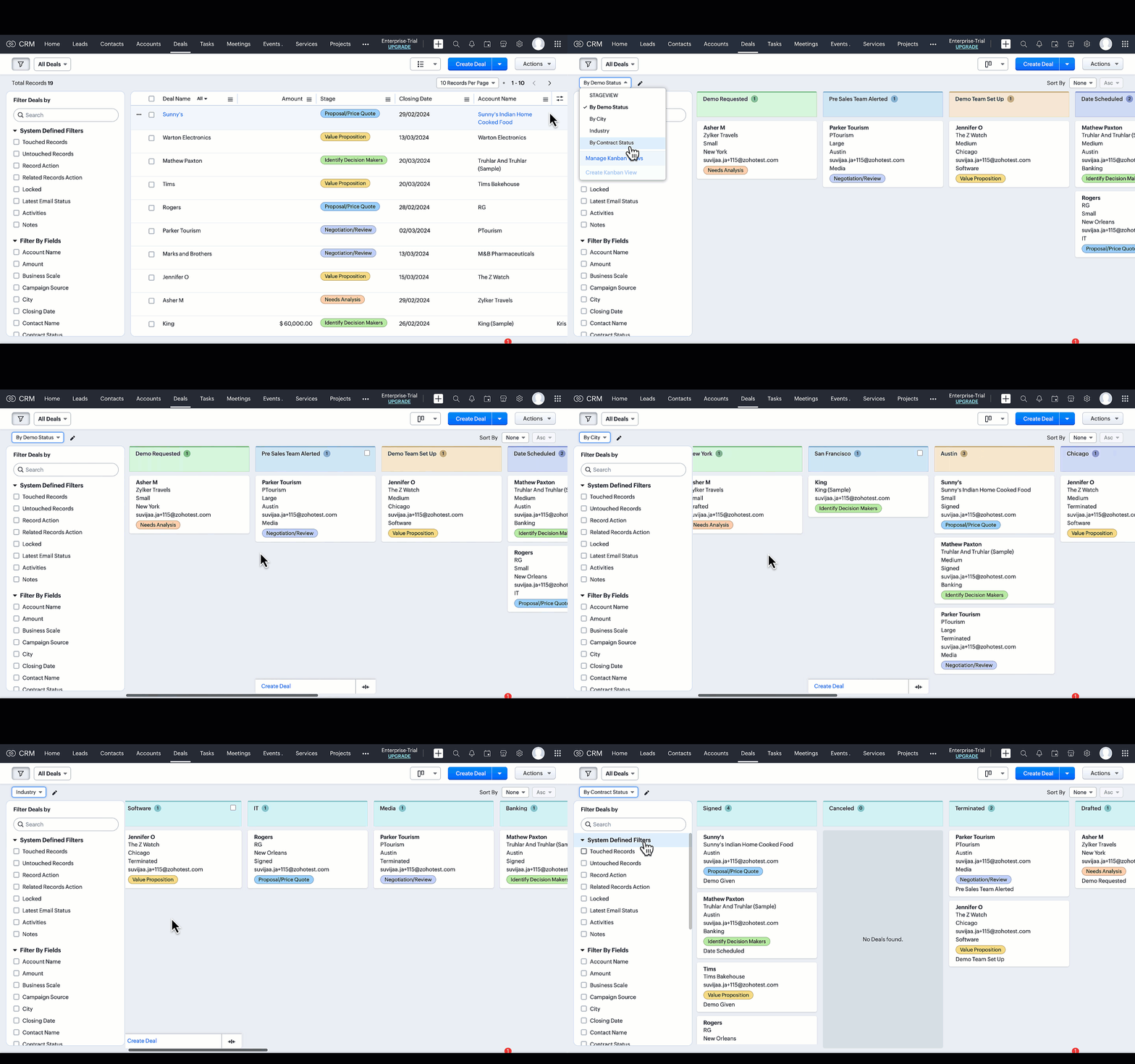
Refer to the GIF below to get a better understanding of the feature.


Why multiple Kanban Views?

Why exactly would businesses have the need to create multiple Kanban views? It's to help streamline the user experience by making it more convenient and less laborious for users. And how is that? By making it possible for users (who utilize Kanban views) to prioritize customer data via different fields.

Let's look at some examples to understand this better.

As you may have seen in the animation above, users can categorize the records in their Deals module based on multiple factors.

For instance, Deals by Contract Status:
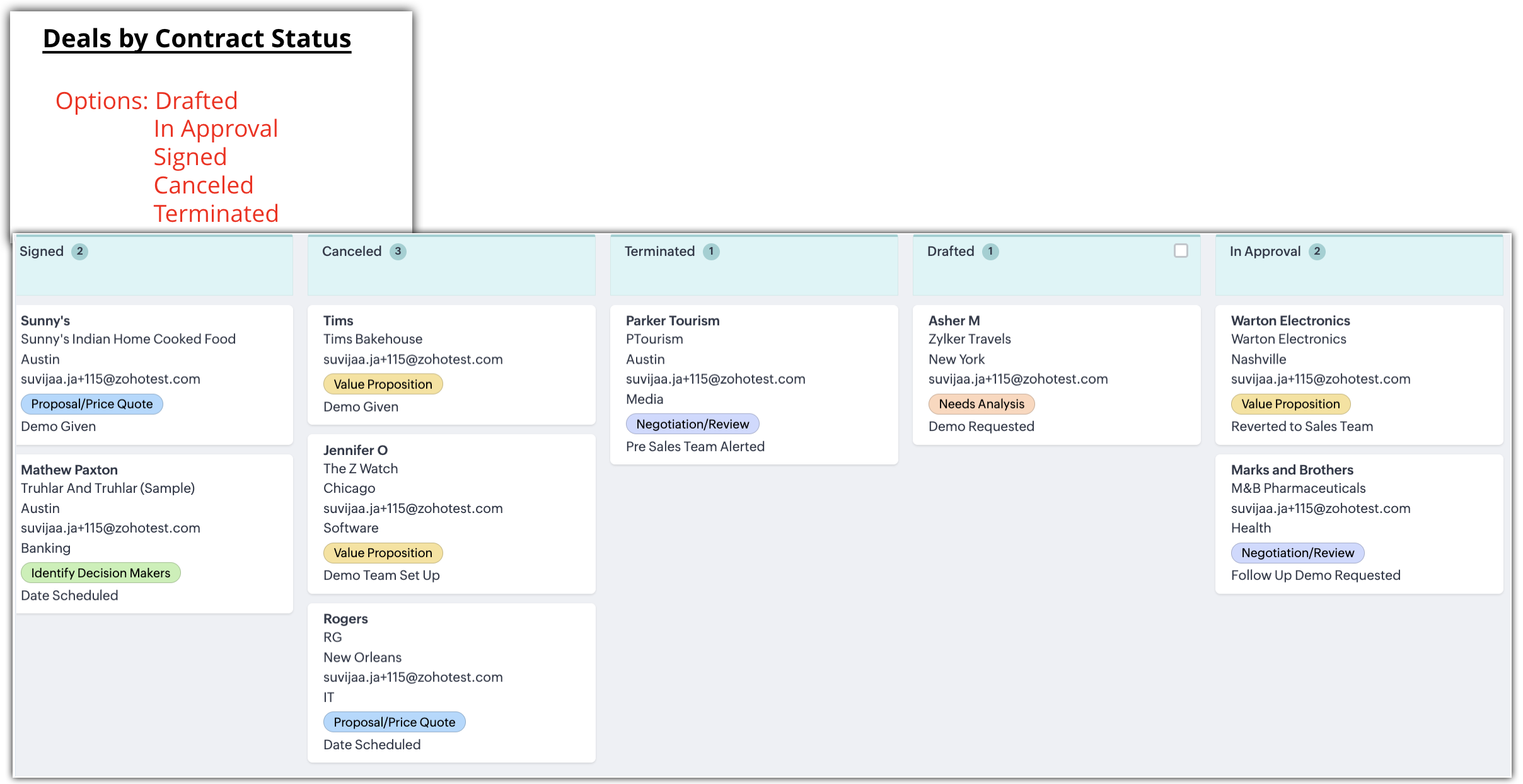


Another instance is Deals by Industry:
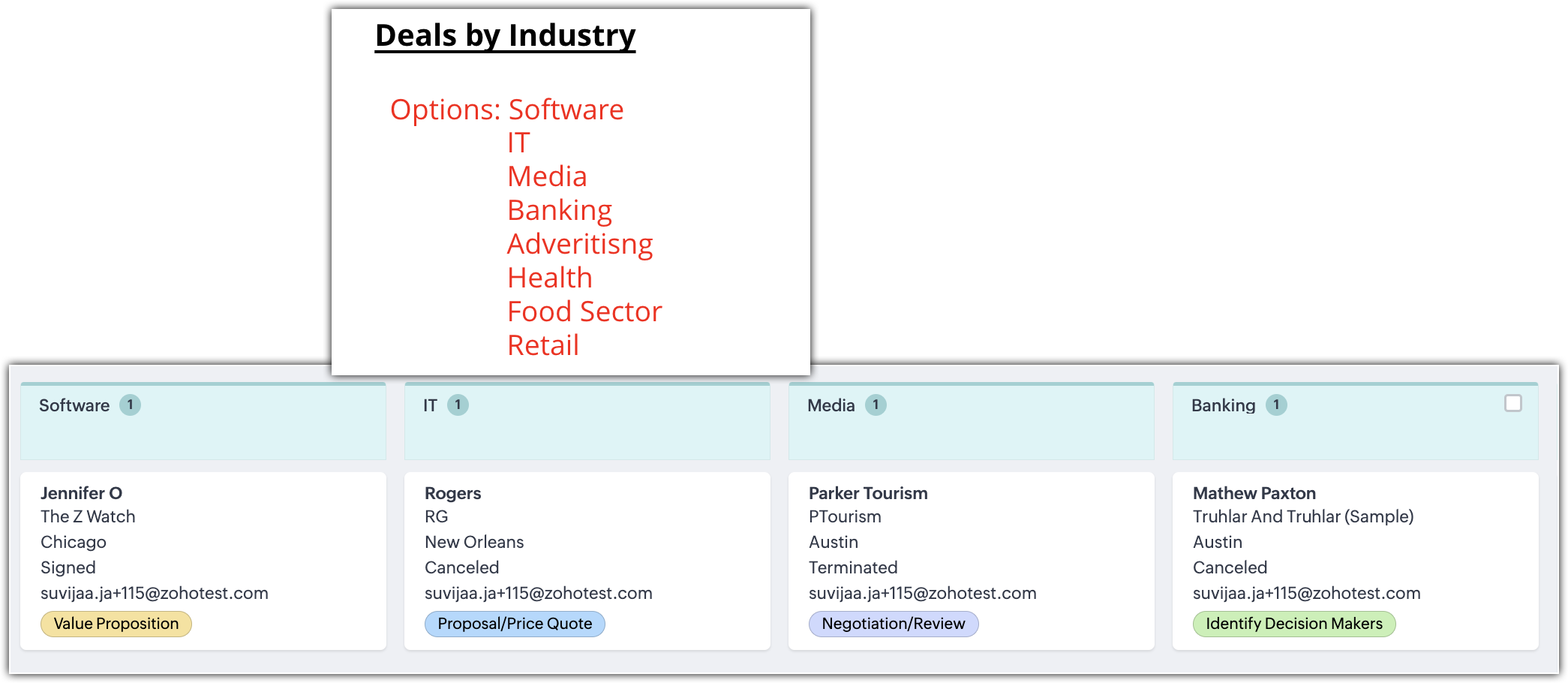


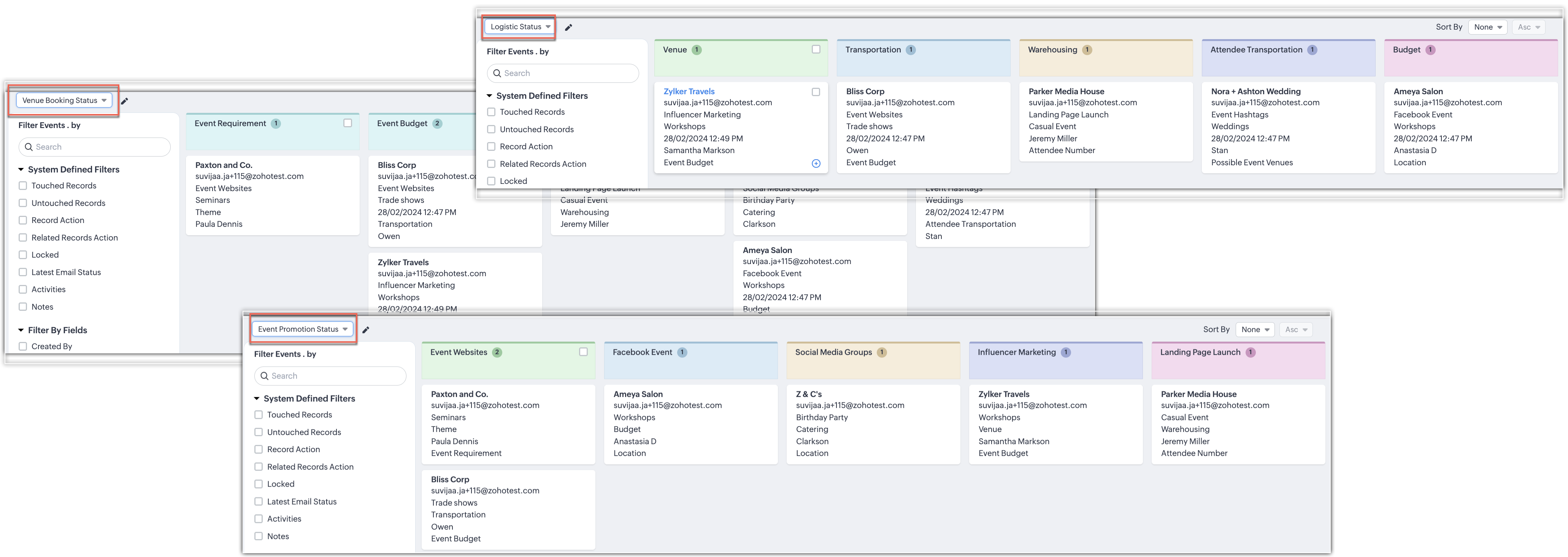
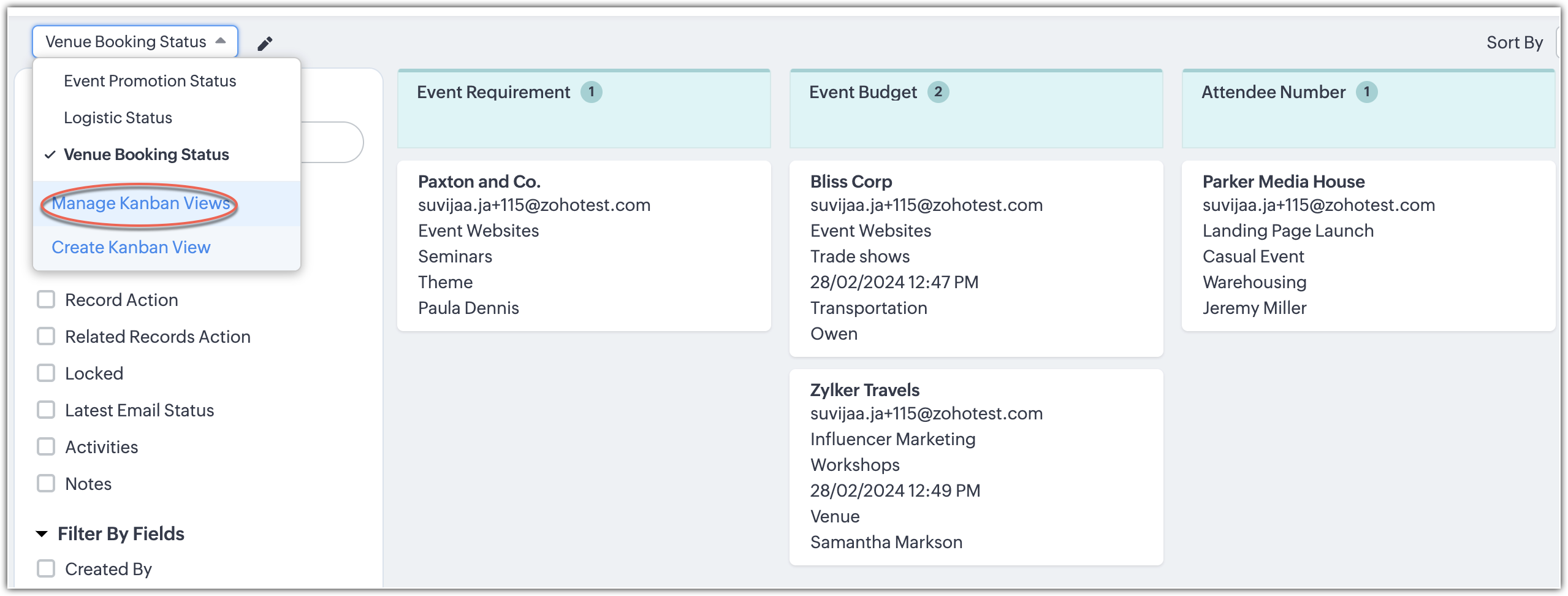
Let us look at another example would be a user at an events company who wants to track their events by multiple statuses. They can do so via the records' statuses:

  • Event promotion status
  • Logistics status
  • Venue booking status


Creating a Kanban View

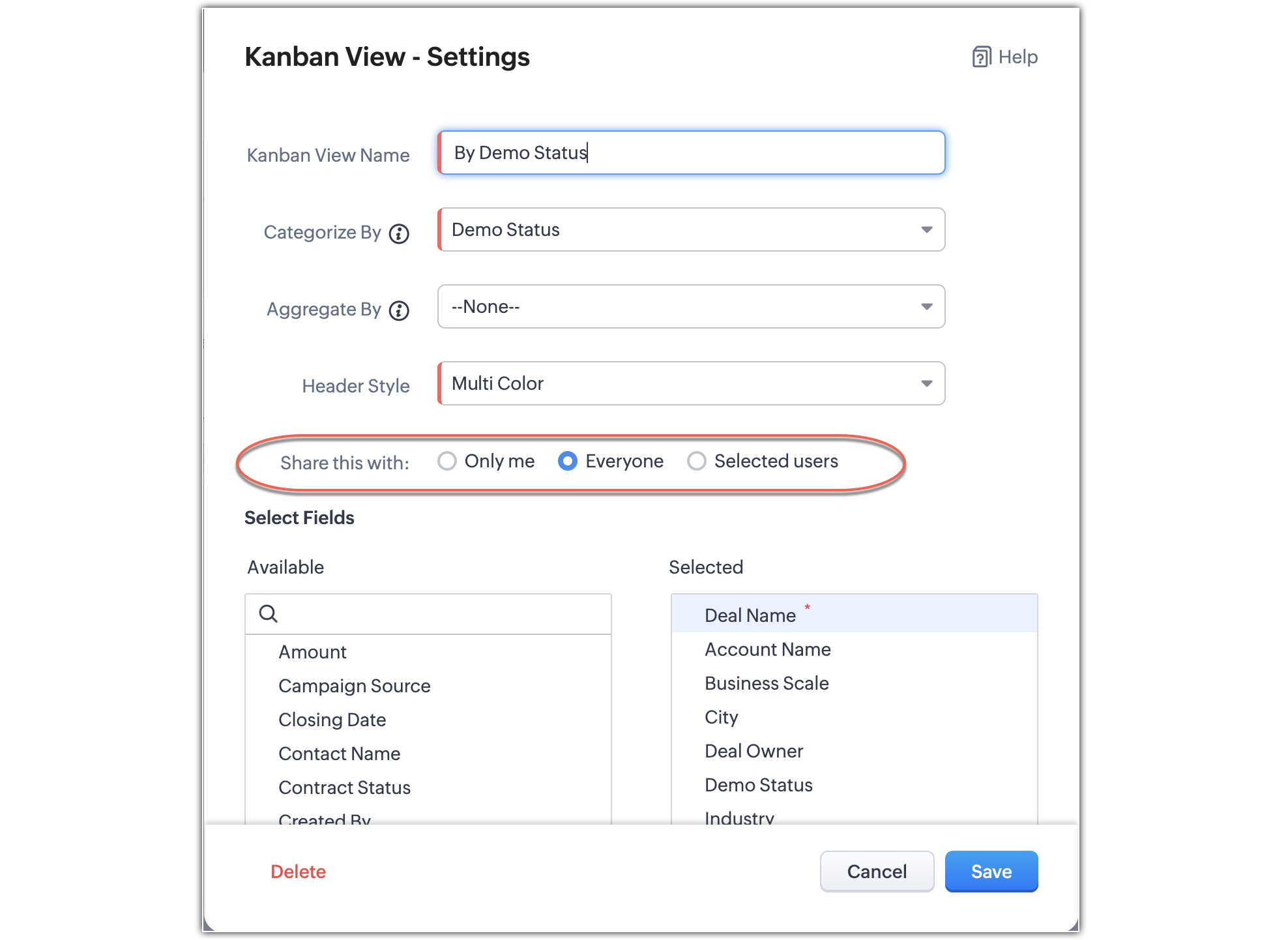
To create a Kanban view for the Accounts module, for instance, you need to fill in the necessary details as shown below:
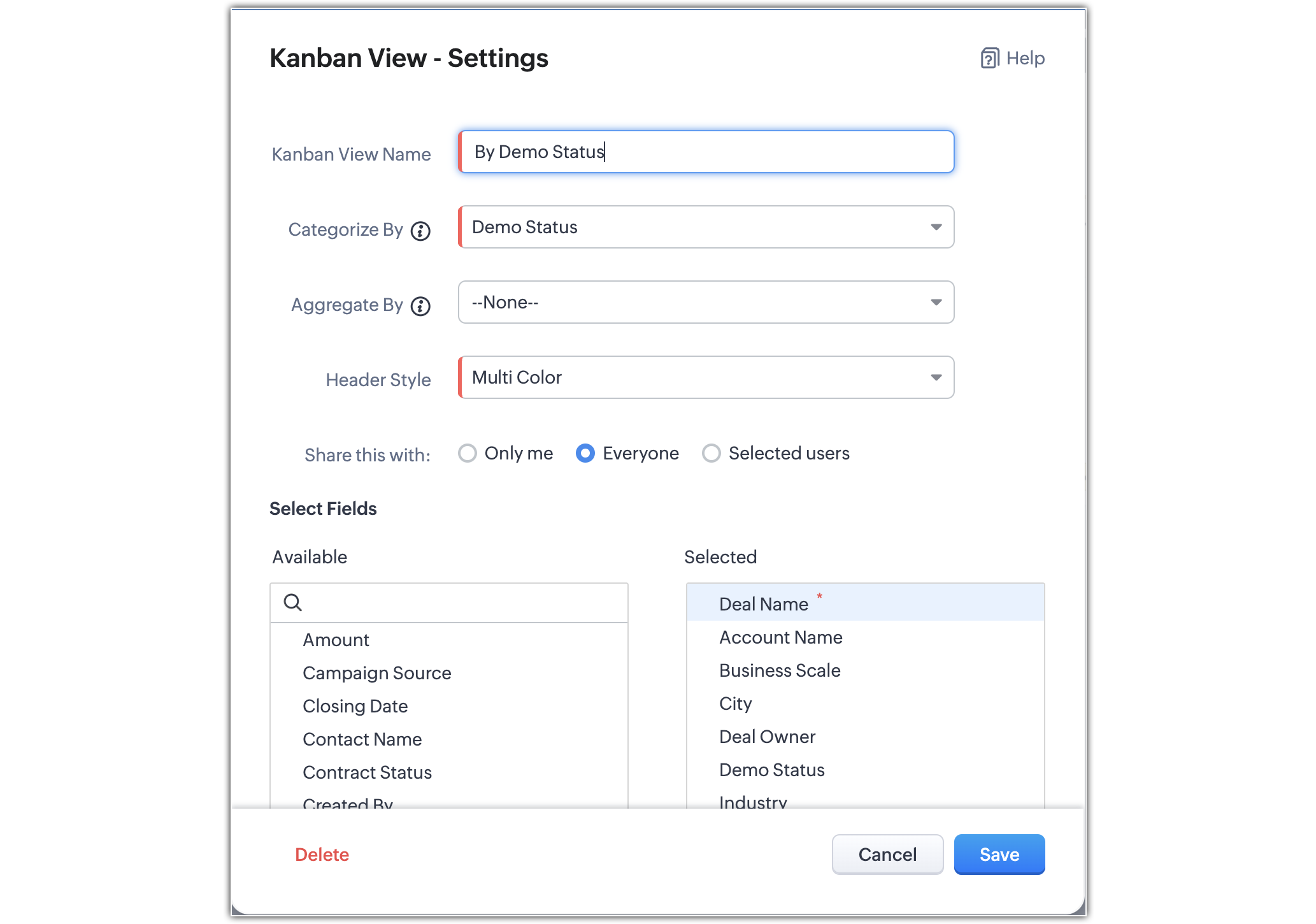


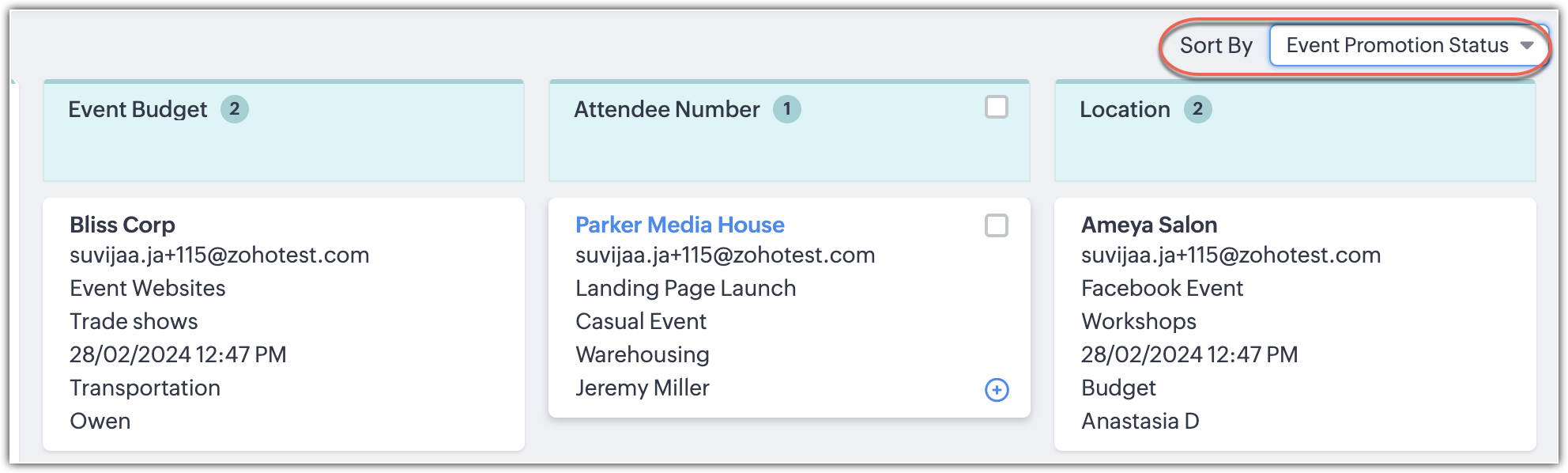
However, with multiple Kanban views in effect, the Aggregate By field will no longer be mandatory. You will be able to view your records based on the field you use to sort them.


Working with your Kanban views
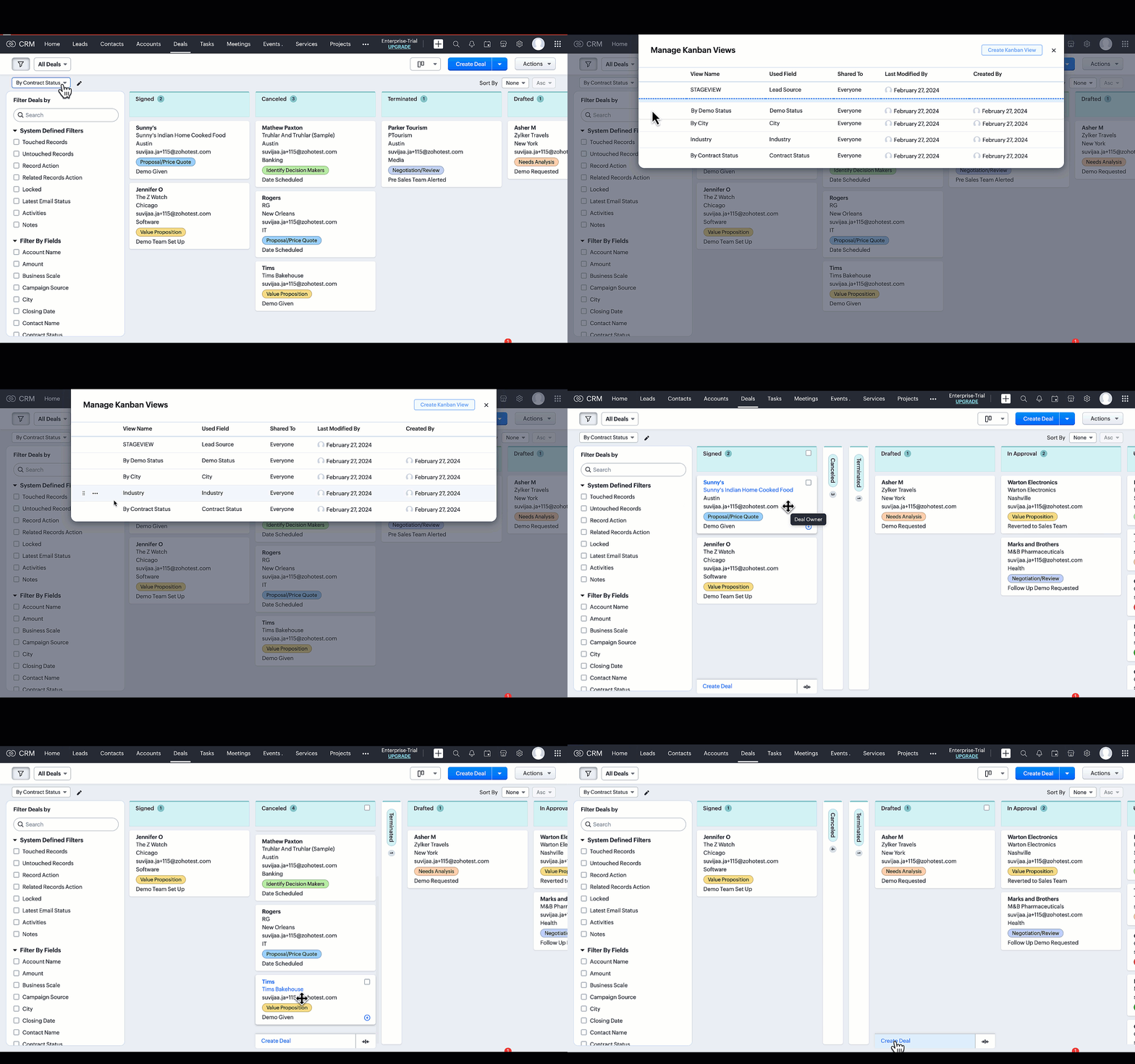


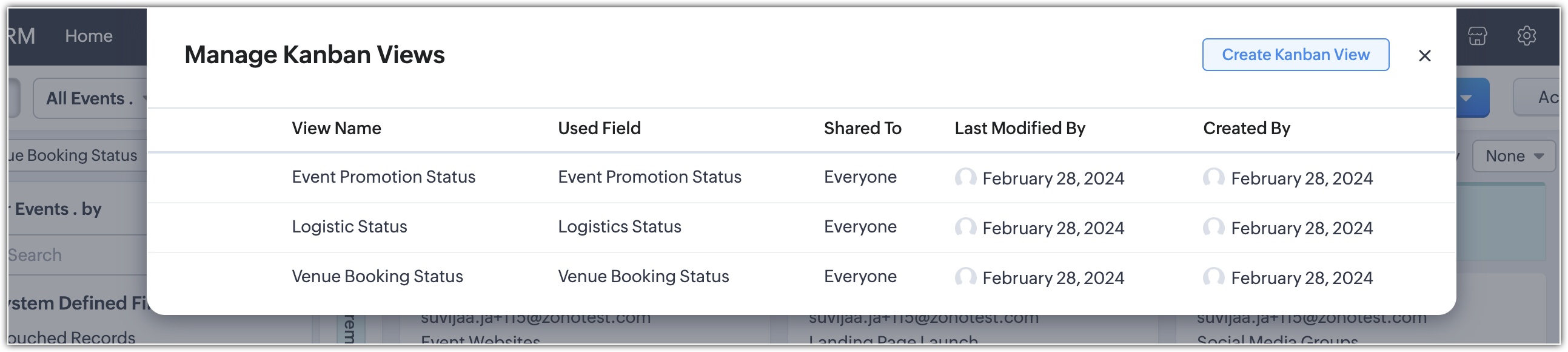
1. Manage your views

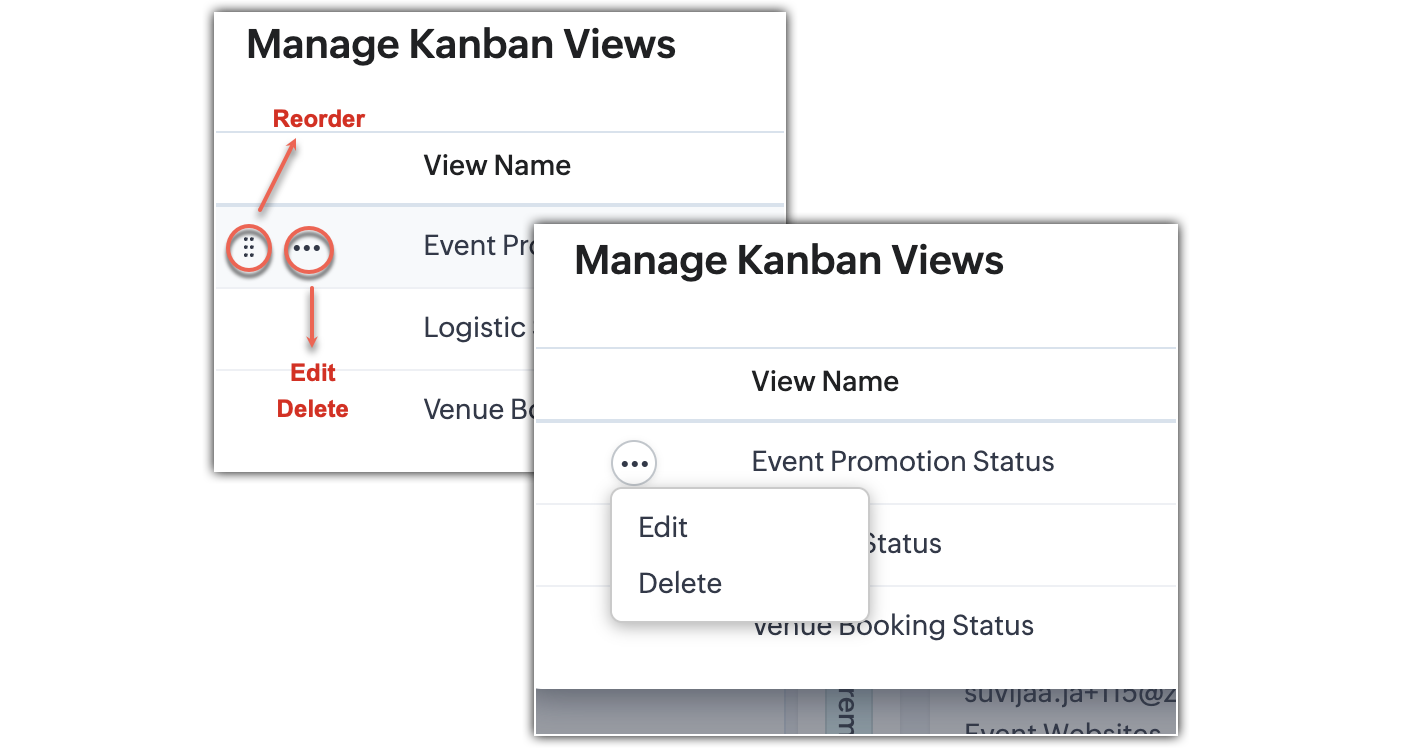
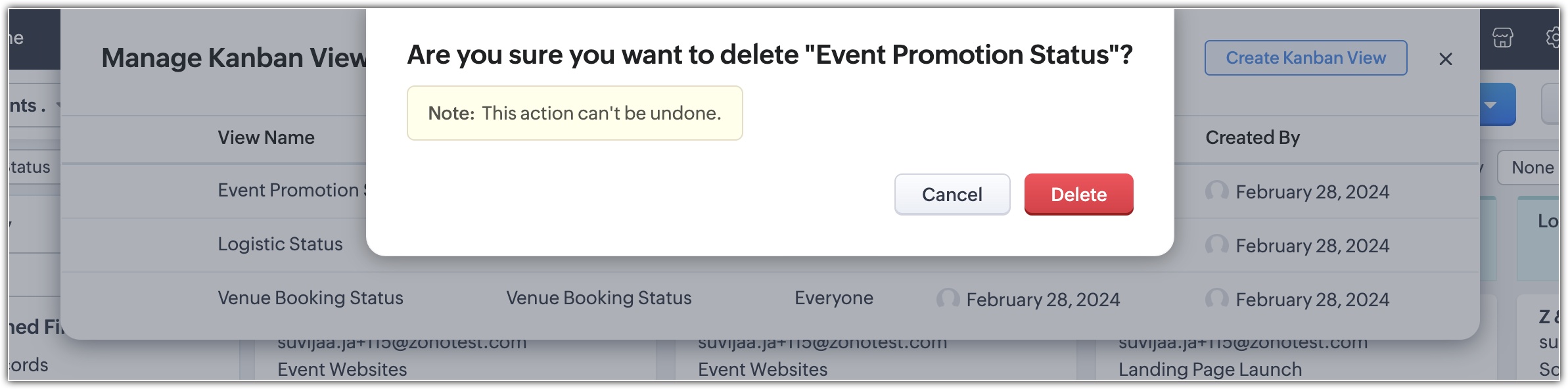
Given that you can create multiple Kanban views per module, you can also manage and delete views based on your requirements. Managing these views mean that you can reorder the Kanban views based on your individual preferences—and you can edit or delete them as well.


Note.
  • Admins can configure user permissions to control which profiles can create, delete, or modify a Kanban view.
  • However, the reordering of views is user-specific; if one user orders their views in a specific way, it will not affect how those views are ordered for other users.
  • To identify who created or modified a view, and when it was modified, you can hover over the view.

2. Expand and collapse your stages

You can now  expand and collapse each stage within your view. Additionally, you can drag and drop cards to collapsed stages.
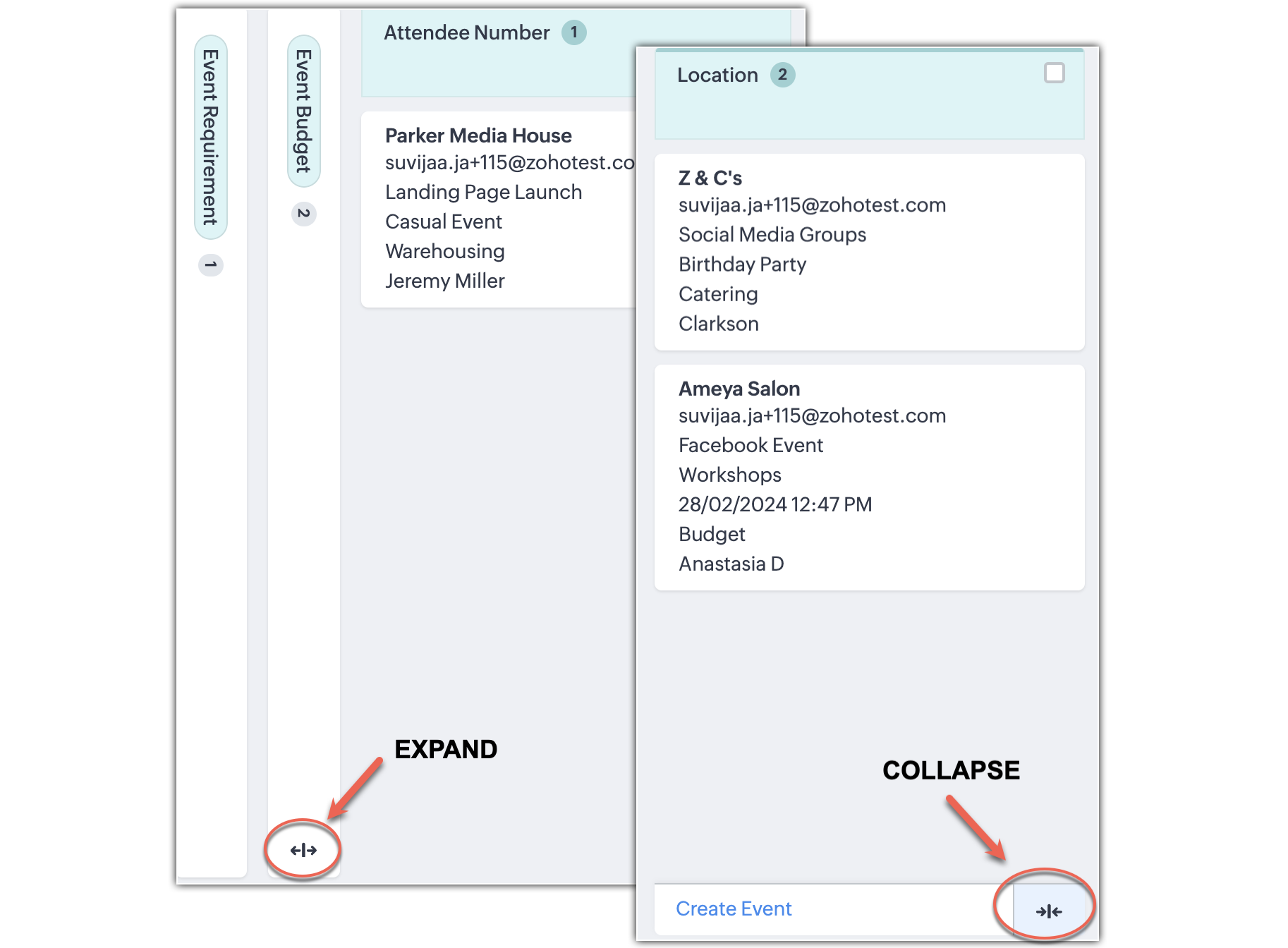


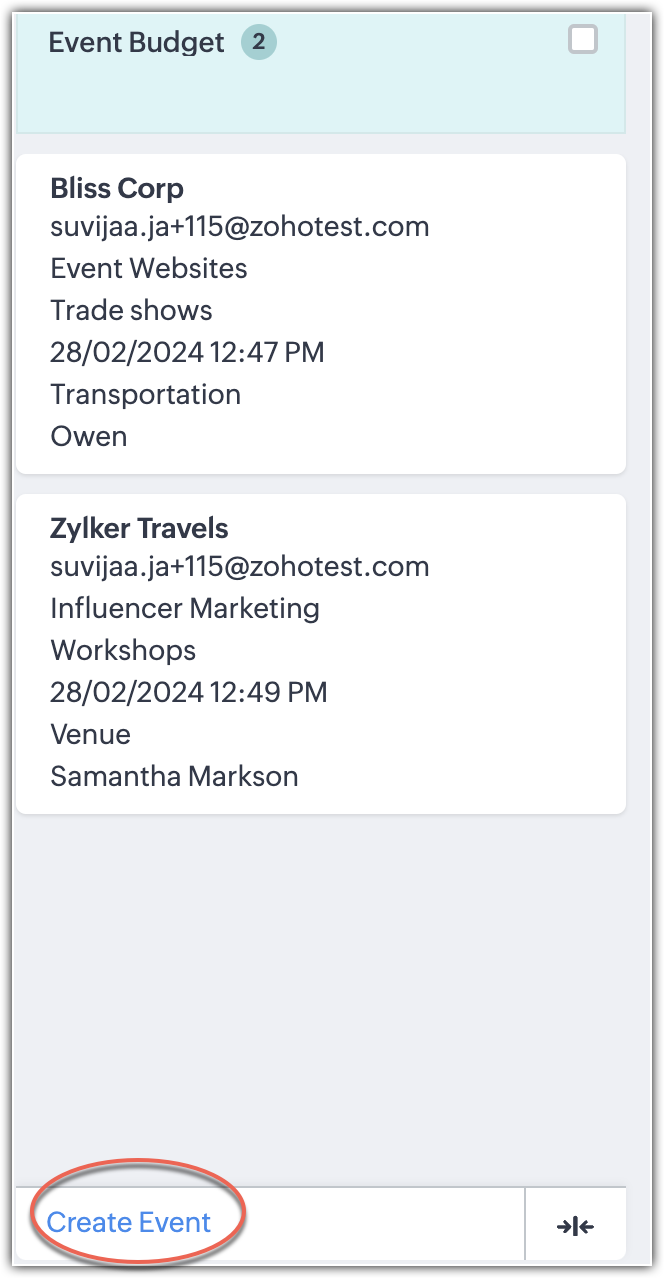
We've provided a button in the footer of each stage that creates stage-specific records. The current view's layout/pipeline and stage detail will be populated in the record creation page.

Access Permissions have also been given so that uUsers can set access permissions and share their views according to the following options:
  • Only me
  • Everyone
  • Selected users


Note. 
  • If you have territories within your organization, territories with subordinates will be displayed in the dropdown. 
  • You can create a Kanban view with picklists containing over 75 options. However, the system will display an alert which states that only the first 75 picklist options will be categorized. 
  • We've also added support for copy customization of the multiple kanban views.
  • The Aggregate By field is no longer mandatory. The user could configure them according to their usage. The supported fields are integer, decimal, currency, formula, and rollup summary.
  • The applied layout and pipeline will be persisted user-specifically for the respective Kanban View.
    The pipeline dropdown will be available only in the Deals module when the Kanban View's Categorize By is "STAGE". 


That's all for this announcement. Please share your feedback in the comments below. For more details on Kanban views, check out our help document

https://help.zoho.com/portal/en/kb/crm/customize-crm-account/managing-module-views/articles/kanban-views#Create_a_Kanban_View


      • Recent Topics

      • Users may not pick the fields to be shown as columns in the Choose Account window when creating a new Deal record

        Hi there, by talking with other users I found out that I, as an Admin, am the only one who can pick fields to be shown as columns in the Choose Account window when creating a new Deal record. In fact, if other users click on the "Add Column" symbol on
      • Zoho Subscriptions -- Zoho Commerce integration

        Is there integration between Zoho Subscriptions and Zoho Commerce? I would like to create subscription plans in Zoho Subscritpions and list them for on my Zoho Commerce store.
      • Zoho CRM for Everyone's NextGen UI Gets an Upgrade

        Hello Everyone We've made improvements to Zoho CRM for Everyone's Nextgen UI. These changes are the result of valuable feedback from you where we’ve focused on improving usability, providing wider screen space, and making navigation smoother so everything
      • Create custom rollup summary fields in Zoho CRM

        Hello everyone, In Zoho CRM, rollup summary fields have been essential tools for summarizing data across related records and enabling users to gain quick insights without having to jump across modules. Previously, only predefined summary functions were
      • Client Script | Update - Client Script Support For Custom Buttons

        Hello everyone! We are excited to announce one of the most requested features - Client Script support for Custom Buttons. This enhancement lets you run custom logic on button actions, giving you greater flexibility and control over your user interactions.
      • Restoring records from the recycle bin programatically

        Background I'm working on a piece of software to automate conversion of Leads into Deals based on order status from my company's website. The process is mostly complete, right now I'm just working on handling a few edge cases to ensure data integrity.
      • How can I clone my website in order to try new templates?

        I want to try a new template for my existing Zoho website without the risk of changing the current site or accidentally publishing the wrong template. Therefore I thought a 'clone website'-option should be somewhere, but I can't find it. How do I try
      • Select forwarding

        For Zoho mail online on PC in web browser: I had forwarding enabled in section "Mail accounts / Forwards", and I also have some filters that send emails from some unwanted senders to Archive. But it doesn't work as intended, it forwards everything (obviously
      • Custom view inconsistencies

        Why is "is not" missing from criteria, along with other comparison operators ??? It makes it almost impossible to build required custom views, I don't want "void" invoices listed & why on earth would "Void" invoices be showing when the criteria includes
      • Cliq iOS can't see shared screen

        Hello, I had this morning a video call with a colleague. She is using Cliq Desktop MacOS and wanted to share her screen with me. I'm on iPad. I noticed, while she shared her screen, I could only see her video, but not the shared screen... Does Cliq iOS is able to display shared screen, or is it somewhere else to be found ? Regards
      • system not picking my default custom service report template

        Can you tell me why when we create a service report always pick the (standard old) template? Even when I have a custom service report selected as Default.
      • Restrict Appointment Booking to Approved Clients

        Dear Zoho Bookings Support Team, We'd like to propose a feature enhancement for managing appointments within Zoho Bookings. This feature would ensure only pre-approved clients can schedule meetings. Desired Functionality: We propose the introduction of
      • Automate Credit Card Surcharge

        Is there a way to create an automation that will add a 3.0% credit card surcharge to a subscription whenever a customer pays via credit card?
      • Product Request: Send email to Secondary email

        Guys, we should be able to send the campaign to the secondary email too.  Is this on the plans for Zoho Campaign? It looks like I can map the secondary email from the CRM to the Campaigs, but can not send the message.  
      • I have the item field and Quantity field in the sub form , on the submit of the form if the quantity is grater than inventory means show alert on submit validation only for item type goods ,

        I have the item field and Quantity field in the sub form , on the submit of the form if the quantity is grater than inventory means show alert on submit validation . Stock Check Validation only for item type goods , not for item type service . For the
      • CRM notes

        I want to be able to add notes to a task that do not necessarily get rolled up into an account or contact.   For example, I tasks to work on a Court Order for John Doe divorce account.  There might be lots of updates (in the form of notes) that employees
      • Disappearance of all articles in the knowledge base

        Hi there! It seems like all of our articles have disappeared from the knowledge base: However, the names still appear in the "sort articles" section:
      • Logic for sending to a non-primary email address

        Hi, I have a scenario where contacts are able to sign up for emails with 2 different email addresses (example: work, personal). I've mapped both to Campaigns from Zoho CRM, but when I go to target an email only the primary email addresses are pulling in. How can I update this to look at both of the email addresses - or specifically the secondary email address in Campaigns? Thanks, Jenny
      • Apple Messages for Business in Omnichannel communications?

        Hello, Apple launched "Apple Messages for Business" but Zoho CRM or Zoho Desk don't appear in the list of possible integrators. Zoho already promotes https://www.zoho.com/crm/omnichannel.html Omni Channel integration, but Apple Messages does not yet appear.
      • Add "Reset MFA" Option for Zoho Creator Client Portal Users

        Hello Zoho Creator Team, We hope you are doing well. We would like to request an important enhancement related to Multi-Factor Authentication (MFA) for client portal users in Zoho Creator. Currently, Creator allows us to enforce MFA for portal users,
      • Tables for Europe Datacenter customers?

        It's been over a year now for the launch of Zoho Tables - and still not available für EU DC customers. When will it be available?
      • Does Zoho has chatroom/chatbot url feature?

        Hi Zoho community! I’m looking for a quick "Yes/No" answer for my dev team regarding Zoho’s capabilities. We currently use Zoho Desk for our Service Team and Zoho CRM for our Marketing Team to bring both functions under one platform. Our question: Does
      • One Support Email Managed By Multiple Departments

        Hello, We use one support email (support@company.com). Incoming emails come to the "Support Department" and based on what the customer is asking, we route that ticket to different departments (billing, technical support, etc.). When users in these different
      • What's New in Zoho Analytics - February 2026

        Hello Users! We're back with another round of updates for Zoho Analytics. This month's release focuses on giving you greater flexibility in how you visualize, manage, and act on your data - with new features like custom visualizations, remote MCP server,
      • Is it Possible to Modify Standard Report Urls

        Is there a way to permanently modify standard report Urls? Use case: Suppose I have a Products report. Showing list as timeline, calendar, or kanban doesn't make sense. Want to hide that from users by adding #Report:Products?zc_ShowAs=false&zc_Print=false
      • Updated font library: New font styles and custom font options in Zoho Sheet

        Zoho Sheet's font library now supports 500+ font styles in 60+ languages! The updated font library is stacked with new font styles, and some of the previously available font styles have been replaced with equivalent options. There are two ways you can
      • scope for phonebridge in CRM and phonebridge API documentation

        Hi I cannot find the scope to be used for phonebridge in CRM API V2 calls. I am getting OAUTH_SCOPE_MISMATCH for scope group ZohoCRM.modules.ALL,ZohoCRM.setttings.ALL Also I am not able to locate the documentation for the same, All I have is phonebridge
      • Job Alerts for Candidates

        hi All, I have 2 questions relating to sharing job details with candidates. 1. is there a way to notify candidates that meet certain criteria of current jobs available? eg. I run a candidate search, and identify 50 candidates that might be suitable. Can
      • Zoho Wiki or new Zoho Learn

        We are currently evaluating if we should move off confluence. At present in Confluence we have multiple levels within our documentation but with learn it looks like you can only have Space       - Manual             - Chapter Is it possible to have levels below Chapter? Also the same question for the existing wiki, can I have more sub-levels?
      • Fix image at bottom of a page fot automatic proposal creation

        I'm working on a proposal document to automate our proposal creation process. So far it works fine, but I experience some problems with an image I want to have fixed at the bottom of the page AND above the footer. This section of the document consists
      • Can't scroll the page down unless I refresh the page

        Hello, This issue has been going on with me and a lot of other users in my organization, we can't scroll down! the scrolling side bar doesn't appear and scrolling down through mouse or keyboard keys doesn't work, it seems that the page just ends in the
      • Price List

        II want to restrict the items to display in sales, quote, etc for which custom rates are added in price list. How I can do the same in Zoho books
      • Let’s Talk Recruit: Still switching tabs to source?

        Welcome back to the Let’s Talk Recruit series. Let’s talk about how you actually source talent. Do you open multiple job boards every single time a role opens? Run the same keyword searches you ran yesterday? Download, upload, rename, and then do it again
      • Kaizen #231 - Embedding Zoho Desk Tickets in Zoho CRM

        Hello, CRM Wizards! This week, let us enhance cross-team visibility between Zoho CRM and Zoho Desk. We will use the Zoho Request Client inside a Related List widget to display open Zoho Desk tickets directly within the Contact record in Zoho CRM. This
      • EU Problem

        Hi all, we've been facing issues with the Europe data center for two days. It's starting to disrupt our daily workflow. Any word on when this will be resolved?
      • Introducing a smarter, faster, and more flexible charting experience

        Hello Zoho Sheet users, We're delighted to share the latest news about a major update to charts in Zoho Sheet! The new version supports dynamic data ranges, granular styling options, faster loading, and other interesting enhancements that allow you to
      • Introducing Job Alerts

        Keeping candidates engaged beyond their first application is one of the most consistent hiring challenges. Many interested candidates simply do not revisit career sites regularly, which can result in missed opportunities and reduced re-applications. To
      • Where is the settings option in zoho writer?

        hi, my zoho writer on windows has menu fonts too large. where do i find the settings to change this option? my screen resolution is correct and other apps/softwares in windows have no issues. regards
      • Enhance Sign CRM integration

        Hello all, I'm working on a custom Deluge script to enhance the integration between Zoho CRM and Sign by using a writer merge template for additional flexibility. I want to replicate the post-sign document integration that exists between CRM and Sign
      • Task status - completed - other options

        I have a dumb question I know i can make custom statuses for the tasks - but is there anyway to make additional "completed" statuses like for instance if i have a task "call back customer" and i leave a vm for them to call back marking it "completed -
      • Next Page