User Tips: Adding Multiple Products (Package) to a Quote v2.0 (with Client Script)
Hopefully this might help a few people. It helps our reps speed up the process of creating quotes and quoting accurately.
Details below:
Problem:
We run numerous manufacturer promotions with various bundled items and discounts. Reps struggle to remember all details, leading to incorrect discounts on quotes.
Solution
I created a custom module for Product Packages. For each promotion, we create a "Package" including all products, discounts, and start/end dates. A quote lookup field allows users to select a package, automatically adding the related products with accurate pricing and information.
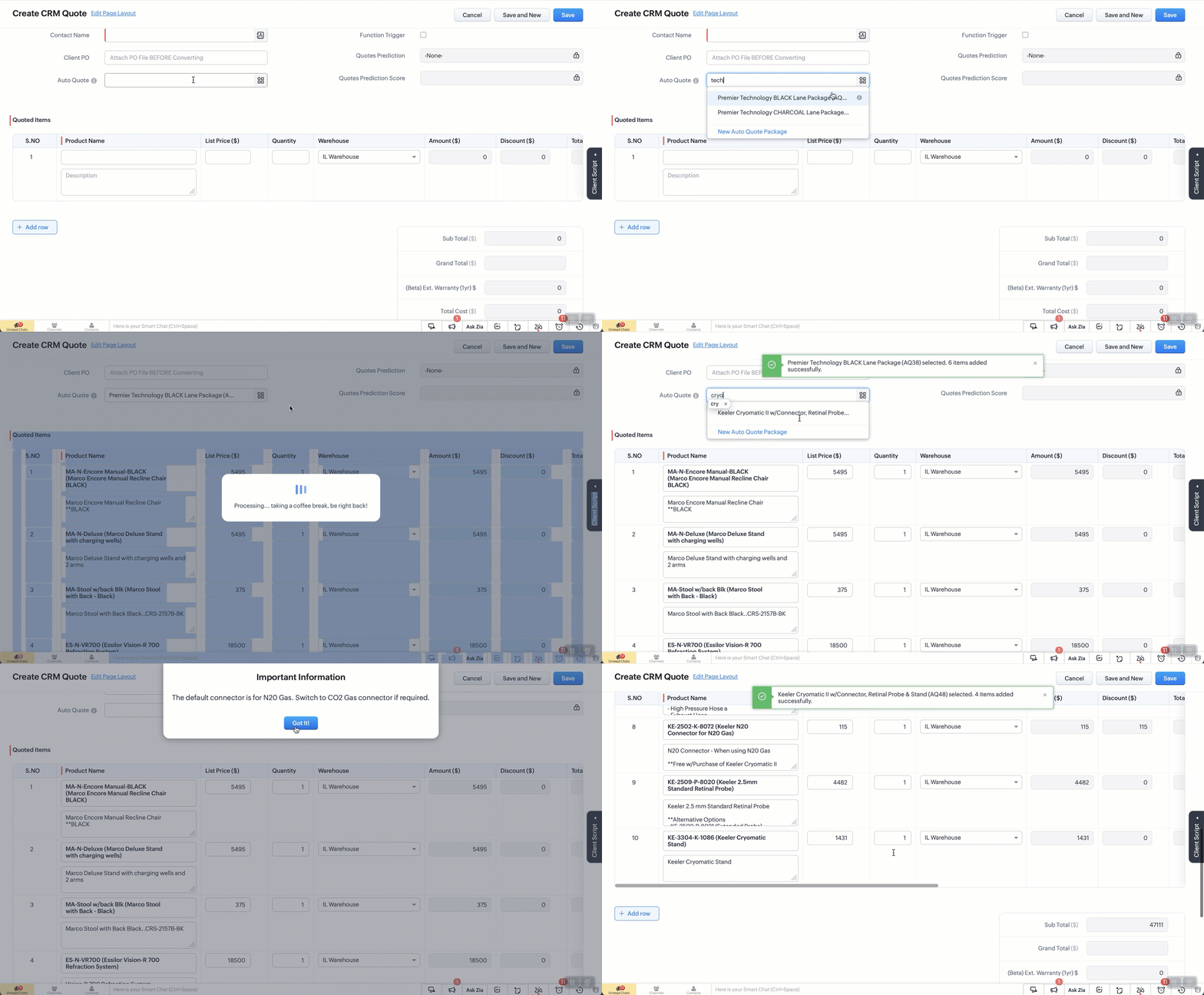
When a user selects a package, a client script retrieves all related products and discounts, adding them to the quote. The lookup field is then reset for additional product entries.
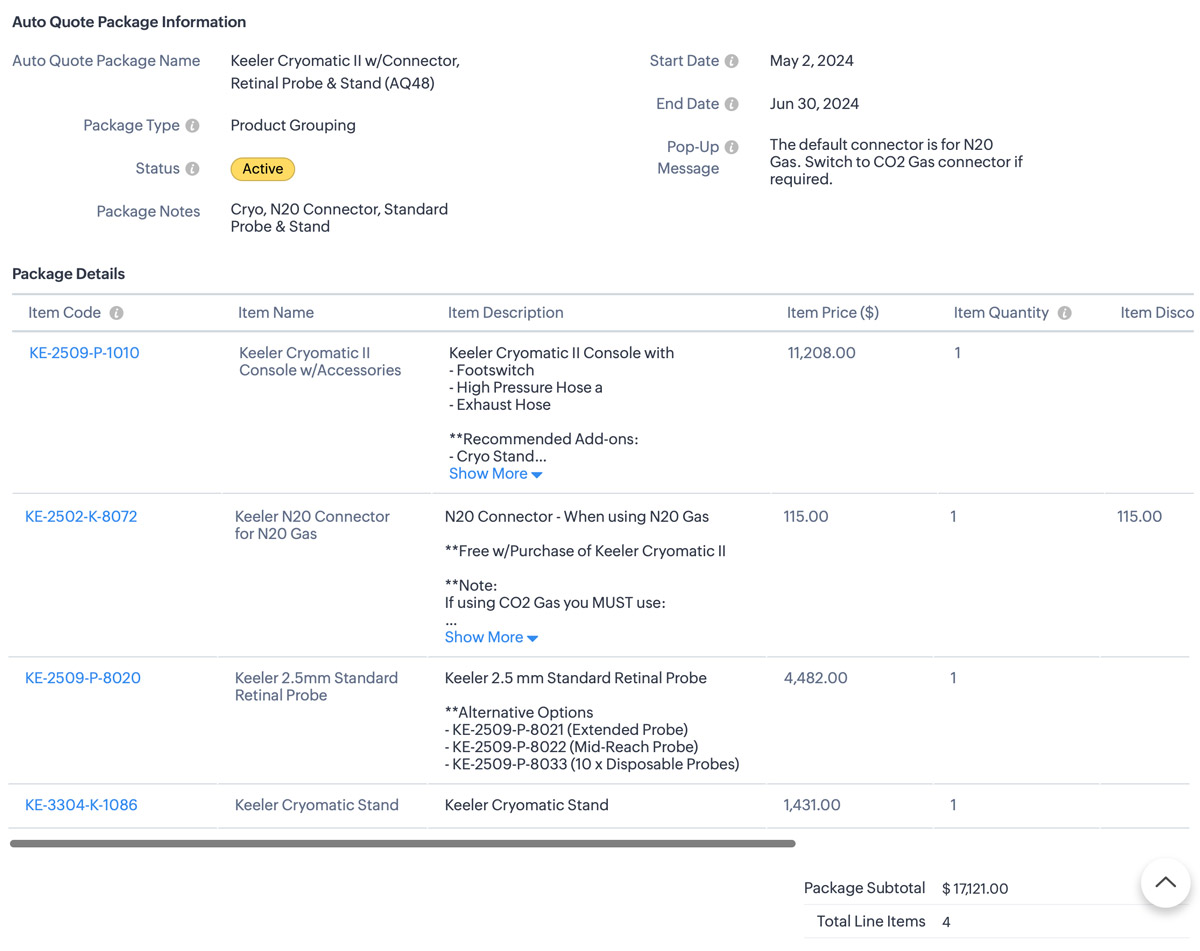
Some fields on the package layout include:
- Promotion type
- Status
- Start / End dates for the promotion.
- Pop-up message field if we want to show the rep a message when quoting the package
I also have a workflow that sets the package to “Expired” when the record expiration date hits. The lookup is filtered in the quotes module to only show “Active” packages.
In Action (with lookup field to the package module):
The Setup:
Create a custom module “Package Items”. Add the fields as below.
Additional Info
1. I also use client script to hide the “Auto-Quote” field when in a standard view page
2. When I name a package, a deluge script runs to append the Package ID number which is an auto-number field.
- try {// List of funny loading messagesvar loadingMessages = ["Cranking up the quote machine...","One sec... just stepped out for coffee.","Hold tight! The hamsters are running the wheels.","Almost there... giving it a little extra attention.","Loading... probably faster than your internet speed.","Please hold while we make magic happen.","Just a moment... our servers are stretching their legs.","Your patience is appreciated... and rewarded!","Brewing up your quote right now...","Give us a second... we're flexing our technical muscles.","Our system is doing some yoga... stay calm!","Loading... don't worry, it's not stuck!","Fetching your data... hopefully with no detours!","Keep calm and let us handle the rest.","Processing... taking a coffee break, be right back!","Stay tuned... greatness is loading.","Our system is running... faster than a cheetah!","Looks like you're going all in on this quote!","Getting things ready... just need a moment.","Hold on... we're aligning some stars for you.","Please wait... we're feeding the server squirrels.","One moment... your quote is coming fresh out of the oven.","Loading... just making sure everything is perfect!","Generating your quote... thanks for your patience!","Almost there... your quote is worth the wait!"];// Select a random message from the listvar randomMessage = loadingMessages[Math.floor(Math.random() * loadingMessages.length)];// Log the entire value object to see its structurelog("Full value object: " + JSON.stringify(value));// Ensure value.id is defined before proceedingif (!value || !value.id) {log("No product selected or value.id is undefined");return; // Exit the script quietly since no valid product was selected}// Show loaderZDK.Client.showLoader({ type: 'page', template: 'vertical-bar', message: randomMessage });// Extract the product ID and name from the value passed invar packageId = value.id;var packageName = value.name;log("Product ID: " + packageId);log("Package Name: " + packageName);// Get the subform field from Quotes modulevar quotedItemsSubform = ZDK.Page.getField("Quoted_Items");// Fetch product information for the package IDvar packageDetails = ZDK.Apps.CRM.Auto_Quote_Packages.fetchById(packageId);var packageStatus = packageDetails.Status; // Active or Expired.var popUpMessage = packageDetails.Pop_Up_Message; // Check the package for any Pop-up message we want to showlog("Package Details: " + JSON.stringify(packageDetails));log("Package Status: " + packageStatus);log("Pop-Up Message: " + popUpMessage);// Initialize array for existing line items.var existingLineItems = quotedItemsSubform.getValue() || [];log("Existing line items: " + JSON.stringify(existingLineItems));//// Only include rows with products. Excude any blank rows from the quotevar filteredExistingLineItems = existingLineItems.filter(function(item) {return item.Product_Name && item.Product_Name.id;}).map(function(item) {return {id: item.Product_Name.id // Include only the item ID};});log("Filtered existing line items: " + JSON.stringify(filteredExistingLineItems));// Array to hold new line items we are addingvar newLineItemArray = [];// Check if package is active and populate new line itemsif (packageStatus === "Active") {var packageItems = packageDetails.Package_Details;packageItems.forEach(function(item) {var productLineItem = {Product_Name: {id: item.Item_Code.id,name: `${item.Item_Code.name} (${item.Item_Name})`},Product_List_Price: item.Item_Price,Description: item.Item_Description,List_Price: item.Item_Price,Quantity: item.Item_Quantity ?? 1, // Default to 1 if Qty is null or undefinedDiscount: Math.abs(item.Item_Discount ?? 0) // Get the discount or default to 0 if null};log("New product line item: " + JSON.stringify(productLineItem));newLineItemArray.push(productLineItem);});} else {// Show error message if the package is not active// My layout to only show Active items but if you don't do that this solves it.ZDK.Client.showMessage('This package / promo is no longer active. Please contact the admin for details.', { type: 'error' });ZDK.Client.hideLoader();return; // Exit the script since the package is not active}// Combine existing line items with new line itemsvar updatedLineItemArray = filteredExistingLineItems.concat(newLineItemArray);log("Updated line items array: " + JSON.stringify(updatedLineItemArray));// Add all updated items to the Quotes pagequotedItemsSubform.setValue(updatedLineItemArray);// Reset the pick list field so user can re-useZDK.Page.getField("Auto_Quote").setValue(null);// Hide loaderZDK.Client.hideLoader();log("Final updated line items: " + JSON.stringify(updatedLineItemArray));// Function to show confirmation and number of items added back to the uservar showSuccessMessage = function() {ZDK.Client.showMessage(`${value.name} selected. ${newLineItemArray.length} items added successfully.`, { type: 'success' });};// Function to show popup message and then success messagevar showAlertAndSuccess = function(message, heading, buttonText) {ZDK.Client.showAlert(message, heading, buttonText);showSuccessMessage();};// Check for pop-up message and show alert if it existsif (popUpMessage) {showAlertAndSuccess(popUpMessage, "Important Information", "Got It!");} else {// No pop-up message, show the success messageshowSuccessMessage();}} catch (error) {// Log the errorlog('Error: ' + error.message);// Show error messageZDK.Client.showMessage('An error occurred while adding items. Please try again.', { type: 'error' });// Hide loaderZDK.Client.hideLoader();}
Topic Participants
Kevin Flynn
Andres
Carnemolla
Vasile Mogos
Sticky Posts
Enhancement to ICR’s field prompting: Preferred data extraction using advanced field prompting
Dear Customers, We hope you’re well A quick background Intelligent Character Recognition (ICR) comes as part of Zia’s optical recognition capability called Zia Vision. When we introduced it last April, the data extraction was training-based and was applicableGood news! Calendar in Zoho CRM gets a face lift
Dear Customers, We are delighted to unveil the revamped calendar UI in Zoho CRM. With a complete visual overhaul aligned with CRM for Everyone, the calendar now offers a more intuitive and flexible scheduling experience. What’s new? Distinguish activitiesAccessibility in Zoho CRM: Not just a feature—a way to empower
For instructions on setting up these controls, please check this help document: Configuring accessibility controls. Hello everyone, Today (December 3, 2024), on the International Day of Persons with Disabilities, we begin our journey towards a CRM thatScaling the customer journey: What's new in CommandCenter
Dear Customers, The last time we connected about CommandCenter, it was about the tool's new controls and revamped UI. Personally, the overhaul of the UI from the last update, still excites me. Today, we're here with news about its scalability and addedZoho CRM's sales trend and sales follow-up trend dashboards are now customizable
Dear Customers, We're here with good news! Sales trend and sales follow-up trend are two system-defined dashboards that help you understand trends and anomalies in your sales outreach and conversion efforts. They use Zia's intelligence to identify patterns
Recent Topics
Internal Fillable Contract with Zoho Writer (Before Sending to Client)
Hi everyone, I’m trying to automate the following process in Zoho CRM and would appreciate some guidance. Process: When a Deal moves to a specific stage, CRM triggers an automation. CRM sends a contract template to an internal team member so they canZoho Writer Frequently not loading
I've reported this as a problem already but I can't log into my email right now or get onto the main site so you're going to hear about it again here: at least once a week, Zoho Writer will just refuse to load entirely. The main page will load and loadRead Thread Details
Does anyone know how to "read" the complete thread details in a ticket? I figured out how to pull a summary of the threads using a webhook, but it doesn't have all the details I want. I tried to create a loop in flow, which should have worked, but insteadHow to Structure Data in Zoho Creator Applications
Data structure is undoubtedly one of the most critical pillars in application development within Zoho Creator. Well-structured projects scale easily, enable more robust automations, and drastically reduce rework. Poorly modeled applications, on the otherApplication Architecture in Zoho Creator: Why You Should Think About It from the Start
Many companies begin using Zoho Creator by building simple forms to automate internal processes. This is natural — the platform is extremely accessible and allows applications to be built very quickly. The challenge begins to appear when the applicationClient Script: Any plans to add support for multi-select field with onChange
Client Script is fantastic and the documentation lists multiselect form fields as unsupported. Just wondering if there are any plans to make this a supported field. https://www.zoho.com/crm/developer/docs/client-script/client-script-events.html 2. FieldUpdate application by uploading an updated DS file
Is it possible? I have been working with AI on my desktop improving my application, and I have to keep copy pasting stuff... Would it be possible to import the DS file on top of an existing application to update the app accordingly?Captcha can't be enabled conditionally
Hi Problem: captcha on a form can't be enabled conditionally. Why is this a problem: Because I use the same form on our website (public) in the portal and mobile app. In the portal it works but in the mobile app it doesn't. So there should be a way toImproved RingCentral Integration
We’d like to request an enhancement to the current RingCentral integration with Zoho. RingCentral now automatically generates call transcripts and AI-based call summaries (AI Notes) for each call, which are extremely helpful for support and sales teams.WorkDrive issues with Windows Explorer Not Responding
We are using WorkDrive to collaborate on editing video content. We have a lot of files and quite a few are a few gigs. Recently anytime I try and work with the files Explorer freezes for a couple minutes whether it's dragging the files into Premiere orUS State abbreviations in Address fields
In regards to all Address fields within Zoho, Is there a way to change the State field to be the 2 letter abbreviation vs the full spelled out US State name? Example: "Washington" should be WA. I am able to type in the abbreviated state, but it's notIs it possible to retrieve function (Deluge) code from Zoho CRM externally?
Hi Everyone, Is it possible to fetch or retrieve the Deluge function code from Zoho CRM using an external method (API or any other approach)? I would like to know if there is any way to access or extract the function script outside of Zoho CRM, or ifZoho CRM Integration Form + Custom Fields
Hi! I've created an Integration Form from Zoho CRM's Vendors Module, but I can choose a few standard fields and no custom fields I've created in Zoho CRM. There is a plan to add this feature soon? Thanks in advance.AI secretary
In our company, Claude is the secretary and creates inquiries and schedules from Gmail. You no longer have to enter them yourself. The secret is that we created an MCP server that connects to CRM. https://x.com/Mac_nishio/status/1917954562566328694Como estruturar dados em aplicações Zoho Creator
A estrutura de dados é um dos pilares mais críticos no desenvolvimento de aplicações no Zoho Creator. Projetos bem estruturados escalam com facilidade, permitem automações mais robustas e reduzem drasticamente retrabalho. Já aplicações mal modeladas rapidamenteCreditos API
Queria saber se alguém poderia me ajudar a resolver um problema na compra e utilização de créditos de mensagens API do WhatsApp. ja tentei todos o tutoriais porem não consegui realizar a compre, pois ao clicar no botão de comprar créditos aparece a mensagemUsing Zoho Forms vs Zoho Survey
Hello - I'm looking for advice on whether to use Zoho Survey or Zoho Forms for our small non-profit. We have a Zoho One subscription, so have access to both. The main use case at the moment is application forms for our professional development programs.Custom CSS for Zoho CRM Team Bookings embeded widget
Hello, we are adding Zoho CRM Team Bookings (crm.zoho.com) in our public website. We know that we can change Theme Color, Font Color and Background Color: Zoho CRM Booking Styling But is it possible to change other CSS attributes e.g. Font Family, likeDashboard target enhancements
Often individuals in IT are creating dashboards for their sales team. The ability to create a single dashboard that can be used by multiple people is key. A components for a dashboard have the ability to filter by logged in user which is great. HoweverEnable integration of CRM CPQ functionality for ZohoOne customers using Zoho Finance application
Hi there. I can't believe I'm needing to launch this idea as I would have thought this was a little obvious. Following a number of conversations with the technical team it's become evident that the CPQ functionality within CRM cannot integrate with ZohoZoho Certified Workshops in Berlin | 20. - 21. April
Liebe Mitglieder der deutschen Zoho-Community! Wir freuen uns, Ihnen mitteilen zu können, dass unsere Zoho Certified Workshops am 20. und 21. April nach Deutschland zurückkehren! 📍Wo finden die Workshops statt? Die zertifizierten Workshops finden imZoho Payroll Expansion Plans
Dear Zoho Team, I truly appreciate the continuous innovation and improvements you bring to your suite of products. However, I—and I’m sure many others—would love some clarity on your Zoho Payroll expansion roadmap. Currently, it’s only available in theBulk upload images and specifications to products
Hi, Many users have asked this over the years and I am also asking the same. Is there any way in which we can bulk upload product (variant) images and product specifications. The current way to upload/select image for every variant is too cumbersome.sync two zoho crm
Hello everyone. Is it possible to sync 2 zoho crm? what would be the easiest way? I am thinking of Flow. I have a Custom Module that I would like to share with my client. We both use zoho crm. Regards.Is there a way to show contact emails in the Account?
I know I can see the emails I have sent and received on a Contact detail view, but I want to be able to see all the emails that have been sent and received between all an Accounts Contacts on the Account Detail view. That way when I see the Account detailExport Invoices to XML file
Namaste! ZOHO suite of Apps is awesome and we as Partner, would like to use and implement the app´s from the Financial suite like ZOHO Invoice, but, in Portugal, we can only use certified Invoice Software and for this reason, we need to develop/customize on top of ZOHO Invoice to create an XML file with specific information and after this, go to the government and certified the software. As soon as we have for example, ZOHO CRM integrated with ZOHO Invoice up and running, our business opportunitiesUsar o Inventory ou módulo customizado no CRM para Gestão de Estoque ?
Minha maior dor hoje em usar o zoho é a gestão do meu estoque. Sou uma empresa de varejo e essa gestão é fundamental pra mim. Obviamente preciso que esse estoque seja visível no CRM, Inicialmente fiz através de módulos personalizados no próprio Zoho CRM,How do I setup the performance review module?
I am pretty adept when it comes to learning software and I've set up quite a few Zoho Apps over the past 3 years. But for the life of me, I can not figure out Zoho People performance reviews. I've figured out the "Organization" & LMS Modules, but theCRM x WorkDrive: We're rolling out the WorkDrive-powered file storage experience for existing users
Release plan: Gradual rollout to customers without file storage add-ons, in this order: 1. Standalone CRM 2. CRM Plus and Zoho One DCs: All | Editions: All Available now for: - Standalone CRM accounts in Free and Standard editions without file storageRecurring Addons
Hi, I know you can set the pricing interval for addons to weekly, monthly and yearly & set it for one off or recurring, which these are fine as a base addon item. It really would be helpful if when creating a subscription when you add on the addon itemCancellation Fees
Hi, It really would be good if Billing could take subscription management further with cancellations & being able to apply or set a cancellation fee for a plan that is either fixed or prorated. It is not uncommon in subscriptions for cancellation feesBulk Associate Tasks/Task Lists to Milestones (Similar to Issues)
Hello Zoho Projects Team, We hope you are doing well. We would like to request an enhancement regarding Milestone management for Tasks in Zoho Projects. Current Behavior: In the Issues module, it is possible to select multiple issues and easily associateAllow agents to enable or disable notifications from certain departments
Agents who are part of multiple departments receive notifications frequently from across the departments. They may not be actively involved in performing every action in all departments. For example, an agent could be a part of both the sales and supportWorkDrive API returning empty response even after placing file in Team Folder
Hi everyone, I am trying to fetch a file from Zoho WorkDrive using a Deluge standalone function in Zoho People. The API call executes successfully using a configured connection, but the response is coming back empty. I have verified the following: TheAddress Typeahead Extension for Zoho Books
I installed the Address Typeahead extension for zoho books but when I went to configure it, it said that that version was deprecated. Is there a newer version somewhere?Transaction Rules & Customer Payments
So I have a situation as follows. We have many clients who are all invoiced on the 1st of each month on a recurring invoice for 1 of 10 plans. This means that almost all payment dates are the same (some people pay late) and that a lot of the amounts areCan I Integrate ADP Payroll with Zoho Books?
Hi, I am hoping that I can integrate ADP Payroll with Zoho Books so that I do not need to manually input the payroll journal entries. Is this possible? If so, how do I do that?Zoho Books | Product updates | February 2026
Hello users, We’ve rolled out new features and enhancements in Zoho Books. From Advanced Reporting Tags to the ability to mark projects as completed, explore the latest updates designed to improve your bookkeeping experience. Introducing Advanced ReportingDarshan Hiranandani : How many participants can join a Zoho Meeting at once?
Hi everyone, I'm Darshan Hiranandani, trying to find out the maximum number of participants that can join a Zoho Meeting at once. Has anyone here used Zoho Meeting for larger groups and can share their experience or knowledge about the participant limit?Ask The Expert: Deep Dive into Zoho CRM, Desk, SalesIQ, and Campaigns!
Are you using Zoho to power your sales, support, and marketing, and have questions about configuration, automation, or best practices? We have great news: the “Ask The Expert” session is coming to the Zoho Benelux Community! This session is specificallyNext Page