Automation Series: Auto-update Phase Status
Hello Folks!
You can auto-update your phase's status based on status of underlying tasks using custom functions.
In this series, we will showcase how to create and run custom functions, using Deluge, with ease. Follow the steps below and automate your project management process.
Use-case
Consider a scenario where a sales representative manages all his customers conversations as tasks in Zoho Projects. To stay organised, he divides the year into four quarters and sets up one milestone for each.
He wants the milestone status to be updated automatically once all the tasks in a milestone are updated.
He wants the milestone status to be updated automatically once all the tasks in a milestone are updated.
So, if every task in Q1 is marked In Progress, the milestone status should automatically be updated to In Progress. When all tasks are Completed, the milestone should also be completed.
Configuration Flow
To automate this process, the sales representative should
- Create custom status for tasks and milestones.
- Establish a connection.
- Create a custom function using Deluge.
- Define a Workflow Rule to set a trigger.
Create Custom Status:
Create a custom status by double-clicking the Status column name in the milestone and task list view.
Establish a connection:
A Connection is a secure and reusable authentication layer that lets your custom functions and integrations communicate with external services or other Zoho apps.
Users can select the relevant scopes to create a connection. Scopes for this particular use case are,
Zohoprojects.portals.all,
Zohoprojects.projects.all,
Zohoprojects.tasks.all,
Zohoprojects.milestones.all
Click here to learn how to establish a connection.
Create a custom function:
You don't need development expertise to execute this custom function. Zoho Projects manages the underlying execution. Simply add the function code, map the required inputs, and the system will run it automatically whenever the workflow is triggered.
Sample connection name - milestonestatus
Sample status name - In Review
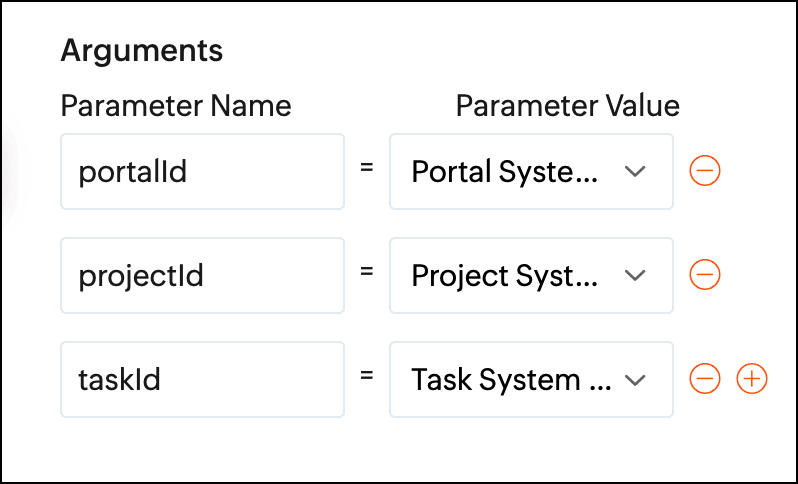
Arguments required:
Arguments are variables or parameters that pass an input value to execute a custom function.
- //scopes: Zohoprojects.portals.all, Zohoprojects.projects.all, Zohoprojects.tasks.all, Zohoprojects.milestones.all
- endPointV3 = "https://projects.zoho.in/api/v3/portal/";
- endPoint = "https://projects.zoho.in/restapi/portal/";
- milestoneStatusIds = List();
- milestoneStatusNames = List();
- milestoneParameter = Map();
- statusName = "In Review";
- indexValue = 0;
- rangeValue = 100;
- taskStatusId = "";
- state = true;
- // Get task layout details
- taskLayoutDetailsResponse = invokeurl
- [
- url :endPoint + portalId + "/projects/" + projectId + "/tasklayouts"
- type :GET
- connection:"milestonestatus"
- ];
- statusDetails = taskLayoutDetailsResponse.get("status_details");
- for each status in statusDetails
- {
- if(status.get("name").notContains(statusName))
- {
- taskStatusId = taskStatusId + status.get("id") + ",";
- }
- }
- taskStatusId = taskStatusId.removeLastOccurence(",");
- taskResponse = zoho.projects.getRecordById(portalId,projectId,"Tasks",taskId,"milestonestatus");
- milestoneId = taskResponse.get("tasks").get(0).get("milestone_id");
- id_list = taskStatusId.toList(",");
- chunk_size = 4;
- count = 0;
- chunk = List();
- all_chunks = List();
- for each id in id_list
- {
- count = count + 1;
- chunk.add(id);
- if(count == chunk_size)
- {
- all_chunks.add(chunk);
- chunk = List();
- count = 0;
- }
- }
- if(chunk.size() > 0)
- {
- all_chunks.add(chunk);
- }
- for each sub_chunk in all_chunks
- {
- param = sub_chunk;
- // Get All Tasks
- taskParameter = Map();
- taskParameter.put("custom_status",param.toString());
- taskParameter.put("index",indexValue);
- taskParameter.put("range",rangeValue);
- taskParameter.put("milestone_id",milestoneId);
- tasks = zoho.projects.getRecords(portalId,projectId,"tasks",taskParameter,0,"milestonestatus");
- if(tasks.containKey("tasks"))
- {
- state = false;
- break;
- }
- }
- if(state)
- {
- // Get milestone layout details
- info "in";
- milestoneLayoutDetails = invokeurl
- [
- url :endPointV3 + portalId + "/projects/" + projectId + "/milestones/layouts"
- type :GET
- connection:"milestonestatus"
- ];
- milestoneCustomFieldDetails = milestoneLayoutDetails.get("section_details").get(0).get("customfield_details");
- for each milestoneCustomFieldDetail in milestoneCustomFieldDetails
- {
- if(milestoneCustomFieldDetail.get("api_name").equalsIgnoreCase("status"))
- {
- milestoneStatusIds = milestoneCustomFieldDetail.getJSON("picklist_details");
- milestoneStatusNames = milestoneCustomFieldDetail.getJSON("picklist_valuemap");
- }
- }
- // Milestone re-open status id
- indexOfReopen = milestoneStatusNames.indexOf(statusName);
- // Get milestone details
- milestoneResponse = zoho.projects.getRecordById(portalId,projectId,"milestones",milestoneId,"milestonestatus");
- if(milestoneResponse.containKey("milestones"))
- {
- milestoneStatusId = milestoneResponse.get("milestones").get(0).get("status_det").get("id");
- }
- else
- {
- return "Couldn't update status of none milestone";
- }
- if(milestoneStatusId != milestoneStatusIds.get(indexOfReopen))
- {
- milestoneParameter = Map();
- milestoneParameter.put("milestone_ids",{"" + milestoneId + ""});
- milestoneParameter.put("update_fields",{"CUSTOM_STATUSID":"" + milestoneStatusIds.get(indexOfReopen) + ""});
- updateMilestoneDetails = invokeurl
- [
- url :endPointV3 + portalId + "/projects/" + projectId + "/milestones/" + milestoneId + "/updatefieldvalue"
- type :POST
- parameters:toString(milestoneParameter)
- connection:"milestonestatus"
- ];
- info updateMilestoneDetails;
- }
- }
- return "success";
Define a Workflow Rule:
After creating the custom function, define a task-based workflow rule. Set the trigger as "when task is updated" and associate the custom function under Add Action.
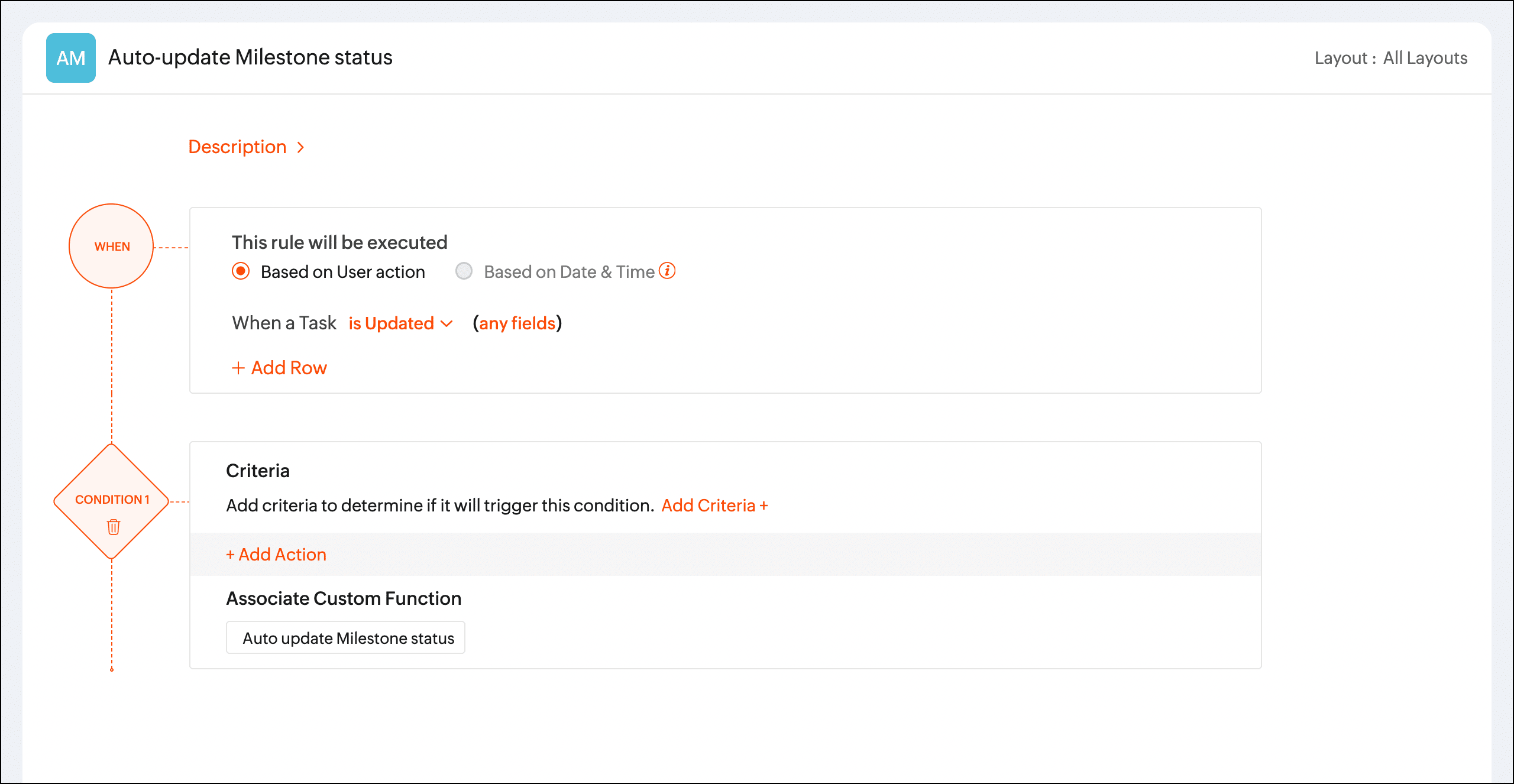
Once the workflow rule is triggered, the custom function will update the phase status automatically.
We hope you found this post to be helpful. If you have any questions, please leave a comment below or email us at support@zohoprojects.com.