Automation Series: Close all tasks once the project is completed

Automation Series: Close all tasks once the project is completed

When a project is marked as Completed, it might still have open tasks such as recurring tasks that were not marked as complete, tasks that are no longer relevant, or tasks that no longer need attention after closure.

To ensure the project reflects its final state, you can use a task workflow rule to automatically close all open tasks once the project reaches the Completed status.

To set this up,

First create a connection with Zoho Projects using these scopes:
  1. ZohoProjects.tasks.ALL
  2. ZohoProjects.projects.READ
  3. ZohoProjects.portals.READ
  4. ZohoProjects.milestones.ALL
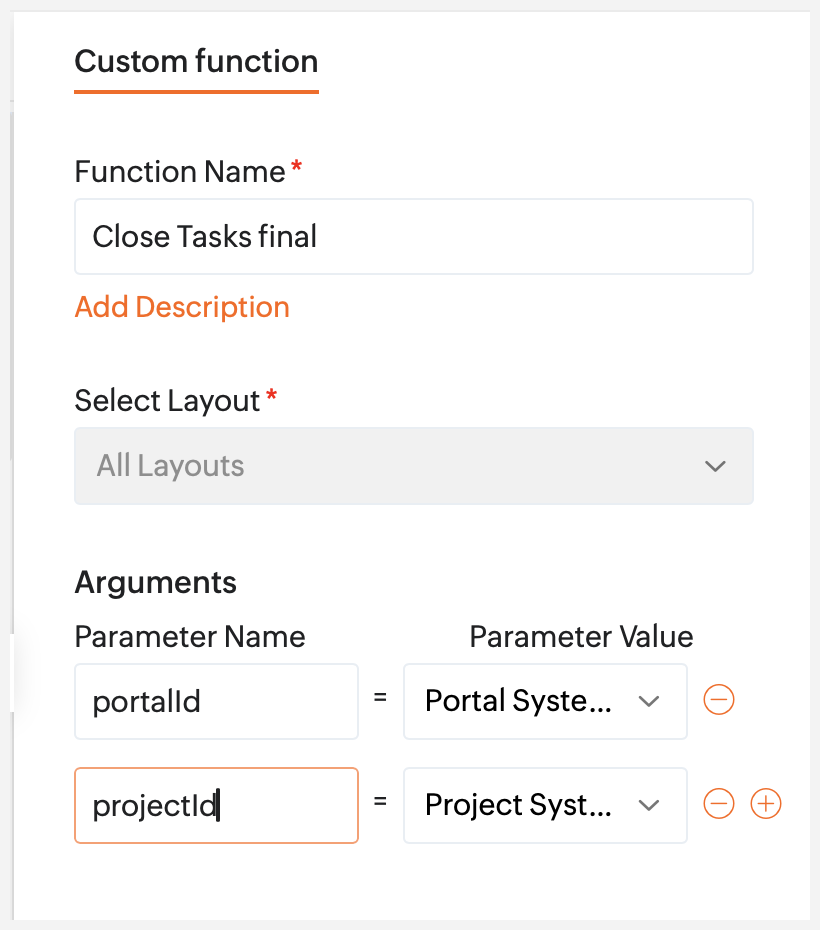
Create a Custom Function and add the Deluge script below. Replace 'xxxxxxxxx' with your Zoho Projects connection name, and map the arguments listed below.

The below script removes task recurrences and closes all tasks in a project. In the below script, the connection name is "closealltasks"

  1. // TODO: Please create a connection for the Zoho Projects service with the scopes "ZohoProjects.tasks.ALL,  ZohoProjects.projects.READ,  ZohoProjects.portals.READ, ZohoProjects.milestones.ALL". Replace 'closealltasks' with the connection name. Click this link below to learn how to create the connection. 
  2. // Link - https://help.zoho.com/portal/en/kb/projects/integration/connections/articles/connections-23-5-2022#How_to_establish_a_Connection
  3. // TODO: Replace the status name (Closed status type) in Line No. 6, if needed.
  4. projectsAPIEndPoint = "https://projectsapi.zoho.com/restapi";
  5. projectsv3APIEndPoint = "https://projectsapi.zoho.com/api/v3";
  6. statusName = "Closed";
  7. statusId = null;
  8. /*  Close all tasks */
  9. //Fetch task layouts
  10. taskLayoutDetails = invokeurl
  11. [
  12. url :projectsAPIEndPoint + "/portal/" + portalId + "/projects/" + projectId + "/tasklayouts"
  13. type :GET
  14. connection:"closealltasks"
  15. ];
  16. // info taskLayoutDetails;
  17. if(taskLayoutDetails != null && taskLayoutDetails.get("status_details") != null)
  18. {
  19. statusDetails = taskLayoutDetails.get("status_details");
  20. for each  status in statusDetails
  21. {
  22. if(status.get("name").equalsIgnoreCase(statusName))
  23. {
  24. // Fetch task status id based on status name
  25. statusId = status.get("id");
  26. info status.get("name") + " : " + statusId;
  27. break;
  28. }
  29. }
  30. }
  31. if(statusId != null)
  32. {
  33. indexValue = 1;
  34. rangeValue = 100;
  35. loop = {1,2,3,4,5,6,7,8,9,10};
  36. predStatusMap = Map();
  37. // This loop fetches up to 300 tasks. Increase the count as needed, e.g., loop = {1,2,3,4,5}; to fetch 500 tasks.
  38. for each  i in loop
  39. {
  40. taskParameter = Map();
  41. taskParameter.put("index",indexValue);
  42. taskParameter.put("range",rangeValue);
  43. taskParameter.put("status","notcompleted");
  44. //  info taskParameter;
  45. taskResponse = zoho.projects.getRecords(portalId,projectId,"tasks",taskParameter,0,"closealltasks");
  46. //  info taskResponse;
  47. if(taskResponse.containKey("tasks"))
  48. {
  49. taskIds = list();
  50. for each  task in taskResponse.get("tasks")
  51. {
  52. taskId = task.get("id");
  53. if(task.get("is_recurrence_set"))
  54. {
  55. updateTaskParameter = Map();
  56. updateTaskParameter.put("json_string",{"recurrence":{"recurring_frequency":"none","time_span":"1","number_of_occurrences":"2","is_comments_recurred":false,"recurrence_type":"after_current_task_completed"}});
  57. updateTaskResponse = zoho.projects.update(portalId,projectId,"tasks",taskId,updateTaskParameter,"closealltasks");
  58. info updateTaskResponse;
  59. }
  60. if(task.containsKey("dependency") && task.get("dependency").containsKey("predecessor"))
  61. {
  62. predTasks = task.get("dependency").get("predecessor");
  63. predList = list();
  64. for each  predTaskId in predTasks
  65. {
  66. predList.add(task.get("dependency").get("dependencyDetails").get(predTaskId).get("IS_COMPLETED"));
  67. }
  68. if(!predList.contains(false))
  69. {
  70. taskIds.add(taskId);
  71. }
  72. }
  73. else
  74. {
  75. taskIds.add(taskId);
  76. }
  77. info "taskIds : " + taskIds;
  78. }
  79. bulkUpdateParams = Map();
  80. bulkUpdateParams.put("taskids",taskIds.toText().remove("[").remove("]"));
  81. bulkUpdateParams.put("status",{"id":statusId});
  82. info bulkUpdateParams;
  83. /* Bulk update */
  84. taskBulkUpdate = invokeurl
  85. [
  86. url :projectsv3APIEndPoint + "/portal/" + portalId + "/projects/" + projectId + "/tasks/bulk-update"
  87. type :PATCH
  88. parameters:bulkUpdateParams.toString()
  89. connection:"closealltasks"
  90. ];
  91. info taskBulkUpdate;
  92. }
  93. else
  94. {
  95. break;
  96. }
  97. }
  98. }
  99. return "success";

Argument Mapping:
  1. portalId - Portal System ID
  2. projectId - Project System ID

After saving the custom function, create a workflow rule with the following settings:


Once the rule is saved, all open tasks are completed automatically whenever a project is marked as Completed. This ensures the project reflects its true closure state, avoids manual cleanup and keeps your project up to date.

If you have any questions, please drop comments below or email us at support@zohoprojects.com.


    • Sticky Posts

    • Improve User Onboarding in Zoho Projects with Zoho DAP

      Rolling out new processes or onboarding new users in the tool comes with a familiar challenge: the employees need guidance at the moment they are doing the work. Traditional training sessions and knowledge sharing often require users to leave the application.
    • Introducing the Zoho Projects Learning Space

      Every product has its learning curve, and sometimes having a guided path makes the learning experience smoother. With that goal, we introduce a dedicated learning space for Zoho Projects, a platform where you can explore lessons, learn at your own pace,
    • Create Custom Module Using AI in Zoho Projects

      Every team has its own way of managing work. While standard modules support common project management needs, many business processes require their own structure, fields, and terminology. With AI-powered Custom Modules in Zoho Projects, users can create
    • Update on V2 API End-of-Life Timeline

      Dear Users, Earlier this year, we shared the launch of the V3 APIs and requested users to migrate from the older V2 APIs by December 2025. We have received valuable feedback from our users and partners regarding their migration timelines. We are happy
    • Automation Series: Auto-assign Task Followers

      As task progresses, several users are required to stay aware of the updates to plan their upcoming work items efficiently. Manually adding users as followers for an active task might create additional overhead. With this automation, followers can be added
      • Recent Topics

      • Which Zoho CRM tasks would you want an AI assistant to handle?

        I’ve started delegating my Zoho CRM work to AI – and many tasks now take me half the time. It has been so useful that we’re now working to make it available to everyone. Instead of clicking through records and tabs, I simply describe what needs to be
      • Is Zoho Assist Secure Connect even practical for 1 person shop?

        I was gun ho with Zoho Assist to replace my existing Remote Access product I have been using but I need to implement MFA on each unattended connection. Right now each of these connections in my other product has a rotating token that I have enter off
      • Export Campaign to another document?

        How can I export my Campaign to Word and PDF? I want to create a PDF archive on my website with old campaigns /Peter
      • Filter isn't

        The ability to filter the history of a given flow to a specific status however it would be great to have the ability to filter to a status that isn't something for example if i want to find all history that isn't complete.
      • Zoho CRM Functions: Redesigned Interface, Rich Analytics, and Multi-Language Support

        Hello everyone! We have given Functions in Zoho CRM a major overhaul with a new interface that makes it easier to build, organize, monitor, and troubleshoot your functions throughout their lifecycle. As part of this revamp, we have also introduced a unified
      • Unable to view existing or create new WhatsApp IM templates on Zoho Desk

        Hi there, Is there a issue with WhatsApp templates in Zoho Desk currently [17 Aug 2026]? I am unable to view existing or create new WhatsApp IM templates. It's saying "Oops, something went wrong. Please try again later."
      • WhatsApp Calling Integration via Zoho Desk

        Dear Zoho Desk Team, I would like to request a feature that allows users to call WhatsApp numbers directly via Zoho Desk. This integration would enable sending and receiving calls to and from WhatsApp numbers over the internet, without the need for traditional
      • Gemini Action - Add "inineData" Support

        Thank you guys for adding a Gemini action. I like Gemini models for the "grunt work" of AI, as they have the cheapest tokens of the trustworthy providers One thing that's missing in the action, though, is the ability to pass file data. If you pass a base64-encoded
      • LinkedIn RSC is now live in Zoho Recruit

        LinkedIn Recruiter System Connect (RSC) is here. Your Zoho Recruit data (candidates, jobs, notes, stage updates, resume attachments, and more) now syncs with LinkedIn in real time. Note: LinkedIn RSC is included with your LinkedIn Recruiter Corporate
      • What's New in Zoho Inventory | April & May 2026

        Hello users, We're excited to roll out the latest Zoho Inventory updates for April and May 2026. These enhancements are designed to make your daily operations smoother and more efficient, from advanced inventory management and flexible pricing to automated
      • Old Gmail inbox migration to Zoho mail

         Hi, I have been checking Zoho products for a while. This week finally decided to migrate my company mail accounts from Gmail to Zoho. I was looking for sometime and could not found a way to perform this; only found the way to take a backup of my old account into Zoho connecting throught pop3 server; but I'm not looking for that, I want that in my new Zoho Mail inbox appear all my mail messages and conversations as I see it in Gmail. Searching in Google and in Zoho Mail docs the workaround begun
      • Zoho CRM Copilot Connector

        Hello, Are there plans to release a connector for Zoho CRM and Copilot? I'm in the early research stages of potentially switching our CRM solution to Microsoft Dynamics because of its out of the box integration with Copilot. The advantage being that we
      • Drop Down Menu - Adding up values

        I have a form that has 22 drop down fields each having a value of 0-10 to choose from. Is it possible to have it add up the total value of those selected numbers and have it tally it up in another field at the end? So example: if each of the 22 fields
      • [Webinar] Conversational AI: The new paradigm for agentic analytics

        From hard coding to powerful agents, data and analytics is undergoing a tectonic shift, and conversational agents are at the forefront of this transformation. This goes beyond democratizing business intelligence; it's about accelerating the path from
      • Make Rich Text fields available in Canva Print Views

        Everything is on the title. I don't really understand why this is not already possible as Rich Text Fields are available in Canva Detailed Views for example.
      • How to RSVP an invite using the Zoho API

        Perhaps I am missing something, but I don't see any way to use the Zoho API to RSVP an Invite. This what I've tried: PATCH https://calendar.zoho.com/api/v1/calendars/{cal}/events/{event} ?attendeedata={"attendees":[{"email":"me@example.com","status":"ACCEPTED"}],
      • FSM service call view

        "Why can't we sort by assigned service resource in the service call view?"
      • Zia Agents looks promising, but I still cannot deploy my first agent or connect WhatsApp after weeks of support tickets

        Hi Everyone, I am posting here because I am stuck and need practical help from someone who has successfully deployed a Zia Agent with WhatsApp. Zia Agents looks like a very promising product. I have watched the platform expand quickly, and I have noticed
      • Marketing Tip #46: Run flash sales the right way

        A flash sale can do a lot for your store. It can clear slow-moving inventory, spike revenue on a slow day, or reward your most loyal customers. But if done carelessly, flash sales can backfire. Customers start expecting discounts, stop buying at full
      • Send Notify on new Ticket to a Team based on customers email address AND only on these addresses

        Hi ZohoDesk, I would like to have Team A receive a Notification on every ticket created. I would like Team B to receive a Notification email only if the incoming ticket contains elements of a certain group of customer's email addresses only.  They should
      • Inventory API - Retrieve all uploaded product / item images

        I know that I can get the primary image for each product / item or composite item, by using the /image endpoint.  https://inventory.zoho.com/api/v1/compositeitems/<item-id>/image?authtoken=<TOKEN> This will return only one photo, even if the item has multiple images uploaded. Is there a way to retrieve all images stored for an item via the Zoho Inventory API?
      • Change Last Name to not required in Leads

        I would like to upload 500 target companies as leads but I don't yet have contact people for them. Can you enable the option for me to turn this requirement off to need a Second Name? Moderation update (10-Jun-23): As we explore potential solutions for
      • Setting checkbox value on template in Sign from Creator

        Good day, Please help me understand how do I set a tick from a checkbox in Creator into a checkbox on a Sign template. Below is the only values on the Sign template and the code from Creator, "field_boolean_data": {}, "field_date_data": {}, "field_radio_data":
      • Cliq iOS can't see shared screen

        Hello, I had this morning a video call with a colleague. She is using Cliq Desktop MacOS and wanted to share her screen with me. I'm on iPad. I noticed, while she shared her screen, I could only see her video, but not the shared screen... Does Cliq iOS is able to display shared screen, or is it somewhere else to be found ? Regards
      • How to Delete, Disable, or Remove Streams from the Mail App?

        Is there a way to remove Streams from the mail app sidebar? I get too many notifications, it doesn't add any value to Zoho's functionality (especially since you can just make comments inside an email), and is distracting. I do not want notifications/alerts
      • Remove the mandatory Name Card buttons (or at least make them optional)

        Please remove the mandatory Name Card buttons (or at least make them optional) A recent change to the Name Card in Zoho SalesIQ (currently affecting WhatsApp) introduced mandatory buttons before a visitor can provide their name. I believe this change
      • Zoho Wont Login

        Can anyone tell me why my password stops logging in all the time? Is it a ploy to make you change your password? I have to use OTP all the time. I dont want to change passwords all the time. Over the last couple of years I've found myself using Zoho (as
      • Frustrated with Zoho Assist QuickSUpport

        Trialling Zoho Assist and I have a variety of clients. A lot are computer illiterate. Some have poor vision. The current support sessions are using apps which have desktop icons for the appropriate apps. I either connect on demand then the client approves
      • HR Helpdesk Cases

        We have Zoho One Enterprise. I'm trying to find HR Helpdesk Cases, but my UI does not match the documentation. I'm not sure how to move forward.
      • CRM x WorkDrive: We're rolling out the WorkDrive-powered file storage experience for existing users

        Release plan: Gradual rollout to customers without file storage add-ons, in this order: 1. Standalone CRM 2. CRM Plus and Zoho One DCs: All | Editions: All Available now for: - Standalone CRM accounts in Free and Standard editions without file storage
      • Zoho Projects - Will there ever be a send email feature in Zoho Project?

        Hi team, Are there plans to or will there ever be a sendemail feature in Zoho Projects, brining it in line with other similar platforms like Asana, ClickUp and Monday? I know that you can add comments via email to a specific task, but I believe this only
      • Introducing Microsoft Word Integration in Zoho Contracts

        We are excited to announce a new feature that brings contract authoring and negotiation in your familiar environment — the Microsoft Word Integration. What This Integration Brings The Microsoft Word Integration connects Zoho Contracts with the Microsoft
      • Share Video Response Card ion Zobot

        I am using the zobot codeless bot builder in SalesIQ. I want to share a video but delay the next response card until after the video has finished playing or has been stopped. Is this possible?
      • Customer image field

        I created a custom image field for estimates, and it works as expected. The only issue I have is that I want to be able to place the custom image field in the estimate invoice. Is there a way I can do that, the field does not give the option to display
      • Sub Folders

        It would be great if there could be sub-folders in reports. We have a ton of individual reports and folders that would be easier to navigate this way 
      • Goals API - Zoho People

        Hi Team, I would like to get the API details for retrieving organisation-wise Goals from Zoho People. Currently, I am able to retrieve individual employee goals using the following API: https://people.zoho.com/api/v3/performance/goal/{emp_id} However,
      • Question and responses disapear

        I have a form where several people have had issues where the questions, responses or submission simply disappear when trying to complete the form. It seems to be random with no pattern of question, browser or OS. Hopefully there is a fix in the platform
      • Unable to send message;Reason:553 Relaying disallowed. Invalid Domain

        Hi, Now when I try to reply to an email, I see the Unable to send message;Reason:553 Relaying disallowed. Invalid Domain voicemessagedownloader.com error. I tested sending an email when I set it up in the past and it worked. I have checked the Zoho Organization
      • Guide customers to the right booking page with routing forms

        Greetings from the Zoho Bookings team! We're excited to introduce Routing Forms in Zoho Bookings. Routing forms let you collect information from customers before they schedule an appointment and automatically direct them to the most appropriate booking
      • Analytics Dashboard User Filters Default Value

        User Filters on Dashboard do not allow Unknown to be set as a default filter value. I have to include NULL values in my dashboard among other values but I can't include NULL/Unknown by default in Dashboard User Filters.
      • Next Page