Exciting Updates to Zoho Recruit's Career Site Feature

Exciting Updates to Zoho Recruit's Career Site Feature


We're thrilled to announce two significant updates to Zoho Recruit's Career Site feature, designed to enhance your candidate experience and streamline your recruitment process.

1. Career Site Embed Code UI Enhancements

The Career Site feature has long been a powerful tool for attracting top talent by allowing you to embed job listings directly onto your company website. Now, with this latest update, the job listings displayed through the Embed Code will automatically match the look and feel of your Career Site templates.

Key Features

  1. Mobile Friendly:
    With Zoho Recruit's Embed code of your careers site, your job listings are optimized for mobile devices, ensuring potential candidates can easily access and apply for positions on the go.
  2. Search Bar:
    The Embed Code with Template 3 comes equipped with a search bar, allowing candidates to quickly find relevant job opportunities based on keywords, location, or other criteria, enhancing their user experience and making the job search process more efficient.
  3. Filters: 
    Zoho Recruit's Embed Code likely offers filtering options. Candidates can apply various filters such as job category, location, experience level, and more to refine their search results further. This helps candidates narrow down their options and find the most suitable job openings.
  4. Opening job in new tab automatically:
    This feature automatically opens job listings in a new browser tab when candidates click on them. This can be convenient for candidates who want to explore multiple job postings without losing their place in the list of search results.
Here is How it Works

When you copy the Embed Code from your career site, it mirrors the appearance of your Career Site, as illustrated below.


How to Access this Enhancement?  

This update is available to all. Simply copy the embed code from your careers site and replace the existing embed code to unlock the exciting new update.

Benefits:  

  1. Increased Visibility:
    Utilizing the Career Site feature helps drive traffic to the organization's website. This increased visibility can attract a wider pool of candidates, thereby improving the chances of finding the right talent for available positions.
  2. Dynamic Job Listing: 
    The feature enables real-time updates to job listings, ensuring that candidates always have access to the latest opportunities
  3. Enhanced SEO:
    This means that job postings are more likely to appear prominently in search engine results, increasing the chances of attracting qualified candidates who are actively seeking employment opportunities.
  4. Uninterrupted Navigation: 
    With seamless integration, candidates can view job listings directly within their current browsing environment, eliminating the need to navigate to a separate careers site.
For more information on utilizing this feature, refer to our help documentation.

2. Retain your Closed Jobs on Career Site

Retaining closed jobs on the careers site is to provide transparency and maintain a historical record of past job openings within your organization. By keeping closed job listings visible, it demonstrates your company's hiring activity and growth over time.

How it Works

 1. Steps to Enable Closed Job Retention When Posting 

  1. Navigate to the Job Opening module
  2. Click on a job opening record you want to publish.
  3. Click on the Publish to Career Site option.
  4. In the interface that appears, there is a toggle button to enable showing filled/closed/unpublished jobs on the career site.
  5. Toggle that option on if you want to retain closed jobs on the site.


  1. Proceed to complete the other fields (application form, assessment, etc.) as needed.
  2. Click the Publish button to publish the job opening with the chosen settings.

    Output

    Closed Job Display in the Career Site
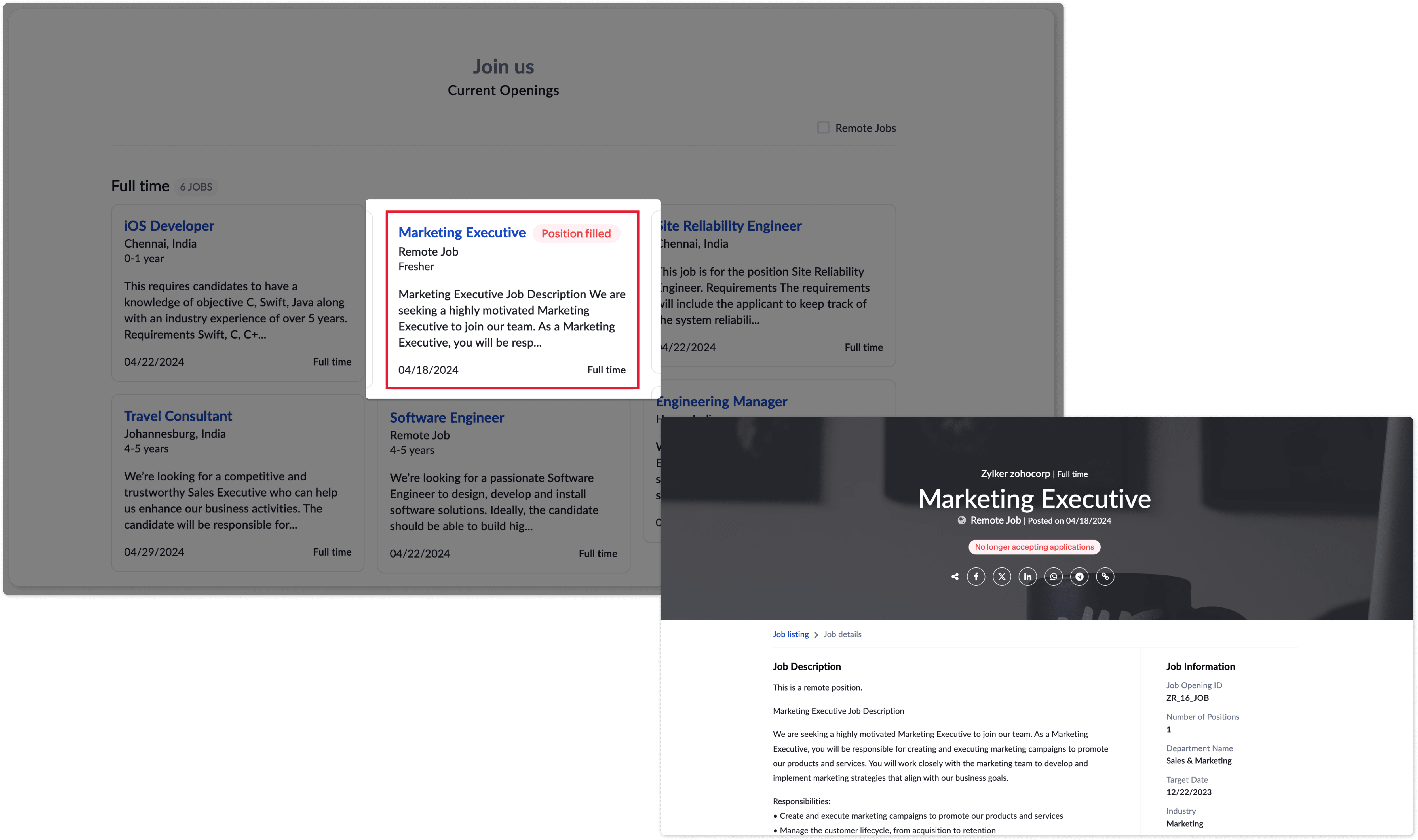
Key Benefits

  1. Employer Branding:
    Displaying closed job listings showcases your organization's hiring momentum and commitment to expanding its workforce, which can positively impact your employer brand and attract potential candidates.
  2. Candidate Experience:
    Candidates who previously applied for a closed position can track the status of their application and understand when a role has been filled, fostering transparency and trust in your recruitment process.
  3. Analytical Insights:
    Retaining closed job data can provide valuable insights for analyzing hiring trends, candidate sourcing strategies, and recruitment metrics over time.
  4. Enhanced SEO:
    Candidates can search through all the jobs listed as closed on the career site and can still view them and potentially gather information about past job opportunities.
For more information on utilizing this feature, refer to our help documentation. If you have any questions or suggestions regarding this enhancement, feel free to leave a comment below or reach out to our customer support team at support@zohorecruit.com.


    • Sticky Posts

    • An update to improve email delivery | Email Authentication & Relay

      Update Rollout Latest Update: Enterprise users (8th July, 2025) This update is now live for Enterprise plan users in all regions. This includes People Plus, but not Zoho One, which will be covered in an upcoming update. Professional users (31st May 2025)
    • Zoho Recruit User Group Meet-up | INDIA 2025 (Venue Finalised)

      Hello Zoho Recruit users from India, We’re pleased and excited to announce our 2025 edition of Zoho user group meet-up in India in five cities! In this meet-up, our team of experts will help you understand the intricate nuances to use Zoho Recruit better,
    • Zoho Recruit is coming to the UK | Zoho Community Learning Series

      Customers from the United Kingdom, Exciting news: We will be in London for the Zoho Recruit user meet up. Our team will help you better understand the intricate nuances of Zoho Recruit to help you hire faster, inform about new and upcoming features, and
    • Ask the experts - A live Q & A discussion on Zoho Recruit

      We are delighted to come back with another edition of Ask the Experts community series. This edition, we'll be focusing on everything about Zoho Recruit. The topics will focus on the features that are used/asked by the majority of users and also based
    • Restriction on 'From' addresses with a public domain

      Dear Zoho Recruit Community, We hope this message finds you well. This post is to inform you about some important updates regarding email restrictions within Zoho Recruit. Effective post 31st March 2025, we will be implementing changes to the use of email
      • Recent Topics

      • Helper Functions and DRY principle

        Hello everyone, I believe Deluge should be able to use 'Helper functions' inside the main function. I know I can create different standalones, but this is not helpful and confusing. I don't want 10000 different standalones, and I dont want to have to
      • Zoho CRM Portal Field Level Permission Issue

        Hi Support Team, I am using the Zoho CRM Portal and configuring field-level editing permissions. However, we are unable to restrict portal users from editing certain fields. We have created a portal and provided View and Edit (Shared Only) access for
      • Holidays - Cannot Enter Two Holidays on Same Day

        I have a fairly common setup, where part-time employees receive 1/2 day's pay on a holiday and full-time employees receive a full day's pay. Historically, I've been able to accommodate this by entering two separate holidays, one that covers full-time
      • Pre-orders at Zoho Commerce

        We plan to have regular producs that are avaliable for purchase now and we plan to have products that will be avaliable in 2-4 weeks. How we can take the pre-orders for these products? We need to take the money for the product now, but the delivery will
      • Introducing the Zoho Projects Learning Space

        Every product has its learning curve, and sometimes having a guided path makes the learning experience smoother. With that goal, we introduce a dedicated learning space for Zoho Projects, a platform where you can explore lessons, learn at your own pace,
      • Customer ticket creation via Microsoft Teams

        Hi all, I'm looking to see if someone could point me in the right direction. I'd love to make it so my customers/ end users can make tickets, see responses and respond within microsoft teams. As Admin and an Agent i've installed the zoho assist app within
      • Zoho Books' 2025 Wrapped

        Before we turn the page to a new year, it’s time to revisit the updates that made financial management simpler and more intuitive. This annual roundup brings together the most impactful features and enhancements we delivered in 2025, offering a clear
      • Add specific field value to URL

        Hi Everyone. I have the following code which is set to run from a subform when the user selects a value from a lookup field "Plant_Key" the URL opens a report but i want the report to be filtered on the matching field/value. so in the report there is
      • Can multiple agents be assigned to one ticket on purpose?

        Is it possible to assign one ticket to two or more agents at a time? I would like the option to have multiple people working on one ticket so that the same ticket is viewable for those agents on their list of pending tickets. Is something like this currently
      • Create static subforms in Zoho CRM: streamline data entry with pre-defined values

        Last modified on (9 July, 2025): This feature was available in early access and is currently being rolled out to customers in phases. Currently available for users in the the AU, CA, and SA DCs. It will be enabled for the remaining DCs in the next couple
      • Restrict Users access to login into CRM?

        I’m wanting my employees to be able to utilize the Zoho CRM Lookup field within Zoho Forms. For them to use lookup field in Zoho Forms it is my understanding that they need to be licensed for Forms and the CRM. However, I don’t want them to be able to
      • Zoho removed ability to see all Scheduled Reports!

        If you are not the owner of a scheduled report, Zoho recently removed the capability to see each scheduled report. As an admin who relies on seeing all scheduled reports being sent, this is a terrible update. Now I cannot see ANY scheduled reports...even the ones I am being sent!!  This should be a setting for admins to control.  This is a bad update.
      • Admins cannot see each others' Scheduled Reports?!

        Very frustrating that as an admin I cannot see what my reports my fellow admins have created and scheduled.  After asking about this on the help chat, I was told the issue is trust and security.  By giving someone Admin status, it means we trust them with those responsibilities. Please change this, it is not a good process to have to bother other users to change a report or change users within a report.
      • Add multiple users to a task

        When I´m assigning a task it is almost always related to more than one person. Practical situation: When a client request some improvement the related department opens the task with the situation and people related to it as the client itself, the salesman
      • This user is not allowed to add in Zoho. Please contact support-as@zohocorp.com for further details

        Hi Team, when I,m trying to create a email account (imagixmidia.com.br) it's showing this error >>  This user is not allowed to add in Zoho. Please contact support-as@zohocorp.com for further details plz help me  thanks
      • Edit default "We are here to help you" text in chat SalesIQ widget

        Does anyone know how this text can be edited? I can't find it anywhere in settings. Thanks!
      • Feature Request: Sync Leave Tracker to Zoho Mail / Calendar or provide option to download information

        Zoho Leave Tracker offers the option to sync the leave Calendar to Microsoft 365 and Google Calendar. Adding an option to sync to Zoho-Mail Calendar would avoid duplication and add significant value for users. An alternative would be to allow users to
      • Compensation | Salary Packages - Hourly Wage Needed

        The US Bureau of Labor Statistics says 55.7% of all workers in the US are paid by the hour. I don't know how that compares to the rest of the world, but I would think that this alone would justify the need for having an hourly-based salary package option.
      • Multiple currencies - doesn’t seem to work for site visitors / customers

        I am trying to understand how the multiple currency feature works from the perspective of the website visitor who is shopping on my Zoho Commerce site. My site’s base currency is US Dollars (USD) but my store is for customers in Costa Rica and I would
      • Archiving Contacts

        How do I archive a list of contacts, or individual contacts?
      • How do people handle using Outlook and Zoho Project calendar at the same time?

        We have an ongoing problem in our organisation where we use Zoho Projects to plan all of our projects tasks and that also allows us to look forward using the workload report to see which of our consultants are overstretched etc and which are available.
      • Printing to a brother label maker

        I see allot of really old unanswered posts asking how to print to a label maker from a zoho creator app. Has their been any progress on providing the capability to create a customized height & width page or print template or whatever to print labels?
      • 10GB Email Storage Limits in Zoho CRM

        We’ve had Zoho One for almost 5 years and have always synced our emails from Gmail via IMAP… As of late, we’ve run into issues with our emails not syncing, due to being over the 10GB storage cap… What’s very odd is that we haven’t changed a thing? I know
      • Performance is degrading

        We have used Mail and Cliq for about three years now. I used to use both on the browser. Both have, over the past 6 months, had a severe degradation in performance. I switched to desktop email, which appeared to improve things somewhat, although initial
      • How to set page defaults in zoho writer?

        hi, everytime i open the zoho writer i have to change the default page settings to - A4 from letter, margins to narrow and header and footer to 0. I cannot set this as default as that option is grayed out! so I am unable to click it. I saved the document
      • Stage-probability mapping feature in custom module

        Hi, I'm building a custom module for manage projects. I would like to implement the stage-probability feature that Potentials has. Is this possible?
      • Add Israel & Jewish Holidays to Zoho People Holidays Gallery

        Greetings, We hope you are doing well. We are writing to request an enhancement to the Holidays Gallery in Zoho People. Currently, there are several holidays available, but none for Israel and none for Jewish holidays (which are not necessarily the same
      • Automatically CC an address using Zoho CRM Email Templates

        Hi all - have searched but can't see a definitive answer. We have built multiple email templates in CRM. Every time we send this we want it to CC a particular address (the same address for every email sent) so that it populates the reply back into our
      • Add RTL and Hebrew Support for Candidate Portal (and Other Zoho Recruit Portals)

        Dear Zoho Recruit Team, I hope you're doing well. We would like to request the ability to set the Candidate Portal to be Right-to-Left (RTL) and in Hebrew, similar to the existing functionality for the Career Site. Currently, when we set the Career Site
      • Unable to Send Different Email Templates for Different Documents in Zoho Sign

        Hello Zoho Community, I am facing a limitation with Zoho Sign regarding email notifications sent to customers when a document is sent for signing. Currently, whenever I send any template/document for signing, the email notification that goes to the customer
      • Enable History Tracking for Picklist Values Not Available

        When I create a custom picklist field in Deals, the "Enable History Tracking for Picklist Values" option is not available in the Edit Properties area of the picklist. When I create a picklist in any other Module, that option is available. Is there a specific reason why this isn't available for fields in the Deals Module?
      • ZO25: The refreshed, more unified, and intelligent OS for business

        Hello all, Greetings from Zoho One! 2025 has been a remarkable year, packed with new features that will take your Zoho One experience to the next level! From sleek, customizable dashboards to an all-new action panel for instant task management, we’ve
      • Vault crashes on Android Devices

        Vault is continuously closing after entering the master password on my Android device. After several attempts I get a system message that says there is a bug in the app. I've uninstalled and reinstalled the app, and cleared the app cache, but nothing
      • ¿Cómo puedo configurar las contraseñas creadas bajo una directiva para que nunca caduquen y no aparezcan como caducadas en los informes?

        ¿Cómo puedo configurar las contraseñas creadas bajo una directiva para que nunca caduquen y no aparezcan como caducadas en los informes? La razón por la cual contraseña estas no deben caducar es porque su actualización depende de mi cliente y no de mí.
      • Camera access

        My picture doesn't appear in a group discussion. (The audio is fine.) The guide says "Click the lock icon on address bar," but I can't find it. Advise, please
      • Are static links available

        I'm still using Zoho Meeting in trial mode. My previous webinar software provided a static link, and I made the mistaken assumption that I could send out my link and start a meeting later. Mass confusion, but my fault. With a paid version do you get a
      • Power up your Kiosk Studio with Real-Time Data Capture, Client Scripts & More!

        Hello Everyone, We’re thrilled to announce a powerful set of enhancements to Kiosk Studio in Zoho CRM. These new updates give you more flexibility, faster record handling, and real-time data capture, making your Kiosk flows smarter and more efficient
      • The reason I switched away from Zoho Notebook

        My main reason for switching to Zoho was driven by three core principles: moving away from US-based products, keeping my data within India as much as possible, and supporting Indian companies. With that intent, I’ve been actively de-Googling my digital
      • Why is Zoho Meeting quality so poor?

        I've just moved from Office 365 to Zoho Workplace and have been generally really positive about the new platform -- nicely integrated, nice GUI, good and easy-to-understand control and customisation, and at a reasonable price. However, what is going on
      • Custom Fonts in Zoho CRM Template Builder

        Hi, I am currently creating a new template for our quotes using the Zoho CRM template builder. However, I noticed that there is no option to add custom fonts to the template builder. It would greatly enhance the flexibility and branding capabilities if
      • Next Page