Handling identifiers during an import
Importing your data


- Users can upload a .csv file or a .zip file containing multiple .csv files.
- The .zip file must be named, for example, Contacts.zip, Accounts.zip, etc.
Working with the Identifier Field
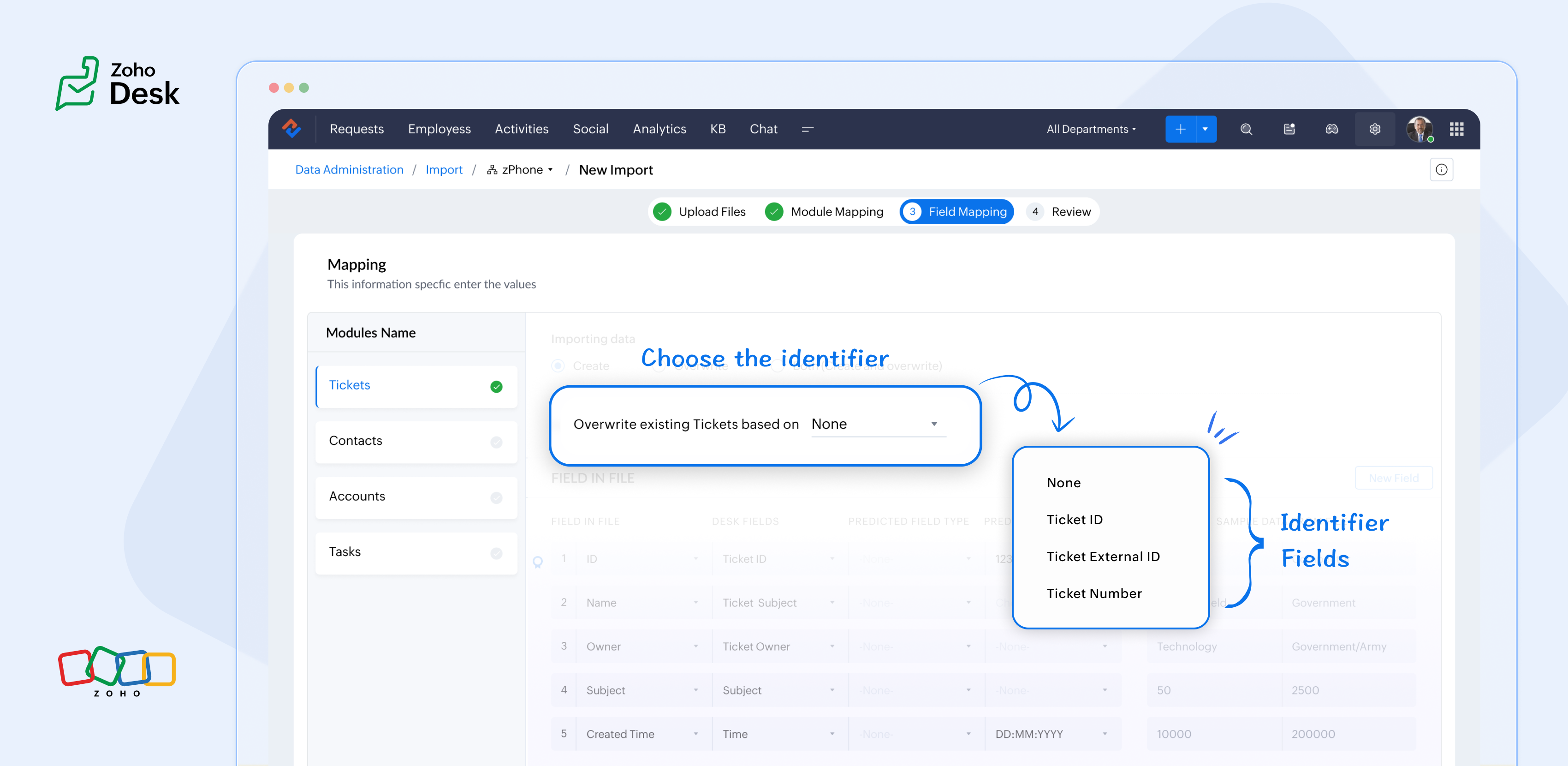
What are the Identifier Fields?
Identifier fields are fields used to find and match existing records when importing data into the product. They also help link related records, like connecting a contact’s name with their email address.
Each module supports different unique identifier fields for identification, as described in the table below:
Module | Unique Identifier Fields |
Accounts | Account ID Account External ID Account Name |
Contacts | Contact ID Contact External ID Last Name First Name Phone Number Mobile |
Tickets | Ticket ID Ticket External ID Ticket Number |
Products | Product ID Product External ID Product Name |
Tasks | TaskId Task External ID |
Calls | Call ID Call External ID |
Events | Event ID Event External ID |
Article Translation | Translation: External ID Translation ID |
Custom Modules | Record External ID Custom Module Name |

Points to remember:
- While these fields help find matching records.
- So, if multiple records match the value, the first matching record will be selected automatically.
- This can lead to unexpected matches or data being updated in the wrong record if you're not careful.
For your understanding:
Some users expressed a preference for matching Contacts by Last Name instead of Email, highlighting the importance of flexibility in their workflow. Furthermore, some additional users approached matching through the use of a custom field, emphasising the need for tailored solutions to fit their unique requirements. Moreover, users requested that the functionality be enhanced by updating existing records with the relevant entity's Zoho Desk ID, aiming to streamline their processes and improve data accuracy.
Commonly used identifier fields:
- Find By is used to identify an existing record during the import process.
- Map By is utilized to link a child record to a parent record, for instance, by linking a Contact to a Ticket.
You can now select specific fields for matching, providing enhanced control and customization during bulk processes or integrations. This functionality enables more precise data handling, ensuring that the information aligns with your specific requirements. By tailoring the matching criteria, you can streamline processes, ultimately leading to enhanced efficiency and better outcomes for your team. This flexibility enables you to harness the full potential of your data.
Import Systems
Let's start by preparing the CSV file.
A sample tickets module CSV file is given below,
External ID | Subject | Contact Email | Contact Name | About |
101 | Hitman | Sharma | Rohit Sharma's journey from a gifted schoolboy to an international icon and fierce competitor reflects resilience, elegance, and remarkable leadership. | |
102 | King Kohli | Virat | Virat Kohli is a world-renowned Indian cricketer known for his aggressive batting, unmatched consistency, and passionate leadership across all forms of the game. | |
103 | Lambu Ishanth | Sharma | Ishant Sharma is a tall and experienced Indian fast bowler known for his 300 test wickets and key performances in overseas conditions. |
Then choose the appropriate Find By identifier field.
The Find By field is selected from a predefined set of fields specific to each module. It is used to determine whether a record already exists in Zoho Desk.
When using the import tool, the system searches the Desk portal for a record (e.g., a ticket) that matches the value mapped to the selected Find By field. This prevents duplicate records by identifying existing entries based on the chosen field.
- Once the file is uploaded, you need to choose a Find By Field — for instance, Ticket External ID.
- Whichever Find By field we choose must correspond to the relevant column in the CSV file. Since we've selected the Ticket External ID, the Case External ID column in your file should be mapped to the Ticket External IDfield.
 If the chosen operation is to 'create new records while avoiding duplicates', and there is no existing ticket with the External ID 101, the import tool will generate a new ticket using the mapped fields. To associate the ticket to the correct Contact, the import tool utilizes the Map By field feature.
Finally, choose the appropriate Map By field.
The Map By field enables users to link imported records to their corresponding dependent records, such as associating a ticket with a specific contact. This functionality ensures that when you import ticket data, the import tool actively searches for a matching Contact in Zoho Desk based on the value defined in the selected Map By field.
For instance, during the field mapping process, you can specifically choose to map the Ticket to a Contact using criteria such as the Contact's email ID. This approach enhances the accuracy of data integration by ensuring that each ticket is correctly associated with the relevant Contact, thereby improving data integrity and streamlining the support process. This meticulous mapping not only minimizes the chances of errors but also facilitates a more organized and efficient ticket management system, ultimately leading to improved customer experiences and satisfaction.
Map by identifier field functionality
The tool efficiently searches for contacts associated with the provided email address.
Search: When a user submits a ticket, the system initiates a search for contacts associated with the specified email address.
Match found: If a single match is identified, the ticket is seamlessly associated with that Contact, ensuring that all relevant customer information is readily accessible for support agents.
Multiple Matches: If numerous contacts are found with the same email address, the system will prioritize and use the first match. This helps streamline the ticketing process while maintaining clarity in customer support.
In summary, the strategic use of Custom Unique Fields and External ID fields as identifiers, along with the potential for composite identifiers, positions support teams to operate more effectively and improve overall customer interactions.
Significant improvements in user experience
Transparent process and status tracking
Unique identifiers for entity mapping
Enhanced error handling and log accessibility
Support for custom modules
Takeaway
Topic Participants
Kavya Rao Addepalli
Sticky Posts
Zoho Desk Partners with Microsoft's M365 Copilot for seamless customer service experiences
Hello Zoho Desk users, We are happy to announce that Zoho Desk has partnered with Microsoft's M365 to empower customer service teams with enhanced capabilities and seamless experiences for agents. Microsoft announced their partnership during their keynoteWhatsApp pricing changes: Pay per message starting July 1, 2025
Starting July 1, 2025, WhatsApp is shifting from conversation-based pricing to per-message billing. That means every business-initiated message you send will count. Not just the first one in a 24-hour window. Pricing updates on the WhatsApp Business PlatformLive Webinar - Work smarter with Zoho Desk and Zoho Workplace integration
Hello customers! Zoho Desk and Zoho Workplace are coming together for a webinar on 14th May, 2024. Zoho Workplace is a suite of productivity apps for email, chat, docs, calls, and more at one single place. Zoho Desk is closely integrated with a few toolsApple iOS 17 and iPadOS 17 updates for Zoho Desk users
Hello Zoho Desk users! Apple recently announced the release of iOS 17 and iPad OS 17. These latest OS updates will help you stay productive and efficient, through interactive and seamless user experiences. Zoho Desk has incorporated the updates to helpZoho Desk Cheat Sheet For The Year-End
Check out these Zoho Desk best practices to end this year on a high and have a great one ahead! #1 Set Business (Holiday) Hours - If you have limited working hours, please make sure you restrict your business hours or set them as holidays for the coming days. Let your customers know when you will, and won't, be available. #2 Update the Annual Holiday List - Check the holidays for the new year and update the holiday schedule. Usually, holidays from the current year will be carried over for the next
Recent Topics
Bug: OAuth 2.0 State Parameter fails with Pipe Delimiters (RFC 6749 Non-Compliance)
I've discovered a bug in how Zoho's API Console handles the OAuth 2.0 authorization flow when the state parameter contains pipe characters (|), and I'm hoping the Zoho team can address this in a future update. The Issue Zoho's OAuth 2.0 implementationZobot with Plugs
Hello, I am having a problem with Zobot using Plugs. Here is my current flow: When I run the flow, I should immediately see the messages from the initial cards (Send Message cards), then after running the plug, and finally, see the messages after thePrint a document from Zoho Writer via Zoho Creator
If i use the code below i can get writer to create a new document or email it to me but i want to be able to print it directly from the browser and not have to send it via email and then print. Below is the code im using. Attached options form zoho writerIs it possible to use HTML formatting in SMS messages sent from Zoho?
Hi everyone, I have a question regarding sending SMS from Zoho When we send emails from Zoho, we can include HTML code to format the message (like adding links, styling, etc.). Is it possible to do something similar when sending SMS messages through ZohoZoho Sign 2025–2026: What's new and what's next
Hello! Every year at Zoho Sign, we work hard to make document signing and agreement execution easy for all users. This year we sat down with our head of product, Mr. Subramanian Thayumanasamy, to discuss what we delivered in 2025 and our goals for 2026.Training for How can i Operate the Software Features
need to Help for Training of the ZOHO Billing SoftwareAutomating Vendor Contract Management between Zoho Contracts and Zoho Books using Zoho Flow
Managing vendor agreements across procurement and finance systems often requires manually downloading executed contracts and attaching them to vendor records. This can become time-consuming and difficult to manage when dealing with a large number of contracts.Problem applying batch operation error keeps looping that error
Problem applying batch operation error keeps looping that error an wont loginShared Email Sending Duplicate Copies of Emails
Hi there, We recently have moved our info@ email to Team Inbox to trial. We set this channel up using the Microsoft setup which works fine and have 3 users. I am wanting to know: 1. When I send a new email, it will create a copy of that email and sendmerhaba
merhaba sosyal medya paketimiz mevcut ama yorumları göremiyoruz ve o yüzden cevap veremiyoruz destek rica ediyoruz.Teaminbox not working
We couldn't send or receive any mail within the team inbox. Displaying error 'Unable to process this request.'Related lists New option in missing
hi I have created quite a few modules and added as related lists to my main module. Some have new, some dont I can not see why?Detailed list of scoring rules in Zoho CRM
Good morning Zoho community, warm greetings The reason for my message today is that I have a problem with my CRM, which I will explain below: Our organization has scoring rules designed to rate our potential customers or leads in the application basedCliq and ToDo integrations?
I'm a bit surprised not to find any way to open a Cliq chat for the current thread, or to create a Zoho Mail ToDo from a thread. Are these on the roadmap?Reply-to names are mangled
Hello, I'm seeing an odd behavior in replies. Steps to reproduce: 1. Click reply to an email from "John Doe <doe.john@example.com> in TeamInbox Expected outcome: TO field pre-filled with "John Doe <doe.john@example.com>" Actual outcome: TO field pre-filledI CANT UPGRADE MY FREE ACCOUNT
I TRY TO UPGRADE MY FREE ACCOUNT AND I COULD NOT UPGRADE IT CAN SOMEBODY TELL ME WHY? AND I HAVE THE MONEY SO.Level up your ASO game with tags & categories in store reviews
Introducing tags and categories in Apptics' store reviews Dear Apptics community, If your app is listed on the Play Store or App Store, you already know how important store reviews and ratings are. They’re one of the most direct signals of user sentimentIncluding attachments with estimates
How can attachments be included when an estimate is sent/emailed and when downloaded as a .pdf? Generally speaking, attachments should be included as part of an estimate package. Ultimately, this is also true for work orders and invoices.Adding VENDOR SKU to PURCHASE ORDERS
how can we add the Vendor SKU when issuing a Purchase Order , so the PO shows the Supplier SKU and our own Internal SKU , which is what we want to receive into the system .Possible to freely prompt/query CRM data using Zia?
Is it possible to prompt Zia to query on any information stored in the CRM, especially on the data stored in custom text fields? My use case is the people in my organisation have entered lots of text in custom text fields to capture information from anRestrict employees to take only one day holiday from a multi-day festival holiday
Hi everyone, I have a requirement related to Optional/Festival Holidays in Zoho People. For example, in the month of May there are three optional holiday dates: May 11, May 12, and May 13. Employees can choose one of these days as their optional holiday.Cannot modify colours in invoice email template
I have tried switching browsers... but I cannot change the (pretty horrible) default colours in the preset email when sending an invoice... the blue banner, red outstanding total and the bright green button... I can change other things but not the colours?Cannot find zpuid for Zoho Projects user
I'm using the Zoho Projects v3 API to create a task. The task is created successfully, but in order to assign the task owner, the "Create a Task" API also requires the zpuid of the task owner. Unfortunately I cannot find any user-related API calls thatPrint a document from Zoho Writer via Zoho Creator
If i use the code below i can get writer to create a new document or email it to me but i want to be able to print it directly from the browser and not have to send it via email and then print. Below is the code im using. Attached options form zoho writerAllow styling for specific Subform fields in Zoho Creator
Sometimes in forms we need to visually highlight a specific field inside a Subform (for example Sanctioned Amount, Approved Value, Critical Fields, etc.) so that users immediately notice it while entering data. Currently there is no direct UI option toCareer site URL - Suggestion to modify URL of non-english job posting
Hi, I would like to suggest making a few modification to career sites that are not in english. Currently, the URL are a mix of different languages and are very long. It makes for very unprofessional looking URLs... Here is an example of one of our URL3/18 オンライン勉強会のお知らせ Zoho ワークアウト (無料)
ユーザーの皆さま、こんにちは。コミュニティチームの中野です。 3月開催のZoho ワークアウトの開催が決定しましたのでご案内します。 今回はZoomにて、オンライン開催します。 ▶︎参加登録はこちら(無料) https://us02web.zoom.us/meeting/register/BoNTN7zYR8OvOPGShqBY0A ━━━━━━━━━━━━━━━━━━━━━━━━ Zoho ワークアウトとは? Zoho ユーザー同士で交流しながら、サービスに関する疑問や不明点の解消を目指すイベントです。New 2026 Application Themes
Love the new themes - shame you can't get a little more granular with the colours, ie 3 different colours so one for the dropdown menu background. Also, I did have our logo above the application name but it appears you can't change logo placement positionPlaceholder format in Number field does not reflect Max Digits configuration
When the Max Digits (Maximum digits of number) property is set to a smaller value (for example, 2 digits), the placeholder in the input field still displays a 7-digit format (#######). The same behavior can also be observed in Decimal and Currency fieldHow does SKU work when selling products in parts in Zoho Inventory
Hello everyone, Zoho Inventory does not understand the physical cutting of the piece.. It only tracks quantities of the unit (like feet ). So when you sell part of an item, the system simply reduces quantity for that SKU. Assume that i have a 50 ft longAbility to Attach Record-Specific Files Automatically in Workflow Email Templates
Currently in Zoho CRM, email templates allow attachments to be added, but these attachments are static and remain the same for every recipient. There is no straightforward option to automatically attach a file that is stored within the specific CRM recordCRM Cadences - working timesThe Friday afternoon? The next Monday morning? Not at all?
I think I’m writing saying that cadence emails are only sent during the organisations set working hours in CRM. So if a particular email is set to send for example in three days and that lands on a Sunday (when working hours are not operational) whenCRM Cadences - working times
I think I’m right in saying that cadence emails are only sent during the organisations set working hours in CRM. So if a particular email is set to send for example in three days and that lands on a Sunday (when working hours are not operational) whenPush Notification for New Bookings in Zoho Bookings App
when a someone schedules an appointment through the booking page, is there any option to receive a push notification in the mobile app?Trying to access records in a custom module in Zoho Desk and not having luck
I've built a custom module in Zoho Desk and am using a custom function to query the records in the module and I'm not having any luck. The only way I have found to retreive a record is by getting it by its recordID (the long zoho assigned one). The functionIntergrating multi location Square account with Zoho Books
Hi, I have one Square account but has multiple locations. I would like to integrate that account and show aggregated sales in zoho books. How can I do that? thanks.Add the same FROM email to multiple department
Hi, We have several agents who work with multiple departments and we'd like to be able to select their names on the FROM field (sender), but apparently it's not possible to add a FROM address to multiple departments. Is there any way around this? Thanks.Zoho Desk View Open Tickets and Open Shared Tickets
Hi, I would like to create a custom view so that an agent can view all the open tickets he has access to, including the shared tickets created by a different department. Currently my team has to swich between two views (Open Tickets and Shared Open Tickets).Clone Banking Transaction
Why is there no option to CLONE a Transaction in the Banking module?? I often clone Expenses (for similar expense transactions each month) so I would also like to clone Income transactions. But there is no option in Banking to clone an existing IncomeOrganization wide Account and Contacts Visibility/Sharing Capabilities?
Has anyone figured out a way to make visibility or sharing of Accounts and Contacts to be available across the entire organization without having to have every individual user edit their Sharing permissions? For our sales folks they need to be able toNext Page