Introducing Connected Workflows in Zoho CRM for Everyone : Free Your Teams to Focus on What Matters

Introducing Connected Workflows in Zoho CRM for Everyone : Free Your Teams to Focus on What Matters

Hello Everyone,

We’re thrilled to introduce the next big evolution in Zoho CRM for Everyone -- Connected Workflows. This new feature builds on our commitment to deliver a CRM that’s truly inclusive, adaptable, and designed for consistent collaboration across your entire organization and not just your sales team.

With the launch of Connected Records, we enabled teams to share contextual information and stay aligned through record connections across modules. Now, with Connected Workflows, we’re taking it one step further by enabling Zoho CRM to coordinate work across teams and enable them to deliver their best for customers.

What are Connected Workflows? 

While Connected Records make it easy to share customer context across your customer journey, however, many of the processes involved in your customer's journey need to be consistently carried out. That’s where Connected Workflows come in.

Connected workflows help free your teams from manual coordination by enhancing coordination across multiple teams and improving customer relationship management. They allow you to automate your entire customer journey that spans across multiple customer-facing teams.

With Connected Workflows, you can build smooth coordination between departments like Sales, Marketing, Legal, Onboarding, and Training  so that each step in the customer journey is coordinated without manual follow-ups or miscommunication.


How to create Connected workflows? 

"Users should have the Connected Workflows permission enabled in their profile settings."

Every connected workflow begins with a primary module, either an organization module or a team module, depending on your customer journey.

Triggers : Initiate by setting up triggers by configuring either a single trigger or multiple triggers for a module. The triggers are :
  • when a record is created in the module
  • When a record is edited record in the module,
  • When a record is created or edited in the module, or
  • When a field in the record is edited in the module.
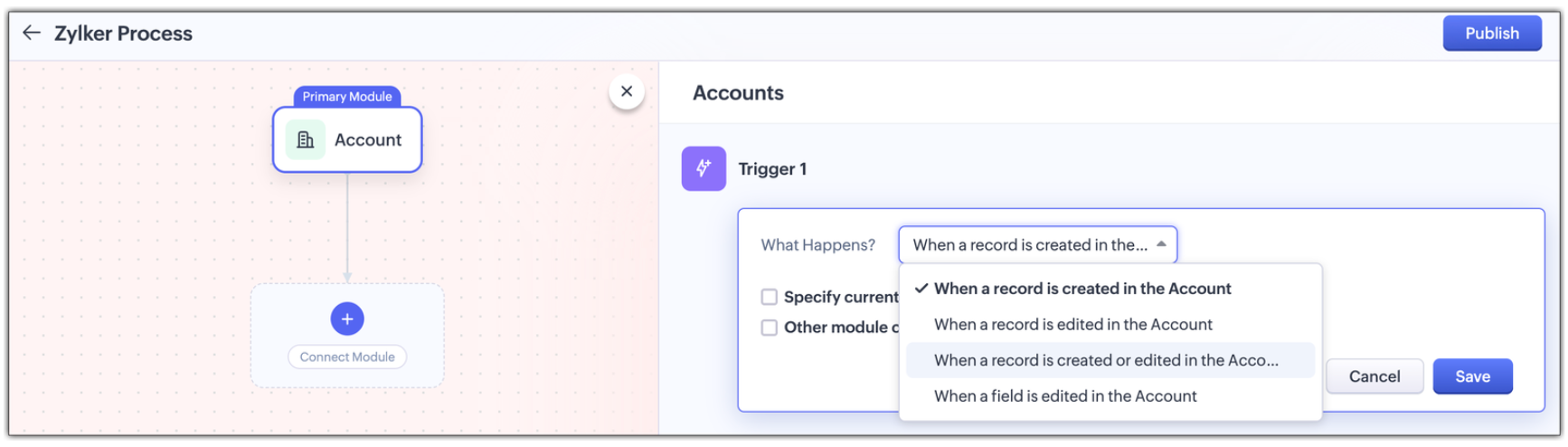
Multi-module criteria for Triggers : You can configure multiple criteria for triggers to execute actions in any other related modules; Enable other module criteria option for this. This ensures actions run when related modules are updated with values matching the trigger.
 
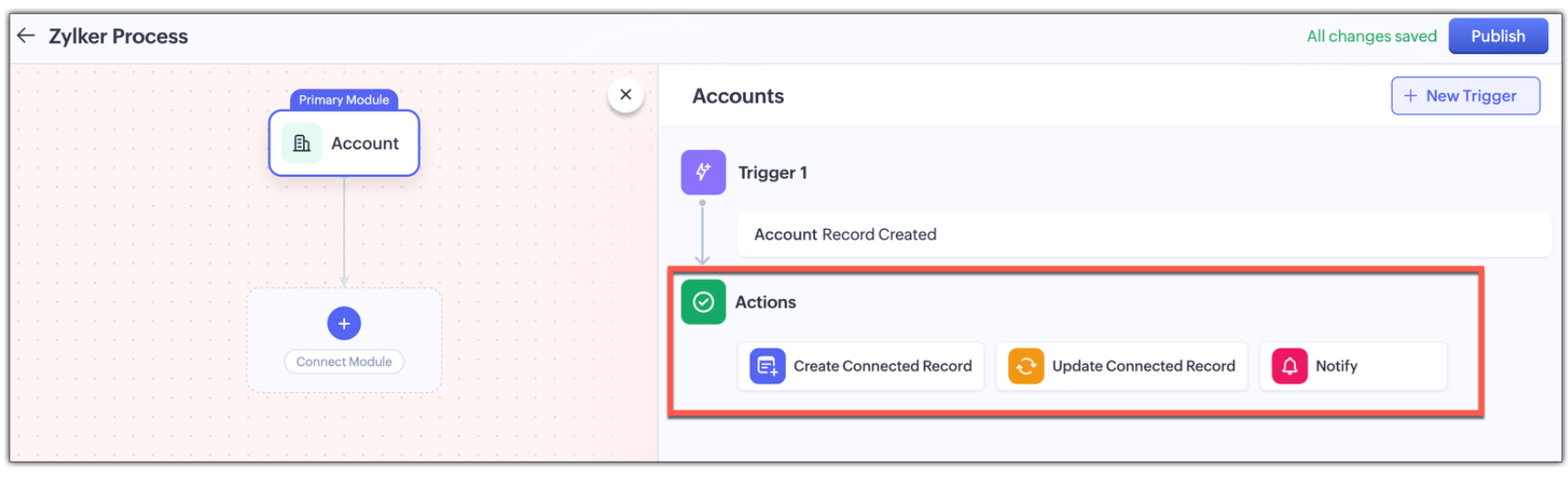
Actions : Assign one or more actions for each trigger . The actions are :
  • Creating a new connected record in the associated module
  • Updating an existing connected record in the associate module, or
  • Notifying users via email. 

Use Case: Automating the customer journey from a sales enquiry  to customer success

A typical customer journey goes through four stages, and we know that even though the sales team is the initial point of contact, multiple teams are involved and will support the sales team to win the customer.                                                        

Involved Teams
Initial Evaluation
Sales Team is the point of contact
Marketing team supports with customer-facing content in the Case Study Module
Demo Request
Sales Team schedules a product demo
Pre-sales team provides product demos in the Product demo module
Customer Onboarding
Sales Team updates the sale cycle stage to 'Closed Won'
Onboarding team helps the customer get started post-sale in the Onboarding Assistance module
Product Training
Sales Team arranges for training sessions
Training team helps the customer to be fully equipped to use the product in the Training module
 
Here's how Connected Workflows can automate the sales process and achieve coordination between the multiple teams involved.  

We’ll create a connected workflow with Deals as the primary module and configure three triggers:

Trigger 1: When a new record is created → Create a connected Case Study record for Marketing (Action)

Trigger 2: When Lead Status is "Qualified" → Create a Product Demo record and notify the Pre-sales Team(Action)

Trigger 3: When Deal Stage is "Closed Won" → Create an Onboarding record for handoff prep(Action)

This sets up three connected modules: Case Study, Demo Request, and Onboarding, as shown in the image below.

 Now we will configure the associated modules.
  • Case Study
    Trigger : When status is "Completed" → Notify Sales Team about availability(Action)

  • Demo Request 
    Trigger : When status is "Completed" → Notify Sales Team that demo was given(Action)

  • Feedbacks (manually created from Demo Request)
    Trigger : When new record is created  → Email lead with feedback form(Action)

  • Onboarding 
    Trigger :
    When status is "Completed" → Notify Training Team to start sessions and Sales Team of onboarding completion; also create a Training record(Action)

  • Training (automatically created from Onboarding)
    Trigger :
    When new record is created → Update Account type to "Customer" and notify Sales Team of training completion(Action


Now let's look at how all these modules have been connected to carry out a customer journey in the GIF below.


In this entire customer journey, there is no loss of customer context, no repeated back-and-forth between teams, and no delays due to miscommunication. Each team receives a connected record with all the relevant data they need to execute their part of the process.
Here is another video with a detailed explanation on how connected workflows works :

How Are Connected Workflows Different from Traditional Workflows?     

  • Connected Workflows go beyond one module; they’re designed to coordinate across team boundaries and hence use multiple modules to build a workflow.
  • Connected workflows trigger follow-up tasks/actions in both org and team modules.
  • Connected Workflows generate connected records as part of the process, so new requests are automatically created in modules, and those teams will have full context from day one. Users can save the time they take to create requests from the Request tab with this feature.

Why use connected workflows for your business? 

  • No more manual follow-ups because of automating cross-team coordination and reducing dependency on reminders or emails.
  • Achieving consistent execution across your customer's journey.
  • Providing end-to-end visibility where teams see the full customer journey, not just their part in the entire journey.
  • Above all, providing contextual coordination among multiple teams by minimizing delays between hand-offs.
 

We believe Connected Workflows will be a game-changer in how you deliver exceptional customer experience. We’re excited for you to start building your first Connected Workflow. Let us know in the comments if you have any queries.

Availability :
  • This enhancement is available only in Zoho CRM's new UI.
  • The number of connected workflows that can be created edition-wise are :
    • Standard Edition.      : 2
    • Professional Edition : 2
    • Enterprise Edition    : 10
    • Ultimate Edition.      : 10
    • Click here to learn about others limitations for this feature.

Early Access for Connected Workflows

We are in the process of opening out connected workflows for our customers, however, if you’d like early access to explore and use this feature, we’ve got you covered!

Fill out this form to get early access.

We’d love for you to try it out and share your feedback.


Regards,
Serena Woolridge
Zoho CRM Marketing Team


      • Recent Topics

      • Zoho Forms API

        Is there any way to get all form entry list using API? Looking forward to hear from you
      • Creating a Chart from a Report

        In Zoho Analytics, is it possible to create a chart from a Pivot View report? We are looking to use Zoho Analytics to replace Excel for Sales reports and would like to be able to show both the table and the chart together.
      • Ability to Set Client Name During Portal Invitation

        Hi Zoho Team, We would like to suggest an important enhancement to the Zoho Creator Client Portal functionality. Zoho Creator recently introduced the option to set a client’s display name in the Client Portal settings, which is very helpful for creating
      • Move email between inboxes?

        Is it possible to move emails from one team inbox to another? We would like to be able to have a single "catch-all" inbox for incoming requests, and then move the email to the appropriate department inbox. I was hoping we would be able to accomplish this
      • PDF Attachment Option for Service Reports

        Hello Team, I would like to check with you all if there is an option to attach PDF documents to the service reports. When I try to attach a file, the system only allows the following formats: JPEG, JPG, and PNG. Could you please confirm whether PDF attachments
      • 【Zoho CRM】データ一覧画面でのメモのバッジ機能リリースのお知らせ

        ユーザーの皆さま、こんにちは。コミュニティチームの藤澤です。2026年度もゾーホーユーザーコミュニティをどうぞよろしくお願いいたします! 今回は「Zoho CRM アップデート情報」の中から、新機能のデータ一覧画面でのメモのバッジ機能をご紹介します。 目次 概要 メモのバッジ機能について メモの作成について メモに関する様々な処理について 最近追加したメモについて メモのバッジの非表示について クライアントスクリプトの対応 概要  メモのバッジ機能について 既存の活動バッジに加えて、すべてのタブのデータ一覧表示画面に、各データごとに利用できる「メモのバッジ」(キャプチャ内の赤枠部分)が新たに導入されました。
      • is it possible to add more than one Whatsapp Phone Number to be integrated to Zoho CRM?

        so I have successfully added one Whatsapp number like this from this User Interface it seems I can't add a new Whatsapp Number. I need to add a new Whatsapp Number so I can control the lead assignment if a chat sent to Whatsapp Phone Number 1 then assign
      • Can’t find fsm in zoho one

        Every other app is available to me in Zoho one except fsm
      • Posibility to add Emoticons on the Email Subject of Templates

        Hi I´ve tried to add Emoticons on the Subject line of Email templates, the emoticon image does show up before saving the template or if I add the Emoticon while sending an Individual email and placing it manually on the subject line. Emoticons also show
      • Task Deletion Restriction & Strict Stage Control

        Hello Zoho Community, We have the following two issues currently pending and under testing, for which we require a workable and reliable solution: 1. Task Deletion Restriction We are testing ways to ensure that staff users are not able to delete tasks
      • Unable to mass update a picklist field

        Hello, I have the records within our Accounts module divided between two account types: Parent Accounts & Member Accounts. I am attempting to mass update accounts from one picklist value to the other (within other specific criteria in our custom fields)
      • Process checklist in CRM

        Hi We've created a new sales process that I'm mapping into the CRM - issue I have is that some of the tasks / milestones I would like to capture require very simple tick box responses but there are quite a few under a variety of sub categories so I don't
      • CRM project association via deluge

        I have created a workflow in my Zoho CRM for closing a deal. Part of this workflow leverages a deluge script to create a project for our delivery team. Creating the project works great however, after or during the project creation, I would like to associate
      • Holidays - Cannot Enter Two Holidays on Same Day

        I have a fairly common setup, where part-time employees receive 1/2 day's pay on a holiday and full-time employees receive a full day's pay. Historically, I've been able to accommodate this by entering two separate holidays, one that covers full-time
      • Where is the settings option in zoho writer?

        hi, my zoho writer on windows has menu fonts too large. where do i find the settings to change this option? my screen resolution is correct and other apps/softwares in windows have no issues. regards
      • File emails in Shared email folder

        Hi, I am unable to allow users to collaborate in Shared email folders: User 1 shares a folder let's say "SharedTopic" with full permissions Users 2 and 3 can see this folder but are unable to add emails to this folder or search in this folder. For example,
      • How create a draft via workflow?

        I wish to create a workflow rule for specific emails that creates a draft response - not an automatic email reply, but just a draft with a set response ready to be verified by an agent who can then manually select recipients. Alternatively, the workflow
      • This user is not allowed to add in Zoho. Please contact support-as@zohocorp.com for further details

        Hi Team, when I,m trying to create a email account (imagixmidia.com.br) it's showing this error >>  This user is not allowed to add in Zoho. Please contact support-as@zohocorp.com for further details plz help me  thanks
      • How to manage task lists in Zoho Desk?

        Hello, I use Zoho Desk for IT customer support. I have a list of standard operating procedures (SOPs), including SOPs for onboarding new users, offboarding users, losing a device, etc. These are lists of tasks to be performed depending on the situation.
      • Zoho → ShipStation Integration – Sales Order–Driven Fulfilment Workflow

        Hello All, I’m reaching out to explore the best way to integrate a shipping tool into our inventory which will speed our process up. We are looking to integrate ShipStation into our existing order-to-fulfilment workflow, as we’re keen to standardise on
      • Business Day Logic Update: More Accurate Scheduling for Your Workflows

        Hello everyone, We’re improving how business-day calculations work in workflows, especially when triggers happen on weekends. This update ensures that offsets like +0, +1, and +2 business days behave exactly as intended, giving you clearer and more predictable
      • Convert Lead Automation Trigger

        Currently, there is only a convert lead action available in workflow rules and blueprints. Also, there is a Convert Lead button available but it doesn't trigger any automations. Once the lead is converted to a Contact/Account the dataset that can be fetched
      • Default Tagging on API-generated Transactions

        If one assigns tags to an Item or Customer, those tags get auto-populated in each line item of an Invoice or Sales Order when one creates those documents. However, if one creates the Sales Order or Invoice via the API (either directly coding or using
      • User

        If user is already part of manage engine endpoint central , what hapens when i try to add them to another Zoho org / directory? Are these users added as external users?
      • Adding a new section to the related details sidebar when creating a new ticket.

        Hello, I was wondering if you can add a new section to the related details sidebar when creating a new ticket. I was wanting to have it to where it also shows the account information related to the contact chosen as well. This is the section I am referring
      • Displaying only unread tickets in ticket view

        Hello, I was wondering if someone might be able to help me with this one. We use filters to display our ticket list, typically using a saved filter which displays the tickets which are overdue or due today. What I'd really like is another filter that
      • How to compare a subform lookup field that allows multiple entries when edited

        I have a form with a subform with multiple fields. One of the fields is a lookup field that allows a multi select. On edit validation, I want a workflow to execute only when the entries in that subform field has changed. The old. function is not working
      • Is Zoho Shifts included in the Zoho One plan?

        In case the answer is no: there's any plan to make it available via One? Thank you
      • Zoho Tracking Image location

        So we've been having an issue with tracking email opens. Specifically in Gmail. Our emails are not that long either, maybe 4 sections of image/250 characters of text/button per section.  But all my test accounts I used via Gmail we're showing opens. But then come to find out the tracking image is at the very bottom of the email. So If the message is clipped (It always just clips our social icons on the bottom) and the user doesn't click the show more button it never tracks the open.  Looking at other
      • Is there a plan to integrate zoho voice with zoho books?

        Hello, Is there a plan to integrate zoho voice with zoho books? Right now we are using the Twilio SMS integration into zoho books, but have recently decided to switch to zoho voice for calls and sms. Is there a plan to integrate zoho voice natively into
      • Zoho Tables is now live in Australia & New Zealand!

        Hey everyone! We’ve got some great news to share — Zoho Tables is now officially available in the Australian Data Center serving users across Australia and New Zealand regions! Yes, it took us a bit longer to get here, but this version of Zoho Tables
      • Delivery and handling of documents e-stamped using Zoho Sign

        Hello everyone! Zoho Sign makes it easy to pay non judicial stamp duty online and automatically attach the digitally generated e-stamp challan to electronic documents. We also manage the delivery of physical e-stamped papers. We periodically receive these
      • Introducing Dedicated Modules for Plans, Addons, and Coupons in Zoho Billing

        We’ve enhanced the way you manage Plans, Addons, and Coupons in Zoho Billing. Previously, all three grouped together under Subscription Items. Now, each one has its own dedicated module, giving you a cleaner and more intuitive experience. This update
      • Sortie de Zoho TABLE ??

        Bonjour, Depuis bientôt 2 ans l'application zoho table est sortie en dehors de l'UE ? Depuis un an elle est annoncée en Europe Mais en vrai, c'est pour quand exactement ??
      • Issue with WhatsApp Template Approval and Marketing Message Limit in Zoho Bigin

        We are facing issues while creating and using WhatsApp message templates through Zoho Bigin, and we request your clarification and support regarding the same. 1. Utility Template Approval Issue Until December, we were able to create WhatsApp templates
      • How to install Widget in inventory module

        Hi, I am trying to install a app into Sales Order Module related list, however there is no button allow me to do that. May I ask how to install widget to inventory module related list?
      • Zoho Social - Feature Request - Non-US Date Format

        Hi Social Team, I have noticed that there is no option to change the date format from US mm/dd/yyyy to others like dd/mm/yyyy. It would be great to see this added as the platform matures. Thanks for considering this feedback.
      • Drop Down Value

        Hi, May I know why Zoho Flow treat this drop down as number and not as string. If so, how can I fetch the right value for filtering. This field is from Creator, in Creator upon checking by default it is a string since it's not a lookup field.
      • Zoho CRM's mobile apps: A 2025 Recap

        2025 marked a year of steady progress for Zoho CRM's mobile apps. We rolled out several updates and features to improve usability and make everyday CRM work a lot easier to manage. Here’s a look back at some of the key releases from 2025. Android releases
      • Facebook follower count doesn't match FB Analytics

        Hi all, I am wondering if anyone else has issues with follower counts for Facebook not matching FB's native analytics tool. On the Zoho dashboard, it's showing 1,007, but FB shows 1,060. All the other channels match up. Any insights are much appreciated!
      • Next Page