Introducing Global Sets for easy management of similar picklists in CRM

Introducing Global Sets for easy management of similar picklists in CRM

[Update | Sep 2024] We've increased the maximum count limit for global sets. These new limits are now live for AU and JP data centers and will be gradually opened to all. Please check this link for the updated limits.

Hello folks,

As administrators who implement and manage CRM solutions, you may have dealt with picklists that are present across multiple modules and have the same picklist values.

For example, consider picklists with industries as picklist values. These are used across leads, contacts, accounts, and custom modules. The purpose of collecting this detail is, among other things, to tailor our communications around the needs and perceptions of these industries.

Until now, you most likely have added and updated the values for each picklist to make sure that they were consistent across the CRM.

This would've involved the repetition of the same set of actions for each picklist. Needless to say, this is tedious and susceptible to error.


Now, we'd like to present a solution to make this task easier.

We're thrilled to introduce a new feature called Global Sets, which is designed to simplify working with similar picklist fields in Zoho CRM.
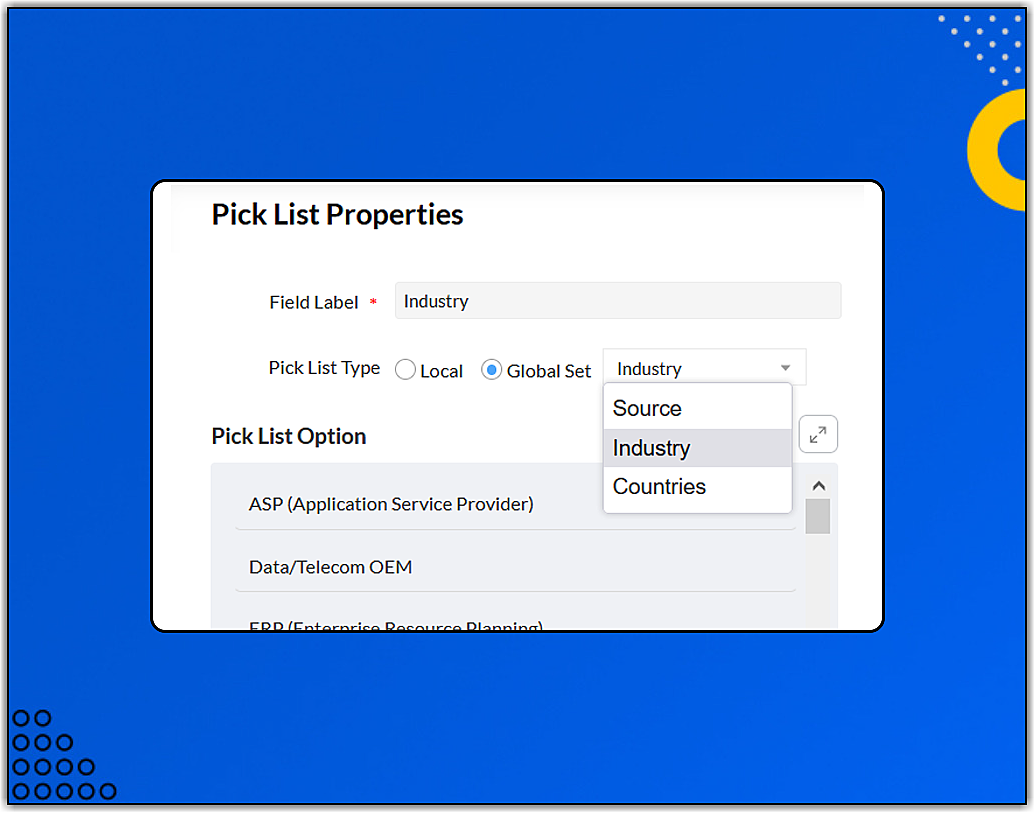

A global set is an admin-defined set of picklist values that can be associated with multiple picklists across modules.

In the case of industry picklists, we can:
  1. Create a global set called "Industry," with industries as picklist values.

  2. Associate the relevant picklists in the different modules with that global set.

  3. Make changes in the "Industry" global set and let the CRM take care of making changes in all other places, like associated picklists, existing records, workflow rules, etc.
Some other useful options include:
  1. Converting existing picklist values to a global set:

  2. Switching the association of a picklist from a local set to a global set and vice versa:
  3. Mapping values when switching from a local set to a global set to preserve data integrity*:
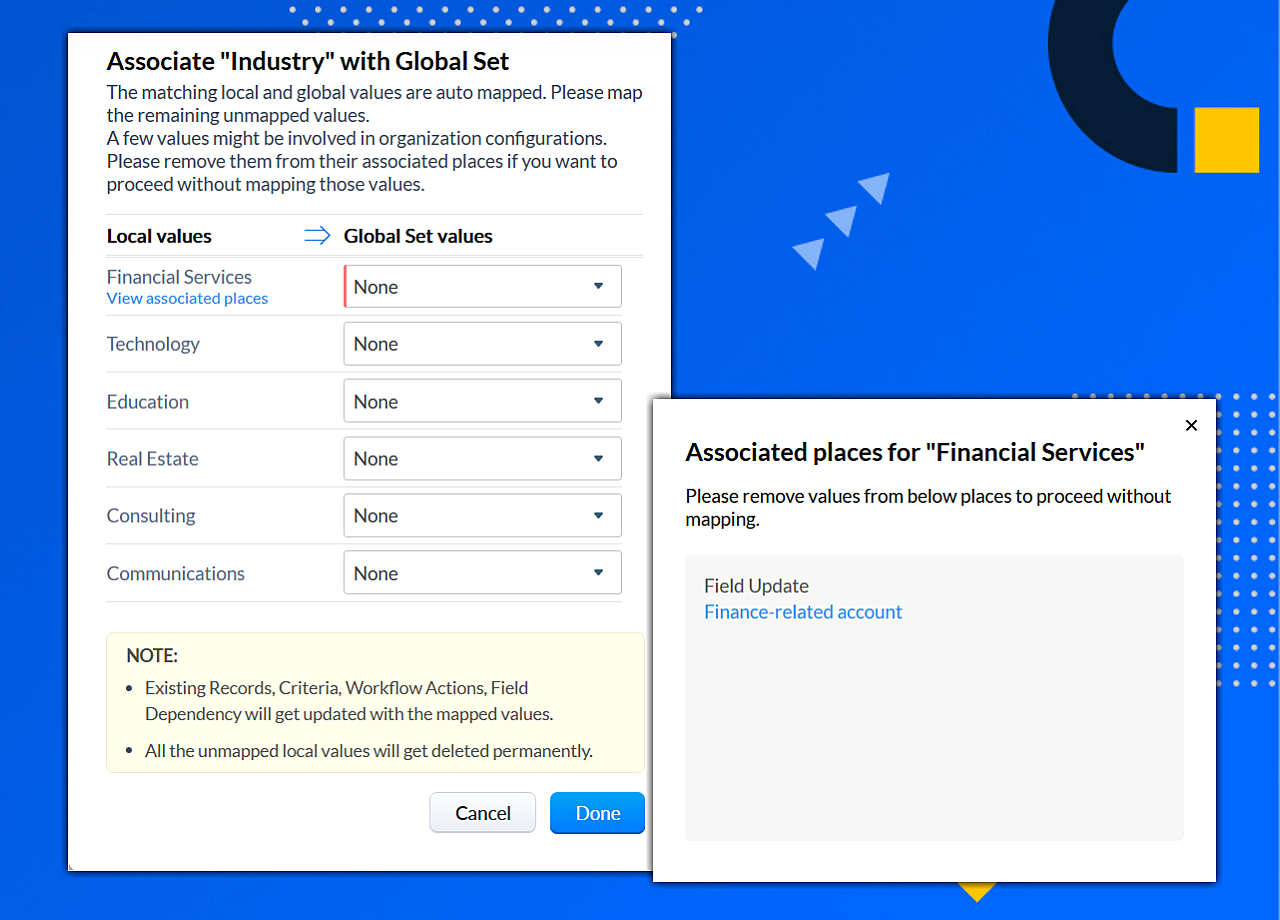
    *If the same value is present in the global set, the value is mapped automatically. It's mandatory to map a value if it's used in places like workflow rules, field updates, etc.
  4. Viewing all of the picklists associated with a global set:

Limits:
  • Number of global sets: 10 (Enterprise) | 25 (Ultimate)
  • Number of picklists (across modules) that can be associated with the one global set: 15 (Enterprise/Ultimate)
  • Number of picklists in a module that can be associated with different global sets : 7 (Enterprise/Ultimate)
  • Number of values in a global set: 1,000 (Enterprise/Ultimate)
  • For now, global sets can't be associated with multi-select picklists.
Updated limits [Sep 2024] [These new limits are now live for AU and JP data centers and will be gradually opened to all. ]
  • Number of global sets: 30 (Enterprise) | 50 (Ultimate)
  • Number of global sets per module: 15 (Enterprise/ Ultimate)
  • Number of picklists that can be associated with one global set: 30 (Enterprise/Ultimate)
  • Number of used values in a global set: 1,000 (Enterprise/Ultimate)
  • Number of unused values in a global set: 500 (Enterprise/Ultimate)
  • For now, global sets can't be associated with multi-select picklists.

    This feature is available in the Enterprise and Ultimate editions of Zoho CRM. It has been rolled out to all users in all DCs.

    To learn more about this feature, please refer to our help documents: Overview of global sets | Working with global sets (for how-to's)

    Once you've taken this feature for a spin, do let us know what you liked and what you didn't like in the comments section below.

        • Recent Topics

        • Edit Pinned Comments in Zoho Desk

          It's great that private comments can now be pinned to the top of the ticket but what would be extremely helpful would be to allow for the pinned comment to be edited vs. having to find the comment in the ticket to edit it.
        • Updating Secondary Contact (CCs)

          We use Zoho Forms to capture the user request and integrated with Zoho Desk to raise tickets. Active Microsoft login is captured in our Zoho forms and registered as Primary contact in Zoho desk ticket. We also an have an option to raise ticket on behalf
        • Show Custom Button in Portal Listview Canvas

          I have created a custom button that shows in a list view of deals (internally I can see it). I have permissions to allow this button on the portal. But it is not displaying in the canvas list? Before I do too much leg work, is this function allowed?
        • Email Opt Out Question

          Has the problem where if a customer is emailed opt out prevents you sending standard emails? For me this feature is simply to stop any email marketing and should not block people from receiving emails via Zoho mobile, which makes no sense.
        • blank page after login

          blank page after logging into my email account Thanks you
        • WriterTh

          After every space Writer goes to capital letters mode in my Android tablet. The cap mode stays till the second letter is typed in the word then it comes to normal mode.
        • Does Thrive work with Zoho Billing (Subscriptions)?

          I would like to use Thrive with Zoho Billing Subscriptions but don't see a way to do so. Can someone point me in the right direction? Thank you
        • Zoho writer unable to merge documents to PDF with basic fonts in Hebrew or fonts from my computer

          I created several forms that will be merged into PDF files through Zoho Writer and I am unable to receive the PDF in the basic fonts of the Hebrew language or in the fonts I have on my computer. The writer exports to PDF an exchange font that looks very
        • I have already created some Bots, Commands, and Widgets in Cliq, but I am still not seeing the “Create Extension” option in my account. Could you please help me enable or access this option?

        • RTL Support for Webforms in Zoho CRM

          Dear Zoho CRM Support Team, We are writing to request an enhancement to the webform builder functionality within Zoho CRM. Currently, to create a webform in a right-to-left (RTL) language, the entire CRM instance must be set to RTL, which can be inconvenient
        • Unveiling Zoho Sites 2.0 - A new dimension in website building

          Dear Zoho Sites Users, We are thrilled to announce the launch of Zoho Sites 2.0 today! This refresh represents a significant step forward in the capabilities of Zoho Sites and is crucial for creating a lasting and positive impact on our customers' businesses.
        • Add Custom Reports To Dashboard or Home Tab

          Hi there, I think it would be great to be able to add our custom reports to the Home Tab or Dashboards. Thanks! Chad
        • Cliq iOS can't see shared screen

          Hello, I had this morning a video call with a colleague. She is using Cliq Desktop MacOS and wanted to share her screen with me. I'm on iPad. I noticed, while she shared her screen, I could only see her video, but not the shared screen... Does Cliq iOS is able to display shared screen, or is it somewhere else to be found ? Regards
        • Support www.camcard.com

          Hi, Is it possible CRM Zoho have integrations with https://camcard.com/? Thanks Br, Andy
        • Subform edits don't appear in parent record timeline?

          Is it possible to have subform edits (like add row/delete row) appear in the Timeline for parent records? A user can edit a record, only edit the subform, and it doesn't appear in the timeline. Is there a workaround or way that we can show when a user
        • CRM x WorkDrive: File storage for new CRM signups is now powered by WorkDrive

          Availability Editions: All DCs: All Release plan: Released for new signups in all DCs. It will be enabled for existing users in a phased manner in the upcoming months. Help documentation: Documents in Zoho CRM Manage folders in Documents tab Manage files
        • How we cut CRM updates from ~20 minutes down to 2, our real workflow

          Updating the Zoho CRM after every call used to be one of the biggest time sucks for our team. By the time you write your notes, clean them up, fill in the fields, and log everything properly… you’ve easily lost 15–20 minutes per call. We started experimenting
        • How can I assign courses to Spaces?

          How can I make courses show up here in this space?:
        • How to assign one Manual to multiple Spaces?

          Hello, I have two spaces, one called tech knowledge and the other one called HR knowledge. I have a manual that is called HR tech. I want to assign this manual to HR knowledge and tech knowledge. How should I do that?
        • Arattai App Features Update

          1. Offline Messaging & Sync Enable users to compose messages without internet and deliver them automatically via peer-to-peer methods (Bluetooth/WiFi Direct) when nearby users are available. This would be a game-changer for rural India with unreliable
        • Zoho CRM mobile app update: Reports module for Android app

          Hello everyone You can now access the Reports module in your Zoho CRM Android app. With this update, you can view any report created in CRM web app in your mobile app. <br> Once you open the report, you can tap on any record to view its details.
        • Zoho Books Sandbox environment

          Hello. Is there a free sandbox environment for the developers using Zoho Books API? I am working on the Zoho Books add-on and currently not ready to buy a premium service - maybe later when my add-on will start to bring money. Right now I just need a
        • How to add Product Add-Ons, Mandatory Forms, and Auto-Save Address in Zoho Commerce

          Hi all, I need help setting up several behaviors in Zoho Commerce. I can’t find the correct configuration options, so I want to confirm whether these are supported or if there is a workaround. 1. Product-Specific Add-Ons (Example: GWB Subscription) When
        • Zoho Workdrive - Communication / Chat Bar

          Hi Team, Please consider adding an option to allow admins to turn on or off the Zoho Communication Bar. Example of what I mean by Communication Bar: It's such a pain sometimes when I'm in WorkDrive and I want to share a link to a file with a colleague
        • Zoho CRM - Writing Assistant Tone

          Hi Zoho CRM Team, Text in my emails often gets underlined in yellow because I tend to use a more informal tone with my client's, like using "I'm" instead of "I am". Is there some way for me to tell the system that this is my preferred writing tone, so
        • Work Order Assignment for Engineers Handling Their Own Requests

          I’m setting up FSM for a business where there are multiple engineers, but each engineer handles their own process end-to-end receiving the service request, creating the work order, and completing the field service job. I noticed that I must create an
        • Proposal for Creating a Unique "Address" Entity in Zoho FSM

          The "Address" entity is one of the most critical components for a service-oriented company. While homeowners may change and servicing companies may vary, the address itself remains constant. This constancy is essential for subsequent services, as it provides
        • Request for Auto PO - Min–Max based Automated Purchase Feature

          Dear Zoho POS Team, I’m writing to request a feature enhancement that would significantly streamline inventory management for businesses using Zoho POS — particularly supermarkets, FMCG retail, and multi-store operations like ours. Feature Requested:
        • Zohomail

          Im trying to setup email address zoho
        • PROBLEMA

          Salve, non riesco a inviare email, e mi esce una tabela errore temporaneo. come posso risolvere il problema ?
        • Forever FREE Business Email with Zoho Mail

          Forever FREE Business Email with Zoho Mail: is it available?
        • CRM: hosting a single html file in Zoho and displaying it as a widget

          I have seen that CRM offers the option of uploading a web project to Zoho itself and displaying it as a widget in CRM. The instructions then talk about setting a development environment with Node and developing an application to upload to Zoho. But I
        • Weekly Tips : Make collaboration effortless with Whiteboard in Zoho Mail

          Working with your team often means switching between emails, notes, and other applications just to explain an idea. Maybe you are trying to sketch a layout, plan a workflow, or quickly brainstorm ideas—with text alone, things can get confusing. So how
        • Formula field number of days between 2 dates

          Hi, I want to have a formula field which calculates the following: IF EndDate < TODAY and Oproep is true (this is a checkbox field) than EndDate - StartDate, otherwise TODAY - StartDate It should calculate the number of days How can I write this for
        • Improved RingCentral Integration

          We’d like to request an enhancement to the current RingCentral integration with Zoho. RingCentral now automatically generates call transcripts and AI-based call summaries (AI Notes) for each call, which are extremely helpful for support and sales teams.
        • Zoho CRM for Everyone's NextGen UI Gets an Upgrade

          Hello Everyone We've made improvements to Zoho CRM for Everyone's Nextgen UI. These changes are the result of valuable feedback from you where we’ve focused on improving usability, providing wider screen space, and making navigation smoother so everything
        • search and Smart Bar both missing in Mail

          One of the users on my account does not have the search bar at the top right or the Smart Bar at the bottom left of the desktop Mail app. Any ideas how to get those back?
        • What's New in Zoho Analytics - November 2025

          We're thrilled to announce a significant update focused on expanding your data connectivity, enhancing visualization capabilities, and delivering a more powerful, intuitive, and performant analytics experience. Here’s a look at what’s new. Explore What's
        • ZOHO reporting DKIM entries are not configured, when they have been configured and verified by 3rd parties

          Why is ZOHO reporting to my organisation users the following: "The DKIM entries in your domain's DNS records are not configured. Please contact your administrator for configuring DKIM to ensure optimal RSVP invite delivery." When I have configured the
        • Manage Bookings directly from Zoho Mail

          Greetings from the Zoho Bookings team! We’re introducing the new Zoho Bookings extension for Zoho Mail, designed to help you view appointments, copy time slots and share booking links without leaving your inbox. This integration brings scheduling right
        • Next Page