Introducing Zia's integration with OpenAI for Zoho CRM

The integration was earlier available only in the US DC. It has now been extended to the EU, IN, and AU DCs.
Hello all,
We are delighted to announce the release of Zia's integration with OpenAI for Zoho CRM. This integration incorporates the power of OpenAI's generative AI into Zia's AI capabilities. As part of the release, we are introducing the Smart Prompt functionality, to assist users in enhancing their communication with leads and customers. Let us have a look at what it has to offer.
Smart Prompt in Zoho CRM
Smart Prompt recommends prompts to users, and assists them in generating relevant and high-quality content, perform various content-based actions on existing content, and get any additional information as required.
The feature will be available for the following sections in Zoho CRM:
- Email compose window
- Email template creation
- Record details page
Let us take a closer look at how you can use it in your Zoho CRM account.
Email Compose Window
In the email compose window, when the email content is available, you can modify the content. It is also possible to trigger the feature by selecting part of the email content. As of now, this feature is applicable for text content.
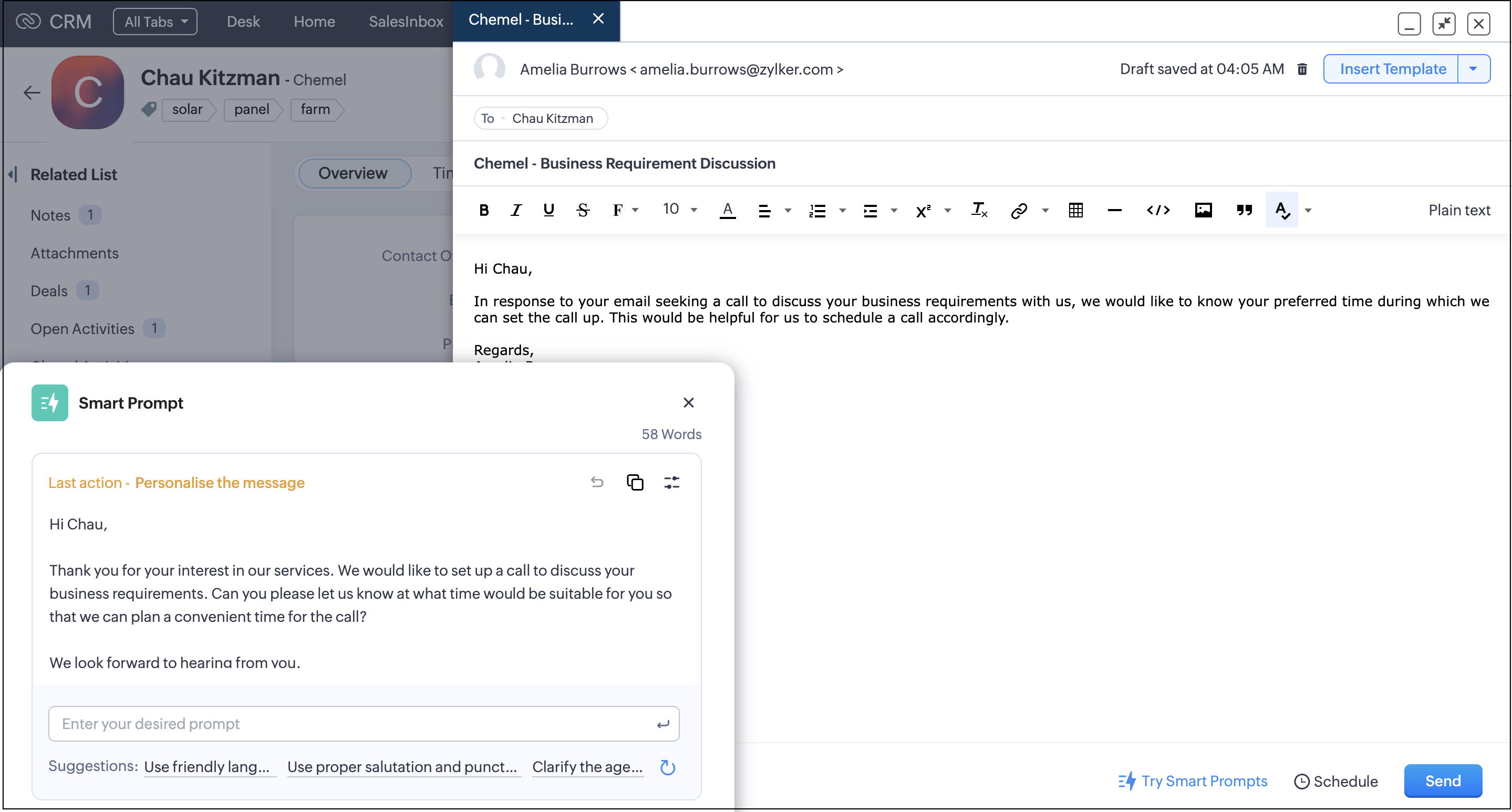
You can also adjust the length and writing style of the generated content.
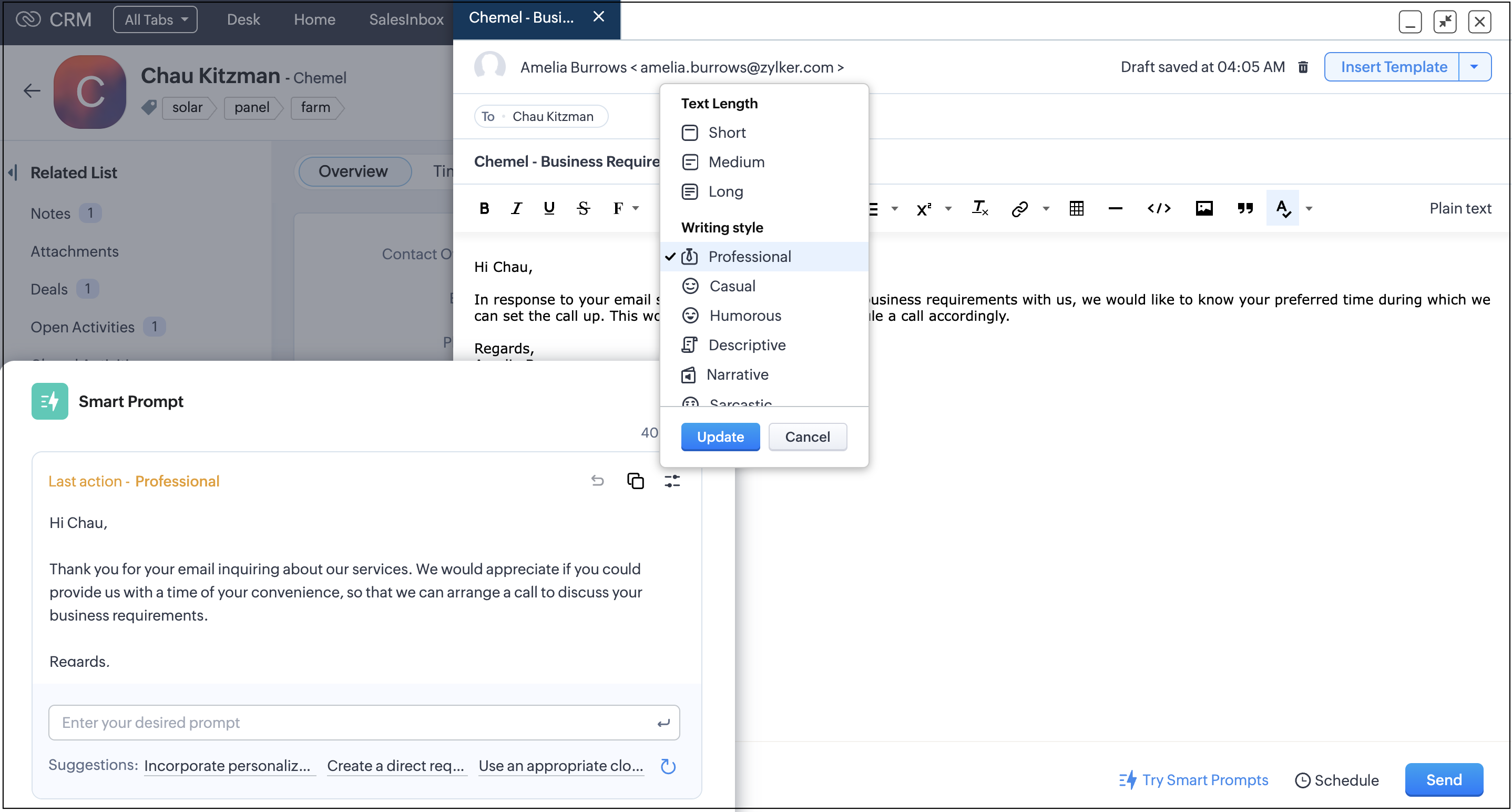
Once you are fine with the changes, you can copy and paste the content in your email compose window. You can directly replace the content in your email compose window using the Replace button, which is available when you compose your email in plain text instead of the rich text format.
When there is no content input in your email compose window, you can generate content from scratch. Additionally, you can perform custom prompts through the prompt window.
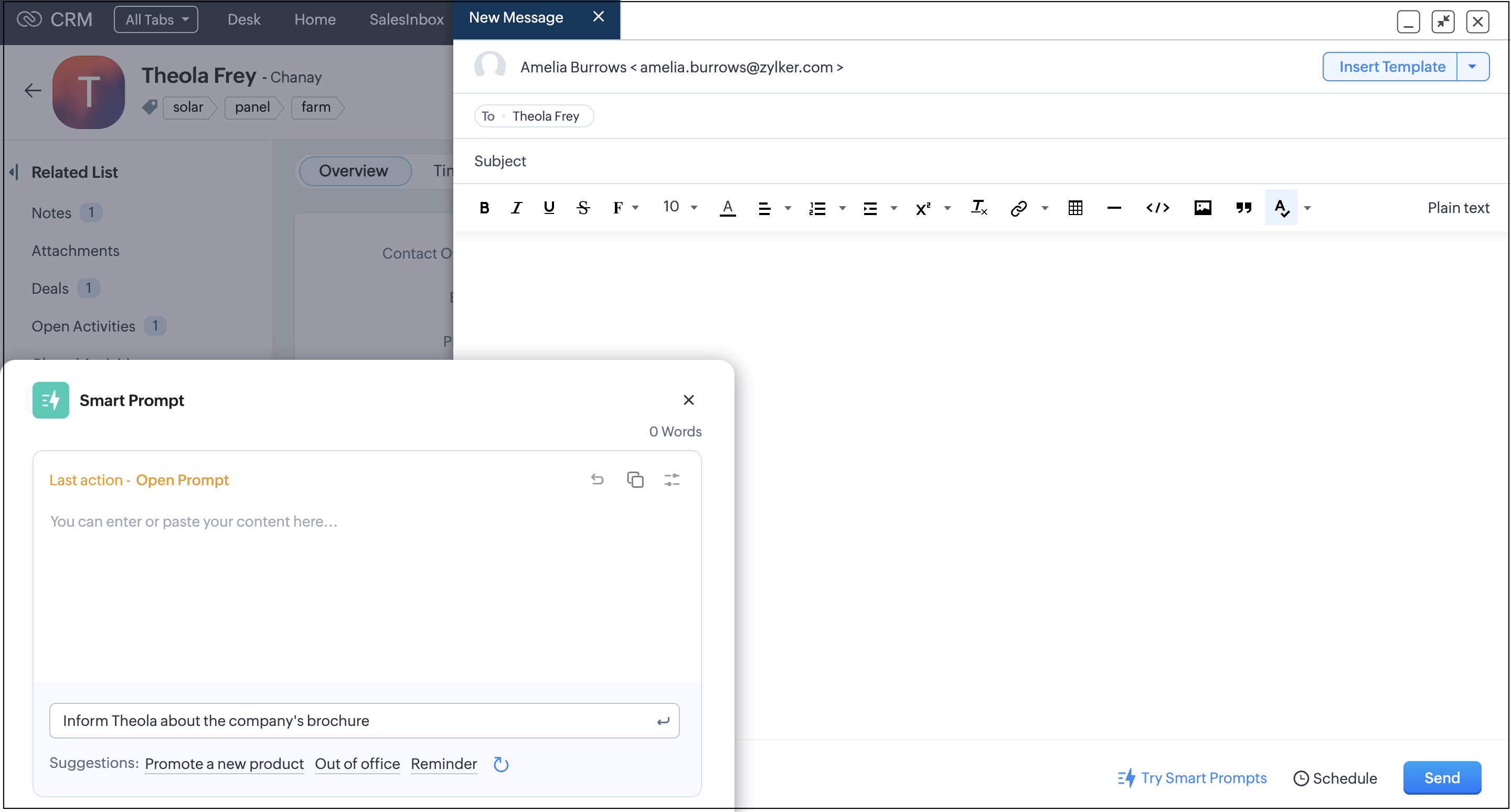
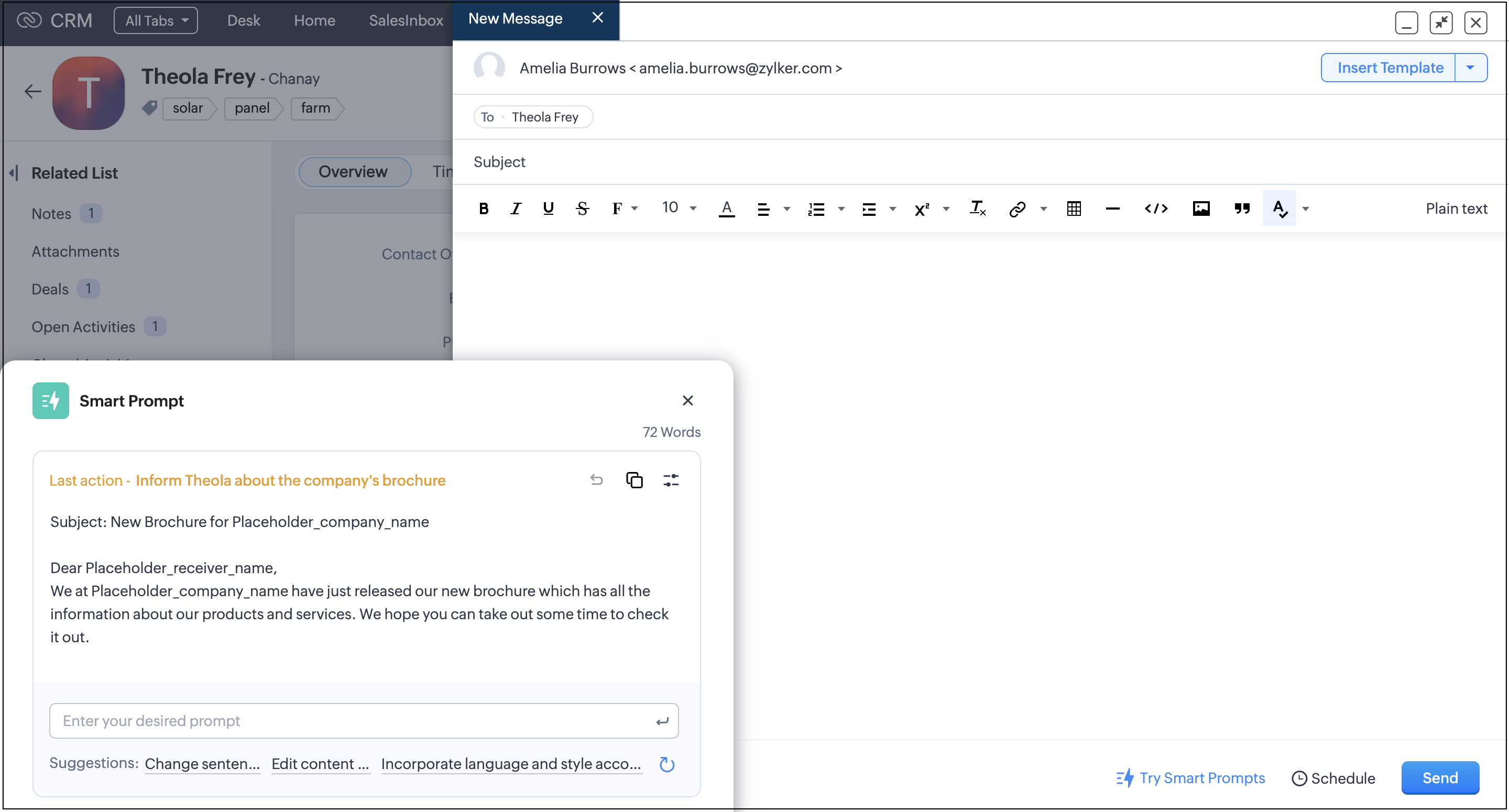
Once you are satisfied, you can copy and paste the content in your email compose window. You can directly insert the content in your email compose window using the Insert button, which is available when you compose your email from scratch in plain text instead of the rich text format.
Email Templates
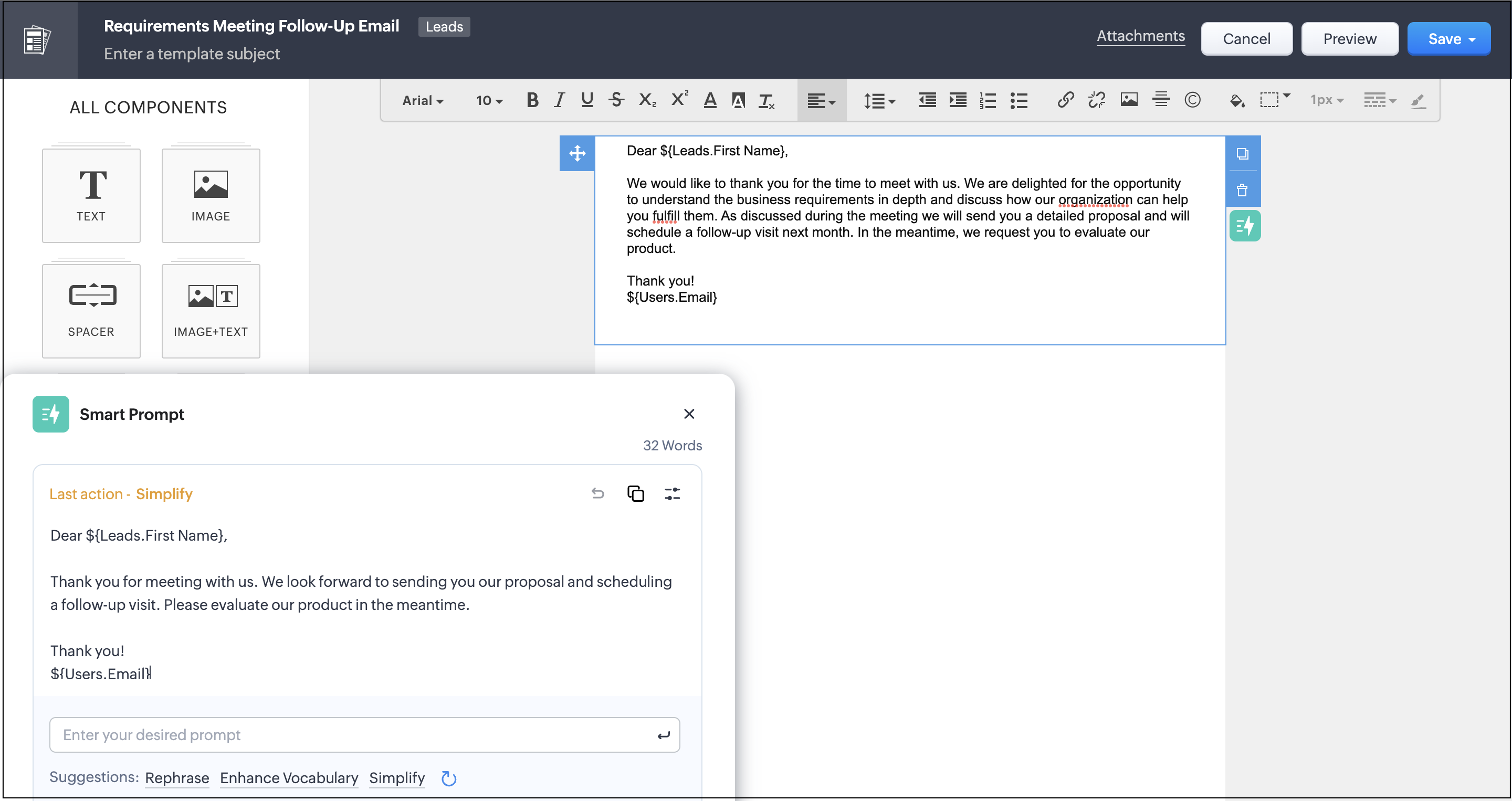
When creating email templates, you can generate or modify existing content. As of now, this feature is applicable only on the text component.
Record Details Page
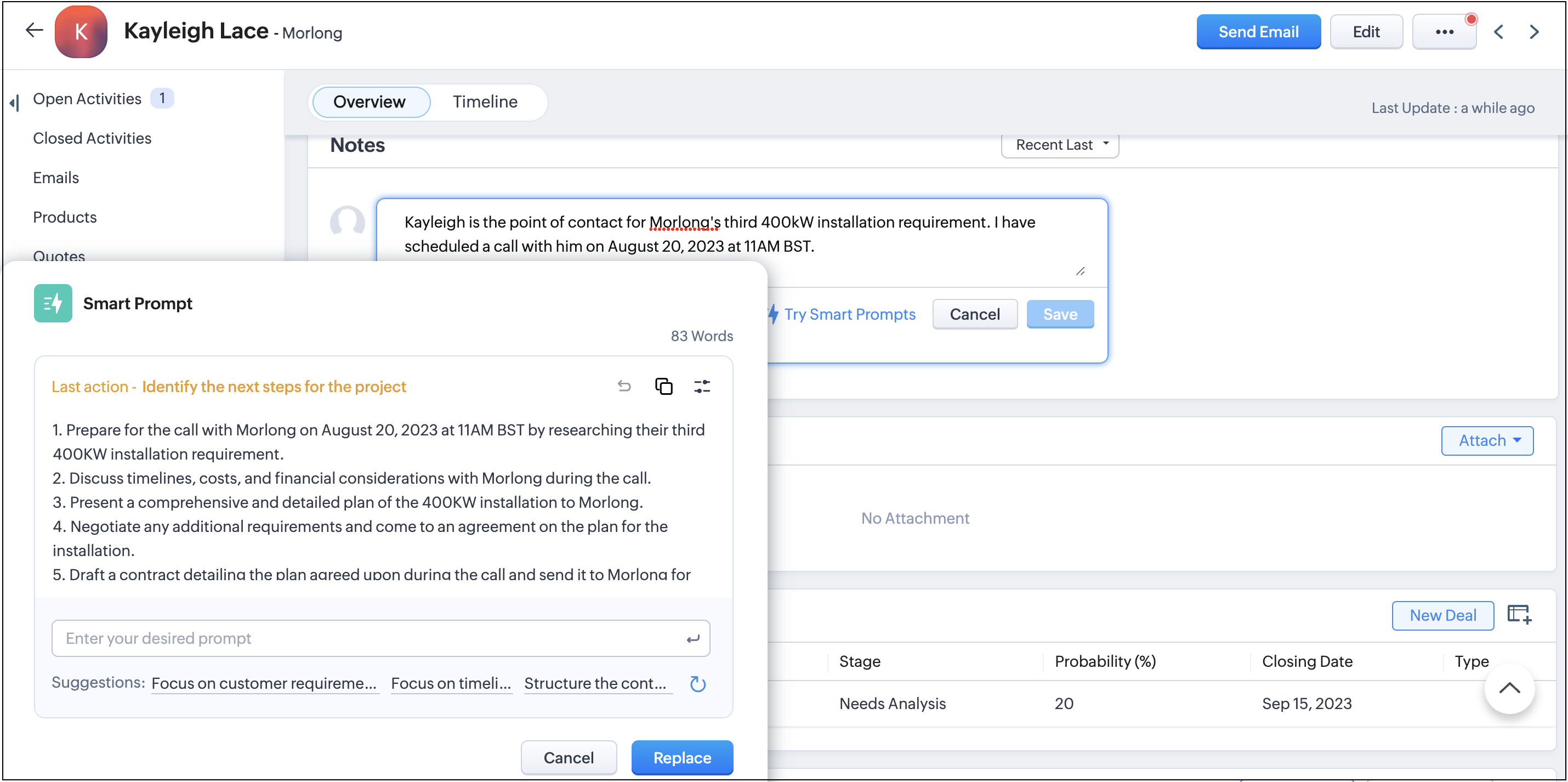
On the record details page, you can leverage suggestions that you can use to refine individual notes as needed.
Apart from these, you can extract more information through some of the fields on the record details page.
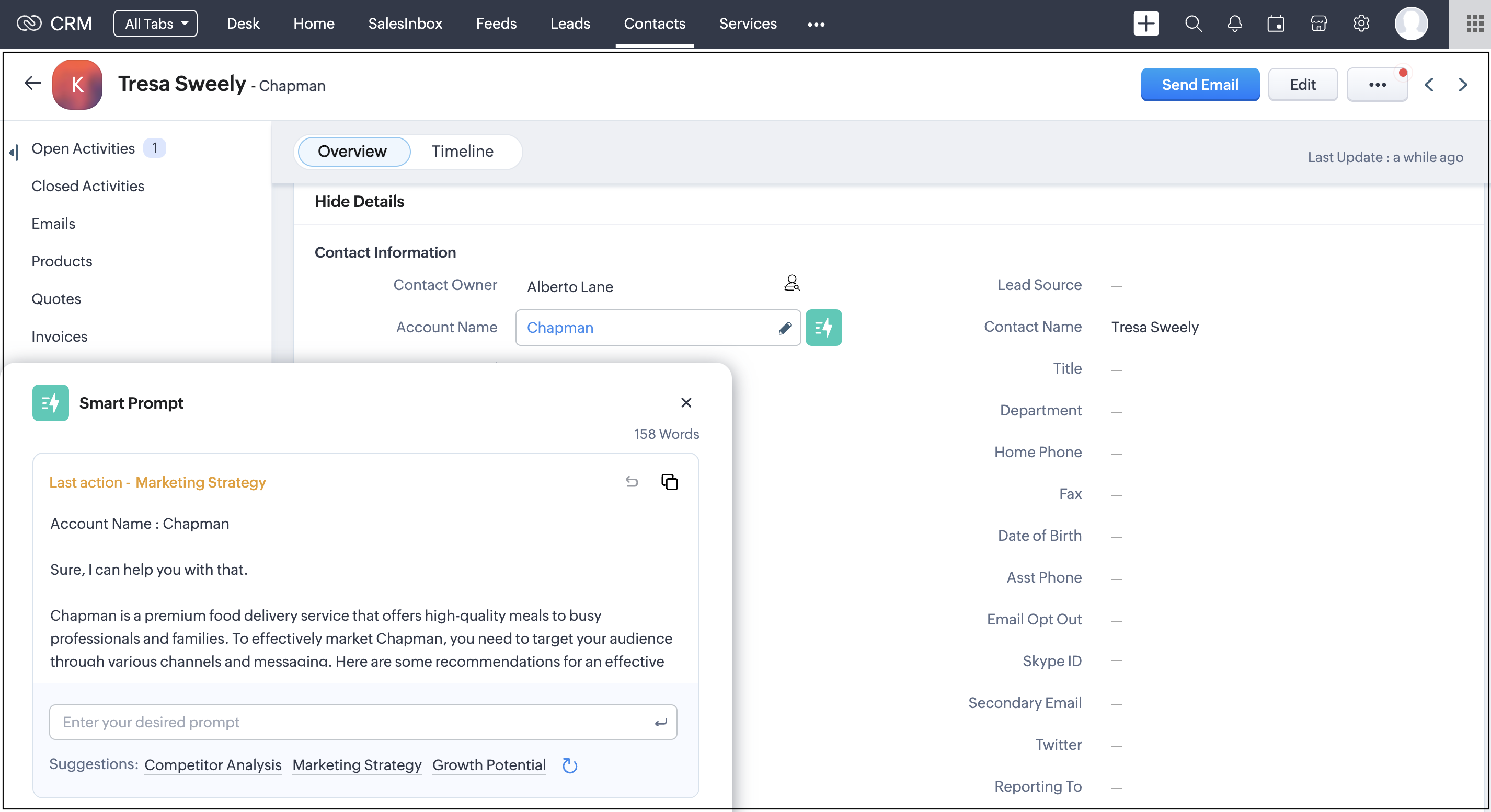
You can extract information using Smart Prompt for the following fields on the records detail page :
Modules | Fields |
Leads | Company, Industry, Website |
Contacts | Account Name, Vendor Name |
Accounts | Account Name, Website, Industry |
Deals | Account Name |
Tasks | Subject |
Calls | Call Agenda, Subject |
Quotes | Subject, Terms and Conditions, Account Name |
Products | Vendor Name |
Sales Orders | Subject, Terms and Conditions, Account Name |
Vendors | Vendor Name, Website |
Cases | Subject, Internal Comment, Account Name, Solution |
Solutions | Questions, Answer |
Appointments | Additional Information |
Notes:
- Only admins can enable/disable the feature.
- Admins can restrict profile permission and disable certain users from accessing this feature.
- Only English language is supported for now.
- Feature is available to accounts with enterprise subscription plan or above.
To learn more about the integration in detail please refer to this help doc. You can also refer to this FAQ section to get some common queries clarified.
Topic Participants
Vinay Karthikk S
George Thiess
Andres
Sunderjan Siddharth
Sticky Posts
Free Webinar - Digital signatures for digital contract management with Zoho CRM
Hi, Did you know you can seamlessly send and collect signatures on important business documents like business proposals, vendor agreements, sales contracts, invoices, and other inventory documents with Zoho Sign’s extension for Zoho CRM? Join our upcomingNew User Interface for your Email integration in Zoho CRM
Hello folks, As most of you may already know, Zoho Mail recently got a new user interface that's a lot better and easier to use. As a result, this change will affect your email integration with your Zoho CRM account**. If you have your email integration in Zoho CRM set up through POP, your Emails UI in CRM will be moved to the new Zoho Mail UI. We hope that you like the new and improved Emails interface inside Zoho CRM. Feel free to share your feedback by commenting below. **Please note that,Fetching leads from Zoho CRM into Zoho Creator, automatically
I'd like to pull new leads from the CRM system, into Creator, on a daily basis. Is this possible? Yes, it is possible. Zoho Creator and Zoho CRM are integrated with each other, enabling you to synchronize data between them. This is done by fetching records from CRM into a Zoho Creator form. In order to achieve this, you'll have to configure a workflow alert in Zoho CRM. For instance, you can maintain the lead details in CRM on a separate form in Zoho Creator by fetching the details automatically
Recent Topics
Run workflow on data import in Creator 6
How to run a workflow on data import in Creator 6?Multi Day booking for resources
I have following business-case: Rental for Tablets. Customer should be able to select how many device for how many days he'd like to rent. Same as a car rental for multiple days. Is this possible with Bookings on the current version?Zoho AI Translate Task as Rest API
I cant find any docs on how to use Zoho AI Translate Task from a rest api call https://www.zoho.com/deluge/help/ai-tasks/translate.html I am working on a custom Widget and I dont think I can execute zoho deluge ai translate task from a custom widget.Add Usage & Voting Analytics for Knowledge Base Articles in Zoho SalesIQ
Dear Zoho SalesIQ Team, We appreciate the current integration between Zoho Desk and Zoho SalesIQ that allows knowledge base articles to be synced and displayed to users directly within the SalesIQ chat interface. One valuable feature already availableReal-Time Alert or Status Indicator for WhatsApp Connection Issues in SalesIQ
Hi Zoho Team, We’d like to request a feature enhancement in Zoho SalesIQ related to WhatsApp integration stability and visibility. Recently, we encountered a critical issue where our WhatsApp bot stopped responding to messages without any warning or alertCustomization of Chat Transcript Emails in Zoho SalesIQ
Hi Zoho SalesIQ Team, I hope you're doing well. We would like to request the ability to customize the email template that is sent to clients when they request a chat transcript from SalesIQ. Currently, when a client clicks the button to receive theirImport from Linkedin
Please provide a way to enable importing contact information for Contacts and Companies from Linkedin? ThanksThe ability to format text fields, ie when data is number or currency
Hello, I have spent some time trying to determine how to accomplish this but it appears to be impossible. I want to merge a currency field from CRM into a PDF document. The CRM data shows $1,234, but when zSign gets the data it shows 1234 in the textTip of the Week #64– Customize your sidebar for a more focused workflow.
When your shared spaces start filling up with too many views, it gets a little harder to zoom in on what really matters. You find yourself scrolling more than working, and the things that need your attention? They’re often buried down below. Custom sidebarSales IQ FAQ duplicating
Hey, We have multiple departments. How do I export all the FAQ questions or duplicate all the FAQ questions to associate with another department. We have 393 questions so I am trying to find the best way to take all these questions and associate themZoho Social - Queries about GST invoices and subscription
Hi, I am going to purchase the Zoho Social tool with a yearly subscription. So, can you please help me with my below queries: 1. How I get the monthly GST Invoices? 2. What is the process of subscription? 2. How to cancel a subscription?Sales IQ needs to capture both first and last names
Sales IQ chat only has one field for name. When this then syncs with Campaigns, the field populates the "last name" field in Campaigns. However most people fill in the "name" field of Sales IQ with either their full name or their Christian name. ThisMulti-Card Selection and Cross-Zobot Copy-Paste Functionality
Dear Zoho SalesIQ Team, We’d like to suggest a productivity-enhancing feature for the Zobot builder in Zoho SalesIQ: the ability to select multiple cards (modules) at once using a selection area, and then copy-paste them either within the same canvasPersonal Link / Meeting ID
with zoho meetings do I have my own personal link to my 'meeting space' ? I have an email template in Zoho CRM which confirms people's appointment with me, I would like to include the link to my Zoho Meetings so that they have it in advance. How do IAbility to Initiate WhatsApp Template Messages in Zoho SalesIQ Without Preexisting Chat
Hi Zoho SalesIQ Team, I hope you're doing well. I understand that with the WhatsApp integration in SalesIQ, clients can contact us via WhatsApp, and we can use WhatsApp templates to send messages outside of the 24-hour window by reopening an existingMaking money out of Zoho Sheets - How?
Hello, Suppose I come up with a brilliant Zoho Sheet that I want to sell to other people, can I do this? How? Thanks.Mobile Display Issues on Zoho Sites After Recent Update
Hello! I’m currently facing an issue with my Zoho website that I created for my small business. After the recent updates, I’ve noticed that my site is not displaying correctly on mobile devices. Specifically, the layout appears distorted, and some elementsCan i set per-client hourly rate in Zoho Desk and not to correct the calculation on invoice?
We use Zoho Desk to run one ticket per client per month. All time entries go to the ticket, we have to enter hourly rate manually and then correct it when we do the invoicing at the end of the month. So, our workflow is as following: I worked for 30 minutes,Unable to add Agents
I am trying to add agents to my account. While filling the details and sending invitation, the system mentions that invitation is sent. But no email is received on the user side. I have tried this multiple times and have also checked Spam and otherHow to add new widgets?
Searched and searched and cannot find anywhere. Why is everything so hidden in zoho! Why is there not a button right here that allows me to create a new one, why is it buried somewhere else! Zoho's UI is so infuriatingSubmit Ticket from Custom Form on Website
Hi I would like to create new tickets from our custom form on our website including some custom fields like serial number. I would prefer PHP to create the ticket. I know there is the Zoho webform but we would like to create our own. I have now read into the API and with AuthToken this would work with PHP but it is deprecated and will not be supported any more in the future, so this not an option. OauthToken on the other hand needs an interaction from the ticket creator (customer) which we wouldCustomising Sign Up Page in Zoho Help Centre Sandbox
Hi, I would like to customise the Sign Up page in my Help Centre Sandbox Environment but when I try to access it I get this message: What setting or permission do I need to achieve this? Many thanks, KunalSort data in Pivot Table
Is it possible to sort by a data field. I can gruop and filter, but I culdn't find how to sort the results. Tank You.How to interact webhooks with Creator?
How can I interact webhooks from external websites with Zoho Creator? I'd like to get notifications from external websites (Stripe, Zoho Subscription, etc.) These notifications are coming as HTTP POST request from those servers, on maybe daily, monthly or based on any events. How should I prepare my app in creator to receive these requests? Where and how to should I program in Deluge if I'd like to add some part of the JSON/XML data to my form? Thank you BR, BalazsNo Experiment Visitors
I have an experiment running for five days. PageSense web analytics data shows the page is getting visitors, but the experiment data itself says zero visitors. I am in trial mode, not sure if that's related. A week ago, I contacted support through chatHow do I get at the data in "Partially Saved Entries"?
Hi, Zoho Newbie here - I'm helping to support an existing Zoho installation, so this is all a bit new to me. I have to say, I'm liking what I've seen so far! We've just spotted that we have a number of respondents to our forms who don't end up submittingHelp Needed with Creating Close % Reporting
Now that our company has a good data set to work with we want to use ZCRM reports ways to track the performance metrics we have established. Specifically, I want to be able to calculate closing % for individual salespeople and individual support people.Static Prefill URLs Functionality in the App
Hi, It would be great to be able to use the same functionality within the App, so create the Static Prefill URL as today and be able to use online as today, and then have an area within the App showing these Entries that can be pressed and opens the formOutbound Gateway
Hi, Is it possible to configure the Outbound Gateway to route external domains only and keep inter-domain emails locally delivered? When one of my users sends an email to another user within our own domain, I want user1@mydomain.com to user2@mydomain.com not to exit. However, if anyone within our domain sends to an external address, I want that email to be routed using the Outbound Gateway. Thanks. P.Delivery Note Delivered item must be reduce in inventory stock
When I create any Delivery note with product like mobile In our stock if it was 10 Unit I sold thru invoice, 4 unit And thru Delivery note, 2 Unit and I also change Delivery note status as delivered So in my stock it should display remaining 4 unit But write now it display 6 unit only. Please help me for that Because when I creating new invoice it display 6 unit in stock but actually in my physical stock its only 4. So I miss guide with stock displayAdding bills from docs *** Internal Error ***
Same internal errors in Chrome & Edge !Response time when adding customers to the database is increasing over time.
Response time when adding customers to the ZoHo books database is increasing over time. The response time to retrieve a newly added customer is now 1.5 to 2 minutes. The database has approximately 2,000 customers. I think you need to reorganise theExcluded transactions in Banking
Why are the payees not checked when 2 payments are for the same amount to avoid exclusion? If there are 2 ( or more ) payment amounts which are the same then they are automatically excluded, this should not happen unless the payee names are the sameIntroducing Zia AI in Zoho Show
AI is no longer a distant concept. It’s one of our everyday tools, from answering casual questions to generating critical business documents. And presentations are one area where AI can be especially helpful. At Zoho Show, we’ve been deliberate in howPlug Sample #10 - Simplify Ticket Management (Zoho Desk) with Chatbots
Hi everyone! We're here with another simple yet effective plug for your chatbot to integrate with Zoho Desk. When a customer reports an issue/request during chat, it's logged as a ticket on Desk. When they return for updates, you end up searching throughTrigger a field rule when Choice Availability reaches 0
First of all, thanks for shipping the new Choice Availability counter. It solves the basic “stop over-booking” problem. What’s missing, though, is a way to react when an option is sold out. Right now we can only disable/hide the choice; we can’t fireZoho People > Performance Management > Appraisal cycle
Hello All I am using this 2 users to test out how it work on Performance Management User 1 - Reportee User 2 - Reporting Manager : Li Ting Haley User 1 : Self Appraisal Error How do i fix this error?What's New - June 2025 | Zoho Backstage
Plans change. People cancel. Tickets get handed off. It happens, and we understand. As an organizer, you need tools that offer flexibility for attendees while protecting your event’s integrity. That’s why we’ve built features to help you manage theseInclude Article Sync Details in SalesIQ–Desk Integration Notification Email
Dear Zoho SalesIQ Team, Greetings, We are using the integration between Zoho SalesIQ and Zoho Desk to sync articles from the Zoho Desk Knowledge Base into SalesIQ. As part of this integration, we receive the following email notification: "Your scheduledNaming a Visitor in SalesIQ Messes up First and Last Name
When I go to Visitor History to manually associate a visitor with a known contact, I press the pencil symbol next to the system-generated ID number. I enter first and last name, then email. Looks good so far. However, when it syncs with CRM, first nameNext Page