Introducing Zoho POS for the Kingdom of Saudi Arabia
Hey everyone,
We are excited to kick-start December with a completely personalized edition of POS for retail businesses in Saudi Arabia to help run your operations with ease. It offers four different subscription plans—Free, Standard, Professional, and Premium—which are equipped with a wide range of features for businesses with varied needs and requirements.
What's new in the Saudi Arabic edition
Access the product in Arabic
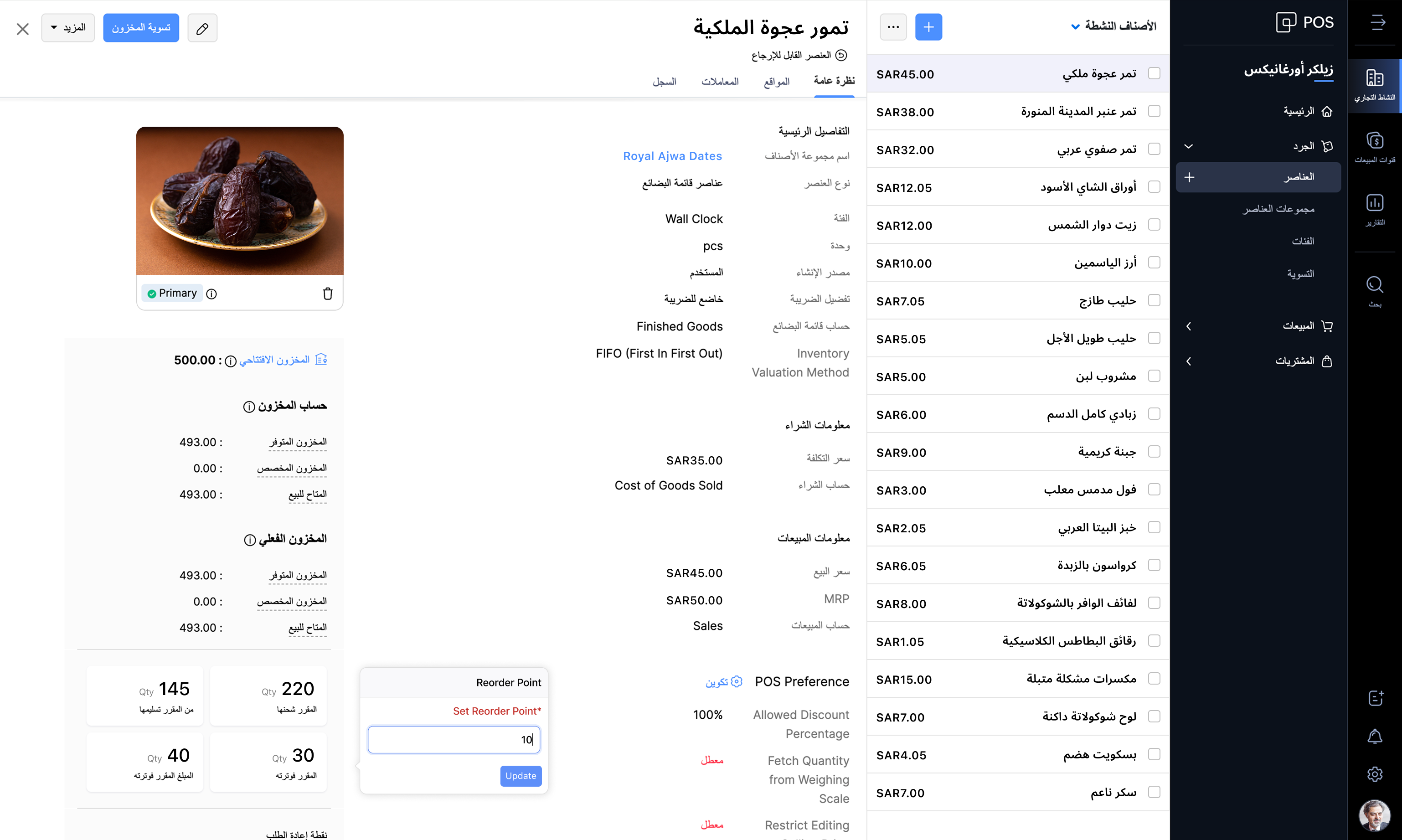
Zoho POS supports the Arabic language along with English, making it easy for businesses to manage operations in the backend and also at the checkout counter. The Windows app also comes with 17 different languages, such as Arabic, English, French, Portuguese, Hindi, Urdu, and so on, personalizing the experience of the salesperson at the point of sale.
Web application
Windows application

Billing made easy
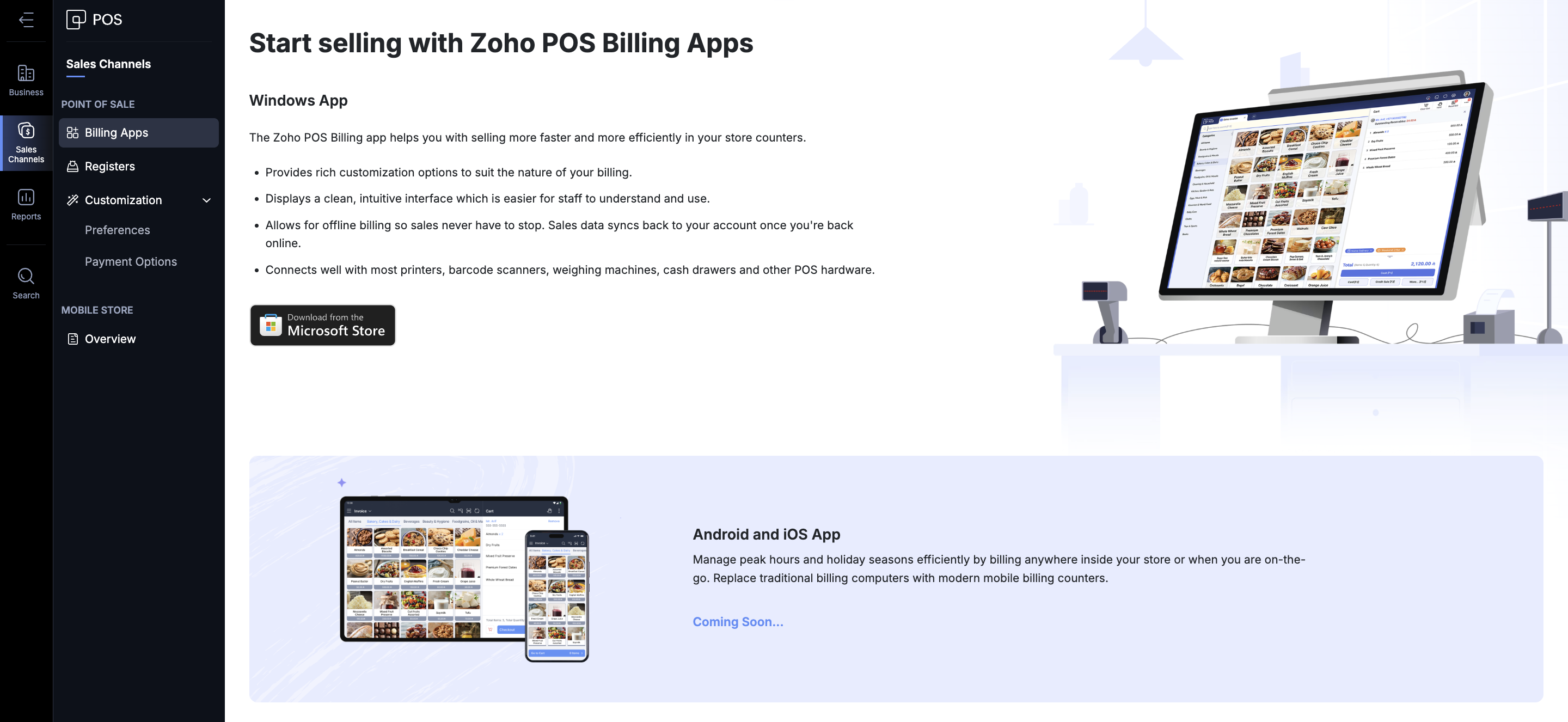
Zoho POS offers various ways in which you can process a sale. You get the Zoho POS app for the Windows operating system, mobile apps for Android and iOS (coming soon), to help speed up sales at the store. You can create invoices, sales orders, process refunds and exchanges, accept payments, and record each transaction. The total sales carried out during a specific time (session) can also be monitored and tracked from the Windows application. The app can be integrated with your hardware components such as scales, cash drawer, pole displays, and printers. Even in the event of an internet disruption, Zoho POS continues to work for you and saves bills offline. Once the internet connection is restored, the data gets synchronized with the web application, ensuring smooth operation at all times.
Stay VAT compliant
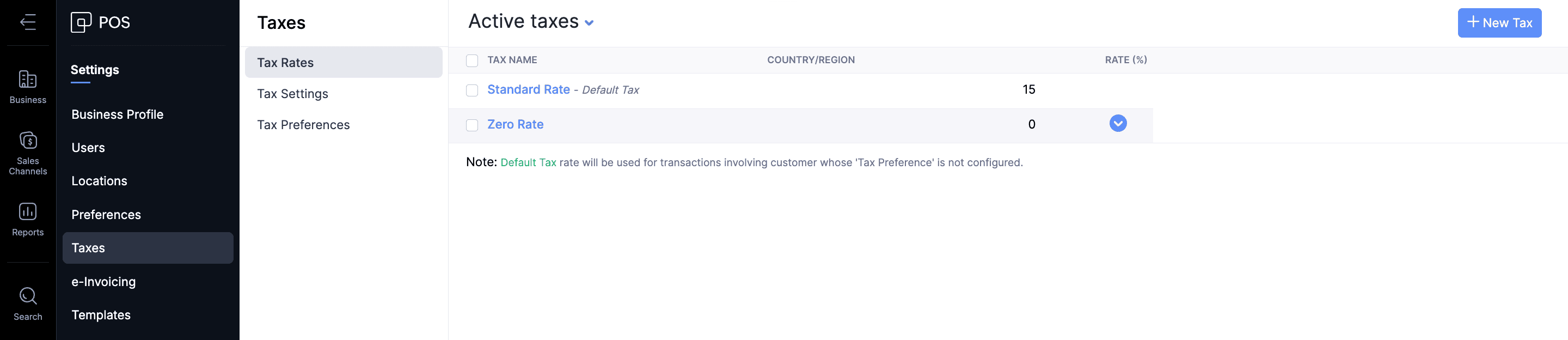
The Value Added Taxes applicable to the products and services offered by businesses can be seamlessly integrated with your sales process in Zoho POS. All tax rate categories, such as standard-rated, zero-rated, and exempt supplies, can be incorporated for the items in Zoho POS, ensuring that your business stays compliant with the regulations.
Create ZATCA-compliant invoices
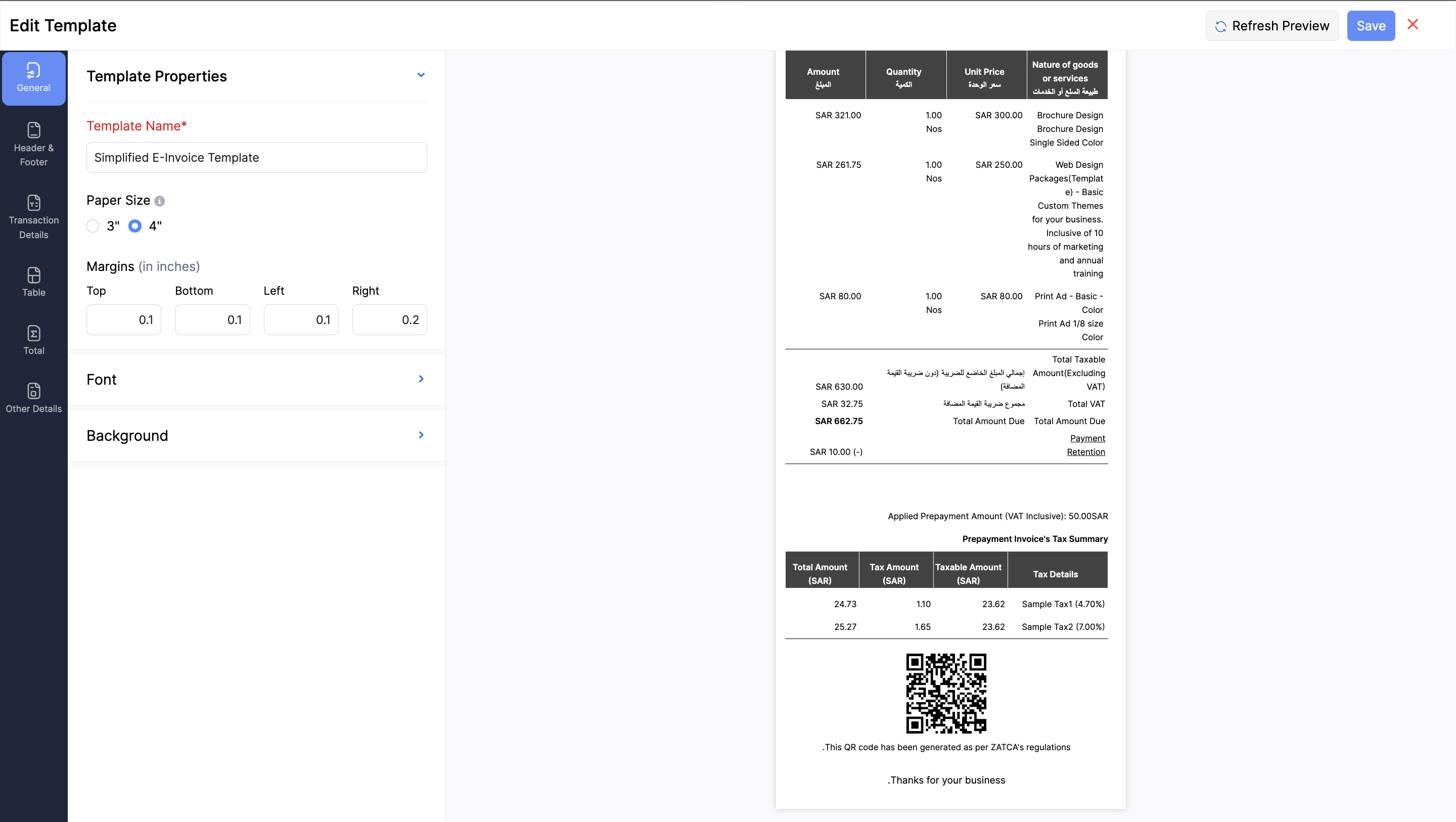
As part of ZATCA's Phase 1 regulations, it's mandatory for businesses serving customers in Saudi Arabia to generate an e-invoice at the point of sale. It should contain all the key information, such as: Retailer’s name, Retailer’s VAT Registration Number (TRN), Invoice date and time, Total invoice amount (including VAT), and the Total VAT amount. Zoho POS is equipped with everything you need to stay compliant with these regulations by helping you generate e-invoices in Arabic, with QR codes that contain all necessary information.
Monitor your business performance anytime, anywhere
For any business, monitoring key performance indicators is important to understand and make crucial decisions regarding various processes involved in your business. This becomes tricky when you are on the move. We aim to address that difficulty with the help of the Business Manager app for Zoho POS, which lets you track all the important business metrics from the palm of your hand, wherever you are. The web application also comes with in-depth reports and dashboards to stay on top of sales, inventory, payments, purchases, and so on.

Expand and manage multiple locations
Businesses of all sizes can make the best use of Zoho POS, and the best part is that it grows with your business. When you have businesses in multiple locations, Zoho POS acts as the central hub, managing the inventory, purchases, and sales. You can create multiple locations, and the stocks can be adjusted seamlessly across all locations.
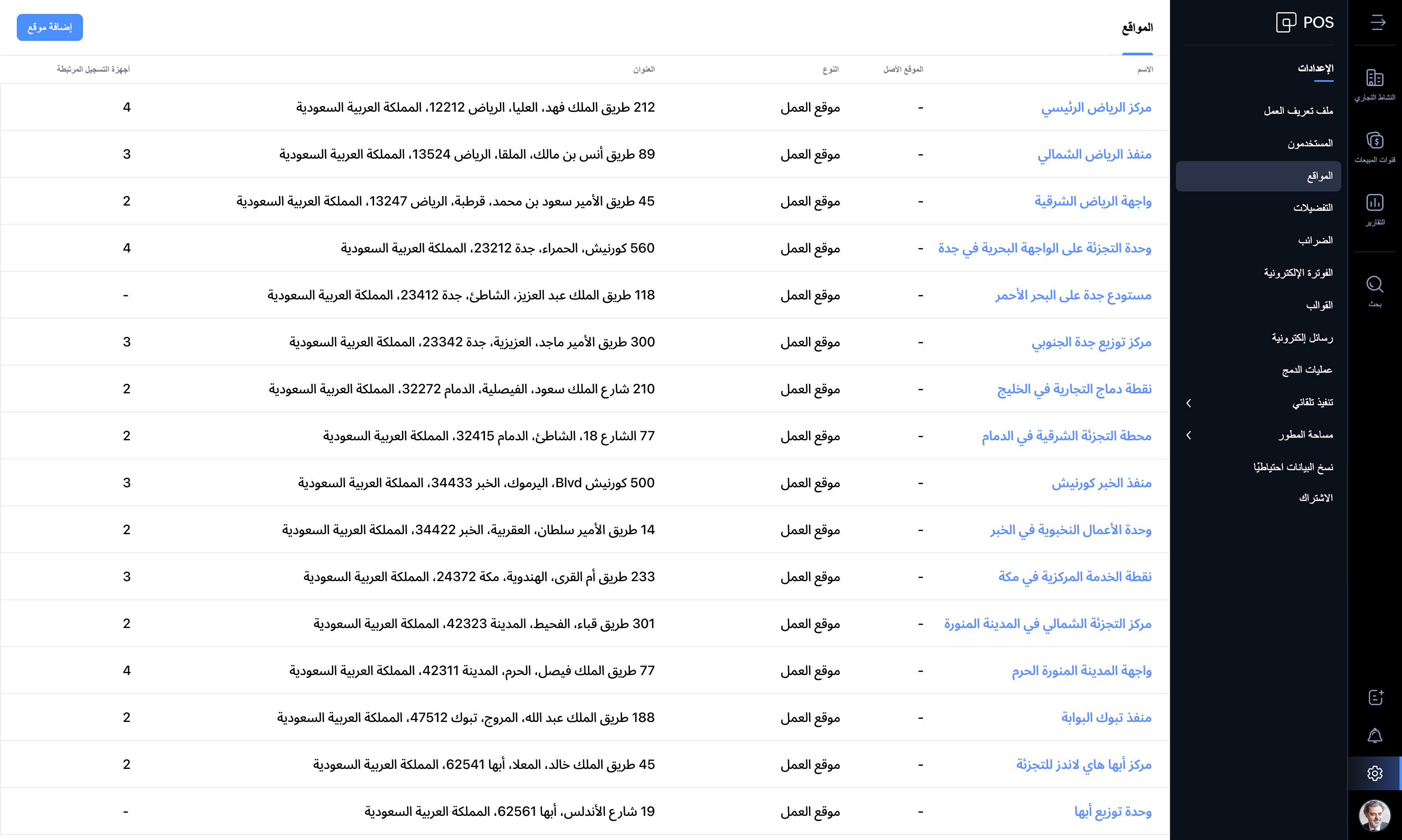
Zoho POS offers everything you need to manage your retail store operations seamlessly. We're updating the product every month with features and enhancements for continuous improvement. Check out Zoho POS's release notes.
Get started with your 15-day trial today.
Have questions? Reach us at support-gcc@zohopos.com
Thank you!
Topic Participants
Arun Kumar V
Recent Topics
Need Help Mapping GST Registration Number Field Between Zoho Books & Zoho CRM + Slow Sync Issues
am facing an issue with field mapping between Zoho Books and Zoho CRM. I want to map the GST Registration Number field from the Customer module in Zoho Books to a custom GST field inside the Accounts module in Zoho CRM. However, I am getting a warningNotification received when self-assigning tickets
When I assign tickets in Zoho Desk the relevant agent gets a notification email. When assigning myself a ticket in Zoho Desk, I get a notification email. Now, as I am the person who assigned the ticket to myself, getting a notification in this regardNouveauté dans Zoho Writer - Création de documents et de modèles assistée par l'IA
Zia, l’assistant IA de Zoho Writer, soutient les utilisateurs dans l’amélioration de leur écriture et la création de contenus : correction orthographique et grammaticale en temps réel, suggestions adaptées au contexte, détection du plagiat, révisionsSession Expired
I constantly get "Session Expired" and need to relogin or close and open the application again. This gets really frustrating during the day. Is this something that can be solved? This really makes me want to leave the app as it is no go to need to reopenDisable Buttons for Users with Profiles without permission
Hey, I've noticed that users without permission of setting up things in the marketplace, can still see the icon: On a click, you see this: It would be way better, if they couldn't see this menu icon at all. (Aside from the fact that it completely misplacedZoho Analytics - Make text clickable in underlying data
Hi Community, I have a simple sales report based on a Invoice query table. I have included a link on to each invoice on the table and sent the Invoice number URL to the link. This works find in the query table, but when I click underlying data on theCredit Management: #5 Advanced Refund Policy
You're subscribed to a well-known SaaS design tool. You've used it to manage your team's projects, create marketing visuals, brochures, and so on. But your needs change over time. Your company may switch to another tool or hire an in-house designer whoExported Slide Image Lacks Portion of the Background Image
This does not always happen, but when I export (or "download") the rendered image of a slide, it sometimes lacks a portion of the background image. I created a sample slide deck to demonstrate it and shared it with the admins. It is also publicly availableEffective Inbox Organization: Folders vs Tags in Zoho Mail?
I'm exploring the best ways to organize a busy inbox, especially when managing multiple clients or project using Zoho Mail. I’d love to know what works best for others: 1. Do you prefer **folders** (possibly with sub-folders) for each client or project?Piss poor service in Support in Domains and email
Srijith Narayanan B contacted me today. Very pleasant fellow. Just didn't want to tell him how bad your support service is. You help the person, but you leave before we can finish the next stage. Which causes a lot of frustration. It's been 8 days nowZoho Mail android app update: Block & reject future emails, Report phishing, Spam alerts, Suspicious URL detection
Hello everyone! In the most recent Zoho Mail Android app update, we have brought in support for the following features: Block & reject future emails Report Phishing Spam alerts in the mail details screen. Suspicious URL detection. Block & reject futureZohomail does not support additional fields in mailto links
Hello, I set up Zohomail as default composer in Firefox according to manual here: https://www.zoho.com/mail/help/defaultcomposer.html#alink2 Later, I wanted to use this functionality to answer in a Linux mailing list thread using mailto link: mailto:xxxxx@kernel.org?In-Reply-To=%3C727o0521-q24p-s0qq-66n0-sn436rpqqr1p@example.com%3E&Cc=xxxxx%example.org&Subject=Re%3A%20%5BPATCH%20v2%28%29Email address for forwarding is not saving and there's no confirmation ema
Steps to reproduce: 1. Enter my forward email in the email forward section of the account 2. Click save 3. See a notification stating saved successfully 4. Refresh the page, no forward email is saved 5. No email confirmation received at the forwardingThis domain is not allowed to add in Zoho. Please contact support-as@zohocorp.com for further details
This is the error i keep getting when trying to use my Zoho Domain Mail. This domain is not allowed to add in Zoho. Please contact support-as@zohocorp.com for further details Find attached. I hope this can be resolved very quickly so i can go on and makeAuto CC - Moving Departments
We have Auto CC e-mail replies to your support mailbox enabled. We have two departments: Helpdesk (helpdesk@domain.com) Delivery (delivery@domain.com) If we create a Helpdesk ticket, and reply, replies are CC'd to helpdesk@domain.com (OK) We then moveUnable to see free plan option
Hello Zoho Support Team, I hope you are doing well. I am trying to sign up for Zoho Mail, but I am unable to see the option for the free plan. Could you please guide me on how I can access or activate the free plan? Thank you for your assistance.Sorten the domain of zoho mail ids
I recently created zoho mail id and am quite excited with the features. But one issue ig nobody wanna type this big zohoaccounts.com I mean silly bold Suggestion zmail.com (sound gmail) (attraction) or some genz words looks coolWeekly Tips : Customize your Zoho Mail Notifications
In a professional context, email communication remains one of the most crucial channels for staying connected and managing workflows. Keeping track of your emails, task updates, or important announcements can be overwhelming—especially if you are jugglingThe attendees will now be redirected to the landing webpage when they exit the webinar, set by the organizer.
Hello All, In the latest version of the Zoho Meeting iOS mobile app (v1.3.16), we have brought in the below enhancements: Post Webinar Re-direction Revamped exit UI for Webinar Post Webinar Re-direction: The attendees will now be redirected to the550-5.1.1 The email account that you tried to reach does not exist
Hi, I made sure my domain, SPF, MX records, and DKIM are all verified. I've entered the information correctly in cPanel and Email Routing is set to Remote Mail Exchanger. I am able to send, but unable to receive emails. When I sent a test reply to it, I get the following error: The response was: 550-5.1.1 The email account that you tried to reach does not exist. Please try 550-5.1.1 double-checking the recipient's email address for typos or 550-5.1.1 unnecessary spaces. Learn more at 550 5.1.1 https://support.google.com/mail/?p=NoSuchUserDownload API file contents from browser
Hi Team - is there something being planned to be able to trigger file downloads from the browser via a deluge script? i.e. retrieve a file via API, trigger the file download directly from the browser. Or... using the convertToPdf function (https://www.zoho.com/deluge/help/functions/file/convert-to-pdf.html)When using "locations" in zoho books, can you keep the two locations totally separate from each other?
I am looking to add a location but I don't want to intermingle the banking or other accounts. I want that to be like two separate independent branches that use different banking accounts, accounts payable, and accounts receivable. The people who are inAdding a Channel to SalesIQ
I have a client that currently uses Zoho CRM and Zoho Desk. They would like a live chat to place on their website that has a mobile app and chat bots (something like SalesIQ). However, they would also like to have all this work over SMS as well. Does the SalesIQ API allow this? Can I add visitors without them being a visitor on a website? Thanks! Bryan RedeagleZoho Flow Needs to Embrace AI Agent Protocols to Stay Competitive
Zoho Flow has long been a reliable platform for automating workflows and integrating various applications. However, in the rapidly evolving landscape of AI-driven automation, it risks falling behind competitors like n8n, which are pioneering advancementsImportant Features Missing
Hey all I love linkthread, but i am missing some important features. I want to be able to include my Google Tag Manager. I have all the important stuff in my GTM Container: Facebook Pixel, LinkIn Pixel, Zoho Pagesense and so on. So i am able to do retargetingZoho SignForms: Prefill parameters with spaces render as “+” in the document (even when using %20)
Hello Zoho Sign team, we are using SignForms with prefill parameters passed via URL. Spaces in parameter values are being rendered as “+” in the finalized document—even when we URL-encode spaces as %20. This is critical for us because we prefill addressesCurrency selector (based on variable) usage in comparsion
Hi, I've developed a currency selector based on the following topic, and it's working well in pivot tables and charts: https://help.zoho.com/portal/en/community/topic/how-can-i-allow-my-users-to-choose-a-currency-for-the-dashboard I also have a comparisonCustomize Column in Projects - Default View for Template?
Is there a way to have the columns you'd like to see added to a template? I want my customized columns to show up every single time I create a project from that template. It appears I can customize them in the template but when I create the project they do not transfer over. Template: See below how the columns in order are : Task, Owner, Status, Assigned, Website URL, Blog H1..etc. When I create a project from that same template it comes out as: Task, Owner, Status, Tags, Start Date, End Date, etcAsk the Experts 24: Analytics, data administration, and mobile experience with Zoho Desk
Hello Everyone! Welcome back to the Ask the Experts(ATE) series! We were so focused on our Autumn 2025 release that we didn't host an ATE session last month. In this month's ATE, we'd like to expand our areas for discussion: we'd like to listen to yourMulti-Page Forms in Zoho Creator!
Let’s make long applications easier to handle by dividing them into pages, adding a progress bar, and guiding users step by step through complex data entry. This would be a total game-changer for the user experience and could significantly boost completionEmail login error
Login successfully but email page errorShared Mailboxes Disappeared
Zoho Mail users in our company haven't been able to see their Shared Mailboxes for the past few hours. I've checked with App and Web Access, but they can't access them. When I send emails to their addresses, I get no error messages. They're still visibleRemote Server is misconfigured
Dear Team, I am unable to use email id as remote server is misconfigured. It would be really great if you could help on this and get this resolved. Thanks & Regard Rohit Guptawhy cant i access my email account. it keeps asking me for reverifiying my account by entering my password.
I cant access my account. it keeps asking me for reverifcaton by entering my password. once its entered it asks for it over and over.Free webinar alert on October 16 - Less Complexity, More Security: Workplace + Directory
Hello Zoho Workplace Community! Security and productivity shouldn't be at odds—and with Zoho, they're not. Discover how Zoho Workplace + Directory delivers seamless collaboration with enterprise-grade security, all in one integrated ecosystem. Join ourWorkdrive and ChatGPT Team Synced Connectors
Hi, we want to be able to integrate Zoho Workdrive with OpenAI’s ChatGPT Team plan. Google Drive and OneDrive both offer this, zoho please catch up asap. We dont want to have to put our company files in google drive, we want to allow chatgpt Team editionAlias Name (on items) use case in Zoho inventory
Hey, Hope everyone is well. Wondering if anyone can shed some light on the use case of Alias Names on Products in Zoho Inventory? Cheers, ChrisUpdating an Invoice Line Item's Discount Account via API Call / Deluge Custom Function
I need help updating an invoice line item's discount account via API. Below is a screenshot of the line item field I am referring to. Now the field to the left of the highlighted field (discount account) is the sales income account. I am able to modifySend e-mail with attachments
Dear Zoho, How is that possible in Zoho Flow to send an e-mail with attachment? Just a simple example: Zoho Flow checks my Zoho mails and if the conditions starts the trigger then I would like to send an email with the original email's attachment. Any idea? BR, AdamHow to I get checkboxes on a subform to update via deluge
Hello, would someone be able to tell me what I'm doing wrong here? I am trying to take the contents of a Deals subform and add them to an invoice then update the checkbox on each row so that 'add to invoice' is unticked and 'invoiced' is ticked. The outputNext Page