Client Script Support for Notes Related List

Client Script Support for Notes Related List


Hello everyone!

Welcome to another week of Kaizen. The final Kaizen post of the year 2025 is here! 

With the new Client Script support for the Notes Related List, you can validate, enrich, and manage notes across modules. In this post, we’ll explore how to prevent unwanted changes to notes by specific profiles based on custom criteria. With Client Script, you can enforce rules that control edits based on user profile and deal stage, ensuring critical notes remain accurate and protected. This use case was taken from the context discussed in this post.

In this Kaizen post, 


  1. Supported Events for Notes Related List
  2.  Supported ZDKs for Notes Related List
  3. Use Case
  4. Solution
  5. Summary
  6. Related Links


1. Supported Events for Notes Related List

onBeforeAdd

This event occurs just before a new note is added to the Notes Related List. Use this event to validate the data or modify note content automatically before the note is created.

onBeforeUpdate

This event occurs just before an existing note in the Notes Related List is updated. It allows you to enforce validation or make changes to the note data before the update is saved.

Click here to know more about the supported events.

2.  Supported ZDKs for Notes Related List

The following Client Script ZDKs can be used to perform actions in Notes Related List.

Retrieves the current value of a field in Notes Related List.

Sets or updates the value of a field in Notes Related List.

3. Use Case: Stage-Based Notes Lock for Specific User Profiles based on Deal stage

Quote
At Zylker, when a Deal is in Proposal/Price Quote, Negotiation/Review, or Closed Won/Closed Lost, a Sales Representative should not edit existing notes. This ensures that critical approval comments, pricing details, and final decisions remain unaltered, maintaining clarity and audit compliance.
Preventing edits ensures critical approval comments, pricing details, and final decisions remain accurate.

4. Solution

  1. Go to Setup > Developer Hub > Client Script. Click +New Script.

  2. Specify the details to create a script and click Next.
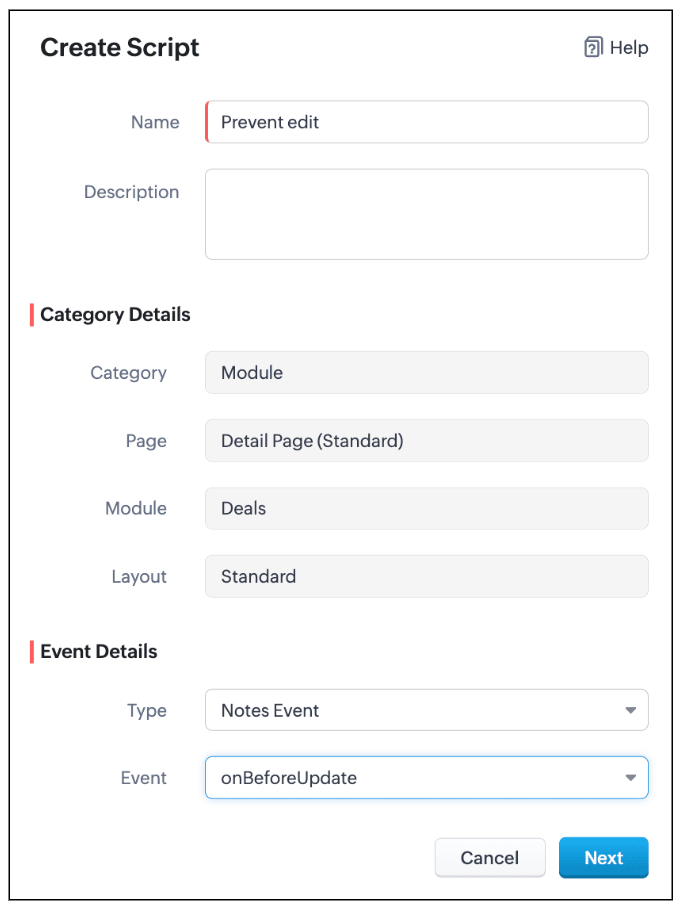

  3. Enter the following script and click Save.
  1. var dealStage = ZDK.Page.getField("Stage").getValue();
  2. // Stages where notes should not be editable by Sales Reps
  3. var restrictedStages = [
  4.     "Proposal/Price Quote",
  5.     "Negotiation/Review",
  6.     "Closed Won",
  7.     "Closed Lost"
  8. ];
  9. // Get current user profile
  10. var currentUserProfile = $Crm.user.profile;
  11. // Profiles allowed to edit notes
  12. var allowedProfiles = ["Manager", "Admin"];
  13. // If the stage is restricted and user is not allowed
  14. if (restrictedStages.includes(dealStage) && !allowedProfiles.includes(currentUserProfile)) {
  15.     // Log original note (optional)
  16.     log("Original Note:", ZDK.Page.getComponent("notes-editor").getValue());
  17.     // Show alert
  18.     ZDK.Client.showAlert("Your profile is *not authorized* to edit notes of a deal in " + dealStage +" stage.");
  19.     // Prevent further action
  20.     return false;
  21. }
  1. Define a variable restrictedStages that contains all the deal stages where notes should not be editable.

  2. Get the current deal stage using ZDK.Page.getField("Stage").getValue(), you fetch the stage of the deal currently being viewed.

  3. Get the profile of the current user using $Crm.user.profile. This helps you to find out the profile of the person trying to edit the note.

  4. Create an array allowedProfiles for profiles that are always allowed to edit notes.

  5. If the deal is in a restricted stage and the current user is not in the allowed profiles, show an alert to the user explaining they cannot edit the note.

  6. Stop the note from getting saved using return false.

  7. This way, the script protects important notes from being edited by unauthorized users during critical deal stages.

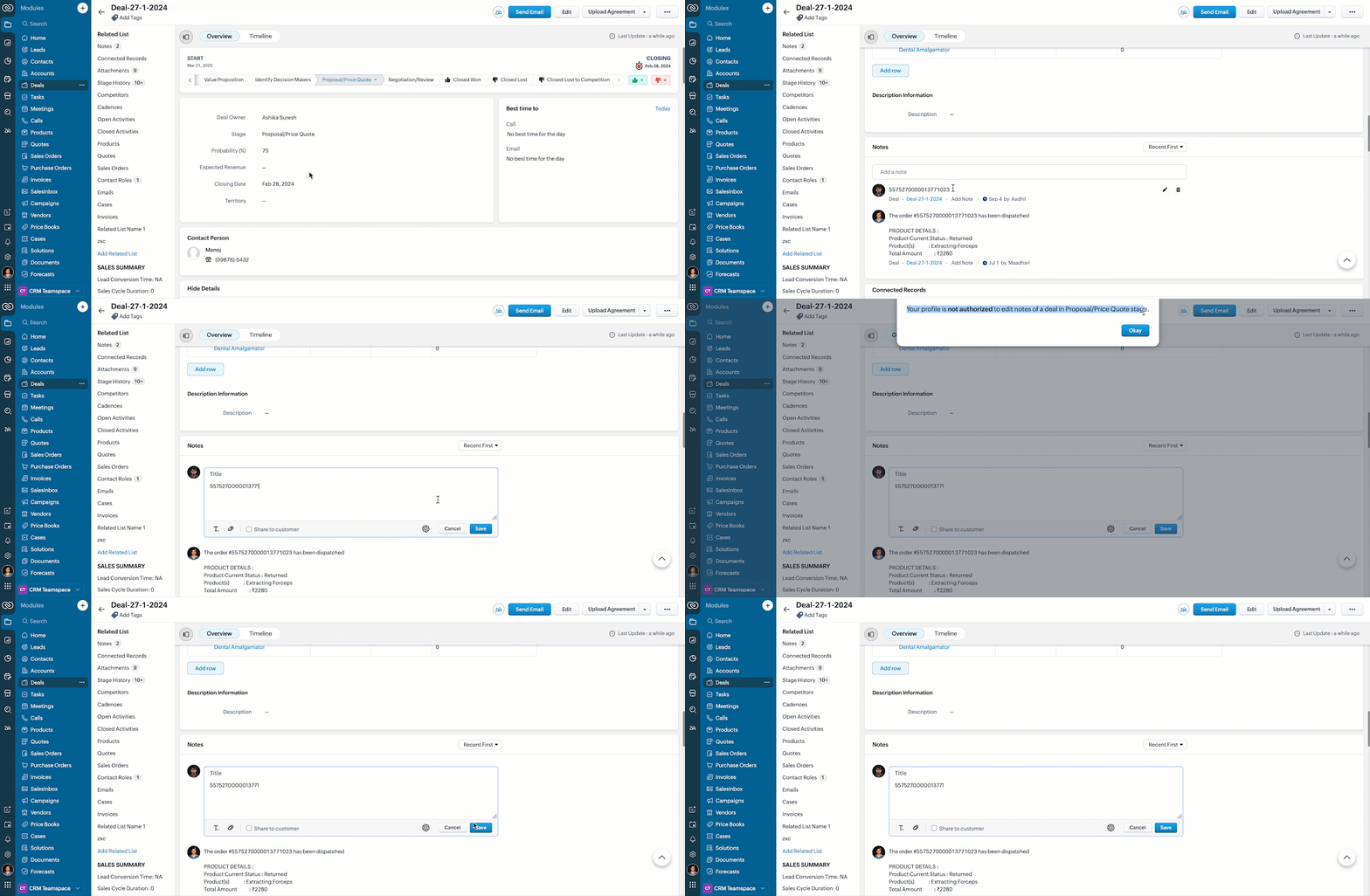
  8. Here is how the Client Script works.


5. Summary

In this post we have discussed,
  1. The Client Script events supported in Notes
  2. The ZDKs available for use in Notes Related List
  3. How to prevent a note from being saved with custom criteria


Wishing you a joyful, successful, and inspiring New Year 2026 See you next week as we kick off an exciting New Year! 😄


    • Sticky Posts

    • Kaizen #198: Using Client Script for Custom Validation in Blueprint

      Nearing 200th Kaizen Post – 1 More to the Big Two-Oh-Oh! Do you have any questions, suggestions, or topics you would like us to cover in future posts? Your insights and suggestions help us shape future content and make this series better for everyone.
    • Kaizen #226: Using ZRC in Client Script

      Hello everyone! Welcome to another week of Kaizen. In today's post, lets see what is ZRC (Zoho Request Client) and how we can use ZRC methods in Client Script to get inputs from a Salesperson and update the Lead status with a single button click. In this
    • Kaizen #222 - Client Script Support for Notes Related List

      Hello everyone! Welcome to another week of Kaizen. The final Kaizen post of the year 2025 is here! With the new Client Script support for the Notes Related List, you can validate, enrich, and manage notes across modules. In this post, we’ll explore how
    • Kaizen #217 - Actions APIs : Tasks

      Welcome to another week of Kaizen! In last week's post we discussed Email Notifications APIs which act as the link between your Workflow automations and you. We have discussed how Zylker Cloud Services uses Email Notifications API in their custom dashboard.
    • Kaizen #216 - Actions APIs : Email Notifications

      Welcome to another week of Kaizen! For the last three weeks, we have been discussing Zylker's workflows. We successfully updated a dormant workflow, built a new one from the ground up and more. But our work is not finished—these automated processes are
      • Recent Topics

      • Associate emails from both primary and secondary contacts to deal

        We need to associate emails from multiple contacts to a deal. Please advise how this can be achieved. At present, only emails from primary contacts can be associated. Thanks
      • How to set default reply email address depending on receipt email address

        Hi, I have a number of different customer support email addresses (info@XYZ.com, retuns@XYZ.com etc.) and want to set Zoho Desk so that the email address from which an agent replies is automatically defaulted to a predetermined address depending to which
      • Writer is horrible

        Form filling is about unusable for complex forms! I am so tired of it.
      • How to Migrate from MDaemon to Zoho Mail Account?

        Hi there, Zoho Mail is one of the most popular as well as leading competitor for several cloud email service providers. It is It provide cloud email service as well as desktop based email client. In recent years people are migrating from third party cloud servers to Zoho Mail. The reasons are plenty, i.e. the user interface, security, high performance and many countless amazing features. On the other hand MDaemon Mail (aka WorldClient) is also popular among cloud email servers. But there are some
      • Trigger workflows from SLA escalations in Zoho Desk?

        Hey everyone, I’m currently working with SLA escalation rules in Zoho Desk and ran into a limitation that I’m hoping someone here has solved more elegantly. As far as I can tell, SLA escalations only support fairly limited actions (like changing the ticket
      • CRM Portal Lookup Linkage and Related Fields

        hi, if someone can give me the right path, would be greatly appreciated. we want to do a customer portal for our partners who we issue work orders for our customers, the linkage via lookup fields Partner -> Work Order -> Customer in our portal, the primary
      • HOW TO: Searching a thread (email body/text) with a custom function, allowing filtering and specific actions

        We are still trialing out Zoho at this time, but have found a major expected feature to be missing - the ability to search within the text of an email for automation/workflows. NOTE: You need to create a connection for zohodesk under settings -> Developer
      • Cold emails not allowed?

        I planned to use Zoho Mail to send businesses some cold emails to offer my freelance writing services, but I noticed that the anti-spam policy is very strict -- no commercial emails whatsoever without prior permission from the recipient? I would be very
      • Zoho Team Inbox - roadmap

        Hi, would be good to understand the Teaminbox roadmap, in particular: 1. API / Zoho Deluge connections. We have a process where the each email needs to be either tagged or assigned daily. It would be great if we could automate a 5pm alert for any exemptions
      • Leave Time - Past Dates by Pay Period

        Under Settings | Leave Policy | [policy name] | Restrictions, one can set a number of days that an employee can go back to apply leave. This is very good and very needed. However, in most organizations, the real deadline isn't X number of days from the
      • Link webform to a job opening

        I have a webfrm embeded on my website and everytime a candidates fill the form, their candidate status is to new. Is it possible that it links to a specific job opening instead of me having to assing it manually ? Thanks
      • New in WorkDrive: Organize your storage using Data Templates

        Organizations generate huge volumes of data day in and out. From financial reports, client details, and resumes to promotional images, product videos, and more. The list is endless. When you have so much data to manage, you need to classify your documents and structure them in a way that makes them more accessible.  This is exactly what WorkDrive's Data Templates lets you do! You can create Data Templates, add meta data as custom fields, and associate those fields with files and folders based on
      • Need Native Support for docx files in Zoho Writer

        Absolutely love Zoho Writer, but often need to share files by email with people who are in the Office ecosystem. Downloading a file as docx, then sending it by email, getting the comments back, converting it to Zoho format, editing it, then converting
      • Mirror Component in Zoho CRM: Access real-time related data without leaving your record

        Hi everyone, This feature is now available for the JP, CA, SA, UAE, and AU DCs. We're excited to bring to you Zoho CRM's mirror component, which presents relevant data on a record's details page and keeps everything users need in one place without having
      • Associate records via the Multi-select lookup RELATED LIST via API

        In the REST API, is there a way to associate records for a multi-select lookup related list other than via the linking module? There are two methods for the lookup: 1. via insert records API 2. via the linking module ...as described in https://help.zoho.com/portal/en/community/topic/kaizen-125-manipulating-multi-select-lookup-fields-mxn-using-zoho-crm-apis
      • What's New - May 2026 | Zoho Backstage

        Another month, another round of improvements in Zoho Backstage. We’ve been busy refining existing experiences and introducing new capabilities to help you plan, manage, and deliver successful events with less effort. Here’s a quick look at everything
      • Product sorting in Zoho Commerce - how can I influence standard behaviour?

        Hello Zoho, I want to sort my products by e.g. name, SKU (Ascending / Descending) or by another attribute. I could neither find any solution in the settings, nor an entry in this help. Can you advice how this would work? Seems the standard sorting is
      • Dynamically prefill ticket fields

        Hello, I am using Zoho Desk to collect tickets of our clients about orders they placed on our website. I would like to be able to prefill two tickets fields dynamically, in this case a readonly field for the order id, and a hidden field for the seller
      • Price Managment

        I have been in discussions with Zoho for some time and not getting what I need. Maybe someone can help explain the logic behind this for me as I fail to understand. When creating an item, you input a sales rate and purchase rate. These rates are just
      • Workflow Assistance in Zoho CRM

        Our client's sales team visits customers on-site and currently fills a physical paper form to capture customer details, and then separately re-enters the same data into Zoho CRM via the mobile app — resulting in double data entry. We want the salesperson
      • Integration problem between zoho crm and zoho forms for an update in zcrm, with two mapped custom fields

        Hello everyone, I need to correct an existing integration between Zoho CRM and Zoho Forms: the use case is that a user needs to send an email to a contact, who will click on a button in this email, redirecting to a Zoho Forms. The contact can update or
      • Delivery Note without services

        Hi all, It there a possibility to create a delivery note from an invoice without the listed services "idem type: service"? Thank you in advance, Michel
      • Automation Series: Auto-assign Task Followers

        As task progresses, several users are required to stay aware of the updates to plan their upcoming work items efficiently. Manually adding users as followers for an active task might create additional overhead. With this automation, followers can be added
      • Send Email Directly to Channel

        Hi, We are coming from Slack. In Slack each channel has a unique Email address that you can send emails too. I currently forward a specific type of email from my Gmail InBox directly do this channel for Verification Codes so my team doesn't have to ask
      • Terms & Conditions

        I have defined Terms & Conditions in the invoice setting and have set %TermsAndCondition% where I want it to appear but nothing shows up in that area. Is this something we have to define per invoice or can we have a global variable?
      • Billing Status Update

        Hello Latha, I’m working on a new automation (deluge) to fulfill one of our requirements. In this automation, there is a step to update the Work Order billing status from “Not Yet Invoiced” to “Non-Billable.” I tried to find the API information relevant
      • Export to pdf. Images not showing

        My report contains a column with images. When I export it as a list, the images do not show in the PDF document. I have published the report but the images are still not visible. What should I do so that the photos appear in the export?
      • Zoho CRM Kiosk question – Passing Screen Fields to a Function

        I am building a Kiosk in Zoho CRM to create new Supplier (Vendors) records. Current setup: Screen 1 contains user input fields: Supplier Name (Vendor_Name) First Name (First_Name) I created a Deluge function: createSupplier(vendor_name, first_name) The
      • パスワード

        ログインするためのパスワード取得したい。
      • Associate Zoho Project with Deal that is in a specific stage?

        Hi there, When a deal hits a certain stage, I'd like to associate it with an pre-exisiting zoho project? I am using blueprints. Using a custom function and deluge, how could I do this? I was thinking that the easiest option would be the modify the pre-made
      • [Product Update] Locations module migration in Zoho Books integration with Zoho Analytics

        Dear Customers, As Zoho Books are starting to support an advance version of the Branches/Warehouses module called the Locations module, users who choose to migrate to the Locations module in Zoho Books will also be migrated in Zoho Analytics-Zoho Books
      • Canvases Auto-Skewing/Adding Scroll Bars When They Were Not There Prior

        Is anyone else noticing rendering issues in their canvases today? It seems to be mainly icons which now have scroll bars added which makes them all look off, though some fields seemed to revert to squished length as well. Were the icons replaced with
      • New UI for Writer - Disappointed

        I've been enjoying Zoho Writer as a new user for about 6 months, and I really like it. One of my favorite things about it is the menu bar, which you can hide or leave out while still seeing most of your page because it is off to the left. I think this
      • Client Script Button in Related List become invalid

        Hi, I am the admin of our organization. And I setup a client script button in related list to raise payment refund request While this button become non selectable recently. I believe there is something wrong from zoho as this button had run for a year.
      • SMTP outgoing problem

        Hello I have a website where the SMTP email is connected through Zoho Mail SMTP. Today I am no longer receiving emails from the website. Joomla shows that the email was sent successfully, but I do not receive it.
      • Fiscal year setting

        Hi, I am looking into using Zoho Books. I cannot understand the organisation fiscal year setting. Our fiscal year runs from 1 April to 31 March. In the organisation profile, I need to set Fiscal Year to “April to March” and Start Date to “2” for the period
      • Issue with payments on invoices

        Hello, I’m having the following issue. When I create an invoice and try to apply a partial payment in a single transaction, the system does not allow it — it only allows full payment. Is this the expected behavior, or am I missing some configuration?
      • auto add as member the contact owner

        is there a way that i can make a zoho flow that will add the owner of the contact as a member of the chat after the round robin assignment?
      • Welcome to Zoho CommunitySpaces

        Hello everyone, This is your space to ask questions, share ideas, and connect with others building and growing their own communities. For those new here, Zoho CommunitySpaces is a platform for building and managing online communities—from discussion spaces
      • Announcing new features in Trident for Windows (v.1.20.4.0)

        Hello Community, Trident for Windows is here with some new features to elevate your work experience. Let's take a quick look at what's new. Export emails. You can now export emails in the .eml file format as compressed zipped files to create a secure
      • Next Page