Let’s Talk Recruit: Forms that think before you do!
Let’s Talk Recruit: Forms that think before you do!


Welcome back to our
Let's Talk Recruit series. In our previous post, we shared highlights from our community meetups held across India.

This time, we’re talking about something that often gets overlooked but makes a huge difference once you set it up right: Webforms and Form Rules.

Let’s say you're rolling out a hiring drive or posting jobs on multiple channels. Candidates start pouring in—but half of them forget to attach their resumes, a few skip critical questions, and some apply to the wrong roles altogether. And that’s before you’ve even started shortlisting.

That’s exactly the kind of cleanup Webforms and Form Rules are built to prevent. They help you collect the right details, personalize the experience for candidates, and automate the little things that usually slow you down. And once you get the hang of them, you'll wonder why you didn’t start sooner.

The Problem

If your team still relies on email attachments or inconsistent spreadsheets to gather applicant info, chances are you’re wasting time fixing errors that shouldn’t exist in the first place.

  • Candidates entering outdated contact details

  • Missing info on key fields like skill set, location, or availability

  • Manually categorizing candidates for different roles or hiring pipelines

Without a structure in place, things slip through the cracks. And when you're hiring at scale, that’s a problem.

Why Webforms matter  

A webform is often the first step a candidate takes to engage with your company. Whether it’s embedded on your careers page, linked on a social post, or shared during campus drives — it sets the tone.

But a lot of recruiters still use basic forms. Candidates fill them out, and then it’s a game of manual edits, sorting, and follow-ups.

What if the form did more? What if it already knew:

  • Which fields to show and when?

  • Whom to assign the record to?

  • Whether the candidate should be redirected after submission?

That’s where form rules come in.

What are Form Rules?  

Form rules let you customize the candidate’s experience while they’re filling out the form by triggering actions based on their input.

Actions include:
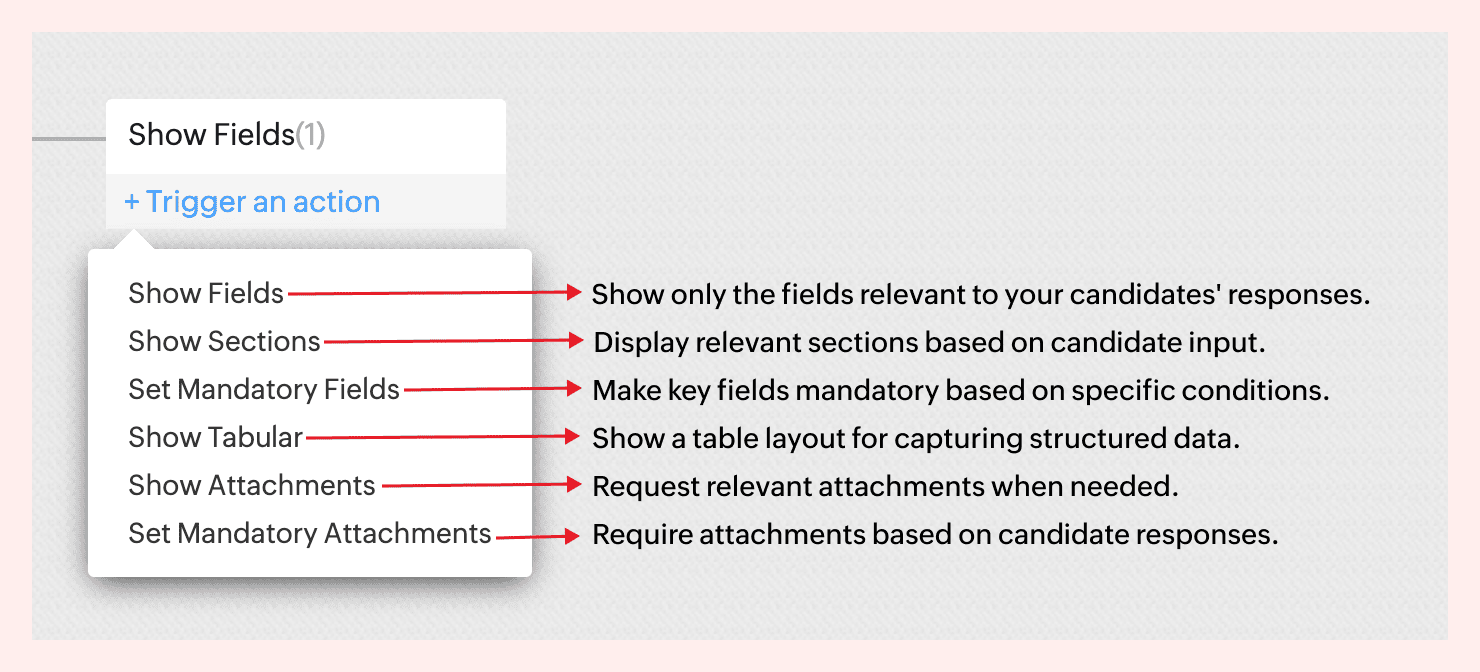

For instance, not all candidates come with the same background—and your forms shouldn’t treat them like they do.
If a candidate indicates they’re a fresher, there’s no need to show fields like Work History or Current Salary. But if they’re experienced, you might want to ask about key projects, past employers, or management experience.


With form rules, you can create this branching logic in just a few clicks—keeping the form clean for early talent and detailed where it matters.
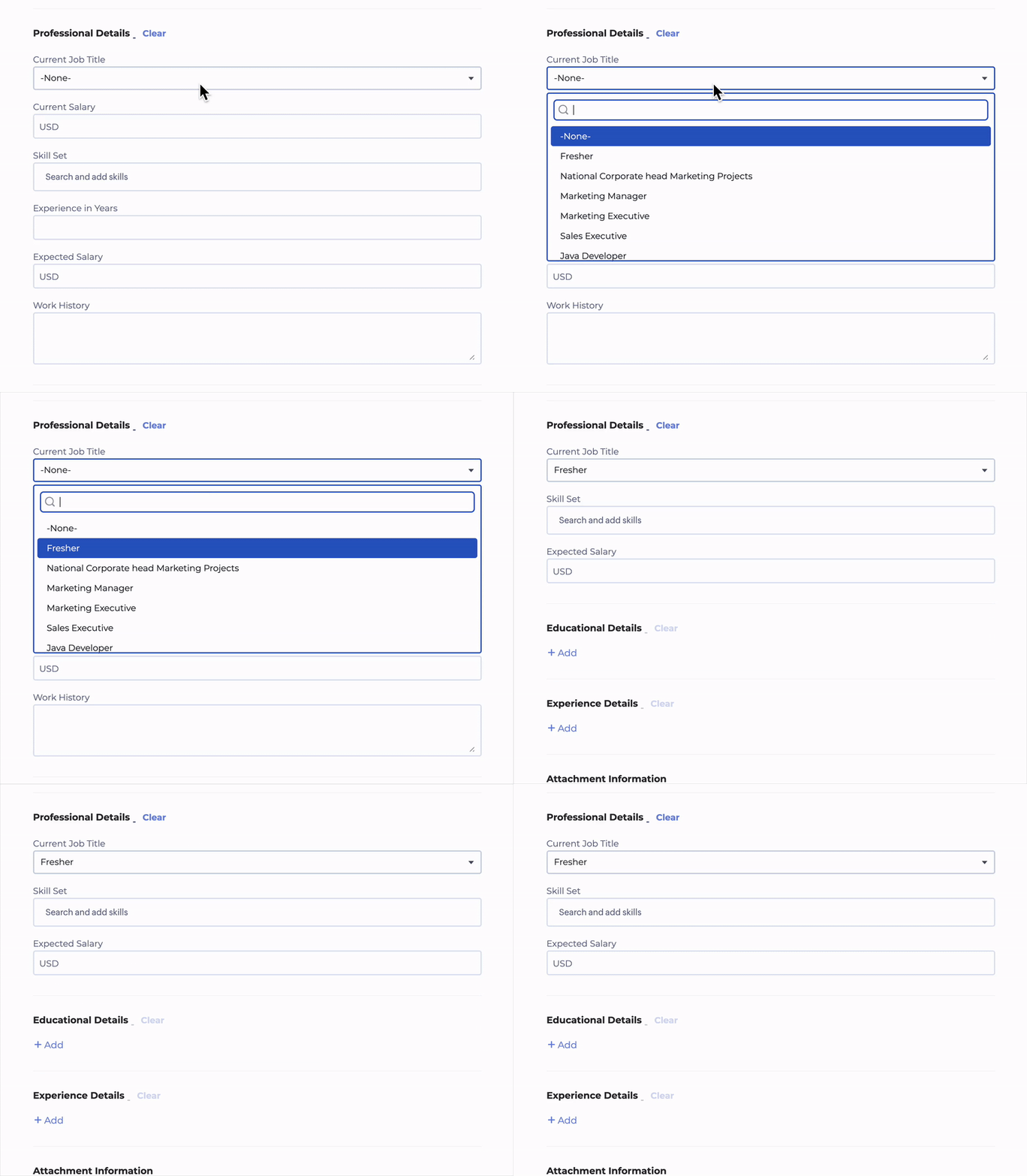
 

No code required. Just simple logic-based conditions.
→ Learn more  

A few use cases to consider  

Client Intake to Job Requisition  
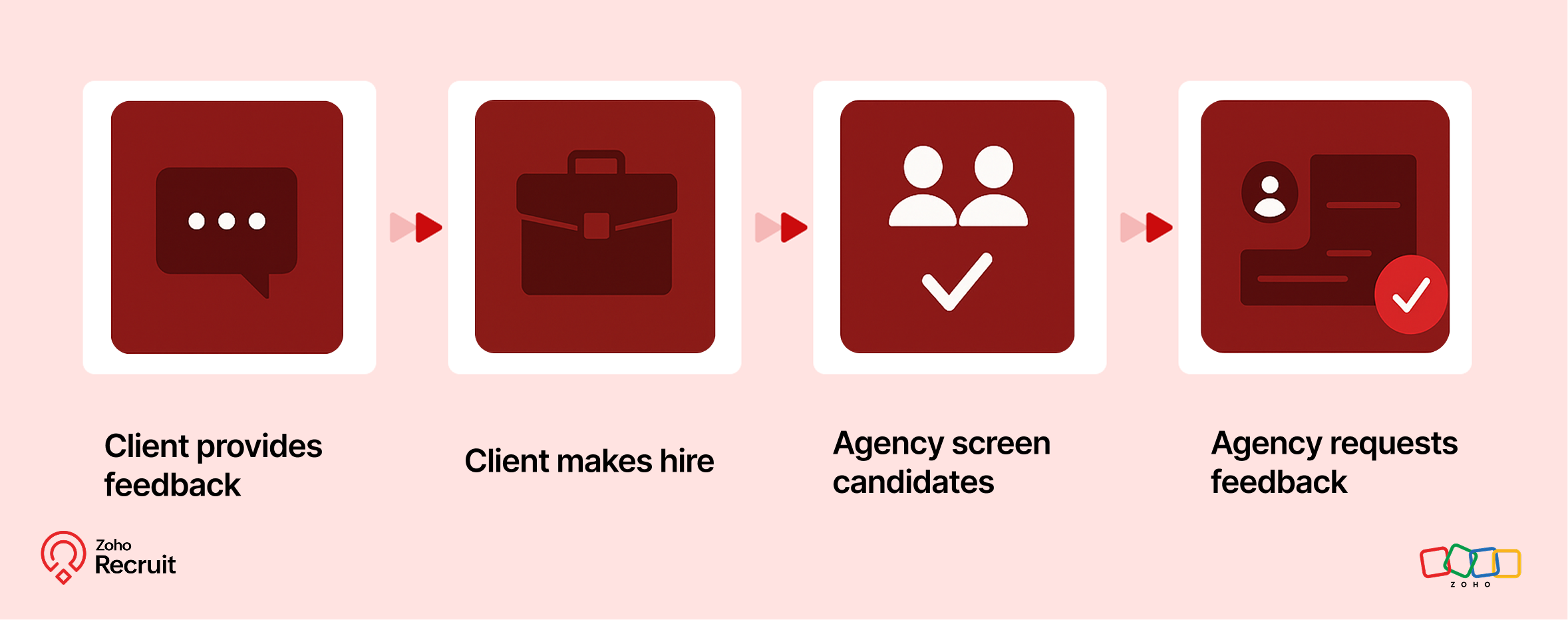

Step 1: Client submits contact form
Embed a Contact webform on your website to capture leads—clients who want to work with your staffing agency.

Step 2: Client shares job details
Once onboarded, clients can submit job requirements through a Job Requisition form. These details feed directly into your system.

Step 3: Agency hires candidates
Use the shared job details to source, match, and hire candidates for the role.

Step 4: Agency requests feedback
After successfully filling positions, request feedback from clients using a Feedback webform.

Candidate Onboarding & Documentation  
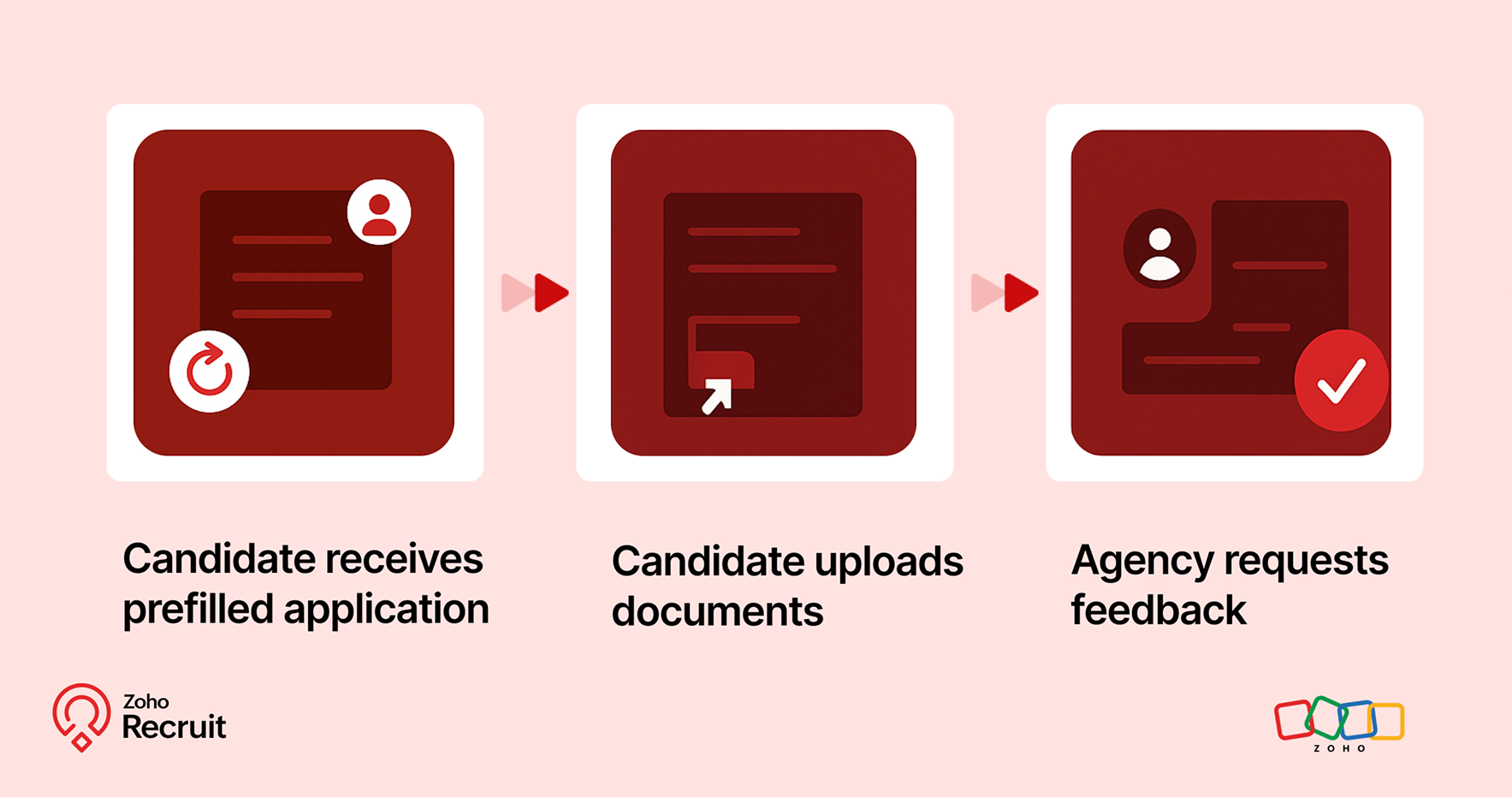

Step 1: Candidate receives prefilled application
Once candidates are selected, use known data to prefill details into a Background Check form.

Step 2: Candidate uploads documents
Share the form with candidates to collect necessary documents—ensuring accuracy and reducing redundant data entry.

Step 3: Agency requests feedback
After onboarding is complete, send a Feedback webform to capture the candidate’s experience.

Notes
Note:
Throughout the process, Form Rules keep the experience smooth—displaying only relevant fields, validating entries, and guiding users as they fill out each form.

A quick look at the numbers  

Webforms and Form Rules aren’t just about convenience — they actually influence how well candidates interact with your hiring process.
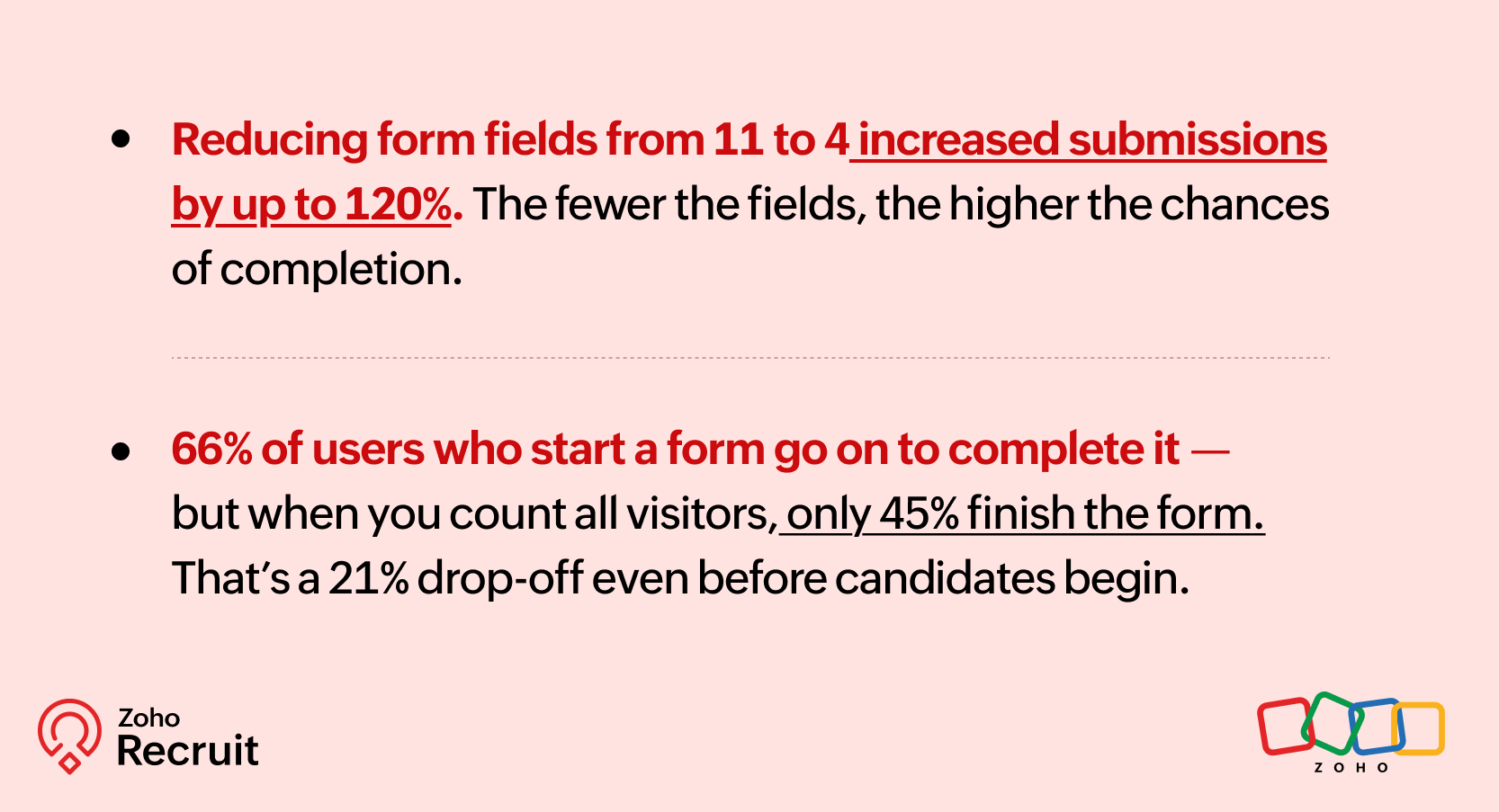

Sources: [1] [2]

These numbers reinforce what we already know — clearer, shorter, and smarter forms can keep more candidates moving forward.

Getting started: A few setup tips  

If you’re new to webforms or haven’t reviewed your setup in a while, here are three things to check:

  1. Do you have job-specific forms?
    A generic form might be easier to maintain — but it might also be collecting unnecessary or missing important info.

  2. Have you mapped fields correctly?
    Ensure that all form fields map directly to your Recruit modules (Candidate, Job Opening, etc.) to avoid duplicates or errors.

  3. Are you using rules to simplify things?
    Even one simple rule — like showing a “Notice Period” field only for full-time roles — can improve form quality.

Need help setting this up? Here’s how to build a webform and how to configure Form Rules.

Let’s Talk Recruit!

Do you already use Webforms in your hiring flow? Have you explored conditional form rules yet—or is that still on your to-do list?

Drop your experience below or tell us what kind of form use case you'd love to automate—we're all ears (and maybe one of our product folks will drop in with a tip or two!).

    • Sticky Posts

    • An update to improve email delivery | Email Authentication & Relay

      Update Rollout Latest Update: Enterprise users (8th July, 2025) This update is now live for Enterprise plan users in all regions. This includes People Plus, but not Zoho One, which will be covered in an upcoming update. Professional users (31st May 2025)
    • Zoho Recruit User Group Meet-up | INDIA 2025 (Venue Finalised)

      Hello Zoho Recruit users from India, We’re pleased and excited to announce our 2025 edition of Zoho user group meet-up in India in five cities! In this meet-up, our team of experts will help you understand the intricate nuances to use Zoho Recruit better,
    • Zoho Recruit is coming to the UK | Zoho Community Learning Series

      Customers from the United Kingdom, Exciting news: We will be in London for the Zoho Recruit user meet up. Our team will help you better understand the intricate nuances of Zoho Recruit to help you hire faster, inform about new and upcoming features, and
    • Ask the experts - A live Q & A discussion on Zoho Recruit

      We are delighted to come back with another edition of Ask the Experts community series. This edition, we'll be focusing on everything about Zoho Recruit. The topics will focus on the features that are used/asked by the majority of users and also based
    • Restriction on 'From' addresses with a public domain

      Dear Zoho Recruit Community, We hope this message finds you well. This post is to inform you about some important updates regarding email restrictions within Zoho Recruit. Effective post 31st March 2025, we will be implementing changes to the use of email
      • Recent Topics

      • text length in list report mobile/tablet

        Is there a way to make the full text of a text field appear in the list report on mobile and tablet? With custom layouts, the text is always truncated after a certain number of characters.
      • Zoho Creator customer portal limitation | Zoho One

        I'm asking you all for any feedback as to the logic or reasoning behind drastically limiting portal users when Zoho already meters based on number of records. I'm a single-seat, Zoho One Enterprise license holder. If my portal users are going to add records, wouldn't that increase revenue for Zoho as that is how Creator is monetized? Why limit my customer portal to only THREE external users when more users would equate to more records being entered into the database?!? (See help ticket reply below.)
      • Link Contacts to Billed Accounts

        Hello, I want to do a survey on all my customers of 2025. For that I want to select all contacts linked to accounts who where billed in 2025. How to I create this link to I can then use Zoho Survey with this database of contacts?
      • Export all of our manuals from Zoho Learn in one go

        Hi, I know there's a way to export manuals in Zoho Learn, but I want to export everything in one go so it won't take so long. I can't see a way to do this, can I get some assistance or is this a feature in the pipeline? Thanks, Hannah
      • Historical Sales Info - Blend with Finance Invoice Line Items, Access in CRM and Desk

        My company has been using Zoho One since 2021, with sales data going back through 2020. However, we have been in business much longer, and we have historical sales information that we want to have at our fingertips when talking with customers (usually
      • Pre-Zoho Sales Info - Best Way to Add to Desk / CRM

        My company has been using Zoho One since 2021, with sales data going back through 2020. However, we have been in business much longer, and we have historical sales information that we want to have at our fingertips when talking with customers (usually
      • Shift-Centric View for Assigning and Managing Shifts in Zoho People

        Hello Zoho People Product Team, Greetings and hope you are doing well. This feature request is related to Zoho People - please don't move it to zoho one! We would like to submit a feature request regarding the shift assignment and management view in Zoho
      • CRM function REST API response format

        Is there a way to control the JSON response returned by the CRM function REST API? If I call a function using either OAuth or an API key it returns a 200 OK response with a string in the format shown below. I am using a particular feature of an external
      • Using MPN across multiple SKUs and inventory tracking

        I have several different SKU's that share a common MPN and would like to track inventory by MPN. SKU1 has MPN1 assigned SKU2 has MPN1 assigned Here is an example If I start with 5 of MPN 1 in stock I want each SKU1 and SKU2 to show as 5 in stock, If I
      • Unable to Access Application:

        Whenever I try to access my application from the desktop, say I am editing it and want to test something in the desktop environment I get: An error has occurred. An internal error has occurred. Please check the URL , or try refreshing the page I can edit
      • Cannot see Application from Lookup field

        Hi all, I am trying to access data for an application on our account via a lookup field; however, the application doesn't appear in the dropdown at all. Can anyone shed any light on this, please? I have asked Zoho support; however, they're just as confused,
      • Cannot see correct DNS config for mail after moving domain to another provider

        I have moved my domain from one provider to another and after that zoho mail stopped working (expected). Problem is, zoho mail admin panel still shows (10 hours after move) that all records are correct while I haven't changed anything in my domain DNS
      • Zoho CRM Meetings Module Issues

        We have a use-case that is very common in today's world, but won't work in Zoho CRM. We have an SDR (Sales Development Rep) who makes many calls per day to Leads and Contacts, and schedules meetings for our primary Sales Reps. He does this by logging
      • Zoho Books integration sync from Zoho CRM does not work

        Hi Zoho Community & Zoho Support We just tried to get a sync some products into Zoho Books from CRM using the native sync and we're getting an error: "It looks like some mandatory fields you're trying to map are empty. Please provide valid field names
      • P & L Sub-categorized accounts

        How can I show sub-categorized Income and Expense accounts on the P & L report?
      • Report showing Bill Details with Project and Sales Invoice Number

        Hi There, I am hoping that someone can help, I am looking for report that can show the bill and expense details along with project its as assigned to and the invoice number that the sales has been raised in. The goal is I can filter a customer/project
      • Advanced Payment for Inventory Items with serial numbers

        Hello, We sell equipment that we track the unique serial numbers on using Sales Orders. We can charge the customers an advanced payment, then the balance on delivery. We cannot figure out a way to do this in Books/Inventory: - Cannot part invoice a SO
      • Is it possible to restrict ZCRM user to see only custom views created by administrator

        I have segmented data in my CRM and I want to allow different users to be able to see only parts of it based on some criteria. I've tried to create and share a custom view, but then there is always an option for user to see all open lead for example.
      • Issues Logging into ZOHO

        Hello, one of my coworkers is having issues logging into ZOHO, she has requested a code when entering and the email is correct but she has not received the code. can you help us with this?
      • Google Fonts Integration in Pagesense Popup Editor

        Hello Zoho Pagesense Team, We hope you're doing well. We’d like to submit a feature request to enhance Zoho Pagesense’s popup editor with Google Fonts support. Current Limitation: Currently, Pagesense offers a limited set of default fonts. Google Fonts
      • Add Popup Rejection Metrics to Reports

        Hello Zoho PageSense Team, We would like to request improved reporting for popup interactions. Current Limitation: PageSense currently provides conversion data, but there is no clear visibility into: Popup rejections Popup closes (✕ button clicks) Dismissals
      • Ability to Reset / Reinitialize Popup Cookies

        Hello Zoho PageSense Team, We would like to request the ability to manually reset popup cookies. Current Limitation: At the moment, it is not possible to initiate a new popup cookie from the our side. Visitors who rejected or closed a popup will not see
      • Control Popup Cookie Expiration Duration

        Hello Zoho PageSense Team, We would like to request an enhancement related to popup cookie management. Current Limitation: Currently, PageSense popup cookies remain active for 365 days, and this duration cannot be modified by us. If a visitor closes or
      • Clone / Export Popup Design Across PageSense Projects

        Hello Zoho PageSense Team, We hope you’re doing well. We would like to request an enhancement that allows popup designs to be reused across different PageSense projects. Problem Statement: Currently, Zoho PageSense allows popups to be duplicated only
      • Are there settings for hyperlinks?

        Clicking a hyperlinked cell in Sheet creates this little pop-up with the actual hyperlink inside. Is it possible to have a 1-click link where if you click the cell it opens the link directly with no pop-up?
      • Automatically include all ticket attachments in the ticket resolution email

        Hello Zoho Community, We are implementing Zoho Desk in a real customer-facing production environment and have run into a limitation that is becoming a blocking requirement for our clients. The problem When a ticket is closed or resolved, Zoho Desk sends
      • Finding text within a ticket: Expand All or Search this Ticket

        The auto-collapse feature within a ticket is nice for screen scrolling, however it makes it difficult to find text within the ticket if the email is collapsed. In fact you cannot find text if it is collapsed. I would like to propose a feature that allows
      • Books & Desk. Client mapping

        Hi, I’ve been using Zoho Books for several years and am now looking to improve my customer service. I'm experimenting with Zoho Desk and want to sync and map my client data from Zoho Books. However, it seems that mapping requires both contacts to have
      • String handling

        If I cut a currency string from a quote and try and paste it into the Deal "Amount", it will fail unless I manually delete any commas. Dollar signs are no problem, but comma's seem to fail. Please correct this Input Validation error.
      • Feature Request - Allow Customers To Pick Meeting Duration

        Hi Bookings Team, It would be great if there was an option to allow customers to pick a duration based on a max and minimum amount of time defined by me and in increments defined by me. For example, I have some slots which are available for customers
      • Support for Custom Fonts in Zoho Recruit Career Site and Candidate Portal

        Dear Zoho Recruit Team, I hope you're doing well. We would like to request the ability to use custom fonts in the Zoho Recruit Career Site and Candidate Portal. Currently only the default fonts (Roboto, Lato, and Montserrat) are available. While these
      • YouTube Live streaming? how to? Zoom has this feature, built-in. Can't find it on zoho meetings.

        YouTube Live streaming? how to? Zoom has this feature, built-in. Can't find it on zoho meetings.
      • Feature Request - A Way To Search Item Groups

        Hi Inventory Team, I can't find any way to filter or search by fields of Item Groups. It would be great to see that functionality added. I have a use case where a single product might come from 5 or more suppliers and each supplier's item is an Item in
      • Feature Reqeust - Include MPN In Selectable FIelds

        I have noticed that the MPN is not available to show in the list view of Items. Please consider adding it as EAN, UPC and ISBN are all available, so it doesn't make much sense to exclude this similar option. Thanks for considering my feedback.
      • Feature Request - Option To Hide Default System Fields on Items

        Hi Zoho Inventory Team, As far as I know it is not possible to hid some of the defult system fields on Items, such as UPC, MPN, EAN, ISBN. A good use case is that in many cases ISBN is not relevant and it would be an improved user experience if we could
      • Making an email campaign into a Template

        I used a Zoho Campaign Template to create an email. Now I want to use this email and make it a new template, but this seems to be not possible. Am I missing something?
      • Campaigns does not work!

        I am running into so many problems trying to use Zoho Campaigns, that I am seriously considering dropping the app from my (shrinking) list of Zoho applications I actually use. Apart from having to fight the software trying to create a design and email,
      • Feature Request - Make Available "Alias Name" Field In Item List View

        Hi Zoho Inventory Team, I have noticed that the "Alias Name" field does not appear on the list of selectable columns in the Customise Columns feature in the Items module. This would be very useful to see for businesses who are using the Alias Name field
      • Marketing Automation

        L.S. Marketing Automation is and has always been part of the Zoho One bundle - according to the information provided on the Zoho Website. Why when I open Marketing Automation do I get the following message?: "Your trial has expired. We hope you enjoyed
      • Cliq iOS can't see shared screen

        Hello, I had this morning a video call with a colleague. She is using Cliq Desktop MacOS and wanted to share her screen with me. I'm on iPad. I noticed, while she shared her screen, I could only see her video, but not the shared screen... Does Cliq iOS is able to display shared screen, or is it somewhere else to be found ? Regards
      • Next Page