Manage Product Quantities with Repeated Selections in Zoho Tables
When managing orders, adding the same product multiple times just to represent its quantity can get repetitive.
What if you could select a product once and specify how many units you need?
With the new Allow Repeated Selections option in Zoho Tables, you can do exactly that! 🎉
Here's how it works
Add a Link field and choose the table containing your products.
Expand Advanced and enable Allow Repeated Selections.
When linking a product, use the + button or enter the required quantity directly.
That's it! You can now select the same product multiple times without having to add it repeatedly. Check our help doc to learn more
Combine this with Rollup fields to calculate order totals based on product quantities.
For example, an order containing:
3 Wired Mouse at $3 each
2 Wireless Keyboards at $8 each
Can have its total calculated as:
(3 × $3) + (2 × $8) = $25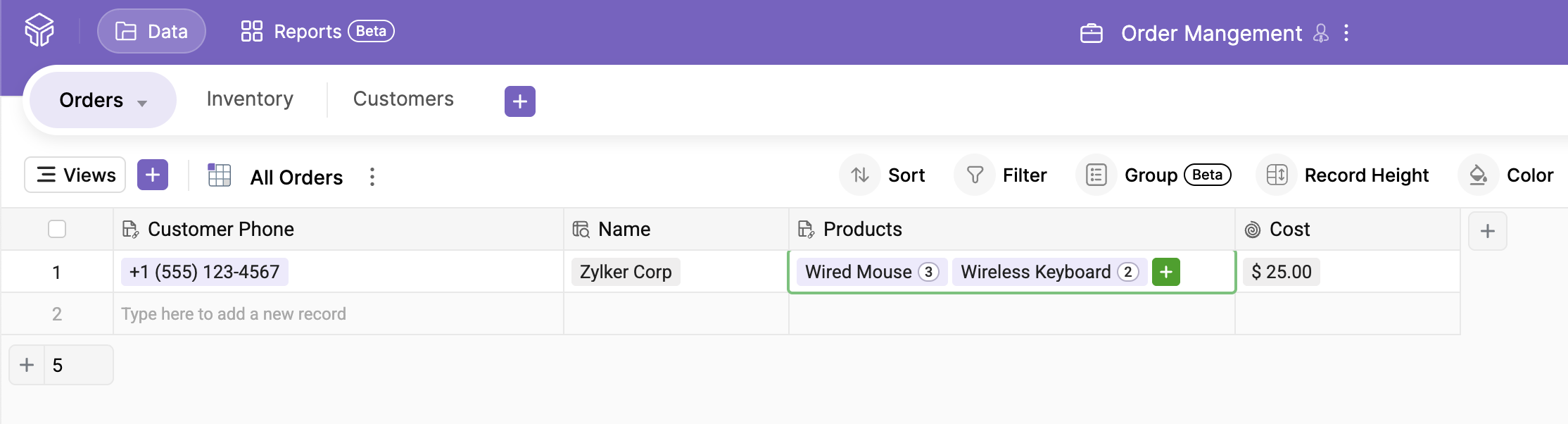
This makes it easier to manage product quantities and calculate order values right within Zoho Tables. Configure your Rollup to account for repeated selections when aggregating the values.
Beyond order management, this feature can also help with procurement, inventory requests, and other processes where the same item may be needed in multiple quantities.