Tip #12: What is Version History and how is it useful? | Revise, revisit, and restore.
Tip #12: What is Version History and how is it useful? | Revise, revisit, and restore.

Online spreadsheets spare you the hassle of creating a new spreadsheet file each time you edit your data set. Collaboration, revision, discussion, and iterations all happen in the same space—so there's no real need to save data as a separate file.

Here's the catch, though. You may sometimes need to revisit an older data set after the spreadsheet has been edited. Fortunately, this is possible thanks to the version history!

What is Version History?


Version History is a Zoho Sheet feature that helps you access the different iterations of your spreadsheet, all the way back to the original. Zoho Sheet automatically saves unlimited versions of your work, so you can always go back and revisit an earlier version at any time. 


Highlighting versions

 
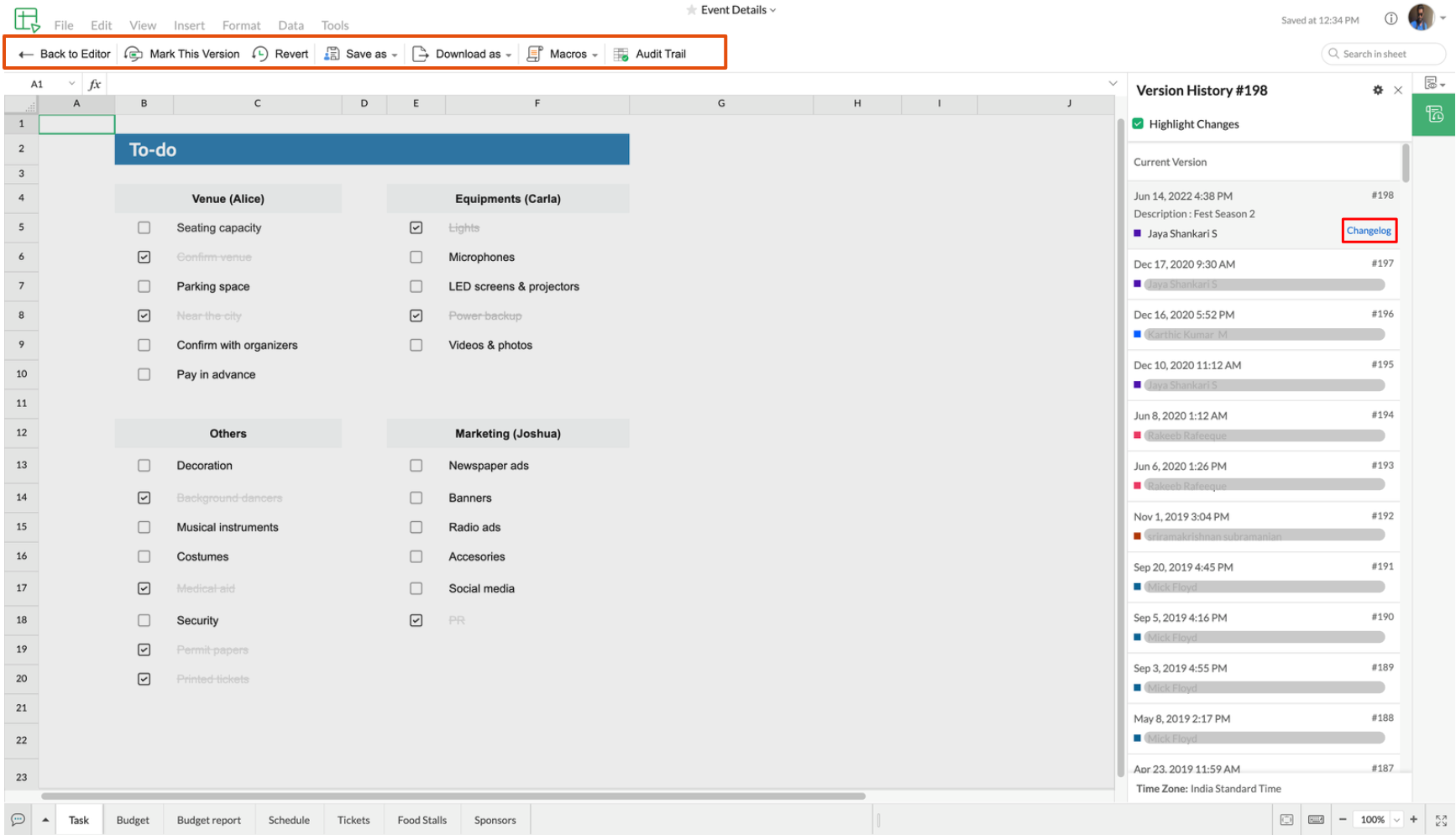
We do not use the term "unlimited" lightly when it comes to the number of spreadsheet versions we save. To help highlight important versions of your spreadsheet for easy location, Zoho Sheet provides the option to name a version. 

Read the Changelog


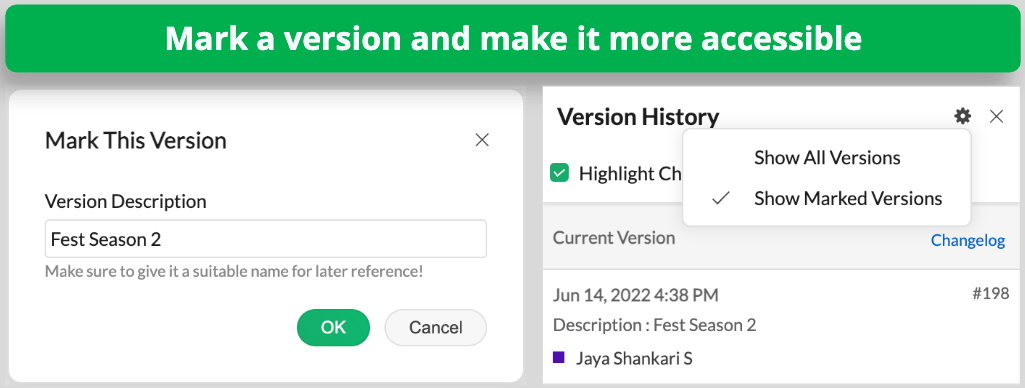
If you're looking to revert to a version before a particular change, you should be able to zero in on the new changes made to every version. Zoho Sheet features a Changelog to bring context to each version. If you are looking to pull details on all the historic changes made to the spreadsheet, you can use the Audit Trail.

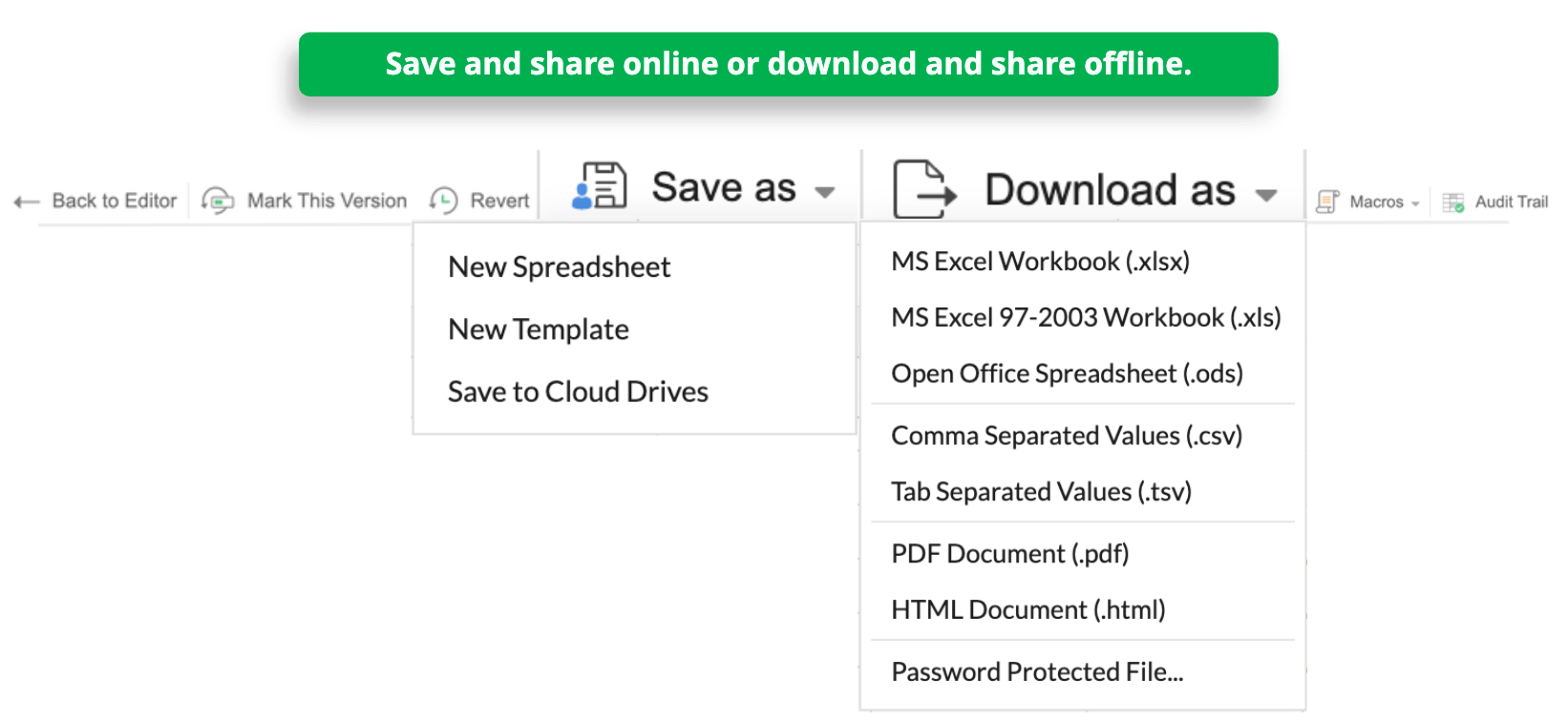
Share a past version online or offline


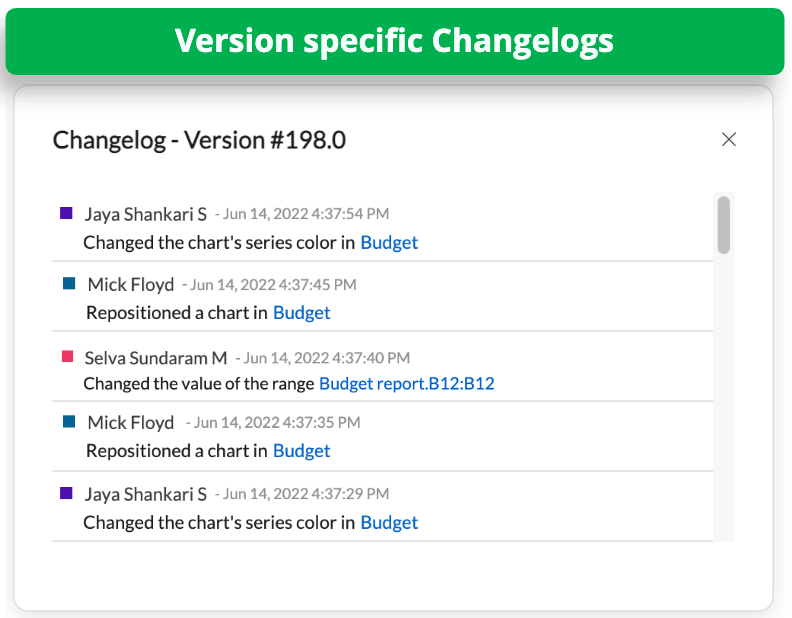
If you want to share an earlier version of your spreadsheet, you can easily download that version. If you're looking to collaborate online on a previous version, you can save that version as a new file and share it with your team.

Reverting to a past version


You can always revert your spreadsheet to any of its previous versions, whether it's a version you created or an auto-saved version. Please note that when you do this, all edits made after the selected version will be reversed. The current state of the file will be saved as a version as well, so this is not an irreversible change. 

Version History helps you effectively keep track of your spreadsheets from creation to finalization. Put it to use and let us know how you like the feature.

Follow our Twitter and LinkedIn spaces for product updates and other spreadsheet related information. Thanks for reading!

    • Sticky Posts

    • Tip #20 - Three things you probably didn't know you can do with picklists

      Hello Zoho Sheet users! We’re back with another quick tip to help you make your spreadsheets smarter. Picklists are a great tool to maintain consistency in your spreadsheet. Manually entering data is time-consuming and often leaves typos and irregular
    • Tip #18: 6 Trendlines and when to use them in your spreadsheet data?

      Charts are a great tool for visualizing and interpreting large chunks of data in spreadsheets. Zoho Sheet offers you 35+ chart options, along with AI-powered chart recommendations based on the data set you select. There are various chart elements that
    • Tip #17: Easily share spreadsheets with non-Zoho account users

      With efficient, collaboration-friendly options, Zoho Sheet is a popular choice among users. Sheet's external share links help you collaborate more effectively by sharing your spreadsheets with anyone outside your organization, including users who do not
    • Tip #16: Ask Zia your data-related questions and get powerful insights

      Zoho Sheet provides a variety of tools and functionalities to help you analyze your data from end to end. But what if you could analyze all your data sets with a single AI-powered tool? Meet Zia, our smart virtual assistant who will answer all your data-related
    • Tip #7: Four things you didn't know you can do with Conditional Formatting

      Conditional formatting helps you highlight and visualize data in your spreadsheet based on provided rules. Zoho Sheet offers three types of conditional formatting: Classic, Color Scales, and Icon Sets. If you're already familiar with how Conditional Formatting works, here are some bonus tips for Classic formats: Customize rules with formulas Zoho Sheet allows you to create personalized rules based on formulas. For example, in a task list you can use customized formulas to highlight tasks which are
      • Recent Topics

      • Adding custom "lookup" fields in Zoho Customization

        How can I add a second “lookup” field in Zoho? I’m trying to create another lookup that pulls from my Contacts, but the option doesn’t appear in the module customization sidebar. In many cases, a single work order involves multiple contacts. Ideally,
      • CRM x WorkDrive: We're rolling out the WorkDrive-powered file storage experience for existing users

        Release plan: Gradual rollout to customers without file storage add-ons, in this order: 1. Standalone CRM 2. CRM Plus and Zoho One DCs: All | Editions: All Available now for: - Standalone CRM accounts in Free and Standard editions without file storage
      • Canvas Detail View Related List Sorting

        Hello, I am having an issue finding a way to sort a related list within a canvas detail view. I have sorted the related list on the page layout associated with the canvas view, but that does not transfer to the canvas view. What am I missing?
      • Windows Desktop App - request to add minimization/startup options

        Support Team, Can you submit the following request to your development team? Here is what would be optimal in my opinion from UX perspective: 1) In the "Application Menu", add a menu item to Exit the app, as well as an alt-key shortcut for these menus
      • Ability for admin to access or make changes in zoho form without asking for ownership

        Currently in zoho form only form owner can make the changes in the form and if someone else has to make changes then we have to transfer the ownership to them and even admin also cant access it . So i think admin must have the ability or option to access
      • Issue with WhatsApp Template Approval and Marketing Message Limit in Zoho Bigin

        We are facing issues while creating and using WhatsApp message templates through Zoho Bigin, and we request your clarification and support regarding the same. 1. Utility Template Approval Issue Until December, we were able to create WhatsApp templates
      • Zoho CRM Calendar View

        Hello Zoho team, We need desperately a calendar view next to list, kandan and other views. I think it should be easy to implement as you already have the logic from Projects and also from Kanban View in CRM. In calendar view when we set it up - we choose
      • Camera

        I can sign on to a meeting and see the other participants, but my screen is dark. The instructions for Zoho "Camera Settings" say "click on lock icon in address bar," but I don't see that icon! Suggestions?
      • What is Workqueue and how to hide it?

        Hi, My CRM suddenly have this "Workqueue", may I ask how to set the permission of this tab?
      • Introducing Workqueue: your all-in-one view to manage daily work

        Hello all, We’re excited to introduce a major productivity boost to your CRM experience: Workqueue, a dynamic, all-in-one workspace that brings every important sales activity, approval, and follow-up right to your fingertips. What is Workqueue? Sales
      • Batch/lot # and Storage bin location

        Hi I want to ask for a feature on Zoho inventory I own a warehouse and I've gone through different management software solutions with no luck until I found Zoho, it has been a game changer for my business with up to the minute information, I'm extremely happy with it. It's almost perfect. And I say Almost because the only thing missing for me (and I'm sure I'm not alone) is the need of being able to identify the lot number of my inventory and where it is located in the warehouse. Due to the nature
      • Adding Sender Address with Basic Plan

        According to the knowledge base, I should be able to add Sender addresses with the Basic Plan. But whenever I try to add an email, it takes me to a search window and I cannot find any emails in the list. Even mine, which is the admin. email.
      • Conditional Field Visibility in Bigin CRM

        I would like to request support for conditional field visibility within Bigin CRM. This feature should allow administrators to configure show/hide rules for fields based on predefined criteria (e.g., field values, picklist selections, stage changes,
      • Bill automation in Zoho Books

        Hi I am looking for 3rd-party options for bill automation in zoho which are economical and preferably have accurate scanning. What options do I have? Zoho's native scanning is a bit pricey
      • Reporting Tags

        We've been using reporting tags for years (before itemizing was available) and now we are finding reporting these tags are impossible to track. Reports have changed in the customization and our columns of reporting tags no longer show up. We do not use
      • Function #53: Transaction Level Profitability for Invoices

        Hello everyone, and welcome back to our series! We have previously provided custom functions for calculating the profitability of a quote and a sales order. There may be instances where the invoice may differ from its corresponding quote or sales order.
      • Consumption based inventory

        I am currently using Zoho Books for my hospitality business, which includes lodging and restaurant services. We purchase many items in bulk for storage and consumption as needed. I'd like these items to be recorded as inventory when purchased and categorized
      • Smarter Access Control: Role-Based Access vs. Responsibility-Based Profiles

        Every business has roles, responsibilities, and workflows. While roles help define structure, responsibilities within those roles are rarely the same. As your team grows, some members need access to only a specific set of features. Others require visibility
      • Partner with HDFC And Sbi Bank.

        Hdfc and sbi both are very popular bank if zoho books become partner with this banks then many of the zoho books users will benefit premium features of partnered banks.
      • API in E-Invoice/GST portal

        Hi, Do I have to change the api in gst/e-invoice portal as I use zoho e books for my e-invoicing. If yes, please confirm the process.
      • Member role in zoho meeting

        does a user with member role can see other users in the organization
      • Mail Merge is not working properly as far as the AUTOMATE section is concerned

        Hi there, I created a Mail Merge template for the Deal module. I would like Deal owners to mail merge their Deal records, download the Mail Merge document as a Word doc and make a few changes before sending it to the customer. Thing is, neither the "Merge
      • Clone Recurring Expenses

        Our bookkeeping practices make extensive use of the "clone" feature for bills, expenses, invoices, etc. This cuts down significantly on both the amount of typing that needs to be done manually and, more importantly, the mental overhead of choosing the
      • Zoho Books - How to Invoke a Custom Function in Schedulers

        We have multiple schedulers that send emails to customers in batches. Currently, we are maintaining the same code across several schedulers. Is it possible to use a custom function inside a scheduler script? If yes, how can we invoke the custom function
      • Workqueue

        I really like the idea of the Workqueue generally - it will be really useful. What it seems to lack however, is the ability to customise it properly. I want to be able to show a custom view rather than just "My Leads" and "Leads Assigned in Last 3 hours".
      • Importing into Multiselect Picklist

        Hi, We just completed a trade show and one of the bits of information we collect is tool style. The application supplied by the show set this up as individual questions. For example, if the customer used Thick Turret and Trumpf style but not Thin Turret,
      • Special characters (like â, â, æ) breaking when input in a field (encoding issue)

        Hey everyone, We are currently dealing with a probably encoding issue when we populate a field (mostly but not exclusively, 'Last Name' for Leads and Contracts). If the user manually inputs special characters (like ä, â, á etc.) from Scandinavian languages,
      • Set Custom Icon for Custom Modules in new Zoho CRM UI

      • Portals-Adjust Column Sizes

        I am trying to adjust the column widths in Portals tabs. Columns that don't need to be wide are wide and longer ones are very short. I thought adding more to the digits box in Edit would widen them, but it doesn't. Anyone know how to adjust these?
      • All new Address Field in Zoho CRM: maintain structured and accurate address inputs

        The address field will be available exclusively for IN DC users. We'll keep you updated on the DC-specific rollout soon. It's currently available for all new sign-ups and for existing Zoho CRM orgs which are in the Professional edition. Latest update
      • is there any way to change the "chat with us now" to custom message?

        is there any way to change the "chat with us now" to custom message? I want to change this text
      • Introducing Connected Records to bring business context to every aspect of your work in Zoho CRM for Everyone

        Hello Everyone, We are excited to unveil phase one of a powerful enhancement to CRM for Everyone - Connected Records, available only in CRM's Nextgen UI. With CRM for Everyone, businesses can onboard all customer-facing teams onto the CRM platform to
      • Notes badge as a quick action in the list view

        Hello all, We are introducing the Notes badge in the list view of all modules as a quick action you can perform for each record, in addition to the existing Activity badge. With this enhancement, users will have quick visibility into the notes associated
      • Is Zoho Live Chat compatible with WordPress CMS?

        Hello, I have a website called www.jjrlab.com and I'm interested in using Zoho Chat on it. Does it support WordPress CMS? Thanks.
      • Using email "importance" as workflow-criteria

        I'd like to set up a workflow that triggers if an incoming email has been flagged as "high importance" but I'm not seeing any way to do that. Hopefully I'm just missing something obvious...?
      • Introducing spam detection for webforms: An additional layer of protection to keep your Zoho CRM clean and secure

        Greetings all, One of the most highly anticipated feature launches—Spam Detection in webforms—has finally arrived! Webforms are a vital tool for record generation, but they're also vulnerable to submissions from unauthenticated or malicious sources, which
      • Bring your CRM and Desk app inside SalesIQ with widgets

        Have you ever been confused and frustrated with multiple open tabs and switching back and forth from SalesIQ to other apps to perform your business-specific operations? How effective would it be to have all the required tools and data of the apps you
      • Password Assessment Reports for all users

        I'm the super admin and looking at the reporting available for Zoho Vault. I can see that there is a Password Assessment report available showing the passwords/weak and security score by user. However I'm confused at the 'report generated on' value. Monitor
      • Speak Your Customers' Language: SalesIQ's chatbots now support 30 languages 🤖

        We're unveiling some major upgrades to our chatbot that are set to revolutionize your experience! Now SalesIQ support 30 languages for both Zobot and Answer bot. By speaking your customers' language, you can enhance engagement, improve customer satisfaction,
      • record submitted from creator and invoice is creating in books , but the workflow of books is not tiggering on create of record in books

        record submitted from creator and invoice is creating in books , but the workflow of books is not tiggering on create of record in books headermap = Map(); headermap.put("X-ZOHO-Execute-CustomFunction","true"); response_inv = invokeurl [ url :"https://www.zohoapis.com/books/v3/invoices/fromsalesorder?salesorder_id="
      • Next Page