Tip #53: Populate and search values from tables using Table Lookup

Tip #53: Populate and search values from tables using Table Lookup


Qntrl supports tables to store organization-related data and access it easily. Data stored here can be populated and displayed in orchestration using Table Lookups. This helps organizations list sizeable data in dropdown or multiselect dropdown fields without having to add them as options to fields manually.
 
For example, Zylker maintains a database of their employee details in Qntrl’s tables. When an orchestration is created to track the company’s appraisal cycle, a Table Lookup field can be used to populate the employee details from the existing table.
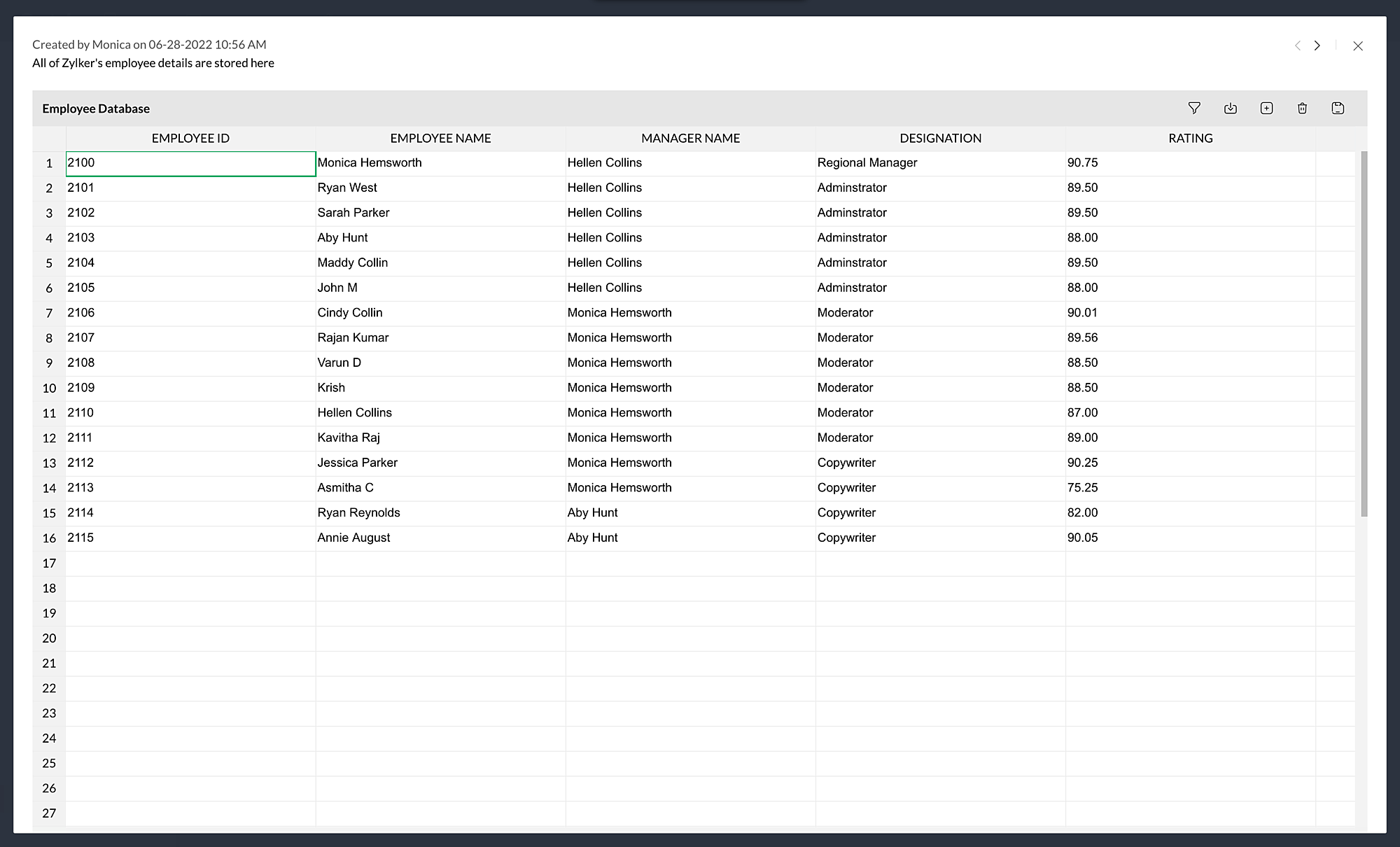


Whenever a card is created in this orchestration, the data from the table is populated for selection. Since tables can hold a lot of data, it might sometimes be hard to spot the data we are looking for when listed as dropdowns. To help with this, we recently rolled out an update that allows you to search the dropdown for the value you are looking for.
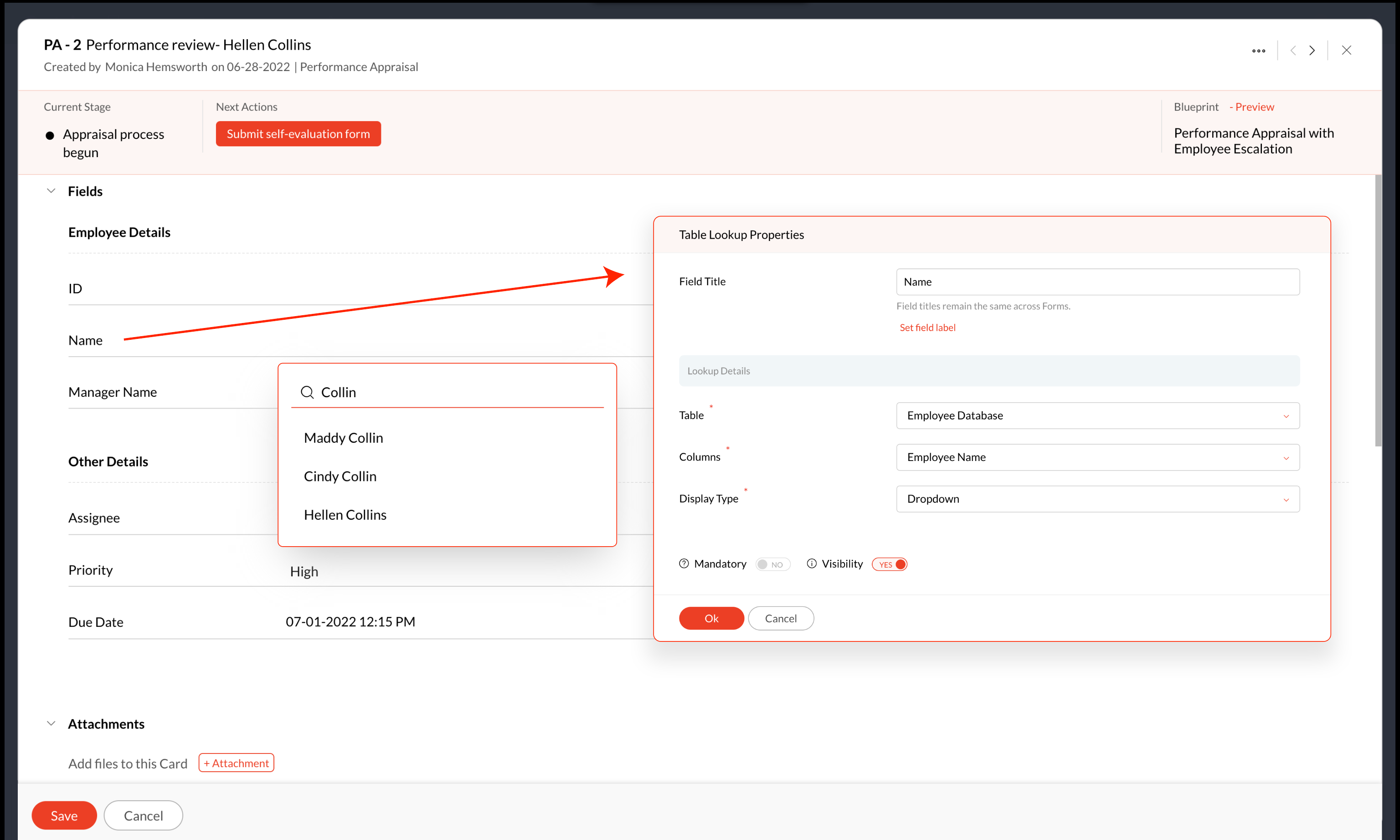


Qntrl supports search in table lookups for both dropdown and multiselect dropdown display types.
 
We hope this update is useful for you. If you have any suggestions or queries, do email us at support@qntrl.com.


    • Sticky Posts

    • Tip #21: Increase user engagement using dynamic email content and attachments in Orchestly

      Businesses often send out bulk emails like weekly newsletters, monthly event updates, promotional emails, surveys, beta access emails, product reviews, seasonal greetings, and so on. Even as the gist of these emails remain constant for all recipients, personalizations capture the audience’s attention and help brands connect with them.   Orchestly’s email templates allows you to draft and send dynamic emails with personalized content and attachments to internal and external users. Email templates
    • Qntrl's 2023 year in review

      This year has been all about analyzing our customer feedback and building a resilient and solution-driven product from it. As a result of this work, we're happy to announce that a whole new version of Qntrl is getting ready for release soon. This new
    • Tip #61: 5 different ways to create Cards in Qntrl

      Qntrl supports an array of features that covers everything required for business orchestration, from process automation to business advancement. Cards, being the elemental feature of Qntrl, record all the details of a particular task from the beginning
    • Tip #17: Stay informed of significant business impact using Orchestly

      With remote working becoming the new norm, leaders across sectors need to stay updated of their business performance in the market to aid business decisions. Instead of awaiting virtual meetings from sales and finance heads to put forth the business status, organization leaders can themselves dig into the system to keep an eye on their revenue generating customers or set up notifications to monitor major updates.   Orchestly recognizes such requirements and provides adaptable solutions for all business
    • Onboard faster with Orchestly's Tutorials

      We are actively rolling out new learning materials to assist our customers onboard at ease and automate their processes effortlessly. On that front, we recently launched Tutorials for Orchestly.   Tutorial is a step-by-step guide to help users familiarize the concepts of Orchestly and automate simple processes right from scratch. We’ve documented 3 such business processes viz. Order Manufacturing, Product Implementation, and Change Management.   We're looking forward to document more customer-centric
      • Recent Topics

      • Introducing Assemblies and Kits in Zoho Inventory

        Hello customers, We’re excited to share a major revamp to Zoho Inventory that brings both clarity and flexibility to your inventory management experience! Presenting Assemblies and Kits We’re thrilled to introduce Assemblies and Kits, which replaces the
      • Intergrating multi location Square account with Zoho Books

        Hi, I have one Square account but has multiple locations. I would like to integrate that account and show aggregated sales in zoho books. How can I do that? thanks.
      • Zoho Learn Zapier Integration

        Hello all, Is there any plan to integrate Zoho Learn with Zapier? It seems almost all Zoho products are in Zapier, with the exception of Learn and Marketing Automation.
      • Notice: SalesIQ integration paused on Zoho Sites

        I have this notice on my Zoho Sites in the SalesIQ integration setup. Can someone assist? "This integration has been temporarily paused for users. Reconnecting SalesIQ after disconnection will not be possible until we provide further updates." thank
      • Differences between Zoho Books and Zoho Billing

        Without a long drawn out process to compare these. If you were looking at these Books and Billing, what made you opt for one and not the other. Thanks
      • New Feature : Copying tickets with all the contents such as conversations/history/attachments etc

        Sometimes our customers and distributors do create tickets (or send emails) which contain more than one incident in them and then also some of the further conversations which are either created by incorrect new tickets or replies to old tickets are being created as combined tickets. In such cases we require to "COPY" the contents of the tickets into separate tickets and merge them into their corresponding original tickets. The "CLONE" feature doesn't copy the contents (especially the conversations
      • Como se agregan los empleados

        Necesito saber si para agregar empleados los mismos necesitan tener licencias
      • Deluge Error Code 1002 - "Resource does not exist."

        I am using the following script in a Custom Button on a Sales Return. Basically, the function takes the information in the sales return (plus the arguments that are entered by the user when the button is pushed) and creates a return shipping label via
      • Adding multiple Attendee email addresses when adding a Zoho Calendar event in Zoho Flow

        I am trying to integrate Notion and Zoho Calendar via Zoho Flow. However, the Attendee email address supported by Zoho Calendar - Create event only supports one email address, so I am having difficulty implementing automation to automatically register
      • Deprecation of SMS-based multi-factor authentication (MFA) mode

        Overview of SMS-based OTP MFA mode The SMS-based OTP MFA method involves the delivery of a one-time password to a user's mobile phone via SMS. The user receives the OTP on their mobile phone and enters it to sign into their account. SMS-based OTPs offer
      • Books & Desk. Client mapping

        Hi, I’ve been using Zoho Books for several years and am now looking to improve my customer service. I'm experimenting with Zoho Desk and want to sync and map my client data from Zoho Books. However, it seems that mapping requires both contacts to have
      • Graceful Handling of Exceeded Option Limits

        Hi Zoho SalesIQ team. I would like to submit a feature request to deal with a bug in salesIQ Current Behavior (Bug): When a dynamic list passed to the Single Select Option Card contains more than 20 options, the Zobot stops responding (freezes/hangs)
      • System default SLA descriptions can't be modified

        The system default SLAs have identical descriptions for all SLA levels, but their settings differ. However, I am facing an issue where I cannot modify these descriptions and save the changes. The content of the description box can be edited but the changes
      • Adding non-Indian billing address for my Zoho subscription

        Hey Need help with adding a non-Indian billing address for my Zoho subscription, trying to edit the address to my Singapore registered company. Won't let me change the country. Would appreciate the help. Regards, Rishabh
      • Zoho Desk - Zoho FSM Integration issue on Mobile and iPad

        Hello Team, I am trying to create a Work Order (WO) using the Zoho FSM integration (Add-on Service) that is integrated with Zoho Desk. The issue is that the integration is not working on mobile devices and iPads. While I am able to create the WO, Request,
      • How to create one ZohoCRM organisation out of a multi-organization?

        Hi, we have a multi-org including two different Zoho CRM organizations for two companies using respectively EUR and USD as default currency. I was wondering if there is any easy way to merge the two organizations into just one, so that users may access
      • Increase the "Maximum Saved Entries per User" Options Limit

        Hi, You can create lots of saved entries, yet the Limit when you apply one is 25, we may often expect 32 to be in draft, and therefore want to enforce that, can we increase the limit of this field from 25 to 100 (As you can just turn it off and have more
      • Gray screen while signing documents

        We are all getting a "gray" screen when trying to sign documents in Zoho sign. Anyone else having issues?
      • Reassign Partially Saved Entries

        Hi, I would like to be able to go to Partially Saved Entries and like the option to delete them I would like the option to multi-select and be able to reassign them to another user to complete (Such as when a user has left the company). Thanks Dan
      • Improved Integration Failure Information (And Notification Options)

        Hi, When an attachment service for example fails, you just get "Field x - Error", I can check the field it is failing on and find nothing wrong, same file size, type, dimensions, etc. so more information as to the actual issue would be helpful. And an
      • Set Frozen Cells in the Report Settings

        Hi, It would be nice to be able to set the frozen cells in the report Settings, and have an option if this is fixed or can be changed after loading (On the next load it still goes back to the Settings). Thanks Dan
      • Designing a practical Zoho setup for a small business: lessons from a real implementation

        I recently finished setting up a Zoho-based operating system for a small but growing consumer beauty business (GlowAtHomeBeauty), and I wanted to share a practical takeaway for other founders and implementers. The business wasn’t failing because of lack
      • Introducing Connected Records to bring business context to every aspect of your work in Zoho CRM for Everyone

        Hello Everyone, We are excited to unveil phase one of a powerful enhancement to CRM for Everyone - Connected Records, available only in CRM's Nextgen UI. With CRM for Everyone, businesses can onboard all customer-facing teams onto the CRM platform to
      • Link Purchase Order to Deal

        Zoho Books directly syncs with contacts, vendors and products in Zoho CRM including field mapping. Is there any way to associate vendor purchase orders with deals, so that we can calculate our profit margin for each deal with connected sales invoices
      • Projects custom colors replaced by default orange

        Since yesterday, projects uploaded to Zoho, to which I had assigned a custom color, have lost the customization and reverted to the default color (orange). Has anyone else had the same problem? If so, how did you resolve it?
      • Interview booked through Invite but no Notifications

        We have a workflow that was developed through a developer/partner that was tested and worked. Today, we pushed a candidate through the process and invited them to an in-office interview. They were sent the booking link (as usual and as tested before successfully)
      • WebDAV support

        I need WebDAV support so that I can upload/download (and modify) documents from my local file system. Is anything planned in his direction?
      • Automatiser la gestion des SLA dans Zoho Desk avec Zoho Contracts

        Les équipes du service client s’efforcent d’assurer un support rapide, régulier et fiable pour garantir la satisfaction de chaque client. Les accords de niveau de service (SLA) permettent de clarifier les engagements en définissant les termes et conditions
      • Create static subforms in Zoho CRM: streamline data entry with pre-defined values

        Last modified on (9 July, 2025): This feature was available in early access and is currently being rolled out to customers in phases. Currently available for users in the the AU, CA, and SA DCs. It will be enabled for the remaining DCs in the next couple
      • iOS App doesn't refresh for Document Creation

        Hello Zoho team, I have created a workflow to be used on a mobile iOS device which starts in Zoho Creater and ends with a murge and store function that then opens the newly created document within the Zoho Writer app. This process is working great however
      • Dynamic Field Folders in OneDrive

        Hi, With the 2 options today we have either a Dynamic Parent Folder and lots of attachments all in that one folder with only the ability to set the file name (Which is also not incremented so if I upload 5 photos to one field they are all named the same
      • Is it possible to transfer data from one related list to another within the same module ?

        In the Leads module, there is an existing default Product related list that already contains data. Recently, I added a custom multi-lookup field, which created a new related list in the same Leads module. Now, I need to move the existing data from the
      • Uploading a signed template from Sign to Creator

        Good day, Please help me on how to load a signed document back into Creator after the process has been completed in Sign. Below is the code that I am trying, pdfFile = response.toFile("SignedDocument_4901354000000372029.pdf"); info pdfFile; // Attach
      • Zoho DataPrep and File Pattern configuration

        I'm using Zoho data prep to ingest data from One Drive into Zoho Analytics... The pipeline is super simple but I can't any way to get all the files that I need. Basically I need to bring all the files with a certain pattern and for that I'm using a regex
      • Change User Role in a Form

        Hi, When in a form, it would be good (And consistent) to be able to change the user role/permission like you can with Shared Reports, All Entries or the actual User itself, rather than having to delete the users permission and then add it back again with
      • Assistance needed: Activation of a domain

        Hello Zoho Support, I purchased the .com domain "primesolva.com" via Zoho 6 days ago. The domain is still pending, and I cannot access the DNS panel to add the TXT verification for domain ownership. Please confirm the registration status and help me activate
      • Operation not permitted

        I am trying to add an email address to the list of user but I am getting error Operation not permitted
      • Request to Permanently Delete Email User (info@mehbobgulf.com ) from Old Organization

        Please permanently delete the user email info@mehbobgulf.com It is still associated with my old Zoho organization. I cannot delete it because it shows ‘You cannot delete email. Zoho host’. I need to use this email in a new Zoho account.”
      • Client host [89.36.170.5] blocked using Spamhaus

        Hello please make make actions for delist ..... "Client host [89.36.170.5] blocked using Spamhaus"
      • Suggestion: Option to Re-run a migration

        As I'm going through a migration process, I like the IMAP migration tool, but it would be better if there were an option to re-run the same migration as configured. There's not even an option to copy/edit one that's already there. Just run if it hasn't
      • Next Page