Tips & Tricks #09 Automatiseren met Zoho Desk Deel 1

Tips & Tricks #09 Automatiseren met Zoho Desk Deel 1


Beste Community leden,

Zoals jullie weten hebben we in Nederland een woningtekort. Een oplossing hiervoor is de hoogbouw. Echter, om de de hoogte in te gaan moet er ook voor de juiste faciliteiten in flats worden gezorgd. Problemen kunnen we allemaal wel bedenken: de afvoer raakt verstopt, de lift is defect of het warme water werkt niet. Om dit op te lossen hebben we verschillende mensen nodig: een elektricien, loodgieter, rioolservice.

We willen natuurlijk dat onze problemen zo snel mogelijk kunnen worden opgelost. Dit kan gemakkelijk gedaan worden door het proces uit te schrijven en dit te automatiseren. Aan de hand van een voorbeeld zullen we jullie uitleggen om het proces te automatiseren met Zoho Desk.

De Zalmhaventoren, het hoogste gebouw van Nederland, bevat maar liefst 256 appartementen. Stel dat de verlichting van verdieping 49 ineens niet meer werkt, je wilt dit zo snel mogelijk melden, zodat het gerepareerd kan worden. Dit kan door bijvoorbeeld op elke verdieping en elke kamer een specifieke QR code op te hangen. Door de QR code te scannen kun je je probleem melden en zal de desbetreffende partij een melding ontvangen, in dit geval de elektricien. De elektricien zal binnen 24 uur langskomen om het probleem op te lossen.

Hoe ziet dit er nou uit in Zoho Desk?
  1. Binnenkomst van probleem en toewijzing naar de juiste afdeling
  2. Melding naar de juiste persoon
  3. 24 uur de tijd om het probleem op te lossen anders een escalatie.
Zoho App Mapping


Vereisten


Aanbevolen applicatie van Zoho

Klacht invoer

Zoho Forms


Toewijzen van agenten en probleem escalatie


Zoho Desk


Deze use case kan worden opgelost door gebruik te maken van Zoho Forms en Zoho Desk, waarbij Zoho Forms kan worden gebruikt om het klachtenformulier te maken en Zoho Desk de verzamelplaats is voor alle klachten als tickets.
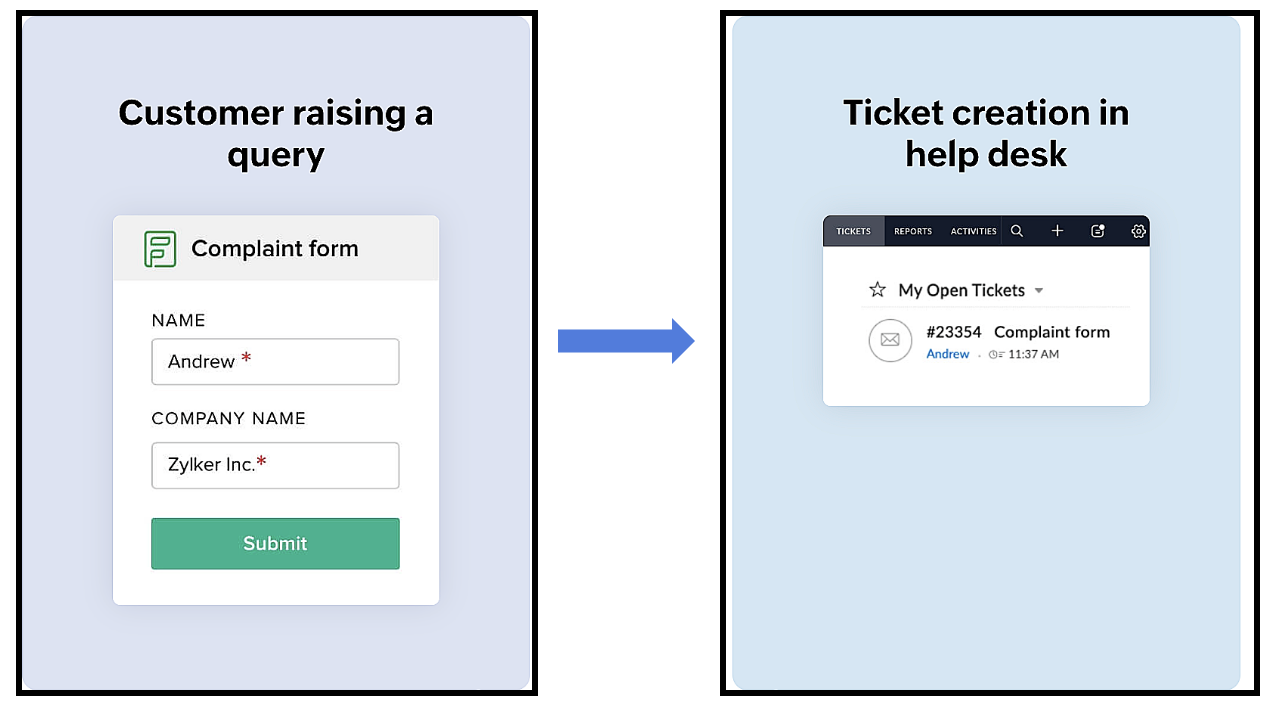


Het proces verloopt als volgt:
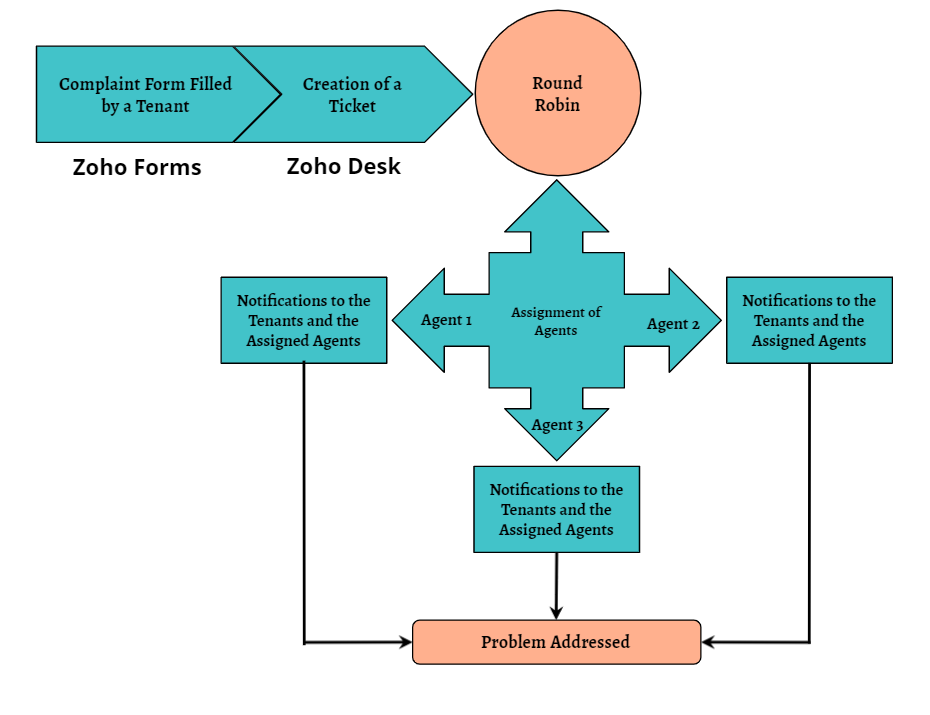
Een huurder scant de QR-code die beschikbaar is op elke verdieping van het gebouw om toegang te krijgen tot het klachtenformulier (dat is aangemaakt in Zoho Forms), om een klacht in te dienen. Zodra de huurder het formulier indient, wordt een ticket aangemaakt (in Zoho Desk) voor de klacht. Het aangemaakte ticket wordt toegewezen aan één van de medewerkers met behulp van de Round Robin toewijzingsregel. Zodra het ticket is toegewezen, ontvangen zowel de huurder als de medewerker aan wie het ticket is toegewezen een notificatie met relevante details. Vervolgens zal de medewerker het probleem aanpakken door de geschikte technici te sturen om het gemelde probleem op te lossen.
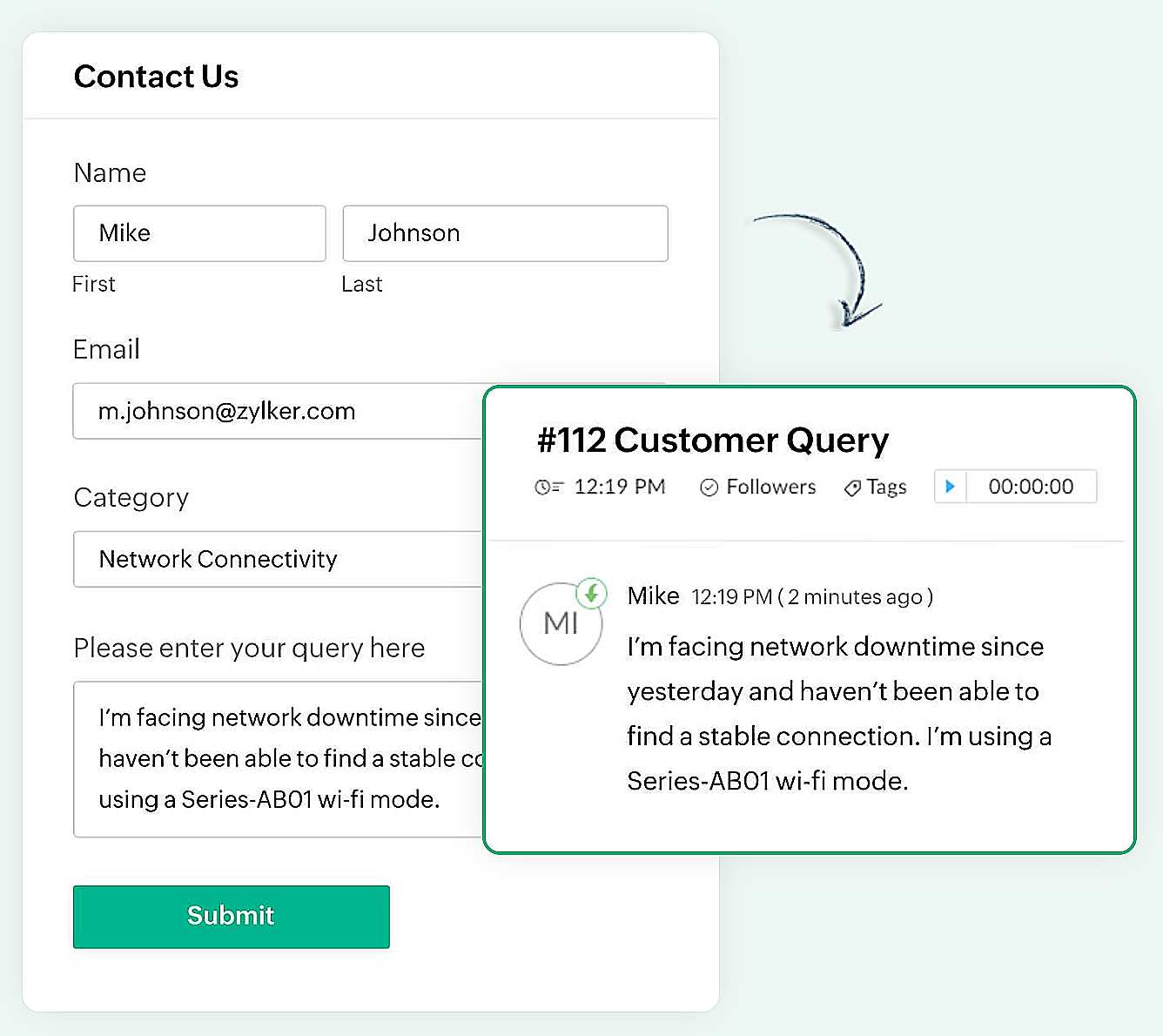

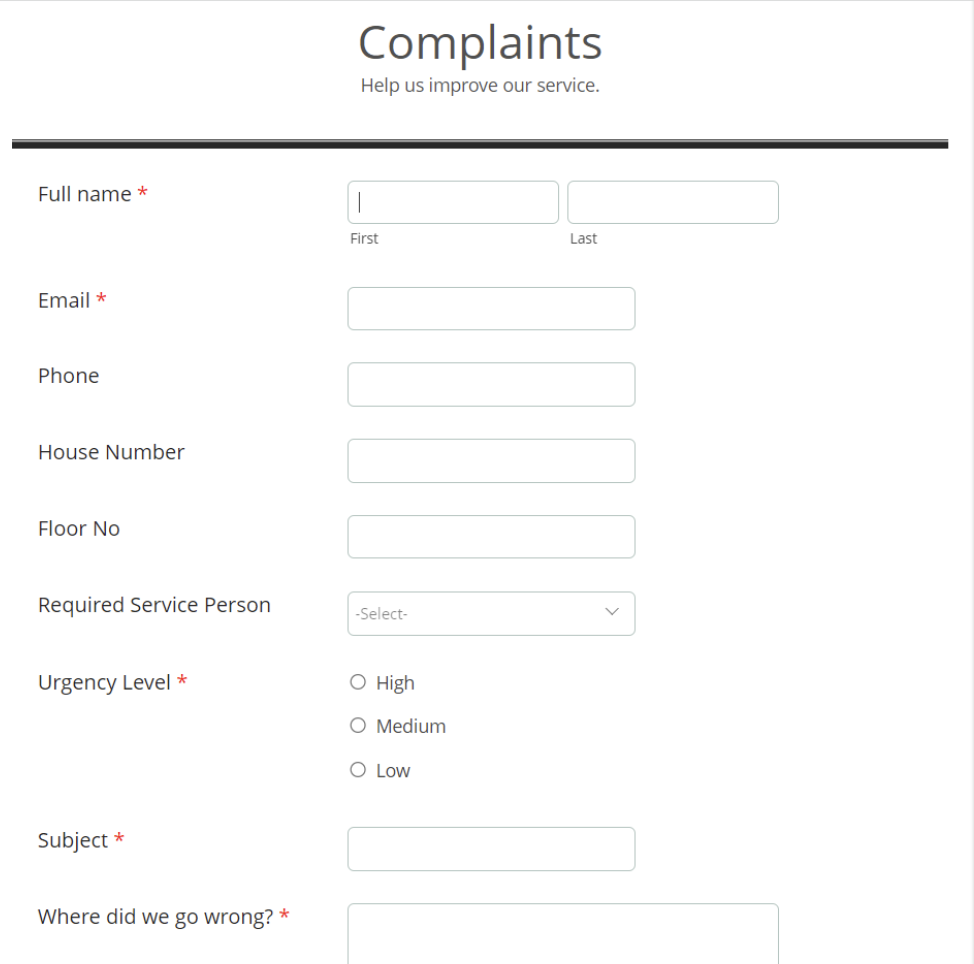
Er kan een eenvoudig formulier met alleen een naam en e-mailadres worden gemaakt of een complex formulier dat meerdere velden bevat om gedetailleerde informatie vast te leggen, zoals de problemen waarmee de huurder wordt geconfronteerd, de prioriteit van het probleem en enkele andere redenen kunnen ook gemakkelijk in Zoho Forms worden gemaakt.

Zoho Forms
Zoho Forms is een eenvoudig te gebruiken tool om formulieren te maken, zonder dat er downloads of installaties nodig zijn. Je kunt een formulier maken, delen en beginnen met het verzamelen van gegevens in slechts enkele minuten. Zoho Forms is toegankelijk vanaf laptops, tablets en mobiele telefoons.

Klachtenformulier maken in Zoho Forms
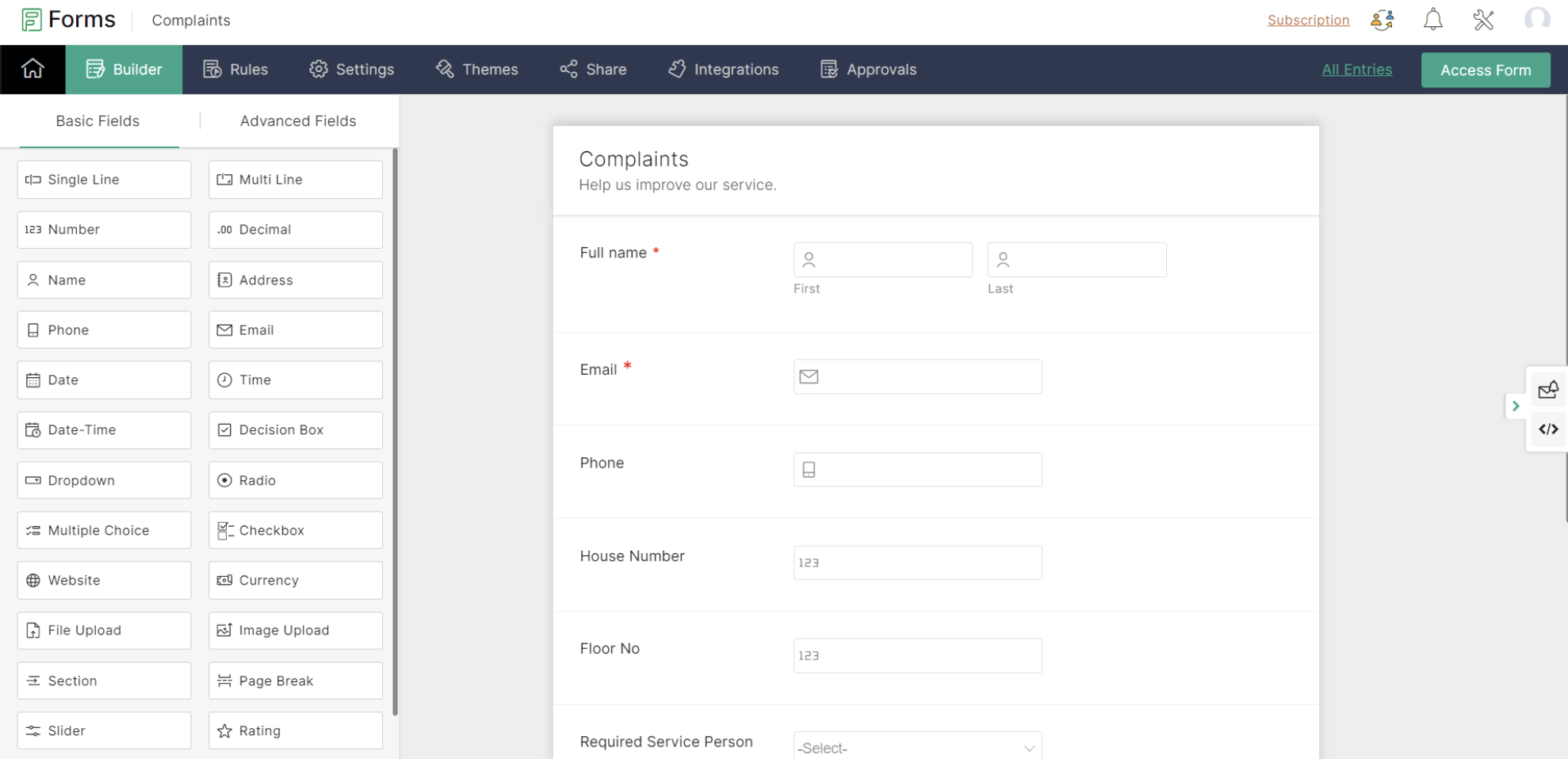


Met Zoho Forms kun je formulieren maken met een eenvoudige drag-and-drop optie.

- Begin met het geven van een formuliernaam (de gebruiker wordt doorgestuurd naar een formulierbouwpagina).
- Voeg de nodige velden toe om informatie van je huurders te verzamelen.
- Sla het formulier op.

Zoho Forms biedt kant-en-klare formulieren die geschikt zijn voor verschillende gelegenheden. Een nieuw formulier kan binnen enkele seconden worden gemaakt met behulp van deze sjablonen.

Klachtenformulier

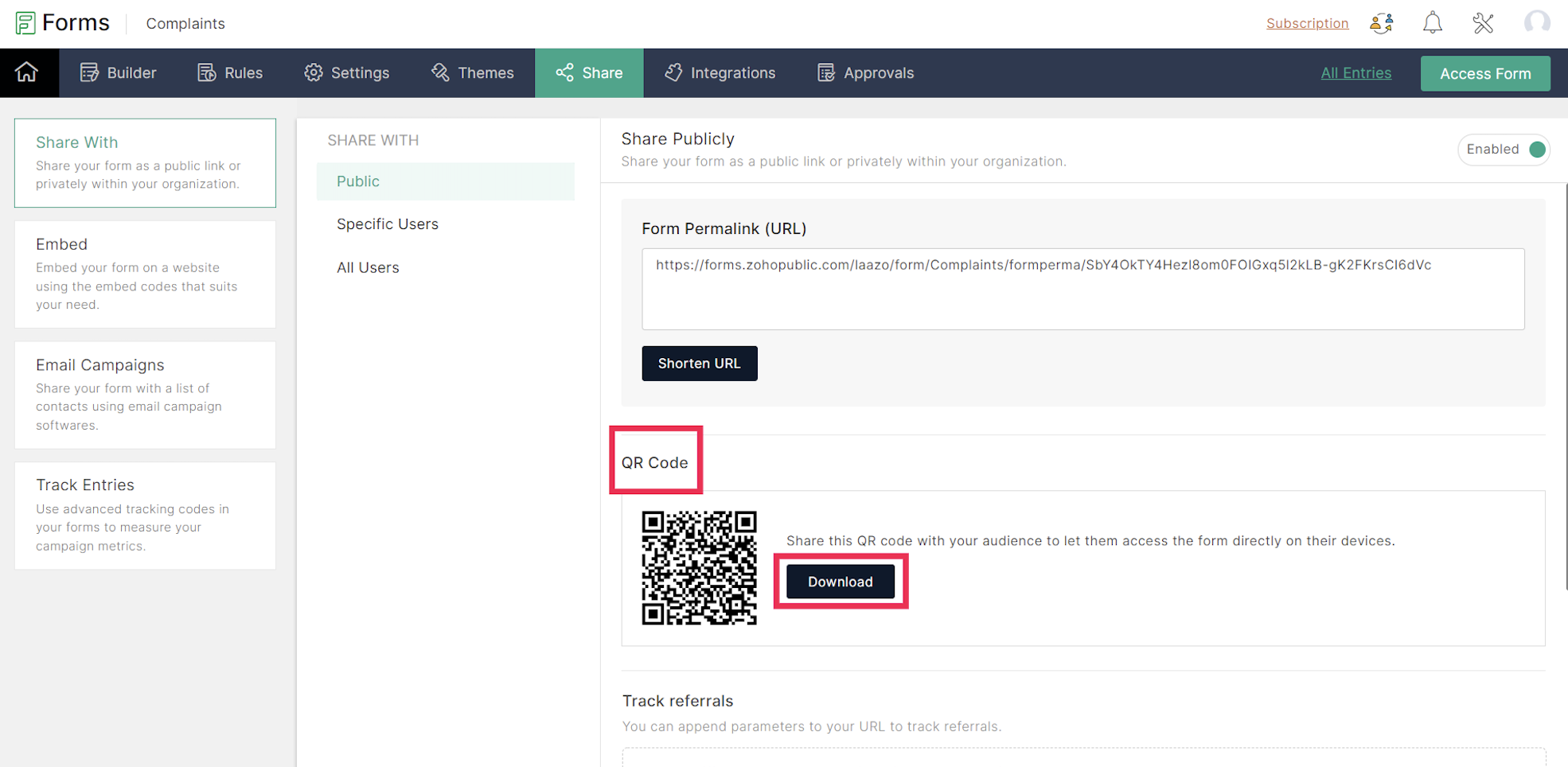
Een URL en een QR-code worden gegenereerd voor het aangemaakte formulier onder het tabblad Delen, dat in een png-vorm kan worden gedownload. De gedownloade QR-code kan worden afgedrukt en op alle muren van elke verdieping van het appartement worden geplakt voor de huurders.

De volgende stap is het integreren van Zoho Forms met Zoho Desk. Dit lees je in de volgende Tips & Tricks van Zoho Desk.

    • Sticky Posts

    • Doe mee aan de Zoho Desk Meetup op 7 maart in Antwerpen

      Beste Community leden, Wij nodigen jullie graag uit voor de Community Meetup van Zoho Desk! Op 7 maart komen we bij elkaar in Antwerpen, samen met een klant en de Zoho Experts van Brainsolutions. Onze experts zullen een live demo presenteren en jouw vragen
    • Doe mee aan de Zoho Desk Meetup op 16 Februari in Utrecht

      Beste Community leden, Wij nodigen jullie graag uit voor de Community Meetup voor Zoho Desk! Op 16 februari komen we bij elkaar in Utrecht, samen met Fleetkennis en de Zoho Expert van Mobile XL. Onze experts zullen een live demo presenteren en jouw vragen
    • Wat is er nieuw in Zoho Desk 2023

      Beste Community leden, Hoeveel je ook van je klanten en je werk houdt, als klantenservice medewerker zul je zeker een aantal zware dagen tegenkomen. We hebben het dan over de dagen dat je een paar keer op de snooze-knop drukt, koffie morst op je favoriete
    • Tips & Tricks #10 Automatiseren met Zoho Desk Deel 2

      In deel 1 van het automatiseren met Zoho Desk las je een use case over een probleem in een appartementencomplex en hoe dit door gebruik te maken van Zoho Forms en Zoho Desk kan worden opgelost. In deel 2 lees je meer over het integreren van Zoho Forms
    • Tips & Tricks #09 Automatiseren met Zoho Desk Deel 1

      Beste Community leden, Zoals jullie weten hebben we in Nederland een woningtekort. Een oplossing hiervoor is de hoogbouw. Echter, om de de hoogte in te gaan moet er ook voor de juiste faciliteiten in flats worden gezorgd. Problemen kunnen we allemaal
      • Recent Topics

      • Can Zoho Flows repeat Actions more than once?

        I'm attempting to make an intentional Zoho Flow loop using the below layout. However, when "WithinLimit" condition is met, the program fails to execute the action "Get & Add Request Co..." again. Is this by design? Is Zoho Flows unable to repeat actions
      • Looking for best practices to import data from SAP Business One (on-prem) into Zoho Analytics via Zoho DataPrep / Databridge — daily automated schedule

        Hi all, I’m using SAP Business One on-prem (SQL Server / or HANA — depending on DB backend) as our ERP. I want to build a pipeline that, every morning at 9:00 AM IST: pulls transactional data (invoices, customers, products, stock, etc.) from SAP B1, loads
      • Zoho One Unified Portal - Applications

        Hello, It is great to see the work on the New Unified Customer Portal. Thanks for that. The number of applications is limited though. It is now only around the Zoho Books ecosystem (Books, Expense...) and Zoho Social. = Are other applications planned
      • Marketing Tip #10: Start a customer loyalty program

        Winning a new customer is great, but keeping them coming back is even better. A loyalty program rewards repeat buyers with points, giving them more reasons to shop again. Over time, this builds trust and long-term relationships. Try this today: Set up
      • Zia Actions: AI-powered Workflow Automation for Faster and Smarter Execution

        Hello everyone, Workflows got a notch better with AI-based actions. Actions such as field extraction, prediction, auto reply, and content generation facilitate quick execution with improved speed and accuracy. Zia can intercept useful details in newly
      • Unable to access my Zoho forms account

        For some days now, I haven't had access to my Zoho Forms account. I keep getting an error that says, "You are an inactive user in your organization" via the mobile app and "You don't have permission to access this organization" via the web. I was removed
      • Do Individual Forums within Categories, in Desk Community, Produce Their Own RSS Feed?

        Do Individual Forums within Categories, in Desk Community, Produce Their Own RSS Feed? If not, can anyone share a work-around that could help me get an RSS feed for individual category forums?
      • Change Last Name to not required in Leads

        I would like to upload 500 target companies as leads but I don't yet have contact people for them. Can you enable the option for me to turn this requirement off to need a Second Name? Moderation update (10-Jun-23): As we explore potential solutions for
      • Resend Client Portal Invitation + View Email Delivery Status

        Hi Zoho Team, We hope you are doing well. We would like to request two important enhancements related to the Zoho Creator Client Portal invitation process. At the moment, when we add a user to the Client Portal, Zoho Creator automatically sends an invitation
      • Get user last login

        1. Is there a way to programmatically get the last user login to trigger certain workflows? 2. Is there a way to programmatically access the custom fields on a user's account?
      • Seeking Zoho Creator Expert (Delivery Management App / Logistics Ops) — Built & Deployed Before

        Hi everyone, We’re building a Delivery Management App (focused on delivery operations for now) using Zoho Creator. We’re looking for a Zoho Creator expert who has already developed and deployed a similar delivery/workflow system and can assist us with
      • Automating Employee Birthday Notifications in Zoho Cliq

        Have you ever missed a birthday and felt like the office Grinch? Fear not, the Cliq Developer Platform has got your back! With Zoho Cliq's Schedulers, you can be the office party-cipant who never forgets a single cake, balloon, or awkward rendition of
      • Adding Multiple Files to a Zoho Vault Entry

        There is a old blog post talking about adding multiple file attachments to one Zoho Vault Secret: https://www.zoho.com/blog/vault/introducing-new-features-in-zoho-vault-powerful-password-sharing-wider-storing.html Is that still possible, I can see how
      • bank charge

        a charge to my account was made that I did not authorize, of $16.46, for something that looks like "computer maintenance or something to that matter". please refund.
      • Dropshipping Address - Does Not Show on Invoice Correctly

        When a dropshipping address is used for a customer, the correct ship-to address does not seem to show on the Invoice. It shows correctly on the Sales Order, Shipment Order, and Package, just not the Invoice. This is a problem, because the company being
      • Add Attachment Support to Zoho Flow Mailhook / Email Trigger Module

        Dear Zoho Support Team, We hope you are well. We would like to kindly request a feature enhancement for the Mailhook module in Zoho Flow. Currently, the email trigger in Zoho Flow provides access to the message body, subject, from address, and to address,
      • Zoho Invoice Customer Login Portal

        Are there any plans for a customer portal to Zoho Invoice, ala Freshbooks?  I would like customers that I invoice to be able to login to review invoices and invoice history.  I have not switched from Freshbooks for this very reason.
      • the custom domain forwards by default to the old career site / how to switch it off??

        dear friends, how to switch off the old version of the career site?? The set up custom domain forwards directly to the old site, so that I cant publish it... Any ideas? Thank you! KR, Victoria
      • Preserve Ticket Issue Mapping When Migrating from Jira to Zoho Projects

        Hello Zoho Projects Team, We hope you are doing well. We are currently exploring a full migration from Jira to Zoho Projects, and we identified a critical limitation during the migration process involving Zoho Desk integration. Current Situation: We use
      • Hotmail is STILL blocking the zoho mail IP

        Greetings, as I already mentioned in my last message, my Zoho IP has been blocked by Hotmail for more than 15 days. Although someone said that the issue was "solved," it still isn't, and this amount of time seems neither normal for a "serious" company,
      • Pre-fill webforms in Recruit

        I don't want to use the career site portal (as I have my own already), but I would like to direct users to the application forms for each role, from my website job pages. Is there a way to pre-fill fields in Recruit application forms, so that I only have
      • This user is not allowed to add in Zoho. Please contact support-as@zohocorp.com for further details

        Hello, Just signed up to ZOHO on a friend's recommendation. Got the TXT part (verified my domain), but whenever I try to add ANY user, I get the error: This user is not allowed to add in Zoho. Please contact support-as@zohocorp.com for further details I have emailed as well and writing here as well because when I searched, I saw many people faced the same issue and instead of email, they got a faster response here. My domain is: raisingreaderspk . com Hope this can be resolved.  Thank you
      • Client Portal ZOHO ONE

        Dear Zoho one is fantastic option for companies but it seems to me that it is still an aggregation of aps let me explain I have zoho books with client portal so client access their invoice then I have zoho project with client portal so they can access their project but not their invoice without another URL another LOGIN Are you planning in creating a beautiful UI portal for client so we can control access to client in one location to multiple aps at least unify project and invoice aps that would
      • ASAP Widget Not showing "My Tickets"ed

        Hello Team, I have created a ZOHO ASAP Widget and embedded to my portal app.clearvuiq.com , widget renders ok and I can open tickets from widget. However I want my opened tickets to be visible in the widget. How can I achieve that?
      • Bug Causing Major Sync & SO Access Failures in Zoho POS

        We are experiencing critical and recurring issues in Zoho POS that all trace back to role-permission handling defects in the latest POS app version. These issues directly affect syncing, login ability, and Sales Order access for role-restricted users
      • Add Zoho Forms to Zoho CRM Plus bundle

        Great Zoho apps like CRM and Desk have very limited form builders when it comes to form and field rules, design, integration and deployment options. Many of my clients who use Zoho CRM Plus often hit limitations with the built in forms in CRM or Desk and are then disappointed to hear that they have to additionally pay for Zoho Forms to get all these great forms functionalities. Please consider adding Zoho Forms in the Zoho CRM Plus bundle. Best regards, Mladen Svraka Zoho Certified Consultant and
      • How to view CRM Sales Orders in Desk

        What's the usual way to view all CRM sales orders linked to a contact, when viewing a ticket in Desk? I don't want to have to open a new tab to see the order in CRM. And the Desk CRM sidebar doesn't seem to be configurable. Would I have to use an extension
      • Kaizen #219: Actions API - Webhooks APIs - Part 1

        Hello all!! Welcome back to a fresh Kaizen week. In the previous weeks, we covered Workflow Rules APIs, Actions APIs - Email Notification APIs, Tasks Update API, and Field Update API. This week, we will continue with another Actions API - Webhooks API
      • Pricing Strategies: #3 Services never Stop with just Plans

        "Hey, while you're here, could you also take a look at the vegetable patch?" Aaron hears that line almost every week. He runs a small gardening service, the kind where customers subscribe to a simple monthly plan that includes basic maintenance, mowing,
      • Presenting ABM for Zoho CRM: Expand and retain your customers with precision

        Picture this scenario: You're a growing SaaS company ready to launch a powerful business suite, and are looking to gain traction and momentum. But as a business with a tight budget, you know acquiring new customers is slow, expensive, and often delivers
      • Cropping Photos for Zoho Sites

        Hi, I'm wondering if there is a built in crop tool for zoho sites for my photos so I can crop them and see what the crop looks like on the site?
      • Deluge scripts

        Why is there not a search function to make it easier to find the script of interest when modifications are required.
      • zoho sheet stuck

        I Need help. ZOHO sheets stuck on the loading screen. I've already deleted the system cache and cookies of my browser (google chrome) but it's still not opening. 
      • bulk edit records and run internal logic

        hi there is few logics in manner "it this than that" logics work well when i edit entry openning it one by one (via workflow "on add/edit - on success" , for custom field "on update/on user input") but when i try bulk edit records - logic does not work.  how can i turn on logic to work as programmed - for mass editing records via bulk edit?
      • WebDAV / FTP / SFTP protocols for syncing

        I believe the Zoho for Desktop app is built using a proprietary protocol. For the growing number of people using services such as odrive to sync multiple accounts from various providers (Google, Dropbox, Box, OneDrive, etc.) it would be really helpful
      • Emails sent through Bigin are not posting in IMAP Sent folder

        I have set up my email to work from within Bigin using IMAP.  I am using IMAP so I can sync my email across multiple devices - phone / laptop / desktop / iPad / etc.  I want all my emails to populate my email client (outlook & iphone email) whether or
      • Possible for first Signer of Sign Form to specify the next signer in the sequence

        We have many use cases where multiple signers need sign the same document. We'd love to be able to use sign forms, where the a signer who uses the Sign Form link can specify the name and email address for the next person in the sequence.
      • BUG: Can't copy-paste data outside Sheet

        Currently I can't paste data copied from inside any of my Zoho Sheet files to any other app. Copy-paste works inside the sheet It does NOT work between two different sheets These sheets are built from automation templates Everything works fine if I create
      • Zoho CRM Community Digest - November 2025 | Part 1

        Hello Everyone! Here’s what came through in the first half of November: new updates and a few helpful community discussions with real, notable solutions. Product Updates: Android App Update: Inctroducing Swipe Actions You can now swipe left or right on
      • Upload own Background Image and set Camera to 16:9

        Hi, in all known online meeting tools, I can set up a background image reflecting our corporate design. This doesn't work in Cliq. Additionally, Cliq detects our cameras as 4:3, showing black bars on the right and left sides during the meeting. Where
      • Next Page