What's New in Zoho Inventory | January - March 2025
Hello users,
We are back with exciting new enhancements in Zoho Inventory to make managing your inventory smoother than ever! Check out the latest features for the first quarter of 2025. Watch out for this space for even more updates.
Email Insights for Sales Orders
We have introduced the Email Insights feature for Sales Orders in Zoho Inventory. With this feature, you can track emails sent for Sales Orders and view when the email was opened. The 'Client Viewed' filter allows you to find Sales Orders that have been viewed via email by the recipient.

Stock Availability Filter in Stock Counts
We have added a Stock Availability Filter to Stock Counts. This filter allows you to filter and add items to a stock count based on their stock availability, making the counting process more efficient.
View and Customize Stock Status in Transactions
When creating a transaction, you can now see both the Stock on Hand and the Available for Sale quantity for each item. The displayed quantity will depend on the selected View option.

Export Bin Locations Report
You can now export the Bin Locations Details Report and Bin Location Transaction Summary Report in your preferred format such as PDF, XLS, or XLSX. This enhancement makes it easier to analyze your bin-level inventory data.
To export a bin locations report, go to Reports > Bin Locations Details Report under Inventory
Add Dropshipping Address in Sales Orders
You can now add a dropship address in your Sales Orders. This address is used exclusively for the specific transaction and will not be saved to the customer's additional address list. You can also view and copy addresses from existing customers when setting the dropship address.
To add a dropshipping address, go to Sales > Sales Orders, edit/create a sales order, and click + Dropshipping Address.

New & Improved Zoho Inventory Reports
Introducing enhancements to Inventory reports for better control and visibility. The Stock Summary Report now supports custom reports, amount columns, and a stock tracking mode filter. Bulk export is available for up to 500,000 records (based on your plan) for key reports like Inventory Summary and FIFO Cost Lot Tracking. Purchase Order Reports now offer detailed columns such as Quantity Ordered, Received, In Transit, and Late By Date. Custom reports, Show/Hide Columns, and advanced filters are now supported across various reports including Inventory Aging, ABC Classification, Committed Stock, Product Sales, Valuation, Landed Cost, and Active Purchase Orders. The Sales by Item Report adds a Report Basis filter, while the Sales Return History Report gets a complete revamp with status tracking, return reasons, grouping, customizations, and scheduled exports. The Inventory Valuation Summary includes a new Stock Account column with filters, and you can now exclude transfer orders in Inventory and Stock Summary reports. These changes will provide a more flexible and insightful reporting experience.
Display Type for Lookup Custom Fields
We now support different display types for lookup custom fields. You can choose between a List view and a Dropdown view. This feature is currently available for specific lookup modules, like items, vendors, purchase orders, and customers.
Generate Serial Numbers in Inward Transactions
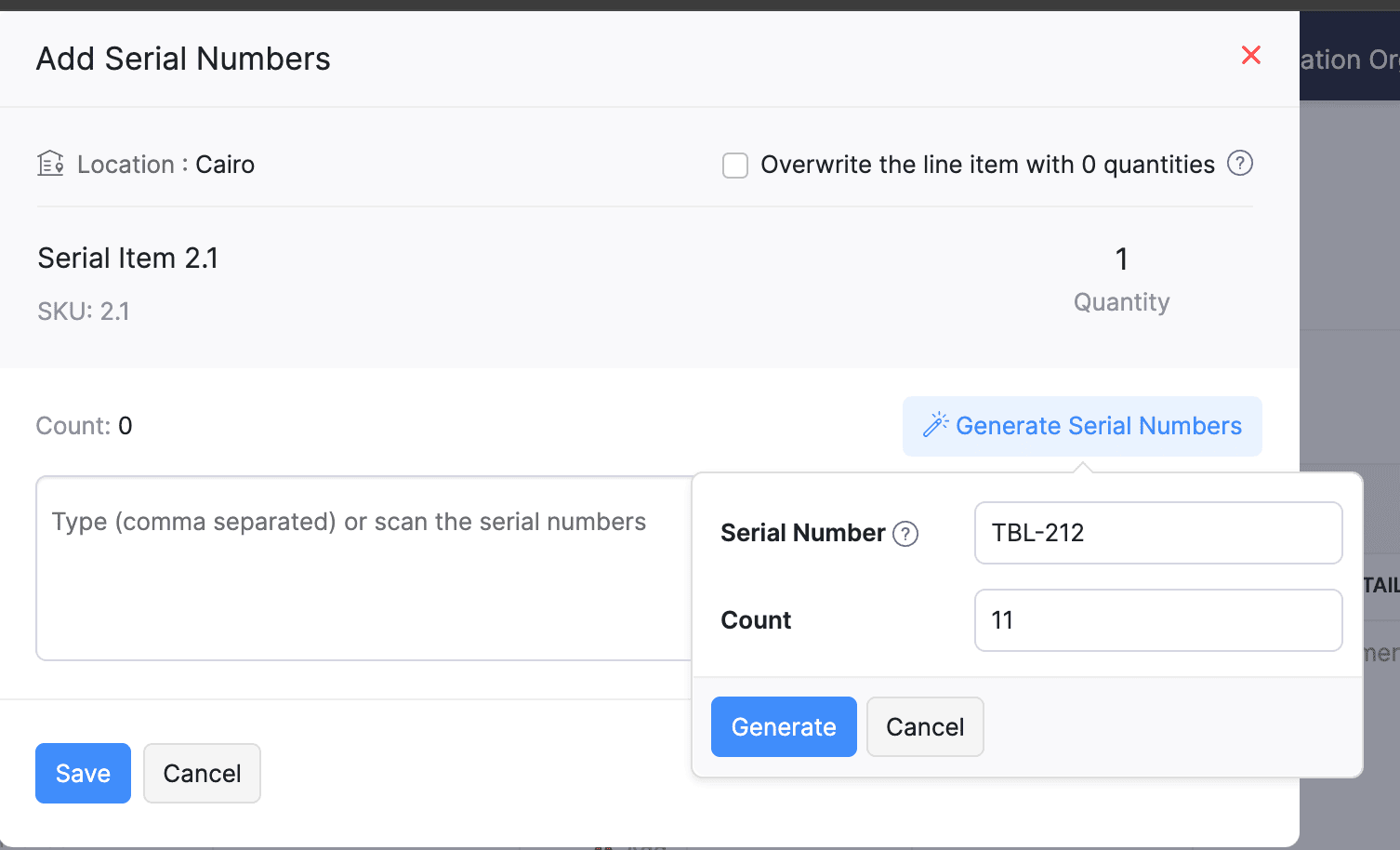
Introducing support serial number generation for inward transactions. You can set a starting serial number and specify the required count to ensure precise inventory tracking and save time.
Note: The starting serial number must always end with a numeric value.
To generate serial numbers, select an item from the item table, click Add Serial Numbers, then select Generate Serial Numbers. Enter the starting value and count, then click Generate.
Note: The starting serial number must always end with a numeric value.
To generate serial numbers, select an item from the item table, click Add Serial Numbers, then select Generate Serial Numbers. Enter the starting value and count, then click Generate.
Batch Tracking Enhancements
Batch Tracking just got more powerful and flexible with some major enhancements. You can now create and edit batches directly from the item details page, making management easier. A new return option allows items to be returned to the same sold batch, improving stock accuracy. You can also use the same batch across multiple line items in purchase transactions. Batch status control lets you mark batches as Inactive, keeping them out of transactions while retaining them for reports. Plus, all batch activity including creation, edits, restocks, and transfers is now visible in the Audit Trail report.
Item Description for UPS Line Items
We have improved the UPS Paperless Invoice feature by introducing the ability to add and edit item descriptions and unit prices individually for each line item within a package. Previously, a single description was applied to all items in a package, limiting the level of detail you could provide. With this update, you now have more control and flexibility.

Enhanced Shopify Integration
We have improved the shopify integration. You can now set sync frequency and mapping options for each store separately. Item sync runs every 24 hours by default, but you can also set it up manually if needed. Non-taxable items are now created with the correct tax exemption. When setting up Sales Order sync, you’ll pick a start date and can set how often it runs. Each store can now sync independently. You can also decide if sales orders should be fetched to Zoho Inventory under a single customer or create new customers using fields like email or name. Now, sync history includes filters for sync type and status, making it easier to show both successful and failed sync.
To integrate Shopify with Zoho Inventory, go to Settings > Integrations & Marketplaces > Shopify
Pin Columns in Transaction List Page
You can now pin up to two columns in the transaction list page in both default and custom views to keep key information visible while scrolling. This feature is available when a view contains more than eight columns.
To pin columns, go to any module, click the Customize Columns icon, hover over the fields, click the Pin icon, and then click Save.

Edit Etsy Orders
You can now edit orders fetched from Etsy with ease. Previously, Etsy orders were imported with non-editable details and tax. Now, you can edit these orders and override the tax applied based on the tax rate configured at your organization level.
To integrate Etsy, go to Settings > Integrations & Marketplaces > Etsy
Clone Delivery Challans
You can now duplicate delivery challans by cloning the existing ones, thereby saving time.
To clone a delivery challan, go to Delivery Challans, select a challan, click the More icon, and select Clone from the dropdown.

Enhanced Export and Print Preferences for Reports
We have added new customization options for report exports and print preferences. You can now set custom file names for exported reports, display column headers on each PDF page, and organize report data into separate pages based on the group by field.
Multi-Factor Authentication (MFA) for Portals
We are improving security by adding Multi-Factor Authentication (MFA) to both Customer and Vendor Portals. This extra security step requires users to enter a Time-Based One-Time Password (TOTP) along with their login credentials.
Admins can turn on MFA in the Customer Portal settings, making it mandatory for customers and vendors to set it up using an authenticator app. Once enabled, users will need to enter a TOTP code each time they log in. If needed, admins can reset MFA for users.
Note that even if MFA is disabled later, users that have already set it up will still need to enter the TOTP code. If they lose access to their authenticator app, they should contact an admin for a reset.
To enable multi-factor authentication for your customers and vendors, go to Settings > Preferences > Customer Portal. Check the Enable multi-factor authentication (MFA) option.

Import Move Orders and Putaways
We have introduced import option for the Move Orders and PutAway modules. You can now seamlessly import data for these, making bulk updates and record creation faster and more efficient.
To import move orders and putaways, go to Transfer Orders/Putaways under Inventory > Click More in the top right corner > Import Transfer Orders/Putaways.
Attach Documents in Purchase Receives
You can now upload, attach, and manage documents directly from the Purchase Receive creation and edit page.
To attach a document in purchase receive, go to Purchases > Purchase Receives > + New > Upload File.

Print & PDF Support for Purchase Receives
You can now generate and print or download your purchase receives. We have also supported a standard template with which you can view the PDF of your purchase receives to simplify record-keeping.
To print or download a purchase receive, go to Purchases > Purchase Receives. Select the purchase receive and click PDF/Print.
To view the PDF of a purchase receive, go to Purchases > Purchase Receives. Select the purchase receive and enable the Show PDF View option on its details page.

Filter Lookup Custom Fields
You can now filter your lookup custom fields by using custom views and setting criteria. The records will be shown based on the chosen custom view and the rules set by you, making sure all the conditions are met.

Leave Organization Option
We have introduced the option to leave an organization from the Manage Organizations page. However, if you are the admin who created the organization or the only admin, you will need to delete the organization instead. Additionally, before you leave, ensure the integrations are disabled, if any.

That's all for now, folks! Try these new features and share your feedback. If you need assistance, reach out to us at support@zohoinventory.com.
Best Regards,
The Zoho Inventory Team
Topic Participants
Akshin Eniyavel S
Jahmonesalmon
Roshin Uchakavil
Marie Sharps Canada
Tocayah
Recent Topics
Get Workflow Metadata via API
Is there a way to get metadata on workflows and/or custom functions via API? I would like to automatically pull this information. I couldn't find it in the documentations, but I'm curious if there is an undocumented endpoint that could do this. ModerationZoho Projects - Q2 Updates | 2025
Hello Users, With this year's second quarter behind us, Zoho Projects is marching towards expanding its usability with a user-centered, more collaborative, customizable, and automated attribute. But before we chart out plans for what’s next, it’s worthFSM setup
So we have been tinkering with FSM to see if it is going to be for us. Now is the time to bite the bullet and link it to our zoho books and zoho crm. The help guides are good but it would really help if they were a bit more in depth on the intergrations.Upcoming Updates to the Employees Module in Zoho Payroll (US)
We've made a couple of updates to the Employees module in Zoho Payroll (latest version of the US edition). These changes will go live today. While creating an employee Currently, the Compensation Details section is part of the Basic Details step, wherePossible to Turn Off Automatic Notifications for Approvals?
Hello, This is another question regarding the approval process. First a bit of background: Each of our accounts is assigned a rank based on potential sales. In Zoho, the account rank field is a drop-down with the 5 rank levels and is located on the accountZOHO Creator subform link
Dear Community Support, I am looking for some guidance on how to add a clickable link within a Zoho Creator subform. The goal is for this link to redirect users to another Creator form where they can edit the data related to the specific row they clickedAllow Resource to Accept or Reject an Appointment
I have heard that this can be done, is there any documentation on how?Create new Account with contact
Hi I can create a new Account and, as part of that process, add a primary contact (First name, last name) and Email. But THIS contact does NOT appear in Contacts. How can I make sure the Contact added when creating an Account is also listed as a Contact?How To Insert Data into Zoho CRM Organization
Hi Team I have this organization - https://crm.zoho.com/crm/org83259xxxx/tab/Leads I want to insert data into this Leads module, what is the correct endpoint for doing so ? Also I have using ZohoCRM.modules.ALL scope and generated necessary tokens.Where can I get Equation Editor por Zoho Writer?
I need to use Math Formulas in my document. Thank you.Filtering repport for portal users
Salut, I have a weird problem that I just cannot figure out : When I enter information as administrator on behalf of a "supplier" portal user (in his "inventory" in a shared inventory system), I can see it, "customer" portal users can see it, but theBUTTONS SHOWN AS AN ICON ON A REPORT
Hi Is there any way to create an action button but show it as an icon on a report please? As per the attached example? So if the user clicks the icon, it triggers an action?I can't connect my Instagram account in Zoho SalesIQ
I deleted an old account to test SalesIQ and connected it to Instagram and facebook. After deciding that I want to use it officially, I deleted the account and create another one with the email account of the company. But, now I having this error whileProduct Updates in Zoho Workplace applications | August 2025
Hello Workplace Community, Let’s take a look at the new features and enhancements that went live across all Workplace applications this August. Zoho Mail Delegate Email Alias Now you can let other users send emails on your behalf—not just from your primaryWant to use Zoho Books in Switzerland. CHF support planned?
Hi, We're a Swiss company using other Zoho suite software and I discovered Zoho Books and other accounting SaaS when looking for an accounting tool. Do you intend to cover Switzerland and CHF based accounting anytime soon? RoyCelebrating Connections with Zoho Desk
September 27 is a special day marking two great occasions: World Tourism Day and Google’s birthday. What do these two events have in common (besides the date)? It's something that Zoho Desk celebrates, too: making connections. The connect through tourismAdding Overlays to Live Stream
Hello folks, The company I work for will host an online event through Zoho Webinar. I want to add an overlay (an image) at the bottom of the screen with all the sponsors' logos. Is it possible to add an image as an overlay during the live stream? If so,Email Sending Failed - SMTP Error: data not accepted. - WHMCS Not sending emails due to this error
I have been trying to figure out a fix for about a week now and I haven't found one on my own so I am going to ask for help on here. After checking all the settings and even resetting my password for the email used for WHMCS it still says: Email Sending Failed - SMTP Error: data not accepted. I have no clue how to fix it at this point. Any insight would be lovely.Zoho Flow - Update record in Trackvia
Hello, I have a Flow that executes correctly but I only want it to execute once when a particular field on a record is updated in TrackVia. I have the trigger filters setup correctly and I want to add an "update record" action at the end of the flow toAdd Comprehensive Accessibility Features to Zoho Desk Help Center for End Users
Hello Zoho Desk Team, We hope you're doing well. We’d like to submit a feature request to enhance the client-facing Help Center in Zoho Desk with comprehensive accessibility features, similar to those already available on the agent interface. 🎯 CurrentZoho CRM mobile: Support for rich text in multi-line fields, Image upload field, and more
Hello everyone, We've made a few enhancements to the Zoho CRM mobile app to improve your experience. Here's what's new: Rich text support for multi-line fields (iOS) Image upload field support (iOS and Android) Tool tip markdown (iOS) Rich text supportin zoho creator Sales Returns form has sub form Line Items return quantity when i upate the or enter any values in the sub form that want to reflect in the Sales Order form item deail sub form field Q
in zoho creator Sales Returns form has sub form Line Items return quantity when i upate the or enter any values in the sub form that want to reflect in the Sales Order form item deail sub form field Quantity Returned\ pls check the recording fetch_salesorderEstimates with options and sub-totals
Hi It seems it would be great to be able to show multiple options in an estimate. For instance I have a core product to which I can add options, and maybe sub-options... It would be great to have subtotals and isolate the core from the not compulsory items. ThanksOptional Items Estimate
How do you handle optional items within an estimate? In our case we have only options to choose with. (Like your software pricing, ...standard, professional, enterprise) How can we disable the total price? Working with Qty = 0 is unprofessional....Important Update : Zendesk Sell announced End of Life
Hello Zendesk users, Zendesk has officially announced that Zendesk Sell will reach its End of Life (EOL) on August 31, 2027 (Learn more). In line with this deprecation, Zoho Analytics will retire its native Zendesk Sell connector effective October 1,Zoho Sheets
Hi, I am trying to transition into Zoho sheets, I have attached the issues encountered. Server issues, file trying to upload for more than 30 mins, even once uploaded my data aren't loaded. Simple calculations are not working I have attached the sample.Zoho CRM + Zoho FSM : alignez vos équipes commerciales et techniques
La vente est finalisée, mais le parcours client ne fait que commencer ! Dans les entreprises orientées service, conclure une vente représente seulement la première étape. Ce qui suit — installation, réparation ou maintenance régulière — influence grandementTop Bar Shifting issue still not fixed yet
I mentioned in a previous ticket that on Android, the top bar shifts up when you view collections or when you're in the settings. That issue still hasn't been fixed yet. I don't wanna have to reinstall the app as I've noticed for some reason, reinstallingPower of Automation:: Automate the process of updating project status based on a specific task status.
Hello Everyone, Today, I am pleased to showcase the capabilities of a custom function that is available in our Gallery. To explore the custom functions within the Gallery, please follow the steps below. Click Setup in the top right corner > DeveloperBilling Management: #3 Billing Unbilled Charges Periodically
We had a smooth sail into Prorated Billing, a practice that ensures fairness when customers join, upgrade, or downgrade a service at any point during the billing cycle. But what happens when a customer requests additional limits or features during theNo bank feeds from First National Bank South Africa since 12 September
I do not know how Zoho Books expects its customers to run a business like this. I have contacted Zoho books numerous times about this and the say it is solved - on email NO ONE ANSWERS THE SOUTH AFRICAN HELP LINE Come on Zoho Books, you cannot expectCitation Problem
I had an previous ticket (#116148702) on this subject. The basic problem is this; the "Fetch Details" feature works fine on the first attempt but fails on every subsequent attempt, Back in July after having submitted information electronically and wasFailing to generate Access and Refresh Token
Hello. I have two problems: First one when generating Access and Refresh Token I get this response: As per the guide here : https://www.zoho.com/books/api/v3/#oauth (using server based application) I'm following all the steps. I have managed to getAuto-Forward All Incoming Mail
I have setup the Zoho Business Mail to host my own domain's mail. Is it possible to have all incoming email auto-forwarded to another email account? What I would like to do is have all incoming emails forwarded to my Yahoo or Hotmail accounts until I can complete the migration to Zoho. I can't seem to locate this setting anywhere. I don't care whether the mail is kept on the Zoho server or not at this time.Zeptomail 136.143.188.150 blocked by SpamCop
Hi - it looks like this IP is being blocked, resulting in hard bounces unfortunately :( "Reason: uncategorized-bounceMessage: 5.7.1 Service unavailable; Client host [136.143.188.150] blocked using bl.spamcop.net; Blocked - see https://www.spamcop.net/bl.shtml?136.143.188.150Apply transaction rules to multiple banks
Is there any way to make transaction rules for one bank apply to other banks? It seems cumbersome to have to re-enter the same date for every account.How to bulk update records with Data Enrichment by Zia
Hi, I want to bulk update my records with Data Enrichment by Zia. How can I do this?How do I split a large CSV file into smaller parts for import into Zoho?
Hi everyone, I’m trying to upload a CSV file into Zoho, but the file is very large (millions of rows), and Zoho keeps giving me errors or takes forever to process. I think the file size is too big for a single import. Manually breaking the CSV into smallerClient Script Payload Size Bug
var createParams = { "data": [{ "Name": "PS for PR 4050082000024714556", "Price_Request": { "id": "4050082000024714556" }, "Account": { "id": "4050082000021345001" }, "Deal": { "id": "4050082000023972001" }, "Owner": { "id": "4050082000007223004" }, "Approval_Status":lead convert between modules
Hello, The workflow we set up to automatically transfer leads registered via Zapier into the Patients module to the Leads module started to malfunction unexpectedly on September 25, 2025, at 11:00 AM. Under normal circumstances, all fields filled in theNext Page