Zoho Backstage January 2026 Updates: Lead Controls, Ticket Group Links & QR Enhancements
Welcome to 2026! If you thought last year was big, buckle up. We’re stepping into this year with a singular focus: unimaginable growth, elite scalability, and performance benchmarks that leave the old ways of event management in the rearview mirror.
As we entered 2026, we found ourselves asking familiar questions. Should we...
- Focus on building brand-new features?
- Refine what already exists?
- Double down on performance and scalability?
- Or quietly fix the things that slow you down?
The truth is, it isn’t a single choice.
Running events today demands all of it—powerful features, thoughtful enhancements, rock-solid performance, and the kind of reliability you only notice when everything just works. So instead of choosing one direction, we chose to move forward on all of them.
At Zoho Backstage, we refuse to let "good enough" be the status quo. We know you need a platform that evolves as fast as your vision does. January’s updates reflect that balance. And this is only the beginning of what 2026 has in store.
Lead Profile Settings
Expos generate valuable conversations—now you have more control over the data that supports them.
With Lead Profile Settings, event organizers can decide exactly what information exhibitor teams see when they scan attendee badges. This means exhibitors get only the details that matter while you stay in control of data visibility and privacy.
You can configure Lead Profile Settings from Exhibitors > Exhibitor Settings > Lead Profile.

Organizers can choose:
- Relevant basic fields such as phone number, company, or designation.
- Selected custom registration fields.
Default fields like first name, last name, and email are always included and can't be removed.
Once configured, these settings apply across all exhibitors for the event. When exhibitors scan a badge, they’ll see only the fields you’ve enabled—directly in the mobile app under Lead Scan > Lead Profile.
To ensure consistency and privacy:
- Hidden registration fields can’t be added to lead profiles.
- Any field removed from the registration form is automatically removed from the lead profile as well.
This is especially useful for events like education fairs, job expos, and industry exhibitions, where custom registration data plays a key role.

Plan availability: Included in the Essentials, Premium, and Ultimate plans.
Ticket group links and IDs
Sharing the right tickets just got easier.
You can now copy the Ticket Group ID or Ticket Group URL directly from the ticket group options.
- The Ticket Group URL takes registrants straight to a specific ticket group on the Select Tickets page—perfect for targeted sharing.
- The Ticket Group ID can be used with the embeddable widget to display tickets from a specific group. Support for this ID will also be extended to APIs once Ticket Group APIs are available.

Whether you’re embedding tickets on an external website or guiding attendees to a focused set of options, ticket group sharing is now simpler and more precise.
Plan availability: Included in the Free, Essentials, Premium, and Ultimate plans.
QR code support extended to more email types
Check-ins and access should feel effortless—for everyone involved.
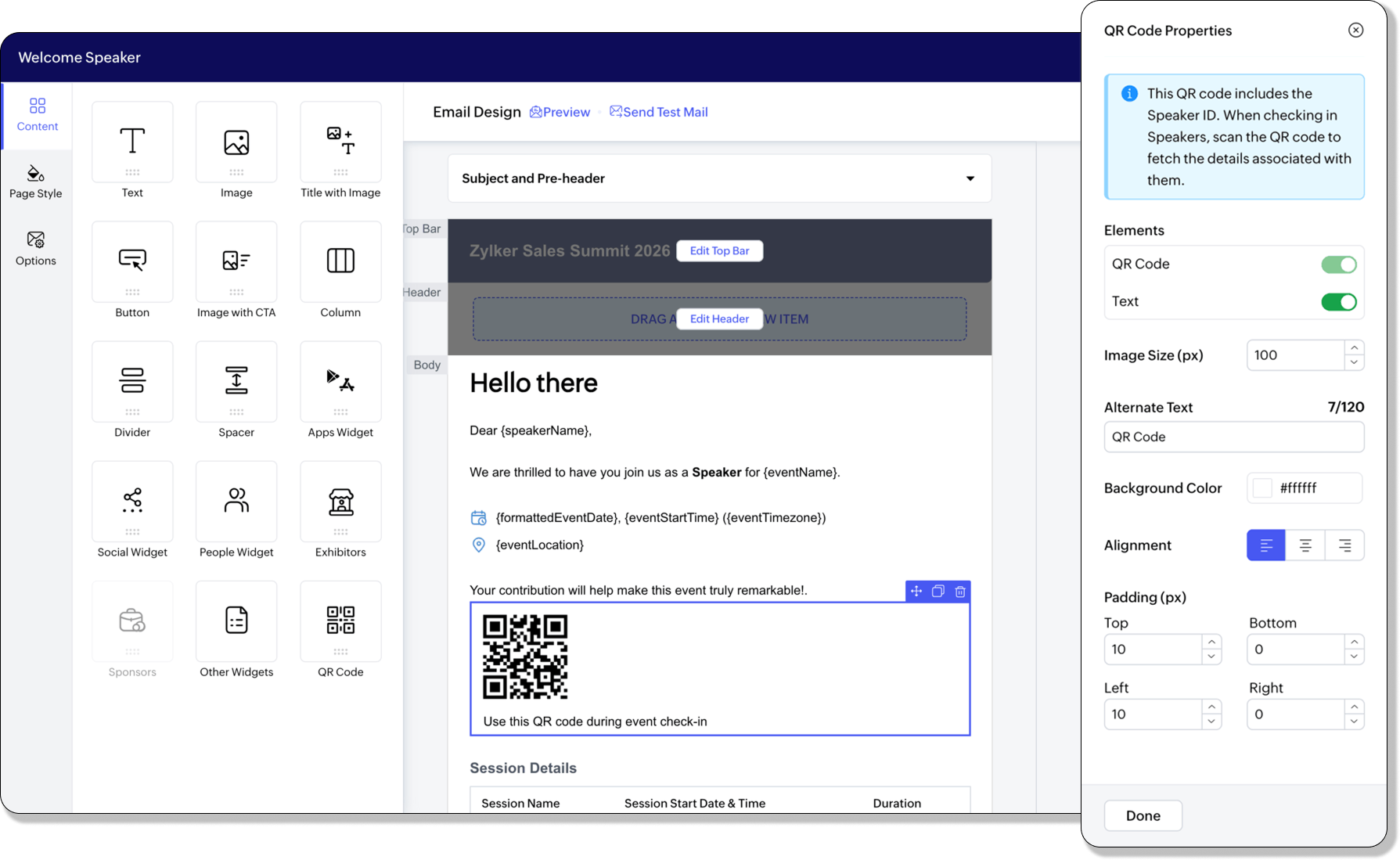
We’ve expanded QR code support across more automated and scheduled emails, making event entry and session access smoother for every role.
In addition to the existing QR code widget in Send Registration Details, Welcome Assignee, and scheduled attendee emails, QR codes can now be added to emails sent to speakers, sponsors, exhibitors, and RSVP guests.
QR codes can also be added to emails sent to speakers, sponsors, exhibitors, and RSVP guests.
Newly supported automated emails include:
- Welcome Speaker and Session Updated emails for speakers
- Inform an early sponsor that the website is live and Welcome and thank a sponsor who contributes after the website is live emails for sponsors
- Exhibitor Request Approved and Invite Booth Member emails for exhibitors
QR code support has also been extended to scheduled emails sent to speakers, sponsors, exhibitors, and RSVP guests attending the event.
Plan availability: Included in the Free, Essentials, Premium, and Ultimate plans for automated emails. Included in the Essentials, Premium, and Ultimate plans for scheduled emails.The road ahead: 2026 & beyond
This January release is just the first spark. This year, Backstage is undergoing a massive transformation in capabilities and performance. We're engineering the platform to handle more data, more users, and more complexity than ever before without breaking a sweat.
We aren't just a tool; we’re your partner in scaling your impact. Let’s make 2026 the year your events become legendary.
All the features and enhancements mentioned in this article are available across all Zoho Backstage-supported data centers.
If you have any questions or need access to early access features, please contact support@zohobackstage.com.
Topic Participants
Jithan Raghuraj
Recent Topics
Bring Zoho Shifts Capabilities into Zoho People Shift Module
Hello Zoho People Product Team, After a deep review of the Zoho People Shift module and a direct comparison with Zoho Shifts, we would like to raise a feature request and serious concern regarding the current state of shift management in Zoho People.Facturation électronique 2026 - obligation dès le 1er septembre 2026
Bonjour, Je me permets de réagir à divers posts publiés ici et là concernant le projet de E-Invoicing, dans le cadre de la facturation électronique prévue très prochainement. Dans le cadre du passage à la facturation électronique pour les entreprises,Quick Create needs Client Script support
As per the title. We need client scripts to apply at a Quick Create level. We enforce logic on the form to ensure data quality, automate field values, etc. However, all this is lost when a user attempts a "Quick Create". It is disappointing because, fromHow to block a WhatsApp user for sending spam
Is there a way to block those whatsapp users that just come to play and annoy our service, they also spam us. We have a waba service with sales iqInquiry regarding auto-save behavior for Zoho Sign Embedded Sending
Dear Zoho Support Team, I am currently integrating Zoho Sign's Embedded Sending functionality using iframes on my website. I would like to know if there is a way to ensure that the document state (including any added fields) is automatically saved asIntroducing Connected Records to bring business context to every aspect of your work in Zoho CRM for Everyone
Hello Everyone, We are excited to unveil phase one of a powerful enhancement to CRM for Everyone - Connected Records, available only in CRM's Nextgen UI. With CRM for Everyone, businesses can onboard all customer-facing teams onto the CRM platform toAutomation#17: Auto-Create Tasks in Zoho Projects Upon Ticket Creation in Zoho Desk
Hello Everyone, This edition delivers the solution to automatically create a task in Zoho Projects when a ticket is created in Zoho Desk. Zylker Resorts uses Zoho Desk for bookings and handling guest requests. Zylker resorts outsources cab bookings toAutomation#20 : Auto-Add Ticket Tags based on Keywords
Hello Everyone! Welcome to unveiling custom functions on our Community series. This week's post lets you add tags to your tickets automatically based on the keywords in the ticket subject and the ticket thread. Discover how this custom function helpsAutomation#21: Track Ticket Transfers Across Departments
Hello Everyone! With Halloween just around the corner, we'd like to let you know the Zoho Desk team is always there to sweep away your customer service troubles! This week, we’re excited to introduce a custom function that tracks tickets moved betweenEmail Integration - Zoho CRM - OAuth and IMAP
Hello, We are attempting to integrate our Microsoft 365 email with Zoho CRM. We are using the documentation at Email Configuration for IMAP and POP3 (zoho.com) We use Microsoft 365 and per their recommendations (and requirements) for secure email we haveHomepage not assignable to group
MS Teams for daily call operations
Hello all, Our most anticipated and crucial update is finally here! Organizations using Microsoft Teams phone system can now integrate it effectively with Zoho CRM for tasks like dialling numbers and logging calls. We are enhancing our MS Teams functionalityAutomation#22 Track Ticket Duration at Specific Status
Hello Everyone! Welcome back to the Community Learning Series! Today, we explore how Zylker Techfix, a gadget servicing firm, boosted productivity by tracking the time spent at a particular ticket status in Zoho Desk. Zylker Techfix customized Zoho Desk’sAutomation#23: Automate Guided Conversations in Zoho Desk with Business Hours
Hello Everyone, This week's edition introduces a custom function designed to automate Guided Conversations in Zoho Desk, based on your business hours. With this feature, you can align the bot's behavior with your business schedule, ensuring a smooth andAddress changes in quote form
When entering a quote, the first piece of information required is the Account, which properly populates the billing and shipping address fields. Then I use the lookup function to select a contact, and when I do, the billing and shipping addresses areAutomation#24: Auto-Update custom field from Accounts to Tickets
Hello Everyone! Welcome back to the Community Learning Series! This episode dives into how Zylker Techfix streamlines account-related ticket references. Previously, employees had to manually check account details to retrieve specific customer information,Kaizen #227 : Client Script Support for List Page (Canvas)
Hello everyone! Welcome to another week of Kaizen. In today's post lets see how Client Script can be used in Canvas List Page to mask sensitive information from specific roles and add colors to Canvas List Page records based on custom criteria.This useImplement Date-Time-Based Triggers in Zoho Desk
Dear Zoho Desk Support Team, We are writing to request a new feature that would allow for the creation of workflows triggered by specific date-time conditions. Currently, Zoho Desk does not provide native support for date-time-based triggers, limitingAutomation#25: Move Tickets to Unassigned When the Owner Is Offline
Hello Everyone, Welcome to this week's Community Series! 'Tis the holiday season—a time when work often takes a brief pause. The holiday spirit is in full swing at Zylker Techfix too, with employees taking some well-deserved time off. During this period,Automation#27: Retain Ticket Owner on Moved Tickets
Hello Everyone! This week, we present to you a custom function that retains the ticket owner when a ticket is moved from one department to another. Here’s more to help you understand the custom function: At Zylker Techfix, Alex, the Support Engineer managesAutomation#28 Notify Agents on Article Expiry
Hello Everyone! This week, we’re bringing you a feature that notifies your team when articles in the Knowledge Base are set to expire to keep your content relevant and helpful for customers. The Zoho Desk's Knowledge Base is an asset for customers toAutomation#29 Retain ticket status on moved tickets
Hello Everyone, Hear out Zylker Techfix’s Success Story on Smoother Ticket Transitions! Zylker Techfix, a gadget servicing firm committed to quick repairs and timely deliveries, faced a challenge when ticket statuses changed automatically while movingAutomation#32:Auto Add New Portal Users to the Help Center User Groups
Hello Everyone, Introducing a custom function that automates the process of adding new portal users to Help Center user groups, making user management effortless! By default, Zoho Desk allows you to assign new portal users to groups manually. But withAutomation#34 : Automate Email threading for Ticket notification
Hello Everyone, It's been a while since we've presented an automation. However, our community has been buzzing with ideas, use cases, and discussions with our community experts and Ask the Experts session. So, here we are again, presenting an automationAutomation#35 : Auto-Add Comments under the Owner's Name in Tickets via Macros
Hello Everyone, This week's custom function provides simple steps to configure a Macro for adding comments to tickets with the name of the Comment owner. When managing tickets, you can use the Comment feature to communicate internally with your team andAutomation#36: Auto-create time-entry after performing the Blueprint transition
Hello Everyone, This week’s edition focuses on configuring a custom function within Zoho Desk to streamline time tracking within the Blueprint. In this case, we create a custom field, and request the agent to enter the spending time within the singleAutomation#33: Automate Splitting Names for Existing Contact Records
An organized directory – who doesn't love one? Previously, we explored how to split contact names into First Name and Last Name for new contacts in Zoho Desk. But what about existing contacts already in your database? This week, we bring you a customWorkqueue
I really like the idea of the Workqueue generally - it will be really useful. What it seems to lack however, is the ability to customise it properly. I want to be able to show a custom view rather than just "My Leads" and "Leads Assigned in Last 3 hours".Webform & spam
Hi, We set up 2 webform on our website, fowarding the content to Zoho CRM. Since it has been opened up, we are getting lot of spam message (for now about 20 a day). To lower the amount of false new leads we added the captcha field and new enquieries areZoho CRM Web form page URL
Hi there, I am getting quite a bit of spam through my Zoho CRM Web form and want to restrict the URLs it is submittable from. I can see that I can add Location URLs but I need to be able to just add a domain so can I enter mydomain.com/* to cover allReceiving too many Spam Leads. Why?
I am receiving so many junk leads from web forms created by zoho's platform. The junk queries are increasing day by day and are affecting our business. I am continuously following up with zoho team from the past one year but not getting any satisfactoryMail Merge is not working properly as far as the AUTOMATE section is concerned
Hi there, I created a Mail Merge template for the Deal module. I would like Deal owners to mail merge their Deal records, download the Mail Merge document as a Word doc and make a few changes before sending it to the customer. Thing is, neither the "MergeCanvas Detail View Related List Sorting
Hello, I am having an issue finding a way to sort a related list within a canvas detail view. I have sorted the related list on the page layout associated with the canvas view, but that does not transfer to the canvas view. What am I missing?project name field issue- n8n
Hey guys, I have a question. I want to create a new product using the workflow. The problem is with the product name field; I don't know how to fill it in. The workflow starts with retrieving information from the leads table, retrieving links to scrapeFunction #20: Custom calculation in item table of invoices
When you create an invoice in Zoho Books, the 'Amount' of a line item is typically calculated as the product of the "Quantity" and the "Rate" of the item. For instance, if an item has a sales rate of $50 and a quantity of 5 is sold, then the amount wouldCritical:- Eneble TDS filing for 26Q from the zoho book
We currently extract TDS data from Zoho Books and manually input it into a separate TDS software to generate the FUV file and file returns. Previously, while using Tally, we benefited from an integrated feature that seamlessly recorded transactions andHow to track repeat customers?
I own a food business and every order is entered into Zoho with: a unique Customer ID total order amount date of order With this information, I want to be able to see a list of my "best" customers. In other words, descending lists arranged according to:How to hide or archive a blog post temporarily in Zoho commerce website builder?
I would like to temporarily hide or archive a blog post in zoho commerce website builder so that it doesnt appear on my website till I enable it again. I tried to look for this option but could not find it. It only allows me to permanently delete a blogZoho Books - Breaking A Working App
We've been using Zoho for many years now. Across all apps, entering phone numbers in standard formats was enabled in all apps. These formats are: xxx.yyy.zzzz xxx-yyy-zzzz (xxx) yyy-zzzz and we were able also to add extension numbers in these formats:Build data protection into your support
At Zoho, privacy is our principle. Every Zoho product is built with privacy as the foundation and the finishing touch, guiding every decision we make. Security, privacy, and compliance are woven into the software development lifecycle, starting from howNext Page