Zoho Creator | Introducing Augmented Reality
We're delighted to announce augmented reality (AR) in Zoho Creator! Now, you can set up your own immersive 3D experiences—combining a glimpse of the real world with computer-generated graphics. AR technology augments what you see, by superimposing digital data (3D models) on real-life objects, captured by your device camera. This real-time digital interaction provides better data visualization and enhances end-user experiences, providing you with exciting new business opportunities.
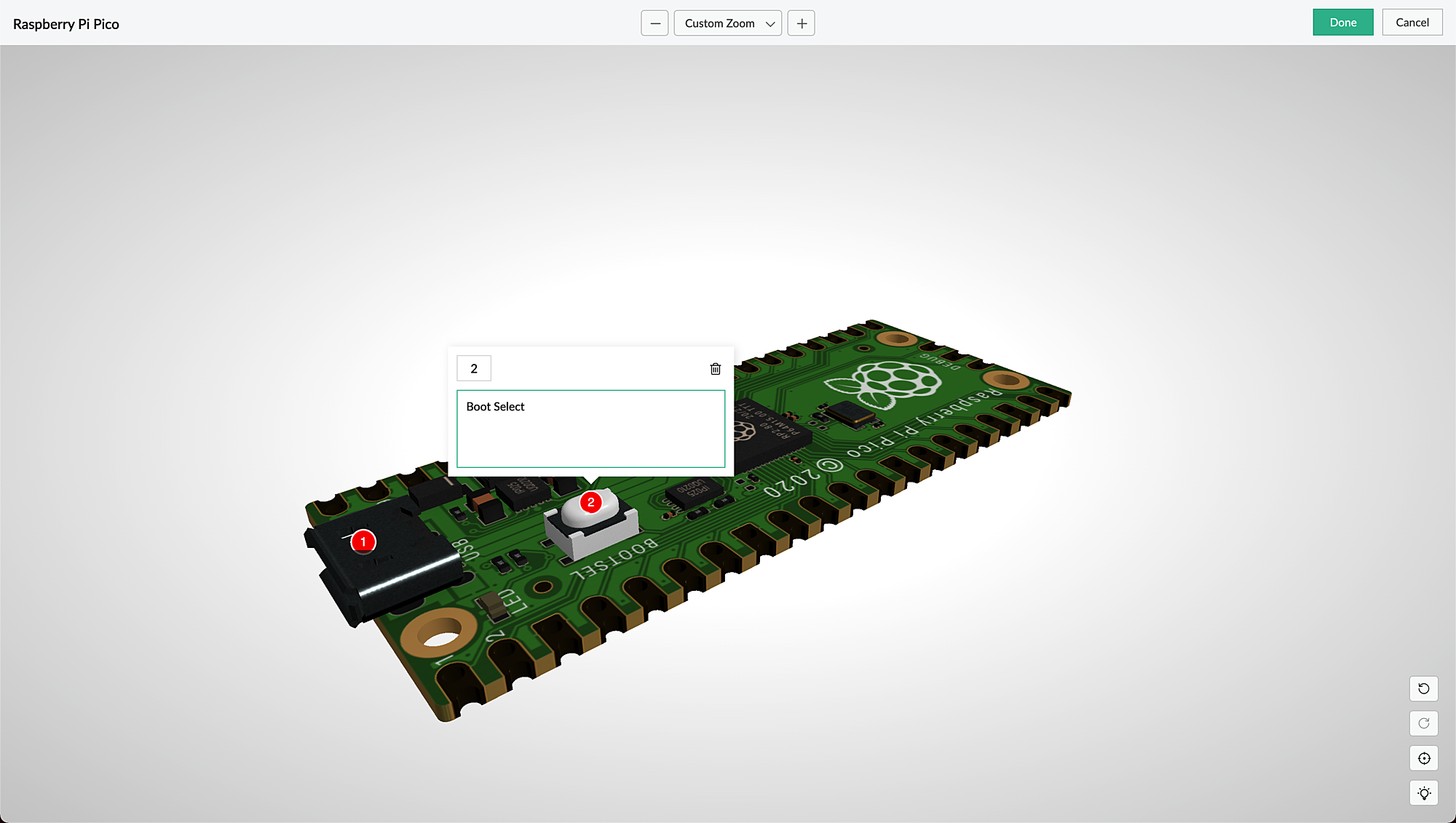
AR is seamlessly accessible via web browsers, smartphones, and tablets, which facilitates the growing interest in multi-experience development platforms (MXDPs). Using AR, your businesses can provide unique approaches to key business challenges in real-world applications.
AR can enhance user experience in many ways:
Organizations can use AR to promote their products or services and launch innovative marketing campaigns.
A rich feedback loop can be created using AR in product customization and quality, where users can select the defective products and also annotate the 3D models by describing the defects.
Users can try out different products virtually, check if a product fits well in their rooms (in the case of furniture products) by either partial or full replacement of the original view of a product with an augmented view of the same product, and make informed choices, all within the comfort of their homes.
AR types in Creator
Marker-based AR: This AR-type relies on the recognition of images (referred to as markers). Markers are unique, visual patterns that your device cameras can easily recognize and process. For example, you can point your devices at markers such as scan codes or logos to seamlessly activate the AR experience. Marker-based AR works by scanning a marker, which triggers the content to be overlaid on the camera upon visuals matching the marker image For example, students can scan a diagram in their textbook and view its 3D model (projected on the diagram) through their digital devices.
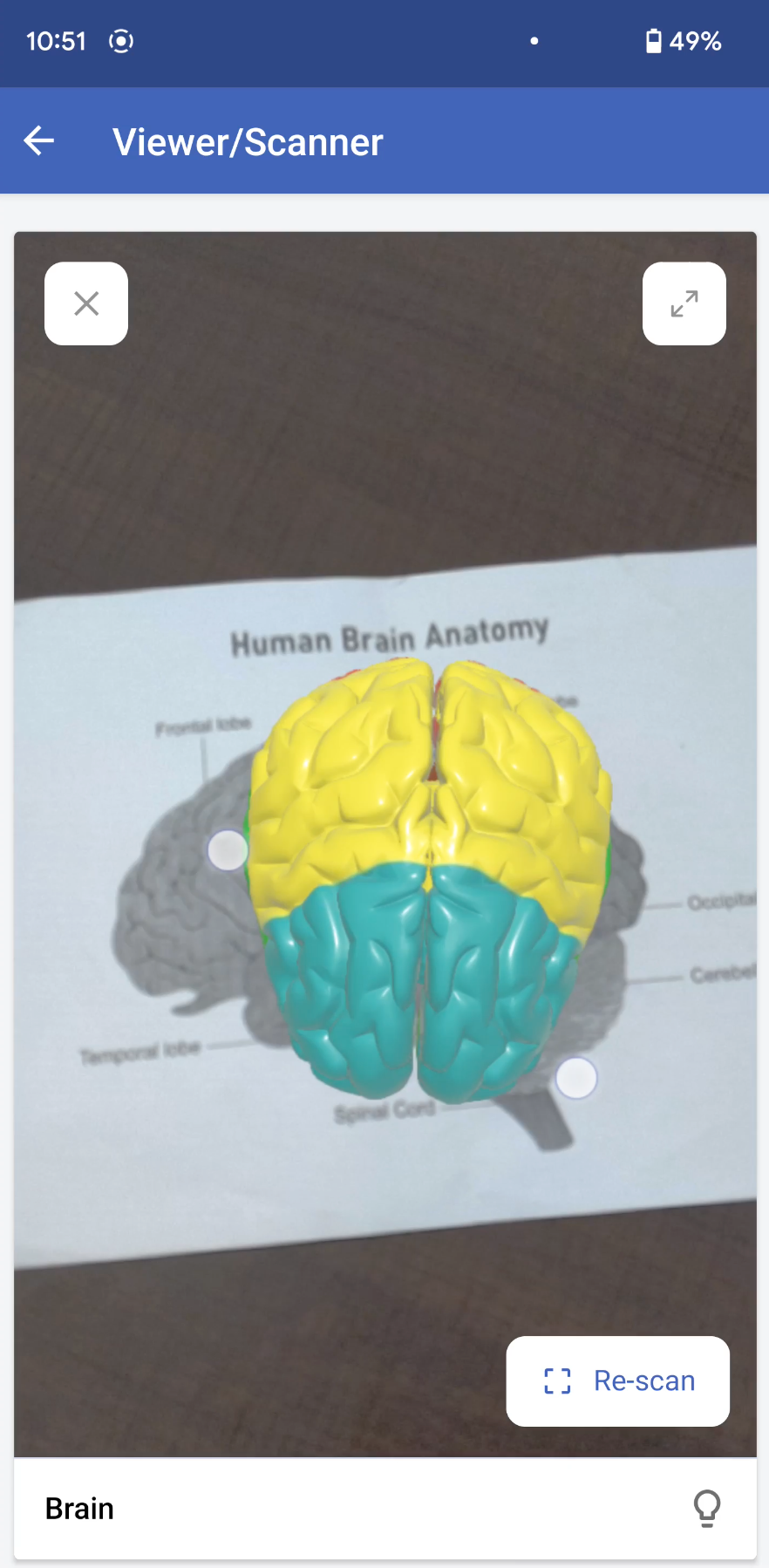
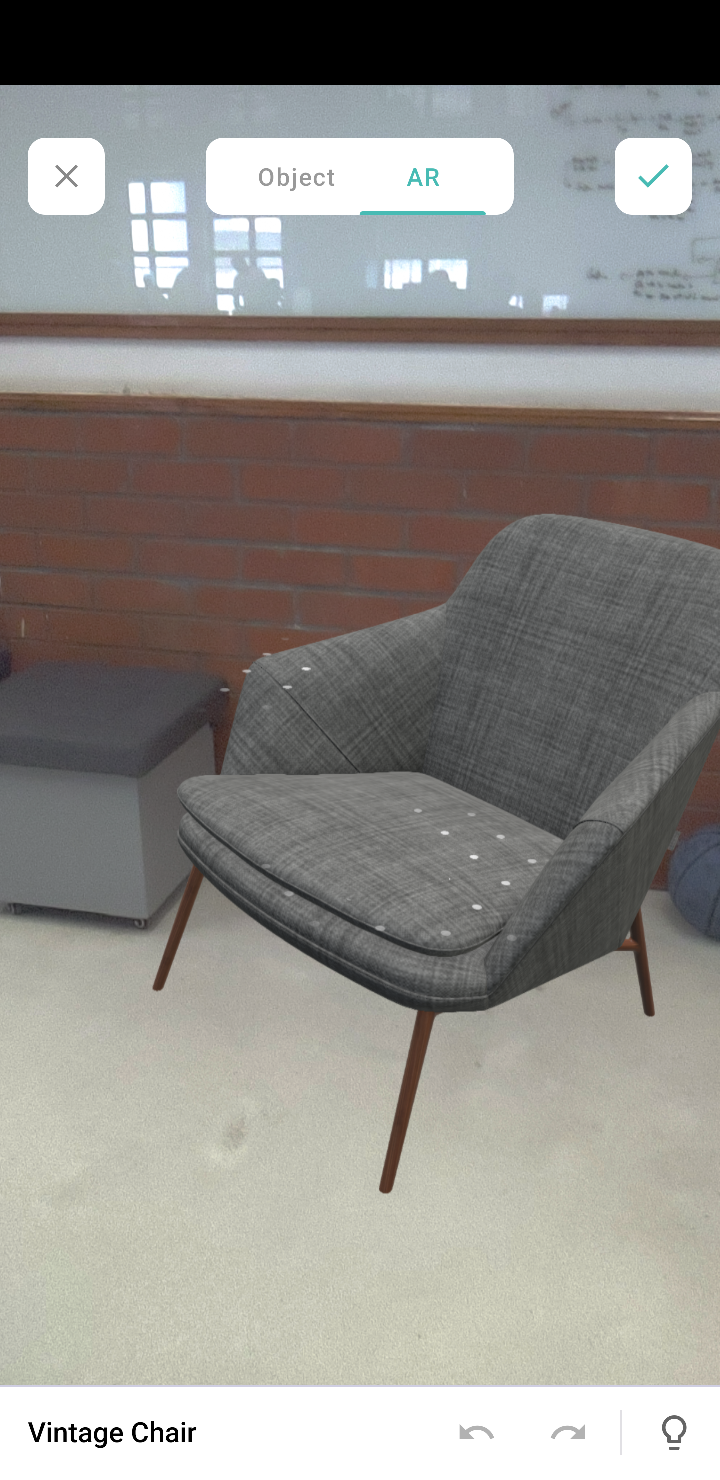
Markerless AR: This AR type does not use a marker. Instead, it allows you to scan the real environment and place digital elements on the recognized (flat) surface. This offers more control to users, as it allows them to choose where they would like to place the virtual object (including real-life placement of virtual augmented objects). For example, furniture companies can enable customers to virtually place their furniture in their homes to check if it would fit well.
In the markerless AR type, users can preview the models in the following two modes:
AR mode: This mode displays the 3D model as superimposed on its environment. Users can rotate/move their devices to view the plotted model.
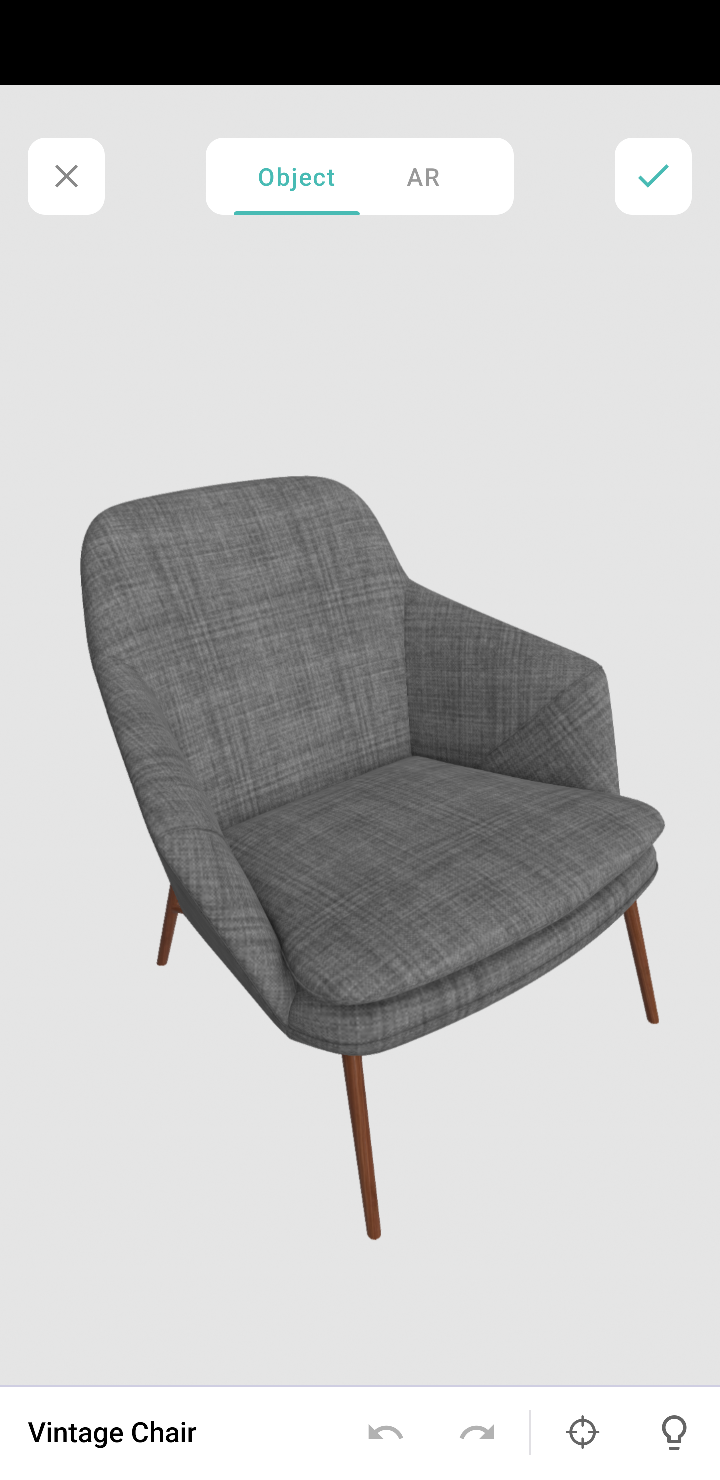
Object mode: This mode displays only the 3D model. It allows you to view the selected/scanned model in a 360˚ rotation. You can also zoom in and zoom out the model, as per your convenience.
Note: These modes are available in the AR field and AR viewer (only for markerless inputs).
AR in Creator
In Creator, AR has been introduced across three modules:
Microservices - AR Library
Form fields - AR field
Pages - AR Viewer
AR Library
AR library stores AR sets of all the apps in your Creator account. You can add and manage AR sets from here. An AR set consists of AR elements such as 3D models and their markers.
AR field
The AR field in a form displays the AR sets (3D models) from the AR library as a dropdown. You can add the AR sets in the AR Inputs field property. When you access your app in live, you can choose a model from either marker-based or markerless AR sets, and you can annotate it.
AR Viewer
The AR Viewer acts as an interface for your device's camera. This interface is used to invoke the camera (only in mobile) to scan a marker for your marker-based AR sets. In your app's page, you can configure the AR Viewer's input in two ways:
Marker-based AR Sets: To scan the marker and plot the respective 3D model.
Passing the 3D model's name through page parameters to load a 3D model directly.
Illustration
1. Imagine you've created an app named Zylker Jewelry. The following flowchart shows how AR is used across this app.
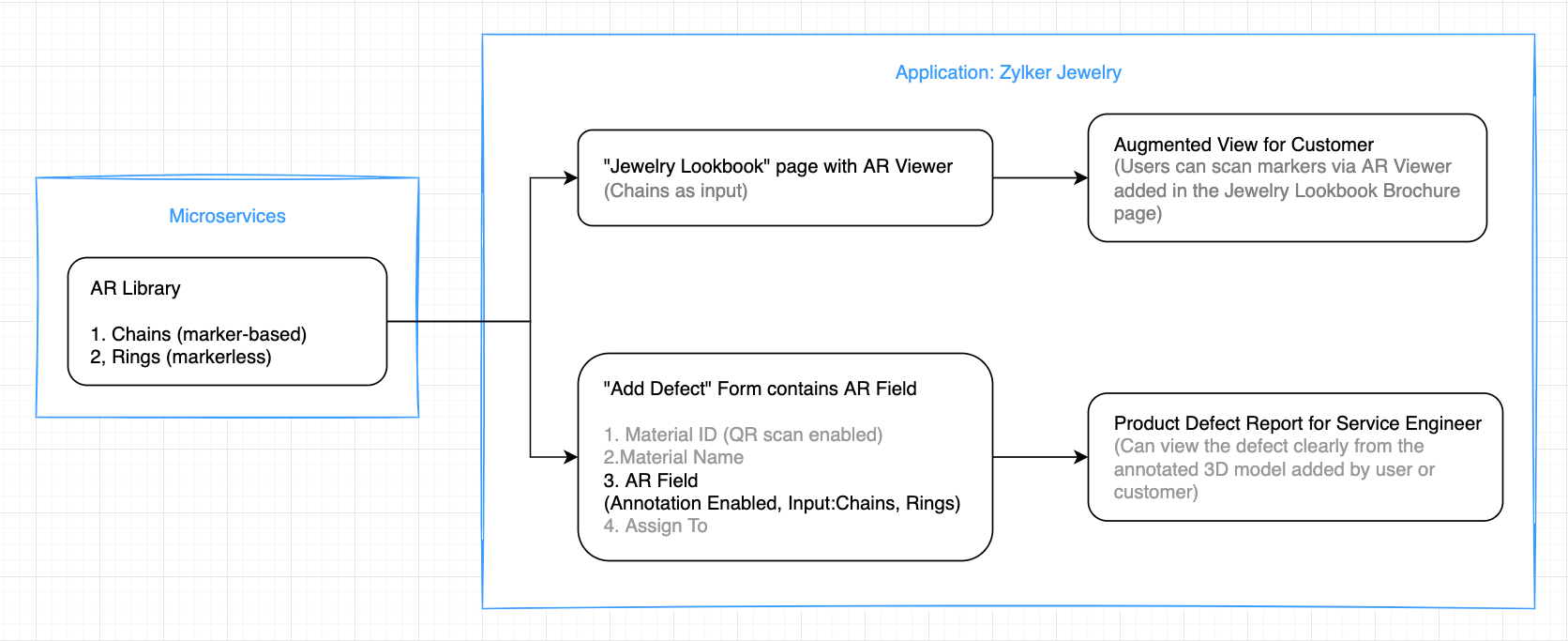
This app enables you to perform the following actions:
(i) Users can use the scanner (AR viewer) on the app's Jewelry Lookbook page to scan the various designs available on your brochure and view them as popup models. They can rotate, zoom in and zoom out, and view the models in full-screen as well.
(ii) Quality assurance engineers can select 3D models of the defective jewels and also annotate them by describing the defects.
Let's take a look at how the above actions can be configured in the Zylker Jewelry app.
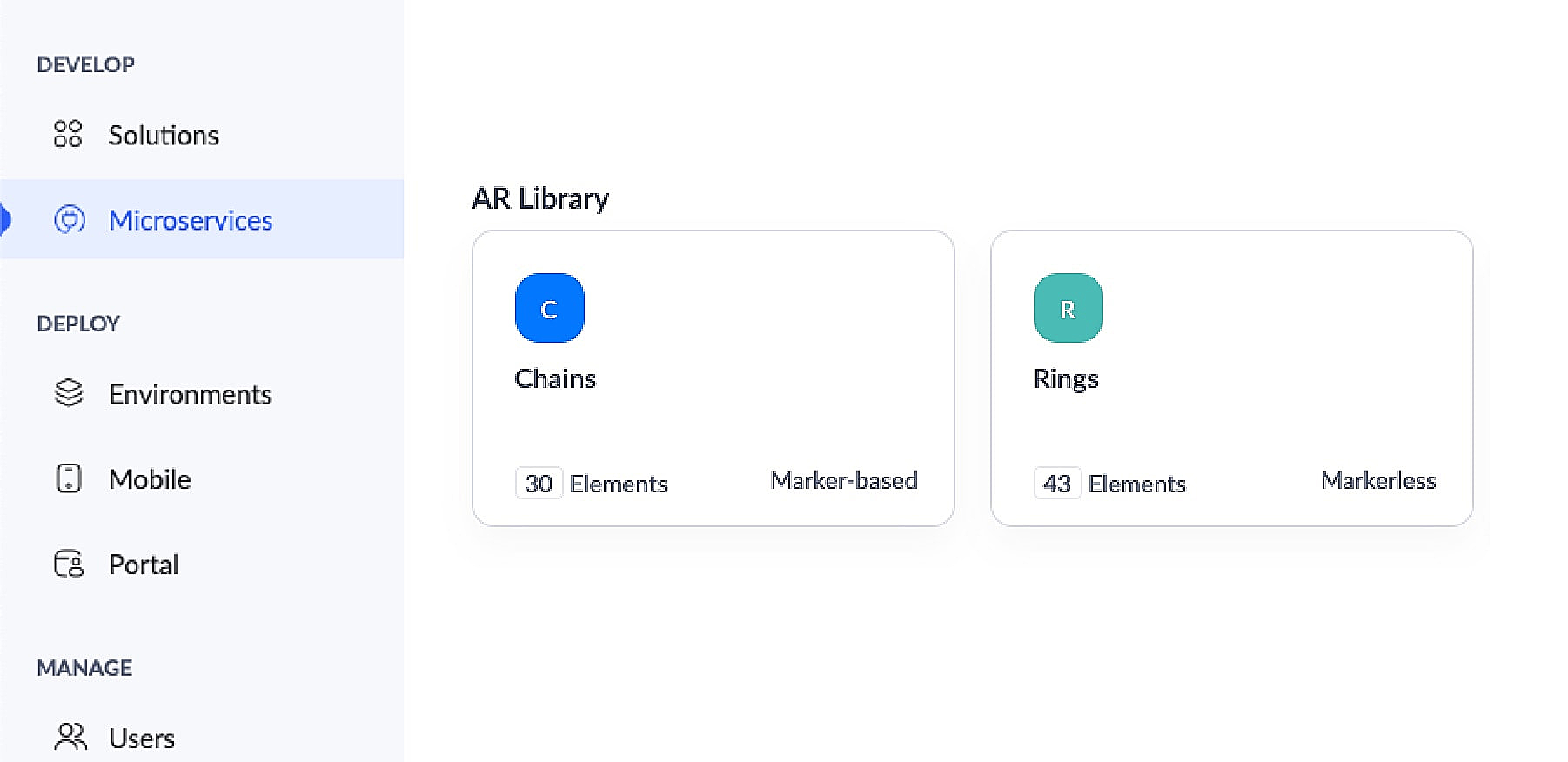
This app has an AR library that contains 3D models of chains (marker-based) and rings (markerless).
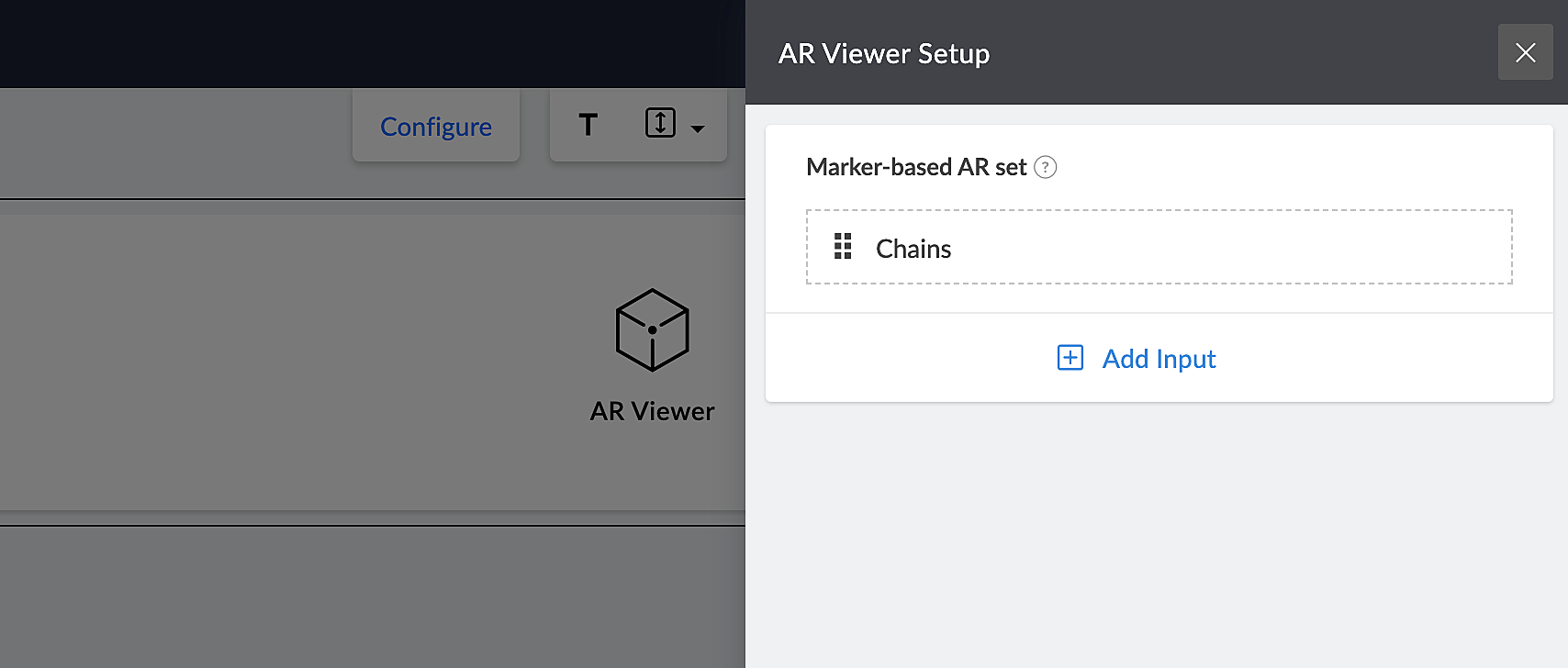
The app's Jewelry Lookbook page has an AR Viewer element with the 3D models of chains as its input. When users access this page, they'll be able to scan the brochure and view the available chain designs on their devices.
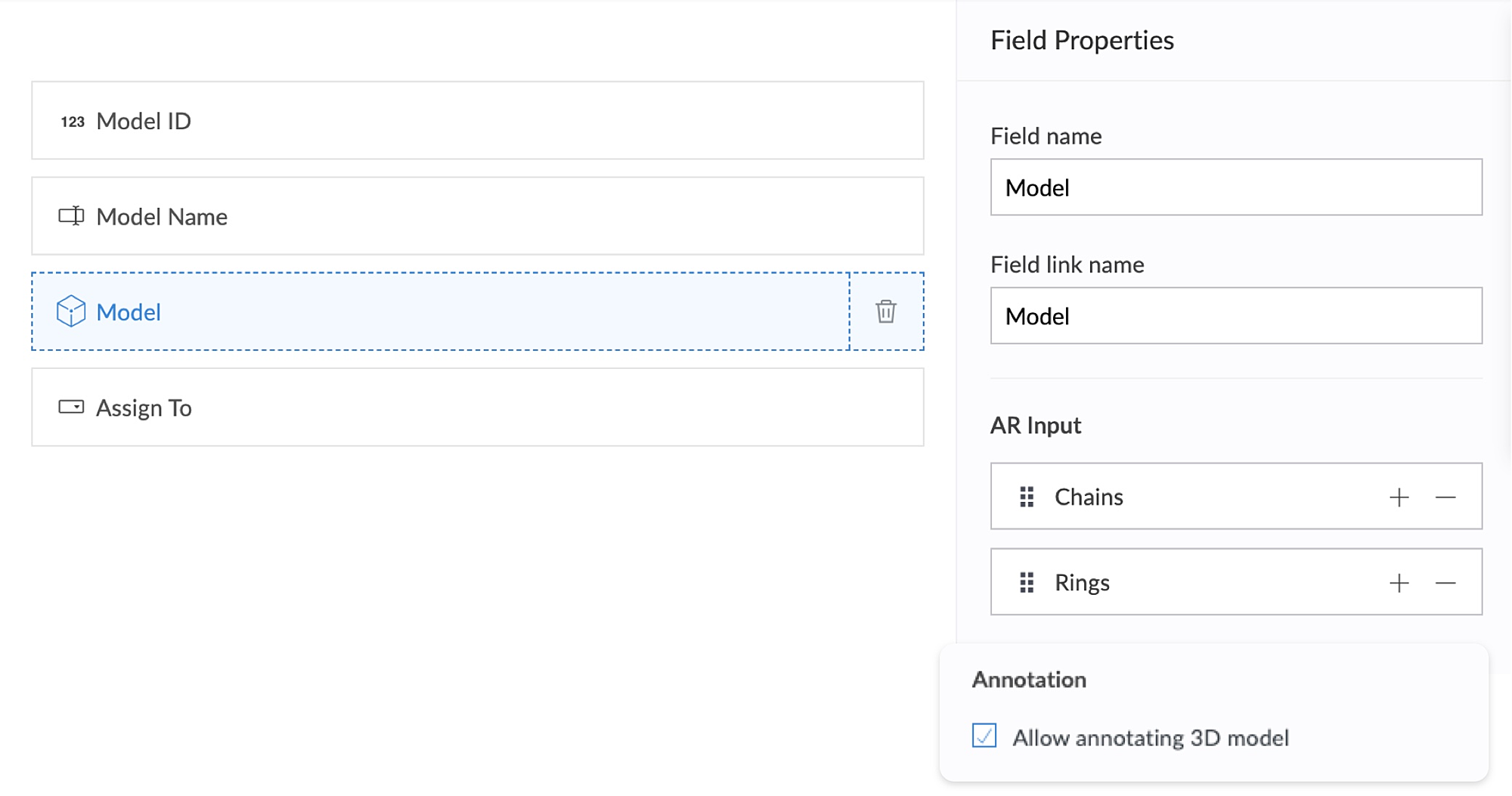
The app's Add Defect form has an AR field containing the 3D models of chains and rings as its AR input. Quality assurance engineers can select the 3D models of defective jewelry from the dropdown and annotate the models by describing the defects. This form also has an Assign To field, that assigns the defect to the designated Service engineer, who can view and take appropriate action.
2. Using AR, classroom education can become all the more intuitive and interactive, as it enables teaching staff to demonstrate virtual examples of textbook concepts. This, in turn, will enable students to engage more actively, learn faster, and memorize information more easily.
Let's take a look at Zylker Schools of Learning, a learning app created for teachers and students. This app facilitates interactive learning through AR technology used across the following components. Apart from these, AR functionality can also be accessed via your mobile applications.
AR Viewer
AR field
AR Viewer:
This app has an AR library that contains textbook diagrams as markers, along with their 3D models. The app's Virtual Book page has an AR Viewer element with the 3D models as its input.
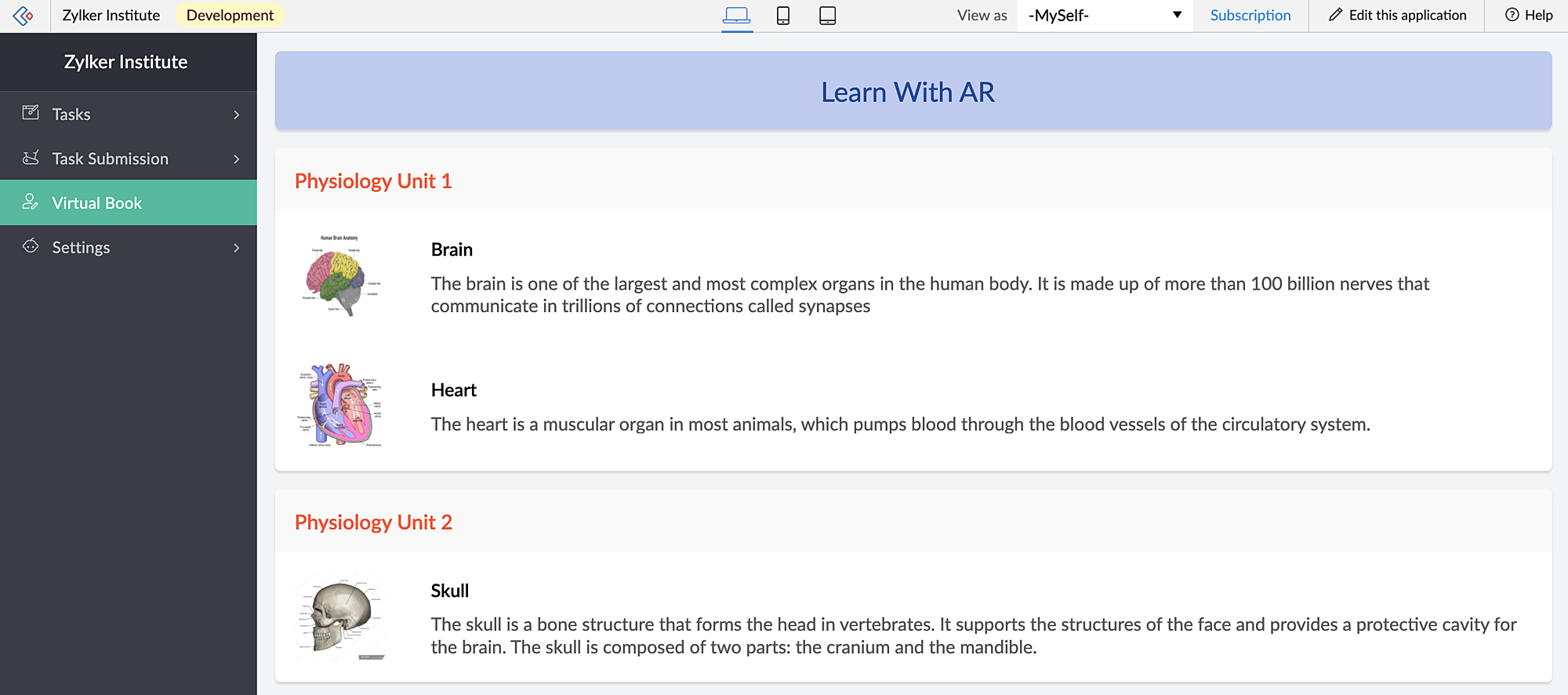
When students access this page, they can click the diagrams and view them in both AR mode and Object mode — rotate, zoom in and zoom out and view in full-screen as well.
When you access the app via mobile, apart from viewing the diagrams in AR Viewer (similar to web), students can also open their device scanner, scan their textbook diagrams and view them as plotted (popup) models on top of their textbook.
AR field:
This app has a New Task form that contains an AR field. This field has 3D diagrams as its input. You can assign tasks to your students, asking them to annotate the 3D models and also view the submitted tasks.
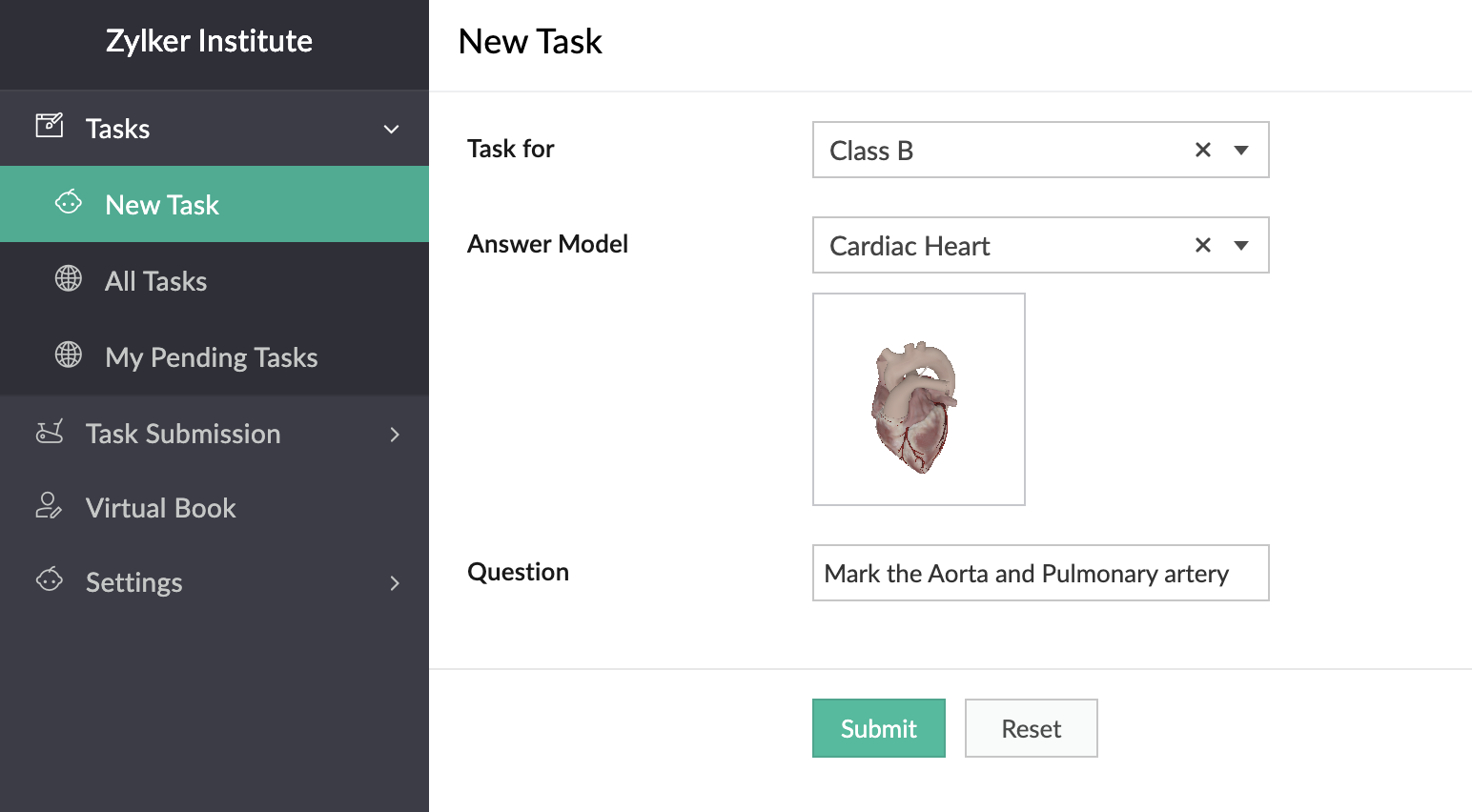
In the below GIF, the demo user Demo 3 is the Teacher profile and Demo 1 is the student profile.
You can also place stickers of the textbook diagrams on your classroom walls, which can be scanned by your students through the provided devices. Upon scanning the sticker, they can view, rotate, and annotate the 3D model of the scanned image which is mapped in the AR Library.
Thus, AR helps in explaining otherwise plain textbook concepts in a visually-appealing manner.
Feature release plan
AR in Creator will be available in C6 for Paid plan users only.
If you have any questions related to AR, please feel free to contact us at support@zohocreator.com.
Regards,
The Zoho Creator Team
Topic Participants
Meghaa Pradyumnan
Catherine
Damien Cregan
PARTHIBAN VALLAVAN
Sriram U
Sticky Posts
Introducing Zoho Creator's 2025 Release Projection 2
Hello Creators! I'm Prakash, from the Creator product management team, and today I'm delighted to unveil our next set of features as part of Release Projection 2 for 2025. With thoughtful analysis and planning, we've curated powerful new capabilitiesZoho Creator - 2023 Release Projection 1
Hello everyone! A very Happy New Year to you and your family. Hope you're all good and having a great time using Zoho Creator to make your lives easier and your businesses prosper. 2022 was an action-packed year for us at Creator, and we hope to continueZoho Creator User Group meetups in a city near you! - Oct - Nov, 2023
Greetings from the Zoho Creator team! We're hosting a series of Zoho Creator meetups in various cities across the globe, and we'd love to meet you there! Our meetups are a great opportunity to network with industry peers, exchange ideas and best practices,Zoho Creator - 2023 Release Projection 2
Hello everyone! Time truly flies when you're having an incredible journey, and today we mark the completion of an eventful and action-packed six months. It feels like just yesterday when we embarked on this adventure together with the launch of our newUpcoming Updates - August 2022
Hi all, Greetings from the Zoho Creator team! Today we've got news for you on some exciting updates. And rest assured— there’s more to come! In this post, we'll be going over the upcoming features and improvements for this month as mentioned below. A
Recent Topics
Operation Not Permitted
Hi, I have problem in adding user after verifying the domain but it seems like error appeared which is "operation not permitted". For your information, I had delete other domain before did it.Email forwarding setup fails
I'm trying to set up email forwarding from my Zoho email to my gmail address. I followed the directions to set up email forwarding here: https://www.zoho.com/mail/help/email-forwarding.html. I did only steps 1-6. After doing this, rather than settingShopify store email issues- Not getting emails
Hi We have migrated from Microsoft outlook to Zoho back in March, we have a shopify store, the domain is hosted on namesilo, not shopify, I have seen some people here complaining about not getting emails from customers who fill out the contact form onHow do I fix this? Unable to send message; Reason:554 5.1.8 Email Outgoing Blocked.
How do I fix this? Unable to send message; Reason:554 5.1.8 Email Outgoing Blocked.Invoice Discount Account
Is there a way to change the account used for Discounts applied to an invoice? The current Discount account (ZB native account) type is an "Income" type. I would like to change it to "Other Income", but that is not possible, I am assuming because it containsNeed Inactive accounts to be visible in Reports in Zoho Books
I N=need Inactive accounts to be visible in Reports in Zoho Books to do recons of the accounts but when i see the same they are not visible in the Accountant - Account Transactions reportjavax.mail.authenticationfailedexception 535 authentication failed
Hi, I am facing 535 authentication failed error when trying to send email from zoho desktop as well as in webmail. Can you suggest to fix this issue,. Regards, RekhaPhantom Opening Balance
While experimenting w/ creating a composite item, Zoho added funds to Petty Cash and added Bank Account equal to previous day's balance. I'm unable to undo the adding of funds. Attaching screenshots of both bank account and petty cash transactions.Importing customer comments and multiple shipto addresses
I am evaluating Zoho Books and have most of my data imported with two exceptions: (1) Import customer comments - in my current system I have several comments of different types, and I need to bring these into Zoho. Preferably Books customer records, butDetailed Account Reports - Add Running Balance
When one clicks into an account from a report (say P/L or Balance Sheet), the default reports have the Debit, Credit, and then the Amount. The Amount column (last one) is duplicate information. It would be far better and fit more peoples' use cases ifHow to Billed from two different GST Numbers
How to Billed from two different GST Numbers. Suppose ABC & Co had GST registration in Delhi and Haryana and Zoho account is created with Delhi GST Registration number. Now i also want to issue invoice from Haryana GST Registration number. How can i proceed ?Zoho IP blocked by SpamHaus
ERROR CODE :550 - 5.7.0 Your server IP address is in the SpamHaus SBL-XBL database, byeIMAP Communication Problems - IMAP Down Again
We are experiencing the same problems over the last week or so that were supposedly 'solved' according to this thread. Zoho Imap Down Again This is affecting attempts to use IMAP on multiple ISPs and users so is definitely narrowed down to Zoho problems.Can't login to Zoho mail
I'm logged into Zoho but when I try to go in zoho mail I get: Invalid request! The input passed is invalid or the URL is invoked without valid parameters. Please check your input and try again. I just set up my mx records and stuff with namecheap a fewHotmail is STILL blocking the zoho mail IP
Greetings, as I already mentioned in my last message, my Zoho IP has been blocked by Hotmail for more than 15 days. Although someone said that the issue was "solved," it still isn't, and this amount of time seems neither normal for a "serious" company,Keyboard shortcut M key
I'm trying to customize my keyboard shortcuts and assign the "m" key. But it says the key is already assigned. I've looked through all my shortcuts and can't see any assigned "m". When I select an email and press the M key, nothing happens. What is theManage customer access across multi-brand help centers
Hello everyone! Managing customer's access across multiple brands has been streamlined with the ability to invite, reinvite, approve, reject, and deactivate contacts individually for each help center brand . This enhancement gives administrators preciseWhite Label certificate
Hi all, About 72 hours ago, we fulfilled all steps for white labeling (CNAME to point to mail.cs.zohohost.eu), but since then the configuration page is now stuck at "generating certificate" since 3 days. When I execute an NSLOOKUP mail.webfoundry.be itUnusual activity detected from this IP. Please try again after some time
When i try to create new addresses on my account i am getting this error, it has been 24 hours now and i am still getting this error can anyone helpHow to add a new domain in my account?
Probably zoho has the worst UI in the market. Cannot add a new domain to manage a new email address.Ability for admin to access or make changes in zoho form without asking for ownership
Currently in zoho form only form owner can make the changes in the form and if someone else has to make changes then we have to transfer the ownership to them and even admin also cant access it . So i think admin must have the ability or option to accessReport sorting not working
I make extensive use of Summary reports and Pivot Tables. Most of these reports are structured such that I have several columns of "information" data that I want displayed, followed by one or more "Data" summarizations. For example, I have the followingNew Enhancements in Wizards
Dear All, Wizards help you break a long form into a series of smaller forms on different screens, making it less overwhelming. We are thrilled to introduce a couple of enhancements to wizards in Zoho CRM: Enhancements for conditional rules in WizardsMicrosoft Teams now available as an online meeting provider
Hello everyone, We're pleased to announce that Zoho CRM now supports Microsoft Teams as an online meeting provider—alongside the other providers already available. Admins can enable Microsoft Teams directly from the Preferences tab under the MeetingsFind and Merge Duplicates to trigger webhook
My sales team uses the Find and Merge Duplicates feature often to cleanup records in the CRM. We use webhooks to signal to our internal tools database when new Contacts are created, updated, or deleted, in order to keep our DB in sync with Zoho CRM. However,Charting the 2025 Voyage: Zoho Invoice's Year in Review
2025 has been a year of progress, productivity, and purposeful growth for Zoho Invoice. From expanding into new regions to refining everyday workflows, each update was designed to help businesses stay compliant, get paid faster, and work with confidence.How to Hide System-DefinedTemplates in Service Report
Is there any option available to hide system-defined templates? these templates are causing confusion for field users.WhatsApp Report in Bigin CRM
Reporting feature for Bigin CRM’s integrated WhatsApp that provides insights such as: Number of WhatsApp conversations closed Number of messages sent and received Number of conversations replied to Response and closure metrics for WhatsApp chats MoreIssue with Azure DevOps Integration in Zoho Flow
Hello, All workflows between Zoho Flow and Azure DevOps have stopped working for several days now. Upon further investigation, it seems that the connection to Azure DevOps is no longer directly supported. Indeed, Microsoft has deprecated the Azure DevOpsNarrative 16: Simplify with workflows
Behind the scenes of a successful ticketing system: BTS Series Narrative 16: Simplify with workflows What is a workflow? A workflow organizes business tasks in a defined sequence that makes each step clear to all participants. This ensures work is completedZoho Invoice Customer Login Portal
Are there any plans for a customer portal to Zoho Invoice, ala Freshbooks? I would like customers that I invoice to be able to login to review invoices and invoice history. I have not switched from Freshbooks for this very reason.Random Leads are being created
Hi, Every few days I am getting random leads that are being created with no form interactions at all. The email addresses are from obvious spam, such as 'Easymerchantsx'. When I look at the timeline, there is a Visit record and then a Lead Created record,Print a price list or price book
Hi Community. Am I right in concluding that Zoho has no functionality to print a price list from either Zoho CRM, Zoho Inventory or Zoho Books? I won't get stuck on the fact that Zoho doesn't sync price books between Zoho CRM and Books/Inventory (moreBar Chart -- sort X-axis
Hi! I created a bar chart ("Top 10 Products by Revenue") X-axis: Product Name Y-axis: Revenue Filter: Revenue - Top 10 Here's a picture: http://screencast.com/t/ZTJlZTdkNz The x-axis is sorted alphabetically by Product Name. How can I force it to sort numerically by Revenue?ZoHo Flow Custom Function not Processing JSON
JSON is being escaped and converting all the quotes in the JSON to '"' Here's the Code: void InsertRowInE123EligibitySheet(map input) { rawData = get("data",""); decodedData = rawData.htmlDecode(); data = decodedData.toMap(); sheet_id = "ID GOESManaging functions
Can someone let me know if there are any plans to improve the features for managing functions in CRM? I have lots of functions and finding them is hard. The search only works on the function name and the filter only works on function type. I have createdZoho FSM - Service Appointment Trouble Adding Field Agent
Hello, I just started using Zoho FSM and I'm currently adding older work orders from prior Field Service application I use. The work order that im trying to add is from an earlier date, and when I try to add a field agent to a service appointment it doesShifts in Zoho People vs Zoho Shifts?
Hello Zoho People Team, We hope you are doing well. We are evaluating the Shifts functionality within Zoho People and comparing it to the standalone Zoho Shifts product. We’ve encountered comments and discussions suggesting that the Shifts feature inside年内最後のユーザー向けイベント:5名限定! 課題解決型ワークショップイベント Zoho ワークアウト開催のお知らせ (12/18)
ユーザーの皆さま、こんにちは。コミュニティチームの中野です。 12月開催のZoho ワークアウトについてお知らせします。 今回はZoomにて、オンライン開催します。 参加登録はこちら(無料) https://us02web.zoom.us/meeting/register/QHn6kJAcRs-znJ1l5jk0ww ━━━━━━━━━━━━━━━━━━━━━━━━ Zoho ワークアウトとは? Zoho ユーザー同士で交流しながら、サービスに関する疑問や不明点の解消を目的とした「Zoho ワークアウト」を開催します。How do I get my account id?
Hello, I followed the instructions to get a list of accounts of the currently authenticated user (which is me, and I am logged in). But when I follow the below instructions I get the following error: ERROR: {"data":{"errorCode":"INVALID_TICKET","moreInfo":"Invalid ticket"},"status":{"code":400,"description":"Invalid Input"}} Instructions that I am following: GET - User account details Purpose The API retrieves the list of accounts of the currently authenticated user. Request URL http://mail.zoho.com/api/accountsNext Page