Ensure Consistent Service Delivery with Comprehensive Job Sheets

Ensure Consistent Service Delivery with Comprehensive Job Sheets


We are elated to announce that one of the most requested features is now live: Job Sheets. They are customizable, reusable forms that serve as a checklist for the services that technicians need to carry out and as a tool for data collection. While on location, the checklists and instructions within the job sheet guarantee that the services are performed accurately and efficiently. Technicians can update job sheets in real-time using the mobile app. Once all the activities are carried out, they can attach photos of the work done and also include their observations. This documentation serves as a reliable record that can be referenced later.
 
Here's why job sheets are an essential feature that you need to make use of right away:
  • Consistent Service Delivery: Job sheets help standardize processes and workflows, ensuring that all technicians follow the same procedures and protocols, resulting in consistent service delivery. Predefined checklists in job sheets allow for built-in quality control measures for all kinds of service, be it inspection, installation, or repair.

  • Superior Data Collection: By providing a structured format for documenting job details, job sheets help minimize errors and omissions, leading to standardized data collection, ensuring that all technicians capture all the required information uniformly. It supports a variety of fields enabling users to capture different types of data.

  • Accountability, Compliance, and Safety: Job sheets can include safety instructions and compliance requirements, ensuring that technicians are aware of necessary precautions and regulations while performing their job. Thus, organizations can ensure compliance with industry regulations and internal policies, thereby reducing liabilities. The uniformity of data collected also makes it easier to conduct audits and reviews.

  • Mobile Accessibility: Using the mobile app, technicians can update job sheets in real-time while on-site, capturing vital information such as photos and diagnostic results. This immediacy enhances the accuracy of the information collected and reduces the risk of errors associated with post-job data entry, also ensuring that all relevant data is immediately available in the system for the office staff.

  • Training and Development: By outlining standardized procedures, job sheets help new technicians learn the correct methods for completing their job. While on-site, they can quickly access important information, such as troubleshooting steps, safety protocols, and equipment specifications. This clarity helps reduce confusion and increases confidence.

Some Job Sheet Illustrations 

You can create job sheets to suit any industry. Below are some sample job sheets.
 

HVAC Preventive Maintenance Checklist 


Pool Cleaning Checklist


Low Water Pressure Repair Job Sheet


Create Job Sheets With Our Intuitive UI 

With our intuitive and user-friendly Job Sheet Builder, you just need to drag and drop the necessary fields to create professional job sheets. You can customize the field properties, arrange fields, and add sections or headers.


A variety of field types are supported, enabling you to create highly customized job sheets tailored to your specific business needs. The table below lists the field supported.
 
Single Line
Multi Line
Number
Long Integer
Decimal
Phone
Email
Date
Date Time
Checkbox
Pick list
Radio Choice
URL
Currency
Multi-Select
Check List
Image Upload
Rating

Associate Job Sheets To Services 

In order to use a job sheet, you need to link it to a relevant entity. It could be Companies, Work Orders, Service Appointments, Services, etc. In Zoho FSM, you link job sheets to Services. All the job sheets associated with the services that are added to a service appointment will be available for use under the Job sheets tab of that service appointment. You can also associate services with a job sheet while creating it.
 

Using Job Sheets in Service Appointments 

All the job sheets associated with the services added to a service appointment will be listed as job sheet line items under the Job sheets tab. The field technician while on the job can perform the following activities on the job sheet line items of a service appointment:
  • Fill out the details
  • Save it as draft
  • Save it as completed
The More Options [  ] for a job sheet entry will have the Start Filling option.
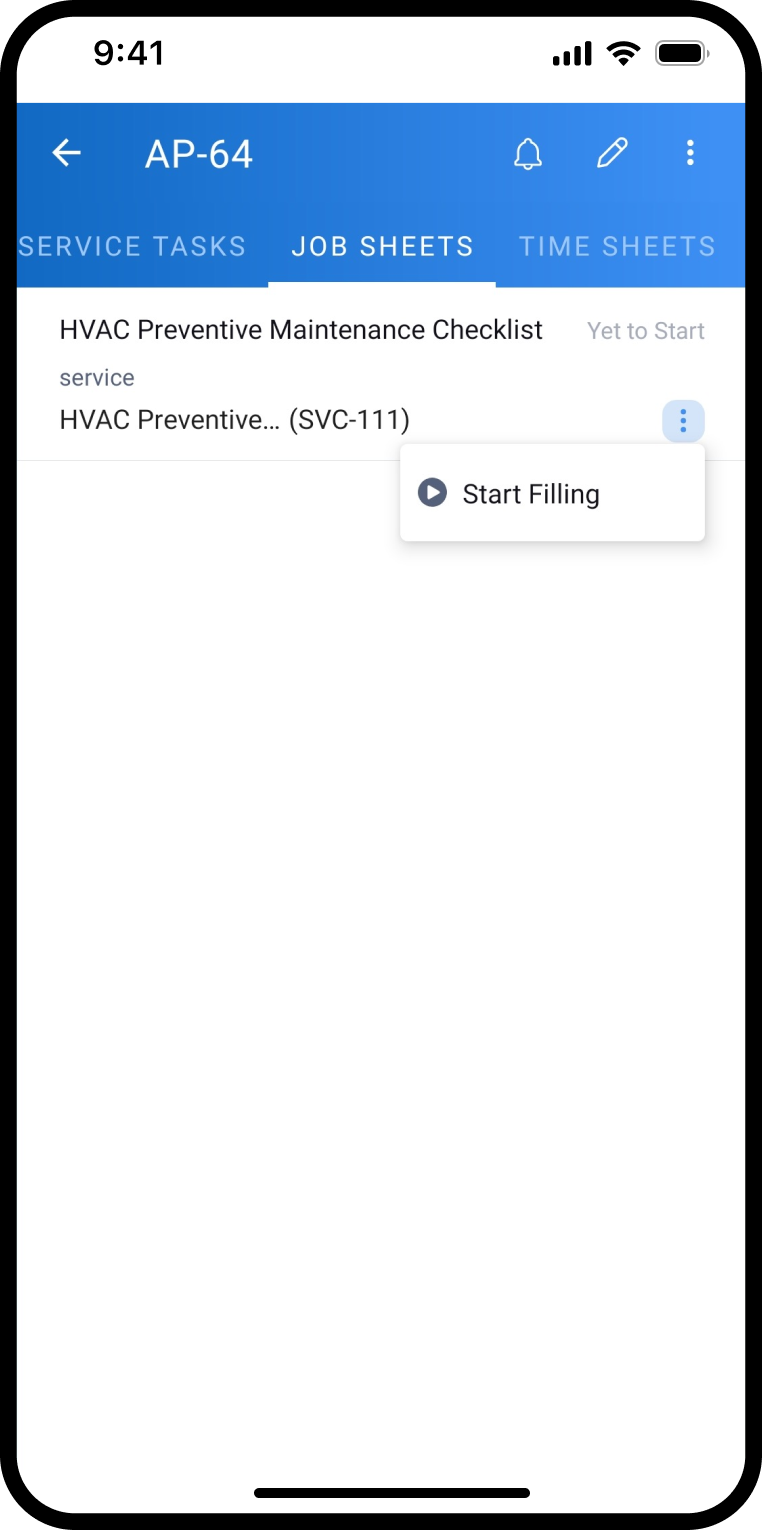

 
The technician can either Save as Draft or Save as Completed.


They can later change its status to Completed by clicking on Save as Completed.


All these actions can be performed from the web app too.

  
Please refer to the help documentation for in-depth details. Do feel free to leave a comment below or email us at support@zohofsm.com if you have any questions.

      • Recent Topics

      • How to import MBOX to Gmail?

        In order to import or restore MBOX file backup Gmail account you can go for Advik MBOX to Gmail Import utility. This utility will import MBOX to Gmail or G Suite account without any configuration. This tool is considered as the most easiest and simplest process to perform email migration. Key Feature of this tool Import MBOX to Gmail in Bulk Maintain folder struture Retain Key elements Single Panel Interface 100% accuracy rate Download source : http://www.adviksoft.com/mbox/gmail.html
      • Free webinar! Accelerate deals with Zoho Sign for Zoho CRM and Bigin by Zoho CRM

        Hello, Paperwork shouldn’t slow you down. Whether you’re growing a small business or running a large enterprise, manual approvals and slow document turnaround can cost you time and revenue. With Zoho Sign for Zoho CRM and Bigin by Zoho CRM, you can take
      • Automatically set the default VAT percentage on a quote

        Every time I create a quote, I have to manually adjust the VAT and activate the checkbox for 21%. But all of our quotes include 21% VAT. So now occasionally, it happens that the checkbox is forgotten, and the customer receives an incorrect quote (without
      • Don't understand INVALID_REQUEST_METHOD when I try to post up an attachment

        When I make the POST request (using python requests.post() for files): https://www.zohoapis.com/crm/v8/Calls/***************01/Attachments I get this response: r:{ "code": "INVALID_REQUEST_METHOD", "details": {}, "message": "The http request method type
      • Bigin & Booking. Associate the appointment with existing customers in bigin.

        I tried to change the stage of the pipeline associated to a existing contact after he book a appointment in Booking. I use flow to create a event in booking when a appointment is done. But.... How can I relate the appointment with the existing contact
      • Can Zoho Books support an Asset account as an item's purchase/COGS account? (Prepaid reseller use case)

        Hi everyone, I run a prepaid digital plan reseller business where I fund a vendor account upfront and draw it down as I make sales — essentially a float-based model, similar to a gift card or prepaid airtime reseller. The correct accounting treatment
      • Quotes - Freehand line items - zoho crm

        Hi, In the zoho crm quotes module is it possible to add line items that are freehand typed? We have a business need to use the quotes module but the product nams/description, quantity, price, etc. needs to be freely typed rather than from a defined list
      • TDS Payable report not Generating

        TDS Payable report for Last Quarter of FY 25-26 is not generating and giving error. Please get it rectified as soon as possble.
      • Remove Zoho Header from Portals

        I have a portal page with custom domain. But when I print directly from a webpage, the Zoho CRM header shows. It kind of kills the branding aspect. Is there a way to get rid of this?
      • Multi-column sorting

        Is multi-column sorting a planned feature for CRM? We are needing to sort by one column and then subsort by another column. I am just wondering if there is a planned feature that will allow this?
      • Clearing Fields using MACROS?

        How would I go about clearing a follow-up field date from my deals? Currently I cannot set the new value as an empty box.
      • Webinar Alert: Turn campaign leads into conversions with Zoho LandingPage and Zoho CRM

        Landing pages are great at capturing leads, but what happens after that is just as important. In this webinar, we’ll walk through how Zoho LandingPage and Zoho CRM work together to create a smooth flow from lead capture to follow-up and conversion. You’ll
      • Catch-All Address: A safety net for misdirected emails

        Email is often the first point of contact with an organization. In many cases, a simple typo in a recipient's address can quietly turn into a missed message—a customer query never reaches support, a partner’s reply goes unnoticed, and the sender has no
      • Need Assistance on Redirect URL or Button Based on Deal Stage

        Hello, I’ve developed a custom application and would like to achieve the following scenario: When a deal is moved to the Billing stage, an automatic trigger should execute and redirect to a URL that includes deal details such as Deal Name and Deal Owner.
      • Zoho IMAP Access to mail doesn't sync messages

        As stated in the topic - I have company account email address setup, and it has ( as in the picutre ) ActiveSync and Imap access enabled. However the messages does not show up while logged in in Zoho Mail however when I log in in thunderbird everything
      • 【無料/オンライン】5/21(木)開催|Zoho ワークアウト ― ユーザー同士で作業・議論するもくもく会

        ユーザーの皆さま、こんにちは。 コミュニティグループの中野です。 5月開催の「Zoho ワークアウト」のご案内です。 本イベントは、Zohoユーザーが各自のテーマを持ち寄り、 作業を進めながら参加者同士で意見交換する「もくもく会」形式のオンラインイベントです。 「設定を進めたいけれど、一人だと手が止まってしまう」 「他社がどう活用しているのか知りたい」 「同じ課題を抱える仲間と話したい」 そんな方にぴったりのイベントです。 ▶︎ 参加登録はこちら(無料 / 残り3枠) URL:https://us02web.zoom.us/meeting/register/6ojuA778RqqWPOWzCaCU5Q
      • i keep see there is a connetion issue connecting 3rd party api on zoho when using zia

        hi there , i have set up open ai api to zoho zia (copied and pasted to zoho zia) but I keep getting notificaiton "there is a connetion issue connecting 3rd party api on zoho" when using zia on top when click zia and try to type in word there
      • Can't access google from toppings menu

        So... When I click the manage button in toppings, nothing happens. it won't let me access the settings.
      • Marketer's Space: Bookmarks by Zoho Campaigns

        Hello Marketers, In this week's Marketer's Space, we'll look at a simple yet powerful feature that makes a big difference in your workflow: Bookmarks. Bookmarks is a built-in feature in Zoho Campaigns that enables you to create a personalized library
      • Introducing the revamped What's New page

        Hello everyone! We're happy to announce that Zoho Campaigns' What's New page has undergone a complete revamp. We've bid the old page adieu after a long time and have introduced a new, sleeker-looking page. Without further ado, let's dive into the main
      • Cliq iOS can't see shared screen

        Hello, I had this morning a video call with a colleague. She is using Cliq Desktop MacOS and wanted to share her screen with me. I'm on iPad. I noticed, while she shared her screen, I could only see her video, but not the shared screen... Does Cliq iOS is able to display shared screen, or is it somewhere else to be found ? Regards
      • Tip #71 - Exploring Technician Console: Send Clipboard Keystrokes - 'Insider Insights'

        Hello Zoho Assist Community! Say you are helping a customer remotely and need to log into a system on their machine. You have the password ready on your end, but the moment you try to paste it into the login field, nothing happens. The remote screen just
      • Tip #7: Customize the appointment confirmation page

        A confirmation page plays a crucial role in creating the first impression, as that's where customers land when booking with you. It shows your brand identity, engages your audience, and drives more conversions. Yet, this section is often overlooked when
      • Images not saved in notes

        Created noteboards and create a note, copy pasted the image, close the note and open again, image is not coming this same problem occurs in note on notebook I have attached the replication steps as video url to analyse it, and also attached the videos
      • New in Office Integrator: Apply conditional formatting to entire rows

        Hi users, We are pleased to introduce the ability to highlight entire rows based on a cell's value in Zoho Office Integrator's spreadsheet editor. For example, if your finance team tracks invoice payments in a spreadsheet, you can highlight overdue invoices
      • Zoho books - Project Module - Itemised expenses

        Hi All, I heavily use the projects function in Zoho books and can work for one client for successive weeks, providing labour and incurring the occasional general expenses.  As an example, during the one purchase, I purchase 10 widgets and of these 10, 
      • How to get REST API of extension function in CRM

        I create a an extension using ZOHO Sigma for integrate ZOHO CRM and XERO and established two way sync but when I public my extension it's standalone function are not provide any type of access so I can't get REST API Key of standalone functions without
      • A few Issues when using "Pay Bill via Check"

        We have quite a bit of issues with how paying for Bills via Check works. Would love some feedback from the Zoho team in case we are doing something incorrectly. 1. When we go from a vendor and select "Pay Bill via Check" option, we see ALL the outstanding
      • Show backordered items on packing slip

        Is it possible to show a column on the Packing Slip that shows number of backordered items when a PO is only partially filled? I would also like to see the Backordered column appear on POs after you receive items if you didn't get ALL of the items or partial amounts of items. And lastly, it would be nice to have the option of turning on the Backordered column for invoices if you only invoice for a partial order. -Tom
      • Elevate your Radar experience: Best practices part 1

        In the Spotlight: Zoho Desk's Radar app Think about RADAR (Radio Detection and Ranging)? The system used to track and identify aircraft, ships, and vehicles using electromagnetic waves. Imagine what a similar “Radar” experience looks like for customer
      • Mise à jour de Zoho Books – France

        Chers clients, Merci pour votre patience et votre soutien continu. Avec les évolutions réglementaires à venir en France nous introduisons de nouvelles fonctionnalités dans Zoho Books pour les clients français. Ces mises à jour ont été conçues pour répondre
      • Automation Series: Auto-update Budget When Time is Logged

        In Zoho Projects, Summary fields enable instant budget sync by capturing Actual Cost and showcases it at project-level when a time log is added. This allows real-time budget visibility and helps teams stay within financial thresholds. Consider an event
      • Preferred Name and Email Formats: Bring consistency to user identity

        A user's display name and email address are often the first identifiers that colleagues, partners, and customers see. Maintaining a consistent format across the organization helps reinforce a professional identity and avoids the confusion that comes from
      • [Webinar] Solving business challenges: Standardizing document operations across your organization

        Hi Writer users, Every organization struggles with document inconsistency due to issues like multiple templates, outdated content in client-facing docs, and the lack of a standard review process. Zoho Writer streamlines the entire lifecycle with capabilities
      • Auto-sync field of lookup value

        This feature has been requested many times in the discussion Field of Lookup Announcement and this post aims to track it separately. At the moment the value of a 'field of lookup' is a snapshot but once the parent lookup field is updated the values diverge.
      • Account name not populating when importing contacts

        When importing a csv file to add contacts the account name is blank? Every other filed gets mapped and imported correctly, i.e contact name, phone number. However not the account name which I have mapped to "company" field in my csv file
      • Requirements using Zoho Projects

        Is there a seperate Zoho application for Requirements (Requirements Repository) or a way to use Zoho Projects to store, track and organize software requirements
      • Control who sees Timeline and Interactions in Zoho CRM through Profiles

        The feature has been enabled for all DCs (except US, EU, and IN DCs). We will be rolling it out to the other DCs in the upcoming days. Dear All, In a CRM, not all users would require access to the history of a record. For instance, a Marketing Operations
      • Billing Management: #3 Billing Unbilled Charges Periodically

        We had a smooth sail into Prorated Billing, a practice that ensures fairness when customers join, upgrade, or downgrade a service at any point during the billing cycle. But what happens when a customer requests additional limits or features during the
      • Hide chart series by default (unchecked in legend)

        Hi, I’m working on a dashboard in Zoho Analytics and ran into a limitation I can’t figure out. Is there a way to have certain columns (series) in a chart hidden by default via the legend (i.e., unchecked), but still available so the user can enable them
      • Next Page