Action Required: Update Microsoft SQL Server Security Settings Before February 2026

Action Required: Update Microsoft SQL Server Security Settings Before February 2026

Dear Users,

We recently deployed security updates in Zoho Analytics that inadvertently caused connection failures for a few customers using Microsoft (MS) SQL Server hosted on older Windows versions (Windows Server 2012, 2012 R2, and 2014).

To restore connectivity, we have temporarily reverted these updates. However, these security changes are mandatory for long-term protection and compliance, and they will be permanently enforced by the end of February 2026.

If you are using MS SQL Server on the affected Windows versions, action is required to ensure uninterrupted connectivity once the security standards are re-applied.

Who Is Affected

This applies only to customers who:

  • Use MS SQL Server as a data source in Zoho Analytics, and
  • Host MS SQL Server on:
    • Windows Server 2012
    • Windows Server 2012 R2
    • Windows Server 2014

If you are not using these operating systems, no action is required.

NotesNote: This update applies only to SQL Server Cloud DB imports.
It does not affect local database imports configured using Zoho Databridge.

Issue Description

When modern security standards are enforced, applications connecting to MS SQL Server hosted on older Operating Systems (Windows Server 2012 / 2012 R2 / 2014) will fail with the following error:

Info
"encrypt" property is set to "false" and "trustServerCertificate" property is set to "true" but the driver could not establish a secure connection to SQL Server by using Secure Sockets Layer (SSL) encryption: Error: SQL Server did not return a response.

Root Cause

  1. Upcoming Security Standard:
    Modern security protocols require Forward Secrecy. Legacy TLS_RSA cipher suites are being deprecated industry-wide.
  2. OS Limitation:
    Older Windows Servers rely on these deprecated ciphers by default. They do not offer modern Elliptic Curve (ECDHE) ciphers unless explicitly configured.
  3. The Impact:
    Without the configuration below, your database will reject secure connections once we re-enable the security update.

Required Configuration: Enabling Modern Cipher Suites

To maintain connectivity, you must configure your Windows Server to support modern cipher suites.

If this configuration is not feasible in your environment, upgrading the Windows Server to a newer supported version is an alternative option, as modern operating systems include these security protocols by default.

To prepare your server, you must add the following modern cipher suites to the TOP of your Windows Server's configuration.

Implementation Methods

You can use one of the following methods.

Option A: GUI Method (Recommended)

Step 1: Download the Tool

Download IIS Crypto (GUI) from Nartac Software.

NotesNote: This is a portable utility and does not require installation.

Step 2: Launch the Tool

  • Copy IISCrypto.exe to the database server.
  • Right-click the executable and select Run as Administrator.

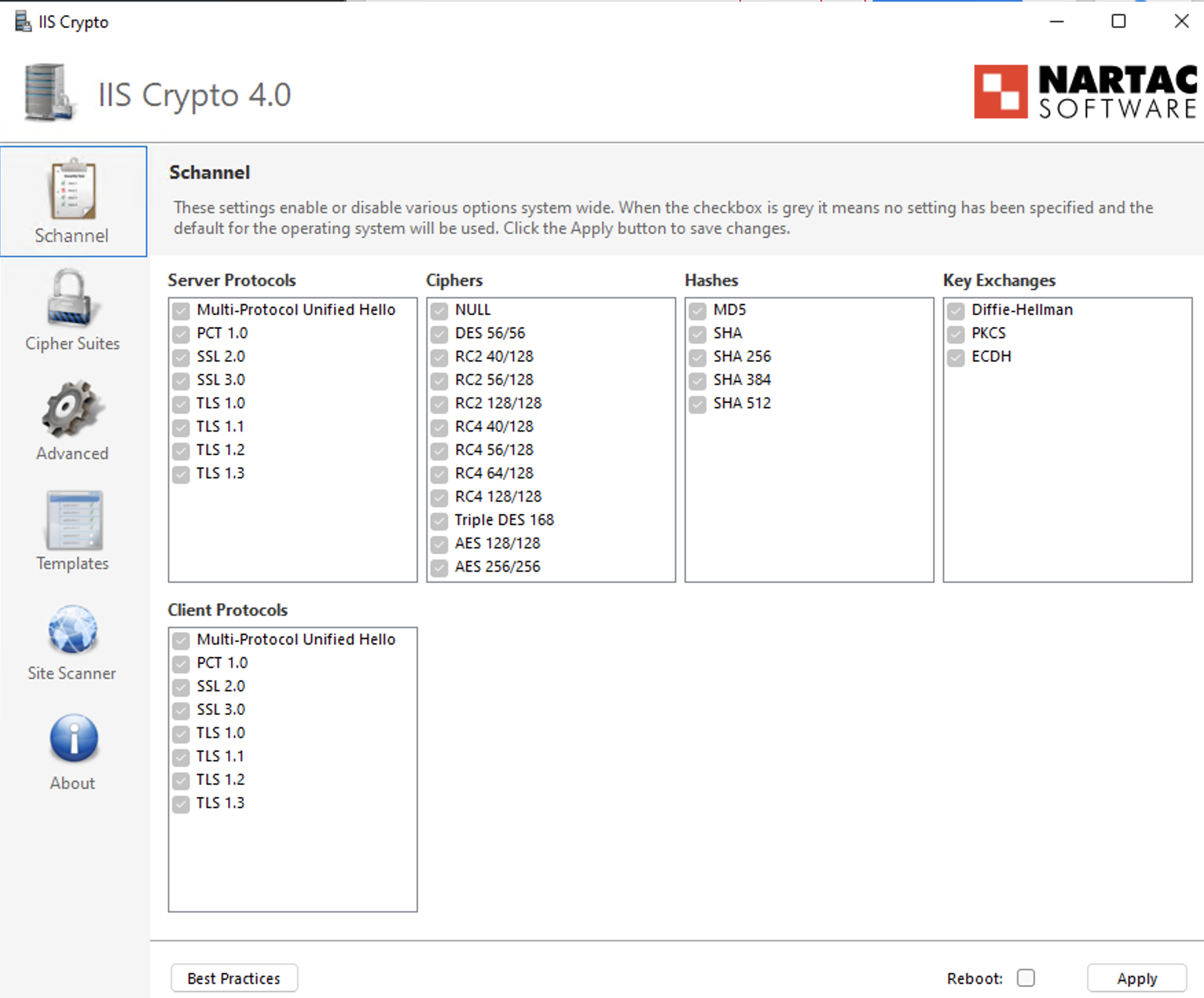
Step 3: Configure TLS Protocols

  • Open the Schannel tab.
  • Ensure TLS 1.2 is enabled (checked).
  • Verify that deprecated protocols (SSL, TLS 1.0, TLS 1.1) remain disabled in accordance with security policy.

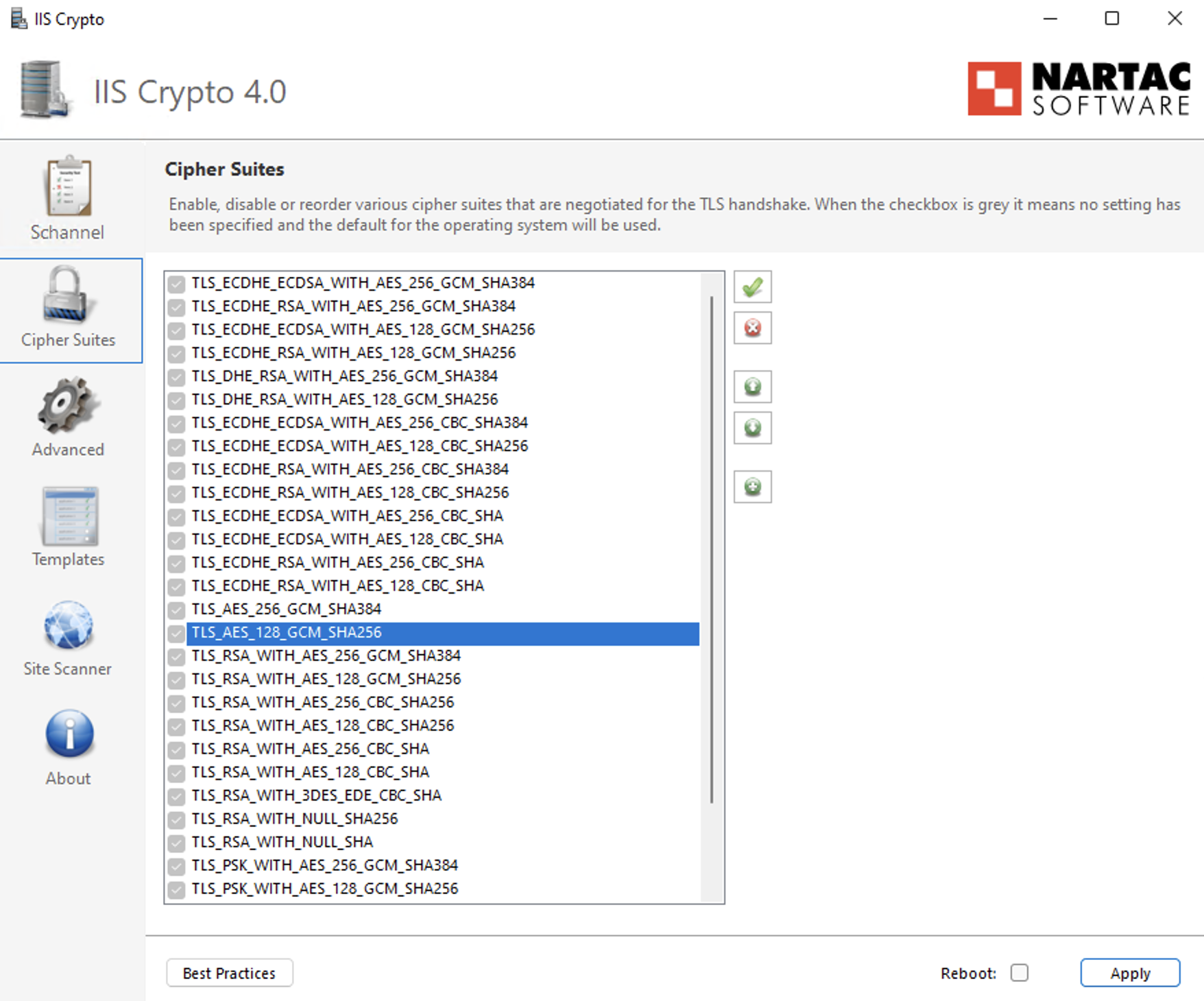
Step 4: Prioritize Cipher Suites

  • Navigate to the Cipher Suites list in the left-hand panel.
  • Identify the following ECDHE cipher suites:
    • TLS_ECDHE_RSA_WITH_AES_256_GCM_SHA384
    • TLS_ECDHE_RSA_WITH_AES_128_GCM_SHA256
    • TLS_ECDHE_RSA_WITH_AES_256_CBC_SHA384_P384
    • TLS_ECDHE_RSA_WITH_AES_128_CBC_SHA256_P256
    • TLS_ECDHE_RSA_WITH_AES_256_CBC_SHA_P384
    • TLS_ECDHE_RSA_WITH_AES_128_CBC_SHA_P256
  • Use the Up Arrow control to move these ECDHE cipher suites to the top of the list to ensure they are prioritized during TLS negotiation.
  • Ensure that older TLS_RSA_* cipher suites remain enabled only for backward compatibility and are positioned below the ECDHE cipher suites with the lowest priority.

Step 5: Apply Configuration

  • Click Apply to save the changes.

Step 6: Reboot

  • Restart the Windows Server to ensure the changes take effect.

Option B: Group Policy Method (Native Windows)

Step 1: Open Group Policy Editor

  • Press Win + R, type gpedit.msc, and press Enter.

Step 2: Navigate to SSL Configuration Settings

Go to: Computer ConfigurationAdministrative TemplatesNetworkSSL Configuration Settings

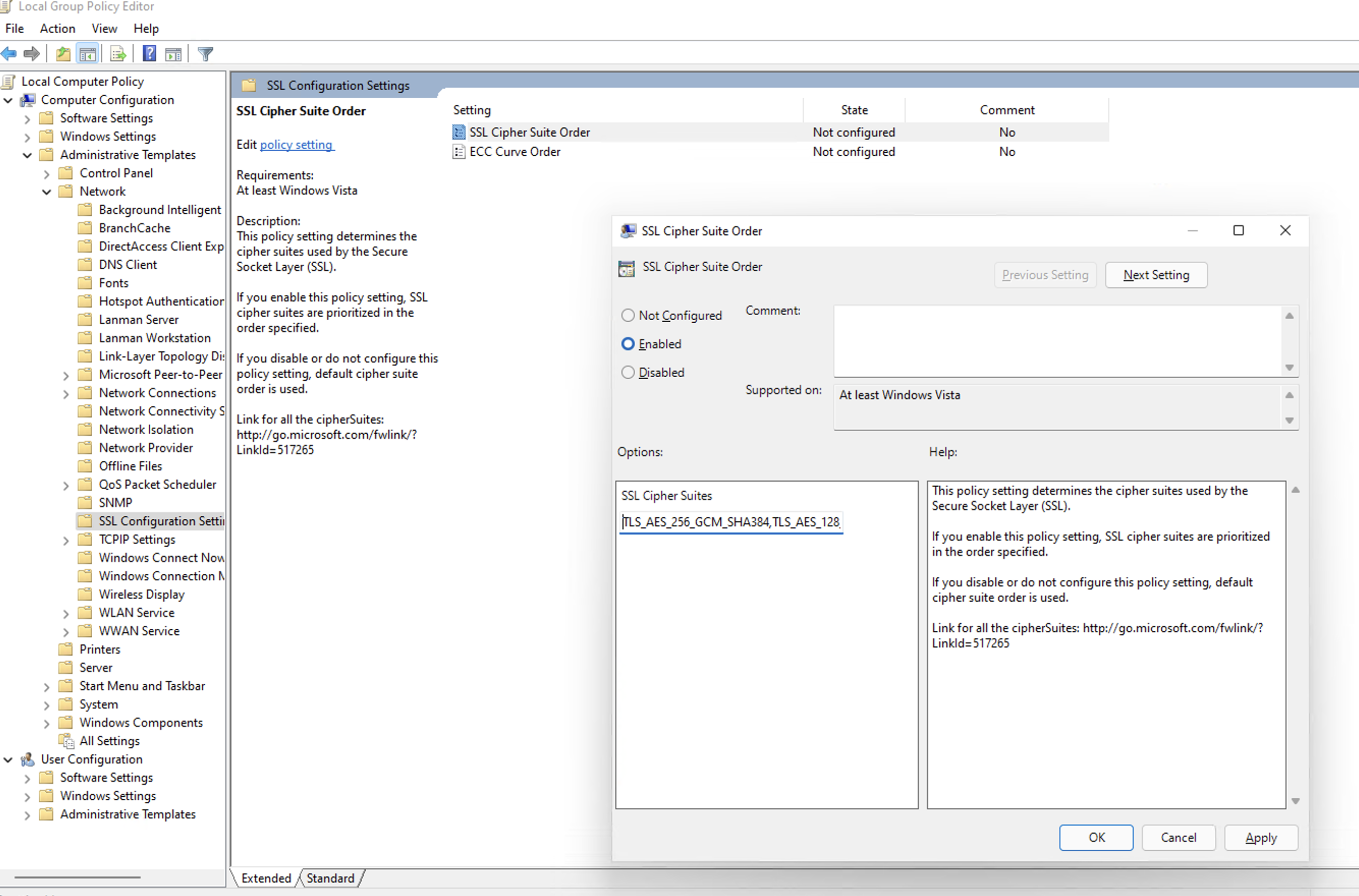
Step 3: Edit Cipher Suite Order

  • Double-click SSL Cipher Suite Order.
  • Select Enabled.

Step 4: Prepend Secure Cipher Suites (Critical Step)

  • Locate the SSL Cipher Suites text box.
  • Do not delete the existing cipher list, as this may impact legacy application compatibility.
  • Place the cursor at the very beginning (far left) of the text box.
  • Paste the following cipher list before the existing entries:
    Info
    TLS_ECDHE_RSA_WITH_AES_256_GCM_SHA384,TLS_ECDHE_RSA_WITH_AES_128_GCM_SHA256,TLS_ECDHE_RSA_WITH_AES_256_CBC_SHA384_P384,TLS_ECDHE_RSA_WITH_AES_128_CBC_SHA256_P256,TLS_ECDHE_RSA_WITH_AES_256_CBC_SHA_P384,TLS_ECDHE_RSA_WITH_AES_128_CBC_SHA_P256,
  • Ensure there is a comma separating the newly added cipher block from the existing cipher list.

Step 5: Apply Configuration

Click OK to save the policy changes.

Step 6: Reboot

Restart the Windows Server for the Group Policy changes to take effect.

Verification: How to Install & Run Nmap

To confirm the server is ready for the future update, use the network scanning tool Nmap.

Step 1: Install Nmap

For Windows Users:

  1. Download the Latest Stable Installer (.exe) from the Official Nmap Download Page.
  2. Run the installer.
  3. Critical Step: During installation, check the box for Install Npcap. This driver is required for the scan to work.
  4. Finish the installation.

For Linux Users:

  • Ubuntu/Debian: Run "sudo apt-get install nmap -y"
  • RHEL/CentOS: Run "sudo yum install nmap -y"

Step 2: Run the Scan

Open your Command Prompt (Windows) or Terminal (Linux) and run:

Infonmap --script ssl-enum-ciphers -p 1433 <YOUR_DB_IP_ADDRESS>

(Replace 1433 with your specific SQL port if different).

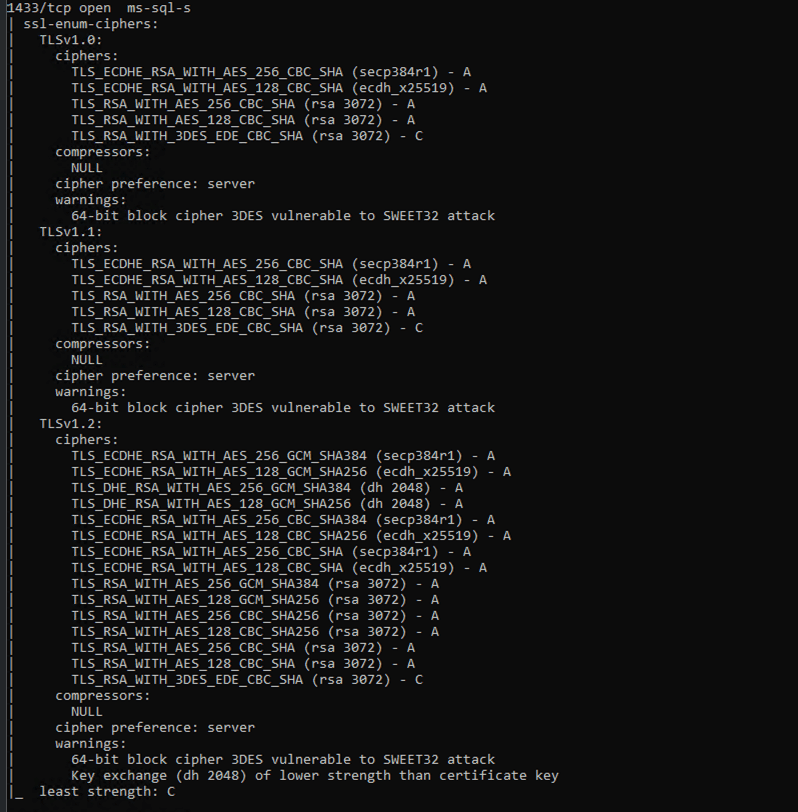
Step 3: Interpret Results

  • Look for the TLSv1.2 section in the output. Ensure TLS_ECDHE_... cipher suites appear at the top of the cipher list with Grade A.
  • TLS_RSA_... cipher suites must not be removed, but should be kept only as fallback and configured with the lowest priority to avoid regression after re-applying the update.

Example of Successful Output:

What Happens If You Skip This Configuration?

If modern ciphers are not enabled before the security update is permanently enforced:

  • Scheduled syncs will fail.
  • You won't be able to add or manage existing connections/sources/tables.

Enforcement Timeline

These security standards will be permanently enforced by the end of February 2026.

Servers that do not meet the required cipher configuration will experience connection failures once enforcement begins.

Need Assistance?

If you need help with the configuration, contact us at support@zohoanalytics.com.

To help us resolve your issue faster, include the following details in your email:

  • Windows Server version
  • SQL Server version
  • SQL port number
  • Nmap scan output (if available)
  • Screenshot of your cipher configuration (if applicable)

Providing this information upfront will help us diagnose and assist you more efficiently.


      • Sticky Posts

      • What's New in Zoho Analytics - February 2026

        Hello Users! We're back with another round of updates for Zoho Analytics. This month's release focuses on giving you greater flexibility in how you visualize, manage, and act on your data - with new features like custom visualizations, remote MCP server,
      • What's New in Zoho Analytics - January 2026

        Hello Users! We are starting the year with a strong lineup of updates, marking the beginning of many improvements planned to enhance your analytics experience. Explore the latest improvements built to boost performance, simplify analysis, and help you
      • What's New in Zoho Analytics - November 2025

        We're thrilled to announce a significant update focused on expanding your data connectivity, enhancing visualization capabilities, and delivering a more powerful, intuitive, and performant analytics experience. Here’s a look at what’s new. Explore What's
      • What's New in Zoho Analytics - October 2025

        Hello Users! We're are back with a fresh set of updates and enhancements to make data analysis faster and more insightful. Take a quick look at what’s new and see how these updates can power up your reports and dashboards. Explore What's New! Extreme
      • What’s New in Zoho Analytics – September 2025

        Hello Users!! In this month’s update, we’re raising the bar across multiple touchpoints, from how you bring in data, plan and track projects to how you design and brand your dashboards. We’ve added the all-new Gantt chart for project visualization, expanded

        • Recent Topics

        • Powering Customer Support with our women

          In Zoho Desk support, women make up 50% of our team. We see this as one of our strengths, reflecting the spirit of this year’s theme, "Give to Gain". Our women find their balance Women carry many responsibilities — they represent frontline support, lead
        • Can't rename groups on Mac desktop app

          I'm working on an up-to-date Mac with a freshly downloaded Notebook app. I'm trying to rename a group within a notebook. Here I have, left to right, a note, a group, and a note. I select the group. On the top left, I select Action. On the dropdown, "Rename"
        • Zoho Forms - Feature Request - Year Field

          Hi Zoho Forms Team, You currently have the following date and time fields: Date Time Date and Time Year and Month It would be useful if you could include a "Year" field For example a recent application I completed said "What year was your house built?"
        • I need help to take Reports for tickets moved between departments.

          Hi, I need help to take Reports for tickets moved between different departments. Pls guide Shyam
        • Export to excel stored amounts as text instead of numbers or accounting

          Good Afternoon, We have a quarterly billing report that we generate from our Requests. It exports to excel. However if we need to add a formula (something as simple as a sum of the column), it doesn't read the dollar amounts because the export stores
        • Increase Round Robin Scheduler Frequency in Zoho Desk

          Dear Zoho Desk Team, We hope this message finds you well. We would like to request an enhancement to the Round Robin Scheduler in Zoho Desk to better address ticket assignment efficiency. Current Behavior At present, the Round Robin Scheduler operates
        • Automation #6 - Prevent Re-opening of Closed Tickets

          This is a monthly series where we pick some common use cases that have been either discussed or most asked about in our community and explain how they can be achieved using one of the automation capabilities in Zoho Desk. Typically when a customer submits
        • Zoho Desk EU slow/unresponsive

          Has anyone else got issues with ZohoDesk today in the EU? It takes an age to come back and if you do start typing something and try and send or save it looks like it times out. We are also getting this pic. ot I can't see anything on https://status.zoho.eu/
        • EU DC Partial Outage Resolved: A Detailed RCA

          Incident Summary Due to an overload on one of the nodes in the EU DC for Zoho Desk, the system was unable to handle the heavy load, causing a slowdown in requests and resulting in a partial outage for customers with data residing in that node. On May
        • Use Zoho Creator as a source for merge templates in Zoho Writer

          Hello all! We're excited to share that we've enhanced Zoho Creator's integration with Zoho Writer to make this combination even more powerful. You can now use Zoho Creator as a data source for mail merge templates in Zoho Writer. Making more data from
        • Perfomance Management - Zoho People

          Hi team, I am looking for performance management data such as KRA, goals, feedback, appraisals, etc., in Zoho Analytics. However, I am unable to find these metrics while editing the setup. Could you please confirm whether these fields are available in
        • Deprecation of the Zoho OAuth connector

          Hello everyone, At Zoho, we continuously evaluate our integrations to ensure they meet the highest standards of security, reliability, and compliance. As part of these ongoing efforts, we've made the decision to deprecate the Zoho OAuth default connector
        • Good news! Calendar in Zoho CRM gets a face lift

          Dear Customers, We are delighted to unveil the revamped calendar UI in Zoho CRM. With a complete visual overhaul aligned with CRM for Everyone, the calendar now offers a more intuitive and flexible scheduling experience. What’s new? Distinguish activities
        • Zoho - Please explain difference between Thread view and Conversation view on Ticket

          I have reviewed the help document here but am still not clear on the difference between the two views. As an example, I just had a back and forth on a ticket: - Customer emails support email. - I email back from Desk. - Customer responds back. - I email back from Desk. On the upper left drop down box on the ticket Zoho Desk now says this is "4 Threads" and "4 Conversations" . How is that 4 threads?? By my count it is 1 thread and 4 conversations (assuming by "conversation" Zoho means number of total
        • Mobile phone version not working well

          I am working on the Zoho Site Builder. In the preview the desktop version looks okay, but in the mobile phone preview many words are cut off in the weirdest (wrong) way. How can I fix that?
        • Zoho Mail iOS app update: Display recipient's nickname on contact suggestion

          Hello everyone! In the most recent version(v3.3.1) of the Zoho Mail iOS app update we have brought in support to display recipient's nickname in contacts suggestion. Please update the app to the latest version directly from the App Store or using the
        • Digest Février - Un résumé de ce qui s'est passé le mois dernier sur Community

          Bonjour chers utilisateurs, Le 26 février, nous avons organisé notre première session Ask the Expert de 2026. Nous sommes heureux de partager que ce fut une session très interactive, avec de nombreuses questions intéressantes posées par nos clients. Si
        • Zoho CRM Case Notes - Share to Customer

          Hi team does anyone know the Api to set a note, against a case, to shared with customer? i cant seem to find it  cheers 
        • Zoho Forms - Feature Request - Past Into Scanning/OCR Field

          Hi Zoho Forms Team, You recently introduced the OCR/Scanning field which I have found great use for with one client who receives work orders as a screenshot from one customer. I want to raise a feature request here which would make that field even more
        • Synching changes to Stripe when changes are made in Zoho Billing

          We have a situation where we have merged customers in Zoho BIlling and then found out later that the payment in Stripe was not updated and still associated with the old customer record. The card gets updated and billed, but that payment is still associated
        • Send out follow-up email in the same thread (threaded conversations in individual emails) from Zoho CRM

          Hi, I'm new to Zoho. I'm trying to send individual emails to my leads one by one. And I'll send out follow up email if I don't hear back from them later. However, instead of sending a new email, I want to reply in the same email thread so that the recipients
        • Depositing funds to account

          Hello, I have been using Quickbooks for many years but am considering moving to Zoho Books so I am currently running through various workflows and am working on the Invoicing aspect. In QB, the process is to create an invoice, receive payment and then
        • Is Zoho Sites still actively being developed?

          Hello, Is Zoho Sites still actively being developed as part of the Zoho ecosystem? I noticed that the What's New page (https://www.zoho.com/sites/whats-new.html) does not show any updates since Q1 2025. We were considering migrating our website from Squarespace
        • FSM integration with Books

          Hi, I have spent a few months working with FSM and have come across a critical gap in the functionality, which I find almost shocking....either that, or I am an idiot. The lack of bi-directional sync between Books and FSM on Sales Orders/ Work Orders
        • web to lead

          Can anyone help me how to create web to lead from zoho marketing automation
        • Introducing Workqueue: your all-in-one view to manage daily work

          Hello all, We’re excited to introduce a major productivity boost to your CRM experience: Workqueue, a dynamic, all-in-one workspace that brings every important sales activity, approval, and follow-up right to your fingertips. What is Workqueue? Sales
        • UI issue with Organize Tabs

          When looking at the organize Tabs window (bellow) you can see that some tabs are grayed out. there is also a "Add Module/Web Tab" button. When looking at this screen it's clear that the grayed out tabs can not be removed from the portal user's screen
        • I created a signup form in Zoho Marketing Automation with the correct field mapping, but the data is not being reflected under Leads in Zoho CRM.

          web to lead from zoho marketing automation
        • Pasted Images not being embedded in custom mail

          Hi, I'm making a custom report by email based on commentaries. I have the email ready, all working great except for images that are being pasted in the commentaries. Zoho deals with them as temp images and so it requires authentication to view them, something
        • Kaizen #232 - Building a Ticket Escalation Mechanism from Zoho CRM

          Howdy, Tech Wizards! Picking up the thread from last week, we will continue our Zoho CRM and Zoho Desk integration. In Kaizen #231 - Embedding Zoho Desk Tickets in Zoho CRM, we built a Related List widget that displays open Zoho Desk tickets within the
        • Inactive License for free account.

          I recently upgraded my Cliq subscription not my team (on the free version), are unable to login to their accounts. The error message received is Inactive License Looks like you have not been covered under the current free plan of users. Please contact
        • Deluge scripts

          Why is there not a search function to make it easier to find the script of interest when modifications are required.
        • Zoho Sheet for Desktop

          Does Zoho plans to develop a Desktop version of Sheet that installs on the computer like was done with Writer?
        • Zoho Books (and other Finance Suite Apps) - Clickable Item Name on Invoices and Reports

          Hi Zoho Books team, It would be really helpful if the Item Name on Reports were clicable to take me to the item. The same on Invoices, often I am looking at an invoice and I want to look at the deails of a product. A link here would be helpful to jump
        • Zoho Books - Payment Gateway - Revolut

          Hi Books Team, My feature request if to include the popular platform Revolut as a payment collection option on invoices in Zoho Books. Please upvote if you are also looking for this option.
        • Searching for an item from within an invoice should show any item containing the string, not just those that begin with the string.

          Hello, I've found myself becoming increasingly frustrated with the limited line-item seach when adding new items to an invoice. The problem is that the characters being typed are only being matched from the beginning of the item name.  This might be usable
        • How to Rank Tables by Row Count in Descending Order

          I am trying to understand the consume of lines that grow up so fast in the last week. Is there any way to create a pivot table or query to get TABLE NAME LINES in descending order?
        • Dealing With One-Time Customers on Zoho Books

          Hello there! I am trying to figure out a way to handle One-Time customers without having to create multiple accounts for every single one on Zoho Books. I understand that I can create a placeholder account called "Walk-In Customer", for example, but I
        • Marking a meeting 'done'.

          I would like to somehow mark a meeting 'done' and placed under the contact's page rather than deleting it and having no record of it. Am I missing a button that does this?
        • Feature Request: Render Markdown (.md) files in Zoho Cliq

          Hi, We regularly share Markdown (.md) files in Zoho Cliq. However, when we open these files in Cliq, the content does not render as Markdown—it displays as plain text. This forces us to copy/paste the content into an external Markdown viewer to read it
        • Next Page