User Tips: Adding Multiple Products (Package) to a Quote v2.0 (with Client Script)

User Tips: Adding Multiple Products (Package) to a Quote v2.0 (with Client Script)

This solution is an improvement on the original idea which used deluge. My solution was posted in the comments are: https://help.zoho.com/portal/en/community/topic/adding-multiple-products-package-to-a-quote

The updated version uses client script instead of deluge.

Hopefully this might help a few people. It helps our reps speed up the process of creating quotes and quoting accurately.

Details below:


Problem:

We run numerous manufacturer promotions with various bundled items and discounts. Reps struggle to remember all details, leading to incorrect discounts on quotes.


Solution

I created a custom module for Product Packages. For each promotion, we create a "Package" including all products, discounts, and start/end dates. A quote lookup field allows users to select a package, automatically adding the related products with accurate pricing and information.

When a user selects a package, a client script retrieves all related products and discounts, adding them to the quote. The lookup field is then reset for additional product entries.

Some fields on the package layout include:

  1. Promotion type
  2. Status
  3. Start / End dates for the promotion. 
  4. Pop-up message field if we want to show the rep a message when quoting the package

I also have a workflow that sets the package to “Expired” when the record expiration date hits. The lookup is filtered in the quotes module to only show “Active” packages.

In Action (with lookup field to the package module):
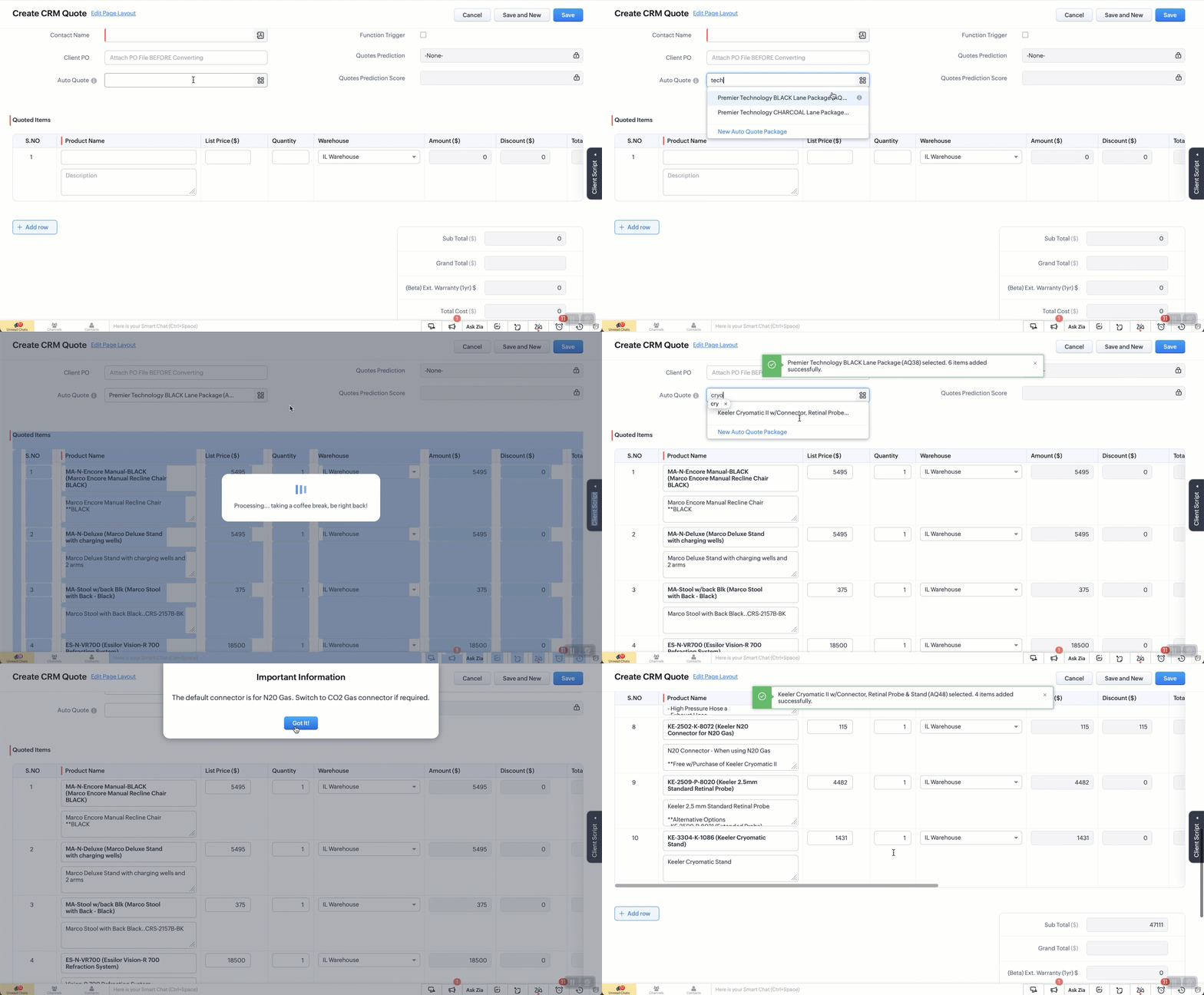


The Setup:
Create a custom module “Package Items”. Add the fields as below. 
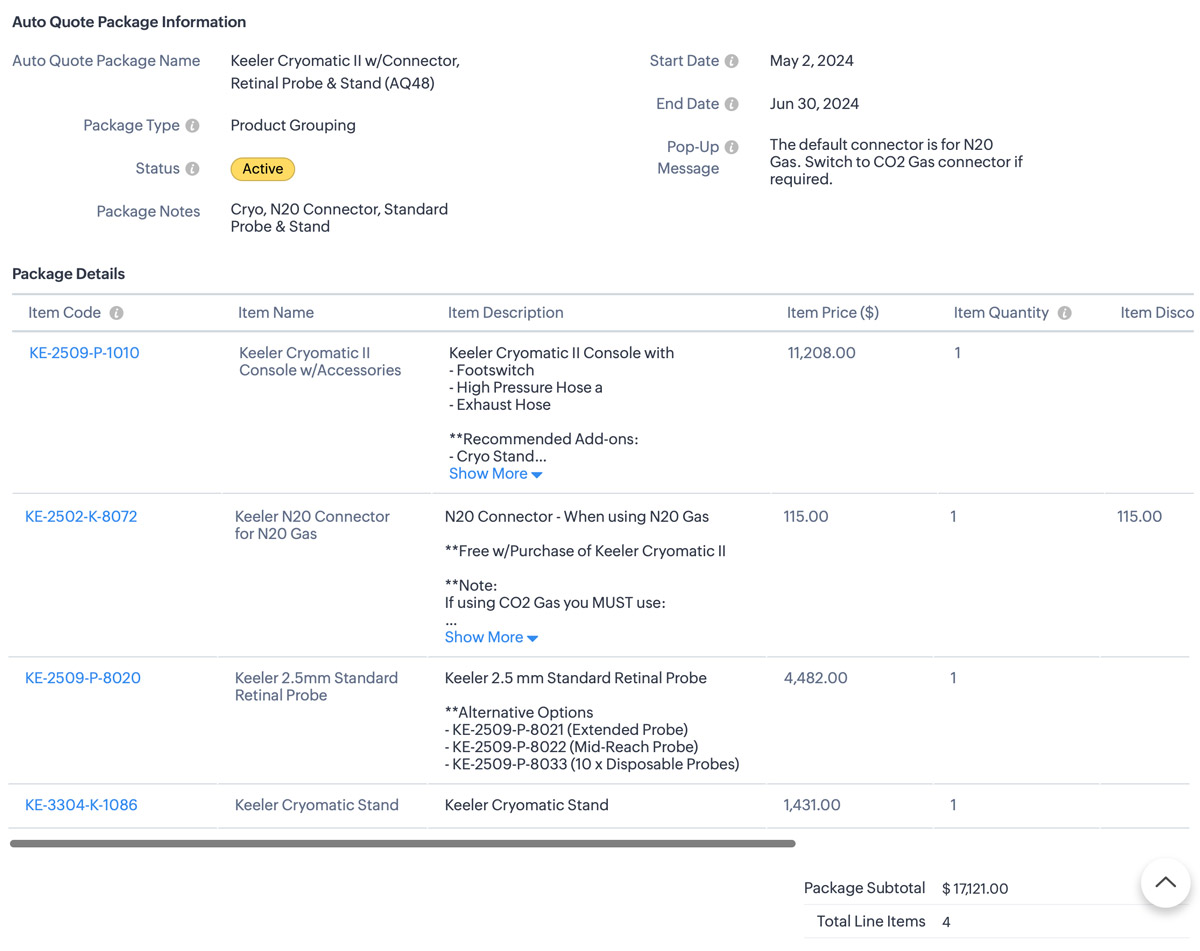


Additional Info
1. I also use client script to hide the “Auto-Quote” field when in a standard view page
2. When I name a package, a deluge script runs to append the Package ID number which is an auto-number field.


The Code: 

  1. try {
    // List of funny loading messages
    var loadingMessages = [
    "Cranking up the quote machine...",
    "One sec... just stepped out for coffee.",
    "Hold tight! The hamsters are running the wheels.",
    "Almost there... giving it a little extra attention.",
    "Loading... probably faster than your internet speed.",
    "Please hold while we make magic happen.",
    "Just a moment... our servers are stretching their legs.",
    "Your patience is appreciated... and rewarded!",
    "Brewing up your quote right now...",
    "Give us a second... we're flexing our technical muscles.",
    "Our system is doing some yoga... stay calm!",
    "Loading... don't worry, it's not stuck!",
    "Fetching your data... hopefully with no detours!",
    "Keep calm and let us handle the rest.",
    "Processing... taking a coffee break, be right back!",
    "Stay tuned... greatness is loading.",
    "Our system is running... faster than a cheetah!",
    "Looks like you're going all in on this quote!",
    "Getting things ready... just need a moment.",
    "Hold on... we're aligning some stars for you.",
    "Please wait... we're feeding the server squirrels.",
    "One moment... your quote is coming fresh out of the oven.",
    "Loading... just making sure everything is perfect!",
    "Generating your quote... thanks for your patience!",
    "Almost there... your quote is worth the wait!"
    ];

    // Select a random message from the list
    var randomMessage = loadingMessages[Math.floor(Math.random() * loadingMessages.length)];

    // Log the entire value object to see its structure
    log("Full value object: " + JSON.stringify(value));

    // Ensure value.id is defined before proceeding
    if (!value || !value.id) {
    log("No product selected or value.id is undefined");
    return; // Exit the script quietly since no valid product was selected
    }

    // Show loader
    ZDK.Client.showLoader({ type: 'page', template: 'vertical-bar', message: randomMessage });

    // Extract the product ID and name from the value passed in
    var packageId = value.id;
    var packageName = value.name;
    log("Product ID: " + packageId);
    log("Package Name: " + packageName);

    // Get the subform field from Quotes module
    var quotedItemsSubform = ZDK.Page.getField("Quoted_Items");

    // Fetch product information for the package ID
    var packageDetails = ZDK.Apps.CRM.Auto_Quote_Packages.fetchById(packageId);


    var packageStatus = packageDetails.Status; // Active or Expired.
    var popUpMessage = packageDetails.Pop_Up_Message; // Check the package for any Pop-up message we want to show
    log("Package Details: " + JSON.stringify(packageDetails));
    log("Package Status: " + packageStatus);
    log("Pop-Up Message: " + popUpMessage);

    // Initialize array for existing line items.
    var existingLineItems = quotedItemsSubform.getValue() || [];
    log("Existing line items: " + JSON.stringify(existingLineItems));
    //
    // Only include rows with products. Excude any blank rows from the quote
    var filteredExistingLineItems = existingLineItems.filter(function(item) {
    return item.Product_Name && item.Product_Name.id;
    }).map(function(item) {
    return {
    id: item.Product_Name.id // Include only the item ID
    };
    });
    log("Filtered existing line items: " + JSON.stringify(filteredExistingLineItems));

    // Array to hold new line items we are adding
    var newLineItemArray = [];

    // Check if package is active and populate new line items
    if (packageStatus === "Active") {
    var packageItems = packageDetails.Package_Details;
    packageItems.forEach(function(item) {
    var productLineItem = {
    Product_Name: {
    id: item.Item_Code.id,
    name: `${item.Item_Code.name} (${item.Item_Name})`
    },
    Product_List_Price: item.Item_Price,
    Description: item.Item_Description,
    List_Price: item.Item_Price,
    Quantity: item.Item_Quantity ?? 1, // Default to 1 if Qty is null or undefined
    Discount: Math.abs(item.Item_Discount ?? 0) // Get the discount or default to 0 if null
    };
    log("New product line item: " + JSON.stringify(productLineItem));
    newLineItemArray.push(productLineItem);
    });
    } else {
    // Show error message if the package is not active
    // My layout to only show Active items but if you don't do that this solves it.
    ZDK.Client.showMessage('This package / promo is no longer active. Please contact the admin for details.', { type: 'error' });
    ZDK.Client.hideLoader();
    return; // Exit the script since the package is not active
    }

    // Combine existing line items with new line items
    var updatedLineItemArray = filteredExistingLineItems.concat(newLineItemArray);
    log("Updated line items array: " + JSON.stringify(updatedLineItemArray));

    // Add all updated items to the Quotes page
    quotedItemsSubform.setValue(updatedLineItemArray);

    // Reset the pick list field so user can re-use
    ZDK.Page.getField("Auto_Quote").setValue(null);

    // Hide loader
    ZDK.Client.hideLoader();

    log("Final updated line items: " + JSON.stringify(updatedLineItemArray));

    // Function to show confirmation and number of items added back to the user
    var showSuccessMessage = function() {
    ZDK.Client.showMessage(`${value.name} selected. ${newLineItemArray.length} items added successfully.`, { type: 'success' });
    };

    // Function to show popup message and then success message
    var showAlertAndSuccess = function(message, heading, buttonText) {
    ZDK.Client.showAlert(message, heading, buttonText);
    showSuccessMessage();
    };

    // Check for pop-up message and show alert if it exists
    if (popUpMessage) {
    showAlertAndSuccess(popUpMessage, "Important Information", "Got It!");
    } else {
    // No pop-up message, show the success message
    showSuccessMessage();
    }
    } catch (error) {
    // Log the error
    log('Error: ' + error.message);

    // Show error message
    ZDK.Client.showMessage('An error occurred while adding items. Please try again.', { type: 'error' });

    // Hide loader
    ZDK.Client.hideLoader();
    }


        • Recent Topics

        • Changing an existing item to different accounts & inventory-tracked

          Hi everyone, I have an item in Zoho Books that was originally set up as a non-inventory item. Over time, I associated it with different sales and purchase accounts, and I now have many invoices, bills, and reports that use this item. My business process
        • How to Convert Emails to PDF Format in Batch

          It is helpful to convert emails into PDF format when you want to save important messages, when you need to share business correspondence, or when you wish to keep email records for future reference. PDF files can be readily opened, printed, and shared
        • Lookups and Custom Modules

          I created a Custom Module that I'm calling "Item Purchasing Group". This module will store information for groups of Items that must be purchased together (including minimum overall quantities and/or values, etc.). This will have a one-to-many relationship
        • Zoho Books | Product updates | October 2026

          Hello users, October brings a range of new features and enhancements to Zoho Books, designed to simplify compliance, streamline accounting workflows, and improve inventory management. From the launch of the Nigeria Edition and France’s e-invoicing capabilities
        • Create custom rollup summary fields in Zoho CRM

          Hello everyone, In Zoho CRM, rollup summary fields have been essential tools for summarizing data across related records and enabling users to gain quick insights without having to jump across modules. Previously, only predefined summary functions were
        • Button or Links order

          Is there a way to re-order the buttons or links that are created? Moderation Update: With our recent enhancement to custom button creation from the layout editor, administrators can now reorder custom buttons directly from the layout editor, and this
        • Bulk updating tags

          My organisation handles a number of restricted funds. We previously did this by having a chart of accounts where each restricted fund has its own income and expense accounts. However, our accountant changed this, moving all transactions into accounts
        • Download or Backup Bulk Emails from IMAP Server

          Taking email messages from an IMAP server and saving them is a wise method for ensuring that important emails are kept safe and easy to access. No matter whether you have a business email address or a personal mailbox, keeping a local copy of your emails
        • Zoho Writer Label Template Merge/Print Via API/Webhook/Flow

          Short version of goal: To be able to kick off a Zoho Writer Label Template Document via API or Webhook or even using Zoho Flow. As of right now I have been unable to figure out a way to do that. Long version of goal: We would like to press a button (run
        • Kaizen #263: Using Zoho CRM Skill to Build Widgets

          Hello everyone! Welcome back to another exciting Kaizen post. In the previous Kaizen posts, we introduced the zoho-crm skill.md and explored how it can help with Zoho CRM APIs, Client Scripts, complex COQL queries, and Skill to build Queries. In this
        • Zoho notebook No login

          Hello Team, I recently downloaded and installed the latest version of zoho notebook for windows. But I am not able to login without providing any sso or email address. Did you removed the no login feature for this app? This is just a windows app. can
        • Search is completely broken for PC

          I go to note, try to search for "mtga" and it shows 702 results (it's a big note), highlights all letters "m" and I can't find anything. Same for "gathering" - it thinkgs I think only for "g". Looking for "zoho" shows as if I searched only for "z". Using
        • Behind a great customer experience is a team

          Hi everyone, October is here, and the first week marks the Customer service week. Each year, we thank our customer service professionals. Service professionals are all around us, even in our own workplaces: They handle essential administrative work like
        • What's New - August and September 2026 | Zoho Backstage

          Hello everyone, August and September bring a fresh wave of intelligence to Zoho Backstage. AI takes the spotlight with tools that help you create content, support attendees, and manage how AI fits into your events. Alongside AI, we’ve refined email communication,
        • Images Not Displaying Properly in Zoho Desk

          Hi, We are experiencing an issue with image rendering in Zoho Desk, affecting both incoming and outgoing emails. Images embedded in email conversations are not displaying properly. Instead, we see broken image icons or empty placeholders where the images
        • Announcing the new SKILL.md for Zoho CRM and the updated OAS repository!

          We are introducing a new zoho-crm skill to make working with Zoho CRM Developer tools (like APIs, functions, widgets, client scripts, queries etc) easier and faster, with the help of AI in your preferred AI harness like Claude Code, Codex, Cursor, VSCode
        • Widget Height were destroyed

          All widget heights in the Details Canvas view are broken. Moderation Update: This is a known issue with widget heights in Client Script popups and flyouts. A fix is in progress, and this post will be updated once it's released.
        • Zoho Projects - Has something changed regarding to linking Projects and Deals via the API?

          I am trying to link Zoho Projects to Deals in CRM using the API, but each time, the Deal Contact is added as a Client user and receives an email invite asking them to join the organisation. These are internal projects and the customer should not have
        • How long does it take to review campaigns?

          Hello Zoho, i scheduled my campaigns yesterday afternoon and it has been under review for over how many hours and those campaigns were supposed to be out yesterday so new ones can go out today. Is there something i'm doing wrong?
        • Convert MSG to PDF in Bulk with Attachment Free

          Microsoft Outlook saves each email as an MSG file, keeping with it key information like the sender, the recipient, the subject, the date, the body of the message, and any attachments. It can, however, be quite difficult to access a large number of MSG
        • Using Mail Merge Template to Print Documents with One Subform Record's Fields per Document

          Hello, We have a Mail Merge template created in Zoho Writer which is not able to perform the functionality which is currently required to automate the documentation task portion of our process. The CRM module we are primarily using is based on a "Loans"
        • Convert MBOX to PST File Using Free Methods

          MBOX is a mailbox format that is used by various email clients and services, such as Thunderbird, Apple Mail, Eudora, and Google Takeout. Yet, in order to be able to open your MBOX emails in Microsoft Outlook, you have to convert them from MBOX to PST
        • Zoho Community Digest - September 2026 | Part 4

          Hi everyone, and welcome back! The final week of September brought a revamped Books integration in Zoho CRM and Zoho Key Service for LLM access without API keys, Zoho Creator's audit trail becoming a full enterprise-grade auditing system, and Zoho One
        • Automate weekly reports from Channels | Zoho Cliq AI use case #01

          Scrolling endlessly through numerous threads in a Cliq channel and manually counting how many have been closed, how long people took to reply, and who actually participated can be tedious. After 20 minutes, you might have a number that no one can verify.
        • Apple Mail to Outlook Converter - Export Apple Mac Mail to PST File

          Apple Mail is a well-known email application among people who use Macs, whereas Microsoft Outlook is widely employed for both personal and business use. Should you decide to move from Apple Mail to Outlook, you'll probably need to transfer your mailbox
        • Creator -Dynamic addition of Customer Portal User Licenses

          Hi, We have a Creator App for B2C about to get released. We are experiencing the Portal User license challenge. Unable to predict the number of users who will download and Subscribe. When a User is about Subscribe and the portal licenses does not exists,
        • Zoho Tables is now part of Zoho One!

          Hey everyone! We've got some exciting news to share. Zoho Tables is now included in your Zoho One subscription at no extra cost. If you're already on Zoho One, head to your app list, add Zoho Tables, and get started right away. You don't need a separate
        • How to import PST files in Office 365?

          You can import PST files into Office 365 using native Outlook applications, the Microsoft Purview network upload method, or specialized third-party migration tools. Choosing the right method depends on whether you are migrating a single mailbox or executing
        • [Webinar] Zoho CommunitySpaces MCP

          New to MCP, or just exploring what's possible? Join us for a webinar on Zoho MCP and your community. We'll show you how Zoho CommunitySpaces and Zoho MCP work together, what your AI co-host can do inside your community, and how to get started. Register
        • Solution to Import OST File into Office 365.

          In today’s digital workplace, organizations are rapidly moving toward cloud-based email systems for better flexibility, security, and collaboration. Microsoft 365 has become one of the most widely used platforms for business communication. A common requirement
        • How can I show an uploaded image larger/full size in a Zoho Forms response PDF?

          Hi,  I noticed that in a response PDF for Forms, the uploaded image is shown in a tiny box as seen in my screenshot. Is there any way I can make that appear larger in the response PDF? thanks.
        • Live connection to DS files in Zoho Creator / ChatGPT

          As an idea, we are using ChatGPT to build with Zoho Creator (outside of Zia), which is works brilliantly to assist write deluge, provide test suggesitons etc. Currently we are uploading the DS files which are very point in time, it would be great to have
        • Meet PageHealth by Zoho PageSense: a free way to find out what's holding your page back

          We all know the feeling. You've spent days tweaking headlines, moving buttons, and rewriting copy, and you're still not sure why visitors aren't sticking around. Revamping your website is hard, and figuring out what's actually getting in the way is even
        • Export Exchange Online Archive Mailboxes to PST for Microsft 365 Users

          With Microsoft 365 it is possible to archive older emails in Exchange Online in order to keep the main mailbox tidy. If however you need to export the archived emails to a PST file for the purposes of backup, migration, compliance or for use offline,
        • Task Module quick create settings

          Hello, requesting the Task module receive a quick create customization settings. We have added custom fields and have to select "More fields" at the bottom of the pop-up to access the custom fields.
        • Your employees changed departments. Did your IT systems notice?

          An employee joins your Marketing team. HR adds their details to the organization's user directory. The IT admin, in turn, creates their Zoho One account, assigns the required applications, adds them to groups and provides access based on the organization's
        • AI Calling

          Hi, does anyone have experience or any thoughts on AI Calling. Getting AI to make calls on behalf of your company. We are looking into it, but are finding it difficult to get info and providers that can assist.
        • Email Forwarding to Zoho Desk Failing After Migration from Gmail to Outlook (Microsoft)

          We recently migrated from Gmail to Microsoft Outlook. Since the migration date, emails sent by our customers are no longer being received by Zoho Desk. I tried setting up the email forwarding rules in Outlook similar to what we had in Gmail, but it still
        • How to Fix an Outlook OST File That Cannot Be Opened

          Have you at any time attempted to open Outlook only to find that your OST file cannot be accessed? It can be very annoying, particularly since the file holds important emails, attachments, and other mailbox data. This problem might arise due to file corruption,
        • Record positive and negative bank transactions in the same expense account

          Hello, I hosted a promotional event and paid a vendor $600 for food catering (bento boxes). Twenty people attended the event, and each person paid $30 for a bento box, resulting in 20 separate $30 transactions deposited into the bank. I coded the $600
        • Next Page