All Zoho Survey tables explained

Introduction
Hey everyone! Sometimes, deciphering the structure and meaning of data in Zoho
Analytics, especially when Zoho’s native syncs and integrations are
activated, can be quite challenging. That’s why I’ve put together an
overview, not only to aid myself but also to assist others in navigating
through these complexities.
Collectors
The table plays an important role in the administration of surveys, especially when using the multi-collector feature. This feature makes it possible to distribute a survey to different groups and then filter the results by group.
What is a collector?
A collector is basically a way to distribute a single survey in different ways. Normally a survey is shared via a single link, but with this feature separate links can be created for different groups. This makes it easier to filter and analyze responses by group. In addition, numerous settings such as restrictions, quotas, visibility and hash URLs can be set separately for each collector.
A practical example illustrates this: Suppose you are organizing a workshop for many different customers from different companies and want to get feedback from the participants. Instead of creating separate surveys per company, you can create a single survey and send it to each participant using multi-collectors. This way, all incoming responses are already automatically segmented by company without participants having to provide information manually.
The Collectors table therefore makes it easier for you to organize survey activities.
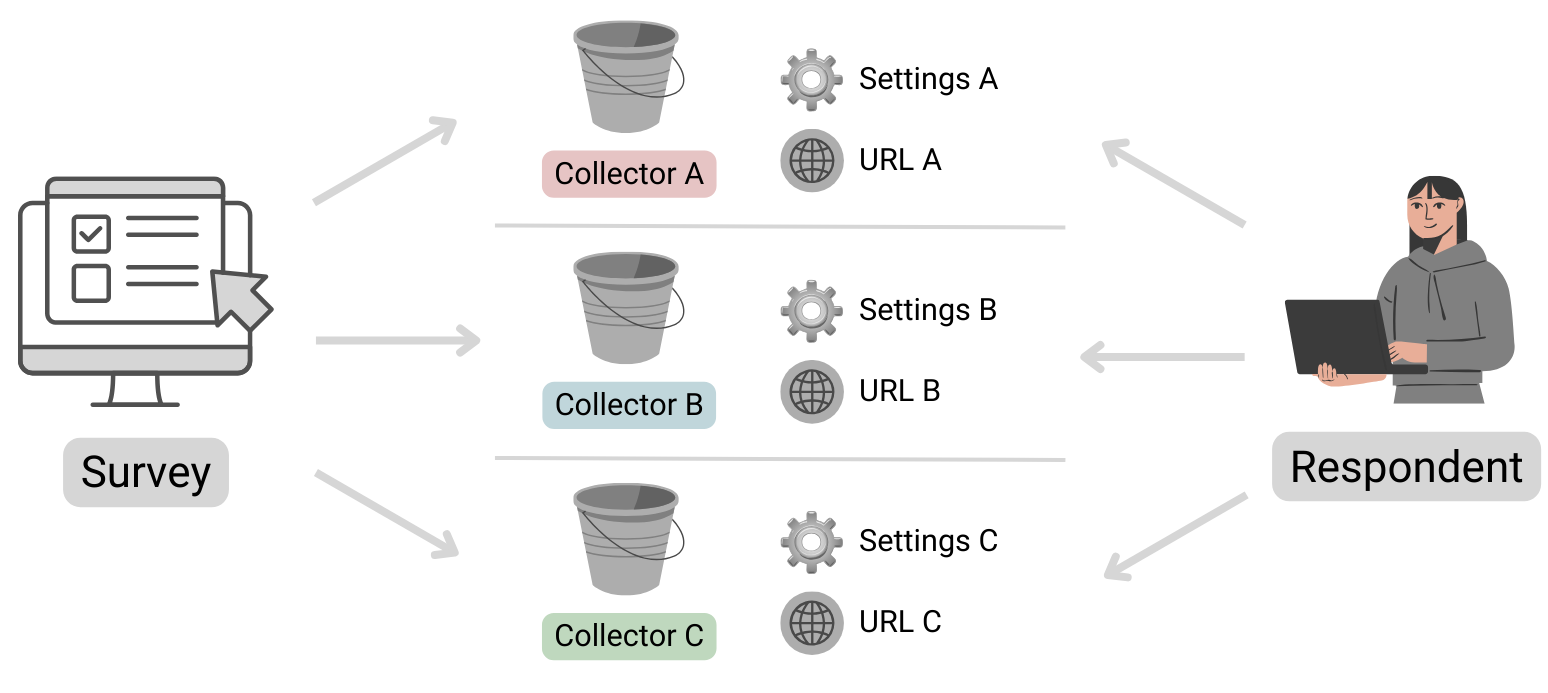
Table structure
| Column name | Data type | Explanation | Table relationships | Values |
|---|---|---|---|---|
| ID | Number | Primary key | Respondents.Collector ID | |
| Name | Text | Name of the collector | ||
| Unique URL | Text | The public URL where the survey can be accessed | ||
| Survey ID | Text | Reference to the survey to which this collector belongs | Surveys.ID | |
| Status | Text | Indicates whether the collector is still accepting submissions or is already closed. | open, closed | |
| Type | Text | Specifies whether the collector is public or private. If a survey is set as private, it can only be opened by logged-in Zoho users. | public, private | |
| Offline URL | Text | Zoho Survey offers the option of completing surveys offline. This
means that responses can be received even without an Internet connection
and can be viewed and uploaded after authentication. Further
information can be found here: https://help.zoho.com/portal/en/kb/survey/launch/offline-survey/articles/offline-surveys
Attention: Even if this function is deactivated, a URL is displayed here. If this is opened, a corresponding message appears stating that it cannot be accessed. |
||
| Offline Enabled | Boolean (DecisionBox) | Indicates whether the offline feature is activated or not. |
|
|
| Published Date | Date + Time | Time at which the Collector was published. | ||
| Cut Off Date | Date | Time at which the collector should be closed (this is the deadline specified in the settings).If a collector was closed manually, the date is not entered here (unfortunately this cannot be found anywhere else). | ||
| Multiple Response | Text | This column is always empty, even the support team couldn’t help me here. It looks as if information on restrictions is stored here (Editor 🡆 Publish 🡆 Restrictions 🡆 Response Restriction). |
Surveys
This table stores basic information about a survey.
Table structure
| Column name | Data type | Explanation | Table relationships | Values |
|---|---|---|---|---|
| ID | Number | Primary key | Responses.Survey IDQuestions.Survey IDVariables.Survey IDResponse Variables.Survey IDCollectors.Survey IDPages.Survey ID | |
| Language | Text | Identification of the standard language selected for the survey | Set 1 of the ISO 639 language codes | |
| Created Date | Date + Time | Date on which the survey was created (the publication date can be found in the Collectors table!) | ||
| Modified Date | Date + Time | Time of the last editing of the survey | ||
| Page Count | Positive number | Indicates the total number of pages in the survey. | ||
| Title | Text | A different title can be configured in the settings if the name of the survey (table column ‘Name’) is not to be used. | ||
| Submit Button | Text | The text stored in the settings for the button to send the survey | ||
| Back Button | Text | The text stored in the settings for the button to go back to the previous page has been changed. | ||
| Enable Back | Text | Indicates whether the respondent can return to the previous page or whether the button is not displayed. | true, false (Attention! Zoho uses the text true and false here and not the data type Desicion Box, this inconsistency is confusing and must be taken into account). | |
| Next Button | Text | The text that was defined in the settings for the button to go to the next page | ||
| Group ID | Number | Reference to the department in which the survey was created | Departments.ID | |
| Name | Text | Survey name | ||
| Type | Text | As a rule, the value “survey” is available here. However, if scores
have been configured under Editor 🡆 Advanced settings, the value scoring is available instead. |
survey, scoring |
Automatically import new surveys is selected, there should normally be no missing data!Pages
The table contains all the information about the pages in the survey. Normally, this table should not play a major role in evaluations, unless you want to use the page title for segmentation.
Table structure
| Column name | Data type | Explanation | Table relationships |
|---|---|---|---|
| ID | Number | Primary key | Responses.Page ID
Questions.Page ID |
| Title | Text | Title of the page | |
| Description | Text | Description text | |
| Question Count | Positive number | Indicates the total number of questions on the corresponding page | |
| Survey ID | Number | Reference to the survey in which this page exists | Surveys.ID |
Questions
All data relating to the individual questions is stored here.
Table structure
| Column name | Data type | Explanation | Table relationships | Values |
|---|---|---|---|---|
| ID | Number | Primary key | Responses.Question ID | |
| Type | Text | Indicates the type of question | ||
| Text | Text | Question text | ||
| Page ID | Number | Reference to the page on which the question is located | Pages.ID | |
| Trashed | Boolean (DecisionBox) | Indicates whether the question is visible or whether it has been deleted |
|
|
| Mandatory Enabled | Boolean (DecisionBox) | Indicates whether the question is defined as a mandatory fieldThis column can contain the value NULL! Further information on the supported question types can be found below. |
|
|
| Random Enabled | Boolean (DecisionBox) | Indicates whether a random order of answer options is activated for the questionThis column can contain the value NULL! Further information on the supported question types can be found below. |
|
|
| Hint Enabled | Boolean (DecisionBox) | Indicates whether a hint text is stored for the questionThis column can contain the value NULL! Further information on the supported question types can be found below. |
|
|
| Other Option | Boolean (DecisionBox) | An optional “Other” field can be activated for certain questions. This column indicates whether this setting is active. Please note that the “Other” field cannot be used for all question types. Therefore, this column may contain the value NULL. Further information on the supported question types can be found below. |
|
|
| Hint | Text | If configured, the information text is stored here | ||
| No. Of Stars | Positive number | Maximum number of stars to be awardedThis column can contain the value NULL! Further information on the supported question types can be found below. |
Question types
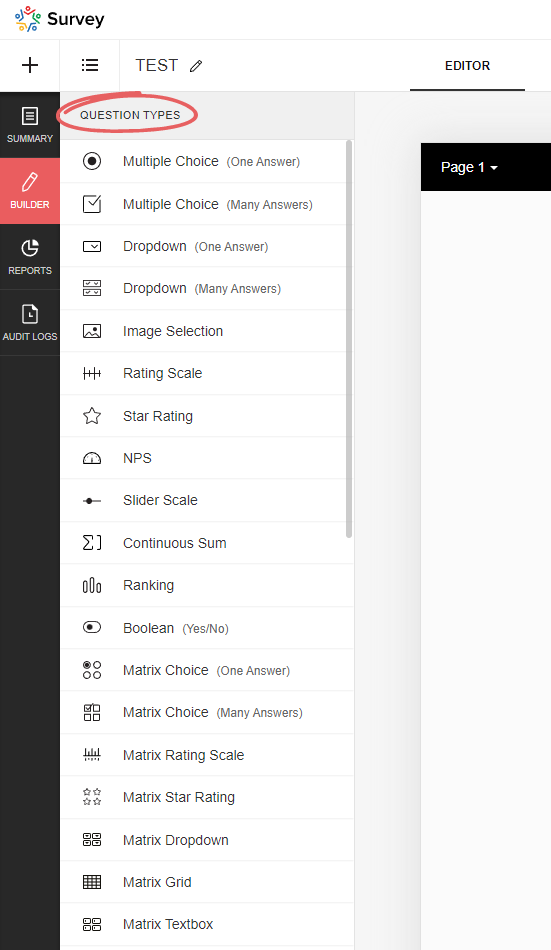
Zoho Survey offers a variety of question types, and depending on which type you select, certain options may not be available, resulting in the corresponding Boolean (DecisionBox) fields having the value NULL. In the table below you will find an overview of all available question types.
| Type | Field name (on the UI) | Note | Mandatory Enabled | Random Enabled | Hint Enabled | Other Option | No. Of Stars |
|---|---|---|---|---|---|---|---|
| full_name | Full name | NULL | NULL | Yes/No | NULL | NULL | |
| demographic | Contact details | NULL | NULL | Yes/No | NULL | NULL | |
| heading_descriptive | Heading and description | This is not a question! This element is only used to display text | NULL | NULL | NULL | NULL | NULL |
| single_drop_down | Dropdown field (one answer) | Yes/No | Yes/No | Yes/No | Yes/No | NULL | |
| multi_select_dropdown | Dropdown field (many answers) | Yes/No | Yes/No | Yes/No | Yes/No | NULL | |
| likert_rating | Rating Scale | The following setting is selected: Likert scale (can be selected when initially added) | Yes/No | NULL | Yes/No | NULL | NULL |
| image_star_rating | Image Selection | The following setting is selected: Star rating | Yes/No | NULL | Yes/No | NULL | Positive number |
| image_single_choice | Image Selection | The following setting is selected: Multiple selection (one answer) | Yes/No | Yes/No | Yes/No | NULL | NULL |
| image_multiple_choice | Image Selection | The following setting is selected: Multiple selection (multiple answers) | Yes/No | Yes/No | Yes/No | NULL | NULL |
| boolean_choice | Boolean | Yes/No | NULL | Yes/No | NULL | NULL | |
| combined_file_upload | File Upload | Yes/No | NULL | Yes/No | NULL | NULL | |
| calendar_box | Date/Time | Yes/No | NULL | Yes/No | NULL | NULL | |
| email_textbox | Yes/No | NULL | Yes/No | NULL | NULL | ||
| single_textbox | Short Answer | Yes/No | NULL | Yes/No | NULL | NULL | |
| textarea | Long Answer | Yes/No | NULL | Yes/No | NULL | NULL | |
| continuous_sum | Continuous Sum | Yes/No | NULL | Yes/No | NULL | NULL | |
| matrix_text_box | Matrix Textbox | Yes/No | NULL | Yes/No | NULL | NULL | |
| matrix_radio_box | Matrix Choice (One Answer) | Yes/No | NULL | Yes/No | Yes/No | NULL | |
| matrix_check_box | Matrix Choice (Many Answers) | Yes/No | NULL | Yes/No | Yes/No | NULL | |
| matrix_likert_rating | Matrix Rating Scale | The following setting is selected: Likert scale (can be selected when initially added) | Yes/No | NULL | Yes/No | NULL | NULL |
| matrix_grid | Matrix Grid | Yes/No | NULL | Yes/No | NULL | NULL | |
| matrix_drop_down | Matrix Dropdown | Yes/No | NULL | Yes/No | Yes/No | NULL | |
| matrix_star_rating | Matrix Star Rating | Yes/No | NULL | Yes/No | NULL | Positive number | |
| multiple_textbox | Multiple Textboxes | Yes/No | NULL | Yes/No | NULL | NULL | |
| single_choice | Multiple Choice (One Answer) | Yes/No | Yes/No | Yes/No | Yes/No | NULL | |
| multiple_choice | Multiple Choice (Many Answers) | Yes/No | Yes/No | Yes/No | Yes/No | NULL | |
| nps | NPS | Yes/No | NULL | Yes/No | NULL | NULL | |
| ranking | Ranking | Yes/No | NULL | Yes/No | NULL | NULL | |
| slider | Slider Scale | Yes/No | NULL | Yes/No | NULL | NULL | |
| signature | Signature | Yes/No | NULL | Yes/No | NULL | NULL | |
| star_rating | Star Rating | Yes/No | NULL | Yes/No | NULL | Positive number | |
| numeric_textbox | Number | Yes/No | NULL | Yes/No | NULL | NULL | |
| matrix_weightage | Matrix Rating Scale | The following setting is selected: Weighted selection (can be selected during initial addition) | Yes/No | NULL | Yes/No | NULL | NULL |
| choice_weightage | Rating Scale | The following setting is selected: Weighted selection (can be selected during initial addition) | Yes/No | NULL | Yes/No | NULL | NULL |
Respondents
This table stores data on the specific completion of the survey, including information on who completed it and when, and to which collector it belongs.
Table structure
| Column name | Data type | Explanation | Table relationships | Values |
|---|---|---|---|---|
| ID | Number | Primary key | Responses.Respondent IDResponse Variables.Respondent ID | |
| Start Date | Date + Time | Time at which the respondent opened the survey | ||
| End Date | Date + Time | Time at which the respondent submitted/completed the survey. If the survey has not yet been completed, this value is of course empty | ||
| IP Address | Text | IP address of the respondent; whether this data is saved or not depends on the setting in the collector (under general restrictions) | ||
| Status | Text | Indicates whether or not the survey has already been completed or submitted by the user | completed, partial | |
| Collector ID | Number | Reference to the collector through which the survey data was collected | Collectors.ID | |
| Survey ID | Number | Reference to the survey | Surveys.ID | |
| Time Taken in Minutes | Decimal number | Time difference between start and end time in minutes | ||
| Time Taken | Number | Time difference between start and end time in seconds | ||
| Survey Modified Time | Date + Time | Time at which the survey was last edited |
partial). Please take this into account when evaluating the data, as these should generally be excluded…Response Variables
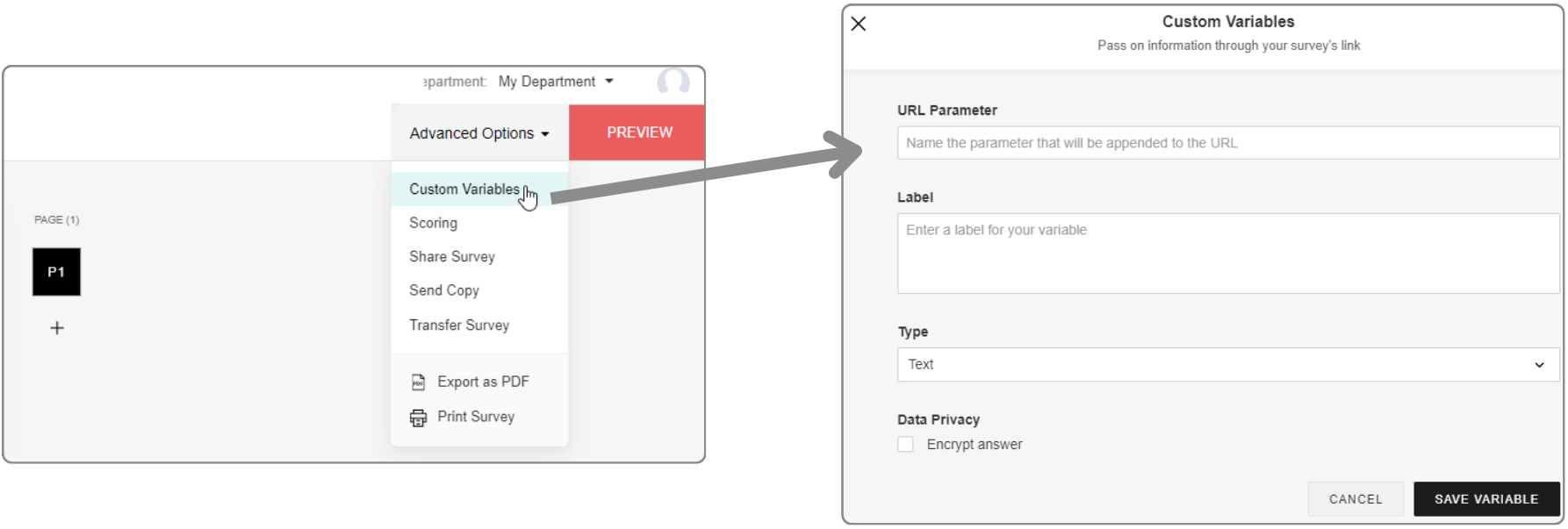
URL parameters can be configured in the editor under Advanced settings. If data has been transferred in a survey link and a response has been submitted, this data is saved here.
In addition, URL parameters can also be used as response restrictions, whereby these can be set per collector. This means that only one submission is permitted per unique URL parameter value.
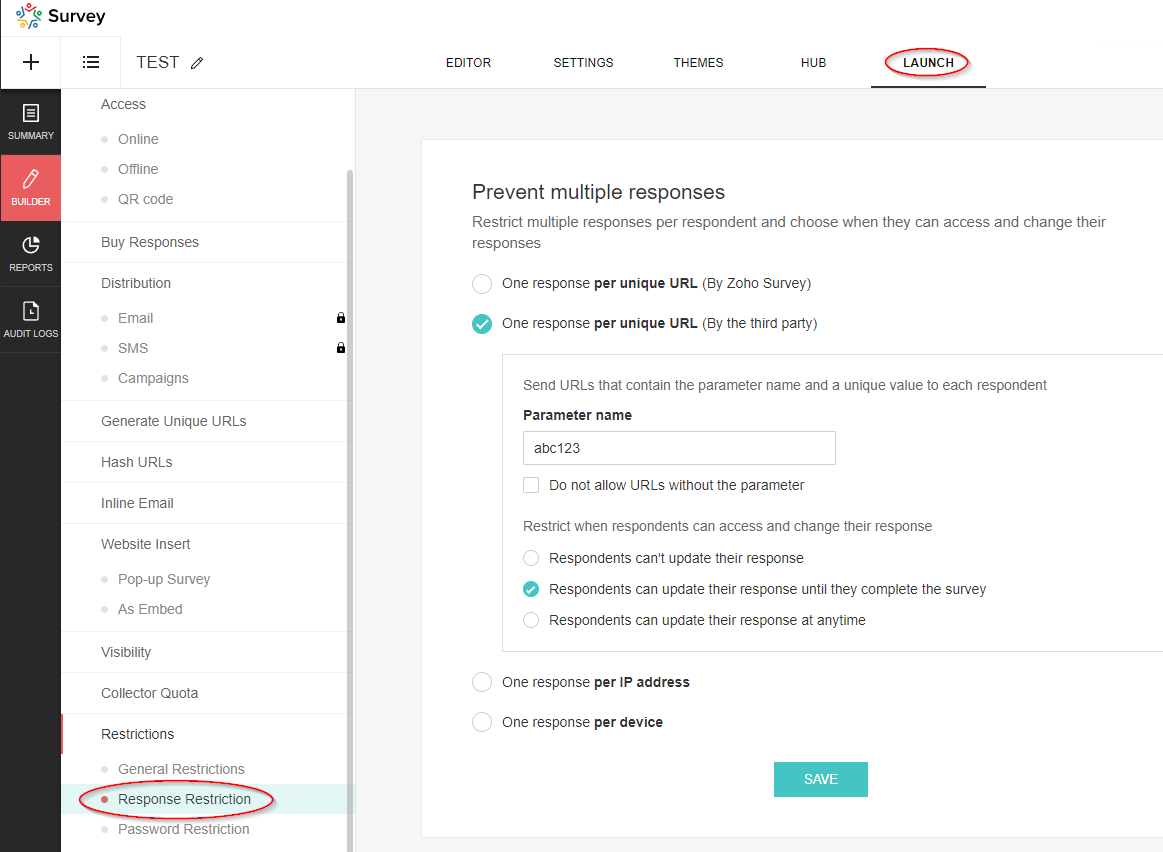
These parameters are not visible in the editor under Advanced settings, but are also saved in this table.
Table structure
| Column name | Data type | Explanation | Table relationships | Values |
|---|---|---|---|---|
| Respondent ID | Number | Reference to the data set of the respondent | Respondents.ID | |
| Variable ID | Number | Reference to the variable | Variables.ID | |
| Variable Label | Text | Description | ||
| Variable Value | Text | Value of the variable | ||
| Skipped By Logic | Boolean (DecisionBox) | ? |
|
|
| Survey ID | Number | Reference to the survey | Surveys.ID |
Variables
This table contains the basic data of the variables (URL parameters).
Table structure
| Column name | Data type | Explanation | Table relationships | Values |
|---|---|---|---|---|
| ID | Number | Primary key | Response Variables.Variable ID | |
| Name | Text | Name of the parameter, i.e. the exact string used in the URL | ||
| Label | Text | Description of the parameter | ||
| Type | Text | Data type |
|
|
| Unique Order | Text | Order in which the parameters were added (in the advanced settings) | Capital letters (A, B, C, etc.) | |
| Trashed | Boolean (DecisionBox) | Indicator whether the parameter has been deleted |
|
|
| Respondent / Custom | Text | If the parameter is used for the response restriction, the value is Respondent, otherwise it is Custom. |
|
|
| Survey ID | Number | Reference to the survey | Surveys.ID |
Responses
This table is of particular interest as it contains the answers to the questions that were submitted.
Table structure
| Column name | Data type | Explanation | Table relationships | Values |
|---|---|---|---|---|
| Respondent ID | Number | Reference to the respondent’s data record | Respondents.ID | |
| Question ID | Number | Reference to the question | Questions.ID | |
| Option ID | Number | Reference to the option: “Option” refers to the selected value in a drop-down field or the selected answer in a multiple choice question. Image selection questions also refer to an option. However, it should be noted that this does not currently contain any information about the image, so it is unfortunately useless. For further details, please see the section on the corresponding table! | Options.ID | |
| Text | Text | Answer to the question. This field is empty if it is a dropdown field or a multiple choice question (then the answer is the selected option) | ||
| Row ID | Number | Reference to the row | Rows.ID | |
| Column ID | Number | Reference to the column | Columns.ID | |
| Row | Text | The name of the row (this is simply a lookup, unfortunately the value at the time of the evaluation is not saved) | Rows.Text | |
| Column | Text | The name of the column (this is simply a lookup, unfortunately the value at the time of the evaluation is not saved) | Columns.Text | |
| Option | Text | The name of the option (this is simply a lookup, unfortunately the value at the time of evaluation is not saved) | ||
| Survey ID | Number | Reference to the survey | Surveys.ID | |
| Field ID | Number | Reference to the field if it is a text field or a number field. Further information can be found in the section on the corresponding table! | Fields.ID | |
| Not Applicable Enabled | Boolean (DecisionBox) | For certain questions, you can add the option “Not applicable”. If this option was selected by the respondent, this flag is set. The option can be activated for the following question types: ranking, image_star_rating, matrix_star_rating, matrix_likert_rating | Yes, No | |
| Others | Text | For certain questions, it is possible to activate the “Other” option. You can find more information on this in the section on question types! If this option is activated and the respondent has used it, the answer is not recorded in the “Text” field, but in this field. | ||
| Page ID | Number | Reference to the page on which the answered question is located. | Pages.ID | |
| Field | Text | The name of the field (this is simply a lookup, unfortunately the value at the time of the evaluation is not saved) | Fields.Text |
Rows
The row information for multi-line questions, such as those that occur in a matrix, is recorded in this table. The data in this table relates to the following question types (Questions.Type):
- matrix_likert_rating
- matrix_grid
- matrix_check_box
- matrix_star_rating
- matrix_radio_box
- matrix_text_box
- matrix_weightage
- ranking
- matrix_drop_down
- image_star_rating
Table structure
| Column name | Data type | Explanation | Table relationships | Values |
|---|---|---|---|---|
| ID | Number | Primary key | Responses.Row ID | |
| Question ID | Number | Reference to the question | Questions.ID | |
| Text | Text | Name of the row | ||
| Survey ID | Number | Reference to the survey | Surveys.ID | |
| Unique Order | Text | Specifies the sequence |
Columns
The column information for questions with multiple columns that only occur in a matrix is recorded in this table. The entries in this table refer to the following question types (Questions.Type):
- matrix_grid
- matrix_text_box
- matrix_radio_box
- matrix_drop_down
- matrix_check_box
- matrix_weightage
Table structure
| Column name | Data type | Explanation | Table relationships | Values |
|---|---|---|---|---|
| ID | Number | Primary key | Responses.Column ID | |
| Text | Text | Name of the column | ||
| Question ID | Number | Reference to the question | Questions.ID | |
| Survey ID | Number | Reference to the survey | Surveys.ID |
Fields
This table contains information on group input fields that are used to enable multiple entries per question. This also includes the file upload field and the Boolean (DecisionBox) field, as multiple fields can also be configured here as an option.
In the table, the fields of the following question types (Questions.Type) are listed:
- continuous_sum
- demographic
- Boolean (DecisionBox)_choice
- multiple_textbox
- full_name
- combined_file_upload
Table structure
| Column name | Data type | Explanation | Table relationships | Values |
|---|---|---|---|---|
| ID | Number | Primary key | Responses.Field ID | |
| Text | Text | Name - Attention! If there is only a single switch, “Boolean (DecisionBox)” is displayed here. Otherwise, the corresponding values for the labels will of course appear. | ||
| Type | Text | Indicates the type of input field. | single_textbox, numeric_textbox, email_textbox, file_upload, single_choice | |
| Unique Order | Text | Specifies the order. | ||
| Sequence No | Number | Specifies the order. | ||
| Question ID | Number | Reference to the question | Questions.ID | |
| Survey ID | Number | Reference to the survey | Surveys.ID | |
| Mandatory Enabled | Boolean (DecisionBox) | Indicates whether the field is defined as a mandatory field or not. | Yes, No |
Options
The selectable values that are available in drop-down fields or for multiple-choice questions are saved here. There is also an option for image selection questions. However, it should be noted that this option currently contains no information on the image and is therefore unfortunately useless. In addition, this table is also important for weighted rating scales, as the weightings are saved here. A look at this table is therefore essential for evaluations with this type of scale.
Options are saved for the following question types (Questions.Type):
- matrix_drop_down
- single_choice
- single_drop_down
- image_single_choice
- multi_select_dropdown
- multi_select_dropdown
- multiple_choice
- matrix_weightage
- choice_weightage
Table structure
| Column name | Data type | Explanation | Table relationships | Values |
|---|---|---|---|---|
| ID | Number | Primary key | Responses.Option ID | |
| Text | Text | Name of the option/answer | ||
| Question ID | Number | Reference to the question | Questions.ID | |
| Survey ID | Number | Reference to the survey | Surveys.ID | |
| Column ID | Number | Reference to the column | Columns.ID | |
| Weightage | Number | For questions of the rating scale type and the Weighted selection option set, the respective weighting is displayed here. |
Topic Participants
Sven
Sticky Posts
What's New in Zoho Analytics - February 2026
Hello Users! We're back with another round of updates for Zoho Analytics. This month's release focuses on giving you greater flexibility in how you visualize, manage, and act on your data - with new features like custom visualizations, remote MCP server,What's New in Zoho Analytics - January 2026
Hello Users! We are starting the year with a strong lineup of updates, marking the beginning of many improvements planned to enhance your analytics experience. Explore the latest improvements built to boost performance, simplify analysis, and help youWhat's New in Zoho Analytics - November 2025
We're thrilled to announce a significant update focused on expanding your data connectivity, enhancing visualization capabilities, and delivering a more powerful, intuitive, and performant analytics experience. Here’s a look at what’s new. Explore What'sWhat's New in Zoho Analytics - October 2025
Hello Users! We're are back with a fresh set of updates and enhancements to make data analysis faster and more insightful. Take a quick look at what’s new and see how these updates can power up your reports and dashboards. Explore What's New! ExtremeWhat’s New in Zoho Analytics – September 2025
Hello Users!! In this month’s update, we’re raising the bar across multiple touchpoints, from how you bring in data, plan and track projects to how you design and brand your dashboards. We’ve added the all-new Gantt chart for project visualization, expanded
Recent Topics
Can I export to PDF in Zoho Learn
I have seen help pages where export to pdf options are available but I do not see that option available from the application. I see that exprt is available in my free trial version but that is only to html pages. I need to be able to export my manualsKaizen #225 - Making Query-based Custom Related Lists Actionable with Lookups and Links
Hello everyone! Welcome back to another post in the Kaizen series! This week, we will discuss an exciting enhancement in Queries in Zoho CRM. In Kaizen #190, we discussed how Queries bridge gaps where native related lists fall short and power custom relatedZia capabilities now available in the Professional edition announcement
Hello all! The Professional edition now supports a broader set of Zia capabilities, enabling teams to bring AI into more of their everyday CRM work. From writing assistance and summaries to setup support, predictions, and recommendations, Zia can nowWhere Do I set 24h time format in Cliq?
Where Do I set 24h time format? ThanksThis will be long, Please bear with me - Next Gen Layout - Search
In general, I think that Zoho are going in the right direction with the Next Gen UI. The latest update brings some nice improvements and all-in-all from a user's perspective I think the improvements are generally very good. However, there are some areasSelecting all notes in a notebook
In Windows11, I select a notebook and I get a list of notes, but only 30 notes. If I scroll down to the end, I get an additional 30 notes (and at the top it now shows 60 notes). I can keep doing this to eventually see all my notes but this is a real pain.Filter Records in CRM API
Hi Team, I’m currently working on a task to retrieve expired deals from the CRM. By “expired deals,” I mean deals where the closing date has already passed and the stage is not “Closed Won” or “Closed Lost” (i.e., all other stages). I tried using bothUser Name in Zoho Cliq Not Updating Across Apps?
We updated the name of a user in Zoho. (From Sue to Taylor) Her name has not been updated in Cliq on all apps. When in Zoho One, if I go to Cliq directly, it is correct, but if I am in another app, and the Cliq bar pops up on the bottom, it will be theAbility to Use Both AND and OR When Creating Rules (Advanced Conditions)
I'd like to be able to use more complicated logic when setting up rules. E.g. in Zoho Mail, I can choose "Advanced conditions (AND/OR) to create a rule that can be applied to multiple subject lines from the same sender. But in Zoho TeamInbox, I will haveAttaching files to emails within CRM Deals.
Hello, We have recently started using the extension "Workdrive for CRM" (Related List) to view/store our documents for each Deal, instead of using Attachments. Overall it feels like a better way to go but the user experience is not so great when it comesWhy I can't map Account Name from lead module to Account module?
When I qualify a lead in the bluerprint, I use automated conversion in Blueprint to automatically create Contact, Account and Deal. the Deal record and contact record has been successfully created automatically as I expect, but I can't see any accountPause(1);
I'm using scheduler to invoke an interaction via http post with an external service. The schedule code uses a for-each loop that runs so fast my external application's log files get messed-up (they are named by date-time stamp). What I'm suggesting isRelease Notes | February 2026
We have rolled out another set of enhancements in Vertical Studio during February 2026, bringing improvements to Canvas customization, reporting capabilities, and data access controls. Here is a summary of what was released during February 2026: CanvasAgentic Engineering with Zoho: The Next Evolution of Intelligent Systems
The concept of Agentic Engineering is reshaping how modern systems are designed. It introduces a new layer to the way we think about artificial intelligence and system architecture. For years, most software systems have operated in a reactive way — respondingEngenharia Agêntica e as soluções da Zoho
O conceito de engenharia agêntica impacta diretamente como os sistemas são projetos. Este tema inseri mais uma camada a nossa idéia de inteligência artificial. Antes o desenvolvimento de sistemas operavam de forma reativa e dependente de comandos diretos,Effective project and task customization with CodeX
Dear users, Beyond Task Lists is a series of articles aimed at showcasing the various customization capabilities of Zoho Projects. We'll discuss real life project management scenarios, use cases, and requirements that needs combining multiple features.Set expiration date on document and send reminder
We have many company documents( for example business registration), work VISA documents. It will be nice if we can set a expiry date and set reminders ( for example 90 days, 60 days, 30 days etc.,) Does Zoho workdrive provide that option?Debit opening balances of vendors
Dear colleagues: I am looking at the trial balance as on 31st March 2024, and punching opening balances (1st April 2024) in Zoho Books. Vendors have credit balances, by its nature, but some of our vendors have debit balances as well (e.g., we have paidZoho Books emails suddenly going to Spam since 11 Nov 2025 (Gmail + now Outlook) — anyone else?
Hi everyone, We migrated to Zoho Books in July 2025 and everything worked fine until 11 Nov 2025. Since then, Zoho Books system emails are landing in customers’ Spam (first Gmail, and now we’re seeing Outlook/Office 365 also starting to spam them). ImpactedClient Portal ZOHO ONE
Dear Zoho one is fantastic option for companies but it seems to me that it is still an aggregation of aps let me explain I have zoho books with client portal so client access their invoice then I have zoho project with client portal so they can access their project but not their invoice without another URL another LOGIN Are you planning in creating a beautiful UI portal for client so we can control access to client in one location to multiple aps at least unify project and invoice aps that wouldThe Social Wall: February 2026
Hello everyone, This month, we’re bringing you a mix of exciting toolkit enhancements and a few improvements across the web and iOS app, all designed to make your social media management simpler and smoother. File converter Images come in different formats,Zoho Mail and SalesInbox doesn't link to CRM record using Reply-To
Hi, I've just set up SalesInbox, with the intention of using it for sales enquiries (instead of Desk, which I have been using until now). I've noticed that, unlike Desk, SalesInbox only uses the 'From' email address to attempt to link to a CRM contactService line items
Hello Latha, Could you please let me know the maximum number of service line items that can be added to a single work order? Thanks, Chethiya.Poor Search Results on Zoho CRM
The search on Zoho CRM is quite poor. Salesforce has now published a new search, when will get this on Zoho? https://help.salesforce.com/s/articleView?id=data.c360_a_hybridsearch_index.htm&type=5How to use filters on all products page? Or even a category page?
Hello, I am trying to create some filters so users can use filters to find products they are looking for. So what i am trying is to create a filter according to price lets say. So if i define it this way i am expecting to see this filter option on categoryCapture Last check-in date & days since
I have two custom fields on my Account form, these are "Date of Last Check-In" and "Days Since Last Contact" Using a custom function how can I pull the date from the last check-in and display it in the field "Date of Last Check-In"? and then also display the number of days since last check-in in the "Days SInce Last Contact" field? I tried following a couple of examples but got myself into a bit of a muddle!Archiving Contacts
How do I archive a list of contacts, or individual contacts?Every time an event is updated, all participants receive an update email. How can I deactivate this?
Every time an event is updated in Zoho CRM (e.g. change description, link to Lead) every participant of this meeting gets an update email. Another customer noticed this problem years ago in the Japanese community: https://help.zoho.com/portal/ja/community/topic/any-time-an-event-is-updated-on-zohocrm-calendar-it-sends-multiple-invites-to-the-participants-how-do-i-stop-that-from-happening3/18 オンライン勉強会のお知らせ Zoho ワークアウト (無料)
ユーザーの皆さま、こんにちは。コミュニティチームの中野です。 3月開催のZoho ワークアウトの開催が決定しましたのでご案内します。 今回はZoomにて、オンライン開催します。 ▶︎参加登録はこちら(無料) https://us02web.zoom.us/meeting/register/BoNTN7zYR8OvOPGShqBY0A ━━━━━━━━━━━━━━━━━━━━━━━━ Zoho ワークアウトとは? Zoho ユーザー同士で交流しながら、サービスに関する疑問や不明点の解消を目指すイベントです。Conversion Rate – Won Deals over Assigned Prospects
Hello, I would like assistance configuring a KPI in Zoho Analytics titled: Objective of the calculation: Number of Won Deals divided by Total number of assigned prospects (not only converted prospects). Important clarification: The denominator must includeFeature Request – Conditional Visitor Information Request in Zoho SalesIQ
We would like to request the ability to conditionally ask for visitor details based on the communication channel used in Zoho SalesIQ. Specifically: When a visitor initiates a conversation through the live chat widget on the website, we want to continueApple Messages for Business in Omnichannel communications?
Hello, Apple launched "Apple Messages for Business" but Zoho CRM or Zoho Desk don't appear in the list of possible integrators. Zoho already promotes https://www.zoho.com/crm/omnichannel.html Omni Channel integration, but Apple Messages does not yet appear.Admin asked me for Backend Details when I wanted to verify my ZeptoMail Account
Please provide the backend details where you will be adding the SMTP/API information of ZeptoMail Who knows what this means?Cliq iOS can't see shared screen
Hello, I had this morning a video call with a colleague. She is using Cliq Desktop MacOS and wanted to share her screen with me. I'm on iPad. I noticed, while she shared her screen, I could only see her video, but not the shared screen... Does Cliq iOS is able to display shared screen, or is it somewhere else to be found ? RegardsZOHO.CRM.UI.Record.open not working properly
I have a Zoho CRM Widget and in it I have a block where it will open the blocks Meeting like below block.addEventListener("click", () => { ZOHO.CRM.UI.Record.open({ Entity: "Events", RecordID: meeting.id }).catch(err => { console.error("Open record failed:",【Zoho CRM】通貨機能のアップデート:為替レートの自動更新やデータ更新オプションなど
ユーザーの皆さま、こんにちは。コミュニティチームの藤澤です。 今回は「Zoho CRM アップデート情報」の中から通貨機能のアップデートをご紹介します。 CRMの複数通貨機能を使うと、地域ごとに通貨を管理し、顧客の現地通貨で記録したデータを自国通貨に自動換算して分析やレポートに活用できます。 従来は、為替レートを管理者が手動で定期更新する必要があり、各データには作成時点のレートが固定されるため、その後の市場変動は反映されませんでした。 本記事では、この問題を解消する「為替レートの自動更新」をはじめ、さまざまな新機能をご紹介します。AI Bot and Advanced Automation for WhatsApp
Most small businesses "live" on WhatsApp, and while Bigin’s current integration is helpful, users need more automation to keep up with volume. We are requesting features based on our customer Feedbacks AI Bot: For auto-replying to FAQs. Keyword Triggers:Can we add zoho sign to a custom module?
i understand out of the box it works with 8 modules. is it possible to add it to a custom module?This domain is not allowed to add in Zoho. Please contact support-as@zohocorp.com for further details
Selected date present employees roster
=CHOOSECOLS(FILTER(A2:E5;(INDEX(C2:E5;0;MATCH(VALUE(B8);INDEX(VALUE(C1:E1));0))<>"OFF")*(INDEX(C2:E5;0;MATCH(VALUE(B8);INDEX(VALUE(C1:E1));0))<>"EL"));1;2;2+MATCH(VALUE(B8);INDEX(VALUE(C1:E1));0)) This way sheet looks lNext Page