Power up Zoho CRM with project intelligence

Power up Zoho CRM with project intelligence


Dear user,

You're probably one of those businesses using your CRM as a single source of truth. It's where sales, project execution, and finance teams go to analyze past decisions and formulate future strategies. But what happens when project data is either missing or out of sync with the CRM? Delayed or missed action results in missed opportunities.

It's important to allow users to track projects and allow salespeople and stakeholders to keep an eye on the client lifecycle without leaving the CRM.

The Zoho Projects-Zoho CRM integration

The existing Zoho CRM plugin for Zoho Projects helps users associate and create new projects right from their CRM modules, as well as map project tasks to CRM deal activities, at a basic level.

But there's more to it than meets the eye. In this post, we're exploring how to sync data so that project activities drive action inside Zoho CRM and vice versa. Let's dive in.

Accelerate onboarding with discovery


When CRM has a sales qualified lead (SQL) or qualifies a lead as "hot," discovery or onboarding tasks should be created in the appropriate project, assigning the lead owner to the task. This reduces manual coordination and facilitates better tracking, reduced wait times, and faster execution.

'Closed Won' to Active Projects
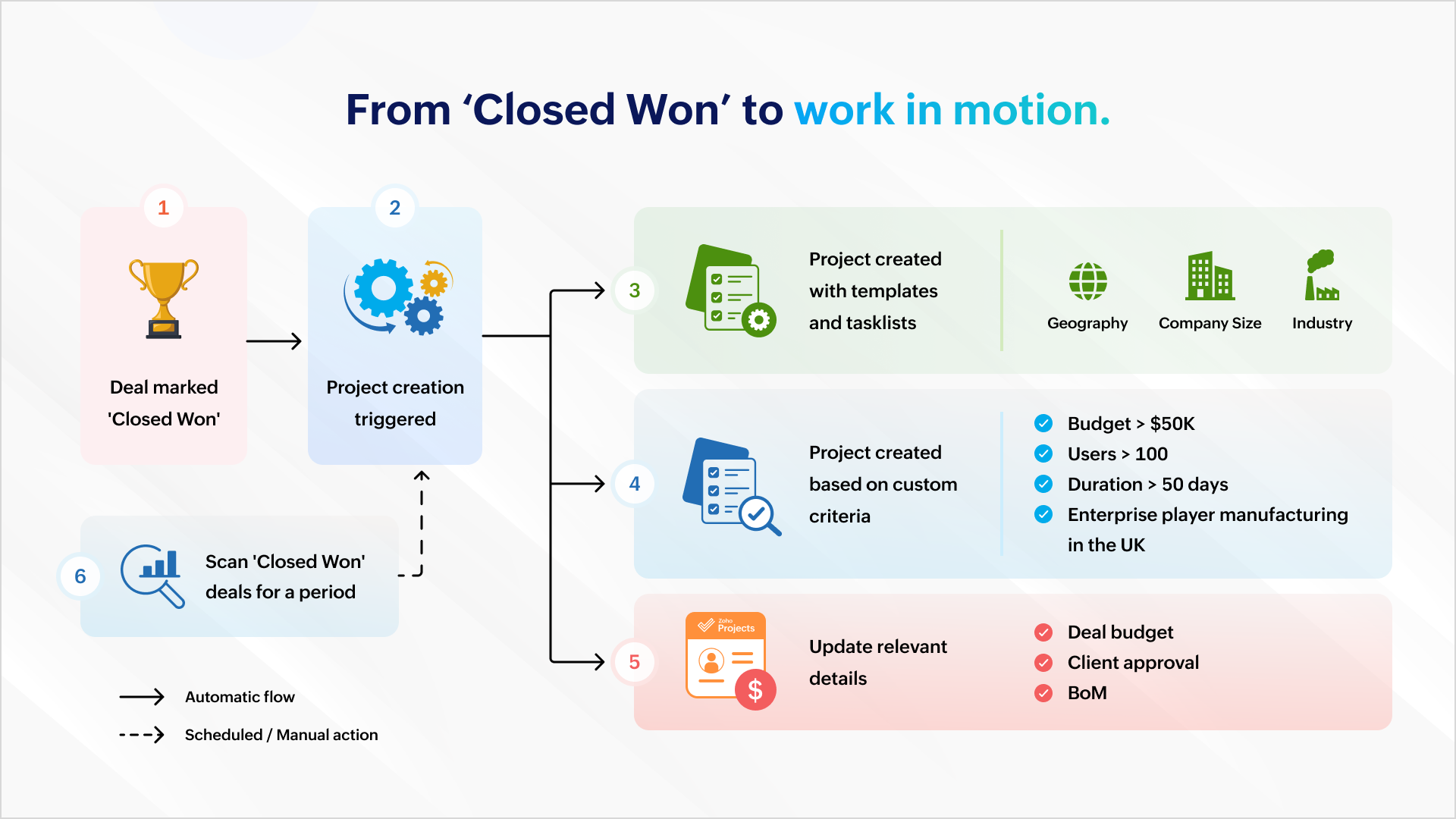


Once a deal is won, a project can be created automatically to ensure work commences immediately. Project creation can be automated with predefined task lists (for EU compliance or HIPAA-readiness) and project templates based on geography, company size, or industry.

It can also be based on custom criteria like a high-value deal (say, a budget that's greater than $50K), a bigger deal size (say, more than 100 users), a fast-track deal (needs closure within 50 days) or a combination of criteria (say, enterprise businesses in the manufacturing sector in the UK).
The deal's budget can be auto-populated during or after project creation so that users are mindful of expenses and effort.

You can scan all the "closed won" deals this quarter and create a project which matches your criteria.

Managing ownership and assignments
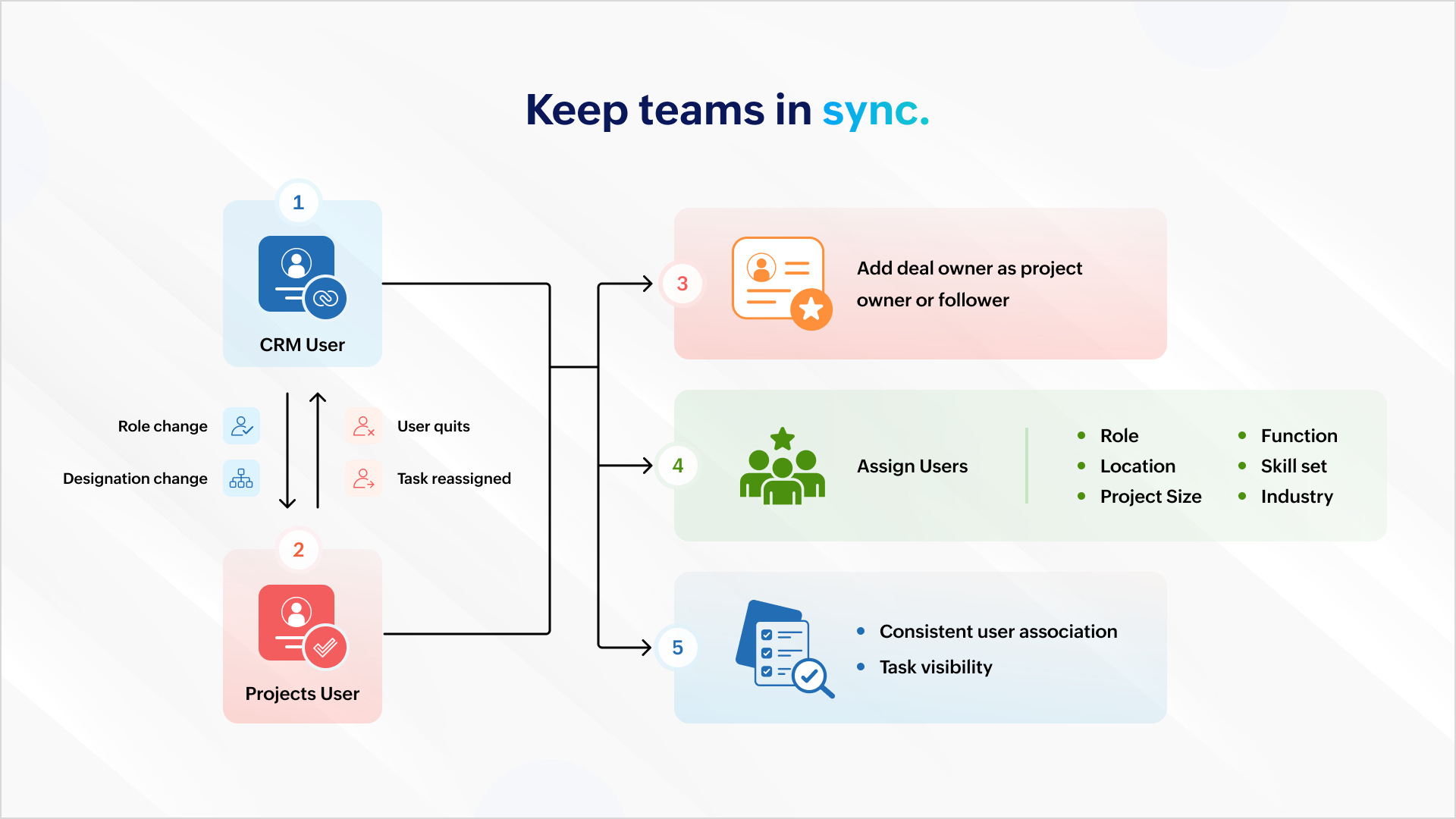


All role and designation changes should reflect uniformly across both platforms to ensure consistent association and task visibility. If a projects user quits or is assigned a new task, the reassignment should reflect inside Zoho CRM.

You can also add the deal owner as the project owner or project follower to ensure accountability carries over. Project users can then be assigned based on role, location, function, skill set, project size, industry, and more.

Deal management


Mapping your project phases to respective deal stages helps mirror project status inside the CRM. Estimated project spends and project completion percent can help identify possible bottlenecks.

Notifying relevant stakeholders about delays or budget overruns helps them intervene and get involved early in damage control. Marking the deal as "At Risk" also ensures it gets the necessary attention among relevant stakeholders.

Tracking


Tasks created in a project must be logged as activities against the associated deal to ensure stakeholders have a complete view of the progress.

Similarly, when users log time in Zoho Projects, it should update against the respective deal in CRM. This gives a picture of the billable hours consumed and the hours remaining to identify scope creep.

Stay on top of issues


It's important to keep customer success and account management teams up to date with showstoppers and blocking issues. This requires creating a case for each issue logged in Zoho Projects so that managers can take ownership and take issues to closure with constant monitoring.


Invoicing


Milestone completion should automatically draft an invoice and send it for approval. Automating invoicing based on project progress gives more time to focus on essential work.

Compliance


It's important that deals don't spring up surprise data during an audit. Zoho Books, Zoho CRM, and Zoho Projects can restrict deal activity during the "Legal Review" stage. Records can return to business as usual when legal review is complete.

And, there's more..

What we discussed here is only the tip of the iceberg. You can do more with analytics, insight-based actions, and advanced forecasting.

As a business owner or head of operations, charting your business process and identifying the gaps, problems, and aspirations will help your identify more opportunities. Once you have what you want, there are two ways to go about it.

1. Customization

You can create workflow rules, custom functions, blueprints, conditional field updates, and webhooks to strengthen automation, alert other systems, and receive data all by yourself.

But there's the risk of your org users meddling with the setup during everyday work.

2. Work with a partner

If you think you don't have the time for it or require assistance, our partners can help. As certified Zoho Experts, partners can help you customize your requirements and help you set it up. They can also help you package the entire setup (workflow rules, custom functions, etc.) into a single installable unit like a plugin or an extension from Zoho Marketplace. The custom plugin can then be installed and set up according to your needs.

AI-powered utilities

You can leverage MCP for Zoho Projects and orchestrate project management from your favorite LLMs using natural language.

Idea
This means you can get answers and initiate actions for the following requests right from a chat box:

"Show me all tasks that don't have a task owner."
"List the least profitable projects from the previous year."
"Create onboarding tasks for all hot leads in Mumbai."
"Generate invoices for milestones completed this week."

We will showcase an extension with custom capabilities to track activities and initiate automated action in one of our upcoming articles. Write to us if you are interested and we can talk - support@zohoprojects.com.

Learn more about the existing integration - setup, capabilities, and uses here - Zoho Projects and Zoho CRM integration.

Feel free to read up on the previous editions of the series:

#1 Effective project and task customization using CodeX
#2 Build an approval management system using custom modules

Best,
The Zoho Projects Team

      • Sticky Posts

      • Update on V2 API End-of-Life Timeline

        Dear Users, Earlier this year, we shared the launch of the V3 APIs and requested users to migrate from the older V2 APIs by December 2025. We have received valuable feedback from our users and partners regarding their migration timelines. We are happy
      • Automation Series: Auto-assign Task Followers

        As task progresses, several users are required to stay aware of the updates to plan their upcoming work items efficiently. Manually adding users as followers for an active task might create additional overhead. With this automation, followers can be added
      • WhatsApp Business Integration for Zoho Projects

        Delivery channel plays a decisive role in how quickly certain project updates translate into immediate actions. A release is ready to go live. An issue is marked critical. An approval is pending. These moments are less about tracking and more about timely
      • Enhanced Collaboration and Global Web Tabs

        Hello Users, We are rolling out two key enhancements in Zoho Projects that will be part of our November release. Here’s what to expect: 1. Collaboration Section in the Left Navigation Panel What’s new? All communication and interactive tools will be grouped
      • Choosing the Right Automation in Zoho Projects

        In any project, different types of actions are needed at different points. Some projects require control on how tasks move, some require reacting to updates, and some require executing additional actions beyond the task. Automation in Zoho Projects is

        • Recent Topics

        • Bing ads integration and tracking

          Hi, Is there any way to track Bing ads in the same way that we are able to track google adwords?  It is important for us to be able to determine the conversion rate of our Bing ads.  If this is not possible now, will this feature be added in the future?
        • #20 Your Business Shouldn't Stop Just Because You Do

          Imagine you are on a well-deserved vacation. Your clients are expecting invoices at the beginning of the month, recurring customers are due for billing, and payments are still coming in. Do you carry your laptop everywhere, hoping you don't miss a billing
        • Marketing Tip #26: Optimize product images for SEO

          Product images can do more than make your store look good. They can also help customers discover your products through search. Since search engines can’t "see" images, they rely on text signals to understand what an image is about. Two small actions make
        • Canva Integration

          Hello! As many marketing departments are streamlining their teams, many have begun utilizing Canva for all design mockups and approvals prior to its integration into Marketing automation software. While Zoho Social has this integration already accomplished,
        • Automation Series: Mandatory Time Logging Before Task Closure

          In a project, when users work on multiple tasks simultaneously, they track time in different ways, either by starting a timer or by adding a time log. Sometimes users may forget to add time, which can lead to discrepancies in the timesheet. When timesheets
        • Is there a way to show contact emails in the Account?

          I know I can see the emails I have sent and received on a Contact detail view, but I want to be able to see all the emails that have been sent and received between all an Accounts Contacts on the Account Detail view. That way when I see the Account detail
        • Zoho CRM gets a new email compose and lot more

          Dear Customers,  [UPDATE October 21, 2021: We have started opening these features to some of the customers already. And, it will be available to all the customers before November 2nd Week, 2021. Sorry for the delay caused]  [UPDATE February 21, 2022:
        • Custom AI solutions with QuickML for Zoho CRM

          Hello everyone, Earlier, we introduced Custom AI Solutions in CRM that let you access QuickML for your custom AI needs. Building on that foundation, we’ve now enabled a deeper integration: QuickML models can be seamlessly integrated into CRM, and surface
        • Introducing document visibility in Zoho Sign

          Hello! Complex document workflows often involve multiple stakeholders with different roles. Sending a separate envelope to every person is time consuming and can lead to administrative bottlenecks. With Zoho Sign's document visibility feature, you can
        • Sent email stuck on processing

          My sent emails are stuck on processing, whats going on?
        • [Webinar] What's new in Zoho Analytics: Q2 2026

          Hey data lovers! Our What's New webinar series is bringing you another lineup of exciting features and product enhancements from the past quarter, all designed to help you get more out of your analytics. Get an inside look at new data connectors, Zoho
        • Alterar número de telefone para receber o código OTP

          Boa tarde! Como posso alterar o número de telefone da minha conta para aceder ao meu email corporativo? Estou tentando logar, mas não consigo, pois está sendo enviado o código OTP para o número antigo, preciso aceder urgente meu email, porque e de trabalho.
        • CRM x WorkDrive: We're rolling out the WorkDrive-powered file storage experience for existing users

          Release plan: Gradual rollout to customers without file storage add-ons, in this order: 1. Standalone CRM 2. CRM Plus and Zoho One DCs: All | Editions: All Available now for: - Standalone CRM accounts in Free and Standard editions without file storage
        • Request to Increase URL Field Character Limit

          Hi Arthi, Hope you are doing well. I'm trying to save a URL in the Work Order (WO) module using the URL field, but I receive the following error message: "Please enter a valid Repair File. Maximum 450 characters are allowed." The issue is that the URL
        • How to change column headings in pivot table?

          Hi, Is there a way to rename the column headers of a pivot table? Now some the columns are named with value labels: 'SUM of .....'. We would like to rename those headers. As of now we couldn't find any direct solution to adjust the headers, besides copying and reformat. We want to avoid these extra steps. Best, Tiemen
        • Undelivered Mail

          I suspect that there are recipient's servers that blocks my emails. I receive the following email from mailer-daemon@mail.zoho.eu : A message that you sent could not be delivered to one or more of its recipients. This is a permanent error. pantelis.sarantos@unipakhellas.gr,
        • Email not loading on PC

          Hello, my email opens on but it doesn’t load on PC. I don’t have other issues with the email, all the configurations are ok and I face with following issue in the photo. It says “ mail.zoho.com refused to connect” I will be very thankful if anyone can
        • Why are bounce/error emails being sent to info@ instead of contact@?

          I have my Zoho Mail and WordPress site configured so that normal website emails should go to contact@hybridbatteryservice.com. However, I keep receiving technical bounce/error emails and delivery failure notifications at info@hybridbatteryservice.com
        • I want to create a gaming website

          Hi, I wanted to ask if it's possible to build a custom website using Zoho? I would like to create a website similar to https://busimulatorultimateapk.com/ with almost the same features, functionality, and user experience. I'm not looking for an exact
        • Do Not Disturb status not respected when Cliq bar is enabled across Zoho apps

          Hi Zoho Cliq team, I want to report what appears to be a bug with how the Do Not Disturb status interacts with the embedded Cliq bar in other Zoho apps. **Issue:** When my Cliq status is set to Do Not Disturb, I continue to receive notification tones
        • Introducing the Employee Portal for internal job posting

          Employee referrals and internal applications are one of the most trusted hiring channels. But in many organizations, employees only hear about openings through messages, word of mouth, or after the role has already been open for a while. When employees
        • Zoho Webinar Summer Broadcast 2026

          What if your webinar platform could connect directly with your business tools, automate routine tasks, trigger actions across your workflows, and support every stage of your webinar lifecycle? That’s the question we’ve been answering so far this year.
        • Zoho CRM Layout Rules: Nine New Actions, Profile-Based Execution, and Interactive Preview

          Hello everyone, Availability: This feature is now available for customers in the JP and SA DCs. It is planned to be released for other customers in soon. We’re excited to announce powerful new enhancements to Layout Rules in Zoho CRM - a feature built
        • Invalid request when trying to access Mail

          When I click on the red button to access Zoho Mail at https://mail.zoho.com/zm/, I get a big yellow warning triangle with "invlid request, The input passed is invalid or the URL is invoked without valid parameters. Please check your input and try ag
        • Whats the average response time for ticket submitted?

          I submitted a request to unblock my mail accounts. They seem to be blocked for outgoing mail, and I have been waiting for days to have this fixed with no reply. I have submitted 2 tickets and an email. My work has to completely stop. I pay for the service
        • All new Address Field in Zoho CRM: maintain structured and accurate address inputs

          Availability Update: 29 September 2025: It's currently available for all new sign-ups and for existing Zoho CRM orgs which are in the Professional edition exclusively for IN DC users. 2 March 2026: Available to users in all DCs except US and EU DC. 24
        • Is there any way to have Dataprep ingest RSS?

          As stated by the title. Does the Zoho environment offer tools that I can use to, directly or using workarounds, have Dataprep ingest an RSS feed? Thanks
        • Introducing Color Coding of Picklist Values

          Dear Everyone, Greetings!! Zoho CRM is uplifting the user experience. Recently, we had some notable aesthetic improvements in CRM like Kanban View UI enhancement, New List view UI enhancement, color coding of tags, and color coding of picklists in meetings.
        • Important updates to your Widget JS APIs

          Hello everyone, Greetings from Zoho Creator! This is an urgent notice for developers and Partners who use widgets in their Zoho Creator applications. We previously announced an update to the CDN URLs used for loading the Widget JS API, with a deadline
        • Deluge sendmail in Zoho Desk schedule can't send email from a verified email address

          I am trying to add a scheduled action with ZDesk using a Deluge function that sends a weekly email to specific ticket client contacts I've already verified the email address for use in ZDesk, but sendmail won't allow it in its "from:" clause. I've attached
        • Mailbox delegation “Send As” error

          I believe there may be an issue with mailbox delegation. When I create a delegation from the Admin Console, it works correctly if I select Read permissions. However, if I select Send As permission for the delegated user, I immediately receive the following
        • Restrict Zoho Cliq Webinars and Announcements to Admins Only

          Hi Zoho Team, We hope you're doing well. We would like to raise a feature request regarding in-app announcements in Zoho Cliq, such as the recent webinar popup about the Cliq Developer Platform: While these announcements are useful, they are not always
        • Desk Contact Name > split to First and Last name

          I am new to Zoho and while setting up the Desk and Help Center, I saw that new tickets created or submitted from the Help Center used the Contact Name field. This would create a new Contact but put the person's name in the Last Name field only. The First
        • how do i get mail.mydomain.com to point to zoho mail web-mail?

          I have started using zohomail, and am loving it. With my previous provider, I used to go to mail.mydomain.com, and it would take me to my webmail. I am not able to find the mapping for zoho's webmail to map to it. It is difficult to go to webmail with
        • Number of decimal places

          Hi Latha, I have added the following three fields to the Company module. Currently, these fields only allow a maximum of 2 decimal places. However, for some of our requirements, we need to enter values with up to 10 decimal places. Could you please help
        • zoho imap connection stopped working 05/28 12pm EST

          Hi, beginning Thursday, 5/28, ~12 pm est imap to siteground stopped working. When I tried to reconnect the account, connection was failing with the following message: Unable to connect SMTP server:gvam1107.siteground.biz, Port: 587. I did notice that
        • User Name in Zoho Cliq Not Updating Across Apps?

          We updated the name of a user in Zoho. (From Sue to Taylor) Her name has not been updated in Cliq on all apps. When in Zoho One, if I go to Cliq directly, it is correct, but if I am in another app, and the Cliq bar pops up on the bottom, it will be the
        • Service currently unavailable

          The Zoho Mail Webmail is working, the Mail Admin Console is not: "Our service is temporarily unavailable, please try after sometime." How long must I wait to retry? edit: To add to this, the Webmail is not working 100% - I can open mail in the inbox,
        • Service currently unavailable

          Service currently unavailable It is not possible to access email; the entire Zohoworkplace platform is down
        • User Permission Log

          Our external auditors are asking for a way to view changes made to user permissions (basically, a user permission change log). Is this feature built into Creator? 
        • Next Page