Power up Zoho CRM with project intelligence

Power up Zoho CRM with project intelligence


Dear user,

You're probably one of those businesses using your CRM as a single source of truth. It's where sales, project execution, and finance teams go to analyze past decisions and formulate future strategies. But what happens when project data is either missing or out of sync with the CRM? Delayed or missed action results in missed opportunities.

It's important to allow users to track projects and allow salespeople and stakeholders to keep an eye on the client lifecycle without leaving the CRM.

The Zoho Projects-Zoho CRM integration

The existing Zoho CRM plugin for Zoho Projects helps users associate and create new projects right from their CRM modules, as well as map project tasks to CRM deal activities, at a basic level.

But there's more to it than meets the eye. In this post, we're exploring how to sync data so that project activities drive action inside Zoho CRM and vice versa. Let's dive in.

Accelerate onboarding with discovery


When CRM has a sales qualified lead (SQL) or qualifies a lead as "hot," discovery or onboarding tasks should be created in the appropriate project, assigning the lead owner to the task. This reduces manual coordination and facilitates better tracking, reduced wait times, and faster execution.

'Closed Won' to Active Projects
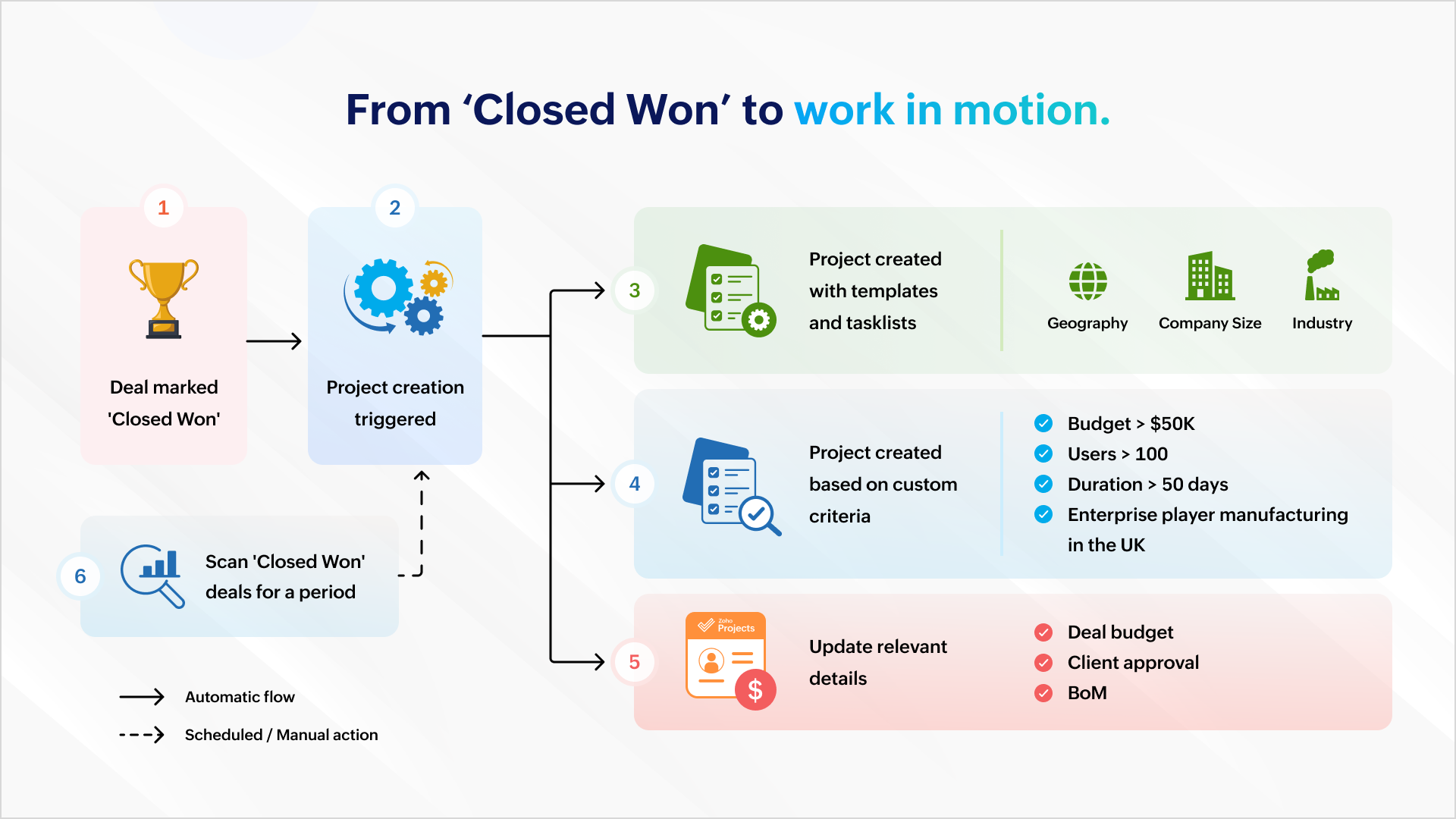


Once a deal is won, a project can be created automatically to ensure work commences immediately. Project creation can be automated with predefined task lists (for EU compliance or HIPAA-readiness) and project templates based on geography, company size, or industry.

It can also be based on custom criteria like a high-value deal (say, a budget that's greater than $50K), a bigger deal size (say, more than 100 users), a fast-track deal (needs closure within 50 days) or a combination of criteria (say, enterprise businesses in the manufacturing sector in the UK).
The deal's budget can be auto-populated during or after project creation so that users are mindful of expenses and effort.

You can scan all the "closed won" deals this quarter and create a project which matches your criteria.

Managing ownership and assignments
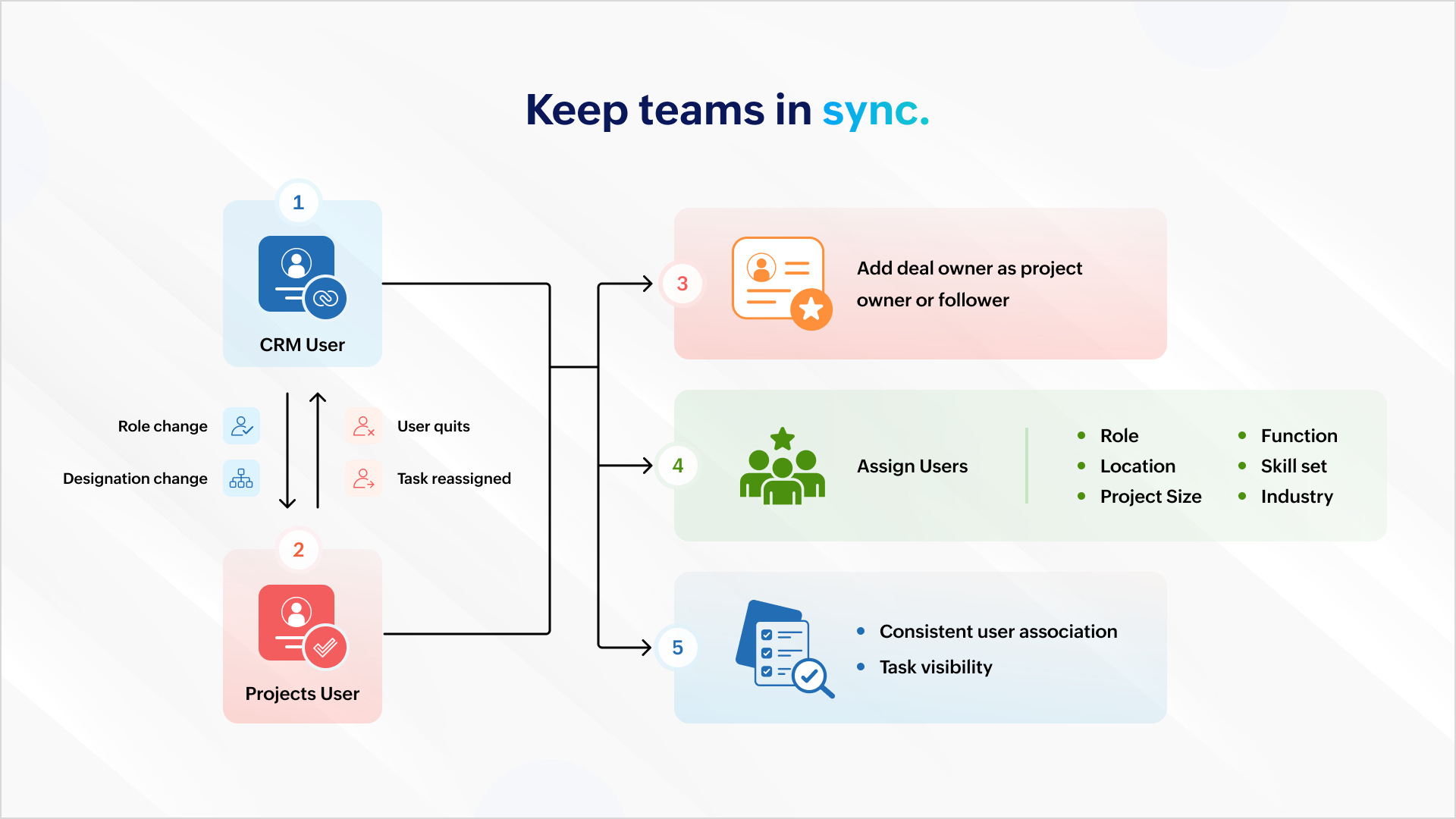


All role and designation changes should reflect uniformly across both platforms to ensure consistent association and task visibility. If a projects user quits or is assigned a new task, the reassignment should reflect inside Zoho CRM.

You can also add the deal owner as the project owner or project follower to ensure accountability carries over. Project users can then be assigned based on role, location, function, skill set, project size, industry, and more.

Deal management


Mapping your project phases to respective deal stages helps mirror project status inside the CRM. Estimated project spends and project completion percent can help identify possible bottlenecks.

Notifying relevant stakeholders about delays or budget overruns helps them intervene and get involved early in damage control. Marking the deal as "At Risk" also ensures it gets the necessary attention among relevant stakeholders.

Tracking


Tasks created in a project must be logged as activities against the associated deal to ensure stakeholders have a complete view of the progress.

Similarly, when users log time in Zoho Projects, it should update against the respective deal in CRM. This gives a picture of the billable hours consumed and the hours remaining to identify scope creep.

Stay on top of issues


It's important to keep customer success and account management teams up to date with showstoppers and blocking issues. This requires creating a case for each issue logged in Zoho Projects so that managers can take ownership and take issues to closure with constant monitoring.


Invoicing


Milestone completion should automatically draft an invoice and send it for approval. Automating invoicing based on project progress gives more time to focus on essential work.

Compliance


It's important that deals don't spring up surprise data during an audit. Zoho Books, Zoho CRM, and Zoho Projects can restrict deal activity during the "Legal Review" stage. Records can return to business as usual when legal review is complete.

And, there's more..

What we discussed here is only the tip of the iceberg. You can do more with analytics, insight-based actions, and advanced forecasting.

As a business owner or head of operations, charting your business process and identifying the gaps, problems, and aspirations will help your identify more opportunities. Once you have what you want, there are two ways to go about it.

1. Customization

You can create workflow rules, custom functions, blueprints, conditional field updates, and webhooks to strengthen automation, alert other systems, and receive data all by yourself.

But there's the risk of your org users meddling with the setup during everyday work.

2. Work with a partner

If you think you don't have the time for it or require assistance, our partners can help. As certified Zoho Experts, partners can help you customize your requirements and help you set it up. They can also help you package the entire setup (workflow rules, custom functions, etc.) into a single installable unit like a plugin or an extension from Zoho Marketplace. The custom plugin can then be installed and set up according to your needs.

AI-powered utilities

You can leverage MCP for Zoho Projects and orchestrate project management from your favorite LLMs using natural language.

Idea
This means you can get answers and initiate actions for the following requests right from a chat box:

"Show me all tasks that don't have a task owner."
"List the least profitable projects from the previous year."
"Create onboarding tasks for all hot leads in Mumbai."
"Generate invoices for milestones completed this week."

We will showcase an extension with custom capabilities to track activities and initiate automated action in one of our upcoming articles. Write to us if you are interested and we can talk - support@zohoprojects.com.

Learn more about the existing integration - setup, capabilities, and uses here - Zoho Projects and Zoho CRM integration.

Feel free to read up on the previous editions of the series:

#1 Effective project and task customization using CodeX
#2 Build an approval management system using custom modules

Best,
The Zoho Projects Team

      • Sticky Posts

      • Improve User Onboarding in Zoho Projects with Zoho DAP

        Rolling out new processes or onboarding new users in the tool comes with a familiar challenge: the employees need guidance at the moment they are doing the work. Traditional training sessions and knowledge sharing often require users to leave the application.
      • Introducing the Zoho Projects Learning Space

        Every product has its learning curve, and sometimes having a guided path makes the learning experience smoother. With that goal, we introduce a dedicated learning space for Zoho Projects, a platform where you can explore lessons, learn at your own pace,
      • Create Custom Module Using AI in Zoho Projects

        Every team has its own way of managing work. While standard modules support common project management needs, many business processes require their own structure, fields, and terminology. With AI-powered Custom Modules in Zoho Projects, users can create
      • Update on V2 API End-of-Life Timeline

        Dear Users, Earlier this year, we shared the launch of the V3 APIs and requested users to migrate from the older V2 APIs by December 2025. We have received valuable feedback from our users and partners regarding their migration timelines. We are happy
      • Automation Series: Auto-assign Task Followers

        As task progresses, several users are required to stay aware of the updates to plan their upcoming work items efficiently. Manually adding users as followers for an active task might create additional overhead. With this automation, followers can be added

        • Recent Topics

        • Upcoming Change: Increased character limits for module and field labels

          To provide greater flexibility in customizing your CRM, we are increasing the maximum character limits for module labels and field labels in Zoho CRM. What's changing? Label Current Limit New Limit Module Label 25 characters 50 characters Subform Module
        • Change of Blog Author

          Hi, I am creating the blog post on behalf of my colleague. When I publish the post, it is showing my name as author of the post which is not intended and needs to be changed to my colleague's name. How can I change the name of the author in the blogs?? Thanks, Ramanan
        • SPAM (and some other) folders missing on three of my Zoho Mail accounts

          I have four email accounts with Zoho Mail. Three days ago, the Spam folder on three of these accounts vanished. It is gone on the Windows and Linux desktops as well as the web-based and Android versions, and I have tried it on multiple machines. The only
        • Using data from multiple sheets

          I am looking for a way to automate the process of taking multiple Zoho sheets and collating the data into one combined sheet (such that no duplicates occur). Currently I can only think of importing all the sheets into Excel and then running a macro to perform the task. Is there a simpler way offered by Zoho?
        • Cliq iOS can't see shared screen

          Hello, I had this morning a video call with a colleague. She is using Cliq Desktop MacOS and wanted to share her screen with me. I'm on iPad. I noticed, while she shared her screen, I could only see her video, but not the shared screen... Does Cliq iOS is able to display shared screen, or is it somewhere else to be found ? Regards
        • Error 1011 saving website personalisation — blocking all changes (corrupted "home_page.content" field)

          When trying to save changes under Settings → Brands → MY COMPANY → Website → Personalisation → Messenger, I receive the following error: "Either the request parameters are invalid or absent" upon checking on the developer console of the browser I get
        • Tip #7 - Siri shortcuts in Zoho CRM

          Hello Everyone, Here is a tip about the 'Siri Shortcuts' feature and how it works in the iOS version of the Zoho CRM mobile app. What are Siri shortcuts? Siri Shortcuts are quick actions across your apps on iOS. They can perform an action automatically
        • Automatic Department and Employee Sync Between Zoho One and Zoho People

          Dear Zoho Support, I'm writing to propose a valuable feature request that would streamline data management and improve user experience within the Zoho ecosystem: automatic synchronization between departments and employees in Zoho One and Zoho People.
        • Nothing triggers a Journey

          I have been on the phone with Zoho support and they claim their development team needs to investigate more. However, I've found this is a pretty standard answer after a call takes any amount of time. After that, it's days and even weeks before it actually
        • Manually Backorder Sales Order and/or Change Sales Order Status

          Is there an option to manually 'backorder' a sales order, or otherwise change it's status?  In some cases, we receive orders for products that are out of stock, but we already have issued POs to our suppliers for replenishment.   Ex- we created a PO on
        • Backorder process review - Automating Removal of Sales Order from "On Hold" When PO is Received

          Hello Zoho Inventory Team, Currently, sales orders in On Hold status are released only when the bill for the purchase order is created. In our workflow, it would be much more efficient if the sales order could automatically move out of On Hold as soon
        • Kaizen #254 - Building a Temporal Lead Score Decay System in Zoho CRM

          Hello, CRM Wizards! Welcome to a fresh week of Kaizen. In this post, we will build a temporal lead score decay system that works alongside your existing scoring rules by introducing percentage-based score decay driven solely by customer inactivity. By
        • Metadata API Access to Functions

          I think it would be incredibly helpful to have api access to every function's code. Our team primarily uses deluge functions to update fields across modules according to business logic. I would like to create a visual dependancy model for our CRM, but
        • API actions/approvals endpoint returns UNAPPROVABLE despite user having full permissions and being the assigned approver

          Hi Team, We are trying to programmatically approve a record via the CRM API but consistently receive an UNAPPROVABLE error, even though the same user can approve the record without issue from the UI. Endpoint called: POST https://www.zohoapis.com/crm/v6/{module}/{record_id}/actions/approvals
        • Get a realistic picture of your revenue with Forecast Adjustments in Zoho CRM

          #crm25q1 Dear Customers, We hope you're doing well! Today, we're here with an important enhancement for business decision makers: forecast adjustments. Let's get straight to it! With technology on the rise and CX at its core, businesses are constantly
        • I am not able to check in and checkout in zoho people even location access allowed

          This issue i am facing in mackbook air m1, I allowed location in chrome browser and i also tried in safari but getting similar issue. Please have a look ASAP.
        • WhatsApp Vendors Module

          Hello, so WhatsApp works with the below, mainly with the customer side modules. Can we get functionality on the vendor side modules, i.e., PO, Bills, Vendor Credits, Payments Made, Purchase Received? WhatsApp is often the preferred method of communication
        • Upload ticket attachments via Drag-&-Drop

          Hello, if you want to upload a file to the ticket attachment you need to click the button and use the file browser to select and upload the desired file. In many cases, it would be much more efficient if you could simply drag the file to the browser window...
        • Elevate your Radar experience: Best practices part 3

          In the Spotlight: Zoho Desk's Radar app Customer support requires human intelligence combined with emotional intelligence. How about these coupled with contextual intelligence? These elevate the customer support experience. When providing support through
        • Migrating my email from GMAIL to ZOHO MAIL..........

          I am a long time GMAIL user and I really only understand how they operate, but after reviewing your tutorials and forums online, it is quite unbelievable how much more and how much more streamlined ZOHO mail is, not to mention ZOHO's wonderful, more advanced capabilities. I do have several questions about transitioning over to ZOHO.  Primarily, where is the best place to start, what do I do first? And how hard is it actually to move all my business and personal accounts over here?  When I sign up
        • Unable to send message;Reason:553 Relaying disallowed. Invalid Domain

          Hi, Now when I try to reply to an email, I see the Unable to send message;Reason:553 Relaying disallowed. Invalid Domain voicemessagedownloader.com error. I tested sending an email when I set it up in the past and it worked. I have checked the Zoho Organization
        • RFID Scanner/Adapter Solution for barcode scanning

          Hello, We will be trialing using barcode scanning for item verification during our picking process. Using a phone or a tablet is awkward and uncomfortable. Are there any Zoho compatible RFID scanners, or an RFID device/adapter that will connect with a
        • Approval Process not retriggering after rejection when stage is manually changed back

          We have an Approval Process on the Opportunities module that triggers when Stage is changed to Negotiation (Execute on: Edit Only). On rejection, a field update action reverts Stage back to Proposal. The issue: after rejection, AE can manually changes
        • Free Webinar Alert! Workdrive + Office Suite in Zoho Workplace: Create, co-edit and collaborate

          Hello Zoho Community! Looking for a better way to create, manage, and collaborate on your business documents? Join our upcoming webinar to discover how Zoho WorkDrive and the Zoho Office Suite (Writer, Sheet, and Show) help teams to work together from
        • Updating Sales orders on hold

          Surely updating irrelevant fields such as shipping date should be allowed when sales orders are awaiting back orders? Maybe the PO is going to be late arriving so we have to change the shipment date of the Sales order ! Not even allowed through the api - {"code":36014,"message":"Sales orders that have been shipped or on hold cannot be updated."}
        • Two-Factor Authentication in Zoho Mail: Add an extra layer of security to your organization

          Account security is a critical aspect of managing any organization's email. With increasing risks of unauthorized access, a single password may not always be sufficient to keep accounts protected. Zoho Mail's Two-Factor Authentication (TFA) addresses
        • Dark Mode - Font Colors Don't Work

          When editing a document in Dark Mode and selecting font colors, they don't show up on screen.  Viewing/editing the same document in Light Mode shows them just fine.
        • API to post drafts for social media

          I we want to post draft posts to our zoho social account and then approve and schedule them within Zoho social. is this possible with for example: https://apis.zoho.com/social/v2/post TIA Jon
        • How to show product cards in your chatbot

          Hey everyone, If you are using Guided Conversations to help customers find products, you have probably run into this problem: the bot gives customers a list of options, but they still have no idea which one to pick. There will be no images, no specs,
        • Changing settings for auto logoff

          I've noticed that when I haven't used Cliq for a while, I have to re-enter my password. That is really clumsy, especially if you have a complicated password. Because it won't be filled in automatically. Is there a way to change that behaviour? We are
        • How do you create invoices before sending them through Zoho Invoice?

          Hi everyone, I'm curious how other businesses handle their invoicing workflow before sending invoices through Zoho Invoice. Do you: Create invoices directly inside Zoho? Prepare them first in another invoice tool or template? Use Excel or Word before
        • ZML Error/Bug

          Hi, I would like to request for your help regarding this kind of behavior. Requested_Start_Time & End_Time - date-time fields https://......#Page:PH_Calendar_Page?reqDate=08-04-2026 https://......#Page:PH_Calendar_Page?reqDate=07-31-2026 https://....#Page:PH_Calendar_Page?reqDate=08-03-2026
        • Item with name in different languate

          Hello, is there a way to have an item with its name in different languages? For example: I sell an item in different markets and I'd like to have a Proposal and the Invoice with the Item Name in a specific language. Rino Bertolotto Zoho Specialist, STESA srl
        • Migration of emails from Yandex to Zoho

          I am trying to migrate an yandex mail account to zoho mail account. I am confused with all the related articles/informations in the net. Could someone please outline the process to do it, just thinking about me as a novice with limited knowledge or experience. A couple of questions from the knowledge gained. 1. I believe we have to delete the yandex current MX from the website records and add Zoho MX. What happens to the emails as we remove the mail exchange record. Yandex stops updating emails and
        • Calling a function within another function

          Hello there, I have just found out that you can simply call up functions in other functions, regardless of the department. You can't create functions with the same name twice, even though you are in a different department. If you try it, you don't get
        • 【続々公開】Zoholics Japan 2026 セッション情報を更新しました!

          ユーザーの皆さま、こんにちは! Zoholics Japan 2026のセッション情報を続々と公開しています! 今年は3つのトラックで、Zohoの最新情報やAI活用、製品アップデート、 活用事例など、多彩なセッションをお届けします。 現在公開中のセッション(一部) ・Zoho CRM 製品アップデート ・Zoho CRM Plus 製品アップデート ・Zoho Community セッション ・Zoho Desk セッション ・中堅・成長企業の人事DX ~AI時代に何から始めるべきか?~ ・Zoho
        • New Ways to Personalize, Organize, and Share Your Notes

          We're excited to introduce a new set of enhancements in Zoho Notebook that make your note-taking experience cleaner, more flexible, and easier to share. With this update, you can create notes that automatically adapt to your device theme, browse your
        • Introducing spam detection for webforms: An additional layer of protection to keep your Zoho CRM clean and secure

          Greetings all, One of the most highly anticipated feature launches—Spam Detection in webforms—has finally arrived! Webforms are a vital tool for record generation, but they're also vulnerable to submissions from unauthenticated or malicious sources, which
        • Rich-text fields in Zoho CRM

          Moderation Update: During the initial release of Rich Text fields, it was supported only in the Enterprise and Ultimate editions. We have gradually extended Rich Text fields to all the paid editions of Zoho CRM. Hello everyone, We're thrilled to announce
        • Email-Data Synchronization with Zoho Analytics

          Hello, Enterprise Support Community! We're excited to announce the availability of Email Data Synchronization with Zoho Analytics! This highly requested enhancement allows you to sync email data from Zoho CRM into Zoho Analytics, making it easier to analyze
        • Next Page