Bidirectional sync between Zoho Bookings and Zoho CRM - Part 2
Hey community members,
Welcome again!
This post continues our discussion of the bidirectional sync between Zoho Bookings and Zoho CRM, focusing on how to reschedule appointments in Zoho Bookings from Zoho CRM. If you've arrived at this community post directly, we recommend checking out Part 1 of this topic for a better understanding. You can access Part 1 through the following link: Bidirectional sync between Zoho Bookings and Zoho CRM - Part 1
How we're approaching this reschedule action:
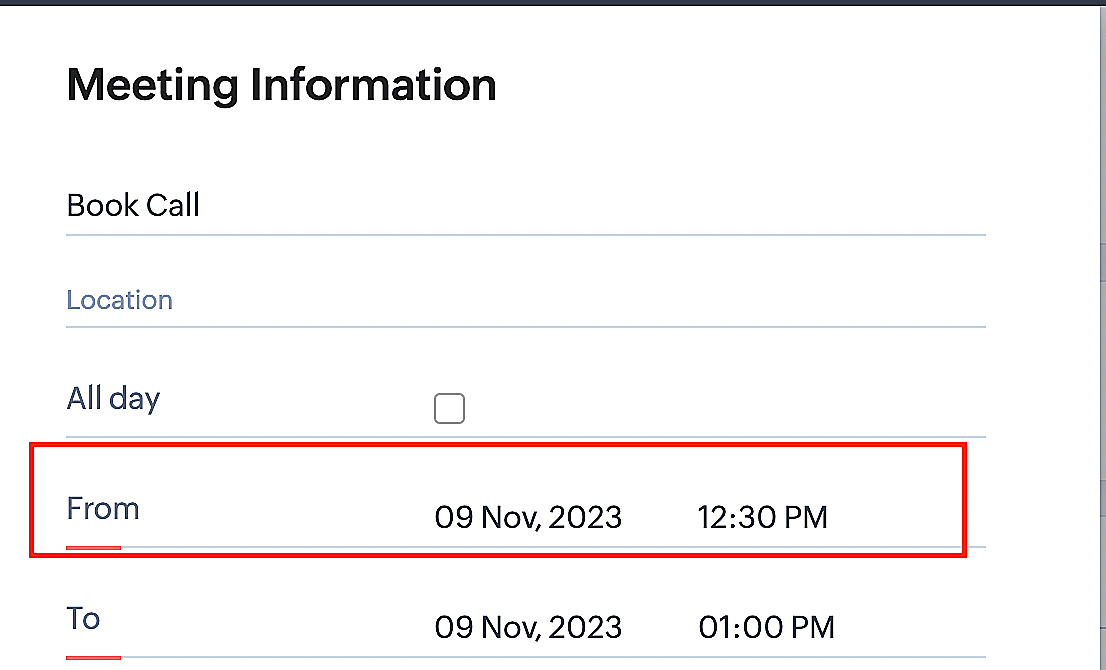
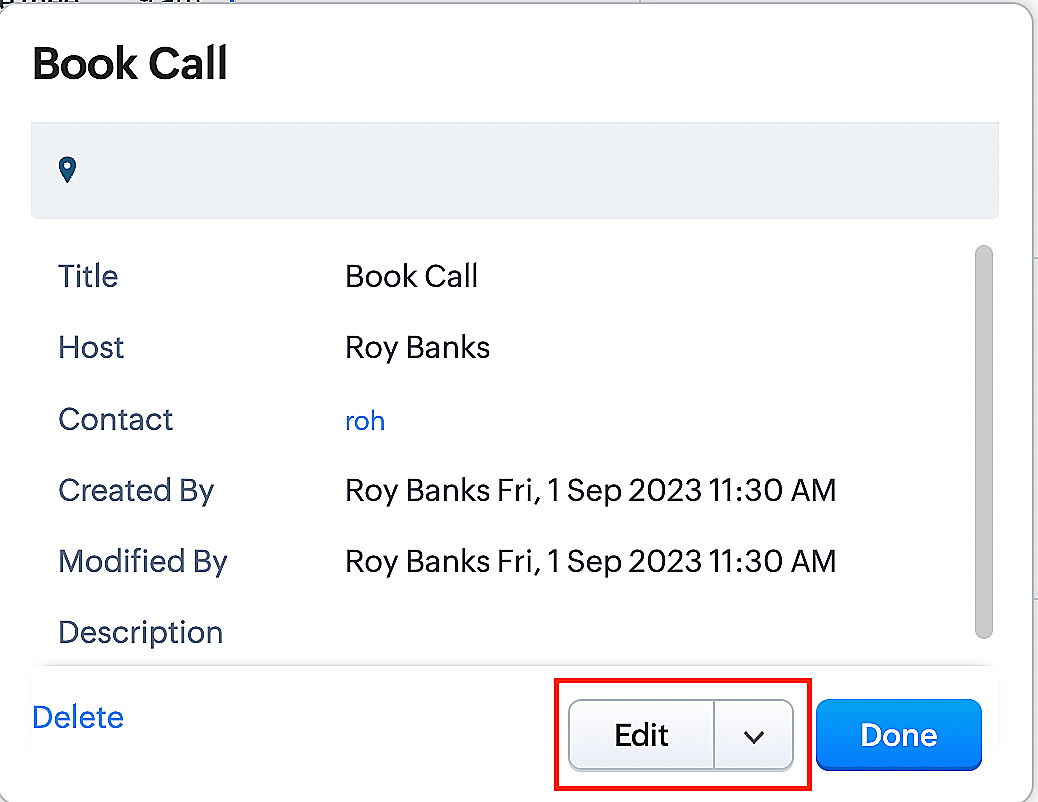
Whenever a meeting initially scheduled through the Zoho Bookings application is rescheduled either within the Meetings module or through the CRM calendar, the changes are recorded and the corresponding appointment within Zoho Bookings is also rescheduled.
Create a function for rescheduling appointments
Complete these steps in Zoho CRM.
Step 1: Creating connections
You don't need to create a separate connection for the reschedule action. You can utilize the same connection name that we established in Part 1 of the Zoho Bookings - Zoho CRM bidirectional sync.
Step 2: Creating functions
Configuring a function that reschedules appointments differs slightly from the functions we discussed in Part 1 of the Zoho Bookings - Zoho CRM bidirectional sync.
Note: Here, we'll fetch the time zone in which the customer scheduled the appointment so that when we reschedule the booking, it will be rescheduled within the same time zone the customer initially chose.
Here are the steps:
1. Go to Setup > Developer Space > Functions.
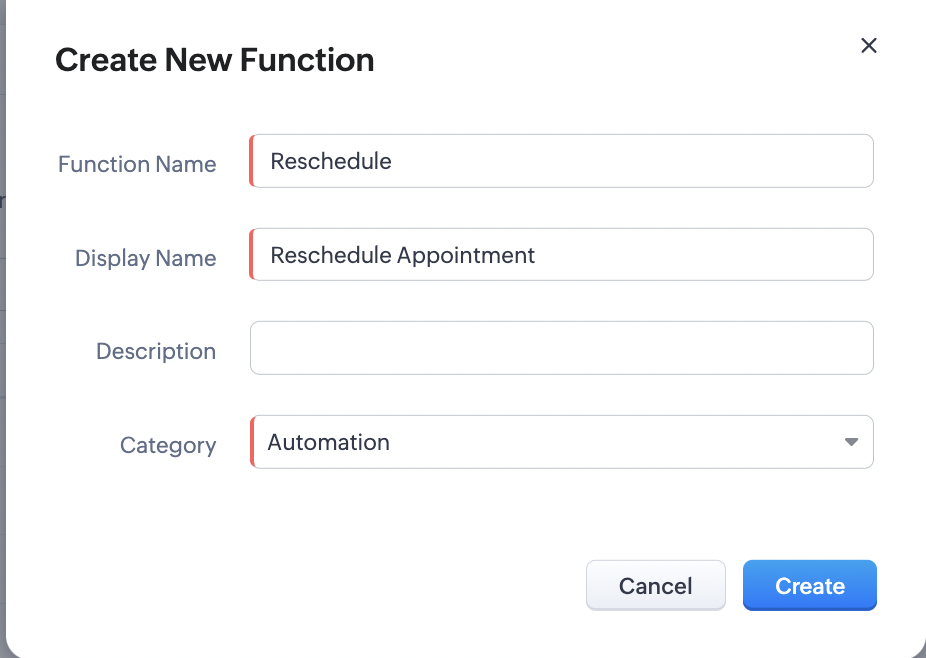
2. In the Functions page, click + Create New Function.

3. Configure the function name, display name, and description.
4. Set the category as automation.
Reference
Reference
5. Next, configure the function's arguments. For the reschedule function, we'll have to pass two arguments: bookingID
as a string, and from as a date.
a. Click on Edit Arguments on the Deluge script page.

b. Set the Parameter Name as bookingID. (Please note that the "bookingID" value is case sensitive and must match
the term used in the code).
c. Set the type as string.
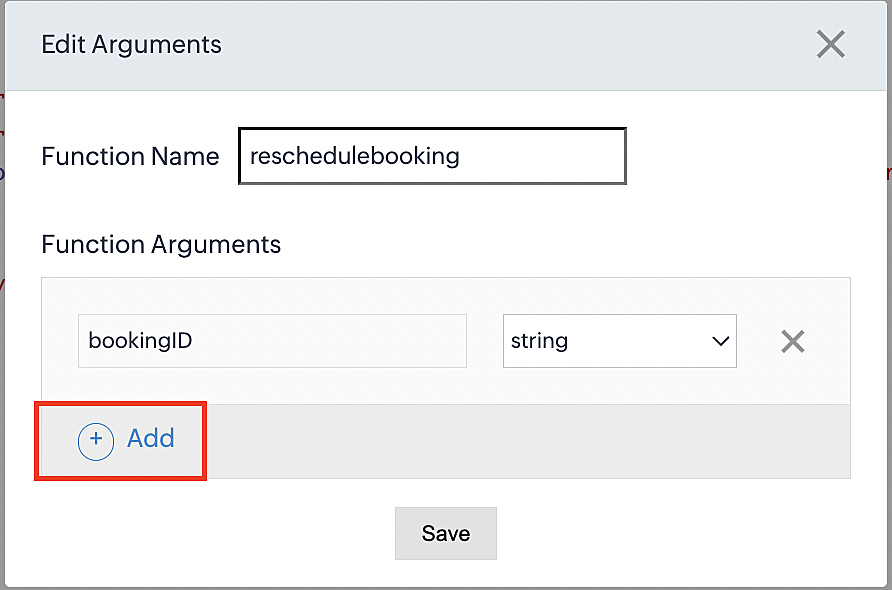
d. Click the +Add button to add a second argument.
e. Set the Parameter Name as from and its type as date.
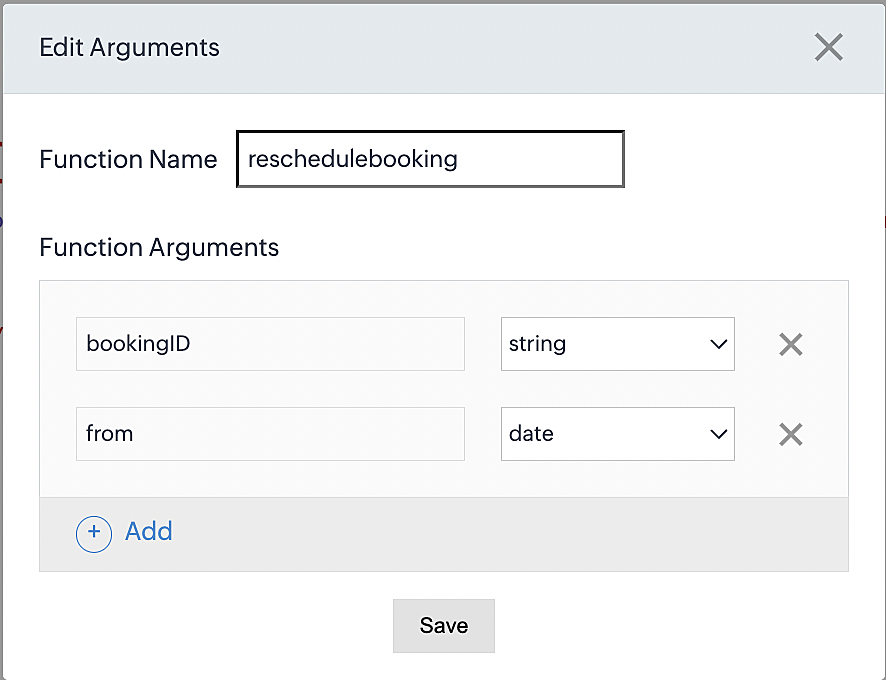
Here, we're using the reschedule appointment API. The term "from" specifically denotes the appointment's start time. In the reschedule API, the booking ID is a required parameter, and we must provide either the staff ID or the start time. Given that we're rescheduling based on the start time, we'll pass the start time as an argument and use "from" as the reference point.
More details: Reschedule Appointment API
Please configure the following code on the Deluge script page.
Code link: Rescheduling an appointment
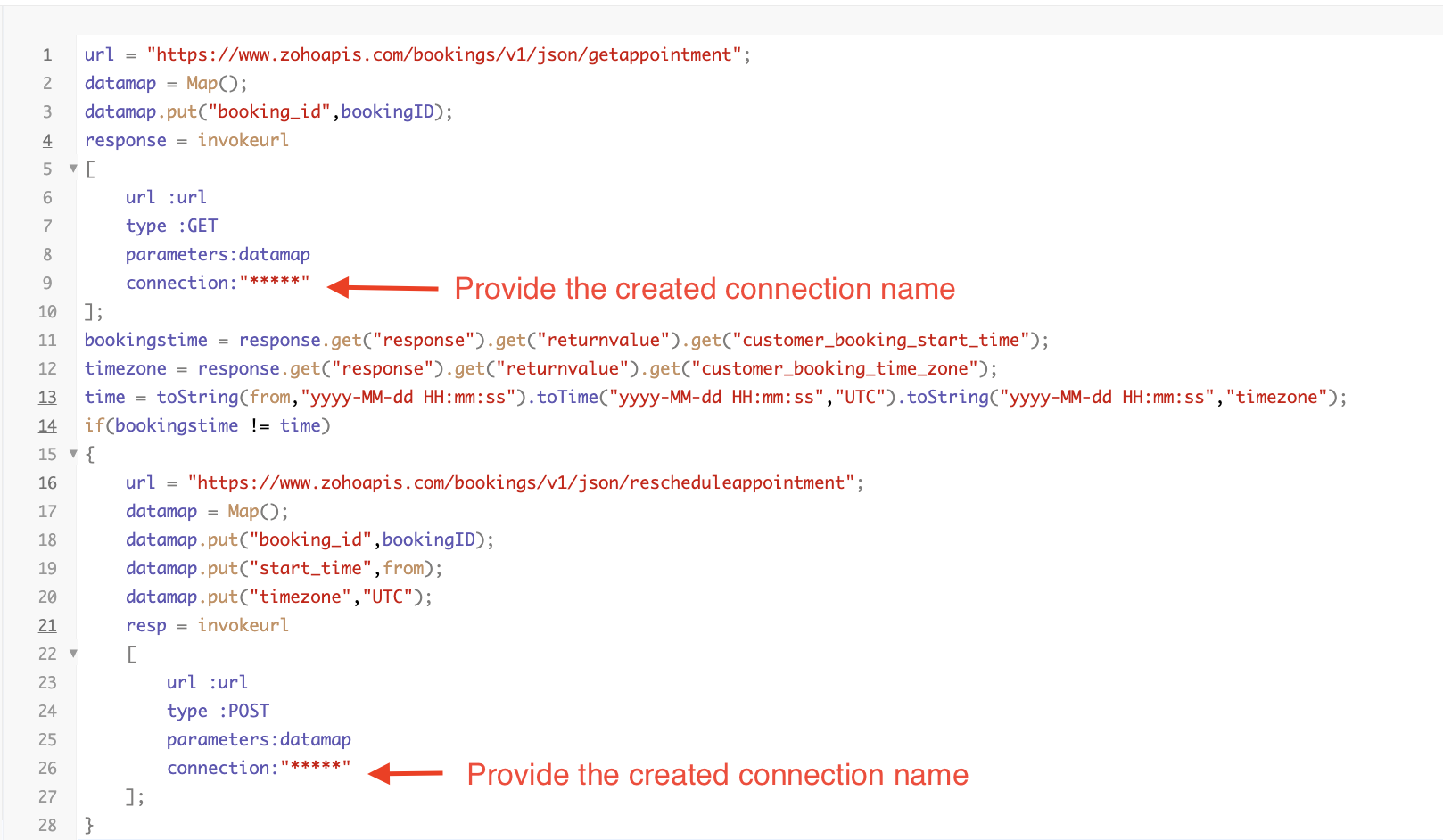
Here's an explanation of the code used for the reschedule function, split into three parts for purposes of clarity:
Lines 1-10 serve to invoke the "get appointment" API to retrieve the relevant booking ID and obtain the associated details. The purpose behind fetching this booking data is to access the actual booking start time and the time zone in which the customer initially scheduled the appointment using the Zoho Bookings application. This information is essential for comparing it with the rescheduled date and time.
- Line 1: Based on the Zoho Bookings account's data center, we'll set up the API endpoint URL configuration. More
details: Domain-specific API URLs
- Line 3: To obtain appointment details, we utilize the GET Appointment API. In this API, the booking ID is a mandatory
field, so we retrieve the booking ID from the Meetings module and subsequently pass it into the code to
retrieve the corresponding booking details.
- Lines 4-10: We use the invokeURL task for API calls. To learn more about the invokeURL task, please refer to the
following document: InvokeURL task for API calls
In lines 11-13, we execute booking data retrieval and date-time format conversion operations.
- Line 11: Here, we're fetching the booking's exact start time as scheduled by the customer.
- Line 12: Here, we're fetching the time zone in which the customer scheduled the appointment.
- Line 13: We perform the date-time format conversion to ensure compatibility with the reschedule appointment API. This API requires the appointment's start time to be in the format dd-MMM-yyyy HH:mm:ss. We retrieve the start time from the Zoho CRM Meetings module, match it to your CRM application's date and time format, and convert it to the format Zoho Bookings' reschedule appointment API supports.
Lines 14-27 serve to perform comparison and rescheduling operations.
- Line 14: Here, we're implementing an "if" condition to compare the actual booking start time (bookingstime) and the rescheduled time (time). We do this in order to execute the reschedule API function only if there is any change in the appointment's start date and time. If we don't implement the "if" condition to compare both inputs, the reschedule API function would enter a loop, continuously executing and potentially exceeding the API count limit.
- Lines 15-27: We use the reschedule appointment API, which requires the booking ID as a mandatory parameter, along with either the staff ID or start time. In this case, as we're rescheduling appointments based on the start time, we provide both the booking ID and the start time. The reschedule appointment API functions similarly to the APIs we've previously discussed, such as the cancel, mark as completed, and no-show APIs.
By reaching the end of these final steps, we've successfully created a function that executes rescheduling actions.
Now, let's proceed with creating a workflow and linking the reschedule function to it. This enables us to automate the syncing of appointment rescheduling actions from Zoho CRM to Zoho Bookings.
Creating a workflow
Create a workflow that handles appointment rescheduling in Zoho Bookings whenever a corresponding meeting is rescheduled within the Zoho CRM application
Part 1: Creating the rule
1. Go to Setup > Automation > Workflow Rules.
2. In the Workflow Rules page, click Create Rule.

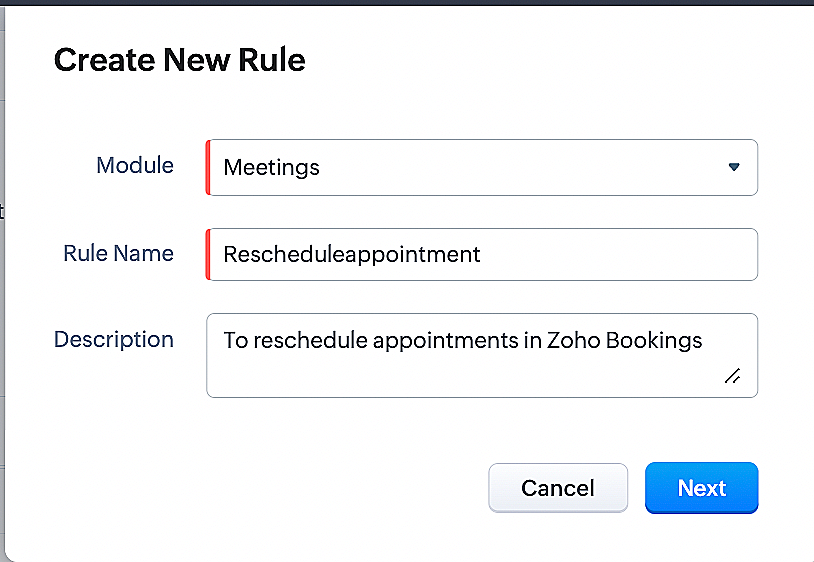
3. Select Meetings under Module and configure the rule name and description as required.
Reference:
Part 2: Specifying the rule trigger
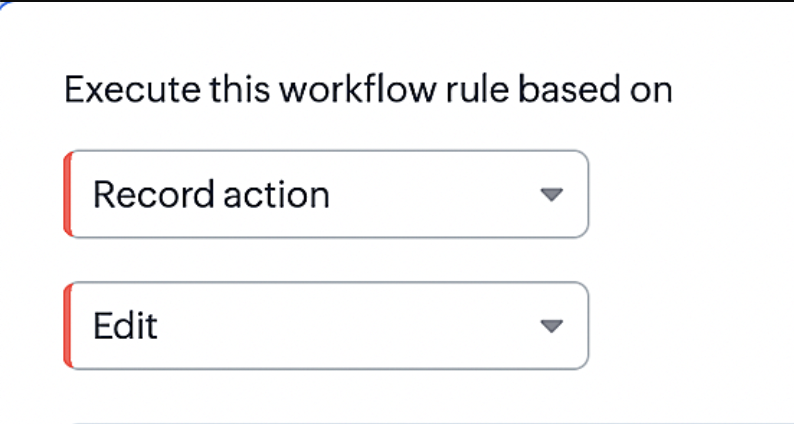
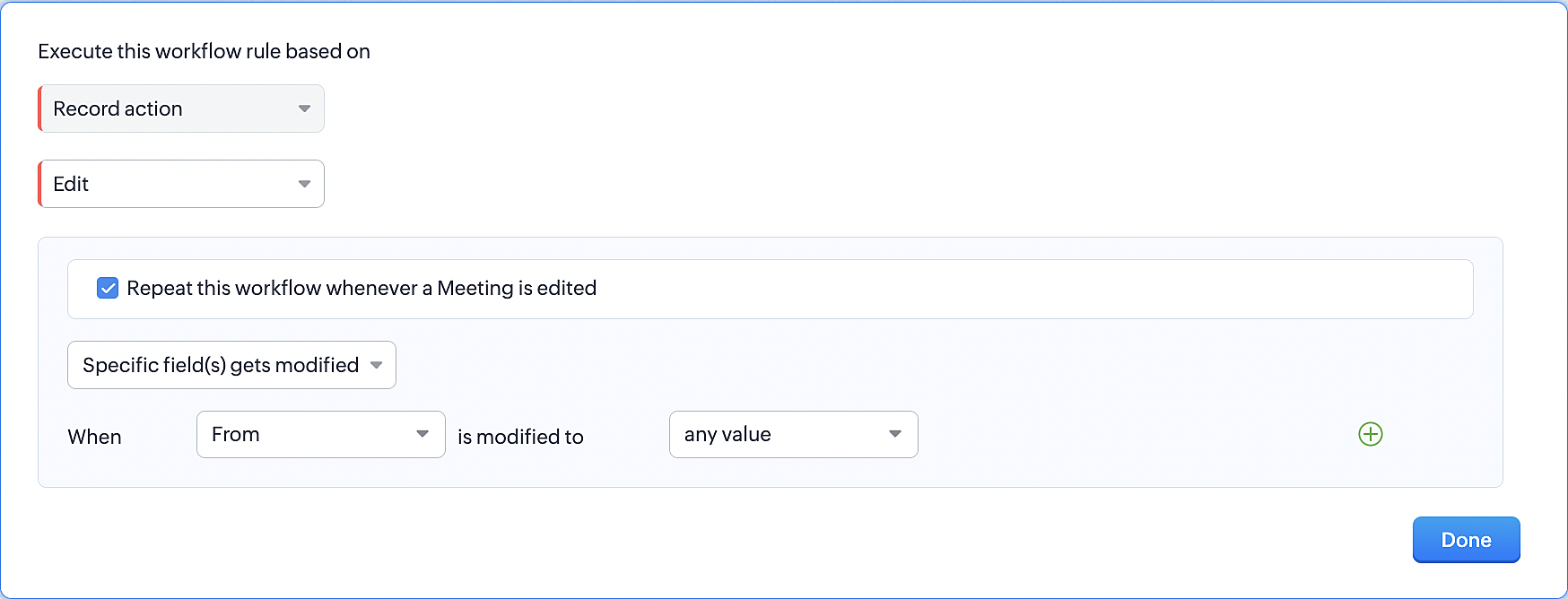
1. Record Action > Edit.
2. Enable the Specific field(s) gets modified setting and configure it per the screenshot below.
This serves to ensure that the workflow is executed only when the "From" field of the meeting is edited.
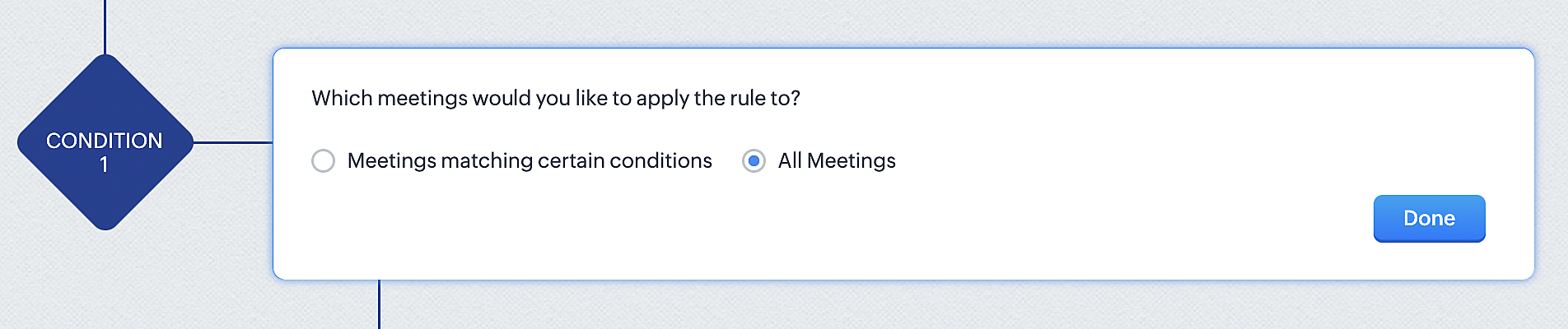
3. Configure condition > All Meetings.
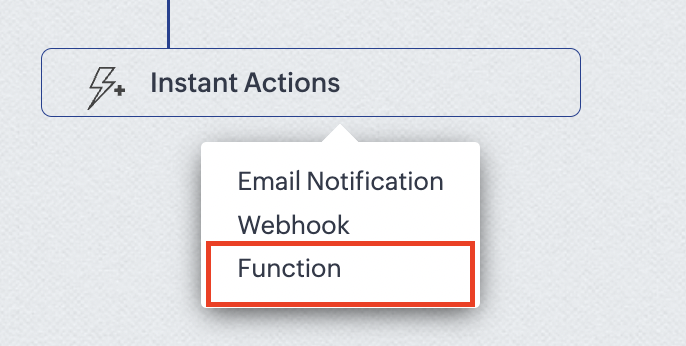
4.Instant Actions > Function.
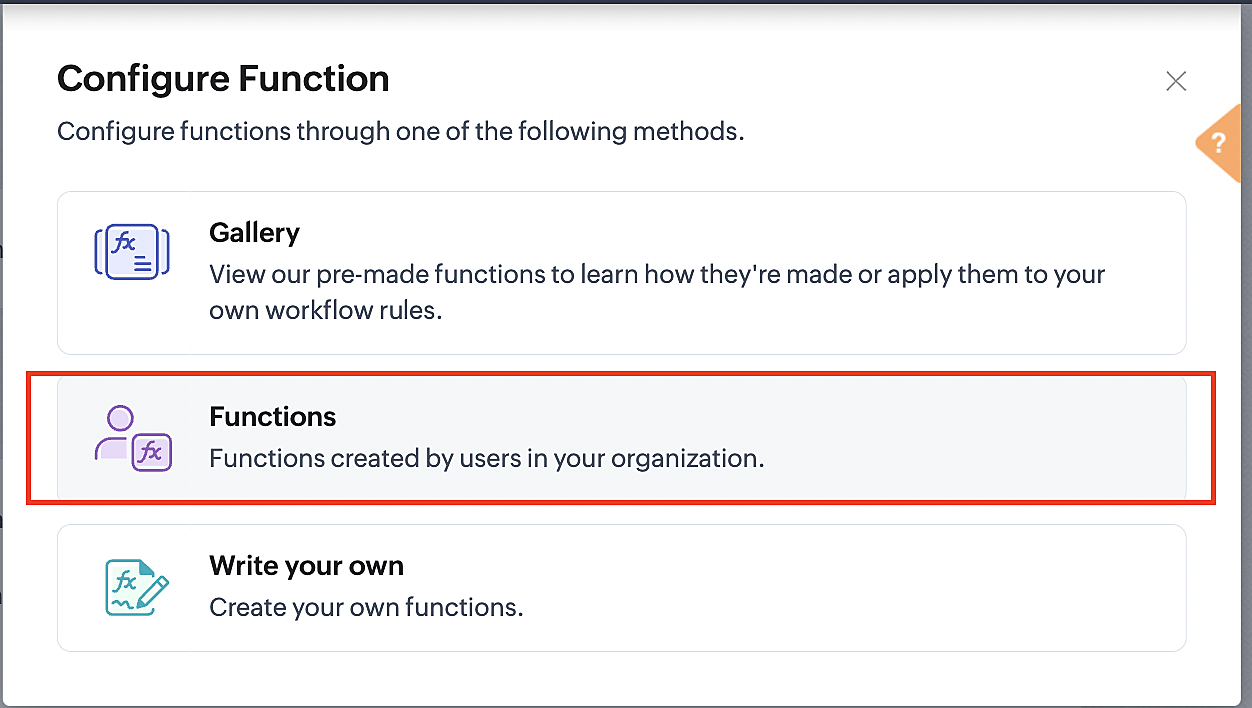
5. Click the New Function button.

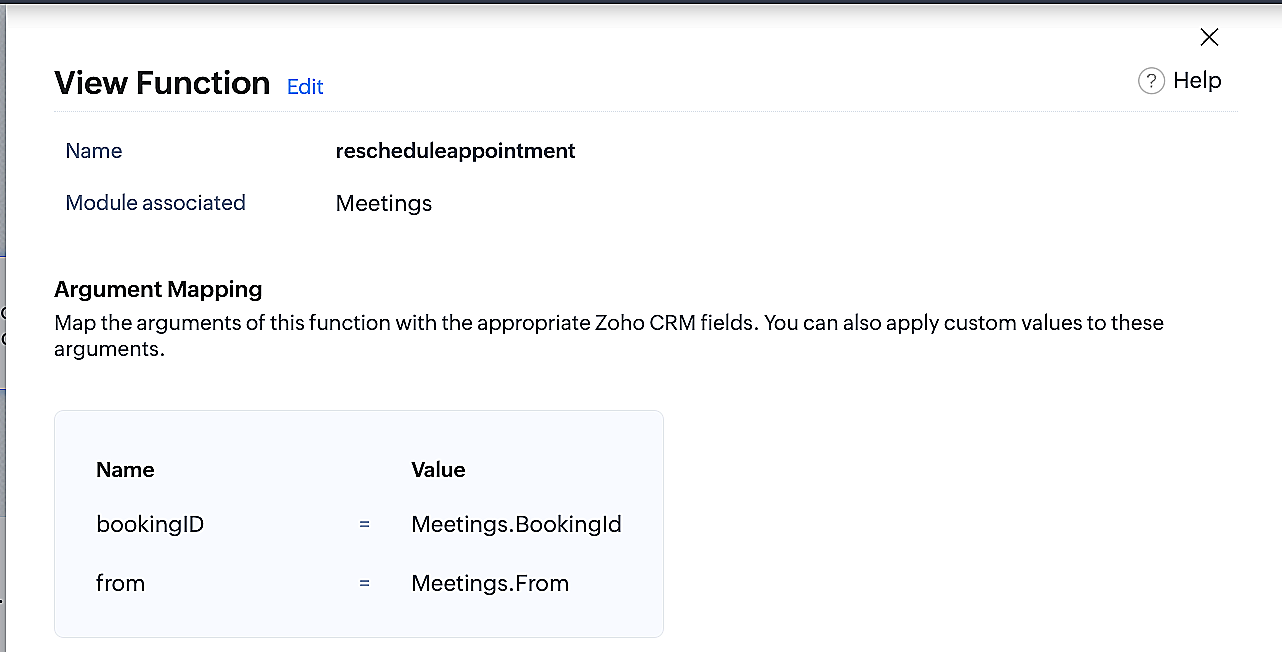
6. In the Configure custom function page, select the "reschedule" function you created from among the functions users in your organization have created.
More details: Specify rule triggers
Part 3: Argument mapping
1. Press # to choose an argument value.
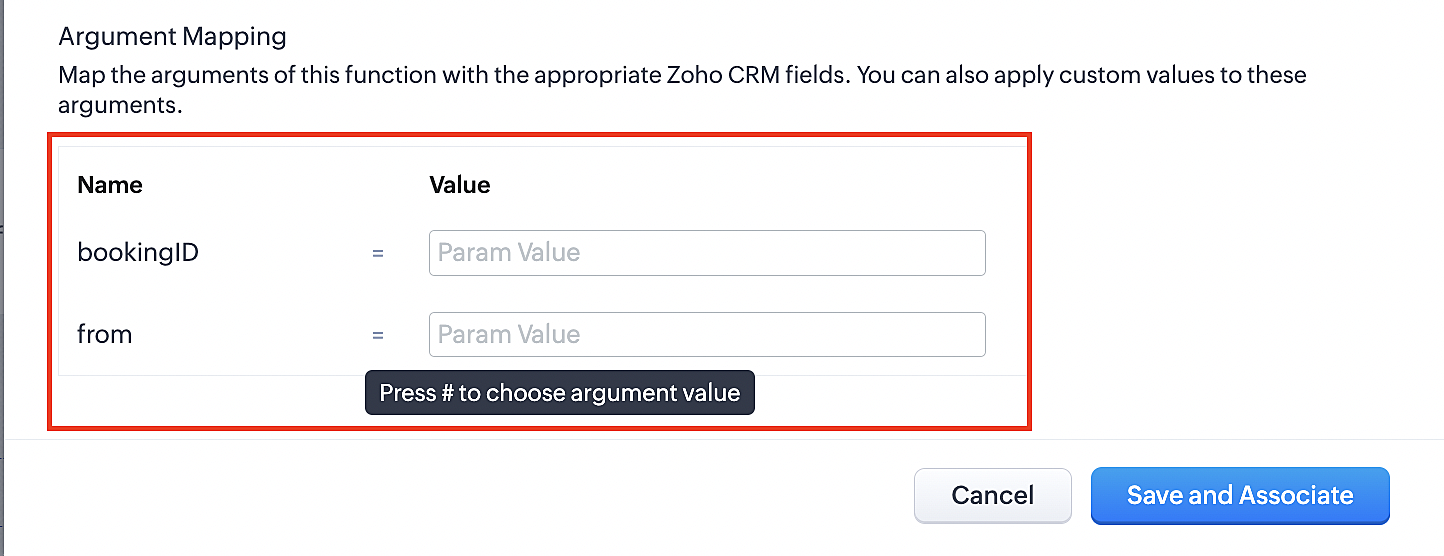
2. Select Meetings under Module and configure the field as "BookingId".
3. Select Meetings under Module and configure the field as "From".
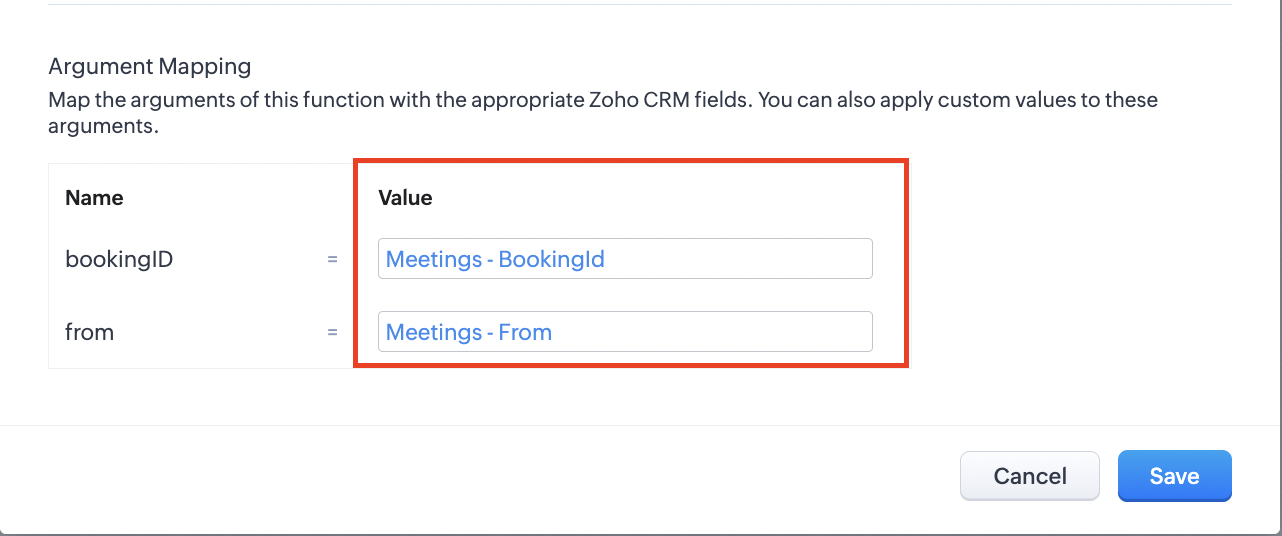
4. Click the Save and Associate button.
Reference:
Below is the final flow of the reschedule appointment workflow:
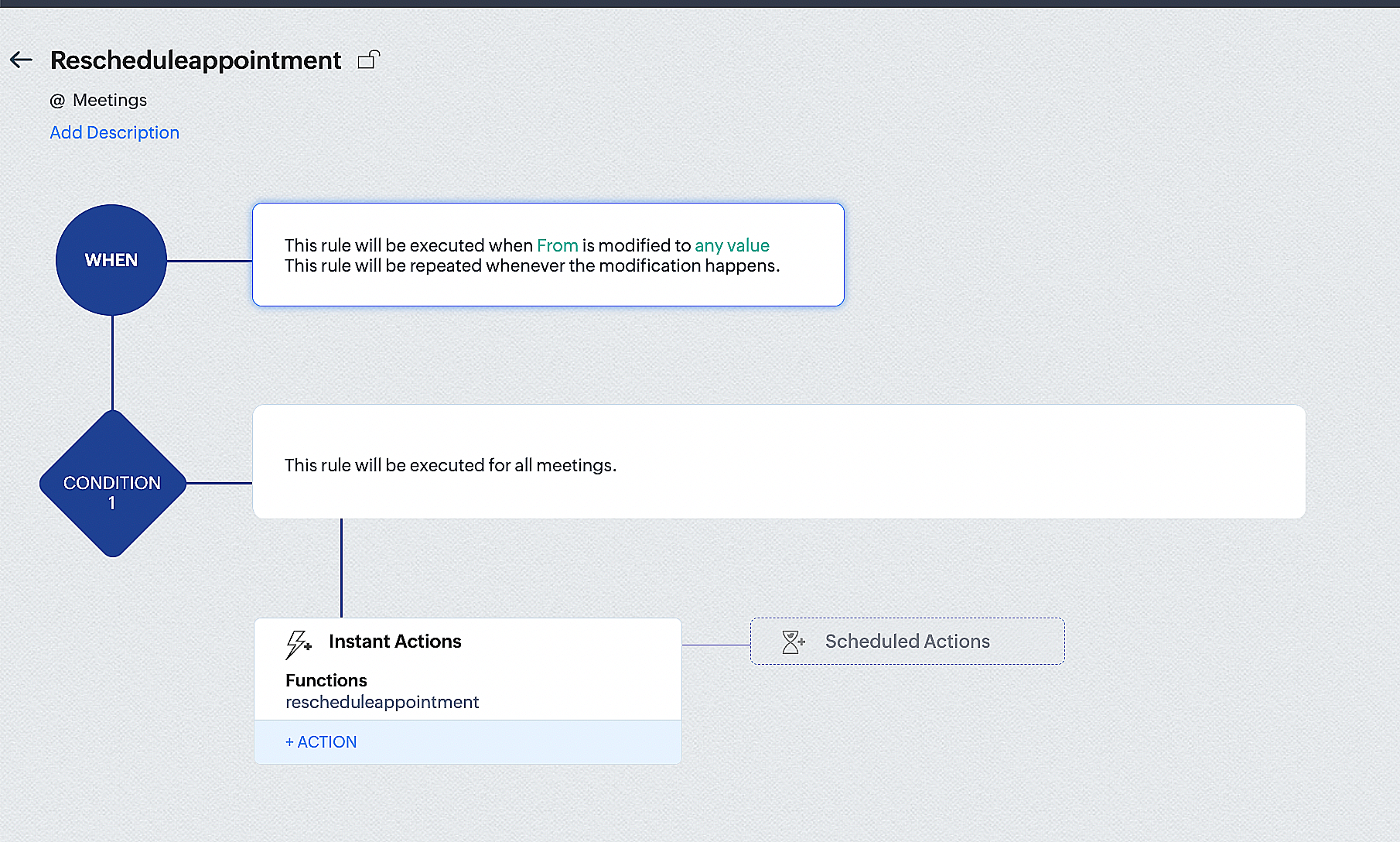
By the end of this process, we will have created a workflow that automatically executes when the "From" field in the Zoho CRM Meetings module is edited with a new date and time. As a result, this workflow will also reschedule the associated bookings for that meeting to the new date and time in Zoho Bookings.
Conclusion
We've arrived at the end of the community post. As mentioned in Part 1 of the Zoho Bookings—Zoho CRM bidirectional sync community post, with all of these configurations in place, you'll be able to book, cancel, reschedule, and update the status of appointments in Zoho Bookings directly from your Zoho CRM application. Which will make your appointment management easier.
If you have any questions or need assistance with your configuration, please email us at hello@zohobookings.com or support@zohobookings.com.
Topic Participants
Kaushik S
Recent Topics
Tip #67- Exploring technician console: Disable Input Devices- 'Insider Insights'
Hello Zoho Assist Community! Picture this: you are in the middle of a critical remote session, carefully configuring a system or running an important update, and the customer accidentally clicks somewhere or types something that undoes your progress.What matters more in Zoho implementations: tools or system architecture?
I recently worked on a full-stack migration for a catering equipment business using Zoho One with Shopify, and it raised a few interesting observations. The setup included migrating a large product catalog (around 9,700+ SKUs), integrating multiple supplier[Webinar] Solving business challenges: One tool for documents, forms, PDFs, e-signatures, and more
Hi Zoho Writer users, Most businesses rely on multiple tools, such as a word processor, form builder, e-signature provider, and PDF editor, for their document workflows. Managing multiple subscriptions, switching between tools, and moving data acrossDeposit on invoice
I'm trying to figure out how to customize an Estimate to include a Deposit/Retainer Invoice line within the Estimate. I tried creating my own custom field called "Deposit" where I manually inputted the deposit amount, which was nice. However, my employerZoho NOTEBOOK: What are file size restrictions?
I understand that Zoho NOTEBOOK is a free product, and what it offers is great. But I'm wondering what the file size restrictions are. When I record an audio note in Zoho Notebook, what is the maximum length of recording time/audio file size? When I wish to upload MP4 video, what is the maximum video size I can upload per Zoho Notebook restriction? Moreover, does Zoho Notebook use its own storage structure, or can I upgrade my storage for Zoho Notebook to add larger file attachments, videos and audioConcern Regarding Stock Validation in Inventory Management
Hi Zoho Team, We would like to highlight a concern regarding stock validation in the inventory system. As per standard inventory management practices, if the stock level is zero, the system should not allow users to create a shipment, packing slip, orAutomation Series #2: SLA vs Supervisor Rule in Zoho Desk
SLA vs Supervisor Rule: Keeping tickets on track in Zoho Desk This post is part of the "Desk Automation Series," Chapter 1. Through this series, we will help you choose the right automation type in Zoho Desk by comparing commonly confused automationsZoho Recruit - Email Relay
Good day, Has anyone succeeded in setting up an email relay for Office 365? If I add the details from https://support.microsoft.com/en-us/office/pop-imap-and-smtp-settings-8361e398-8af4-4e97-b147-6c6c4ac95353, I get the connection error. Regards, EkaBetter use of contacts
Zoho inventory has the ability to add multiple contacts to customers. However Zoho inventory doesn't currently provide a way to link a contact to objects like sales orders. This means that while you can tell what company has placed a sales order you can'tNotebook AI limits
Hi folks, Working with the AI transcription tools in Notebook, on the Mac App, which I find quite handy, but the one thing I am struggling with is the inability to either edit or copy the results of the transcript: I can't click in any of the boxes, andDisappointment with Zoho Payments
Dear Gowdhaman, I am writing to inform you that I am removing Zoho Payments from my website. I cannot continue to disappoint my customers due to the lack of UPI support, as has been the case with my experience so far. Please note that the 0.5% transactionZoho Commerce B2B
Hello, I have signed up for a Zoho Commerce B2B product demo but it's not clear to me how the B2B experience would look for my customers, in a couple of ways. 1) Some of my customers are on terms and some pay upfront with credit card. How do I hide/showRename system-defined labels in Zoho CRM
Renaming system-defined labels is now available across all DCs. Hello everyone, Zoho CRM includes predefined system fields across modules to support essential CRM operations. Until now, the labels of these fields were fixed and could not be edited fromIntroducing parent-child ticketing in Zoho Desk [Early access]
Hello Zoho Desk users! We have introduced the parent-child ticketing system to help customer service teams ensure efficient resolution of issues involving multiple, related tickets. You can now combine repetitive and interconnected tickets into parent-childSeparate Items & Services
Hi, please separate items and services into different categories. Thank youLog a call: Call Duration for Inbound is mandatory but inbound is optional
Hi Team Can you advise on why the call duration for the inbound call type is a mandatory field? We have a use case where we are manually logging a call but do not use the call duration field. The field does not have the option to make it non mandatoryZoho Sign 2025–2026: What's new and what's next
Hello! Every year at Zoho Sign, we work hard to make document signing and agreement execution easy for all users. This year we sat down with our head of product, Mr. Subramanian Thayumanasamy, to discuss what we delivered in 2025 and our goals for 2026.【開催報告】東京 Zoho ユーザー交流会 NEXUS vol.1 ~ データドリブン経営・少人数組織のCRM活用・AIエージェントの最前線 ~
ユーザーの皆さん、こんにちは。 コミュニティグループの中野です。 2026年3月27日(金)、東京・新橋にて「東京 Zoho ユーザー交流会 NEXUS vol.1」が開催されました。 今回は「マーケティング領域のZoho 活用法 × AI」をテーマに、ユーザーさん2名による事例セッション、Zoho 社員によるAIセッションなどを実施しました。 ご参加くださったユーザーの皆さま、ありがとうございました! この投稿では、当日のセッションの様子や使用した資料を紹介しています。残念ながら当日お越しいただけなかった方も、ぜひチェックしてみてください。Monthly Webinar : Getting Started with Zoho LandingPage
Our monthly Getting Started with Zoho LandingPage webinar is back! If you're building your first page and want a little guidance, this is where to start. Learn how landing pages fit into your strategy, generate leads, and improve conversions. Here’s whatMass emails - Allow preview of which emails will receive the email based on the criteria
Feature request. Please allow us to view and confirm the exact recipients of the mass emails based on the criteria we've chosen before sending. It can be quite sensitive if you send the mass email to some wrong accounts accidently, so it would be greatLimitation in Dynamic Constant Sum Based on Previous Question Selections in Zoho Survey
Zoho Survey supports the Constant Sum question type, allowing respondents to distribute a fixed total (such as 100) across a set of options. However, it does not support dynamically populating these options based on selections made in a previous question.SAP Business One(B1) integration is now live in Zoho Flow
We’re excited to share that SAP Business One (B1) is now available in Zoho Flow! This means you can now build workflows that connect SAP B1 with other apps and automate routine processes without relying on custom code. Note: SAP Business One integrationsync two zoho crm
Hello everyone. Is it possible to sync 2 zoho crm? what would be the easiest way? I am thinking of Flow. I have a Custom Module that I would like to share with my client. We both use zoho crm. Regards.CRM Client Script Buttons
Hello, Client Script ZDK list button functions, but I am not sure how to interact with them. I tried a few methods of getting the API name for a custom button, but no luck. Any ideas where the button API names are stored? Also, custom buttons must beCopy all reports in a folder
I currently have a database that I need to create multiple charts filtered by market. All of the charts are identical, I just change to of the filters and then I have the next market's set of charts. The only way I've been able to copy charts (reports)OpenURL working Intermittently
Never had this issue before, everything was working fine up to a few days ago. We have a buttons on reports to open forms with pre-filled fields. Now, there are instances where it will throw and error and gives no feedback. What is really strange is notZoho Recruit mailserver get blocked by Microsoft!
Hi, We have experienced this issue twice now, where Zoho Recruit outbound IP addresses are being blocked by Microsoft. We are confident that Microsoft is the blocking party, as all outbound emails to candidates with @hotmail.com, @live.com, and @outlook.comCalculate Hours Minutes Sec in Zoho Creator Using Deluge
check_In = "8-Aug-2023 10:00:00".toDateTime().toLong(); checkout = "8-Aug-2023 18:00:00".toDateTime().toLong(); //difference = start.timeBetween(end); check_In = "8-Aug-2023 17:56:50".toDateTime().toLong(); checkout = "8-Aug-2023 18:00:00".toDateTime().toLong();Build Smarter Apps with AI in Zoho Creator
Build Smarter Apps with AI in Zoho Creator This is truly the era of AI, and businesses that adapt now will lead tomorrow. Zoho is already moving ahead in this direction, continuously evolving its platform with powerful AI capabilities. With Zoho Creator,Mail app badge count and shared inboxes
Is there a way for the badge count for the Trident MacOS app and the Mail iOS app to include unread messages in shared mailboxes, not just my own? If not, any workaround so that I know there's something in one of my shared inboxes? (And "polling" is notZia Dashboard Insights : turn your dashboard into decisions
When you look at a chart or KPI in a dashboard, you would possibly see something like: Revenue: $2.4M ↓ 18% vs last month. It can be a positive growth or a negative one, or a dip in revenue, a spike in deals, a slowdown in renewals—all you usually seeTickets without registration
Hi, would it be possible to give customers the opportunity to be able to read their tickets without registration?Zoho Desk Answer Bot vs. Zia Agents – Knowledge Base & Ticket Access
Hi everyone, I’m currently evaluating AI options in Zoho Desk and ran into some limitations with the Answer Bot: Answer Bot limitations Only uses Knowledge Base articles No access to tickets Limited control over sources: Either one Help Center or allComo estruturar automações eficientes no Zoho Creator
Como estruturar automações eficientes no Zoho Creator Introdução No contexto de aplicações empresariais, automação não é apenas uma conveniência, é um fator crítico para ganho de produtividade, redução de erros e escalabilidade operacional. O Zoho CreatorChanging the status of a work-order
Is there a way to change the status of a work-order?Bank Feeds
Since Friday my bank feeds wont work. I have refreshed feeds, deactivate and reactivate and nothing is workingLogged out
Hi, just been working on a sheet when a pop up box appeared telling me I'm going to be logged out in x number of seconds and if I reload I may lose any edits, or words to that effect. It did indeed log me out and I did indeed lose my last edits. Any ideaZoho API
I have little experience with API. I'm trying to get a Custom API working with Zoho creator. I have created a Custom API and created an Endpoint URL, but i get a 9400 error code "The provided HTTP method is not valid for this custom API". Based off the#157127950
Where did my initial question go?Zoho writer unable to merge documents to PDF with basic fonts in Hebrew or fonts from my computer
I created several forms that will be merged into PDF files through Zoho Writer and I am unable to receive the PDF in the basic fonts of the Hebrew language or in the fonts I have on my computer. The writer exports to PDF an exchange font that looks veryNext Page