Commandes client
La commande client est un document commercial qui précise la vente de biens ou de services et détaille les spécificités de la vente, notamment le prix, la qualité des biens ou des services fournis ainsi que l'adresse, la date de livraison prévue, les conditions de paiement, de vente et de livraison. Elle vous permet de savoir si vos produits sont en stock ou en rupture , afin d'aider votre service achats à faire des prévisions.
Voici quelques-unes des façons dont votre entreprise peut bénéficier de l'optimisation du processus de commande client:
- Réduire le risque d'erreur humaine
- Gardez vos commandes en ordre
- Améliorer le suivi des stocks
Gestion de commandes client dans Zoho Inventory
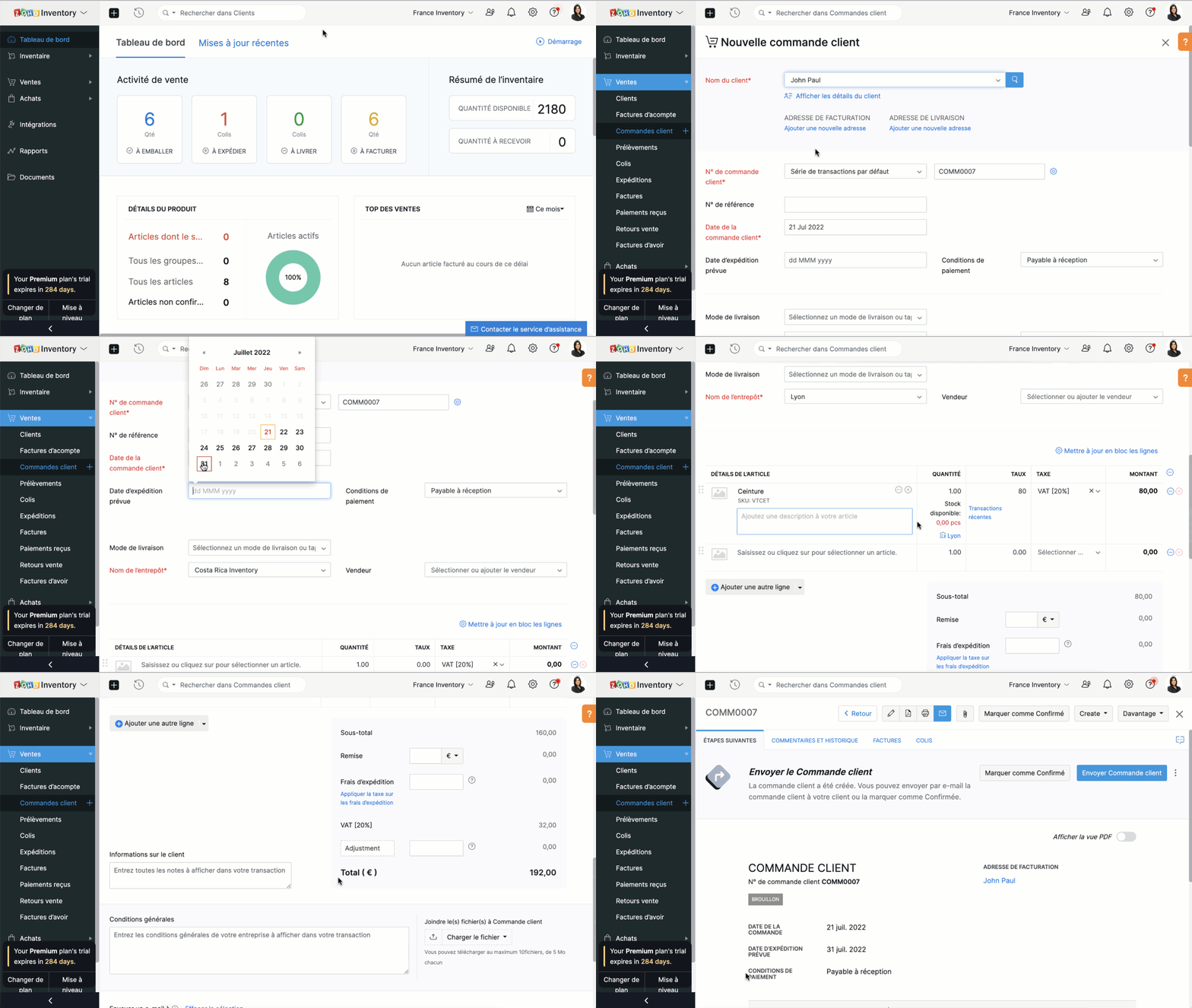
Créer une commande client
- Sélectionnez l'onglet "Commandes client" sous "ventes"
- Cliquez sur "+nouveau" et saisissez les détails du client. Dans le champs "Nom du client", vous pouvez soit sélectionner un client dans la liste déroulante, soit ajouter un nouveau client.
- Le N° de commande est généré par défaut. Si vous souhaitez le saisir manuellement , cliquez sur l'icône "Paramètres" à côté de l'onglet et une fenêtre s'affichera pour vous permettre de choisir entre la génération automatique et la saisie manuelle.
- Saisissez les autres informations comme la date d'expédition, le mode de livraison, les conditions de paiement, le nom de l’entrepôt. Ajoutez un produit ou un service à partir de votre inventaire. Vous pouvez également cliquer sur l'option "Ajouter des articles en vrac" pour ajouter plusieurs articles à la fois à votre commande client.
- Saisissez la quantité, le taux et la taxe applicable à partir de la liste déroulante. La liste déroulante des taxes affiche uniquement celles que vous avez créées dans l'onglet "Paramètres", sous la section "Taxes".
- Saisissez le taux de remise, les frais d'expédition et les modifications, si applicable.
- Vous pouvez ensuite choisir d' sur "Enregistrer comme brouillon" ou "Enregistrer et envoyer"
Créer une commande à partir du module "Clients"
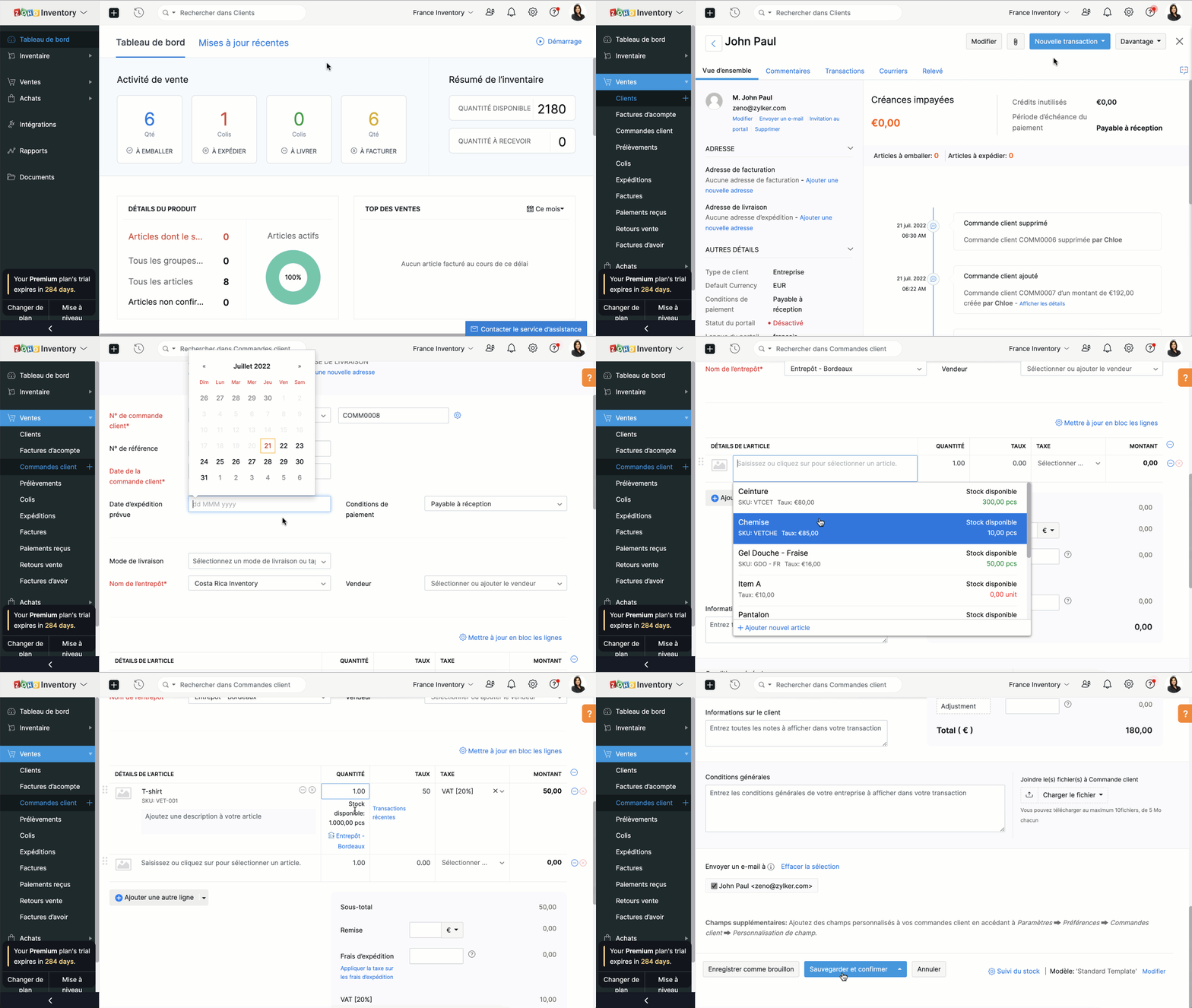
- Passez à l'onglet "Clients" et sélectionnez un client pour lequel vous souhaitez créer une commande.
- Cliquez sur le bouton "Nouvelle transaction" et sélectionnez "Commande client", une nouvelle fenêtre apparaît pour créer une nouvelle commande client.
- Vous pouvez maintenant suivre le parcours ci-dessus.
Fermer une commande client
En fonction de vos préférences, vous pouvez choisir que le statut de votre commande client soit automatiquement défini comme clôturé. Les critères sont les suivants:
- Lorsqu'une facture est créée
- Lorsqu’une expédition est effectuée
- Lorsque l’expédition est traitée et que la facture est créée
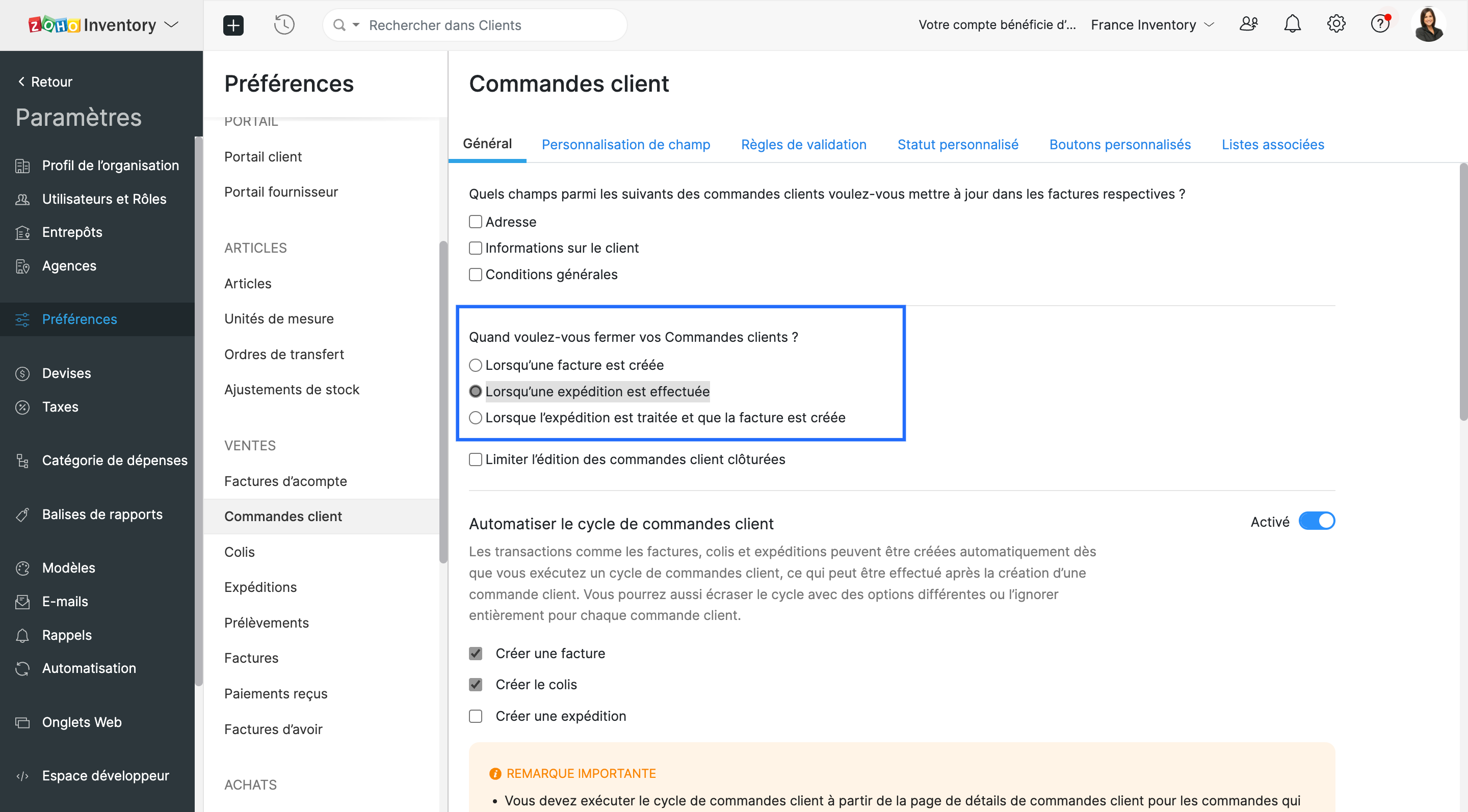
- Vous pouvez choisir l'un ou l'autre. Lorsque les critères sont satisfaits, le statut de la commande client est défini comme fermé.
Envoyer une commande à votre client
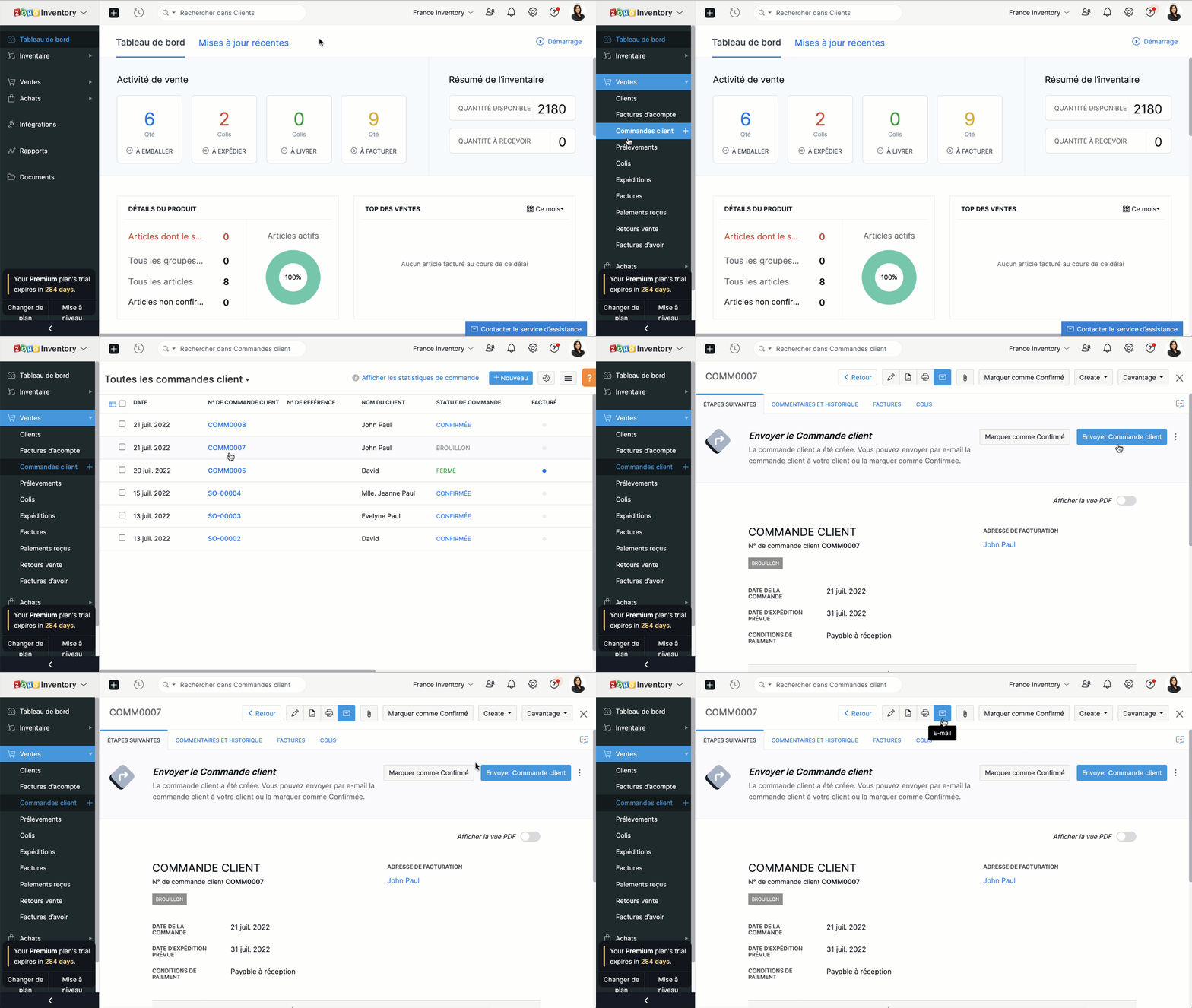
Vous pouvez soit envoyer la commande client au moment où vous la créez en cliquant sur "Enregistrer et envoyer", soit l'envoyer plus tard depuis le bouton "E-mail" situé en haut de la fenêtre.
Fusionner les commandes client.
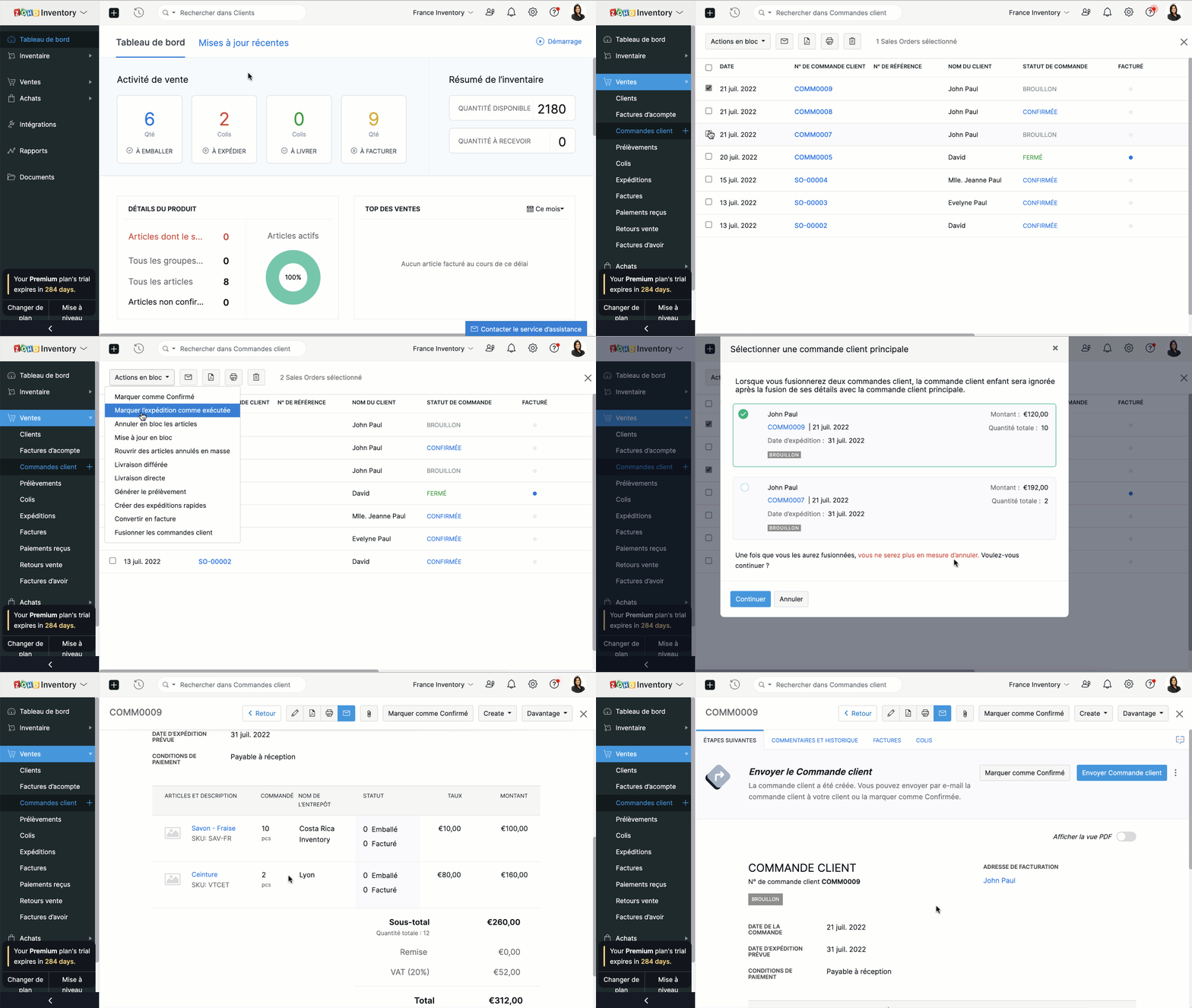
Si vous recevez deux commandes d'un même client, vous pouvez en regrouper les détails dans un seul document. Ainsi, vous pourrez préparer, expédier et facturer une seule commande au lieu de deux.
- Accédez au module "Commandes clients" depuis le panneau à gauche.
- Sélectionnez deux commandes clients à fusionner.
- Cliquez sur "Actions en bloc" et sélectionnez "Fusionner les commandes client".
Conditions préalables :
- Vous ne pouvez fusionner que deux commandes clients à la fois.
- Les deux commandes clients doivent être adressées au même client avec la même adresse de facturation et de livraison.
- Les deux commandes clients doivent avoir le même statut (statut Brouillon ou Confirmé uniquement) sans forfaits ou factures associés.
- Vous ne pouvez pas fusionner de commandes client de marketplace.
Créer des factures à partir de commandes clients
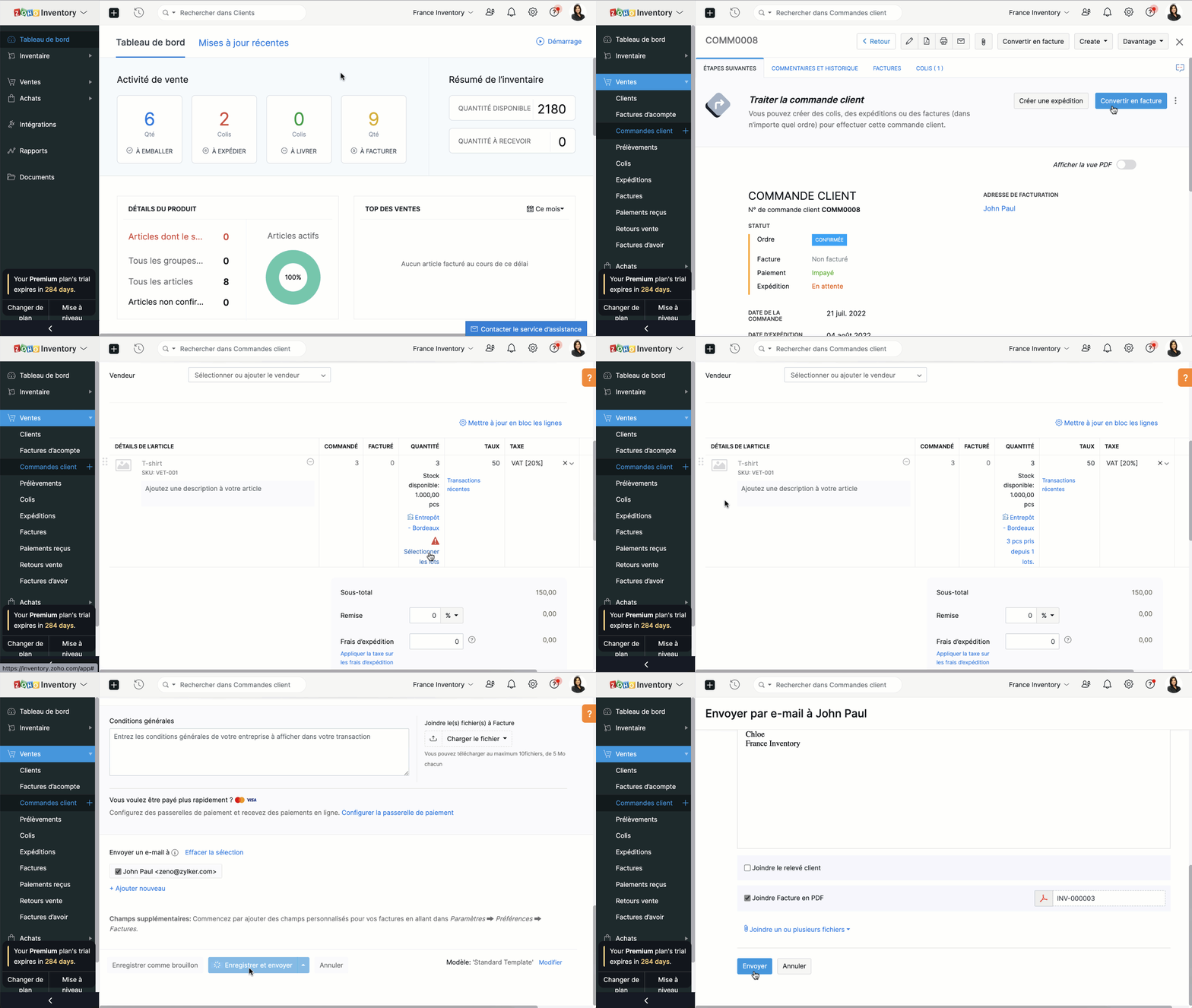
- Depuis le panneau à gauche, sélectionnez une commande client que vous voulez convertir en facture.
- Vous pouvez directement convertir en facture depuis l'onglet "Convertir en facture" soit depuis l'onglet "Facture".
- Vous serez dirigé vers la page de création de la facture. Par défaut, tous les détails fournis dans la commande client seront remplis automatiquement.
- En fonction des besoins, vous pouvez soit choisir de facturer partiellement la commande client et cliquer sur "Enregistrer", soit envoyer la facture immédiatement à vos clients en cliquant sur "Enregistrer et envoyer".
Merci
L'équipe Zoho France
Topic Participants
Kinjal Lodaya
renaud.laurent
Sticky Posts
Collaboration sans faille avec Zoho One
Bonjour à tous, Dans cet article nous allons voir comment Zoho One permet une collaboration à différents niveaux . La façon dont nous travaillons évolue. À mesure que les entreprises se mondialisent, la plupart des activités sont menées en équipe.
Recent Topics
Notes of Tasks in Zoho CRM
Hello, Is there a way to filter the Notes that appear on a Task to only show the notes related to that specific Task and not display all the Notes of the objects related to that Task (Accounts, Contacts, Deal, etc). In essence, our team struggles to understandHow to next stage blueprint in Zoho Creator
Hello, I have question, its possible to next stage blueprint? in case, Start - (first stage) Leader 1 (with condition 1) - (second stage) Leader 2 (with condition 2) - (third stage) Leader 3 (with condition 3) - (fourth stage) After first stage, i wantFeature Request: Email Follow-Up Sequences Similar to Zoho CRM
I’m wondering if Zoho Recruit is planning to introduce a feature similar to the Email Automation – Follow-Up Sequences that is available in Zoho CRM. In CRM, this allows users to send a series of timed follow-up emails triggered by specific actions (forCurrency limitation when integrating Zoho CRM & Zoho Books
Brief Video of Problem: https://www.loom.com/share/d61d1d07d0904e149d80c1901a22418e. Background · Our business is based in Australia and we have to have Zoho Books in AUD to comply with tax and reporting regulations in Australia. · We sellMulti-select Lookup does not have Advanced filter options in CRM
With much fanfare Zoho announced the advanced filter options for CRM lookup fields which was a nice addition. This feature is not available for Multi-Select lookup fields. Will it be rolled out in the next 3-6 months, considering the standard lookup filterExperience effortless record management in CRM For Everyone with the all-new Grid View!
Hello Everyone, Hope you are well! As part of our ongoing series of feature announcements for Zoho CRM For Everyone, we’re excited to bring you another type of module view : Grid View. In addition to Kanban view, List view, Canvas view, Chart view andKaizen #157: Flyouts in Client Script
Hello everyone! Welcome back to another exciting edition of our Kaizen series, where we explore fresh insights and innovative ideas to help you discover more and expand your knowledge!In this post, we'll walk through how to display Flyouts in Client ScriptAdmin Control Over Profile Picture Visibility in Zoho One
Hello Zoho Team, We hope you are doing well. Currently, as per Zoho’s design, each user can manage the visibility of their profile picture from their own Zoho Accounts page: accounts.zoho.com → Personal Information → Profile Picture → Profile PicturePublished Course Not Reflecting In Hub
Hi! I am trying to create micro-learning courses for our team to be available for self-guided learning. I have published the courses with enrollment settings open to all users of the hub, but they don't appear to be available for enrollment. Am I missingUnlock Locked Users via Zoho One Mobile App
Hello Zoho One Team, We have noticed that in the Zoho One web admin panel, we can unlock a locked user when needed. However, when using the Zoho One mobile app, there is no indication that a user is locked, nor is there an unlock button similar to whatTip #47- Stay Ahead with Automated Scheduled Reports in Zoho Assist- 'Insider Insights'
We’ve made it easier for you to stay informed, even when you’re busy managing remote sessions! With Scheduled Reports in Zoho Assist, you can now automatically receive detailed insights about your remote support and unattended access activities directlyColour Coded Flags in Tasks Module List View
I really like the colour coded flags indicating the status of the tasks assigned to a Contact/Deal in the module list view. It would be a great addition to have this feature available in the list view of activities/tasks. I understand you have the DueUploading data to S3
Has anyone successfully uploaded data from Creator to S3 using the InvokeURL command or any other method in Deluge? (keywords: S3, AWS, Amazon, bucket)UPS Label size when generated via Zoho
We've integrated UPS with Zoho inventory. When creating and downloading the shipping labels they are created in a larger paper size. I'd like them to be generated to print on a 4x6 printer. Zoho have told me I need to do this within our UPS portal. UPSCredit Management: #4 Credits on Unused Period
Recall a familiar situation. You sign up for a monthly gym membership. You pay the subscription fee upfront, get motivated, and show up consistently for the first week. Then, suddenly, you get caught up in work deadlines, travel plans, or a dip in motivation.Record payment: Payment Mode vs. Deposit To and how to "connect" them!?
How do we set up that when we choose: "Payment Mode"= Cash, then "Deposit to" is automatically set to Petty Cash, and if we choose "Payment Mode"= Check, then "Deposit to" is automatically set to Undeposited Checks, and if we choose "Payment Mode"=Zoho Analytics Automatically Deletes Queries and Reports When a Synced CRM Field Is Removed
We’ve encountered a serious and recurring issue that poses a massive data integrity risk for any Zoho Analytics customer using Zoho CRM integration. When a field is deleted in Zoho CRM — even an unused one — Zoho Analytics automatically deletes everyPrevent new Record Association
Hello all, We have a small sales organization therefore, it's helpful for everyone on the sales team to be able to view the full list of accounts to assist in preventing duplicate accounts from being created. However we want to prevent people from creatingTip of the Week #73– Automate workflow with Make integration.
Make is a no-code workflow automation platform designed to connect your favorite apps and automate repetitive tasks across services. By integrating Make with Zoho TeamInbox, you can streamline everyday inbox management and save valuable time. With thisViewing attachments
I'm using a Web Form integrated in my web site to collect Leads several info, including a image upload. In order to to approve each lead, we have to view the image uploaded. Unfortunately, in the Leads view, the Attachments can only be downloaded, notKaizen #89 - Color Coding using Client Script
Hello everyone! Welcome back to another exciting Kaizen post. Today let us see how you can apply color codes to the List and Detail Pages of Zoho CRM using Client Script. Need for color code in Zoho CRM When you mark things with different colors as aInstant Sync of Zoho CRM Data?
With how valuable Zoho Analytics is to actually creating data driven dashboards/reports, we are surprised that there is no instant or near instant sync between Zoho CRM and Zoho Analytics. Waiting 3 hours is okay for most of our reports, but there areIs it possibly to directly set the tax amount on order instead of indirectly via tax rates?
We own an eCommerce application and want to funnel submitted orders from that system into Zoho. We're already calculating tax in our application and just need a way to set it in Zoho. We tried to use Zoho's tax objects for tax by setting the rates toZoho account sign in with passkey
Hello, I am trying to sign in using passkey, but the option doesn't show up in the web and is disabled in Oneauth on mobile, saying the admin has restricted the use. On the Admin page in Security MFA I can find no option for passkey. Help would be greatlyRescheduled US meetups: Zoho Desk user meetups are coming to seven U.S. cities in October and November, 2025
Hello to our Zoho Desk users in the United States, We're excited to share the revised dates for the upcoming Zoho User Groups happening across the US this summer. Our product experts are heading to seven cities throughout the country, and for the firstChecklists as templates
Is it possible to save checklists as templates to reuse them in other tasks? Example: I have a web project. I maintain individual web URLs as tasks. Within the tasks the same checklist should be used again and again: - Page created in CMS - PropertiesSend mass email using my secondary email
Hello, When I send an email to just one person from Zoho CRM, a complete email editor appears, where I can choose which of my email addresses I want to use in the From field. When I send a mass email, there is not such option. I can only select the emailZOHO TEAM INBOX Calendar Integration
The Problem: Clients send meeting invitations to our TeamInbox address. TeamInbox receives these invites, but we cannot accept them. We do not use individual inboxes for transparency purposes. Ideal Solution: A way to accept calendar invites sent to ourWhy Can't I add unicode emoji's to my signature?
Why would Zoho Mail prevent me from adding unicode emojis to my email signature? Every time I try to save the signature, Zoho Mail erases the emoji and any nearby content. Every time I setup something with Zoho, I know I'm going to run into some incrediblyUnearned / Deferred Revenue Automatic Calculation for Subscriptions
As a SaaS business, we have multiple active subscriptions with varying dates and amounts. Is there a way to have a monthly automatic calculation for all of them that debits or credits the unearned revenue and revenue accounts accordingly? Alternatively,Zoho Desk Limit for Comma Separated Queries
Hi, I have just discovered a limit that I believed is not mentioned in any of Zoho's documentations. My search query looks like so: "query: {"accountId":"786050000091629966,786050000163589273,786050000163589427,786050000162753705,786050000162112971,786050000161987643,786050000160752868,786050000167089504,786050000167089378,786050000167089024,786050000167070005,786050000166295256,786050000128153693,786050000110560021,786050000046594575,786050000039106461,786050000002225356,786050000076889093,786050000047895103,786050000043365354,786050000044765191,786050000041790249,786050000040359116,786050000037945198,786050000024605077,786050000000525015,786050000155333895,786050000157741437,786050000000718125,786050000011574353,","departmentId":"786050000042648070","status":"Finished","sortBy":"createdTime","customField2":"cf_completion_date:2025-01-28T03:00:00.000Z,2025-10-28T03:00:00.000Z","customField3":"cf_billed:false"}"Module Name doesn't exist
I am trying to create a module named Activity, with plural Activities, but I have an error that module name already exists. This module is doesn't exist, and I don't have a single field called Activity or Activities.Zoho Desk iOS and Android app update: AI powered: Reply Assistance and Refine Messages on IM module.
Hello everyone! We are excited to introduce new AI powered features on the IM module of the Zoho Desk app. Reply Assistance: Reply Assistance generates suggested responses for incoming chat messages, which you can directly insert into the conversationIs it possible to embed Youtube shorts?
Hi Zoho desk support, This is Ryan from Accuver America. While I'm trying to create a knowledge base article with embed video, I ran into this issue. "www.youtube.com refuse to connect" A little bit background is that because this video is recorded onSplit functionality - Admins need ability to do this
Admins should be able to split an expense at any point of the process prior to approval. The split is very helpful for our account coding, but to have to go back to a user and ask them to split an invoice that they simply want paid is a bit of an inDelegates - Access to approved reports
We realized that delegates do not have access to reports after they are approved. Many users ask questions of their delegates about past expense reports and the delegates can't see this information. Please allow delegates see all expense report activity,How to include total km for multiple trips in expense report.
Whenever I create a mileage report it only shows the total dollar amount to be reimbursed. The mileage for each individual trip is included but I also need to see the total distance for all trips in a report? How do I do this?I didn't receive my domain verification mail
I didn't receive my domain verification mailGet logged in user ID in Deluge script
Hello all, How do I get the id of the logged-in user in a deluge script? the "zoho.loginuserid" function actually returns the users email address or whatever the user id they use to login to zoho with and not the id of the user record, and given thatItem Details Field - New Barcode / Document option?
Is this a new feature??? its in both books and inventory.Next Page