Connect and Engage On the Go: How Zoho SalesIQ's Mobile App Empowers Sales Teams?

Connect and Engage On the Go: How Zoho SalesIQ's Mobile App Empowers Sales Teams?

In sales, timing is crucial. It makes a huge difference.

What if a prospect is checking out your pricing page? Or a high-value lead revisits your business' website or mobile app while you're at lunch? You can’t afford to miss that opportunity, and you need to strike immediately. Right?
But in reality, sales people may not always be available at their desks. Whether your sales representatives are meeting a client, commuting, or taking a quick break, opportunities can arise at any moment—and your Sales Team needs to be ready.

And, we have the perfect solution!  The Zoho SalesIQ Mobile App is built to give sales professionals the tools they need to connect with visitors to your business' website or mobile app in real time, qualify leads intelligently, and manage their pipelines on the go.


How does the SalesIQ Mobile App help your sales team?

Let’s explore how the SalesIQ Mobile App can make a sales representative's day-to-day activities much more efficient and effective.

I. Engage prospects instantly, even when on the move

Quote

On the way to a client meeting, Emma, a sales representative, gets notified that a visitor has entered the website and checks to see that they are viewing a particular product. With one tap on the SalesIQ App, Emma initiates a live chat, answers their questions, and sparks immediate interest—all before reaching her destination.

The SalesIQ Mobile App enables sales representatives to chat with website visitors straight from their phone, responding in real time without needing to be at a desk.

How this helps sales reps?
  • Be instantly available to answer prospect questions - wherever you are.
  • Respond instantly to inbound queries to reduce turnaround time.
  • Initiate chats based on visitor behavior, instead of waiting for them to reach out.

II. Spot and Prioritize High-Potential Leads

Quote

As Emma chats, she notices that the visitor’s lead score is high: they've browsed key product pages and downloaded the pamphlet earlier. Realizing that the visitor is highly interested, she gives them priority, reaches out with a customized offer to close the deal faster.

With Lead scoring on SalesIQ, sales representatives can easily spot and prioritize high potential leads and engage with prospects who are most likely to convert. The lead score will be based on the visitor's actions on your website/mobile app.

How this helps sales reps?
  • Eliminate guesswork by focusing on leads with real buying intent.
  • Save time by not chasing cold or low-intent prospects.
  • Use visitor activity to automatically qualify leads based on their potential.
  • Receive push notifications when high-priority leads visit your website/mobile app, ensuring timely engagement.

III. Monitor Visitor behaviour with Live Visitor View

Quote

Seeing that the visitor has just clicked on the "New Offers" page, Emma shifts the conversation:
“Would you like me to show you a list of customized brand-new offers that are trending right now?” This personalized approach immediately connects with the visitor, peaking their interest and paving the way to a potential purchase.

Knowing who is on your website/mobile app and understanding their journey and intent is crucial for personalized sales engagement. The SalesIQ Mobile App tracks visitor activity like what pages they view, how long they stay, and what interests them most in real time, helping sales representatives tailor their conversations based on interests and needs.

How this helps sales reps?
  • Quickly understand each prospect’s needs without asking repetitive questions.
  • Use page navigation history to gauge visitor intent and tailor your approach.
  • Jump into conversations at the perfect time, based on live visitor behavior.

IV. Update CRM and Keep Deals Moving — Instantly 

Quote

As Emma almost reaches her destination for her client meeting, she decides that this was a successful live chat with a potential client, and Emma quickly updates the lead’s details in Zoho CRM using the Mobile App, ensuring a smooth transfer of data and seamless handover for sales follow-up.

SalesIQ syncs seamlessly with Zoho CRM, allowing reps to add leads, contacts, and even add deals and follow up tasks on CRM—all from the SalesIQ Mobile App.

How this helps sales reps?
  • Add or update lead details in Zoho CRM right from the mobile app.
  • Access critical customer information before initiating a chat.
  • Maintain clean, up-to-date CRM data on SalesIQ without ever navigating to CRM.

V. Let AI Do the Heavy Lifting for Routine Tasks

Quote

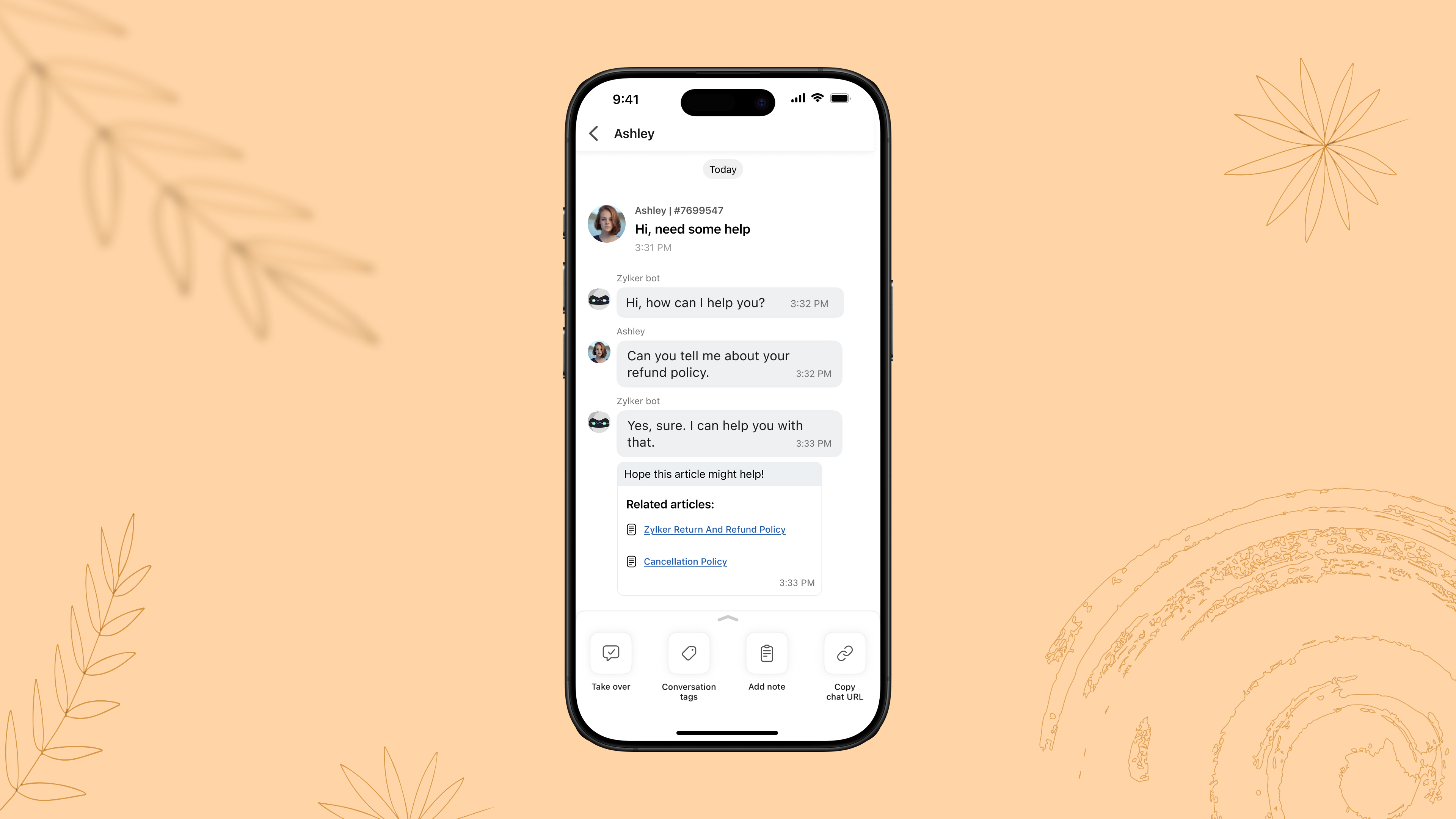
Later at night, when the business is offline, a visitor asks about the refund policy. The SalesIQ AI chatbot immediately provides the correct information, collects the visitor’s contact details, and flags them for follow-up—allowing Emma to follow up with the lead the next morning seamlessly.

With SalesIQ’s Answer bot and Zobot, routine queries to complex workflows can be easily automated on chat as a first level filter, offloading your operator's workload to a huge extent. 

How this helps sales reps?
  • Free up sales reps' time to focus on complex, high-value conversations and tasks.
  • Ensure prospects get instant responses, even outside of working hours.
  • Boost productivity without sacrificing personalization.
VI. Trigger Custom Push Notifications to Drive Conversions

Quote

During a weekly sales followup, Emma notices that earlier in the week, a visitor had spent time browsing a pair of sneakers but didn’t complete a purchase.
Emma, using the SalesIQ App, notices the browsing history and drafts a personalized push notification with an offer, to drive sales. The visitor returns to the website, applies the offer, and completes the purchase. In this way, a missed opportunity becomes a closed deal with well-timed, engagement.

With the SalesIQ Mobile App, sales reps can send personalized push notifications to visitors based on their past navigation history on your website or mobile app. By tailoring messages to match user behavior and preferences, reps can re-engage prospects, nudge them toward a purchase, and revive cold leads—all without sounding generic or intrusive.

How this helps sales reps:
  • Re-engage visitors who showed interest but didn’t convert.
  • Deliver timely, personalized messages based on each visitor’s browsing behavior.
  • Drive return visits and accelerate purchase decisions with targeted deals or recommendations.

Final thoughts: Equip Yourself to Sell Smarter

Sales success today isn’t just about having the best product; it’s about engaging the right person at the right moment. With the Zoho SalesIQ Mobile App, you can stay connected, responsive, and efficient—no matter where you are. 

Do check out the SalesIQ Mobile App for iOS and Android and equip your sales teams with the agility they need to convert more prospects into customers.

Hope this was helpful and we'll see you soon with another interesting post!

Cheers,
Hameetha


        • Recent Topics

        • Changing Department often causes the Firefox tab to freeze

          Title, it doesn't seem to happen with neither Opera nor Chrome. And even in Firefox, sometimes it just lets me change the department I'm in no problem, even to All Departments which is probably the most, like, resource heavy? But most of the time, the
        • Duplicate customers being created in Desk

          Hi I've trying to work out why I've getting duplicated customers being created in my desk. I have an external booking system that generates an email when I get a customer booking a job. A booking email gets sent to Desk where I manage the booking and
        • Using a CRM Client Script Button to create a Books Invoice

          Hello, I need help handling error messages returned to my client script from a function. The scenario I have setup a client script button which is available from each Deal. This CS executes a crm function, which in turn creates an invoice based on the
        • Building Toppings #2 - Learn how to use Bigin's Developer Console to build toppings

          Hey Biginners, In our last post, we discussed what toppings are, why they're essential to extending Bigin's capabilities, and how the Bigin Developer Center serves as the starting point for building them. As a cloud platform, the Developer Center empowers
        • Proposal for Creating a Unique "Address" Entity in Zoho FSM

          The "Address" entity is one of the most critical components for a service-oriented company. While homeowners may change and servicing companies may vary, the address itself remains constant. This constancy is essential for subsequent services, as it provides
        • Links are incorrect when sent out

          I'm adding in hyperlinks into my eDM. When I send a test email, it's all correct. However, when I send out the eDM, all the hyperlinks jump up one space so none of the links are opening to the correct page. Why is this happening and how can I fix it?
        • Tip of the week #16 - Search and filter threads based on criteria

          Zoho TeamInbox lets you search and filter threads with any information that you have about the thread. You just have to input the criteria and Zoho TeamInbox will list all the threads that match the condition.   Firstly, there is a global search you can
        • Introducing recipient authentication via Stripe Identity

          Hi everyone! It's important to authenticate your recipient's identity before they access and sign important documents to ensure the highest level of compliance. Zoho Sign already helps businesses do this with various authentication methods: SMS OTP Email
        • Introducing Multi-Asset Support in Work Orders, Estimates, and Service Appointments

          We’re excited to announce a highly requested enhancement in Zoho FSM — you can now associate multiple assets with Work Orders, Estimates, and Service Appointments. This update brings more clarity, flexibility, and control to your field service operations,
        • Open a record to edit based on another form being edited

          Hi all, I am trying to edit a record based on another record being edited. It works out like this: When I create a Monthly_Update and then submit I open the Monthly_Levels form and pass the ID from the Monthly_Update to a field called mu. I want it to
        • CRM: hosting a single html file in Zoho and displaying it as a widget

          I have seen that CRM offers the option of uploading a web project to Zoho itself and displaying it as a widget in CRM. The instructions then talk about setting a development environment with Node and developing an application to upload to Zoho. But I
        • Keep Converted Leads

          How do I keep the converted leads in the Leads Module after conversion (converting it to account, contact, deal). I want to add it in a converted stage in the leads module in order to get a report or dashboard and see all converted leads from my pip
        • Customizing Global Search Settings for All Users

          Hi Our team use the brilliant global search functionality within CRM many many times daily. But, we struggle with the out-of-the box columns that CRM gives you. We are always telling users to customize this look to more suit our business, to show the
        • Zoho CRM Kiosk issues

          Firstly this is for a system on the AU servers if that makes a difference. Issues are as follows (For Kiosk): 1. Re-ordering fields in the screen builder is broken. The fields seem to be re-ordering themselves, unless you order everything by moving the
        • Presenting ABM for Zoho CRM: Expand and retain your customers with precision

          Picture this scenario: You're a growing SaaS company ready to launch a powerful business suite, and are looking to gain traction and momentum. But as a business with a tight budget, you know acquiring new customers is slow, expensive, and often delivers
        • Introducing Formula Fields for performing dynamic calculations

          Greetings, With the Formula Field, you can generate numerical calculations using provided functions and available fields, enabling you to derive dynamic data. You can utilize mathematical formulas to populate results based on the provided inputs. This
        • From Zoho CRM to Paper : Design & Print Data Directly using Canvas Print View

          Hello Everyone, We are excited to announce a new addition to your Canvas in Zoho CRM - Print View. Canvas print view helps you transform your custom CRM layouts into print-ready documents, so you can bring your digital data to the physical world with
        • Tip of the Week #77– Stay informed of the activities happening in your organization

          Whenever a message is handled in Zoho TeamInbox, every action is recorded in the Activity Log. This ensures you always know what’s happening across your teams and inboxes. To access it, simply click the Audits icon on the left pane’s top bar after logging
        • Let us add Lookup fields in the Blueprint Transitions

          We are unable to add Lookup Fields in the blueprint transitions in Zoho Desk, we wanted to make it a requirement for our workflow but since it's not available in the transition we cannot. The lookup field exists in the Layout: But it cannot be added/selected
        • Zoho Logs - Not seeing logs since 30 Nov

          Hi, we have a few functions running, I am testing some new ones and noticed that although I can see executions, I cannot see any logs, even when the first line on the functions is a log. I reviewed some existing functions, one of which is invoked on a
        • Workdrive MS Office integration

          Have installed subscribed version of Zoho WorkDrive VSTO runtime not found is the error when I try to install Zoho_WorkDrive_For_Office Unable to open work files in Excel and Word Urgent, since I have migrated all my OneDrive files to work drive already
        • How do I create an update to the Cost Price from landed costs?

          Hi fellow Zoho Inventory battlers, I am new to Zoho inventory and was completely baffled to find that the cost price of products does not update when a new purchase order is received. The cost price is just made up numbers I start with when the product
        • Checkbox Field Mapping Zoho Forms to Zoho Sign

          I have an application that will be filled out via Forms that I am mapping into a PDF Filler on Zoho Sign. I need to have a series of checkboxes mapped to the corresponding fields in Sign and I only see single checkboxes available via the mapping, though
        • How to change Zoho Vault password

          I am searching where I can change the Vault Password after having changed the Zoho account password. I don't see this option anywhere in my account. It should be simple and accessible! Please help. Thanks!
        • Zoho Workdrive - Communication / Chat Bar

          Hi Team, Please consider adding an option to allow admins to turn on or off the Zoho Communication Bar. Example of what I mean by Communication Bar: It's such a pain sometimes when I'm in WorkDrive and I want to share a link to a file with a colleague
        • Prefered Bin Missing in android APP

          Andoroid app dosent show preferred bin in the picklist. The workaround support reccomend is to use the computre to create the picklist. it shuld be information to be shown aas basic for the pciker.
        • When Marking a Multiple Choice Answer Exclusive - Not Following My Survey Disqualification Logic

          Using a multiple choice (many answers) question and I created survey disqualification logic that was working as intended. My question: Disqualification page logic is: If (QUESTION) is "any one of the following" then (OPTIONS) - a custom message populates
        • Where to Add Machines as Products to Map with Assets in Zoho FSM?

          implementing Zoho FSM for a clinical equipment supply company. The business sells and installs clinical machines in hospitals and clinics, and they also handle service requests, scheduled maintenance, calibration visits, and general machine upkeep. In
        • Show Zoom Link in Recipient's Calendar

          We set up meetings within a record, selecting the "Make this an online meeting".  We use Zoom. Most of the recipients go to their calendar (usually Gmail or Outlook, corporate) to join the Zoom meeting, but there is no Zoom link in the calendar. Can this
        • Creating multiple CRM leads from a Zoho Forms subform

          Hi all, We have a heavily used intake form that is used for new leads as a part of our intake. There is a subform that allows the lead to add additional team members, their titles and other basic info. That form submission creates a new Lead and the subform
        • Passing the CRM

          Hi, I am hoping someone can help. I have a zoho form that has a CRM lookup field. I was hoping to send this to my publicly to clients via a text message and the form then attaches the signed form back to the custom module. This work absolutely fine when
        • Zoho CRM for Everyone's NextGen UI Gets an Upgrade

          Hello Everyone We've made improvements to Zoho CRM for Everyone's Nextgen UI. These changes are the result of valuable feedback from you where we’ve focused on improving usability, providing wider screen space, and making navigation smoother so everything
        • Zoho Bigin - should be able to link a "contact" to multiple "companies"

          Hello Support, I called into telephone support and was told that a contact can only be linked to one company. We have situations were director are contacts of and directors of multiple companies so that seems a basic weakness in Bigin. When go to add
        • Does Thrive work with Zoho Billing (Subscriptions)?

          I would like to use Thrive with Zoho Billing Subscriptions but don't see a way to do so. Can someone point me in the right direction? Thank you
        • Using IMAP configuration for shared email inboxes

          Our customer service team utilizes shared email boxes to allow multiple people to view and handle incoming customer requests. For example, the customer sends an email to info@xxxx.com and multiple people can view it and handle the request. How can I configure
        • Radio button data won't update

          Wondering if anyone is experiencing the same problem. I tried bulk updating our data on Zoho Creator using API and noticed that the radio button field wasn't updated. I have tried updating it manually, it didn't work. When I tried updating a text field
        • Register the 'Contact Role' addition and change as a Potential edition so it can trigger Workflows

          We are trying to use "Contact Roles" in Potentials. Contact Roles are special and different than the other Related lists, so, it may have a special behavior. Something to keep in mind is that you will never have 100 Contact Roles as you can have 100 Tasks, Calls, or any other Related list. In our case we will have 2 in average and up to 4 or 5 maximum. The problem is that we need to bring information from 3 key Contact Roles to the Potential and adding a Contact to the Contacts Roles area never trigger
        • Synchronise item image between Zoho Commerce and Zoho Books/Inventory/CRM

          Here is a blindingly simple idea to tie several Zoho products together. Zoho - please include a method to synchronise the item image (or images) from one Zoho application to another. For example, if you upload an item image in Zoho Inventory, a user should
        • Accessing shared mailboxes through Trident (Windows)

          Hi, I have a created a couple of shared mailboxes. The mailboxes are showing up on the browser based Zoho workplace, but I cannot seem to figure out how to access my shared inboxes through Trident (Windows). Am I missing something or is this feature not
        • Introducing Global Sets for easy management of similar picklists in CRM

          [Update | Sep 2024] We've increased the maximum count limit for global sets. These new limits are now live for AU and JP data centers and will be gradually opened to all. Please check this link for the updated limits. Latest update (December 2025): You
        • Next Page