CRM x WorkDrive: File storage for new CRM signups is now powered by WorkDrive

CRM x WorkDrive: File storage for new CRM signups is now powered by WorkDrive

Notes

Availability

Editions: All

DCs: All

Release plan: Released for new signups in all DCs. It will be enabled for existing users in a phased manner in the upcoming months.


Help documentation:


Hello everyone!

We're excited to announce the first cut of Zoho CRM's native integration with WorkDrive! This highly anticipated release marks the first step in bringing together two of our most popular apps. Now, WorkDrive powers file storage for new CRM signups in all DCs.
 
The initial release includes the following changes:
  • You have the option to connect your CRM org with a current or new WorkDrive account.
  • Access this connected WorkDrive account seamlessly through the Documents tab, which was previously powered by Zoho Docs.
  • Attachments added to a CRM record will be automatically placed in pre-defined folders in the record owner's My Folders section.
First things first. Let's see how new users can set this up quickly!

Setup

Configuring this integration is a one-time process that happens when you first login to your new CRM account.

If you do not have an existing WorkDrive account, a new WorkDrive account will be created and linked automatically.
 
If you have a WorkDrive account, a Set up WorkDrive popup will appear.


You have two options:

  • Map an existing WorkDrive account.

  • Create a new WorkDrive account.

After setup, it is not possible to unlink the WorkDrive account associated with your CRM organization. Please exercise caution as we are currently unable to reverse this connection even on our end.

Documents tab 
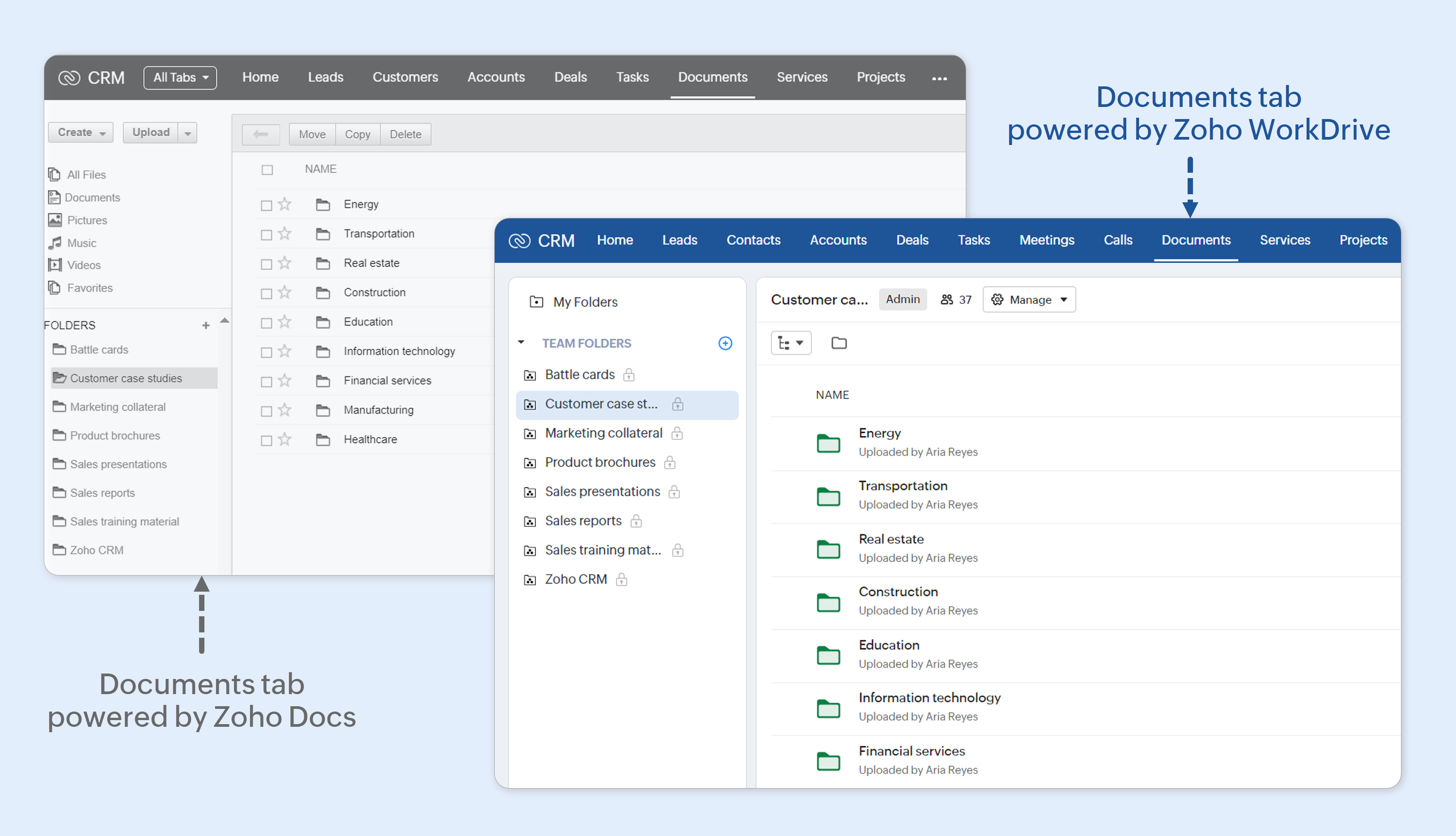
In Zoho CRM, the Documents tab is the central repository where all business-related documents are stored, organized, and shared across your organization. Examples of the kinds of documents that are stored in the Documents tab include brochures, request for information (RFIs), invoices, comparison docs, presentations, forms, contract templates, product manuals, internal handbooks, and so on. It was previously powered by Zoho Docs.


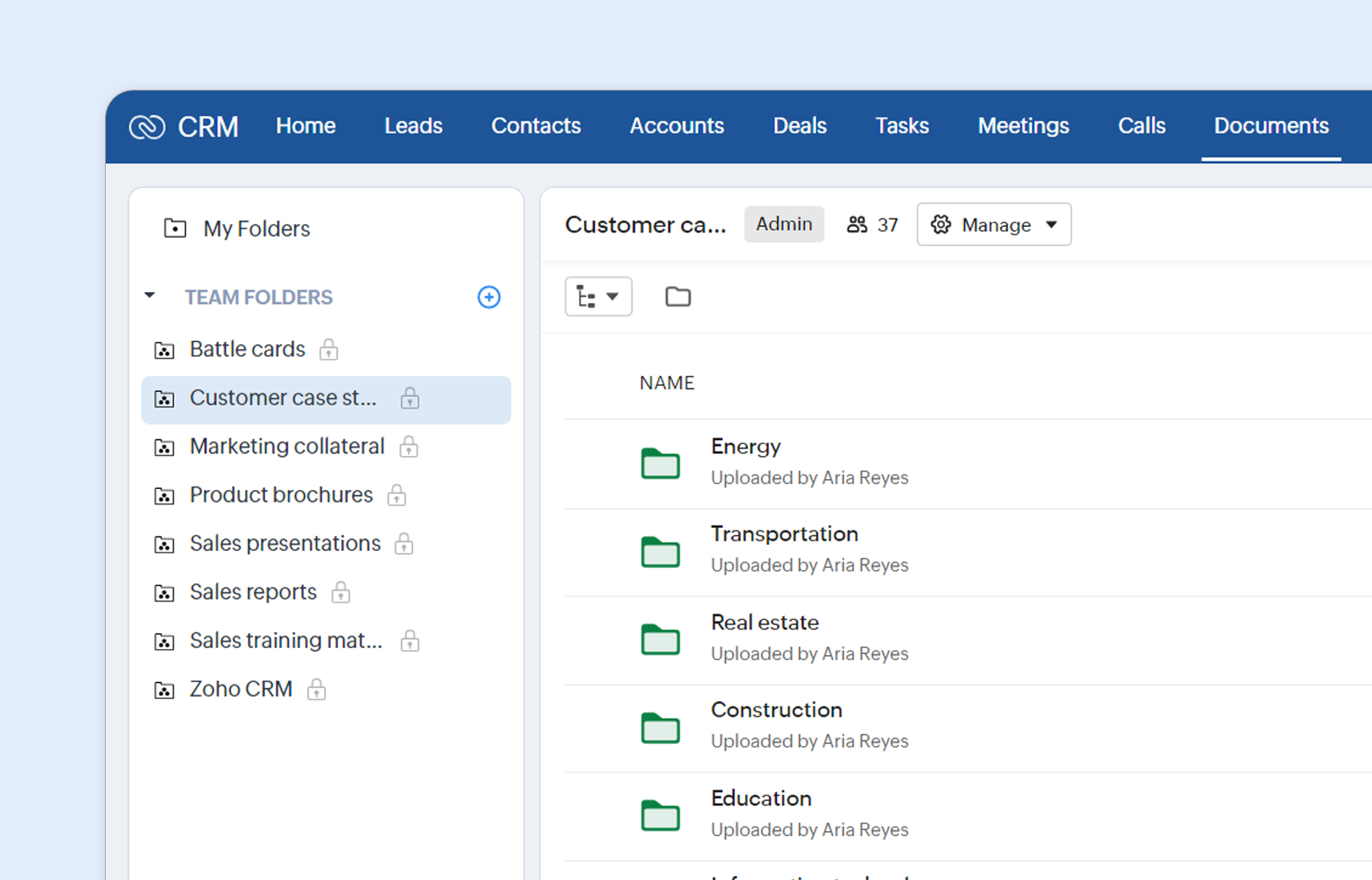
As mentioned before, for new signups, this tab is now powered by Zoho WorkDrive. Apart from a more modern UI, every CRM user will now have access to two kinds of folders: My Folders and Team Folders.

My Folders for viewing attachments


Attachments added to records in Zoho CRM will be automatically added to folders in this section of the Documents tab. These folders will follow a pre-defined structure (Apps > Zoho CRM > Module Name > Record Name > Attachments) and you can find them under My Folders. Please note that only the attachments of records owned by you will be visible to you. You will not be able to add, edit, or delete attachments in WorkDrive or in the Documents tab.

In this first cut, we have the following limitations when it comes to attachments:

  • You cannot share these attachments to external users via Documents tab or WorkDrive.

  • Sharing a record allows others to view its attachments on the record detail page, but not in the Documents tab or WorkDrive. This also applies to non-owners with access to the record, such as higher roles in the hierarchy.

  • Attachments to notes and emails will not be added to these folders.

Team folders for collaboration


The Team Folders section in the Document's tab provides full access to the power of WorkDrive within your CRM. Let's look at some examples.
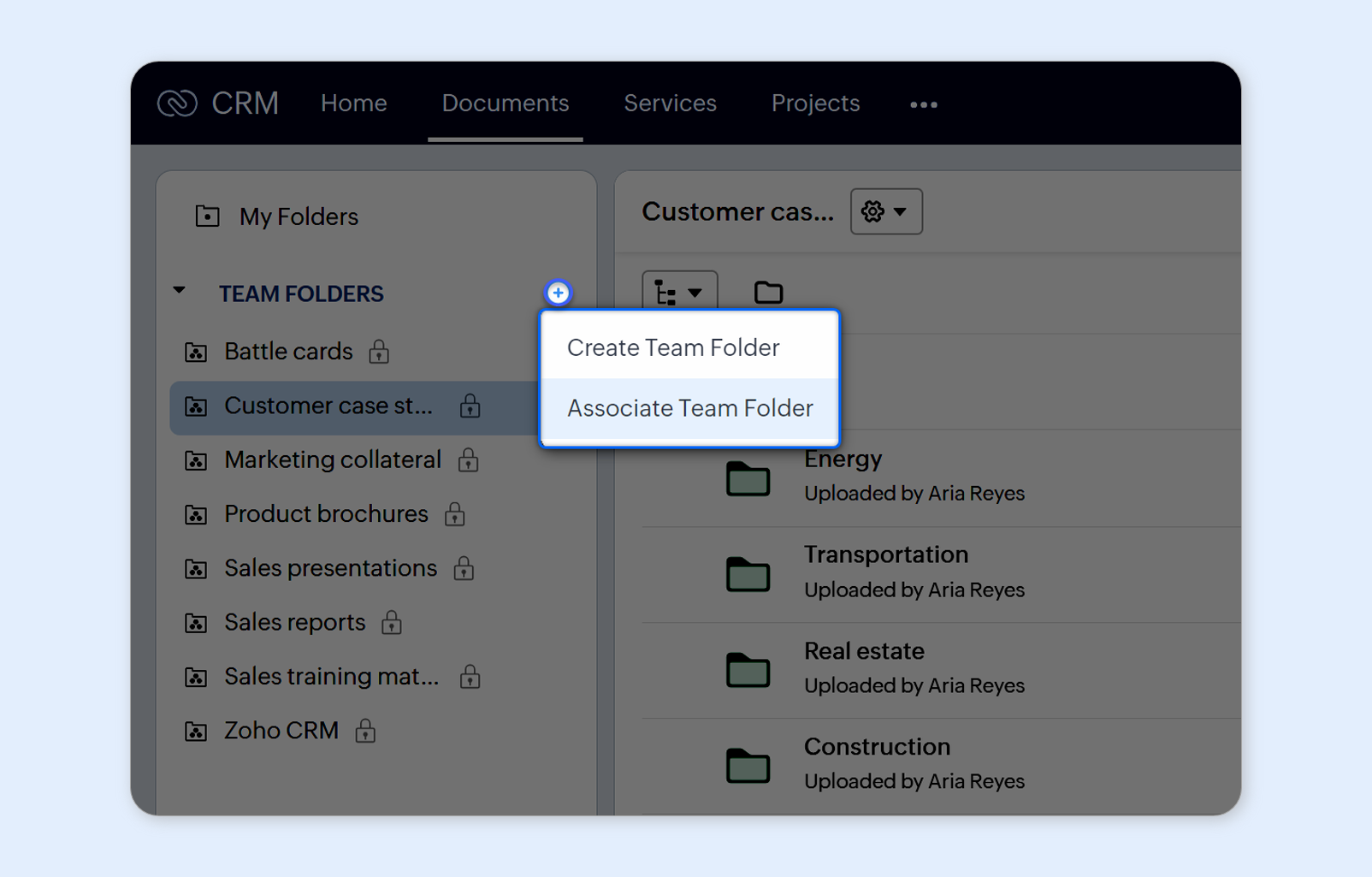
You can create team folders within the Documents tab. But if you are connecting an existing WorkDrive account, it is likely that you have a ton of team folders already created there. Simply connect these team folders to the Documents tab and begin accessing them in the CRM.


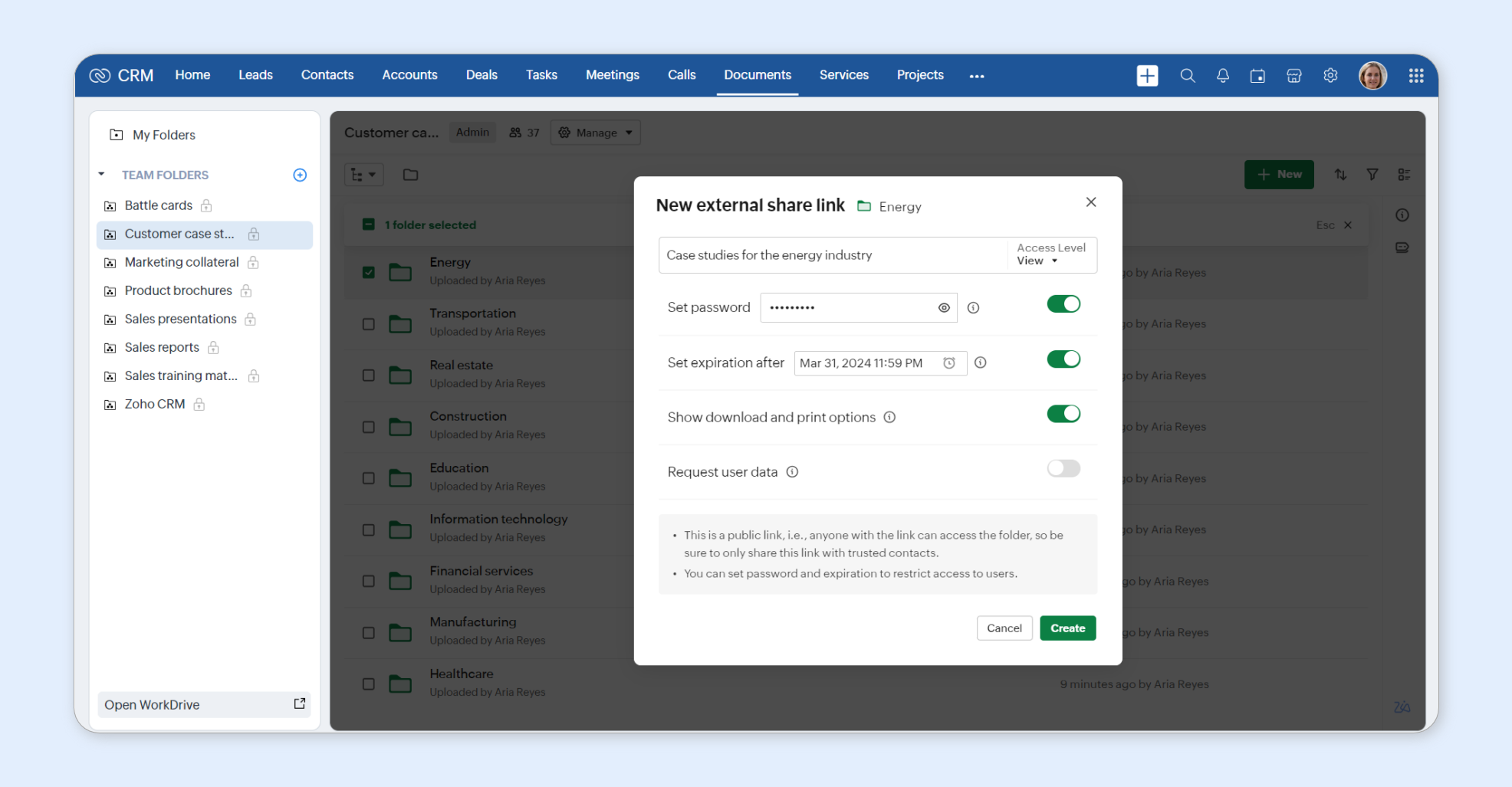
You can share a file with someone outside of your organization by creating an external share link in the Documents tab.


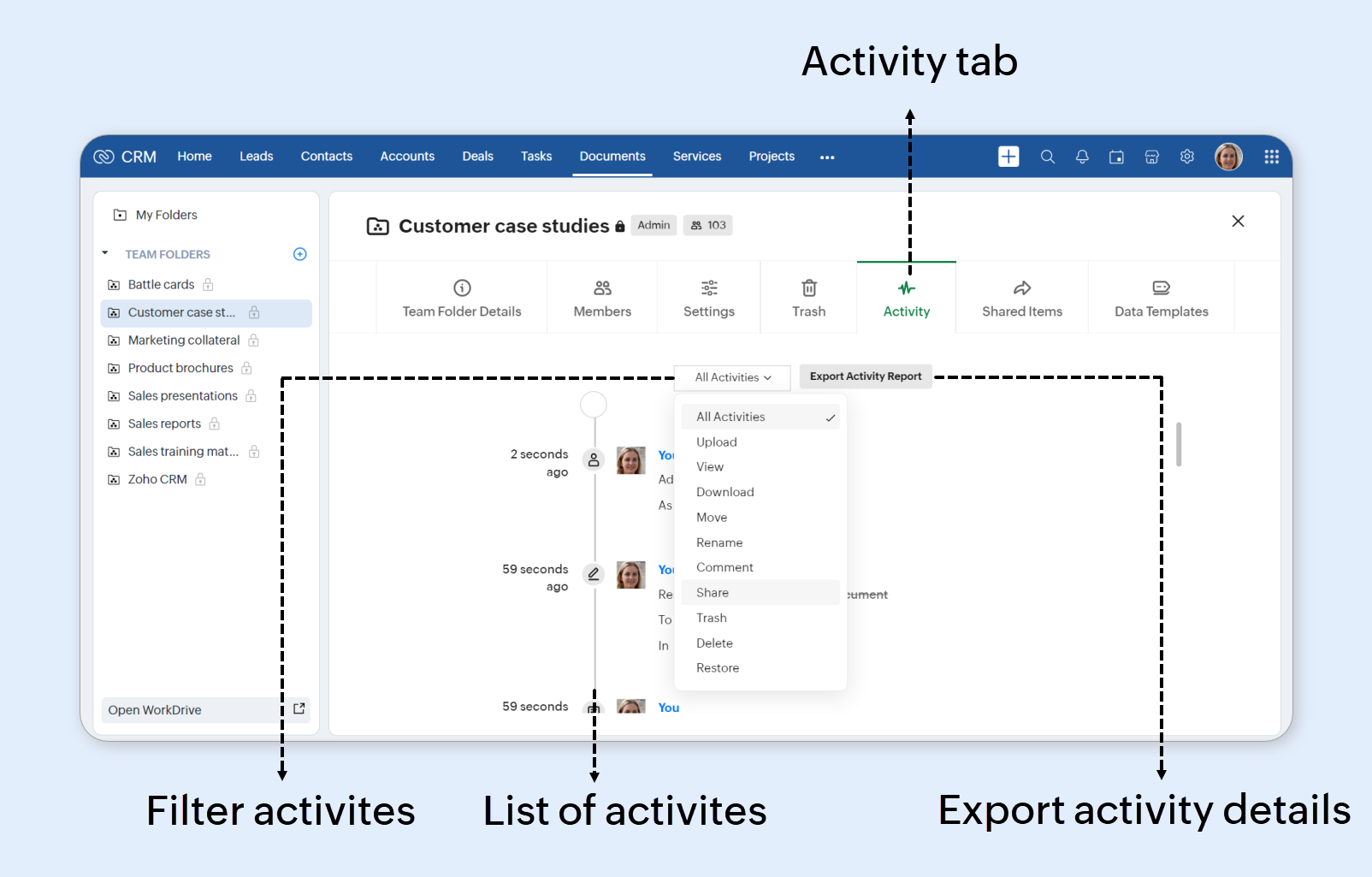
Activities carried out by various users in a team folder can also be monitored within CRM.


WorkDrive admin-related features like Admin Console can be accessed only from the WorkDrive side. You can click Open WorkDrive to quickly go there.


In short, the Documents tab will now function as a window into your WorkDrive account!


NotesIf you are on the free Essentials plan, you will not be able to access Team Folders from the WorkDrive side.

How does access to the Documents tab work?

CRM admins can regulate access to this tab using the Documents permission in a profile.


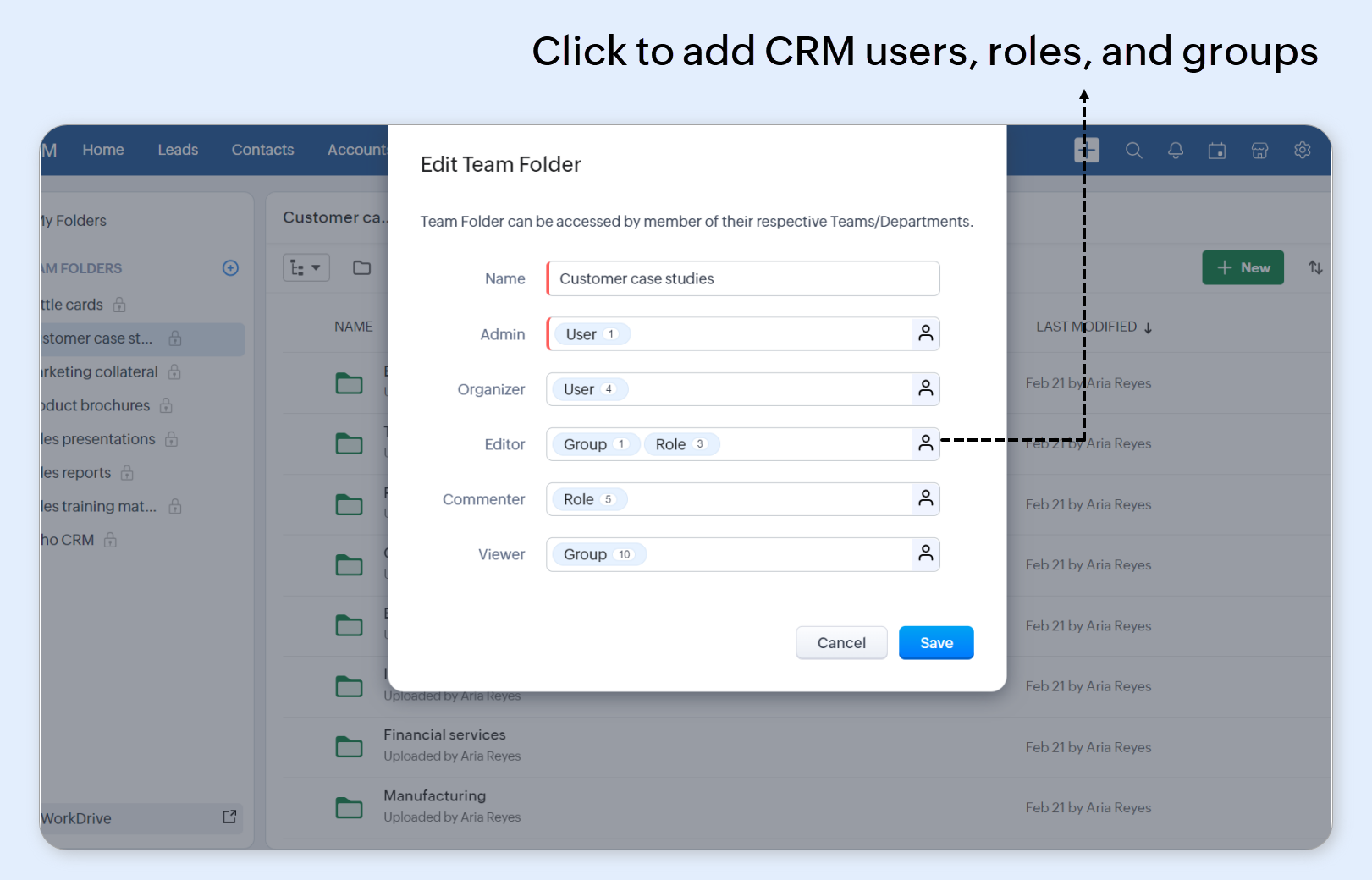
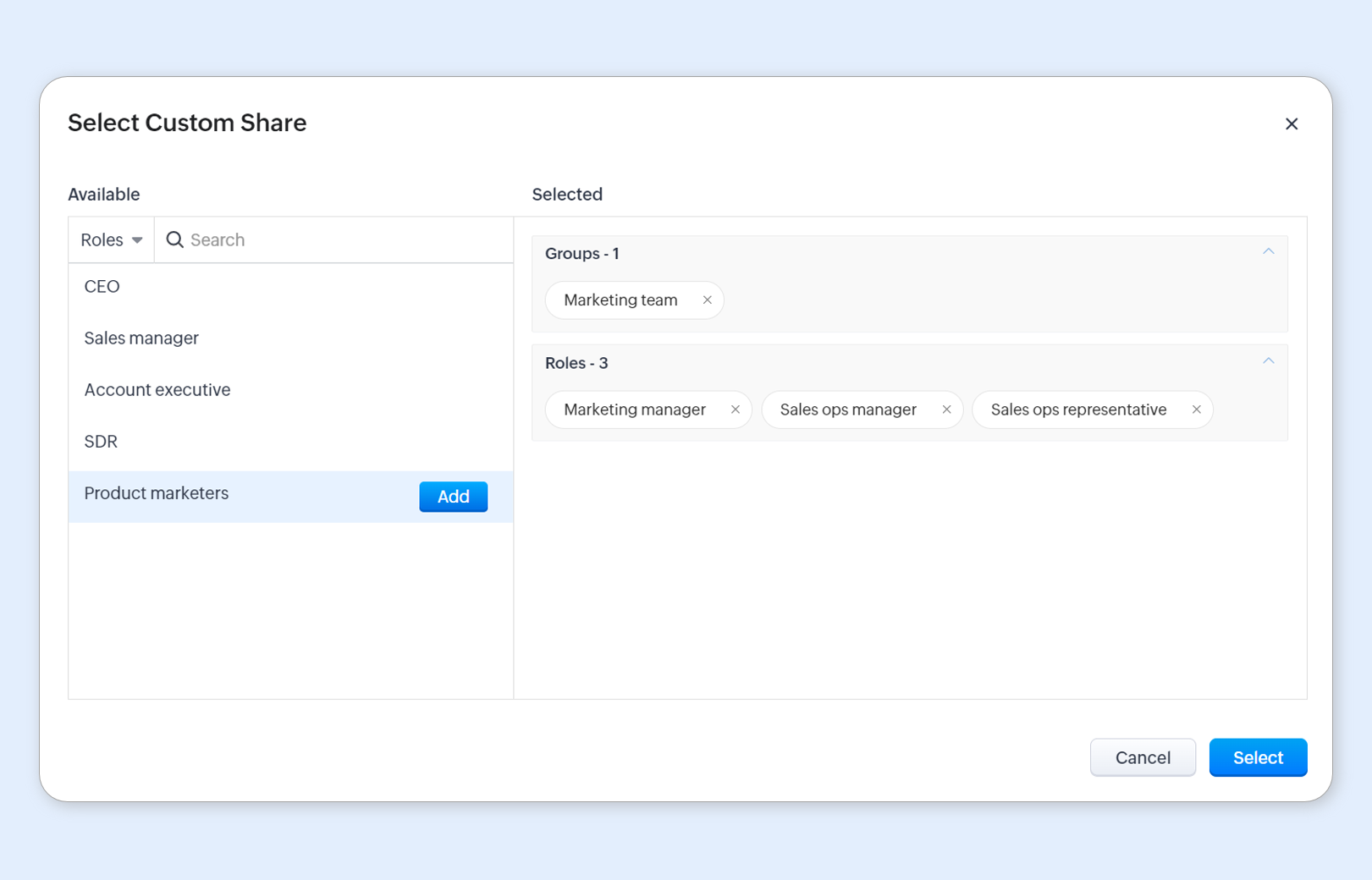
Individual team folders can have their access controlled by assigning CRM users, groups, and roles to specific folder roles.


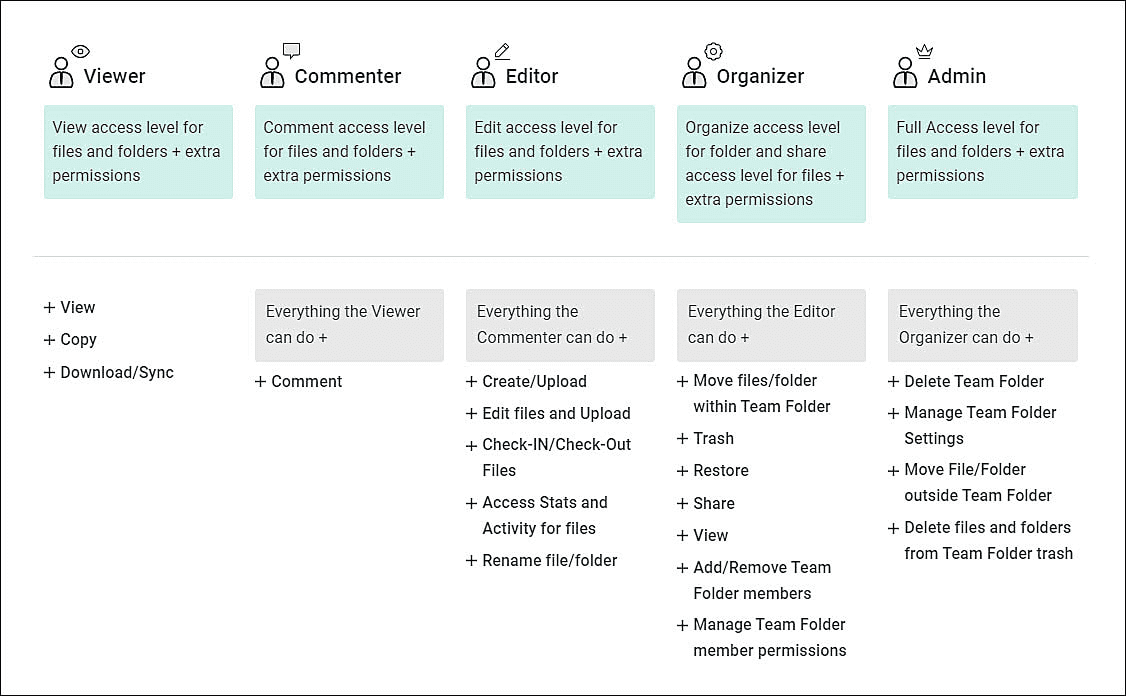
The available actions for CRM users will vary based on the team folder roles they are assigned. See the image below for a list of actions corresponding to each role


Non-CRM users can be granted access to the same team folder from the WorkDrive side.


Cost and storage

Creating a new WorkDrive account automatically maps you to the Essentials plan, with 5 GB storage for the org and additional storage per CRM user license based on edition (512 MB/user license for Standard and Professional, 1 GB/ user license for Enterprise and Ultimate). This is free for all Zoho CRM editions. If your CRM account is linked to a paid WorkDrive plan, its storage limits will apply to file storage in CRM.


You can upgrade your plan or buy additional storage on the File Storage page in CRM.


In the File Storage page, non-inclusive storage details refer to files not currently included in your WorkDrive's storage plan. They will count towards storage soon. These are:

  • Templates

  • Files added to a record via the File Upload field

  • Images added to a record via the Image Upload field

  • Notes attachments

If you've integrated other Zoho apps to WorkDrive, their storage will be combined and displayed as the total storage in WorkDrive. No app-specific restrictions apply to this storage, as it is shared among all apps.

What's next?

Due to the extensive file storage and permissions involved, we are handling the migration work with great care. Access for existing customers will begin in the upcoming months in a phased manner. Please follow this post for updates related this enhancement.


Thanks and do share your feedback in the comments section below!


        • Recent Topics

        • Quotes - Freehand line items - zoho crm

          Hi, In the zoho crm quotes module is it possible to add line items that are freehand typed? We have a business need to use the quotes module but the product nams/description, quantity, price, etc. needs to be freely typed rather than from a defined list
        • TDS Payable report not Generating

          TDS Payable report for Last Quarter of FY 25-26 is not generating and giving error. Please get it rectified as soon as possble.
        • Remove Zoho Header from Portals

          I have a portal page with custom domain. But when I print directly from a webpage, the Zoho CRM header shows. It kind of kills the branding aspect. Is there a way to get rid of this?
        • Multi-column sorting

          Is multi-column sorting a planned feature for CRM? We are needing to sort by one column and then subsort by another column. I am just wondering if there is a planned feature that will allow this?
        • Clearing Fields using MACROS?

          How would I go about clearing a follow-up field date from my deals? Currently I cannot set the new value as an empty box.
        • Webinar Alert: Turn campaign leads into conversions with Zoho LandingPage and Zoho CRM

          Landing pages are great at capturing leads, but what happens after that is just as important. In this webinar, we’ll walk through how Zoho LandingPage and Zoho CRM work together to create a smooth flow from lead capture to follow-up and conversion. You’ll
        • Catch-All Address: A safety net for misdirected emails

          Email is often the first point of contact with an organization. In many cases, a simple typo in a recipient's address can quietly turn into a missed message—a customer query never reaches support, a partner’s reply goes unnoticed, and the sender has no
        • Need Assistance on Redirect URL or Button Based on Deal Stage

          Hello, I’ve developed a custom application and would like to achieve the following scenario: When a deal is moved to the Billing stage, an automatic trigger should execute and redirect to a URL that includes deal details such as Deal Name and Deal Owner.
        • Zoho IMAP Access to mail doesn't sync messages

          As stated in the topic - I have company account email address setup, and it has ( as in the picutre ) ActiveSync and Imap access enabled. However the messages does not show up while logged in in Zoho Mail however when I log in in thunderbird everything
        • 【無料/オンライン】5/21(木)開催|Zoho ワークアウト ― ユーザー同士で作業・議論するもくもく会

          ユーザーの皆さま、こんにちは。 コミュニティグループの中野です。 5月開催の「Zoho ワークアウト」のご案内です。 本イベントは、Zohoユーザーが各自のテーマを持ち寄り、 作業を進めながら参加者同士で意見交換する「もくもく会」形式のオンラインイベントです。 「設定を進めたいけれど、一人だと手が止まってしまう」 「他社がどう活用しているのか知りたい」 「同じ課題を抱える仲間と話したい」 そんな方にぴったりのイベントです。 ▶︎ 参加登録はこちら(無料 / 残り3枠) URL:https://us02web.zoom.us/meeting/register/6ojuA778RqqWPOWzCaCU5Q
        • i keep see there is a connetion issue connecting 3rd party api on zoho when using zia

          hi there , i have set up open ai api to zoho zia (copied and pasted to zoho zia) but I keep getting notificaiton "there is a connetion issue connecting 3rd party api on zoho" when using zia on top when click zia and try to type in word there
        • Can't access google from toppings menu

          So... When I click the manage button in toppings, nothing happens. it won't let me access the settings.
        • Marketer's Space: Bookmarks by Zoho Campaigns

          Hello Marketers, In this week's Marketer's Space, we'll look at a simple yet powerful feature that makes a big difference in your workflow: Bookmarks. Bookmarks is a built-in feature in Zoho Campaigns that enables you to create a personalized library
        • Introducing the revamped What's New page

          Hello everyone! We're happy to announce that Zoho Campaigns' What's New page has undergone a complete revamp. We've bid the old page adieu after a long time and have introduced a new, sleeker-looking page. Without further ado, let's dive into the main
        • Cliq iOS can't see shared screen

          Hello, I had this morning a video call with a colleague. She is using Cliq Desktop MacOS and wanted to share her screen with me. I'm on iPad. I noticed, while she shared her screen, I could only see her video, but not the shared screen... Does Cliq iOS is able to display shared screen, or is it somewhere else to be found ? Regards
        • Tip #71 - Exploring Technician Console: Send Clipboard Keystrokes - 'Insider Insights'

          Hello Zoho Assist Community! Say you are helping a customer remotely and need to log into a system on their machine. You have the password ready on your end, but the moment you try to paste it into the login field, nothing happens. The remote screen just
        • Tip #7: Customize the appointment confirmation page

          A confirmation page plays a crucial role in creating the first impression, as that's where customers land when booking with you. It shows your brand identity, engages your audience, and drives more conversions. Yet, this section is often overlooked when
        • Images not saved in notes

          Created noteboards and create a note, copy pasted the image, close the note and open again, image is not coming this same problem occurs in note on notebook I have attached the replication steps as video url to analyse it, and also attached the videos
        • New in Office Integrator: Apply conditional formatting to entire rows

          Hi users, We are pleased to introduce the ability to highlight entire rows based on a cell's value in Zoho Office Integrator's spreadsheet editor. For example, if your finance team tracks invoice payments in a spreadsheet, you can highlight overdue invoices
        • Zoho books - Project Module - Itemised expenses

          Hi All, I heavily use the projects function in Zoho books and can work for one client for successive weeks, providing labour and incurring the occasional general expenses.  As an example, during the one purchase, I purchase 10 widgets and of these 10, 
        • How to get REST API of extension function in CRM

          I create a an extension using ZOHO Sigma for integrate ZOHO CRM and XERO and established two way sync but when I public my extension it's standalone function are not provide any type of access so I can't get REST API Key of standalone functions without
        • A few Issues when using "Pay Bill via Check"

          We have quite a bit of issues with how paying for Bills via Check works. Would love some feedback from the Zoho team in case we are doing something incorrectly. 1. When we go from a vendor and select "Pay Bill via Check" option, we see ALL the outstanding
        • Show backordered items on packing slip

          Is it possible to show a column on the Packing Slip that shows number of backordered items when a PO is only partially filled? I would also like to see the Backordered column appear on POs after you receive items if you didn't get ALL of the items or partial amounts of items. And lastly, it would be nice to have the option of turning on the Backordered column for invoices if you only invoice for a partial order. -Tom
        • Elevate your Radar experience: Best practices part 1

          In the Spotlight: Zoho Desk's Radar app Think about RADAR (Radio Detection and Ranging)? The system used to track and identify aircraft, ships, and vehicles using electromagnetic waves. Imagine what a similar “Radar” experience looks like for customer
        • Mise à jour de Zoho Books – France

          Chers clients, Merci pour votre patience et votre soutien continu. Avec les évolutions réglementaires à venir en France nous introduisons de nouvelles fonctionnalités dans Zoho Books pour les clients français. Ces mises à jour ont été conçues pour répondre
        • Automation Series: Auto-update Budget When Time is Logged

          In Zoho Projects, Summary fields enable instant budget sync by capturing Actual Cost and showcases it at project-level when a time log is added. This allows real-time budget visibility and helps teams stay within financial thresholds. Consider an event
        • Preferred Name and Email Formats: Bring consistency to user identity

          A user's display name and email address are often the first identifiers that colleagues, partners, and customers see. Maintaining a consistent format across the organization helps reinforce a professional identity and avoids the confusion that comes from
        • [Webinar] Solving business challenges: Standardizing document operations across your organization

          Hi Writer users, Every organization struggles with document inconsistency due to issues like multiple templates, outdated content in client-facing docs, and the lack of a standard review process. Zoho Writer streamlines the entire lifecycle with capabilities
        • Auto-sync field of lookup value

          This feature has been requested many times in the discussion Field of Lookup Announcement and this post aims to track it separately. At the moment the value of a 'field of lookup' is a snapshot but once the parent lookup field is updated the values diverge.
        • Account name not populating when importing contacts

          When importing a csv file to add contacts the account name is blank? Every other filed gets mapped and imported correctly, i.e contact name, phone number. However not the account name which I have mapped to "company" field in my csv file
        • Requirements using Zoho Projects

          Is there a seperate Zoho application for Requirements (Requirements Repository) or a way to use Zoho Projects to store, track and organize software requirements
        • Control who sees Timeline and Interactions in Zoho CRM through Profiles

          The feature has been enabled for all DCs (except US, EU, and IN DCs). We will be rolling it out to the other DCs in the upcoming days. Dear All, In a CRM, not all users would require access to the history of a record. For instance, a Marketing Operations
        • Billing Management: #3 Billing Unbilled Charges Periodically

          We had a smooth sail into Prorated Billing, a practice that ensures fairness when customers join, upgrade, or downgrade a service at any point during the billing cycle. But what happens when a customer requests additional limits or features during the
        • Hide chart series by default (unchecked in legend)

          Hi, I’m working on a dashboard in Zoho Analytics and ran into a limitation I can’t figure out. Is there a way to have certain columns (series) in a chart hidden by default via the legend (i.e., unchecked), but still available so the user can enable them
        • Zoho CRM - Restrict Login based on work hours

          Hi there, I'm wondering if we can restrict users to login during works - For example the users would be able to login from 8am to 5pm. I have seen the IP address restriction - the only downfall is what if the customer has dynamic IP. thanks Jiri
        • ZDK.Client.showConfirmation() and showAlert() silently fail on Boolean/checkbox field onChange - anyone else?

          Hi community, I've been trying to show a message pop-up when a checkbox field is ticked. I'm using the onChange event on the Opporutnities create page. function onChange(value) { if (value === true) { ZDK.Client.showMessage( "Note: Message goes here.",
        • Tip #22 Three ways you can split your text into columns

          When you're working with large datasets, you often have the problem of messy, inconsistent formatting, which makes analysis difficult. This is especially true when the data is being collected elsewhere and then imported to the spreadsheet, which can result
        • CRM Timeline History Permissions ?

          Hello, I am curious about this. in Zoho CRM on the Timeline Tab everyone knows that it displays the history of edits and such for that particular Lead record. What if I wanted to Hide some of the History Events from CRM Users? For example, I have a workflow
        • Zia Emails Summary: Instant context from past emails

          Hello all, Reading all of the past emails associated with a specific record can be tedious, which in turn makes it difficult to understand the context quickly, as these messages often include irrelevant details that waste time. This is true for everyone
        • Custom Display Field for Lookup Dropdowns in Zoho CRM

          Could Zoho CRM support changing the display field in lookup dropdowns, like Zoho Creator does? This would make it much easier to select the right record by showing a more useful field instead of only the default one. It would improve speed, clarity, and
        • Next Page