Customize your SalesIQ live chat with Custom CSS and blend it with your website design

Customize your SalesIQ live chat with Custom CSS and blend it with your website design

Hi everyone. Hope you all are having a great day!

SalesIQ offers various inbuilt customization choices for your chat widget and window like changes in colour, theme, font etc. Although these choices are many, sometimes they may not match with the design of your website. For such cases, we offer the Custom CSS feature which will allow you to customize, modify and change the appearance and feel of every aspect of your SalesIQ live chat widget and window on your website.
In this post, we will be talking about some necessary pointers on how you can write and implement Custom CSS for your requirements. We have also included a few tips and sample CSS for frequently asked queries.

Building your CSS

For ease of understanding, we have broken down all of the structural modules of the chat window and given the field names and their basic CSS in our detailed user guide here. Using this, you will be able to build your CSS code for individual parts of the module and then apply it, according to your specific requirements.

Where do I place the CSS code? 

There are 2 methods to carry out Custom CSS on SalesIQ. Both methods are used for varying circumstances. 

  1. Brand Personalization - The first method is by uploading the Custom CSS file in the Personalization area of the chat widget. This method is to be used when changes/modifications are to be made on the elements within the chat window. For example, changes in the messaging area, font used within the chat window, colour changes for the header or minimize button etc.

For this,

  • Navigate to Settings > Brands > Personalization > Appearance tab.
  • Scroll down to Upload custom CSS and click on Upload.
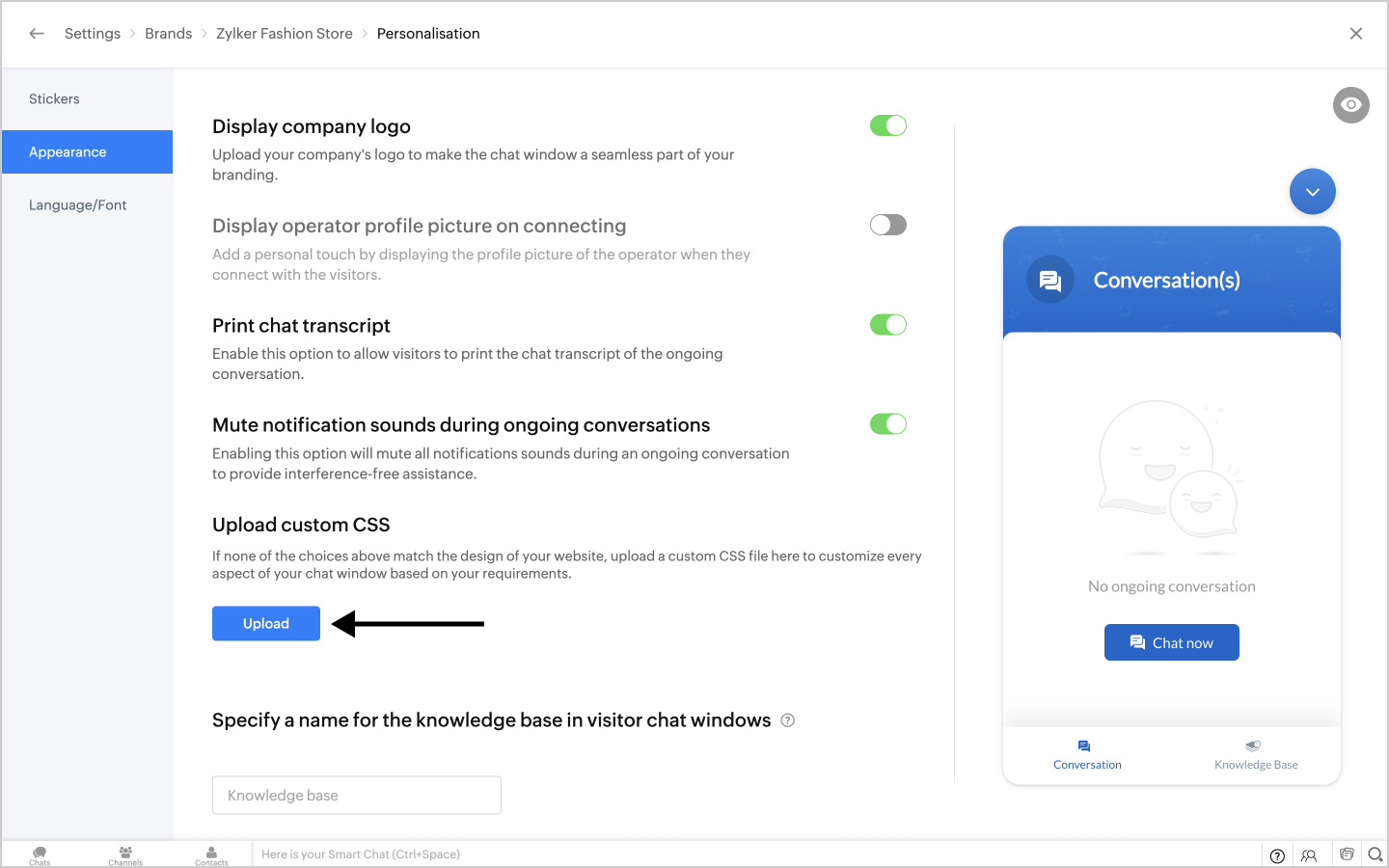

  • Choose the required CSS file from the list.
  • The preview window on the right will immediately display the result of adding your Custom CSS code to SalesIQ.
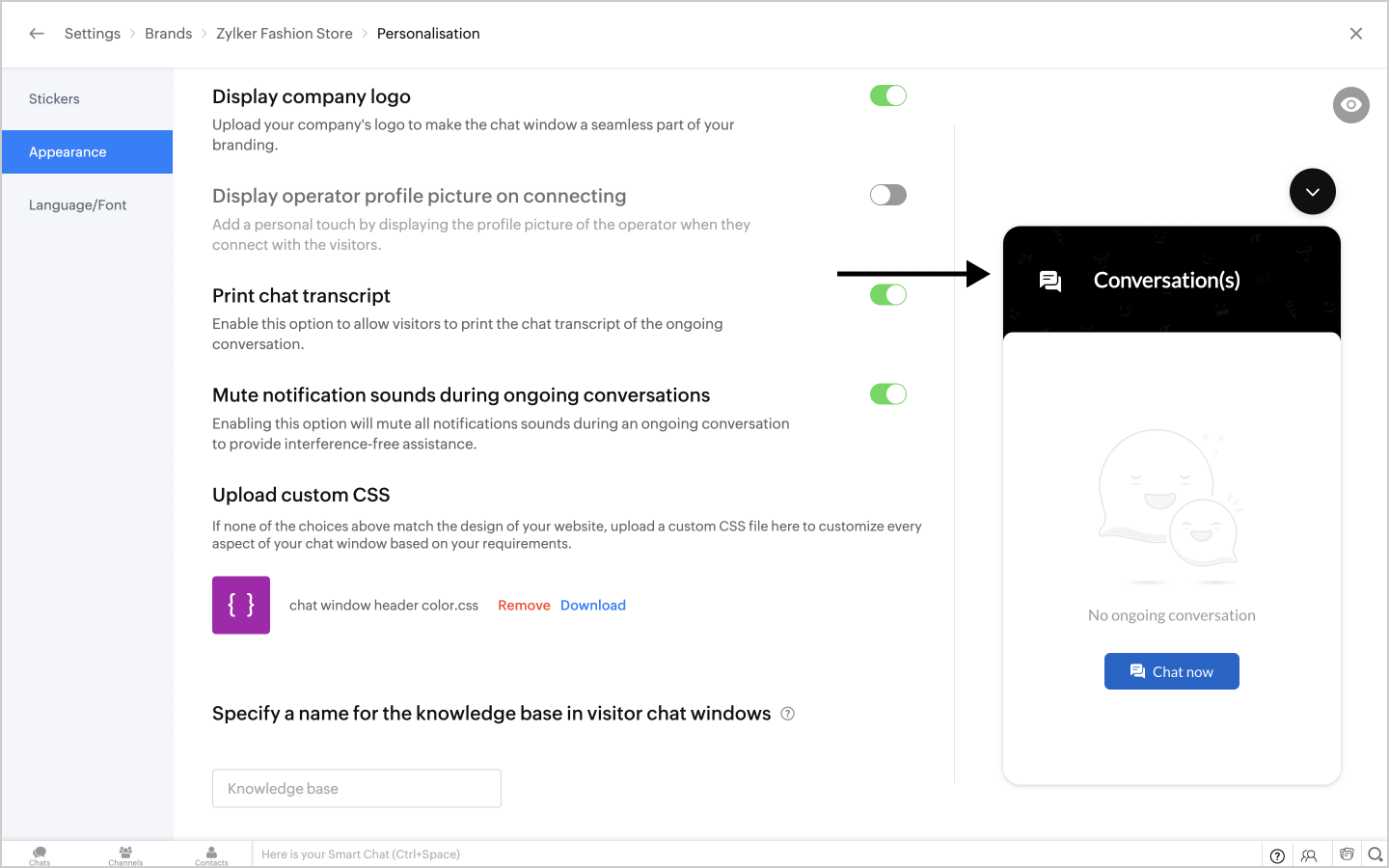
In this case, CSS for changing the header colour was added.
  1. Website Style sheet

In this method, the CSS needs to be uploaded directly to a website's style sheet. This method is used when changes are required outside of the chat window. For example, sizing changes of the chat window, position and colour changes of the chat widget etc.


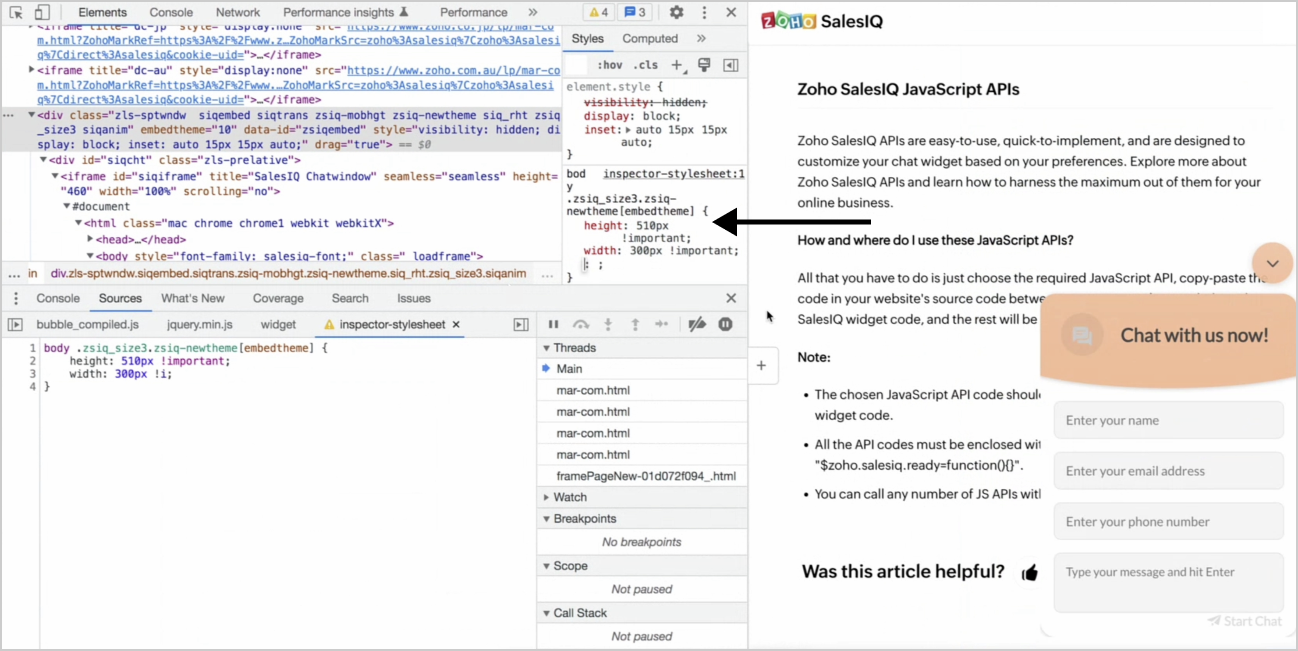
In this case, a Custom CSS for changing the height and width of the chat window has been added to the style sheet.

Tips for writing Custom CSS

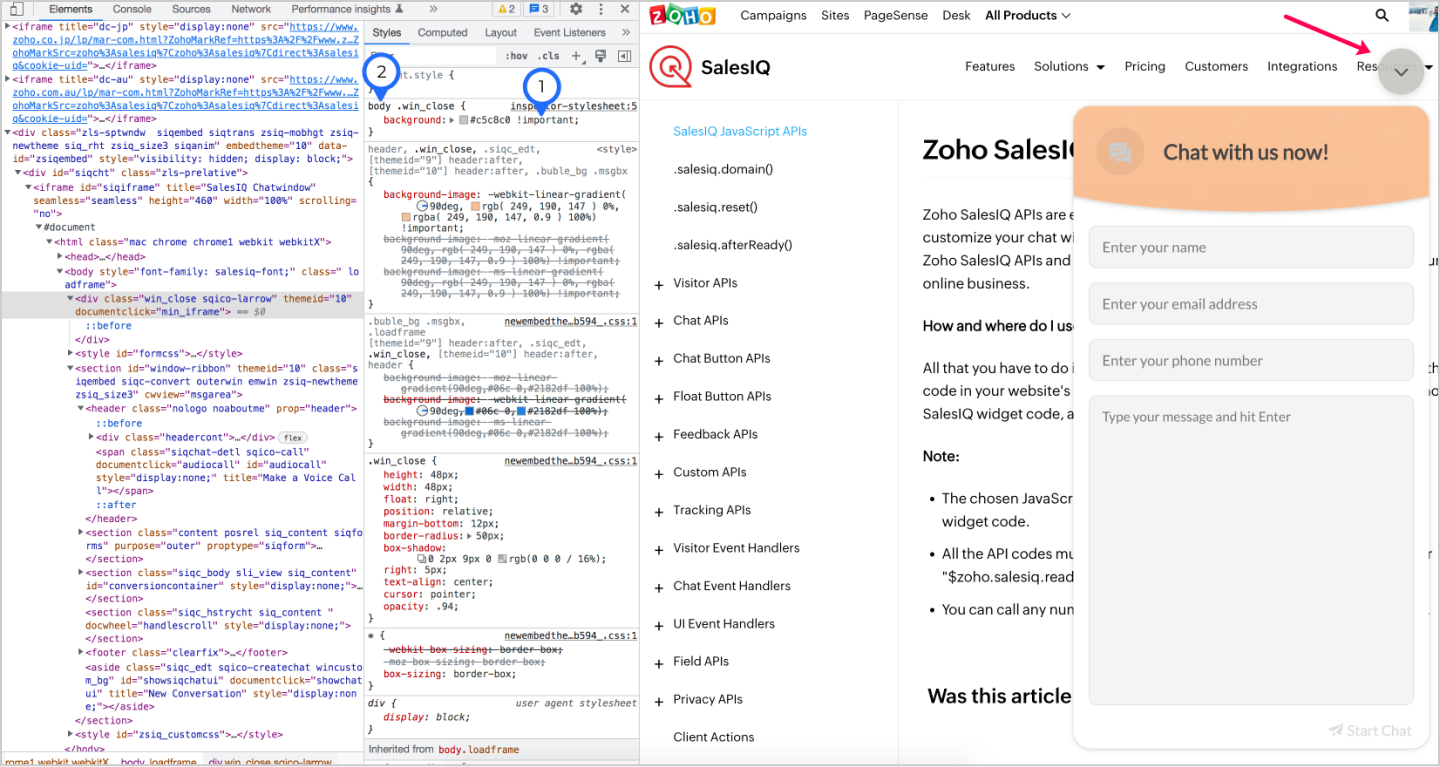
  1. The !important rule in CSS can be used to add more weightage to a property and override other previously added styling rules.

  2. Extra CSS weightage can be added with a body tag, which will be another way to override all previous styling rules for the element.

Frequently asked CSS formats 

We have taken note of some of the frequently asked queries and provided the custom CSS code here for your reference.

  • To change the header colour of the chat window.

  1. body header {
  2.     background: #e2bb3c !important;
  3. }
  • To change the chat window dimensions on website.

  1. body .zsiq-newtheme.siqembed.zls-sptwndw {
  2. height: 500px !important;
  3. width: 400px !important;
  4. }
  • To change the chat widget colour.

  1. body .zsiq_flt_rel {
  2. background-color: #e2bb3c !important;
  3. }

  • To change the chat window dimensions on mobile alone.

  1. @media only screen and (min-width: 100px) and (max-width: 555px)
  2. {
  3. body .zsiq-newtheme.zsiq-mobhgt.siqembed {
  4. height: 80% !important;
  5. width: 80% !important;
  6. }
  7. }

  • To move the position of the chat widget.

  1. body .zsiq_floatmain {
  2. right: 40px !important;
  3. bottom: 40px !important;
  4. }
Thank you for reading through. We hope you found this post helpful. If you have any questions, please drop a comment and our team will be happy to help you.


        • Recent Topics

        • since the new interface of ZOHO writer can't turn of automatic reminder option for merge documents

          Since the new interface of ZOHO writer I have this problem. I have a large set of templates that I use to send documents to ZOHO Sign. But now in all those templates the box for Sending reminders is ticked, which i don't want. But even if I untick the
        • Global "Search" in FSM

          I'm missing the global Search function like in CRM. This should save us a lot of time. We don't now upfront if the customer is a Contact or a Company. So now we have to guess in what module to start a search/filter. Also looking up an address, phone number,
        • Set Default Status of Assembly to "Assembled" When Entered in UI

          I've just discovered the new "confirmed" status of Assemblies within Inventory. While I understand the intent of this (allowing for manufacturing planning and raw material stock allocation), it was initially confusing to me when manually entering some
        • Unable to Access /crm/v7/taxes – OAuth Scope Mismatch in Zoho CRM API

          I am currently integrating Zoho CRM (v7 API) with our system and I need clarification regarding the Taxes API and OAuth scopes. Context: We are creating Quotes via the API (/crm/v7/Quotes) Each quote contains line items with taxes (e.g., TVA 19%, 10%,
        • Reading emails sent from Zoho

          Hi there, How do I view an email sent from Zoho, for example an email which contains an estimate? I can see there is a tab in the screen for that estimate which is labelled 'Emails' and I can see a summary of the email sent listed there, but I cannot
        • Can't View Project Names in Mobile App

          I can't view project names on PO's in the app, nor can I add that as a viewable PDF field in inventory on the computer. I've attached screenshots showing that in the mobile version whether you are on the PO, editing the PO, or viewing the PO line items,
        • Looking for other Zoho users in Canada

          I would like to find other users in Canada to share ideas and suggestions. To see if you are experiencing same issues re HST/taxes, banking, etc.
        • Zoho Books' 2025 Wrapped

          Before we turn the page to a new year, it’s time to revisit the updates that made financial management simpler and more intuitive. This annual roundup brings together the most impactful features and enhancements we delivered in 2025, offering a clear
        • Intergrating multi location Square account with Zoho Books

          Hi, I have one Square account but has multiple locations. I would like to integrate that account and show aggregated sales in zoho books. How can I do that? thanks.
        • Columns with no data still displayed despite "Show missing values" disabled

          I have a table with missing data, but columns are still being displayed even though the "Show missing values" option is disabled. The table contains 3 columns split across 12 months. I suspect the issue is caused by one of the columns using an aggregation
        • What's New in Zoho Inventory | January - March 2026

          Hello users, The first quarter of 2026 has been dynamic! We’ve shipped a powerful set of updates in Zoho Inventory to enhance item control, improve warehouse efficiency, expand integration and reporting capabilities. From a unified item creation experience
        • Business Day Logic Update: More Accurate Scheduling for Your Workflows

          Hello everyone, We’re improving how business-day calculations work in workflows, especially when triggers happen on weekends. This update ensures that offsets like +0, +1, and +2 business days behave exactly as intended, giving you clearer and more predictable
        • Permission Denied - Reports Module - Super Admin

          "Permission Denied Sorry, you cannot view this report because you do not have permission to access one or more of its modules. To view the report, please provide permission to access those modules in the Profiles and Organize Tabs settings." Fresh new
        • Allocating inventory to specific SO's

          Is there a way that allocate inventory to a specific sales order? For example, let's say we have 90 items in stock. Customer 1 orders 100 items. This allocates all 90 items to their order, and they have a back order for the remaining 10 items which could
        • Changing naming convention for Estimates

          Hi there, How do I customise the naming of the filenames for estimates when sending them? Currently they are named literally just ES11.PDF or whatever the number of the estimate is. There is no Company name, description of the work, customer name, date
        • Please design a better spam filter

          Hi Team, While I love Zoho Mail for all the awesome features you have designed - this is the one you need to do a lot of work on - Spam Filter. Your spam categorization seems to be very inefficient - any email containing brand images or a tracking pixel
        • Change Default Currency in Zoho Reports

          Is it possible to default all currency fields in my Reports and Tables to my local currency without having to reformat them every time?
        • Zoho Project - Total Forecasted Hours

          Does anyone know an easy way to get a total of all the forecasted hours across the portfolio? I'm aware trying to create a custom report that can generate this figure for each task and the total up but the completion percentage doesn't seem to come back
        • All new Address Field in Zoho CRM: maintain structured and accurate address inputs

          Availability Update: 29 September 2025: It's currently available for all new sign-ups and for existing Zoho CRM orgs which are in the Professional edition exclusively for IN DC users. 2 March 2026: Available to users in all DCs except US and EU DC. 24
        • Zoho Books recurring invoicing link to a Zoho CRM Deal?

          With the Zoho CRM Finance Integration setup, normally when creating an invoice via Zoho CRM Finance Integration on a Deal, it creates the invoice in Zoho Books with the CRM Deal *Potential link for that invoice. Alternatively, if you create the invoice
        • Editing Estimates

          Hi team, How do I delete line items in an estimate when editing it? I can't see any option to do this - no X, no trashcan, no drop down... And how do I revert to the original estimate after cloning? I cloned to see if the option to edit were disabled
        • Drop Down Menu - Adding up values

          I have a form that has 22 drop down fields each having a value of 0-10 to choose from. Is it possible to have it add up the total value of those selected numbers and have it tally it up in another field at the end? So example: if each of the 22 fields
        • Stage-probability mapping feature in custom module

          Hi, I'm building a custom module for manage projects. I would like to implement the stage-probability feature that Potentials has. Is this possible?
        • Cross Module Fields Merging between Zoho Sign and Zoho CRM for custom module

          Hello everyone, I've been exploring custom integration between Zoho Sign and Zoho CRM, and I've encountered some interesting findings and would need advanced help. To integrate Zoho Sign with Zoho CRM, there are two primary methods: Installing the extension
        • WO Completion Status Not Updating Automatically

          Hello Latha, Hope you are doing well. Over the past few days, we have been facing an issue with WO completion. When an AP is marked as complete, the work order status is not automatically updating to “Completed,” and we have to mark it manually. Could
        • Removing Custom Modules

          Hello Everyone, I'm trying to remove custom modules from my Zoho CRM. I've ran into the issue, where I'm unable to delete the Modules because there are lookup fields in the fields associated with other modules. When I attempt to delete the modules, they are grayed out and I'm unable to remove them.  Can I please get help on removing the modules or resetting the entire Zoho CRM to its Out of Box settings with out having to delete my account? Thanks SC
        • Calculation on form submit not wokring unless i click F5

          I'm using the built in on succesful form submission option and running the code below but when i click submit my form just gets stuck with the blue loading icon and nothing happens until i click F5 and then the page reloads and the calculation does actually
        • Territories as filters

          The territory function within the CRM is great for controlling record access and managing a sales organization however, territories are not available as a filter options within the CRM when creating reports or dashboard components. Adding the ability
        • Tip #69 - Exploring Technician Console: Blacken Screen - 'Insider Insights'

          Hello Zoho Assist Community! Imagine a scenario where you are providing remote support to a customer at a busy front desk. The issue involves their billing software, and fixing it means navigating through sensitive customer records, payment details, and
        • Free virtual webinar: Zoho Sign for Q1 2026

          Hi there! We’ve packed this quarter with some of our biggest updates yet—and you won’t want to miss what’s new in Zoho Sign. Watch this video for a quick rundown: Join our upcoming webinar for a complete walkthrough of the latest features, enhancements,
        • On Duty Requests - Zoho People Data

          Hello Team, We are currently using the On Duty Form to record Work From Home (WFH) requests in our organization. However, we are facing an issue where pending On Duty requests are not appearing in the Attendance Module. For example, if I submit On Duty
        • On Duty Requests - Zoho People Data

          Hello Team, We are currently using the On Duty Form to record Work From Home (WFH) requests in our organization. However, we are facing an issue where pending On Duty requests are not appearing in the Attendance Module. For example, if I submit On Duty
        • Zoho Cliq not working on airplanes

          Hi, My team and I have been having this constant issue of cliq not working when connected to an airplane's wifi. Is there a reason for this? We have tried on different Airlines and it doesn't work on any of them. We need assistance here since we are constantly
        • Tabular View Report | Scale To Fit Screen

          Please add the option to scale Tabular View reports to fit the screen. I constantly have to adjust the column size of Tabular View reports to fit various screen sizes and it just looks messy. You can see in the screenshot below there is a blank gap after
        • Missing Fields in Lead Conversion Mapping

          I’ve been using Zoho CRM since 2013 to manage leads and convert them into contacts and jobs. When I convert a lead to a customer, I create a new contact and a job. Previously, this process automatically transferred key information from the lead to the
        • RouteIQ for Zoho FSM

          Beste, Zou wel top zijn dat we een RouteIQ hebben voor FSM aangezien we constant moeten zien wat de beste route is voor onze monteurs. Nu moeten we een speciale aparte programma hebben om de beste route te berrekenen voor onze monteurs aangezien de planning
        • Ignroe_filtrers and drill through

          I have two charts, where one is connected to the other using drill-through. The issue is with the second chart (the drill-through target). It contains an aggregation formula that uses the ignore_filters function. Under normal conditions, the formula works
        • Issue with Zoho Sheets

          Edit: Small Error of Opening doc and losing entire formatting while downloading to *.xlsx format. Also my formulas don't work while opening a document downloaded from Zoho sheets, since the colors aren't matched to the correct data. Even though the data
        • Query on Tracking Visitor Activity with Zoho Forms & SalesIQ

          I have a query regarding Zoho Forms, Zoho SalesIQ, and Zoho CRM. I have embedded a Zoho Forms form on my website, and I’m trying to understand if it’s possible to capture a user’s website activity (such as pages visited, visit count, etc.) when they submit
        • Option+C shortcut conflict

          In the latest Cliq release, you introduced `Option+C` shortcut to start a new audio call. In Polish, `option+C` is used for letter `ć`. I changed this button combo but `Option+C` is still being blocked and doesn't allow me to write letter `ć`.
        • Next Page